[개발일지12일]실습_KIDSGAO
1.학습내용
키즈가오 홈페이지를 참고해서 똑같이 만들어보는 작업을 했다.
각 파트별로 나누고 기본 pc버전, 모바일버전, 애니메이션효과까지 넣어서 실습해봤다.
- 로고파트 + 구름 + 잠자리

<!DOCTYPE html>
<html>
<head>
	<meta charset="utf-8">
	<meta name="description" content="우리쌀 점토로 만든 키즈가오 웹사이트 소개">
	<meta name="keywords" content="키즈가오 점토, 장난감">
	<meta name="author" content="키즈가오">

	<meta name="viewport" content="width=device-width, initial-scale=1.0">

	<title>키즈가오</title>

	<link rel="stylesheet" type="text/css" href="css/style.css">
	<link rel="stylesheet" type="text/css" href="css/animation.css">
	<link rel="stylesheet" type="text/css" href="css/mobile.css">
</head>
<body>
	<header id="intro">
		<div class="introWrap">
			<div class="logo"></div>
			<div class="lion"></div>
			<div class="rabbit"></div>
			<div class="bear"></div>
			<div class="monkey"></div>
		</div>
        <div class="cloudWrap">
			<div class="leftCloud"></div>
			<div class="rightCloud"></div>
			<div class="dragonfly"></div>
		</div>

</header>- style.css
/*Default Css*/
html, body {
	margin: 0;
	padding: 0;
}

body {
	overflow-x: hidden;
    (오브젝트들이 화면을 넘어가도 가로 스크롤 생성 방지)
}

h1, h2, h3, h4, h5, h6, p {
	margin: 0;
	padding: 0;
}

button {
	border: none;
	background-color: transparent;
}

.clearfix {
	clear: both;
}

(_bg크기에 높이 맞추기. 넓이는 항상 100%*)

#intro {
	width: 100%;
	height: 1600px;
	background-image: url(../img/intro/intro_bg.png);
}

#intro .introWrap {
	position: relative;

	width: 760px;
	height: 516px;
	/*background-color: yellow;*/

	left: 50%;
	margin-left:-380px;
	top: 100px;
}

#intro .introWrap .logo {
	position: absolute;

	width: 760px;
	height: 516px;
	background-image: url(../img/intro/logo.png);

	z-index: 100;
}

#intro .introWrap .lion {
	position: absolute;

	width: 161px;
	height: 161px;
	background-image: url(../img/intro/lion.png);

	margin: 80px 0 0 30px;
}
#intro .introWrap .rabbit {
	position: absolute;

	width: 105px;
	height: 129px;
	background-image: url(../img/intro/rabbit.png);

	margin: 90px 0 0 580px;
}

#intro .introWrap .bear {
	position: absolute;

	width: 112px;
	height: 105px;
	background-image: url(../img/intro/bear.png);

	margin: 310px 0 0 560px;

	z-index: 200;
}

#intro .introWrap .monkey {
	position: absolute;

	width: 85px;
	height: 93px;
	background-image: url(../img/intro/monkey.png);

	margin: 310px 0 0 50px;

	z-index: 200;
}

#intro .cloudWrap {
	position: relative;

	width: 100%;
	height: 1050px;
	/*background-color: pink;*/
}
#intro .cloudWrap .leftCloud {
	position: absolute;

	width: 934px;
	height: 816px;
	background-image: url(../img/intro/cloud1.png);

	left: 0;

	z-index: 2;
}

#intro .cloudWrap .rightCloud {
	position: absolute;

	width: 843px;
	height: 858px;
	background-image: url(../img/intro/cloud2.png);

	right: 0;
}

#intro .cloudWrap .dragonfly {
	position: absolute;

	width: 366px;
	height: 228px;
	background-image: url(../img/intro/dragonfly.png);
	/*background-color: yellow;*/

	top: 800px;
}- 로고파트 animation.css 동물 4마리 고개 까닥까닥 + 잠자리 이동
#intro .introWrap .lion {
	animation: spinLion 1500ms linear infinite alternate;
}

@keyframes spinLion {
	from {
		transform: rotate(-10deg);
	}

	to {
		transform: rotate(10deg);
	}
}

#intro .introWrap .rabbit {
	animation: spinRabbit 1000ms linear infinite alternate;
}

@keyframes spinRabbit {
	from {
		transform: rotate(0deg);
	}

	to {
		transform: rotate(5deg);
	}
}

#intro .introWrap .bear {
	animation: spinBear 1000ms linear infinite alternate;
}

@keyframes spinBear {
	from {
		transform: rotate(10deg);
	}

	to {
		transform: rotate(-10deg);
	}
}

#intro .introWrap .monkey {
	animation: spinMonkey 800ms linear infinite alternate;
}

@keyframes spinMonkey {
	from {
		transform: rotate(20deg);
	}

	to {
		transform: rotate(50deg);
	}
}
#intro .cloudWrap .dragonfly {
	animation: flyDragonfly linear 7s infinite;
}

@keyframes flyDragonfly {
	from {
		left: -366px;
	}

	to {
		left: 100%;
	}
}
@media (max-width: 767px) {
#intro {
height: 1150px;
background-image: url(../img/mobile/intro/mobile_intro_bg.png);
}
#intro .introWrap {
width: 189px;
height: 129px;
margin-left: -94.5px;
/*background-color: yellow;*/
top: 230px;
}
#intro .introWrap .logo {
width: 189px;
height: 129px;
background-image: url(../img/mobile/intro/mobile_logo.png);
}
(pc버전 로고 이미지들 감추기)
#intro .introWrap .lion,
#intro .introWrap .rabbit,
#intro .introWrap .bear,
#intro .introWrap .monkey,
#intro .cloudWrap .dragonfly {
display: none;
}
#intro .cloudWrap {
height: 350px;
top: 280px;
}
#intro .cloudWrap .leftCloud {
width: 267px;
height: 314px;
background-image: url(../img/mobile/intro/mobile_cloud1.png);
}
#intro .cloudWrap .rightCloud {
width: 237px;
height: 309px;
background-image: url(../img/mobile/intro/mobile_cloud2.png);
}- 농부파트
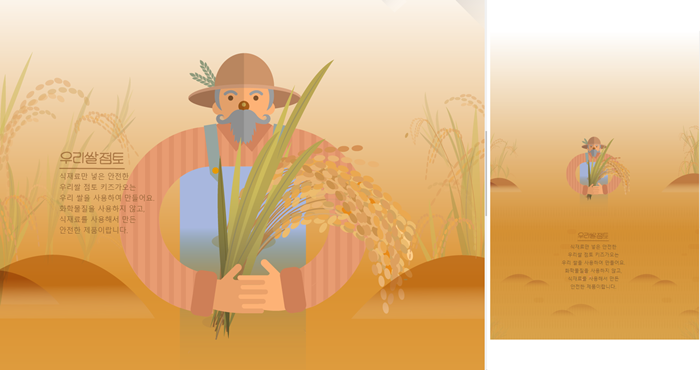
<div id="farm1">

		<div class="leftRice1"></div>
		<div class="farmer"></div>
		<div class="rightRice1"></div>

		<div class="farmSpeechWrap">
			<img src="img/farm/farm1/farmspeech.png" align="우리쌀 점토">

			<p class="farmSpeech">
				식재료만 넣은 안전한<br>
                					(br=enter기능)
				우리쌀 점토 키즈가오는<br>
				우리 쌀을 사용하여 만들어요.<br>
				화학물질을 사용하지 않고,<br>
				식재료를 사용해서 만든<br>
				안전한 제품이랍니다.
			</p>
		</div>

</div>- 농부 style.css
#farm1 {
	position: relative;

	width: 100%;
	height: 800px;
	background-image: url(../img/farm/farm1/farm1_bg.png);
}

#farm1 .leftRice1 {
	position: absolute;

	width: 390px;
	height: 670px;
	background-image: url(../img/farm/farm1/leftrice.png);

	left: 0;
}

#farm1 .rightRice1 {
	position: absolute;

	width: 335px;
	height: 570px;
	background-image: url(../img/farm/farm1/rightrice.png);

	right: 0;
	top: 100px;
}

#farm1 .farmer {
	position: absolute;

	width: 747px;
	height: 1078px;
	background-image: url(../img/farm/farm1/farmer.png);

	left: 50%;
	margin-left: -310px;
}

#farm1 .farmSpeechWrap {
	position: relative;

	top: 250px;
	left: 150px;
}

#farm1 .farmSpeechWrap .farmSpeech {
	color: #895c2f;
	font-size: 18px;
	line-height: 27px;
}- 농부 mobile.css
#farm1 {
		height: 450px;
		background-image: url(../img/mobile/farm/farm1/mobile_farm1_bg.png);
	}

	#farm1 .leftRice1 {
		width: 86px;
		height: 150px;
		background-image: url(../img/mobile/farm/farm1/mobile_leftrice.png);
	}

	#farm1 .rightRice1 {
		width: 95px;
		height: 170px;
		background-image: url(../img/mobile/farm/farm1/mobile_rightrice.png);

		top: -20px;
	}

	#farm1 .farmer {
		width: 160px;
		height: 250px;
		background-image: url(../img/mobile/farm/farm1/mobile_farmer.png);

		margin-left: -69px;
	}

	#farm1 .farmSpeechWrap {
		width: 300px;

		text-align: center;

		left: 50%;
		margin-left: -150px;
	}

	#farm1 .farmSpeechWrap img {
		width: 79px;
	}

	#farm1 .farmSpeechWrap .farmSpeech {
		line-height: 20px;
		font-size: 12px;
}- 양쪽 벼, 허수아비
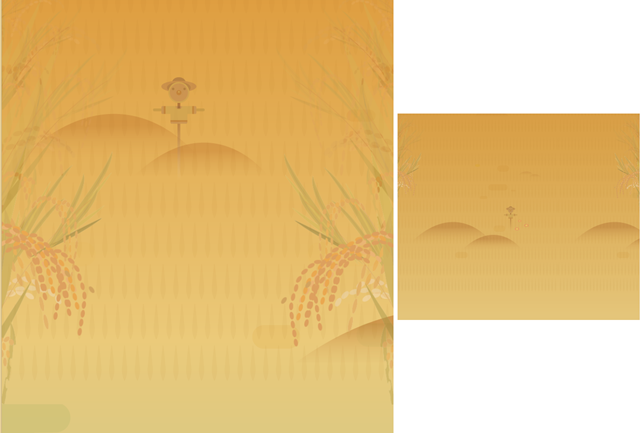
<div id="farm2">
		<div class="leftRice2"></div>
		<div class="scarecrow"></div>
		<div class="rightRice2"></div>
</div>- 양쪽 벼, 허수아비 style.css
#farm2 {
	position: relative;

	width: 100%;
	height: 850px;
	background-image: url(../img/farm/farm2/farm2_bg.png);
}

#farm2 .leftRice2 {
	float: left;

	width: 250px;
	height: 850px;
	background-image: url(../img/farm/farm2/leftrice2.png);
}

#farm2 .rightRice2 {
	float: right;

	width: 236px;
	height: 850px;
	background-image: url(../img/farm/farm2/rightrice2.png);
}

#farm2 .scarecrow {
	position: absolute;

	width: 103px;
	height: 206px;
	background-image: url(../img/farm/farm2/scarecrow.png);

	margin: 200px 0 0 300px;
}- 양쪽 벼, 허수아비 mobile.css
#farm2 {
		height: 440px;
		background-image: url(../img/mobile/farm/farm2/mobile_farm2_bg.png);
	}

	#farm2 .leftRice2 {
		width: 57px;
		height: 201px;
		background-image: url(../img/mobile/farm/farm2/mobile_leftrice2.png);
	}


	#farm2 .rightRice2 {
		width: 54px;
		height: 202px;
		background-image: url(../img/mobile/farm/farm2/mobile_rightrice2.png);
	}

	#farm2 .scarecrow {
		display: none;
}- 기계
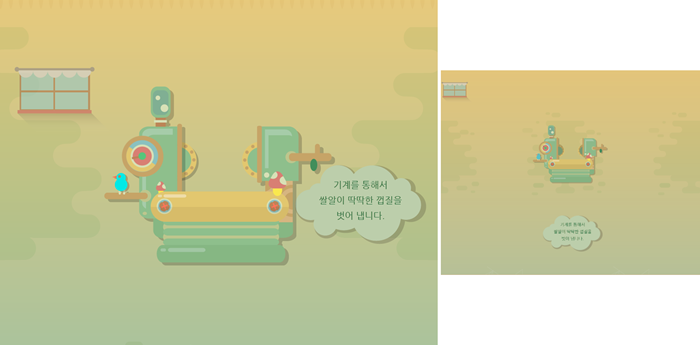
<div id="farm3">

		<div class="farm3Window"></div>
		<div class="machineWrap">
			<div class="machine1"></div>
			<div class="sawShadow"></div>
			<div class="saw1"></div>
			<div class="saw2"></div>
			<div class="machineBird"></div>
			<div class="timer"></div>
		</div>

		<img class="farm3Bubble" src="img/farm/farm3/farm3bubble.png" alt="기계를 통해서 쌀알이 딱딱한 껍질을 벗어 냅니다.">

</div>- 기계 파트 style.css
#farm3 {
	position: relative;

	width: 100%;
	height: 850px;
	background-image: url(../img/farm/farm3/farm3_bg.png);
}

#farm3 .farm3Window{
	position: absolute;

	width: 247px;
	height: 169px;
	background-image: url(../img/farm/farm3/window.png);

	margin: 100px 0 0 100px;
}

#farm3 .machineWrap {
	position: relative;

	width: 600px;
	height: 455px;
	/*background-color: yellow;*/

	left: 50%;
	margin-left: -285px;
	top: 150px;
}

#farm3 .machineWrap .machine1 {
	position: absolute;
	width: 586px;
	height: 455px;
	background-image: url(../img/farm/farm3/machine1.png);

	z-index: 900;
}

#farm3 .machineWrap .sawShadow {
	position: absolute;

	width: 95px;
	height: 95px;
	background-image: url(../img/farm/farm3/sawshadow.png);

	margin: 145px 0 0 145px;
}

#farm3 .machineWrap .saw1,
#farm3 .machineWrap .saw2 {
	position: absolute;
	width: 95px;
	height: 95px;
	background-image: url(../img/farm/farm3/saw.png);
}

#farm3 .machineWrap .saw1 {
	margin: 140px 0 0 140px;
}

#farm3 .machineWrap .saw2 {
	margin: 140px 0 0 350px;
}

#farm3 .machineWrap .timer {
	position: absolute;

	width: 103px;
	height: 104px;
	background-image: url(../img/farm/farm3/second.png);

	margin: 125px 0 0 45px;

	z-index: 999;
}

#farm3 .machineWrap .machineBird {
	position: absolute;

	width: 44px;
	height: 49px;
	background-image: url(../img/farm/farm3/machinebird.png);

	margin: 220px 0 0 20px;

	z-index: 999;
}

#farm3 .farm3Bubble {
	position: absolute;

	top: 350px;
	right: 80px;
}- 기계 돌아가는 animation.css
#farm3 .machineWrap .timer {
	animation: rotateTimer 10000ms linear infinite;
}

@keyframes rotateTimer {
	from { transform: rotate(0deg); }
	to { transform: rotate(360deg);  }
}


#farm3 .machineWrap .saw1 {
	animation: rotateLeftSaw 10000ms linear infinite;
}

@keyframes rotateLeftSaw {
	from { transform: rotate(0deg); }
	to { transform: rotate(360deg);  }
}


#farm3 .machineWrap .saw2 {
	animation: rotateRightSaw 10000ms linear infinite;
}

@keyframes rotateRightSaw {
	from { transform: rotate(360deg); }
	to { transform: rotate(0deg);  }
}- 기계 mobile.css
#farm3 {
		height: 500px;
		background-image: url(../img/mobile/farm/farm3/mobile_farm3_bg.png);
	}

	#farm3 .farm3Window {
		width: 82px;
		height: 56px;
		background-image: url(../img/mobile/farm/farm3/mobile_window.png);

		margin: 10px 0 0 10px;
	}

	#farm3 .machineWrap {
		width: 200px;
		height: 150px;

		top: 120px;
		margin-left: -96px;
	}

	#farm3 .machineWrap .machine1 {
		width: 191px;
		height: 149px;
		background-image: url(../img/mobile/farm/farm3/mobile_machine1.png);
	}

	#farm3 .machineWrap .sawShadow,
	#farm3 .machineWrap .timer,
	#farm3 .machineWrap .machineBird {
		display: none;
	}

	#farm3 .machineWrap .saw1,
	#farm3 .machineWrap .saw2 {
		width: 31px;
		height: 31px;
		background-image: url(../img/mobile/farm/farm3/mobile_saw.png);
	}

	#farm3 .machineWrap .saw1 {
		margin: 50px 0 0 50px;
	}

	#farm3 .machineWrap .saw2 {
		margin: 50px 0 0 115px
	}

	#farm3 .farm3Bubble {
		position: absolute;

		width: 152px;

		left: 50%;
		margin: 0 0 0 -70px;
	}
2.어려운 내용
-
이미지가 많아지니 크기 확인부터 배치하는 것까지 너무 복잡했다. margin을 어떻게 설정해야 하는지, z-index 값은 얼마나 설정해야 하는 지 아직 감이 안와서 힘들었다.포지션으로 2차원 3차원 겹치는 것 까지는 알겠는데 혼자 실습할 땐, 빨리 적용이 안된다.
-
class명이 많아지는 만큼 잘 확인해서 작성해야한다. 대문자, 소문자가 섞이니까 오류찾기가 힘들다.
3.해결방법
- marign값은 보통 css작업할 때 명시돼 있다고 한다.
- 포지션 작성은 반복 실습 밖에 답이 없는 듯하다.
- 항상 이미지 크기부터 확인하는 습관 들이자.
- 아직까지는 차근히 해나가면서 오타, 괄호 부족 줄이기.
4.학습소감
이때까지 연습해왔던 파트들을 모아서 한 번에 실습해 볼 수 있어서 좋았다.
파트별로는 이해하고 지나갔더라도, 실제로 어떻게 쓰이는지 흐름을 볼 수 있는 기회였다.

예비 프론트엔드 개발자