Docker Storage
Storage drivers
Docker uses storage drivers to store image layers, and to store data in the writable layer of a container. The container's writable layer doesn't persist after the container is deleted, but is suitable for storing ephemeral(일시적인) data that is generate at runtime.
Storage drivers are optimized for space efficiency, but write speeds are lower than native file system performance, especially for storage drivers that use a copy-on-write filesystem.
Each layer is only a set of differences from the layer before it . Note that both adding, and removing files will result in a new layer.
In the example above, the $HOME/.cache directory is removed, but will still be available in the previous layer and add up to the images's total size.
Container and layers
The major difference between a container and an image is the top writable layer. All writes to the container that add new or modify existing data are stored in this writable layer. When the container is deleted, the writable layer is also deleted. The underlying image remains unchanged.
Because each container has its own writable container layer, and all changes are stored in this container layer, multiple containers can share access to the same underlying image and yet have their own data state. The diagram below shows multiple containers sharing the same Ubuntu 15.04 image.
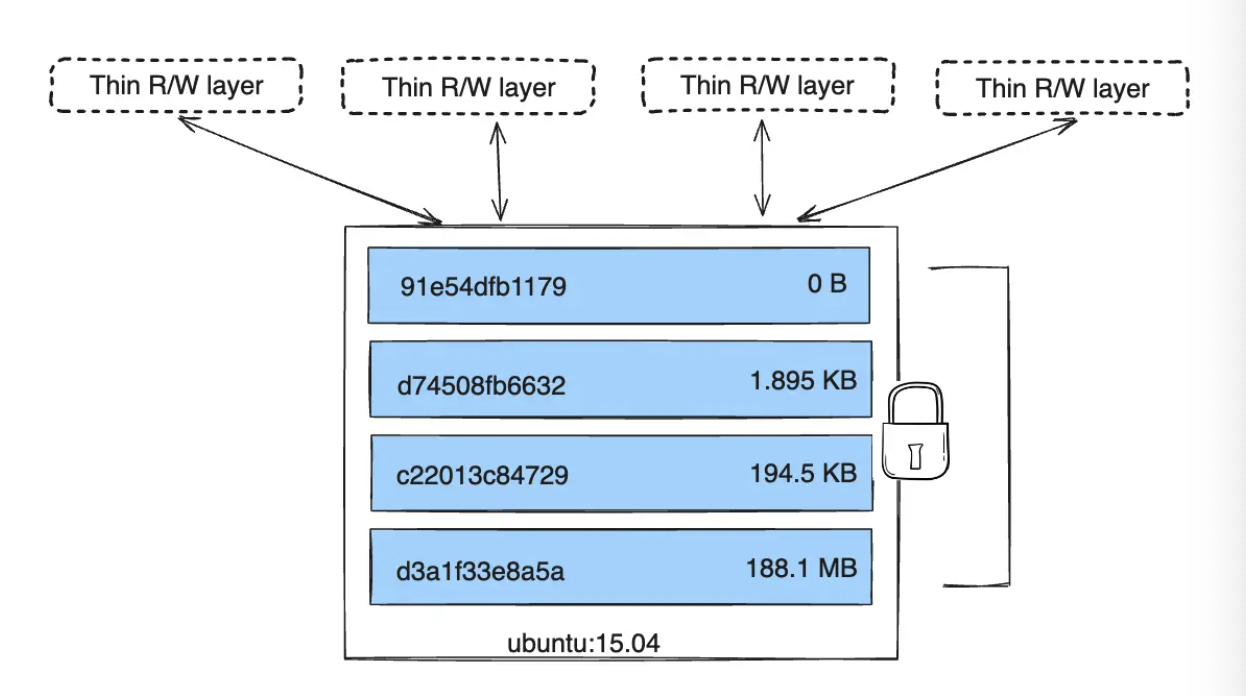
Docker uses storage drivers to manage the contents of the image layers and the writable container layer. Each storage driver handles the implementation differently, but all drivers use stackable image layers and the copy-on-write (CoW) strategy.
Container size on disk
To view the approximate size of a running container, you can use the docker ps -s command. Two different columns relate to size.
- size: the amount of data (on disk) that's used for the writable layer of each container.
- virtual size: the amount of data used for the read-only image data used by the container plus the container's writable layer size.
Use Docker volumes if you need multiple containers to have shared access to the exact same data. Refer to the volumes section to learn about volumes.
The copy-on-write (CoW) strategy
Copy-on-write is a strategy of sharing and copying files for maximum efficiency. If a file or directory exists in a lower layer within the image, and another layer (including the writable layer) needs read access to it, it just uses the existing file. The first time another layer needs to modify the file (when building the image or running the container), the file is copied into that layer and modified. This minimizes I/O and the size of each of the subsequent layers. These advantages are explained in more depth below.
Copying makes containers efficient
When an existing file in a container is modified, the storage drivers performs a copy-on-write operation. The specific steps involved depend on the specific storage driver.
For the overlay2 driver, the copy-on-write operation follows this rough sequence:
- Search through the image layers for the file to update. The process starts at the newest layer and works down to the base layer one layer at a time. When results are found, they're added to a cache to speed future operations.
- Perform a
copy-upoperation on the first copy of the filethat's found, to copy the file to the container's writable layer. - Any modifications are made to this copy of the file, and the container can't see the read-only copy of the file that exists in the lower layer.
출처: https://docs.docker.com/engine/storage/drivers/#storage-drivers-versus-docker-volumes