
📖 Vue Component
📌 Vue Component
✅ Vue Component
-
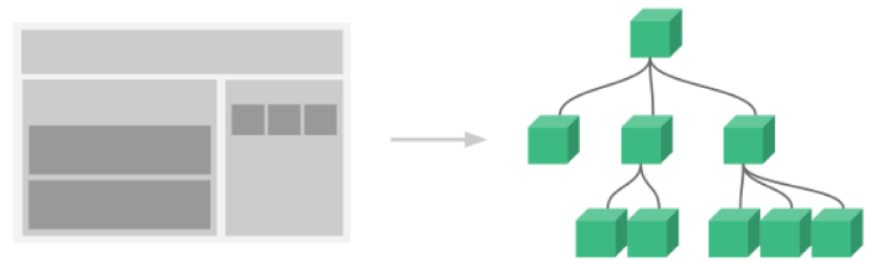
Vue의 가장 강력한 기능 중 하나
-
기본 HTML 엘리먼트를 확장하여 재사용 가능한 코드를 캡슐화하는데 도움이 된다.
-
Vue Component는 Vue Instance이기도 하다. (루트에서만 사용하는 옵션을 제외하고 모든 옵션 객체 사용 가능)
-
Life Cycle Hook 사용 가능
-
전역 컴포넌트와 지역 컴포넌트 사용
✅ Vue Componenet(전역)
-
전역 컴포넌트를 등록하려면 Vue.Component(tagName, options)를 사용
-
권장하는 컴포넌트 이름 : 케밥 케이스
<div id="app1">
  <my-comp></my-comp>
</div>

<div id="app2">
  <my-comp></my-comp>
</div>

<script>
  Vue.component('my-comp', {
  	template: '<div>전역 컴포넌트</div>'
  });
  new Vue({
  	el: '#app1'
  });
  new Vue({
  	el: '#app2'
  });
</script>
✅ Vue Component(지역)
-
모든 컴포넌트를 전역으로 등록할 필요 X
-
컴포넌트를 components 인스턴스 옵션으로 등록함으로써 다른 인스턴스 / 컴포넌트의 범위에서만 사용할 수 있는 컴포넌트 생성 가능
var Child = {
 	template: '<div>사용자 정의 컴포넌트 입니다!</div>'
}

new Vue({
  // ...
  components: {
   	// <my-component>는 상위 템플릿에서만 사용할 수 있습니다.
    'my-component' : Child
  }
})<div id="app1">
<my-comp></my-comp>
</div>
<div id="app2">
<my-comp></my-comp>
</div>
<script>
let comp = {
template: '<div>지역 컴포넌트</div>'
}
new Vue({
el: '#app1',
components: {
'my-comp' : comp
}
});
</script>✅ Vue Component Template
-
DOM을 템플릿으로 사용할 때, Vue는 템플릿 콘텐츠만 가져올 수 있기 때문에 HTML이 작동하는 방식에 고유한 몇 가지 제한 사항이 적용됨
-
따라서 가능한 경우 항상 문자열 템플릿을 사용하는 것이 좋다.
-
Component에서는 data를 함수 형태로 작성해야 한다. (return 포함된 형태)
<div id="app">
  <my-comp></my-comp>
</div>

<script>
  <template id="my-temp">
  <div>로컬</div>
  </template>

  Vue.component('my-comp', {
      template: "#my-temp"
  })
  new Vue({
      el: '#app'
  })
</script>
✅ Vue Component data
-
data는 반드시 함수여야 한다.
-
data 객체를 공유하는 문제를 막고 새로운 데이터 객체를 반환해서 해결한다.
<div id="app">
  <count-view></count-view>
  <count-view></count-view>
</div>

<template id="count-view">
  <div>
    <span>{{count}}</span>
    <button @click="count++">..</button>
  </div>
</template>

<script>
  let data = { count: 0 };
  Vue.component('count-view', {
  	data() {
  		return data
  	},
  	template: '#count-view'
  });
</script>

</br></br>

```html
<div id="app">
  <count-view></count-view>
  <count-view></count-view>
</div>

<template id="count-view">
  <div>
    <span>{{count}}</span>
    <button @click="count++">..</button>
  </div>
</template>

<script>
  Vue.component('count-view', {
  	data() {
  		return {
  			count: 0
  		}
  	},
  	template: '#count-view'
  });
</script>
개발 공부!