OpenCV란?
- an open source library that includes several hundreds of computer vision algorithms
- 컴퓨터 비전 알고리즘 수백개를 포함하는 오픈소스 라이브러리
*OpenCV 1.x api는 C로 만들어졌고, OpenCV 2.x api는 C++로 만들어짐
Grayscale in computer vision
- 2-dimensional array: (rows, columns)
- from 0(Black) to 255(White)
color in computer vision
- 3-dimensional array: (rows, columns, channels)
- RGB model: (rows, columns, 3)
- Black: (0, 0, 0)
- White: (255, 255, 255)
- Red: (255, 0, 0)
- Green: (0, 255, 0)
- Blue: (0, 0, 255)
이미지 읽기: imread
cv.imread(filename[, flags]) -> retval- filename: Name of file to be loaded
- flags: Flag that can take values of cv::ImreadModes
- cv.IMREAD_UNCHANGED
- cv.IMREAD_GRAYSCALE
- ...
이미지 저장하기: imwrite
cv.imwrite(filename, img[, params])색 변환: cvtColor
- openCV는 색상값을 BGR 순으로 읽는다 (cf. plt)
cv.cvtColor(src, code[, dst[, dstCn]]) -> dstshape
- 컬러: (rows, columns, channels)
- 흑백: (rows, columns)
Q. 둘 다 흑백으로 보이는데 shape가 다른 건?
흑백으로 저장된 이미지
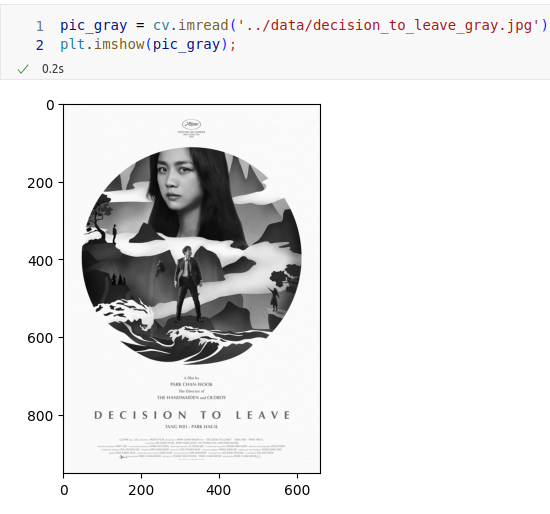
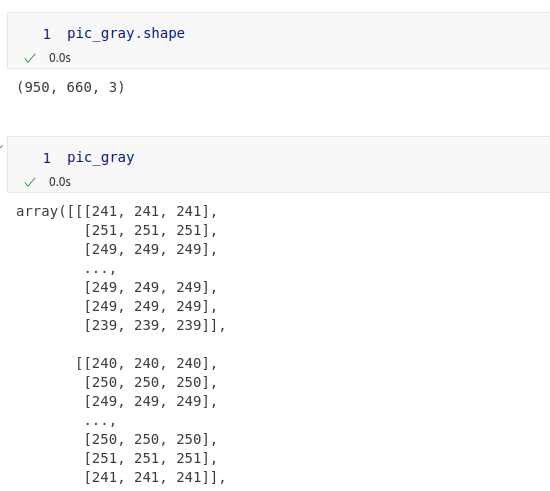
읽을 때 흑백으로 불러온 이미지
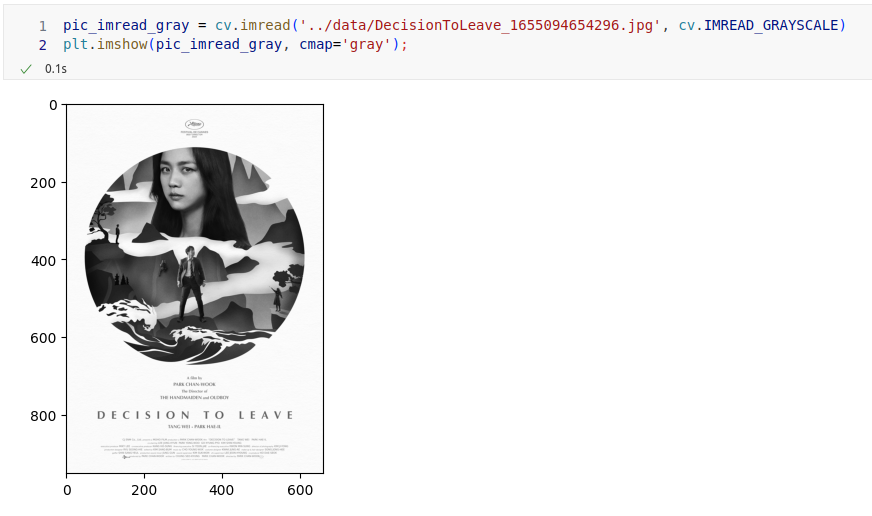
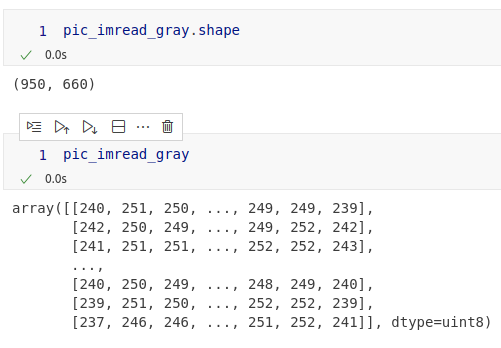
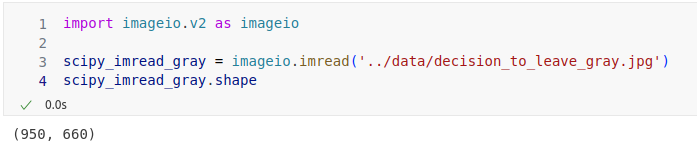
A. opencv imread 대신 imageio imread 사용
- opencv의 imread 함수 실행 시, 같은 값을 3번 입력하는 방식으로 3차원 어레이를 생성함(imread의 flags 기본값이 IMREAD_COLOR이기 때문)
- imageio의 imread 함수로 흑백여부 확인 가능
마우스 이벤트 또는 상태에 따라 함수 실행하기: setMouseCallback
cv.setMouseCallback(winname, onMouse, userdata)- winname: Name of the window
- onMouse: Callback function for mouse events
- userdata: the optional parameter
콜백 함수 작성방법
- how to specify and use the callback
# typedef: void
mousecallback(event, x, y, flags, userdata)- event: one of the cv.MouseEventTypes constants
- cv.MouseEventTypes
- cv.EVENT_MOUSEMOVE
- cv.EVENT_LBUTTONDOWN
...
- cv.MouseEventTypes
- x: the x-coordinate of the mouse event
- y: the y-coordinate of the mouse event
- flags: one of the cv.MouseEventFlags constants
- cv.MouseEventFlags
- cv.EVENT_FLAG_LBUTTON
- cv.EVENT_FLAG_RBUTTON
...
- cv.MouseEventFlags
- userdata: the optional parameter
event와 flags
- event: action
- cv.EVENT_LBUTTONDOWN: 마우스 왼쪽버튼이 내려가는 이벤트가 발생
- flags: status (계속)
- cv.EVENT_FLAG_LBUTTON: 마우스 왼쪽버튼이 계속 내려가 있는 상태
# event는 cv.MouseEventTypes와 비교
# flags는 cv.MouseEventFlags와 비교
if event == cv.EVENT_MOUSEMOVE:
	if flags == cv.EVENT_FLAG_LBUTTON:
    	...