React with typescript
react-cli로 typescript 설정
https://create-react-app.dev/docs/adding-typescript/
yarn create react-app my-app --template typescript
React with Typescript
- module bundler
- webpack2
- webpack-dev-server
- loader
- ts-loader : 웹팩에서 파일을 읽고 JS로 변경해서 내려줌. 타입스크립트 컴파일러를 사용하는게 ts-loader이다.
- typescript
- tslint-loader
- tslint : 컨벤션 체크
- tslint-react
- source-map-loader : 소스 맵 확인
- ts-loader : 웹팩에서 파일을 읽고 JS로 변경해서 내려줌. 타입스크립트 컴파일러를 사용하는게 ts-loader이다.
- react
- react, @types/react : React는 타입 definition을 설치가 필요. definition 파일을 읽어오는 과정을 거쳐야 한다.
- react-dom, @types/react-dom
- loadable-component, @types/loadable__component : 코드 스플리팅
- react-router-dom, @types/react-router-dom : 라우터 생성
src 디렉토리 구조
- tslint.json
- tsconfig.json
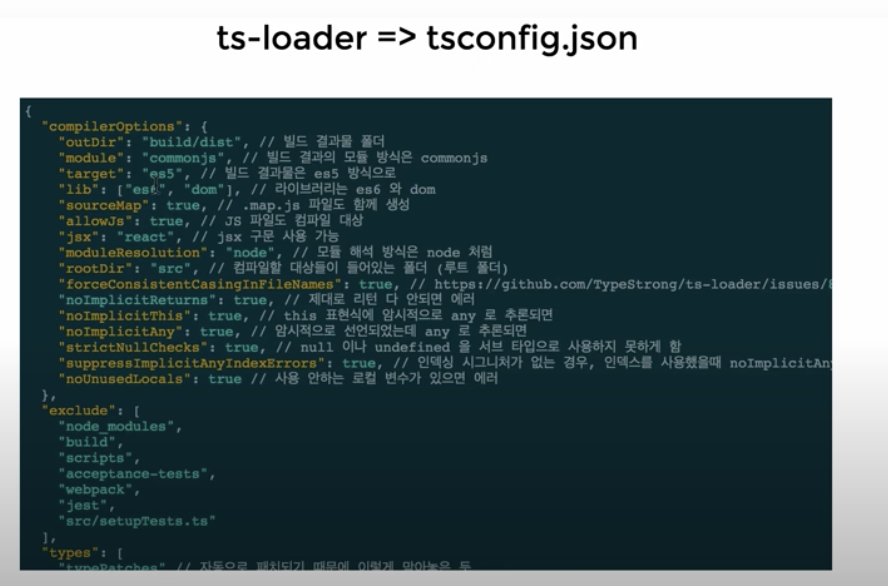
- index.tsx (메인 엔트리 파일 Root.tsx => App.tsx => 다른 컴포넌트로 이동, 꼭대기에서 ReactDom.render를 수행)
- index.css (글로벌 스타일 작성)
- pages (라우터 위치)
- components (이동할 페이지가 있는 폴더)
- lib
- util.ts
- api.ts
- interface
- common (여러 군데에서 사용하는 interface)
- index.ts
- stores (stores 에 사용하는 interface)
- 모듈별로 파일 생성 (ex/ cast, home)
- index.ts (store root 파일)
- common (여러 군데에서 사용하는 interface)
- stores
- pages (페이지 모듈별로 분리)
- index (store root)
- shared (공통)
- App.tsx: App 컴포넌트 (클래스 이름과 파일 이름 맞추는 것이 관례)
- App.css
- App.test.tsx (App 컴포넌트에 대한 테스트 작성 파일)

무를 심자.