Chapter 3. 목적 파일
3.1 ABI
응용 프로그램 인터페이스(API: Application Programming Interface)는 라이브러리의 공용 인터페이스로서, 두 소프트웨어 컴포넌트가 상호작용 시 수용하는 규칙(convention) 혹은 표준(standard)이다.
ABI는 이와 비슷하게 두 프로그램이 기계어 수준에서 호환 가능하도록 두 프로그램의 목적 파일을 함께 사용할 수 있게 해 주는 인터페이스이다. 그러므로 두 프로그램이 공유하는 동적·정적 라이브러리는 동일한 ABI를 갖는다.
동적 링크, 실행 파일 로딩, 함수 호출 규칙과 같은 시스템의 중요 기능들은 합의된 ABI에 따라 정확히 수행되어야 한다.
ABI는 보통 다음 내용을 포함한다.
- 대상 아키텍처의 명령어 집합: 프로세서 명령어, 메모리 레이아웃, 엔디언(endianness), 레지ㅡ터 등
- 기존의 자료형과 크기 및 정렬 규칙(alignment policy)
- 함수 호출 규칙(convention): 함수 호출 방식, 스택 프레임 구조, 인자의 순서를 푸시(push)하는 문제 등
- 유닉스 계열 시스템에서 시스템 호출 방식 정의
- 사용된 목적 파일 형식: 재배치 가능한, 실행 가능한, 공유 목적 파일에 관한 내용
- C++ 컴파일러로 생성한 목적 파일의 네임 맹글링, 가상 테이블(virtual table) 레이아웃
유닉스 계열 시스템에서 가장 널리 사용되는 ABI 표준은 System V ABI이고, 이 ABI에서는 실행 가능한 링크 파일 형식(ELF: Executable and Linking Format)을 사용한다.
3.2 목적 파일 형식
- ELF: Linux 및 Unix 계열 운영체제
- Mach-O: OS X(macOS 및 iOS)
- PE(Portable Execution, 이식 가능한 실행 파일): Windows
모든 목적 파일 형식은 초기 버전의 유닉스를 위해 설계된 a.out 목적 파일 형식을 계승한다. 이 형식은 COFF(Common Object File Format, 공용 목적 파일 형식)으로 대체되어 ELF의 토대가 되었다.
ELF의 기반 아키텍처가 동일하다면 상이한 운영체제 간 동일한 목적 파일을 사용할 수 있다.
3.3 재배치 가능한 목적 파일
컴파일 파이프라인의 어셈블리 단계의 결과물로 재배치 가능한 목적 파일이 생성된다. 이 목적 파일에서는 컴파일된 변환 단위와 관련해 다음 항목을 찾아볼 수 있다.
- 변환 단위에서 발견되는 함수에 대해 생성된 기계 수준 명령어(코드)
- 변환 단위에서 선언·초기화된 전역 변수 값(데이터)
- 심볼 테이블
명령어는 이동 가능(movable)하거나 재배치 가능(relocatable)하다. 그러므로 재배치 가능한 목적 파일의 명령어는 주소를 갖지 않는다.
코드 박스 3-1 [예제 3-1]의 두 함수의 정의를 포함하는 파일
int max(int a, int b) {
    return a > b ? a : b;
}
int max_3(int a, int b, int c) {
    int temp = max(a, b);
    return c > temp ? c : temp;
}
코드 박스 3-2 [예제 3-1]의 이미 선언된 함수를 사용하는 main 함수: 정의는 별도의 소스 파일에 있음
int max(int, int);
int max_3(int, int, int);

int a = 5;
int b = 10;

int main(int argc, char** argv) {
    int m1 = max(a, b);
    int m2 = max_3(5, 8, -1);
    return 0;
}
셀 박스 3-1 소스 파일에 해당하는 재배치 가능한 목적 파일로 컴파일하기
$ gcc -c 3_1.funcs.c -o funcs.o
$ gcc -c 3_1.c -o main.o
셀 박스 3-2 funcs.o 목적 파일의 ELF 내용
$ readelf -hSl funcs.o
ELF Header:
  Magic:   7f 45 4c 46 02 01 01 00 00 00 00 00 00 00 00 00
  Class:                             ELF64
  Data:                              2's complement, little endian
  Version:                           1 (current)
  OS/ABI:                            UNIX - System V
  ABI Version:                       0
  Type:                              REL (Relocatable file)
  Machine:                           Advanced Micro Devices X86-64
  Version:                           0x1
  Entry point address:               0x0
  Start of program headers:          0 (bytes into file)
  Start of section headers:          632 (bytes into file)
  Flags:                             0x0
  Size of this header:               64 (bytes)
  Size of program headers:           0 (bytes)
  Number of program headers:         0
  Size of section headers:           64 (bytes)
  Number of section headers:         13
  Section header string table index: 12

Section Headers:
  [Nr] Name              Type             Address           Offset
       Size              EntSize          Flags  Link  Info  Align
  [ 0]                   NULL             0000000000000000  00000000
       0000000000000000  0000000000000000           0     0     0
  [ 1] .text             PROGBITS         0000000000000000  00000040
       000000000000004f  0000000000000000  AX       0     0     1
  [ 2] .rela.text        RELA             0000000000000000  000001c0
       0000000000000018  0000000000000018   I      10     1     8
  [ 3] .data             PROGBITS         0000000000000000  0000008f
       0000000000000000  0000000000000000  WA       0     0     1
  [ 4] .bss              NOBITS           0000000000000000  0000008f
       0000000000000000  0000000000000000  WA       0     0     1
  [ 5] .comment          PROGBITS         0000000000000000  0000008f
       0000000000000027  0000000000000001  MS       0     0     1
  [ 6] .note.GNU-stack   PROGBITS         0000000000000000  000000b6
       0000000000000000  0000000000000000           0     0     1
  [ 7] .note.gnu.pr[...] NOTE             0000000000000000  000000b8
       0000000000000020  0000000000000000   A       0     0     8
  [ 8] .eh_frame         PROGBITS         0000000000000000  000000d8
       0000000000000058  0000000000000000   A       0     0     8
  [ 9] .rela.eh_frame    RELA             0000000000000000  000001d8
       0000000000000030  0000000000000018   I      10     8     8
  [10] .symtab           SYMTAB           0000000000000000  00000130
       0000000000000078  0000000000000018          11     3     8
  [11] .strtab           STRTAB           0000000000000000  000001a8
       0000000000000017  0000000000000000           0     0     1
  [12] .shstrtab         STRTAB           0000000000000000  00000208
       000000000000006c  0000000000000000           0     0     1
Key to Flags:
  W (write), A (alloc), X (execute), M (merge), S (strings), I (info),
  L (link order), O (extra OS processing required), G (group), T (TLS),
  C (compressed), x (unknown), o (OS specific), E (exclude),
  D (mbind), l (large), p (processor specific)

There are no program headers in this file.
재배치 가능한 목적 파일은 12개의 섹션으로 구성된다.
.text: 변환 단위에 대응되는 모든 기계 수준 명령어.data초기화된 전역 변수 값.bss초기화되지 않은 전역 변수에 필요한 바이트 수.symtab: 심볼 테이블
셀 박스 3-3 funcs.o 목적 파일의 심볼 테이블
$ readelf -s funcs.o

Symbol table '.symtab' contains 5 entries:
   Num:    Value          Size Type    Bind   Vis      Ndx Name
     0: 0000000000000000     0 NOTYPE  LOCAL  DEFAULT  UND
     1: 0000000000000000     0 FILE    LOCAL  DEFAULT  ABS 3_1.funcs.c
     2: 0000000000000000     0 SECTION LOCAL  DEFAULT    1 .text
     3: 0000000000000000    27 FUNC    GLOBAL DEFAULT    1 max
     4: 000000000000001b    52 FUNC    GLOBAL DEFAULT    1 max_3
Value 열에 따르면 max에 할당된 주소는 0, max_3에 할당된 주소는 27(1b)이다. 관련된 명령어가 서로 인접했고, 심볼 및 대응되는 기계 수준 명령어는 재배치될 준비를 마친 상태이다.
셀 박스 3-4 main.o 목적 파일의 심볼 테이블
$ readelf -s main.o

Symbol table '.symtab' contains 8 entries:
   Num:    Value          Size Type    Bind   Vis      Ndx Name
     0: 0000000000000000     0 NOTYPE  LOCAL  DEFAULT  UND
     1: 0000000000000000     0 FILE    LOCAL  DEFAULT  ABS 3_1.c
     2: 0000000000000000     0 SECTION LOCAL  DEFAULT    1 .text
     3: 0000000000000000     4 OBJECT  GLOBAL DEFAULT    3 a
     4: 0000000000000004     4 OBJECT  GLOBAL DEFAULT    3 b
     5: 0000000000000000    73 FUNC    GLOBAL DEFAULT    1 main
     6: 0000000000000000     0 NOTYPE  GLOBAL DEFAULT  UND max
     7: 0000000000000000     0 NOTYPE  GLOBAL DEFAULT  UND max_3
전역 변수 a, b와 함수 main에 대한 심볼 모두 주소가 배정되지 않았다. 이는 재배치 가능한 목적 파일이라는 표시이다.
3.4 실행 가능한 목적 파일
실행 가능한 목적 파일도 기계 수준 명령어, 초기화된 전역 변수 값, 심볼 테이블을 갖지만 정렬(arrangement)은 다를 수 있다.
셀 박스 3-5 [예제 3-1]에서 이전에 빌드한 재배치 가능한 목적 파일을 링크하기
$ gcc funcs.o main.o -o 3_1.outELF 실행 가능한 목적 파일, ELF 공유 목적 파일은 0개 이상의 섹션으로 구성된 세그먼트를 갖는다. 예를 들어 기계 수준 명령어를 포함하는 모든 섹션은 정적 메모리 세그먼트(static memory segment)에 연결(map)된다.
셀 박스 3-6 3_1.out 실행 목적 파일의 ELF 내용
$ readelf -hSl 3_1.out
ELF Header:
  Magic:   7f 45 4c 46 02 01 01 00 00 00 00 00 00 00 00 00
  Class:                             ELF64
  Data:                              2's complement, little endian
  Version:                           1 (current)
  OS/ABI:                            UNIX - System V
  ABI Version:                       0
  Type:                              DYN (Position-Independent Executable file)
  Machine:                           Advanced Micro Devices X86-64
  Version:                           0x1
  Entry point address:               0x1040
  Start of program headers:          64 (bytes into file)
  Start of section headers:          14064 (bytes into file)
  Flags:                             0x0
  Size of this header:               64 (bytes)
  Size of program headers:           56 (bytes)
  Number of program headers:         14
  Size of section headers:           64 (bytes)
  Number of section headers:         29
  Section header string table index: 28

Section Headers:
  [Nr] Name              Type             Address           Offset
       Size              EntSize          Flags  Link  Info  Align
  [ 0]                   NULL             0000000000000000  00000000
       0000000000000000  0000000000000000           0     0     0
  [ 1] .note.gnu.bu[...] NOTE             0000000000000350  00000350
       0000000000000024  0000000000000000   A       0     0     4
  [ 2] .interp           PROGBITS         0000000000000374  00000374
       000000000000001c  0000000000000000   A       0     0     1
  [ 3] .gnu.hash         GNU_HASH         0000000000000390  00000390
       0000000000000024  0000000000000000   A       4     0     8
  [ 4] .dynsym           DYNSYM           00000000000003b8  000003b8
       0000000000000090  0000000000000018   A       5     1     8
  [ 5] .dynstr           STRTAB           0000000000000448  00000448
       0000000000000088  0000000000000000   A       0     0     1
  [ 6] .gnu.version      VERSYM           00000000000004d0  000004d0
       000000000000000c  0000000000000002   A       4     0     2
  [ 7] .gnu.version_r    VERNEED          00000000000004e0  000004e0
       0000000000000030  0000000000000000   A       5     1     8
  [ 8] .rela.dyn         RELA             0000000000000510  00000510
       00000000000000c0  0000000000000018   A       4     0     8
  [ 9] .init             PROGBITS         0000000000001000  00001000
       000000000000001b  0000000000000000  AX       0     0     4
  [10] .plt              PROGBITS         0000000000001020  00001020
       0000000000000010  0000000000000010  AX       0     0     16
  [11] .plt.got          PROGBITS         0000000000001030  00001030
       0000000000000010  0000000000000010  AX       0     0     16
  [12] .text             PROGBITS         0000000000001040  00001040
       0000000000000181  0000000000000000  AX       0     0     16
  [13] .fini             PROGBITS         00000000000011c4  000011c4
       000000000000000d  0000000000000000  AX       0     0     4
  [14] .rodata           PROGBITS         0000000000002000  00002000
       0000000000000004  0000000000000004  AM       0     0     4
  [15] .eh_frame_hdr     PROGBITS         0000000000002004  00002004
       000000000000003c  0000000000000000   A       0     0     4
  [16] .eh_frame         PROGBITS         0000000000002040  00002040
       00000000000000d4  0000000000000000   A       0     0     8
  [17] .note.gnu.pr[...] NOTE             0000000000002118  00002118
       0000000000000030  0000000000000000   A       0     0     8
  [18] .note.ABI-tag     NOTE             0000000000002148  00002148
       0000000000000020  0000000000000000   A       0     0     4
  [19] .init_array       INIT_ARRAY       0000000000003df0  00002df0
       0000000000000008  0000000000000008  WA       0     0     8
  [20] .fini_array       FINI_ARRAY       0000000000003df8  00002df8
       0000000000000008  0000000000000008  WA       0     0     8
  [21] .dynamic          DYNAMIC          0000000000003e00  00002e00
       00000000000001c0  0000000000000010  WA       5     0     8
  [22] .got              PROGBITS         0000000000003fc0  00002fc0
       0000000000000040  0000000000000008  WA       0     0     8
  [23] .data             PROGBITS         0000000000004000  00003000
       0000000000000018  0000000000000000  WA       0     0     8
  [24] .bss              NOBITS           0000000000004018  00003018
       0000000000000008  0000000000000000  WA       0     0     1
  [25] .comment          PROGBITS         0000000000000000  00003018
       0000000000000026  0000000000000001  MS       0     0     1
  [26] .symtab           SYMTAB           0000000000000000  00003040
       00000000000003c0  0000000000000018          27    19     8
  [27] .strtab           STRTAB           0000000000000000  00003400
       00000000000001e0  0000000000000000           0     0     1
  [28] .shstrtab         STRTAB           0000000000000000  000035e0
       000000000000010c  0000000000000000           0     0     1
Key to Flags:
  W (write), A (alloc), X (execute), M (merge), S (strings), I (info),
  L (link order), O (extra OS processing required), G (group), T (TLS),
  C (compressed), x (unknown), o (OS specific), E (exclude),
  D (mbind), l (large), p (processor specific)

Program Headers:
  Type           Offset             VirtAddr           PhysAddr
                 FileSiz            MemSiz              Flags  Align
  PHDR           0x0000000000000040 0x0000000000000040 0x0000000000000040
                 0x0000000000000310 0x0000000000000310  R      0x8
  INTERP         0x0000000000000374 0x0000000000000374 0x0000000000000374
                 0x000000000000001c 0x000000000000001c  R      0x1
      [Requesting program interpreter: /lib64/ld-linux-x86-64.so.2]
  LOAD           0x0000000000000000 0x0000000000000000 0x0000000000000000
                 0x00000000000005d0 0x00000000000005d0  R      0x1000
  LOAD           0x0000000000001000 0x0000000000001000 0x0000000000001000
                 0x00000000000001d1 0x00000000000001d1  R E    0x1000
  LOAD           0x0000000000002000 0x0000000000002000 0x0000000000002000
                 0x0000000000000168 0x0000000000000168  R      0x1000
  LOAD           0x0000000000002df0 0x0000000000003df0 0x0000000000003df0
                 0x0000000000000228 0x0000000000000230  RW     0x1000
  DYNAMIC        0x0000000000002e00 0x0000000000003e00 0x0000000000003e00
                 0x00000000000001c0 0x00000000000001c0  RW     0x8
  NOTE           0x0000000000000350 0x0000000000000350 0x0000000000000350
                 0x0000000000000024 0x0000000000000024  R      0x4
  NOTE           0x0000000000002118 0x0000000000002118 0x0000000000002118
                 0x0000000000000030 0x0000000000000030  R      0x8
  NOTE           0x0000000000002148 0x0000000000002148 0x0000000000002148
                 0x0000000000000020 0x0000000000000020  R      0x4
  GNU_PROPERTY   0x0000000000002118 0x0000000000002118 0x0000000000002118
                 0x0000000000000030 0x0000000000000030  R      0x8
  GNU_EH_FRAME   0x0000000000002004 0x0000000000002004 0x0000000000002004
                 0x000000000000003c 0x000000000000003c  R      0x4
  GNU_STACK      0x0000000000000000 0x0000000000000000 0x0000000000000000
                 0x0000000000000000 0x0000000000000000  RW     0x10
  GNU_RELRO      0x0000000000002df0 0x0000000000003df0 0x0000000000003df0
                 0x0000000000000210 0x0000000000000210  R      0x1

 Section to Segment mapping:
  Segment Sections...
   00
   01     .interp
   02     .note.gnu.build-id .interp .gnu.hash .dynsym .dynstr .gnu.version .gnu.version_r .rela.dyn
   03     .init .plt .plt.got .text .fini
   04     .rodata .eh_frame_hdr .eh_frame .note.gnu.property .note.ABI-tag
   05     .init_array .fini_array .dynamic .got .data .bss
   06     .dynamic
   07     .note.gnu.build-id
   08     .note.gnu.property
   09     .note.ABI-tag
   10     .note.gnu.property
   11     .eh_frame_hdr
   12
   13     .init_array .fini_array .dynamic .got
여러 개의 재배치 가능한 목적 파일을 링크할 시 모든 유사한 섹션을 모아 더 큰 섹션을 형성하고, 이를 실행 혹은 공유 목적 파일로 변환한다. 이후 변하지 않는 주소가 확정될 수 있다.
실행 가능한 목적 파일은 절대 주소를 사용하고(ASLR 적용 시 상대 주소 사용), 공유 라이브러리는 상대 주소를 사용한다.
셀 박스 3-7 3_1.out 실행 가능한 목적 파일에서 찾아볼 수 있는 심볼 테이블
$ readelf -s 3_1.out

Symbol table '.dynsym' contains 6 entries:
   Num:    Value          Size Type    Bind   Vis      Ndx Name
     0: 0000000000000000     0 NOTYPE  LOCAL  DEFAULT  UND
     1: 0000000000000000     0 FUNC    GLOBAL DEFAULT  UND _[...]@GLIBC_2.34 (2)
     2: 0000000000000000     0 NOTYPE  WEAK   DEFAULT  UND _ITM_deregisterT[...]
     3: 0000000000000000     0 NOTYPE  WEAK   DEFAULT  UND __gmon_start__
     4: 0000000000000000     0 NOTYPE  WEAK   DEFAULT  UND _ITM_registerTMC[...]
     5: 0000000000000000     0 FUNC    WEAK   DEFAULT  UND [...]@GLIBC_2.2.5 (3)

Symbol table '.symtab' contains 40 entries:
   Num:    Value          Size Type    Bind   Vis      Ndx Name
     0: 0000000000000000     0 NOTYPE  LOCAL  DEFAULT  UND
     1: 0000000000000000     0 FILE    LOCAL  DEFAULT  ABS Scrt1.o
     2: 0000000000002148    32 OBJECT  LOCAL  DEFAULT   18 __abi_tag
     3: 0000000000000000     0 FILE    LOCAL  DEFAULT  ABS crtstuff.c
     4: 0000000000001070     0 FUNC    LOCAL  DEFAULT   12 deregister_tm_clones
     5: 00000000000010a0     0 FUNC    LOCAL  DEFAULT   12 register_tm_clones
     6: 00000000000010e0     0 FUNC    LOCAL  DEFAULT   12 __do_global_dtors_aux
     7: 0000000000004018     1 OBJECT  LOCAL  DEFAULT   24 completed.0
     8: 0000000000003df8     0 OBJECT  LOCAL  DEFAULT   20 __do_global_dtor[...]
     9: 0000000000001120     0 FUNC    LOCAL  DEFAULT   12 frame_dummy
    10: 0000000000003df0     0 OBJECT  LOCAL  DEFAULT   19 __frame_dummy_in[...]
    11: 0000000000000000     0 FILE    LOCAL  DEFAULT  ABS 3_1.funcs.c
    12: 0000000000000000     0 FILE    LOCAL  DEFAULT  ABS 3_1.c
    13: 0000000000000000     0 FILE    LOCAL  DEFAULT  ABS crtstuff.c
    14: 0000000000002110     0 OBJECT  LOCAL  DEFAULT   16 __FRAME_END__
    15: 0000000000000000     0 FILE    LOCAL  DEFAULT  ABS
    16: 0000000000003e00     0 OBJECT  LOCAL  DEFAULT   21 _DYNAMIC
    17: 0000000000002004     0 NOTYPE  LOCAL  DEFAULT   15 __GNU_EH_FRAME_HDR
    18: 0000000000003fc0     0 OBJECT  LOCAL  DEFAULT   22 _GLOBAL_OFFSET_TABLE_
    19: 0000000000000000     0 FUNC    GLOBAL DEFAULT  UND __libc_start_mai[...]
    20: 0000000000000000     0 NOTYPE  WEAK   DEFAULT  UND _ITM_deregisterT[...]
    21: 0000000000004000     0 NOTYPE  WEAK   DEFAULT   23 data_start
    22: 0000000000001144    52 FUNC    GLOBAL DEFAULT   12 max_3
    23: 0000000000004014     4 OBJECT  GLOBAL DEFAULT   23 b
    24: 0000000000004018     0 NOTYPE  GLOBAL DEFAULT   23 _edata
    25: 00000000000011c4     0 FUNC    GLOBAL HIDDEN    13 _fini
    26: 0000000000001129    27 FUNC    GLOBAL DEFAULT   12 max
    27: 0000000000004000     0 NOTYPE  GLOBAL DEFAULT   23 __data_start
    28: 0000000000000000     0 NOTYPE  WEAK   DEFAULT  UND __gmon_start__
    29: 0000000000004008     0 OBJECT  GLOBAL HIDDEN    23 __dso_handle
    30: 0000000000002000     4 OBJECT  GLOBAL DEFAULT   14 _IO_stdin_used
    31: 0000000000004020     0 NOTYPE  GLOBAL DEFAULT   24 _end
    32: 0000000000001040    38 FUNC    GLOBAL DEFAULT   12 _start
    33: 0000000000004010     4 OBJECT  GLOBAL DEFAULT   23 a
    34: 0000000000004018     0 NOTYPE  GLOBAL DEFAULT   24 __bss_start
    35: 0000000000001178    73 FUNC    GLOBAL DEFAULT   12 main
    36: 0000000000004018     0 OBJECT  GLOBAL HIDDEN    23 __TMC_END__
    37: 0000000000000000     0 NOTYPE  WEAK   DEFAULT  UND _ITM_registerTMC[...]
    38: 0000000000000000     0 FUNC    WEAK   DEFAULT  UND __cxa_finalize@G[...]
    39: 0000000000001000     0 FUNC    GLOBAL HIDDEN     9 _init
위 실행 가능한 목적 파일은 2개의 상이한 심볼 테이블을 갖고 있다.
.dynsym: 실행 파일 로드 시 해결할(resolve) 심볼.symtab: 해결된 심볼 및 동적 심볼 테이블의 미해결된 심볼
심볼 테이블에서 해결된 심볼은 링크 단계에서 획득한 주소에 대응되는 절대 주소(absolute corresponding address)를 갖는다.
3.5 정적 라이브러리
정적 라이브러리는 재배치 가능한 목적 파일로부터 생성되는 유닉스 아카이브이다. 다른 목적 파일과 함께 링크되어 실행 가능한 목적 파일을 생성한다.
정적 라이브러리 자체는 목적 파일이 아니고, 목적 파일을 위한 컨테이너이다. 정적 라이브러리는 단순히 유닉스의 ar 유틸리티로 파일을 아카이브할 뿐이다.
링커는 링크 단계 중 재배치 가능한 목적 파일로부터 정적 라이브러리 추출을 시도한다. 이후 정의되지 않은 심볼을 찾아 해결해 나간다.
유닉스 시스템에서 정적 라이브러리의 이름은 lib로 시작하고, .a 확장자를 갖는다. 윈도우에서는 .lib 확장자를 갖는다.
셀 박스 3-8 여러 소스 파일을 그에 해당하는 재배치 가능한 목적 파일로 컴파일하기
$ gcc -c aa.c -o aa.o
$ gcc -c bb.c -o bb.o
...
$ gcc -c zz.c -o zz.o
셀 박스 3-9 재배치 가능한 목적 파일 여러 개에서 정적 라이브러리를 생성하는 일반적인 방법
$ ar crs libexample.a aa.o bb.o ... zz.olibexample.a 파일은 하나의 아카이브에 이전의 재배치 가능한 목적 파일 모두를 포함하는 정적 라이브러리이다.
코드 박스 3-3 [예제 3-2]의 헤더 파일
#ifndef EXTREME_C_EXAMPLES_CHAPTER_3_2_H
#define EXTREME_C_EXAMPLES_CHAPTER_3_2_H

#define PI 3.14159265359

typedef struct {
    double x;
    double y;
} cartesian_pos_2d_t;

typedef struct {
    double length;
    double theta;
} polar_pos_2d_t;

typedef struct {
    double x;
    double y;
    double z;
} cartesian_pos_3d_t;

typedef struct {
    double length;
    double theta;
    double phi;
} polar_pos_3d_t;

double to_radian(double deg);
double to_degree(double rad);

double cos_deg(double deg);
double acos_deg(double deg);

double sin_deg(double deg);
double asin_deg(double deg);

cartesian_pos_2d_t convert_to_2d_cartesian_pos(
    const polar_pos_2d_t* polar_pos
);
polar_pos_2d_t convert_to_2d_polar_pos(
    const cartesian_pos_2d_t* cartesian_pos
);

cartesian_pos_3d_t convert_to_3d_cartesian_pos(
    const polar_pos_3d_t* polar_pos
);
polar_pos_3d_t convert_to_3d_polar_pos(
    const cartesian_pos_3d_t* cartesian_pos
);

#endif
코드 박스 3-4 [예제 3-2]의 삼각 함수의 정의를 포함하는 소스 파일
#include <math.h>

// include user-defined header file to use macro PI
#include "3_2_geometry.h"

double to_radian(double deg) {
    return (PI * deg) / 180;
}

double to_degree(double rad) {
    return (180 * rad) / PI;
}

double cos_deg(double deg) {
    return cos(to_radian(deg));
}

double acos_deg(double deg) {
    return acos(to_radian(deg));
}

double sin_deg(double deg) {
    return sin(to_radian(deg));
}

double asin_deg(double deg) {
    return asin(to_radian(deg));
}
코드 박스 3-5 [예제 3-2]의 2D 함수의 정의를 포함하는 파일
#include <math.h>

// include user-defined header file to use external functions
#include "3_2_geometry.h"

cartesian_pos_2d_t convert_to_2d_cartesian_pos(
    const polar_pos_2d_t* polar_pos
) {
    cartesian_pos_2d_t result;
    result.x = polar_pos->length * cos_deg(polar_pos->theta);
    result.y = polar_pos->length * sin_deg(polar_pos->theta);
    return result;
}

polar_pos_2d_t convert_to_2d_polar_pos(
    const cartesian_pos_2d_t* cartesian_pos
) {
    polar_pos_2d_t result;
    result.length = sqrt(cartesian_pos->x * cartesian_pos->x + cartesian_pos->x * cartesian_pos->y);
    result.theta = to_degree(atan(cartesian_pos->y / cartesian_pos->x));
    return result;
}
코드 박스 3-6 [예제 3-2]의 3D 함수의 정의를 포함하는 파일
#include <math.h>

// include user-defined header file to use external functions
#include "3_2_geometry.h"

cartesian_pos_3d_t convert_to_3d_cartesian_pos(
    const polar_pos_3d_t* polar_pos
) {
    cartesian_pos_3d_t result;
    result.x = polar_pos->length * sin_deg(polar_pos->theta) * cos_deg(polar_pos->phi);
    result.y = polar_pos->length * sin_deg(polar_pos->theta) * sin_deg(polar_pos->phi);
    result.z = polar_pos->length * cos_deg(polar_pos->theta);
    return result;
}

polar_pos_3d_t convert_to_3d_polar_pos(
    const cartesian_pos_3d_t* cartesian_pos
) {
    polar_pos_3d_t result;
    result.length = sqrt(cartesian_pos->x * cartesian_pos->x +
        cartesian_pos->y * cartesian_pos->y +
        cartesian_pos->z * cartesian_pos->z);
    result.theta = to_degree(acos(cartesian_pos->z / result.length));
    result.phi = to_degree(atan(cartesian_pos->y / cartesian_pos->x));
    return result;
}
소스 파일 중 main 함수를 포함한 파일이 없으므로 링크 후 실행 파일을 생성할 수 없다. 다음으로는 이 파일들을 아카이브한다.
셀 박스 3-10 소스 파일을 재배치 가능한 목적 파일로 컴파일하기
$ gcc -c 3_2_trigon.c -o trigon.o
$ gcc -c 3_2_2d.c -o 2d.o
$ gcc -c 3_2_3d.c -o 3d.o
셀 박스 3-11 재배치 가능한 목적 파일에서 정적 라이브러리 만들기
$ ar crs libgeometry.a trigon.o 2d.o 3d.o
$ sudo mkdir -p /opt/geometry
$ sudo mv libgeometry.a /opt/geometry
ar 명령어의 -t 옵션을 사용하면 아카이브 파일의 내용을 확인할 수 있다.
셀 박스 3-12 정적 라이브러리 파일의 내용 나열하기
$ ar -t /opt/geometry/libgeometry.a
trigon.o
2d.o
3d.o
C 언어 라이브러리를 사용하기 위해 라이브러리의 공용 인터페이스(public interface) 또는 API에 접근해야 한다.
코드 박스 3-7 [예제 3-3] 기하학 함수를 검사하는 main 함수
#include <stdio.h>

#include "3_2_geometry.h"

int main(int argc, char** argv) {
    cartesian_pos_2d_t cartesian_pos;
    cartesian_pos.x = 100;
    cartesian_pos.y = 200;
    polar_pos_2d_t polar_pos =
        convert_to_2d_polar_pos(&cartesian_pos);
    printf("Polar Position: Length: %f, Theta: %f (deg)\n",
        polar_pos.length, polar_pos.theta);
    return 0;
}
셀 박스 3-13 [예제 3-3] 컴파일하기
$ gcc -c 3_3.c -o main.o셀 박스 3-14 [예제 3-2]에서 생성한 정적 라이브러리 링크하기
$ gcc main.o -L/opt/geometry -lgeometry -lm -o 3_3.out-L/opt/geometry:gcc가/opt/geometry경로를 정적·동적 라이브러리를 탐색할 수 있는 경로로 인식하도록 명령한다.-lgeometry:gcc가libgeometry.a또는libgeometry.so를 탐색하도록 한다.-lm:gcc가libm.a또는libm.so를 탐색하도록 한다. 이 라이브러리에는glibc의 수학 함수에 관한 정의가 있다.
3.6 동적 라이브러리
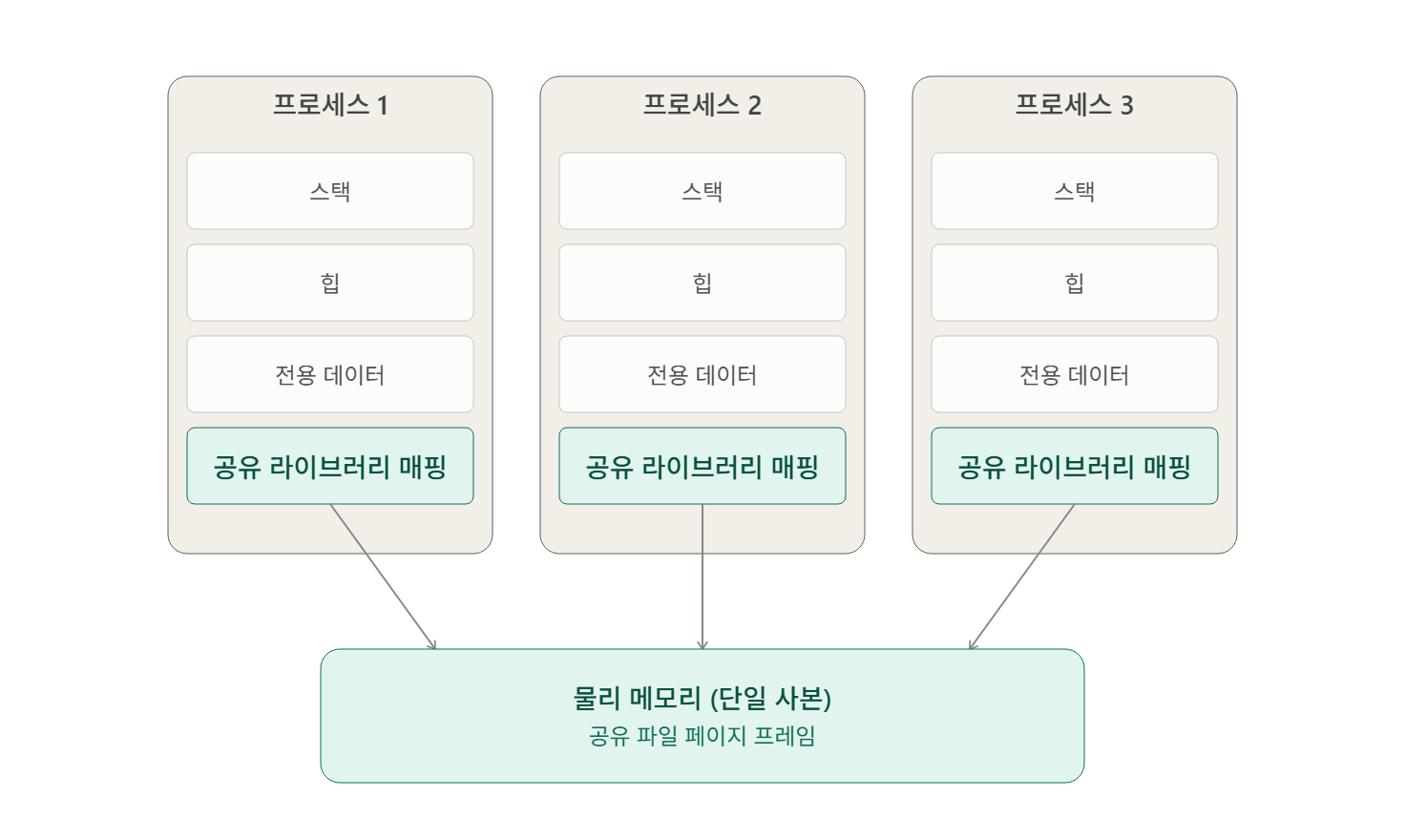
동적 라이브러리는 정의되지 않은 심볼을 가질 수 있다. 이는 링크 단계에서 해결되지 않으며 실행 시점에 검색된다.
동적 링커(dynamic linker) 또는 로더(loader)는 실행 시점에 새로운 종류의 링크 단계를 수행한다. 프로세스 실행 시 공유 목적 파일을 적재하고 프로세스의 메모리 영역에 연결한다.
ELF 공유 목적 파일은 ELF 실행 가능한 목적 파일과 대비해 두 가지 주요 차이점을 가진다.
- 심볼이 상대적인 절대 주소를 가진다: 각 명령어의 주소는 상대적으로 결정되지만, 두 명령어 사이의 거리는 절대적으로 고정되어 있다. 재배치 가능한 목적 파일이 위치 독립적(position independent)이기 때문이다.
- ELF 실행 가능한 목적 파일에 관련된 세그먼트가 없다: 공유 목적 파일은 실행 불가능하다.
셀 박스 3-15 [예제 3-2]의 소스를 위치 독립적인 재배치 가능한 목적 파일로 컴파일하기
$ gcc -c 3_2_2d.c -fPIC -o 2d.o
$ gcc -c 3_2_3d.c -fPIC -o 3d.o
$ gcc -c 3_2_trigon.c -fPIC -o trigon.o
-fPIC 옵션은 재배치 가능한 목적 파일로부터 공유 목적 파일을 생성할 때 사용한다. PIC는 위치 독립적인 코드(position independent code)를 의미한다. 위치 독립성으로 인해 파일 안의 명령어는 고정 주소가 아닌 상대 주소를 가진다.
공유 목적 파일을 생성하려면 컴파일러가 필요하다. 이는 단순 아카이브이기 때문에 ld 유틸리티를 사용할 수 있다. 대부분의 유닉스 계열 시스템에서 ld가 컴파일을 수행하지만, 직접 사용하기보다 gcc의 -fPIC 옵션을 활용해 컴파일하는 것이 안전하다.
셀 박스 3-16 재배치 가능한 목적 파일에서 공유 목적 파일 생성하기
$ gcc -shared 2d.o 3d.o trigon.o -o libgeometry.so
$ sudo mkdir -p /opt/geometry
$ sudo mv libgeometry.so /opt/geometry
-shared 옵션을 통해 공유 목적 파일 생성을 지시했다.
셀 박스 3-17 빌드된 공유 목적 파일에 [예제 3-3] 링크하기
$ sudo rm -fv /opt/geometry/libgeometry.a
$ gcc -c 3_3.c -o main.o
$ gcc main.o -L/opt/geometry -lgeometry -lm -o 3_3.out
같은 디렉터리에서 정적 라이브러리를 제거했기 때문에 -lgeometry 옵션은 동적 라이브러리를 링크한다. 동적 라이브러리는 최종 실행 파일에 임베딩되지 않고 실행 시 적재된다. 만약 같은 디렉터리에 정적 라이브러리, 공유 목적 파일이 둘 다 존재하면 gcc는 공유 목적 파일을 링크한다.
셀 박스 3-18 [예제 3-3]의 실행을 시도하기
$ ./3_3.out
./3_3.out: error while loading shared libraries: libgeometry.so: cannot open shared object file: No such file or directory
정적 라이브러리와 링크된 실행 파일은 독립 실행 파일(standalone executable)에서 실행할 수 있다.
하지만 동적 의존성(dynamic dependency)을 갖는 실행 파일은 로더에게 환경 변수를 통해 동적 라이브러리를 탐색하기 위한 경로를 지시해 주어야 한다.
셀 박스 3-19 LD_LIBRARY_PATH를 지정해 [예제 3-3] 실행하기
$ export LD_LIBRARY_PATH=/opt/geometry
$ ./3_3.out
Polar Position: Length: 173.205081, Theta: 63.434949 (deg)
셀 박스 3-20 같은 명령어로 LD_LIBRARY_PATH의 경로를 지정해 [예제 3-3]을 실행하기
$ LD_LIBRARY_PATH=/opt/geometry ./3_3.out
Polar Position: Length: 173.205081, Theta: 63.434949 (deg)
공유 라이브러리가 링크된 실행 파일은 실행 전 로더의 적재 및 주소 연결 작업을 필요로 한다.
3.6.1 공유 라이브러리의 수동 로딩
로더 프로그램(동적 링커)의 도움 없이 개발자가 직접 공유 목적 파일을 수동으로 적재하는 함수를 사용할 수 있다.
셀 박스 3-21 표준 수학 라이브러리에 관한 기하학 공유 목적 파일을 링크하기
$ gcc -shared 2d.o 3d.o trigon.o -lm -o libgeometry.so-lm 옵션을 통해 링커가 표준 수학 라이브러리(libm.so)와 관련된 공유 목적 파일을 링크하도록 지시한다. libgeometry.so 파일을 수동으로 적재 시 cos, sqrt와 같은 의존성이 어느 정도는 자동으로 적재되어야 하기 때문이다.
코드 박스 3-8 [예제 3-4] 기하학 공유 목적 파일을 수동으로 로드
#include <stdio.h>
#include <stdlib.h>
#include <dlfcn.h>

#include "3_2_geometry.h"

polar_pos_2d_t (*func_ptr)(cartesian_pos_2d_t*);

int main(int argc, char** argv) {
    void* handle = dlopen("/opt/geometry/libgeometry.so", RTLD_LAZY);
    if (!handle) {
        fprintf(stderr, "%s\n", dlerror());
        exit(1);
    }

    func_ptr = dlsym(handle, "convert_to_2d_polar_pos");
    if (!func_ptr) {
        fprintf(stderr, "%s\n", dlerror());
        exit(1);
    }

    cartesian_pos_2d_t cartesian_pos;
    cartesian_pos.x = 100;
    cartesian_pos.y = 200;
    polar_pos_2d_t polar_pos = func_ptr(&cartesian_pos);
    printf("Polar Position: Length: %f, Theta: %f (deg)\n",
        polar_pos.length, polar_pos.theta);
    return 0;
}dlopen, dlsym 함수를 사용해 공유 목적 파일을 적재하고 함수 포인터로 대상 함수를 불러올 수 있다.
셀 박스 3-22 [예제 3-4] 실행하기
$ gcc 3_4.c -ldl -o 3_4.out
$ ./3_4.out
Polar Position: Length: 173.205081, Theta: 63.434949 (deg)
이 방법은 지연된 로딩(lazy loading)이라고 하며, 실행 시점에 공유 목적 파일을 링크할 수 있다.