
0. OOP 객체 지향 프로그래밍
실제 사물을 프로그래밍으로 옮겨와 모델링 하는 것
Object =Variable (속성) + Method(행위)
- OOP의 핵심은 공통된 목적을 띈 데이터와 동작들을 묶어 하나의 객체로 정의 하는 것.
- 클래스로 모듈화 하며, 관심사 분리 원칙을 준수 해야 한다.
- (separation of concerns, SoC)
- 낮은 결합도, 높은 응집도, 한 번에 한 가지 일만 처리하도록 나눔.
- https://velog.io/@zaman17/%EA%B4%80%EC%8B%AC%EC%82%AC%EC%9D%98-%EB%B6%84%EB%A6%ACSOC-Seperation-Of-Concern-%EC%9B%90%EC%B9%99
0-1 OOP의 문제점
비즈니스 클래스에서 횡단 관심사, 핵심 관심사가 공존하게 되는데, 프로젝트가 고도화 됨이 따라 메서드 복잡도가 증가하여 비즈니스 코드 파악이 어렵고, 부가 기능의 불특정 다수 메소드가 반복적으로 구현되어 횡단 관심사 모듈화가 어려움.
이러한 OOP의 관심사 분리에 한계를 해결하고자 한다면 AOP를 활용하면 된다.
핵심 관심사
핵심 기능. (객체가 제공하는 고유한 기능)
횡단 관심사
핵심 기능을 보조하기 위해 여러 클래스에 걸쳐 고통으로 사용되는 부가 기능, 코드를 모듈화 시켜 재사용 함으로 중복 코드를 줄인다.
Soc
하나의 관심사는 하나의 기능만을 가지도록 구성하는 디자인 원칙
1. AOP 관점 지향 프로그래밍
핵심 관심사와 횡단 관심사를 분리해 부가기능을 Aspect 라는 모듈 형태로 만들어 설계 개발하는 방법.
- AOP 모듈화의 핵심 단위 Aspect (기능)
- OOP 모듈화의 핵심 단위 Class
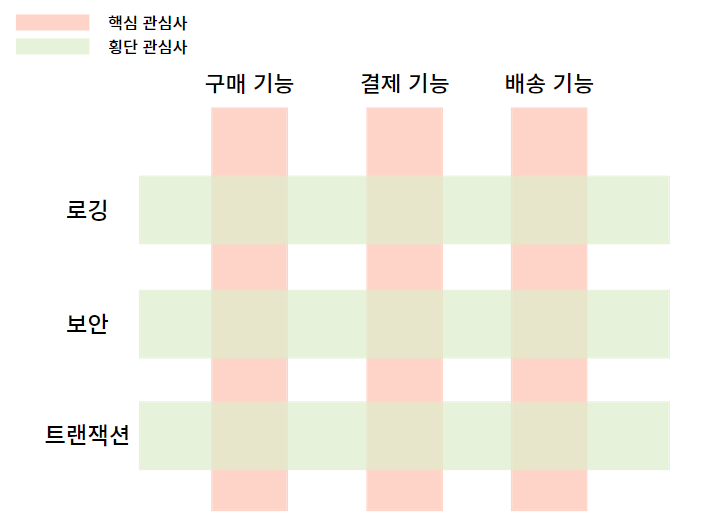
출처 :https://velog.io/@wnguswn7/Spring-AOPAspect-Oriented-Programming%EB%9E%80
1-1AOP 정리 Aspect Oriented Programming
Aspect
- 여러 객체에 공통적으로 적용되는 기능 ( 횡단 관심사 )
- Aspect* = adivce : 부가 기능 + pointcut :넣을 위치
프로젝트 내 공통으로 적용되는 Aspect(부가기능+넣을 위치)만 따로 기능별로 묶어, 프록시 객체를 만들어 한 번에 처리 한다.
이때 해당 Advice(부가기능) 은 어디에 적용할지 (Target) 을 적용 해야 하는데 포인트컷(PointCut) 을 활용해 위치를 지정하고, 어드바이스(Advice) 를 활용해 어느 시점에 넣을 건지 지정할 수 있다.
AOP가 적용될 수 있는 모든 지점 : JoinPoint
JoinPoint 중 구체적으로 지정하는 지점 : PointCut
2. AOP 와 CustomAnnotation 을 이용한 NotifyAspect
2-1 CustomAnnotation
@Retention(RetentionPolicy.RUNTIME) // 런타임까지 유지
@Target({java.lang.annotation.ElementType.METHOD}) //메서드 단위에 붙여서 사용
public @interface NeedNotify {

}
2-2 NotifyAspect
네, 각 줄마다 상세한 설명을 달아드리겠습니다:

```java
@Aspect // AOP(관점 지향 프로그래밍)를 사용하기 위한 애너테이션, 이 클래스가 AOP 관련 로직을 포함함을 명시
@Slf4j  // Lombok 애너테이션으로, 로깅을 위한 log 변수를 자동으로 생성
@Component // 스프링 빈으로 등록하기 위한 애너테이션
@EnableAsync // 비동기 처리를 활성화하는 애너테이션, 해당 클래스 내의 @Async 메서드들이 비동기로 동작하게 함
@RequiredArgsConstructor // Lombok 애너테이션으로, final 필드에 대한 생성자를 자동으로 생성
public class NotifyAspect {

    private final NotifyService notifyService; // 알림 서비스를 처리하기 위한 의존성 주입

    @Pointcut("@annotation(com.example.simplechatapp.annotation.NeedNotify)")
    // NeedNotify 애너테이션이 붙은 메서드들을 AOP 적용 대상으로 지정하는 포인트컷 정의
    public void annotationPointcut() {
        // 포인트컷 선언을 위한 빈 메서드
    }

    @Async // 이 메서드를 비동기적으로 실행하도록 지정
    @AfterReturning(pointcut = "annotationPointcut()", returning = "result")
    // 지정된 포인트컷의 메서드 실행이 성공적으로 완료된 후 실행되는 어드바이스
    public void checkValue(JoinPoint joinPoint, Object result) throws Throwable {
        NotifyInfo notifyInfo = null;

        // 결과가 ResponseEntity 타입인 경우의 처리
        if (result instanceof ResponseEntity) {
            ResponseEntity<?> responseEntity = (ResponseEntity<?>) result;
            Object body = responseEntity.getBody();
            if (body instanceof NotifyInfo) {
                notifyInfo = (NotifyInfo) body;
            }
        }
        // 결과가 직접 NotifyInfo 타입인 경우의 처리
        else if (result instanceof NotifyInfo) {
            notifyInfo = (NotifyInfo) result;
        }

        // 알림 정보가 존재하는 경우 처리
        if (notifyInfo != null) {
            Set<String> receivers = notifyInfo.getReceiver(); // 수신자 목록 가져오기

            // 각 수신자에게 알림 전송
            for (String receiver : receivers) {
                notifyService.send(
                        receiver,                           // 수신자
                        notifyInfo.getNotificationType(),   // 알림 타입
                        notifyInfo.getNotifyMessage().getMessage(), // 알림 메시지
                        notifyInfo.getGoUrlId(),           // 이동할 URL ID
                        notifyInfo.getPostId()             // 게시물 ID
                );
            }

            // 알림 전송 완료 로깅
            log.info("Notification sent for result: {}", notifyInfo);
        } else {
            // 알림 정보가 없는 경우 에러 로깅
            log.error("Method did not return a NotifyInfo instance or ResponseEntity with NotifyInfo body");
        }
    }
}
2-3 NotifyInfo
알람을 받을 Entity 의 DTO 에 해당 NotifyInfo interface 를 상속시켜 해당 값 들을 받아오게 한다.
public interface NotifyInfo {
    Set<String> getReceiver();
    String getGoUrlId();
    NotificationType getNotificationType();
    NotifyMessage getNotifyMessage();
    Long getPostId();
}
3. SSE (server-sent-events) 구현 부분
3-1 WebSocket 과 SSE 비교
WebSocket
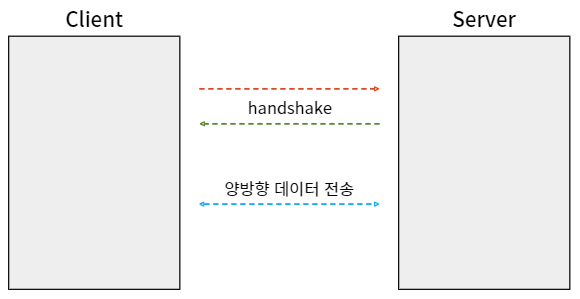
- 실시간 양방향 통신을 위한 스펙
- 서버와 브라우저가 지속적으로 연견된 TCP 라인을 통해 실시간으로 데이터를 주고 받을 수 있도록 하는 HTML5 사양
- 연결을 유지하며 클라이언트- 서버 간 양방향 통신이 가능
- 채팅, 게임, 주식 차트 등에 사용
SSE
![[Pasted image 20241029131825.png]]
- 서버-> 클라이언트 방향으로만 흐르는 단방향 통신
- 클라이언트가 주기적으로 HTTP 요청을 보낼 필요가 없어 HTTP 연결을 통해 서버에서 클라이언트로 데이터 전달이 가능하다.
SSE 를 선택한 이유
- 항시 연결해 사용할 계획이므로 WebSocket 보다 리소스 면에서 더 효율적이다.
- 채팅이나 주식 서비스가 아닌 간단한 단방향 통신만 필요했다.
- 기존의 HTTP 프로토콜을 사용하므로 별도의 라이브러리나 프레임 워크가 필요 없어 구현이 간편하다.
SSE의 장점
- 비동기 통신이 가능하다.
- 서버에서 이벤트가 발생하면 즉각적으로 클라이언트에게 전송. - 재시도 및 연결 관리가 용이하다
- 연결이 끊어지는 경우 재시도 처리를 지원한다.
- 구독 후 연결이 끊어지면, 클라이언트는 다시 연결을 시도하고 이전에 미수신한 이벤트를 잃지 않도록 처리가 가능하다. - 확장성이 높다.
- 여러 클라이언트와 동시 통신이 가능하다.
- (동일한 알람을 여러 클라이언트에게 전송 가능.)
SSE의 단점 - 지속적인 연결을 유지해야 하는 특성상 서버 리소스와 클라이언트의 네트워크 연결을 소비하게 된다.
- 특히 많은 수의 클라이언트가 동시에 연결을 유지하면 서버에 부하가 가중될 수 있다.
- 서버가 불안정할 경우 연결이 종료되고, 재연결이 필요하므로 추가적인 네트워크 오버헤드가 발생할 수 있다.
3-2 SSE 코드 구현부
Controller
@RestController
@RequestMapping("/api/notifications")
@RequiredArgsConstructor
public class NotifyController {

    private final NotifyService notifyService;

    @GetMapping(value = "/subscribe", produces = MediaType.TEXT_EVENT_STREAM_VALUE)
    public ResponseEntity<SseEmitter> subscribe(
               @AuthenticationPrincipal UserDTO principal,
                                                @RequestHeader(value = "Last-Event-ID", required = false, defaultValue = "") String lastEventId) {


        return ResponseEntity.ok(notifyService.subscribe(principal.getEmail(), lastEventId));
    }

    @GetMapping("/all")
    public ResponseEntity<NotifyDto.PageResponse> getAllNotifications(@AuthenticationPrincipal UserDTO principal,
                                                                        @RequestParam(value = "page", defaultValue = "0") int page,
                                                                       @RequestParam(value = "size", defaultValue = "5") int size){

        return ResponseEntity.ok(notifyService.getAllNotifications(principal.getEmail(), page, size));
    }

    @PostMapping("/{notificationId}/read")
    public ResponseEntity<Void> markAsRead(@AuthenticationPrincipal UserDTO principal, @PathVariable Long notificationId) {
        notifyService.markAsRead(principal.getEmail(), notificationId);
        return ResponseEntity.ok().build();
    }

    @GetMapping("/unread/count")
    public ResponseEntity<Long> getUnreadCount(@AuthenticationPrincipal UserDTO principal) {
        return ResponseEntity.ok(notifyService.getUnreadCount(principal.getEmail()));
    }

    @PostMapping("/clear")
    public ResponseEntity<Void> clearAll(@AuthenticationPrincipal UserDTO principal) {
        try {
            notifyService.markAsReadAll(principal.getEmail());
            return ResponseEntity.ok().build();
        } catch (ResponseStatusException e) {
            return ResponseEntity.status(e.getStatusCode()).build();
        }


    }
}
구독, 알람 수 카운트, 읽음 처리, 일괄 읽음 처리(clear)
@RequestHeader(value = "Last-Event-ID", required = false, defaultValue = "") String lastEventId으로 마지막 eventId 를 수신 받아 미수신한 알람을 조회/ 전송 할수 있지만 단순 DB 조회 후 subscribe 이후에 오는 알람만 받고 있다. Id 관리가 필요 없고, 구현이 간단하며, 미수신 알람을 조회, 추후 전송 받는 서버 부하도 덜하기 때문이다.
추후의 Redis pub/sub 알림큐를 적용해 리팩토링은 고려 해볼만 하다.
NotifyService
@Service
@Log4j2
@RequiredArgsConstructor
public class NotifyService {


    private static final Long DEFAULT_TIMEOUT = 60L * 1000 * 60;

    private final EmitterRepository emitterRepository;
    private final NotifyRepository notifyRepository;
    private final UserRepository userRepository;
    private final PostRepository postRepository;


    public SseEmitter subscribe(String userNickname, String lastEventId) {

        String emitterId = makeTimeIncludeId(userNickname);
        SseEmitter sseEmitter = emitterRepository.save(emitterId, new SseEmitter(DEFAULT_TIMEOUT));

        sseEmitter.onCompletion(() -> emitterRepository.deleteById(emitterId));
        sseEmitter.onError((e) -> emitterRepository.deleteById(emitterId));
        sseEmitter.onTimeout(() -> emitterRepository.deleteById(emitterId));

        //503 에러 방지를 위한 더미 이벤트 전송

        String eventId = makeTimeIncludeId(userNickname);
        sendNotification(sseEmitter, eventId, emitterId, "EventStream Created. [userEmail=" + userNickname + "]");

        // 클라이언트가 미수신한 Event 목록이 존재할 경우 전송하여 Event 유실을 예방

        if (hasLostData(lastEventId)) {
            sendLostData(lastEventId, userNickname, emitterId, sseEmitter);
        }

        return sseEmitter;

    }

    // userNickname 과 lastEventId를 받아 구독을 서정 하고 emitterId 생성 -> makeTimeIncludeId 메소드를 통해 고유한 아이디 생성 ->    // SsEmitter 객체 생성/ 저장  -> onCompletion, onError, onTimeout 메소드를 통해 에러 발생시 삭제 -> 생성된 SseEmitter 클라이언트에게 이벤트 전송

    // makeTimeIncluded 한 브라우저에서 여러개의 구독을 진행할 때 탭 마다 SseEmitter 의 구분을 위해 시간을 붙여 구분할 수 있어야 함
    // Last-Event-Id 로 마지막 받은 전송 이벤트 ID 가 무엇인지 알고, 받지 못한 데이터 정보들에 대해 인지할 수 있어야 함
    // 등록 후 SseEmitter 의 유효 시간 동안 데이터가 전송되지 ㅇ낳으면 503 에러 발생 - > 맨 처음 연결 진행 더미데이터를 보내 이를 방지

    private String makeTimeIncludeId(String email) {

        return email + "_" + System.currentTimeMillis(); //고유한 아이디를 만들기 위해 이메일과 현재 시간을 합침
    }


    private void sendNotification(SseEmitter emitter, String eventId, String emitterId, Object data) {

        try {
            emitter.send(SseEmitter.event()
                    .id(eventId)
                    .name("sse")
                    .data(data)
            );

        } catch (IOException e) {
            emitterRepository.deleteById(emitterId);
        }
    }

    //SseEmitter 를 통해 이벤트를 전송하는 메서드
    // 파라메터  : SsEmitter 객체인 emitter, eventId, emitterId ( 식별을 위한 고유 ID ) , data ( 전송할 데이터 )

    private boolean hasLostData(String lastEventId) {
        return !lastEventId.isEmpty();
    }
    // lastEventId 가 비어있지 않다 -> controller 의 헤더를 통해 lastEventId 가 들어 왔다 - > 손실된 이벤트가 있다 -> true    // lastEventId 가 비어있다 -> false
    private void sendLostData(String lastEventId, String userEmail, String emitterId, SseEmitter emitter) {
        Map<String, Object> eventCaches = emitterRepository.findAllEventCacheStartWithByUserNickname(userEmail);

        eventCaches.entrySet().stream()
                .filter(entry -> lastEventId.compareTo(entry.getKey()) < 0)
                .forEach(entry -> sendNotification(emitter, entry.getKey(), emitterId, entry.getValue()));

    }
// 구독자의 이메일을 기반으로 이벤트 캐시를 가져와 마지막 이벤트 ID 와 비교하여 미수신한 데이터 전송


    public void send(String receiver, NotificationType notificationType, String content, String url, Long postId) {

        Notify notification = notifyRepository.save(createNotification(receiver, notificationType, content, url, postId));


        String eventId = receiver + "_" + System.currentTimeMillis();

        Map<String, SseEmitter> emitters = emitterRepository.findAllEmitterStartWithByUserNickname(receiver);

        emitters.forEach(
                (key, emitter) -> {
                    emitterRepository.saveEventCache(key, notification);
                    sendNotification(emitter, eventId, key, NotifyDto.Response.createResponse(notification));
                }
        );
    }

    // 지정된 수신자에게 알림을 전송하는 메서드 : 받아온 정보를 저장한 후 Notify 객체를 생성
    // findAllEmitterStartWithByMemberId(receiverEmail) 을 통해 수신자 이메일로 시작하는 모든 SseEmitter 객체를 가져옴
    // 각 Ssemitter 에 대해 이벤트 캐시에 key 와 생성한 Notify 객체를 저장하고,
    // SendNotification 메서드를 호출해 알림과 관련된 데이터 (eventId, key, ResponseNotifyDto) 를 emitter 로 전송

    private Notify createNotification(String receiver, NotificationType notificationType, String content, String url, Long postId) {

        User user = userRepository.findByEmail(receiver).orElseThrow(() -> new RuntimeException("User Not Found"));
        Post post = postRepository.findById(postId).orElseThrow(() -> new RuntimeException("Post Not Found"));

        return Notify.builder()
                .createdAt(LocalDateTime.now())
                .receiver(user)
                .notificationType(notificationType)
                .content(content)
                .url(url)
                .isRead(false)
                .post(post)
                .build();
    }

    @Transactional
    public void markAsRead(String email, Long notificationId) {

        User user = userRepository.findByEmail(email).orElseThrow(() -> new RuntimeException("User Not Found"));

        Notify notification = notifyRepository.findById(notificationId).orElseThrow(() -> new RuntimeException("Notification Not Found"));

        if (!notification.getReceiver().equals(user)) {
            throw new RuntimeException("User is not authorized to mark this notification as read");
        }

        if (!notification.getIsRead()) {
            notification.setIsRead(true);
            notifyRepository.save(notification);
        }
    }

    @Transactional
    public void markAsReadAll(String email) {
        User user = userRepository.findByEmail(email)
                .orElseThrow(() -> new ResponseStatusException(HttpStatus.NOT_FOUND, "User Not Found"));
        List<Notify> allByReceiverAndIsReadFalse = notifyRepository.findAllByReceiverAndIsReadFalse(user);

        allByReceiverAndIsReadFalse.forEach(notify -> notify.setIsRead(true));
        notifyRepository.saveAll(allByReceiverAndIsReadFalse);
    }


    public NotifyDto.PageResponse getAllNotifications(String userEmail, int page, int size) {

        Pageable pageable = PageRequest.of(page, size, Sort.by("createdAt").descending());


        Page<NotifyDto.Response> notifications = notifyRepository.findNotificationDtosByReceiverEmail(userEmail, pageable);

        return NotifyDto.PageResponse.builder().
                content(notifications.getContent())
                .totalPages(notifications.getTotalPages())
                .totalElements(notifications.getTotalElements())
                .currentPage(notifications.getNumber())
                .build();
    }

    public Long getUnreadCount(String email) {


        return (long) notifyRepository.countUnreadNotifications(email);
    }
}
NotifyRepository
public interface NotifyRepository extends JpaRepository<Notify, Long>{

    Page<Notify> findByReceiverOrderByCreatedAtDesc(User user, Pageable pageable);

      @Query("SELECT new com.example.simplechatapp.dto.NotifyDto$Response(n.id, u.nickname, n.content, " +
           "n.notificationType, n.url, n.isRead, n.createdAt) " +
           "FROM Notify n " +
           "JOIN n.receiver u " +
           "WHERE u.email = :email " +
           "ORDER BY n.createdAt DESC")
    Page<NotifyDto.Response> findNotificationDtosByReceiverEmail( String email, Pageable pageable);


    @Query("SELECT COUNT(n) FROM Notify n JOIN n.receiver u WHERE u.email = :email AND n.isRead = false")
    int countUnreadNotifications(String email);

    @Query("SELECT n FROM Notify n WHERE n.receiver = :receiver AND n.isRead = false")
    List<Notify> findAllByReceiverAndIsReadFalse(User receiver);

}
EmitterRepositoryImpl
@Repository
public class EmitterRepositoryImpl implements EmitterRepository{

    private final Map<String, SseEmitter> emitters = new ConcurrentHashMap<>(); // key value 에 각각 emitterId 와 SseEmitter 객체를 저장
    private final Map<String, Object> eventCache = new ConcurrentHashMap<>();  // key value 에 각각 eventCacheId 와 eventCache 를 저장 한다

    // 코커렌트 해쉬맵을 쓰는 이유는 여러 클라이언트가 동시에 구독하고 이벤트를 전송할 수 있으므로 동시성 제어를 하는 것이 중요하기 때문


    @Override
    public SseEmitter save(String emitterId, SseEmitter sseEmitter) {
        emitters.put(emitterId, sseEmitter);

        return sseEmitter;
    }

    @Override
    public void saveEventCache(String eventCacheId, Object event) {

        eventCache.put(eventCacheId, event);

    }

    @Override
    public Map<String, SseEmitter> findAllEmitterStartWithByUserNickname(String userNickname) {
        return emitters.entrySet().stream()
                .filter(entry -> entry.getKey().startsWith(userNickname))
                .collect(Collectors.toMap(Map.Entry::getKey,Map.Entry::getValue));
    }

    @Override
    public Map<String, Object> findAllEventCacheStartWithByUserNickname(String userNickname) {
        return eventCache.entrySet().stream()
                .filter(entry->entry.getKey().startsWith(userNickname))
                .collect(Collectors.toMap(Map.Entry::getKey,Map.Entry::getValue)); // Entry : Map의 key와 value를 의미
    }

    @Override
    public void deleteById(String id) {

        emitters.remove(id);
    }

    @Override
    public void deleteAllEmitterStartWithId(String userId) {
        emitters.forEach(
                (key,emitter)->{
                    if(key.startsWith(userId)){
                        emitters.remove(key);
                    }
                }
        );

    }

    @Override
    public void deleteAllEventCacheStartWitId(String userId) {

        eventCache.forEach(
                (key,emitter)->{
                    if(key.startsWith(userId)){
                        eventCache.remove(key);
                    }
                }
        );
    }
}
NotifyDto
public class NotifyDto {

    @AllArgsConstructor
    @Builder    @NoArgsConstructor    @Data    public static class Response{
        Long id;
        String nickname;
        String content;
        String type;
        String  goUrl;
        Boolean isRead;
        LocalDateTime createdAt;

        public Response(Long id, String nickname, String content,
                        NotificationType notificationType, String goUrl,
                        Boolean isRead, LocalDateTime createdAt) {
            this.id = id;
            this.nickname = nickname;
            this.content = content;
            this.type = notificationType.name();
            this.goUrl = goUrl;
            this.isRead = isRead;
            this.createdAt = createdAt;
        }

        public static Response createResponse(Notify notify) {

            return Response.builder()
                    .id(notify.getId())
                    .nickname(notify.getReceiver().getNickname())
                    .content(notify.getContent())
                    .type(notify.getNotificationType().name())
                    .goUrl(notify.getUrl())
                    .isRead(notify.getIsRead())
                    .createdAt(notify.getCreatedAt())
                    .build();
        }
    }

    @AllArgsConstructor
    @Builder    @NoArgsConstructor    @Data    public static class PageResponse{
        List<Response> content;
        int totalPages;
        long totalElements;
        int currentPage;
//        int unreadCount;
    }
}
4. 적용 부문
어노테이션 적용 부분
@MessageMapping("/chat/{postId}/send")
@SendTo("/topic/chat/{postId}")
@NeedNotify
public ChatMessageDTO sendMessage(@Payload ChatMessageDTO requestDTO, @DestinationVariable Long postId) throws JsonProcessingException {

    ChatMessageDTO savedMessage = chatMessageService.createChatMessage(requestDTO, postId);
    String jsonMessage = objectMapper.writeValueAsString(requestDTO);

    redisTemplate.convertAndSend("/topic/chat/"+postId,jsonMessage);

    return savedMessage;

}
NotifyInfo Implements 부분
@Data
@Builder
@NoArgsConstructor
@AllArgsConstructor
public class ChatMessageDTO implements NotifyInfo {
//test
    private Long id;
    private String content;
    private Long chatRoomId;
    private String nickname;
    private String email;
    private LocalDateTime createdAt;
    private String chatMessageType;

    private Set<String> receivers;
    private String goUrlId;
    private NotificationType notificationType;
    private NotifyMessage notifyMessage;
    private Long postId;

    public static ChatMessageDTO ChatMessageEntityToDto(ChatMessage chatMessage) {
        String senderEmail = chatMessage.getUser().getEmail();

        return ChatMessageDTO.builder()
                .id(chatMessage.getId())
                .content(chatMessage.getContent())
                .chatRoomId(chatMessage.getChatRoom().getId())
                .nickname(chatMessage.getUser().getNickname())
                .email(senderEmail)
                .createdAt(chatMessage.getCreatedAt().atZone(ZoneId.of("UTC"))
                        .withZoneSameInstant(ZoneId.of("Asia/Seoul"))
                        .toLocalDateTime())
                .chatMessageType(chatMessage.getChatMessageType().name())
                .receivers(chatMessage.getChatRoom().getParticipants().stream()
                        .map(User::getEmail)
                        .filter(email -> !email.equals(senderEmail))
                        .collect(Collectors.toSet()))
                .goUrlId("/post/" + chatMessage.getChatRoom().getPost().getId() + "/chat/")
                .notificationType(NotificationType.CHAT)
                .notifyMessage(NotifyMessage.CHAT_APP_ALERT)
                .postId(chatMessage.getChatRoom().getPost().getId())
                .build();
    }

    @Override
    public Set<String> getReceiver() {
        return receivers;
    }

    @Override
    public String getGoUrlId() {
        return goUrlId;
    }

    @Override
    public NotificationType getNotificationType() {
        return NotificationType.CHAT;
    }

    @Override
    public NotifyMessage getNotifyMessage() {
        return NotifyMessage.CHAT_APP_ALERT;
    }

    @Override
    public Long getPostId() {
        return postId;
    }
}
이벤트 발생시 전송할 NotifyInfo 값을 설정 해주면 된다.
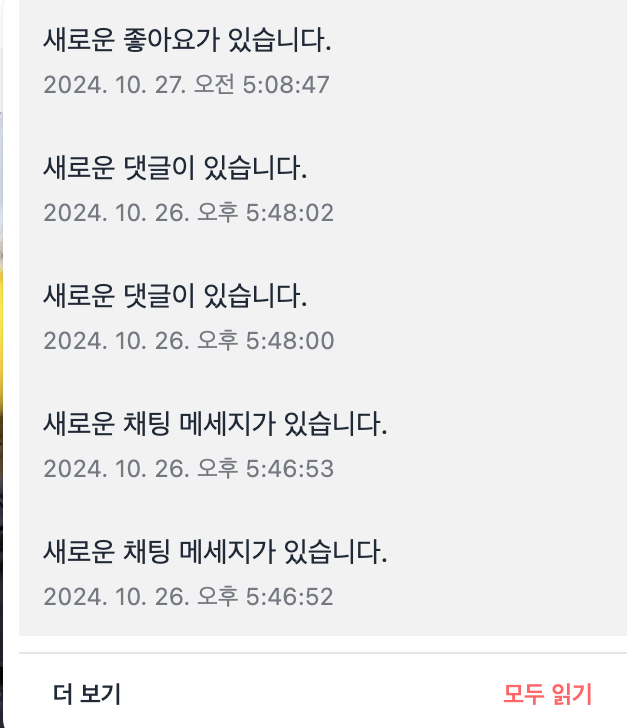
참고
Spring AOP로 로그/ 알림 Aspect 구현 : https://velog.io/@wnguswn7/Project-Spring-AOP%EB%A1%9C-%EB%A1%9C%EA%B7%B8-%EC%95%8C%EB%A6%BC-%EA%B8%B0%EB%8A%A5-%EA%B5%AC%ED%98%84%ED%95%98%EA%B8%B0
Spring AOP란? : https://velog.io/@wnguswn7/Spring-AOPAspect-Oriented-Programming%EB%9E%80
Spring AOP 용어 정리 : https://velog.io/@wnguswn7/Spring-AOPAspect-Oriented-Programming-%EC%9A%A9%EC%96%B4-%EC%A0%95%EB%A6%AC
Custom Annotation 을 이용해 Spring AOP 에 적용하기 : https://velog.io/@wnguswn7/Project-Custom-Annotaiton%EC%9D%84-%EC%9D%B4%EC%9A%A9%ED%95%98%EC%97%AC-Spring-AOP-%ED%94%84%EB%A1%9C%EC%A0%9D%ED%8A%B8%EC%97%90-%EC%A0%81%EC%9A%A9%ED%95%98%EA%B8%B0
알람 기능 구현 SSE
https://gilssang97.tistory.com/69