1. 글쓰기 페이지 실행 화면
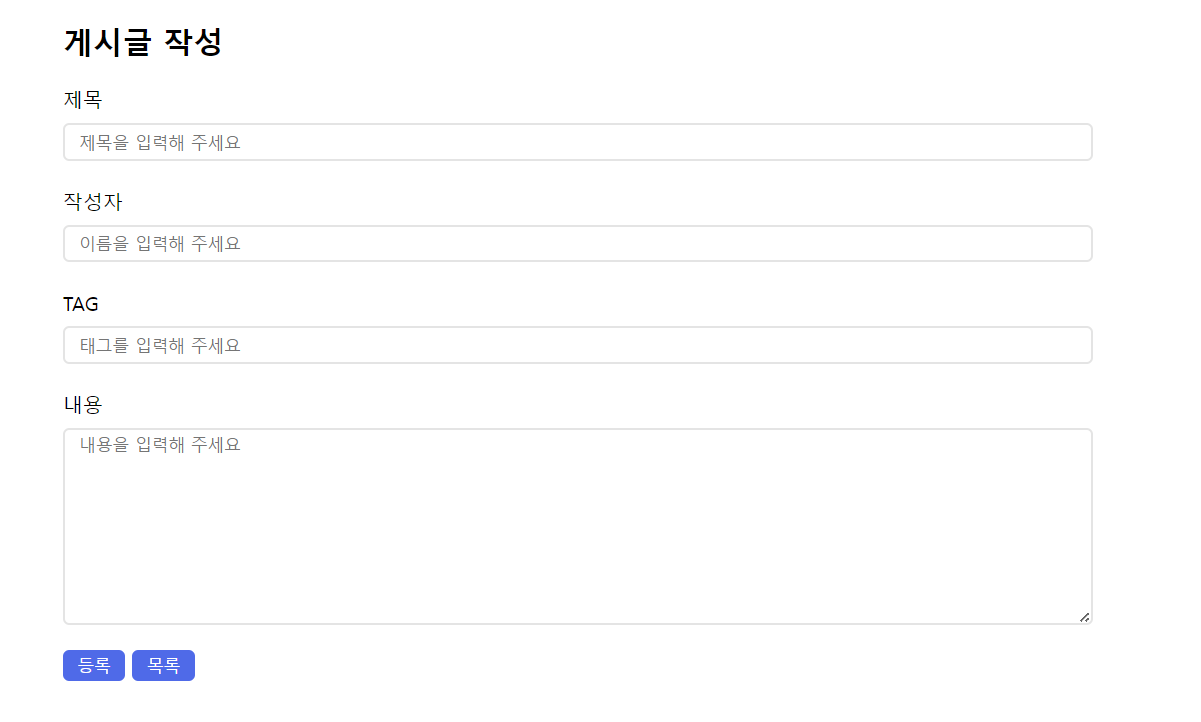
1-1. 글쓰기 페이지 코드
<!DOCTYPE html>
<html lang="en">
<head>
    <meta charset="UTF-8">
    <meta name="viewport" content="width=device-width, initial-scale=1.0">
    <title>글쓰기</title>
    <style>
        .div {
            padding-left: 55px;
        }
        .form, textarea {
            width: 80%;
            border-radius: 5px;
            border: solid rgb(228, 228, 228) 2px;
            font-family: "맑은고딕", Malgun Gothic;
            margin-top: 8px;
        }
        .form {
            height: 25px;
        }
        textarea {
            height: 150px;
        }
        button {
            background-color: rgb(42, 105, 241);
            color: white;
            border: none;
            border-radius: 5px;
            height: 25px;
            width: 50px;
        }
    </style>
</head>
<body>
    <div class="div">
        <h2>게시글 작성</h2>
        <formmethod="post">
            <div>
                <label>제목</label>
                <br><input type="text" class="form" name="title" placeholder="  제목을 입력해 주세요">
            </div>
            <br>
            <div>
                <label>작성자</label>
                <br><input type="text" class="form" name="id" placeholder="  이름을 입력해 주세요">
            </div>
            <br>
            <div>
                <label>TAG</label>
                <br><input type="text" class="form" placeholder="  태그를 입력해 주세요">
            </div>
            <br>
            <div>
                <label>내용</label>
                <br><textarea placeholder="  내용을 입력해 주세요"></textarea>
            </div>
        </form>
        <div><p>
            <button type="button" onclick="alert('등록 완료'); location.href='board.html'">등록</button>
            <button type="button" onclick="location.href='board.html'">목록</button>
        </div>
    </div>
</body>
</html>
2. 게시판 페이지 실행 화면
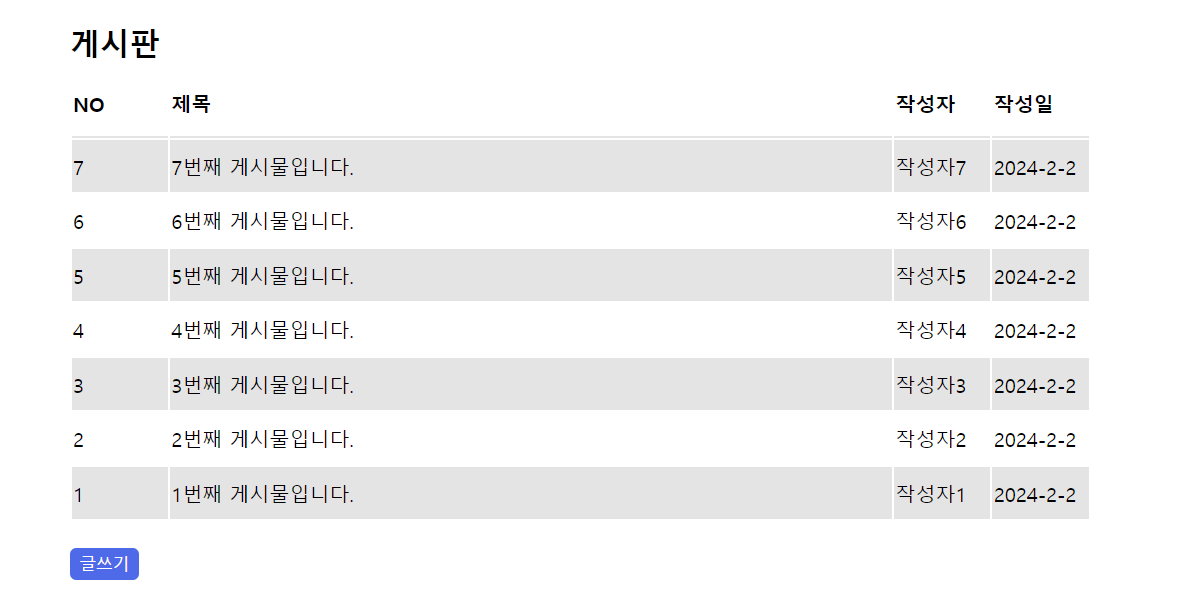
2-1. 게시판 페이지 코드
<!DOCTYPE html>
<html lang="en">
<head>
<meta charset="UTF-8">
<meta name="viewport" content="width=device-width, initial-scale=1.0">
<title>게시판</title>
<style>
div {
padding-left: 55px;
}
table {
width: 80%;
text-align: left;
}
th {
padding-bottom: 15px;
border-bottom: 2px solid rgb(228, 228, 228);
}
td {
height: 40px;
}
.no {
width: 8%;
}
.title {
width: 60%;
}
.writer, .date {
width: 8%;
}
button {
background-color: rgb(42, 105, 241);
color: white;
border: none;
border-radius: 5px;
height: 25px;
width: 55px;
}
</style>
</head>
<body>
<div>
<h2>게시판</h2>
<table>
<tr>
<th>NO</th>
<th>제목</th>
<th>작성자</th>
<th>작성일</th>
</tr>
<script>
for (var i = 7; i > 0; i--) {
document.write("<tr>");
document.write("<td class=\"no\" style=\"background-color: " + (i % 2 == 1 ? "rgb(228, 228, 228)" : "white") + "\">" + i + "</td>");
document.write("<td class=\"title\" style=\"background-color: " + (i % 2 == 1 ? "rgb(228, 228, 228)" : "white") + "\">" + i + "번째 게시물입니다. </td>");
document.write("<td class=\"writer\" style=\"background-color: " + (i % 2 == 1 ? "rgb(228, 228, 228)" : "white") + "\"> 작성자" + i + "</td>");
document.write("<td class=\"date\" style=\"background-color: " + (i % 2 == 1 ? "rgb(228, 228, 228)" : "white") + "\">")
printDate();
document.write("</td>");
document.write("</tr>");
}
function printDate() {
var today = new Date();
var year = today.getFullYear();
var month = today.getMonth() + 1;
var day = today.getDate();
var date = year + "-" + month + "-" + day;
document.write(date);
}
</script>
</table>
<br><button type="button" onclick="location.href='write.html'">글쓰기</button>
</div>
</body>
</html>