Problem 1.
Create a project-related database in AWS RDS (MySQL) and create an accessible user account.
Database Name: oneday
User Name / Password: oneday / 1234
Call required module
pip install mysql-connector-python
import mysql.connector

import mysql.connector
mydb = mysql.connector.connect(
    host = "your aws rds's host name",
    port = 3306,
    user = "your ID",
    password = "your password"
)

cursor = mydb.cursor(buffered = True)
Account setting
sql = 'create database oneday default character set utf8mb4'
cursor.execute(sql)

cursor.execute("create user 'oneday'@'%' identified by '1234'")
cursor.execute("grant all on oneday.* to 'oneday'@'%'")
Checking
- Database creation statement query result: SHOW CREATE DATABASE oneday;
- User permission check result: SHOW GRANT FOR ‘oneday’@‘%’
result1 = "show create database oneday"
cursor.execute(result1)

result1 = cursor.fetchall()
for i in result1:
    print(i)
result2 = "show grants for 'oneday'@'%'"
cursor.execute(result2)

result2 = cursor.fetchall()
for i in result2:
    print(i)
Problem 2.
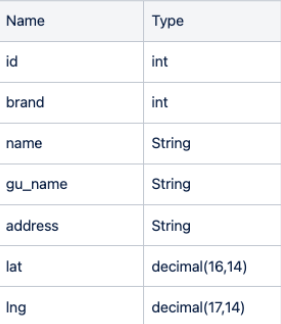
Create a table to store Starbucks Ediya data
cursor.execute('use oneday')

cBrand = "create table COFFEE_BRAND(id int not null auto_increment primary key, name varchar(12))"
cursor.execute(cBrand)

cStore = "create table COFFEE_STORE(id int not null auto_increment primary key, brand int, name varchar(32) not null, gu_name varchar(5) not null, address varchar(128) not null, lat decimal(16,14) not null, lng decimal(17,14) not null, foreign key (brand) references COFFEE_BRAND(id))"
cursor.execute(cStore)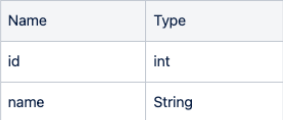
Checking
- Table creation result: Desc COFFEE_BRAND; Desc COFFEE_STORE;
- COFFEE_BRAND query result: SELECT * FROM COFFEE_BRAND;
result3 = 'desc COFFEE_BRAND'
cursor.execute(result3)

result3 = cursor.fetchall()
for i in result3:
    print(i)
result4 = 'desc COFFEE_STORE'
cursor.execute(result4)

result4 = cursor.fetchall()
for i in result4:
    print(i)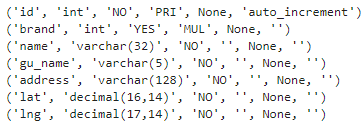
Problem 3.
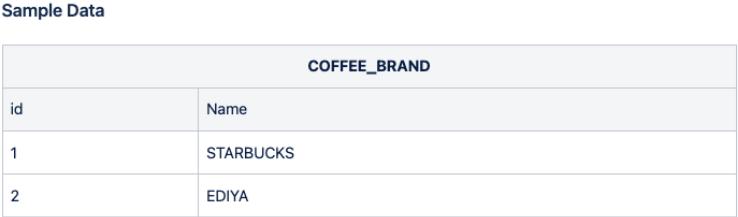
Enter and check the COFFEE_BRAND data with Python code as follows.
cursor = mydb.cursor(buffered = True)
cursor.execute("insert into COFFEE_BRAND values (1, 'STARBUCKS'), (2, 'EDIYA')")
conn.commit()
Checking
result5 = "select * from COFFEE_BRAND"
cursor.execute(result5)

result5 = cursor.fetchall()
for i in result5:
    print(i)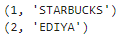
Problem 4.
When importing data from the Starbucks page with Python code, modify it to enter directly into the COFFEE_STORE table.
url = "https://www.starbucks.co.kr/store/store_map.do"
driver = webdriver.Chrome()
driver.get(url)

driver.find_element(By.CSS_SELECTOR,'#container > div > form > fieldset > div > section > article.find_store_cont > article > header.loca_search > h3 > a').click()
time.sleep(0.5)
driver.find_element(By.CSS_SELECTOR, '.set_sido_cd_btn').click()
time.sleep(0.5)

xpath = '//*[@id="mCSB_2_container"]/ul/li[1]/a'
tag = driver.find_element(By.XPATH, xpath)
tag.click()
time.sleep(0.5)
soup = BeautifulSoup(driver.page_source, "html.parser")
seoul_list = driver.find_elements(By.CSS_SELECTOR, '#mCSB_3_container ul li')
soup.select_one(f'#mCSB_3_container > ul > li:nth-child(100) > p').text[:-9]
Read entire data
cursor = mydb.cursor(buffered=True)

sql = "insert into COFFEE_STORE (brand, name, gu_name, address, lat, lng) values (1, %s, %s, %s, %s, %s)"

cnt = 1

for content in tqdm_notebook(seoul_list):
    name = content.get_attribute('data-name')
    address = soup.select_one(f'#mCSB_3_container > ul > li:nth-child({cnt}) > p').text[:-9]
    lat = content.get_attribute('data-lat')
    lng = content.get_attribute('data-long')
    gu_name = address.split()[1] if address else ''

    cnt += 1

    cursor.execute(sql, (name, gu_name, address, lat, lng))
    conn.commit()

    driver.close()
Count Records
count_query = 'SELECT COUNT(*) FROM COFFEE_STORE where brand = 1;'
cursor.execute(count_query)

record_count = cursor.fetchone()[0]
record_count
Checking 10 records
check = "select * from COFFEE_STORE where brand = 1 limit 10"
cursor.execute(check)

result = cursor.fetchall()
for i in result:
    print(i)
Problem 5.
When importing data from the Ediya page with Python code, modify it to enter directly into the COFFEE_STORE table.
Collecting Data
driver = webdriver.Chrome()
driver.get('https://www.ediya.com/contents/find_store.html')
driver.find_element(By.CSS_SELECTOR, '#contentWrap > div.contents > div > div.store_search_pop > ul > li:nth-child(2) > a').click()

sql = "INSERT INTO COFFEE_STORE (brand, name,gu_name, address, lat, lng) VALUES (2, %s, %s, %s, %s, %s)"

for gu in tqdm_notebook(gu_list):

    keyword = driver.find_element(By.CSS_SELECTOR, '#keyword')
    keyword.clear()
    keyword.send_keys(gu)

    driver.find_element(By.CSS_SELECTOR, '#keyword_div > form > button').click()

    time.sleep(1)

    html = driver.page_source
    soup_ed = BeautifulSoup(html, 'html.parser')
    contents = soup_ed.select('#placesList li')

    for content in contents:
        name = content.select_one('dt').text
        address = content.select_one('dd').text
        gu_name = address.split(' ')[1]

        print(f'{name}--{address}--{gu_name}')

        cursor.execute(sql,(name, gu_name, address, lat, lng))
        conn.commit()

        driver.close()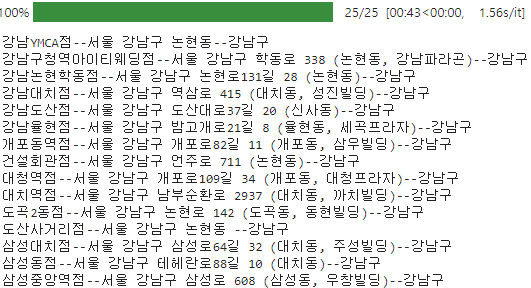
Recoords count
count_query = 'SELECT COUNT(*) FROM COFFEE_STORE where brand = 2;'
cursor.execute(count_query)

record_count = cursor.fetchone()[0]
record_count
Checking 10 records
cursor.execute("select * from COFFEE_STORE where brand = 2 limit 10;")
result = cursor.fetchall()
for row in result:
    print(row)
Checking
- Main distribution areas of Starbucks stores (names of top 5 districts with the most stores, output of number of stores)
strb = "select s.gu_name, count(s.brand) from COFFEE_BRAND as b, COFFEE_STORE as s where b.id = s.brand and b.name='STARBUCKS' group by s.gu_name order by count(s.brand) desc limit 5"

cursor.execute(strb)
result = cursor.fetchall()

for row in result:
    print(row)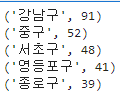
- Ediya store main distribution area (name of top 5 districts with most stores, output number of stores)
edy = "select s.gu_name, count(s.brand) from COFFEE_BRAND as b, COFFEE_STORE as s where b.id = s.brand and b.name='EDIYA' group by s.gu_name order by count(s.brand) desc limit 5"

cursor.execute(edy)
result = cursor.fetchall()

for row in result:
    print(row)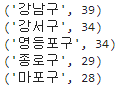
- Search the number of stores for each distinct brand (output old name, brand name, number of stores)
  gu_each_st = "select gu_name, '스타벅스' as brand, count(brand) as count from COFFEE_STORE where brand = 1 group by gu_name"

  cursor.execute(gu_each_st)
  result = cursor.fetchall()

  for row in result:
      print(row)

  gu_each_ed = "select gu_name, '이디야' as brand, count(brand) as count from COFFEE_STORE where brand = 2 group by gu_name"

  cursor.execute(gu_each_ed)
  result = cursor.fetchall()

  for row in result:
      print(row)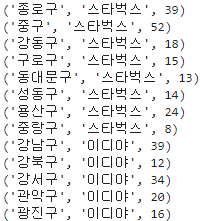
- Check the number of stores for each brand (output old name, number of Starbucks stores, number of Ediya stores)
count = ("select s.gu_name, "
         "sum(s.brand=1) as count1, "
         "sum(s.brand=2) as count2 "
         "from COFFEE_BRAND b, COFFEE_STORE s "
         "where b.id = s.brand "
         "group by s.gu_name "
         "order by s.gu_name;")

cursor.execute(count)
result = cursor.fetchall()

for row in result:
    gu_name, count1, count2 = row
    print(f'({gu_name}, {count1}, {count2})')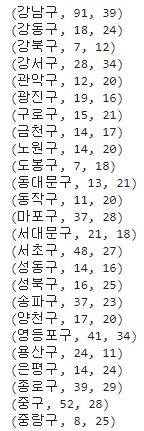
Problem 6.
Save as CSV file. (Working with Python code)
final = ("select A.*, B.* from (select * from COFFEE_STORE where brand=1) as A join (select * from COFFEE_STORE where brand=2) as B on B.gu_name = A.gu_name")

cursor.execute(final)
result = cursor.fetchall()

df = pd.DataFrame(result)
df.columns = ['s_id', 's_brand', 's_name', 's_gu', 's_address', 's_lat', 's_lng',
              'e_id', 'e_brand', 'e_name', 'e_gu', 'e_address', 'e_lat', 'e_lng']

df.to_csv('./starbucks_ediya.csv', index = False, encoding = "euc-kr")
Full of adventure