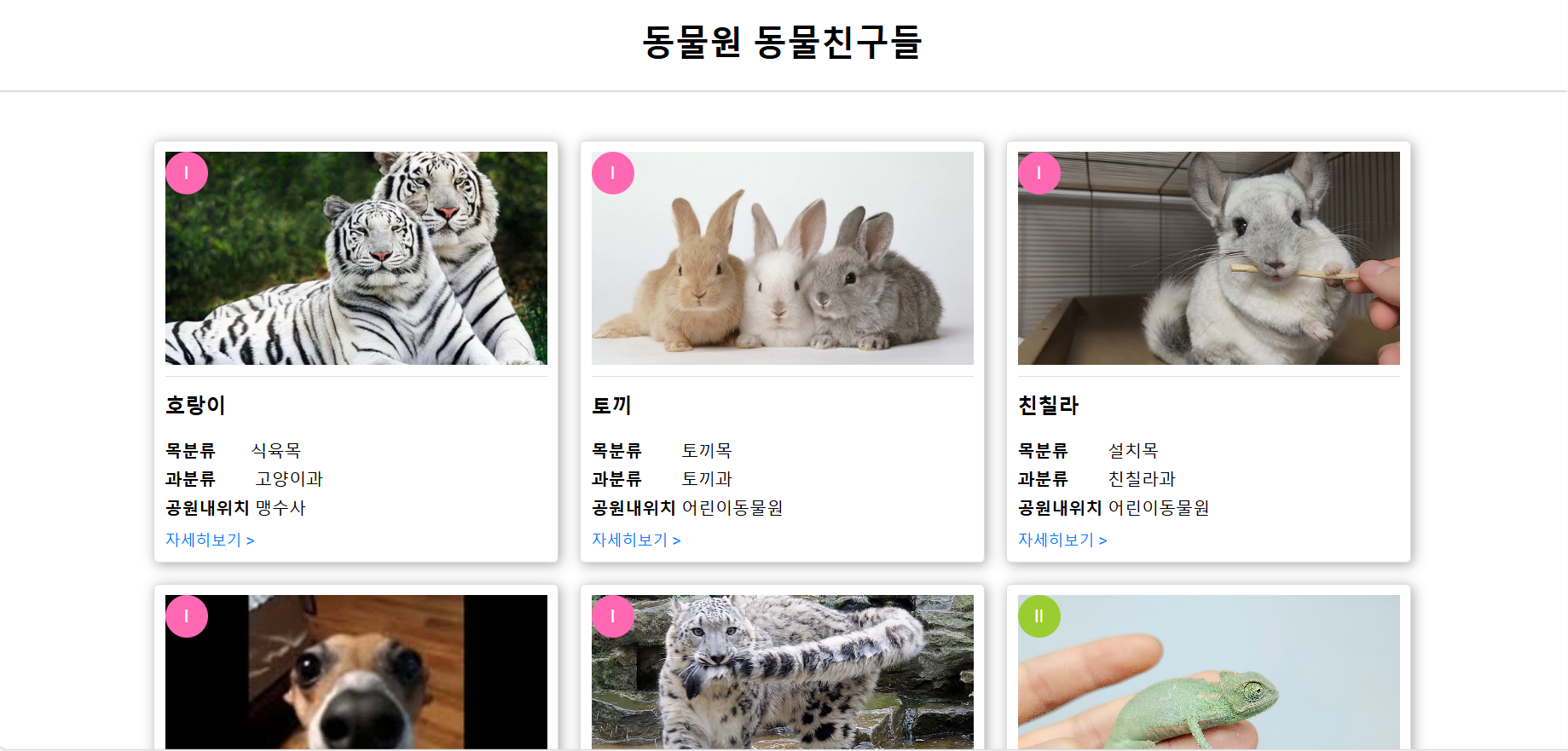
이번 포스트에서는 HTML과 CSS를 사용하여 동물원 동물친구들 웹 페이지를 만드는 방법을 소개합니다. 이 페이지는 동물원에서 볼 수 있는 다양한 동물 친구들을 카드 형식으로 보여줍니다. 각 카드에는 동물의 사진, 이름, 분류 정보, 공원 내 위치, 그리고 자세히 보기 링크가 포함되어 있습니다.
1. HTML 구조
HTML 구조는 간단합니다. 먼저 <head> 섹션에서 메타데이터와 CSS 파일을 포함하고, <body> 섹션에서 제목, 구분선, 그리고 동물 카드를 나열합니다. 각 동물 카드는 animal-card 클래스를 사용하여 스타일링됩니다.
<!DOCTYPE html>
<html lang="ko">
<head>
    <meta charset="UTF-8">
    <title>동물원 동물친구들</title>
    <link rel="stylesheet" href="../css/main.css">
</head>
<body>

<h1 class="title">동물원 동물친구들</h1>
<hr class="divider">

<div class="animal-container">
    <div class="animal-card">
        <div class="badge red">I</div>
        <img src="../img/tiger.png" alt="tiger">
        <h3>호랑이</h3>
        <ul>
            <li><strong>목분류</strong>식육목</li>
            <li><strong>과분류</strong> 고양이과</li>
            <li><strong>공원내위치</strong> 맹수사</li>
        </ul>
        <a href="tiger.html">자세히보기 <span>></span></a>
    </div>

    <div class="animal-card">
        <div class="badge red">I</div>
        <img src="../img/rabbit.png" alt="rabbit">
        <h3>토끼</h3>
        <ul>
            <li><strong>목분류</strong> 토끼목</li>
            <li><strong>과분류</strong> 토끼과</li>
            <li><strong>공원내위치</strong> 어린이동물원</li>
        </ul>
        <a href="../html/rabbit.html">자세히보기 <span>></span></a>
    </div>

    <div class="animal-card">
        <div class="badge red">I</div>
        <img src="../img/chin.jpg" alt="chin">
        <h3>친칠라</h3>
        <ul>
            <li><strong>목분류</strong> 설치목</li>
            <li><strong>과분류</strong> 친칠라과</li>
            <li><strong>공원내위치</strong> 어린이동물원</li>
        </ul>
        <a href="../html/Chinchilla.html">자세히보기 <span>></span></a>
    </div>

    <div class="animal-card">
        <div class="badge red">I</div>
        <img src="../img/grayhound.jpg" alt="grayhound">
        <h3>이탈리안그레이하운드</h3>
        <ul>
            <li><strong>목분류</strong> 개목</li>
            <li><strong>과분류</strong> 개과</li>
            <li><strong>공원내위치</strong> 강아지관</li>
        </ul>
        <a href="../html/maru.html">자세히보기 <span>></span></a>
    </div>

    <div class="animal-card">
        <div class="badge red">I</div>
        <img src="../img/snow.jpg" alt="snow">
        <h3>눈표범</h3>
        <ul>
            <li><strong>목분류</strong> 식육목</li>
            <li><strong>과분류</strong> 고양이과</li>
            <li><strong>공원내위치</strong> 맹수사</li>
        </ul>
        <a href="../html/snowLoepard.html">자세히보기 <span>></span></a>
    </div>

    <div class="animal-card">
        <div class="badge green">II</div>
        <img src="<https://더쥬.com/web/upload/NNEditor/20230225/KakaoTalk_20230225_133137317.jpg>" alt="Chimpanzee">
        <h3>카멜레온</h3>
        <ul>
            <li><strong>목분류</strong> 뱀목</li>
            <li><strong>과분류</strong> 이과나</li>
            <li><strong>공원내위치</strong> 동양관</li>
        </ul>
        <a href="../html/chameleon.html">자세히보기 <span>></span></a>
    </div>

    <div class="animal-card">
        <div class="badge bisque">III</div>
        <img src="../img/gorilla.jpg" alt="gorilla">
        <h3>고릴라</h3>
        <ul>
            <li><strong>목분류</strong> 영장목</li>
            <li><strong>과분류</strong> 성성이과</li>
            <li><strong>공원내위치</strong> 유인원관</li>
        </ul>
        <a href="../html/gorilla.html">자세히보기 <span>></span></a>
    </div>

    <div class="animal-card">
        <div class="badge bisque">III</div>
        <img src="../img/OrangUtan.jpg" alt="OrangUtan">
        <h3>오랑우탄</h3>
        <ul>
            <li><strong>목분류</strong> 영장목</li>
            <li><strong>과분류</strong> 성성이과</li>
            <li><strong>공원내위치</strong> 유인원관</li>
        </ul>
        <a href="../html/OrangUtan.html">자세히보기 <span>></span></a>
    </div>

    <!-- 빈 공간을 채우기 위한 추가 요소 -->
    <div class="animal-card empty"></div>
    <div class="animal-card empty"></div>
</div>

</body>
</html>
<!DOCTYPE html>
<html lang="en">
  <head>
    <meta charset="UTF-8" />
    <meta name="viewport" content="width=device-width, initial-scale=1.0" />
    <title>Document</title>
    <link rel="stylesheet" href="../css/tiger.css">
  </head>
  <body>
    <div id="tiger">
      <img src="../img/tiger.png" alt="tiger_image" />
    </div>
    <div id="detail_container">
      <div id="tiger_detail">
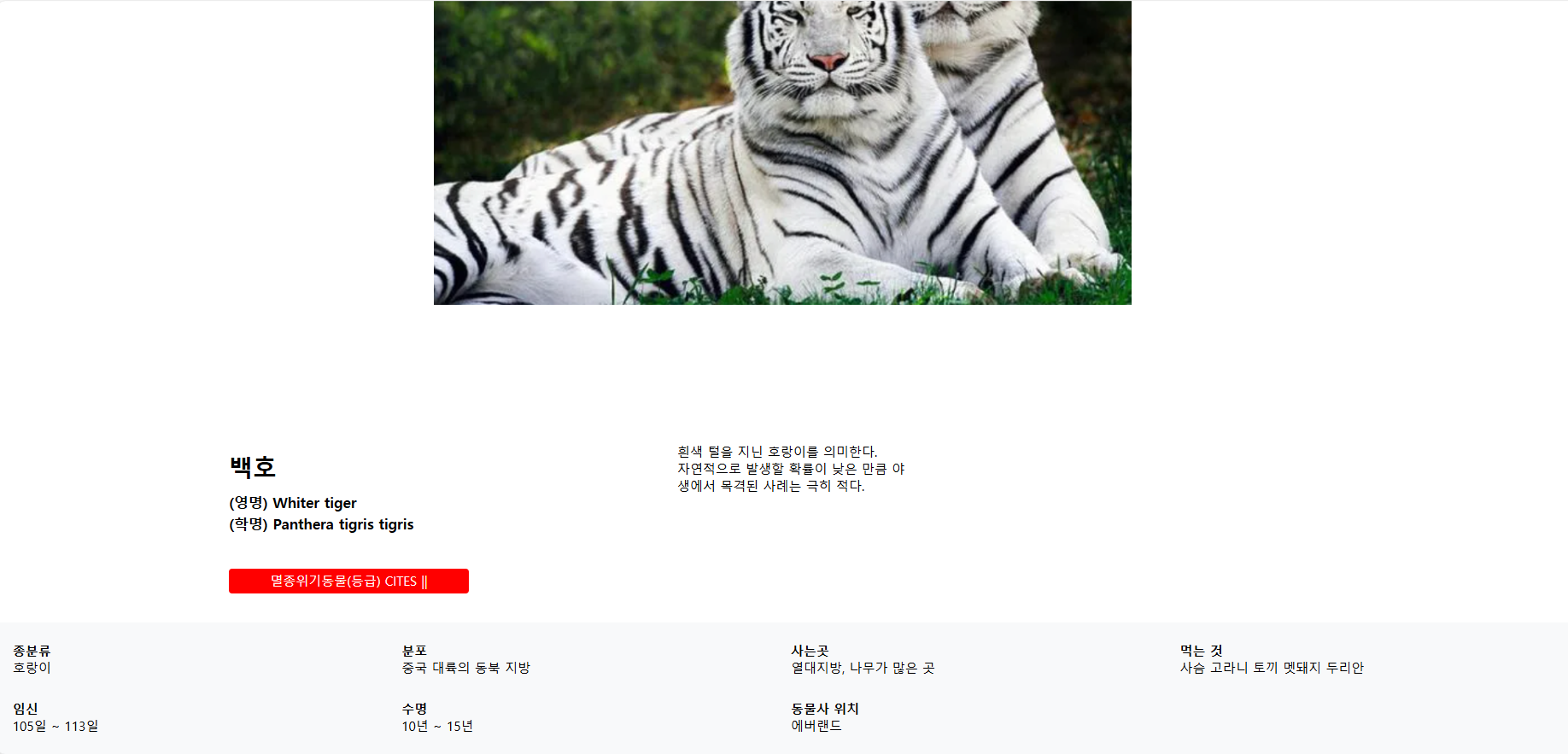
        <h3>백호</h3>
        <h6>
          (영명) Whiter tiger <br />
          (학명) Panthera tigris tigris
        </h6>
        <p>멸종위기동물(등급) CITES ||</p>
      </div>
      <div id="tiger_detail_2">
        <p>
          흰색 털을 지닌 호랑이를 의미한다. <br />자연적으로 발생할 확률이 낮은
          만큼 야생에서 목격된 사례는 극히 적다.
        </p>
      </div>
    </div>
    <div class="classification">
      <ul>
        <li>
          <strong>종분류</strong>
          <span>호랑이</span>
        </li>
        <li>
          <strong>분포</strong>
          <span>중국 대륙의 동북 지방</span>
        </li>
        <li>
          <strong>사는곳</strong>
          <span>열대지방, 나무가 많은 곳</span>
        </li>
        <li>
          <strong>먹는 것</strong>
          <span>사슴 고라니 토끼 멧돼지 두리안</span>
        </li>
      </ul>
      <ul>
        <li>
          <strong>임신</strong>
          <span>105일 ~ 113일</span>
        </li>
        <li>
          <strong>수명</strong>
          <span>10년 ~ 15년</span>
        </li>
        <li>
          <strong>동물사 위치</strong>
          <span>에버랜드</span>
        </li>
        <li></li>
      </ul>
    </div>
  </body>
</html>
— tiger.html—
2. CSS 스타일
CSS는 페이지의 레이아웃과 스타일을 설정합니다. 아래는 각 동물 카드의 스타일을 정의하는 CSS 코드입니다. 이 코드에서는 Flexbox를 사용하여 카드를 한 줄에 세 개씩 배치하고, 이미지 크기를 통일하며, 텍스트와 배지 스타일을 정의합니다.
body {
    font-family: Arial, sans-serif;
    display: flex;
    flex-direction: column;
    justify-content: center;
    align-items: center;
    margin: 0;
    overflow-x: hidden;
}

h1.title {
    font-size: 2em;
    margin: 20px 0;
    text-align: center;
    position: relative;
}

hr.divider {
    width: 100%;
    border: 1px solid #ddd;
    margin: 20px 0;
    position: relative;
    top: -15px; /* 줄을 위로 올려 제목과 가깝게 만듭니다 */
}

.animal-container {
    display: flex;
    flex-wrap: wrap;
    justify-content: center;
    align-items: flex-start;
    width: 100%;
    max-width: 1200px;
    margin: 0 auto;
}

.animal-card {
    flex: 1 1 calc(33.333% - 20px); /* 카드가 세 개씩 한 줄에 들어가도록 설정 */
    margin: 10px;
    padding: 10px;
    border: 1px solid #ddd;
    border-radius: 5px;
    text-align: left; /* 텍스트 왼쪽 정렬 */
    box-shadow: 2px 2px 12px #aaa;
    box-sizing: border-box;
    position: relative;
}

.animal-card img {
    width: 100%;
    height: 200px; /* 이미지의 고정 높이 설정 */
    object-fit: cover; /* 이미지를 고정된 높이와 너비에 맞게 조정 */
    border-bottom: 1px solid #ddd;
    padding-bottom: 10px;
    margin-bottom: 10px;
}

.animal-card h3 {
    margin-top: 0;
    font-size: 1.2em;
    font-weight: bold;
}

.animal-card ul {
    list-style: none;
    padding: 0;
    margin: 0;
}

.animal-card ul li {
    margin: 5px 0;
    font-size: 1em;
}

.animal-card ul li strong {
    display: inline-block;
    width: 80

px;
}

.animal-card a {
    display: block;
    margin-top: 10px;
    font-size: 0.9em;
    color: #007bff;
    text-decoration: none;
}

.animal-card .badge {
    position: absolute;
    color: white;
    padding: 5px;
    border-radius: 50%;
    width: 30px;
    height: 30px;
    display: flex;
    align-items: center;
    justify-content: center;
    top: 10px;
    left: 10px;
}

.animal-card .badge.green {
    background-color: yellowgreen;
}

.animal-card .badge.red {
    background-color: hotpink;
}

.animal-card .badge.bisque {
    background-color: bisque;
}

.animal-card.empty {
    visibility: hidden;
    height: 0;
}
예시:)
—tiger.css—
 body,
html {
        margin: 0;
        padding: 0;
      }
      #tiger {
        display: flex;
        justify-content: center;
        align-items: center;
        height: 100vh;
        margin: 0;
      }
      .tiger img {
        width: 100%;
        width: 740px;
        height: 555px;
        height: auto;
      }
      #detail_container {
        display: flex;
        flex-direction: row;
        align-items: flex-start;
        margin-left: 290px;
      }
      #tiger_detail {
        margin-right: 20px;
        width: 300px;
      }
      #tiger_detail h3 {
        font-size: 30px;
        margin-bottom: 10px;
        margin-top: 10px;
      }
      #tiger_detail h6 {
        font-size: 18px;
        line-height: 1.5;
        margin-top: 0;
      }
      #tiger_detail p {
        background-color: red;
        color: white;
        border-radius: 4px;
        padding: 5px;
        text-align: center;
      }
      #tiger_detail_2 {
        width: 300px;
        margin-left: 240px;
      }
      #tiger_detail_2 p {
        margin-top: 0;
      }
      .classification {
        margin-top: 20px;
        margin-left: 0;
        background-color: #f8f9fa;
        padding: 10px;
      }
      .classification ul {
        list-style: none;
        padding: 0;
        margin-left: 290px;
        display: flex;
        flex-wrap: wrap;
        margin: 0;
      }
      .classification li {
        flex: 1 1 calc(25% - 10px);
        box-sizing: border-box;
        padding: 10px;
        margin: 5px 0;
      }
      .classification strong {
        display: block;
      }
3. 결과물 확인
넙-죽