Qwen-Image-edit 모델 구조 및 LoRA 파인튜닝
Qwen-Image-Edit Context
- HuggingFace: https://huggingface.co/Qwen/Qwen-Image-Edit
- lora finetuning 제공 git repo: https://github.com/FlyMyAI/flymyai-lora-trainer
Qwen-Image-Edit 모델 구조
Text Encoder
- 모델: Qwen2.5-VL-7B-Instruct -
Qwen2_5_VLForConditionalGenerationclass로 load - 역할: 텍스트 프롬프트와 입력 이미지(Visual Prompt)를 동시에 이해하여 Embedding 생성
- 특징
- 기존의 CLIP이나 T5 같은 단순 텍스트 인코더가 아닌, 이미지를 넣는 VLM(Vision-Language Model)을 사용
- Prompt Template: 시스템 프롬프트가 이미지의 특징(색상, 모양 등)을 묘사하고 사용자의 수정 요청을 반영하도록 유도 (
prompt_template_encode) - 입력:
User Prompt+Input Image(리사이즈됨) →Text Encoder→Prompt Embeddings
VAE
- 모델:
AutoencoderKLQwenImage - 역할: 고해상도 이미지를 압축하여 Latent 공간으로 변환 및 복원
- Patching & Packing (
_pack_latents)- FLUX와 유사하게 2D Latent를 2x2 패치로 묶어서 처리
[Batch, Channel, Height, Width]→[Batch, Sequence_Len, Channel * 4]- Transformer가 이미지를 긴 토큰 시퀀스로 처리할 수 있게 만듦
- Normalization
latents_mean,latents_std를 사용하여 Latent 값을 정규화
Transformer
- 모델:
QwenImageTransformer2DModel - 역할: 노이즈가 섞인 Latent에서 원본 이미지로 가는 Flow 예측
- 입력 (Input Concatenation)
- 단순히 노이즈만 입력받는 것이 아닌, 원본 이미지의 Latent(
image_latents)와 노이즈(latents)를 Channel 방향으로 Concatenate하여 입력 받음 - 코드:
latent_model_input = torch.cat([latents, image_latents], dim=1) - 이 구조 덕분에 모델이 원본 이미지를 직접 참조하며 생성이 아닌 수정(Editing) 작업을 수행할 수 있음
- 단순히 노이즈만 입력받는 것이 아닌, 원본 이미지의 Latent(
- Conditioning:
- Text Encoder에서 나온
prompt_embeds(이미지+텍스트 정보 포함)가 Cross-Attention 을 통해 주입됨 img_shapes: 이미지의 종횡비(Aspect Ratio) 정보를 RoPE(Rotary Positional Embedding)에 활용
- Text Encoder에서 나온
Scheduler
- 스케줄러:
FlowMatchEulerDiscreteScheduler - 방식: Flow Matching (ODE)
- Diffusion의 확률적 노이즈 제거 방식이 아닌, 시간 t에 따른 데이터의 이동 경로(Vector Field)를 학습하는 방식
- Time Shift (
calculate_shift):- 이미지의 해상도(Sequence Length)에 따라 스케줄링의 타임스텝 t를 조정. 해상도가 높을수록 노이즈 처리 스케줄을 다르게 가져가는 전략
LoRA 학습 로직
-
LoRA 삽입 위치
QwenImageTransformer2DModel내부의 Attention Layer에만 주입됨- Text Encoder나 VAE는 학습되지 않음 (
requires_grad = False)
-
Target Modules
- 코드의
LoraConfig설정을 보면 Attention 메커니즘의 Query, Key, Value, Output 전체에 LoRA가 적용됨.target_modules=["to_k", "to_q", "to_v", "to_out.0"] to_k,to_q,to_v: Self/Cross Attention의 입력 투영층to_out.0: Attention의 결과 출력층
- 코드의
-
학습 진행 과정 (Flow Matching)
- Noise 주입: VAE로 압축된 Latent에
sigmas에 따른 노이즈를 섞음 (noisy_model_input). - Model Prediction: Transformer가
noisy_model_input과timestep,prompt_embeds를 받아 Flow 예측 (model_pred). - Loss 계산
- 목표값(Target):
noise - pixel_latents(Source에서 Target으로 가는 벡터). - MSE Loss: 예측된 Flow(
model_pred)와 실제 목표 Flow(target) 간의 차이를 최소화. - 코드:
loss = torch.mean((weighting * (model_pred - target) ** 2))
- 목표값(Target):
Hyperparameter
- Noise 주입: VAE로 압축된 Latent에
-
학습 리소스 및 속도 관련 파라미터
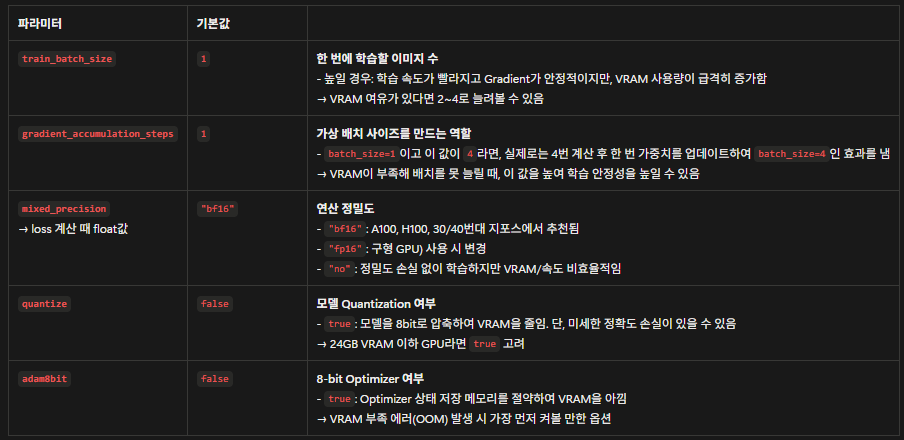
-
학습 성능 및 수렴 관련 파라미터
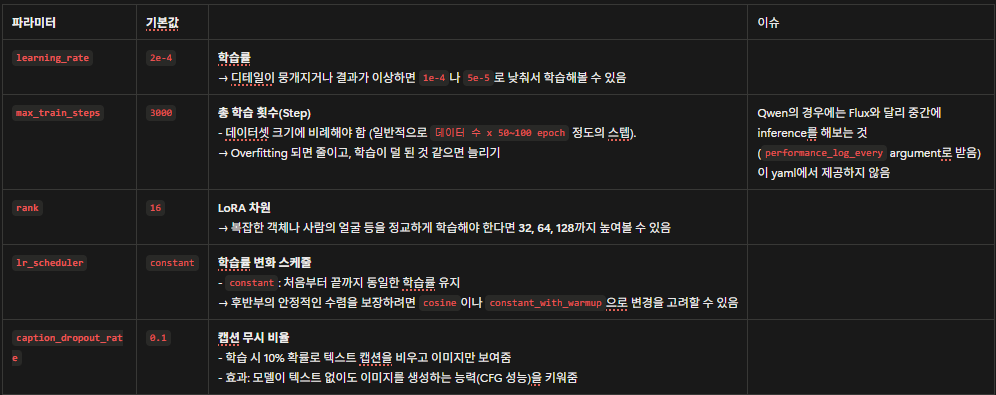
-
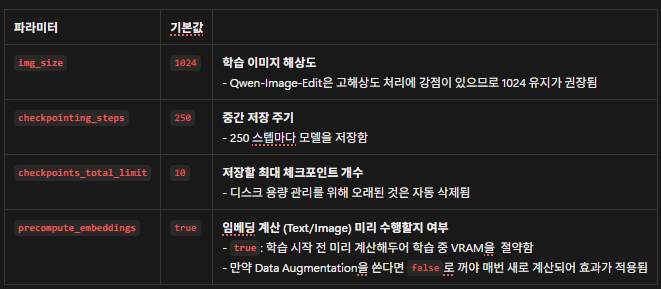
데이터 및 저장 관련 파라미터