Image Segmentation 이해하기
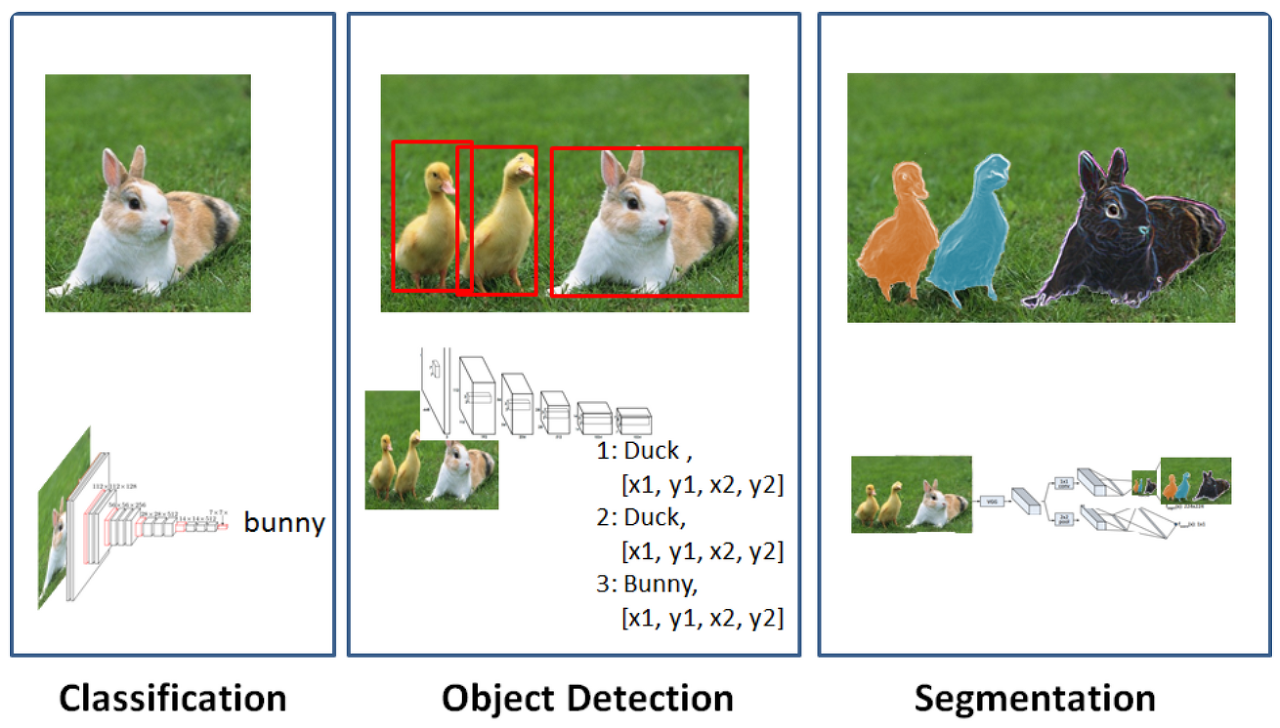
- 객체의 위치를 bounding box만으로 표현하는 게 아니라 객체에 포함된 픽셀의 정확한 위치를 예측하는 기술
- 자율주행, 차량파손영역 예측 등에 활용
Segmentation이 예측을 수행하는 원리
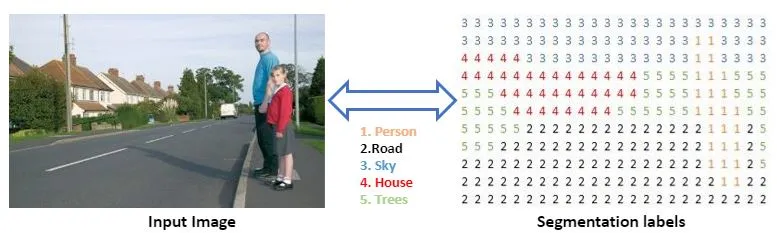
- 픽셀 단위로 라벨링하여 학습/예측한다.
- 각 픽셀이 어떤 범주에 속하는지 확률값을 예측
💠 Segmentation 종류
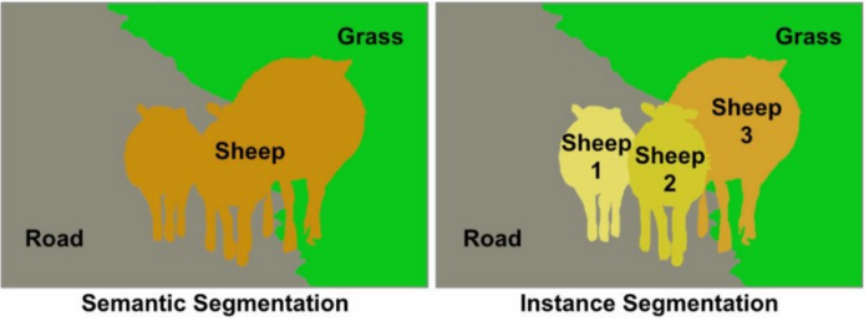
- Segmentic Segmentation : 각 픽셀이 어떤 범주영역에 속하는지만 예측하는 방식(각 객체를 구별하지 않는다.)
- Instance Segmenntation : 각 픽셀이 어떤 범주영역에 속하는지 예측을 수행하고 같은 도메인을 가진 영역에서도 객체를 분할하여 예측을 수행
Segmentation 기술의 발전
- 기존 classification의 문제점 : CNN(특징강조)와 Pooling(불필요한 정보 삭제)을 거치면서 이미지 정보가 추상화되면서 압축된 정보가 도출
- 각 개별 픽셀들의 정보 중 위치 정보는 소실되고 색상 정보는 추상화되어 전체 이미지에 대한 압축된 정보만 남게 된다.
Fully Convolutional Network(FCN)의 등장
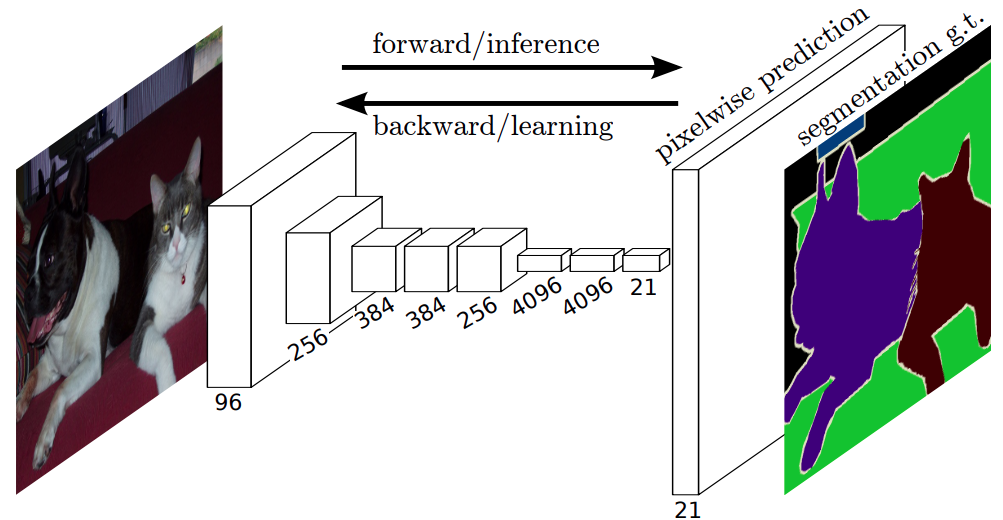
- 기존 classification 모델의 마지막에 사용되던 MLP를 제거하고 convolution layer로 대체
- 압축된 정보를 원래 이미지 크기로 복원하는 CNN레이어가 마지막에 붙게 됨
- 모델 내부에 CNN레이어로만 구성이 되어있어 FCN이라는 이름이 붙음
Encoder Decoder 구조의 등장
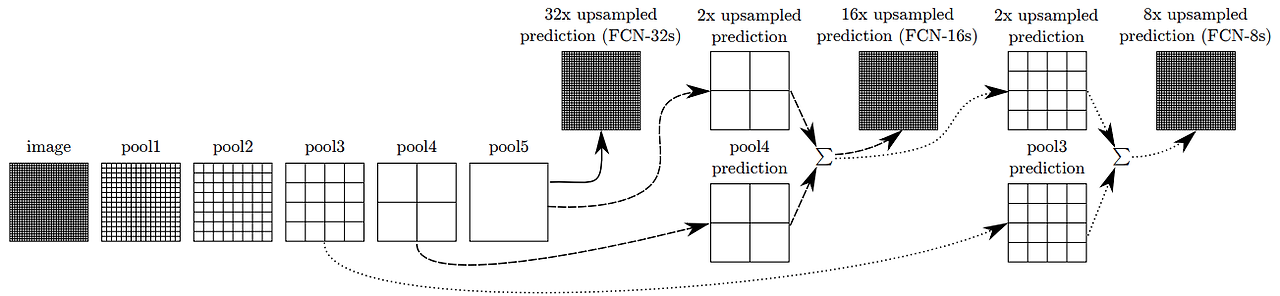
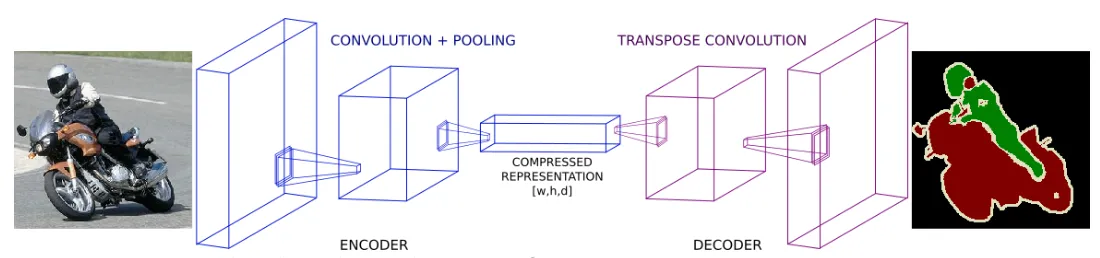
- Encoder : 원본 이미지의 주요 정보를 압축해가는 역할 (Downsampling)
- Decoder : 압축된 정보로 원본 크기의 segmentation정보를 복원하는 역할(Upsampling)
- Skip connection : Decoder가 복원시 최종 압축된 정보만 활용하는게 아니라 이전에 pooling된 정보를 참고해서 합쳐주는 방식
1. YOLOv8을 이용한 Image Instance Segmentation 실습
# 라이브러리 설치
!pip install ultralytics- 모델종류 확인
- https://docs.ultralytics.com/tasks/segment/
- 데이터셋 가이드
- https://docs.ultralytics.com/datasets/segment/
# 모델 불러오기
from ultralytics import YOLO

model = YOLO('yolov8n-seg.pt') # 사전에 학습된 YOLOv8 segmentation 모델 로딩
conf = 0.15
# 예측 수행하기
results = model.predict(source="https://ultralytics.com/images/bus.jpg", # 예측할 이미지
                        save=True, # 예측 결과를 이미지로 저장
conf=0.15) # 예측에 대한 확신도 임계치 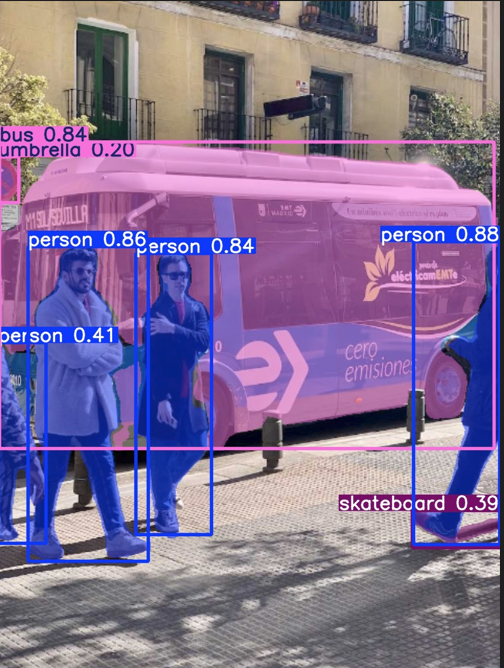
conf = 0.40
# 예측 수행하기
results = model.predict(source="https://ultralytics.com/images/bus.jpg", # 예측할 이미지
                        save=True, # 예측 결과를 이미지로 저장
                        conf=0.40) # 예측에 대한 확신도 임계치
# 예측에 사용 된 이미지 출력
import matplotlib.pyplot as plt
import cv2
img = cv2.cvtColor(results[0].plot(), cv2.COLOR_BGR2RGB)
plt.figure(figsize=(10, 10))
plt.imshow(img)
plt.show()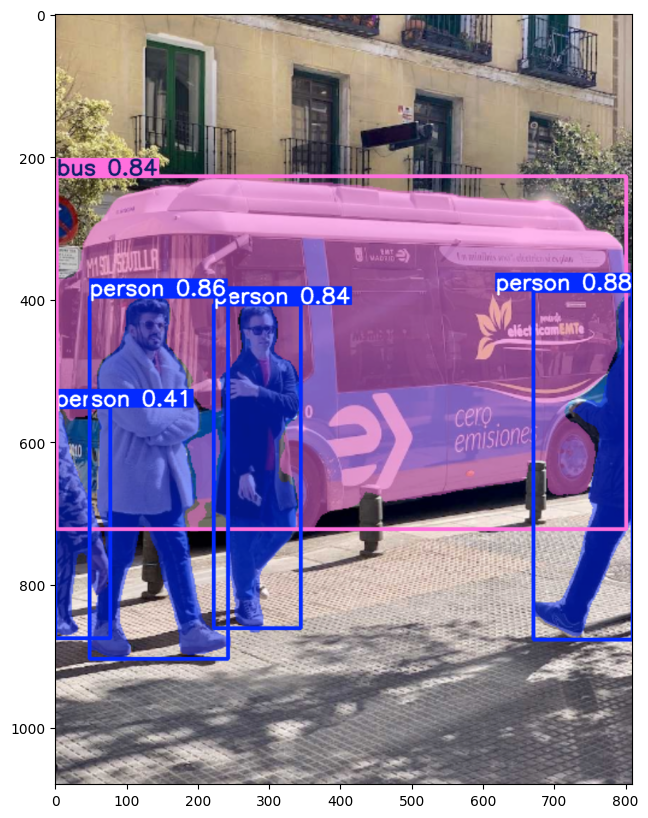
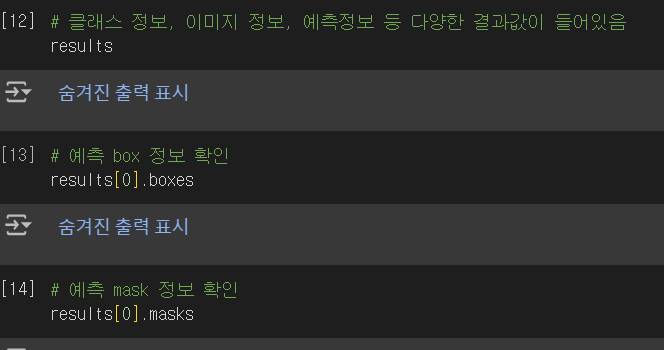
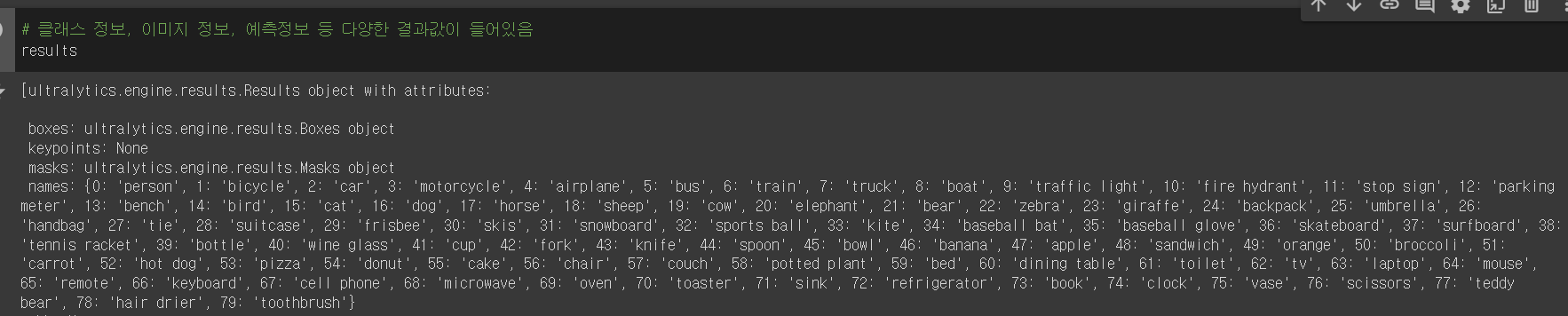
2. 커스텀 데이터를 활용한 차량파손범위 예측
AP : 평균
mAP : 여러 Object에 대한 AP를 평균
학습데이터
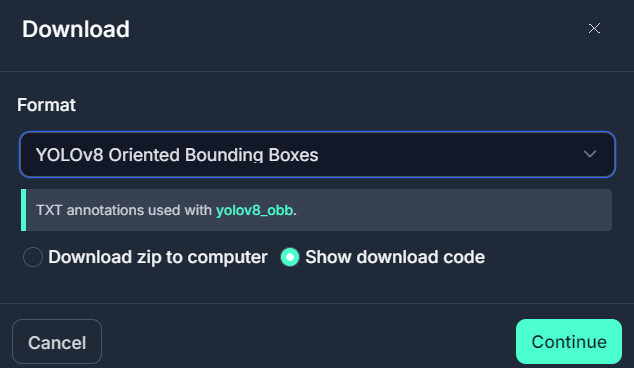
- https://universe.roboflow.com/none-n1imd/car-jxbzt/dataset/1#
- YOLOv8 Oriented Bouding Boxes로 다운로드
!pip install roboflow
from roboflow import Roboflow
rf = Roboflow(api_key="Itm8WkbVFGNUfRDOErTQ")
project = rf.workspace("none-n1imd").project("car-jxbzt")
version = project.version(1)
dataset = version.download("yolov8-obb") - data.yaml에서 train, val 경로 수정해주기, test data는 없으니까 지움
모델 파인 튜닝
# 전이학습을 진행할 사전학습 모델 생성
model = YOLO('yolov8n-seg.yaml').load('yolov8n-seg.pt')# 모델학습
results = model.train(data="./car-1/data.yaml", # 데이터셋 설정파일 경로
epochs=100, # 학습횟수 설정
imgsz=640) # 입력 이미지 사이즈 설정학습된 모델 활용하기
# 학습 가중치 파일경로 설정
best_model_path = "/content/drive/MyDrive/Colab Notebooks/24.08.29 DeepLearning/data/best.pt"
# 모델로딩
best_model = YOLO(best_model_path)
# 모델예측
results = best_model.predict(source="/content/drive/MyDrive/Colab Notebooks/24.08.29 DeepLearning/car-1/valid/images/16-rear-side_jpg.rf.a2cb70870143ce9d081d8ddc9d13760c.jpg", # 이미지 경로
save=True, # 예측 결과 이미지로 저장
conf=0.15) # 모델의 확실도 임계치 설정
# 예측에 사용 된 이미지 출력
import matplotlib.pyplot as plt
import cv2

img = cv2.cvtColor(results[0].plot(), cv2.COLOR_BGR2RGB)

plt.figure(figsize=(10, 10))
plt.imshow(img)
plt.show()학습된 모델로 로컬에서 예측 수행하기
-
영상을 활용해 차량파손범위 예측
-
참고 : https://docs.ultralytics.com/modes/predict/#streaming-source-for-loop
-
local jupyternotebook으로 이동
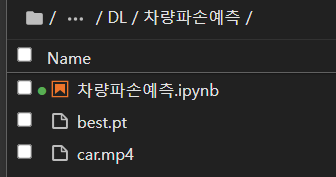
-
OpenCV, Ultralytics 설치 확인
# 라이브러리 설치
!pip install opencv-python ultralytics
import cv2
from ultralytics import YOLO
# Load the YOLOv8 model
model = YOLO("./best.pt")
# Open the video file
video_path = "./car.mp4"
cap = cv2.VideoCapture(video_path)
# Loop through the video frames
while cap.isOpened():
# Read a frame from the video
success, frame = cap.read()
if success:
# Run YOLOv8 inference on the frame
results = model(frame)
# Visualize the results on the frame
annotated_frame = results[0].plot()
# Display the annotated frame
cv2.imshow("YOLOv8 Inference", annotated_frame)
# Break the loop if 'q' is pressed
if cv2.waitKey(1) & 0xFF == ord("q"):
break
else:
# Break the loop if the end of the video is reached
break
# Release the video capture object and close the display window
cap.release()
cv2.destroyAllWindows()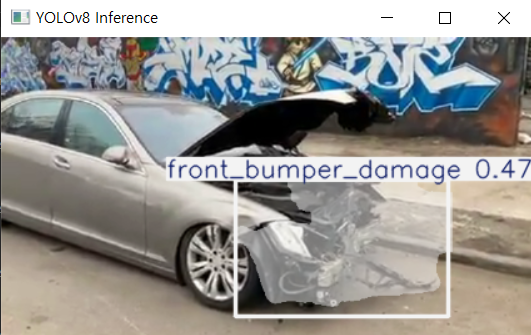

Hello, World!