이미지 생성모델
- GAN(Generative Adversarial Network) : 적대적생성신경망으로 생성자와 판별자 2개의 딥러닝 네트워크를 학습시켜 이미지를 생성하는 기법
- Diffusion : 잠재공간에서 정보가 확산되는 수학적 모델을 개념으로 이미지를 생성하는 기법
GAN
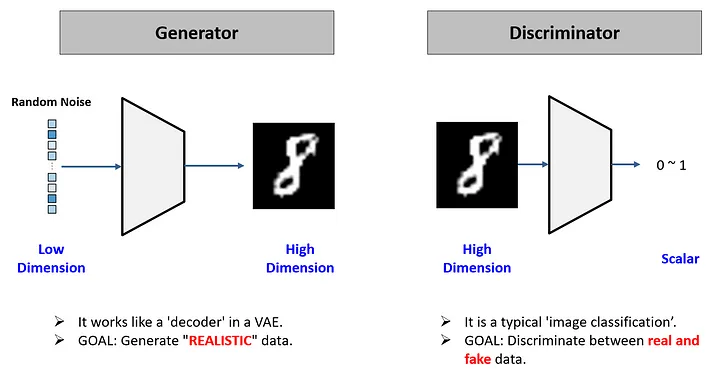
- 생성자(Generator) : 일종의 decoder 역할을 하는 모델. 랜덤한 숫자 벡터에서 이미지를 생성하는 역할을 수행. 목표는 판별자가 헷갈릴 정도로 정교한 이미지를 만드는 것.
- 판별자(Discriminator) : 이미지 분류기(이진분류)로 진짜 이미지(1)와 가짜 이미지(0)를 분류한다. 목표는 생성자가 만들어낸 이미지를 잘 분류하는 것.
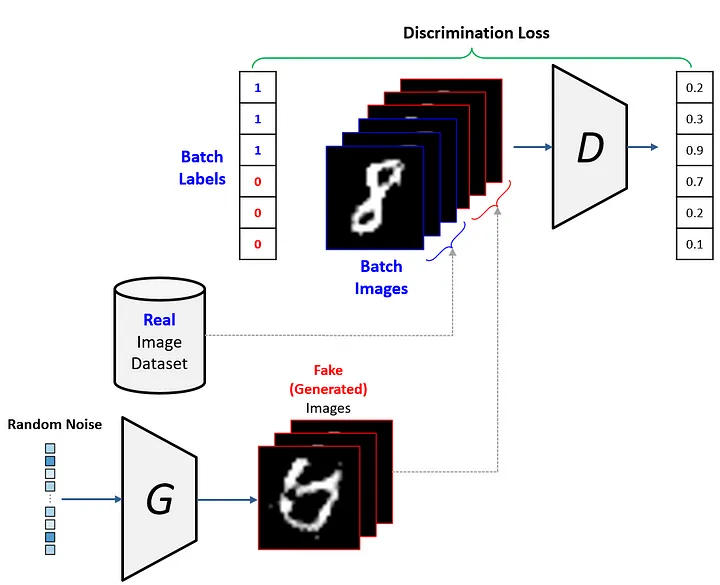
판별자 훈련 프로세스
- 가짜이미지 절반, 진짜이미지 절반 넣어서 구분할 수 있게 학습을 수행.
- 판별자는 어느 정도 학습이 됐다면(판별할 정도가 된다면) 학습을 일시중지
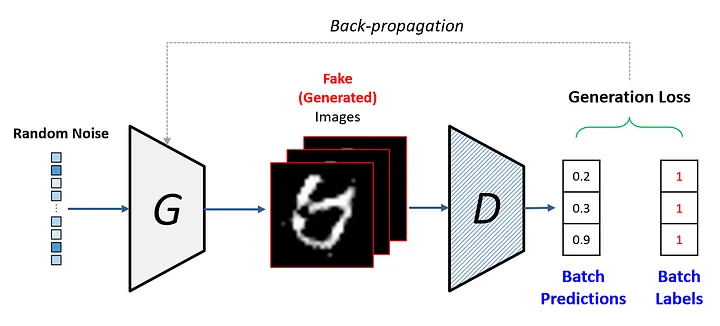
- 생성자는 판별자가 stop된 상태에서 학습을 시작함.
생성자 훈련 프로세스
-
생성자가 이미지를 넣었을 때 (학습을 중단한 상태인)판별자가 가짜라고 판별할 것이고, 가짜와 진짜와의 LOSS(간격)을 생성자에게 넘겨줌
-
이 과정을 반복하며 훈련함
-
모델이 만든 예측값이 0.5(평균값)에 가까워졌을 때 판별하기 어려워질 때 생성이미지를 생성함.
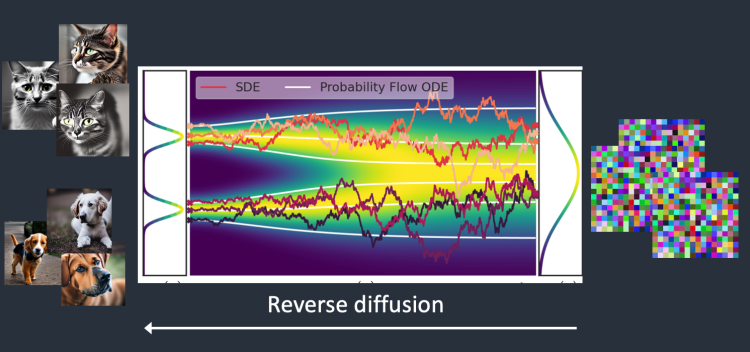
Diffusion
- 특정 공간에 존재하는 분자 그룹에 일정한 힘이 여러번 가해지면 확산하는 패턴이 생긴다.
- 여러번 가해지는 힘의 크기를 알고 있으면 반대로 원래 분자그룹 형태로 복원하는 게 가능하다.
- 이미지의 픽셀들을 분자처럼 생각하고 일정한 노이즈 값(힘)을 반복적으로 연산(더하기, 빼기)하여 완전한 노이즈 이미지로부터 원래 이미지로 생성하는 과정을 적용
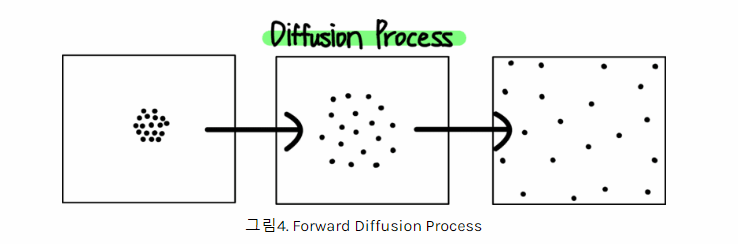
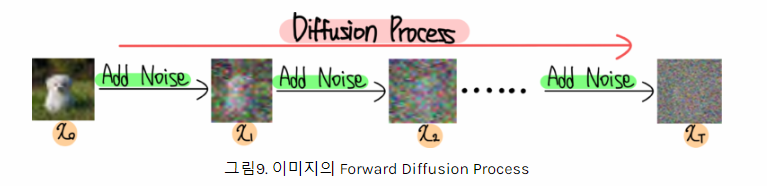
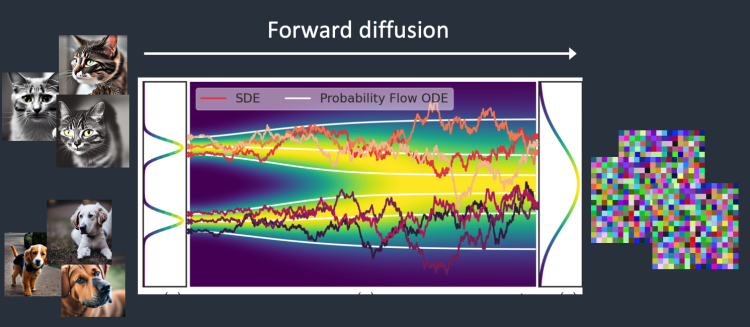
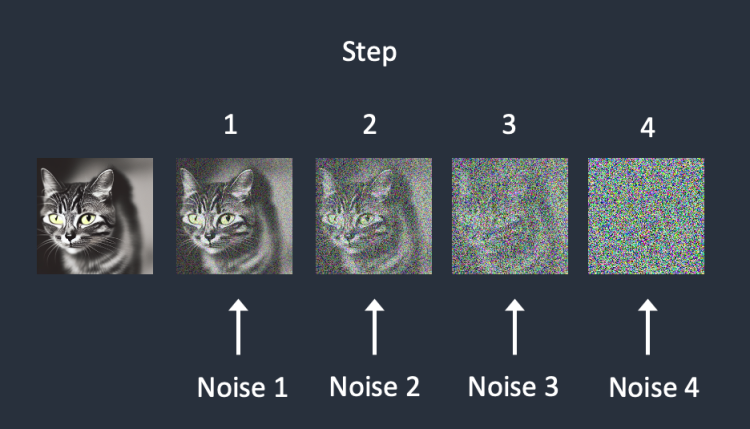
Diffusion 모델의 학습/예측 프로세스
- Forward Diffusion : 학습을 수행하는 프로세스
- Reverse Diffusion : 예측(이미지생성)을 수행하는 프로세스
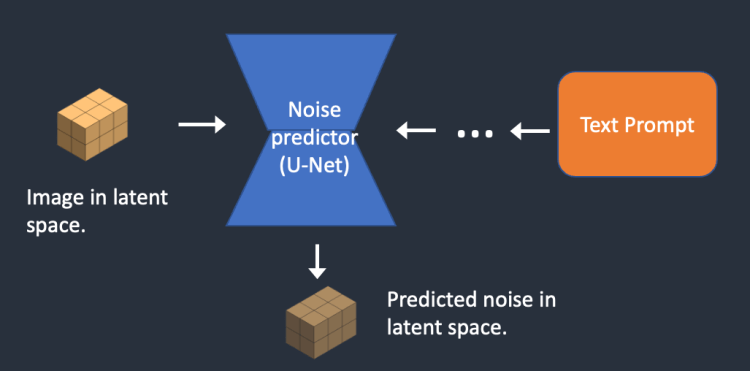
- 학습을 하는 모델을 잡음 예측기(noise predictor)라고 부르며 U-Net 모델을 활용한다.
잡음 예측기의 학습과정
- 원본 이미지에 일정한 noise를 추가하여 noise한 이미지를 생성
- 잡음 예측기에 입력으로 집어 넣어 얼마나 noise값이 추가된건지 예측 수행
- 모델의 예측값 (잡음의 정도)과 실제 noise값의 차이(loss)를 계산하여 모델을 업데이트
- 위 과정을 반복적으로 진행하면 특정 이미지를 집어넣으면 noise값이 얼마나 추가되었는지 예측하는 모델(잡음예측기)가 완성됨
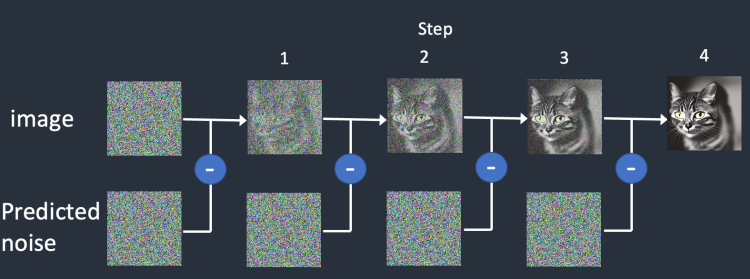
잡음 예측기의 예측과정
- 완전한 noise 이미지를 준비(랜덤)
- 학습된 잡음 예측기를 이미지를 입력한다
- 모델이 예측한 잡음 정도를 입력 이미지에서 제거한다
- 조금 더 선명한 이미지가 생성된다
- 선명해진 이미지를 다시 입력으로 활용하여 위 과정을 반복한다
학습의 효율성을 위해서 추가한 방법
- 오리지날 이미지의 경우 크기가 크기 때문에 연산량이 많아 학습과 예측에 시간이 많이 걸린다.
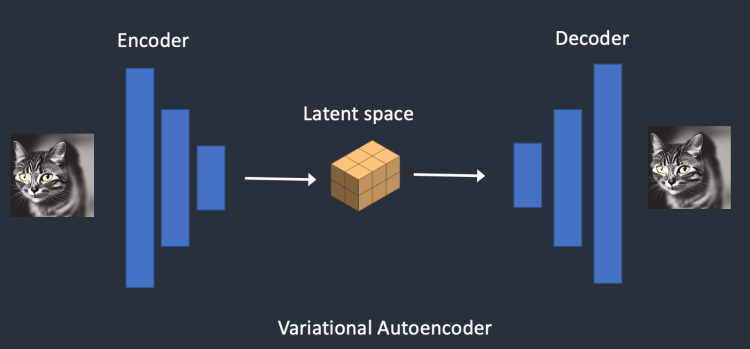
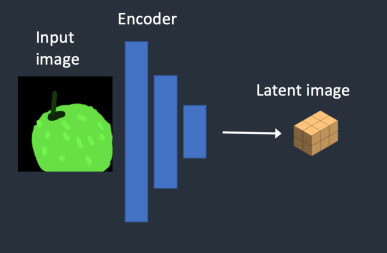
- 학습 및 예측의 효율성을 위해 가변 자동 인코더(VAE, Variational AutoEncoder) 개념을 도입한다
- 잡음 예측기에 오리지널 데이터를 집어 넣지 않고 인코더를 통해 주요한 정보만 압축된 잠재공간벡터(Latent space vector)를 넣어서 연산량을 줄였다
- 위 방식으로 학습된 잡음 예측기를 활용해 이미지 생성을 하면 역시 압축되고 노이즈가 제거된 잠재공간벡터가 만들어지기 때문에 사람들이 아는 픽셀단위 이미지로 만들어내기 위해 디코더를 활용하게된다(후처리)
Diffusion 모델의 다양한 활용법
- 기본 Diffusion 모델의 구조는 학습된 이미지중에 랜덤하게 만들어져서 제어가 어렵다
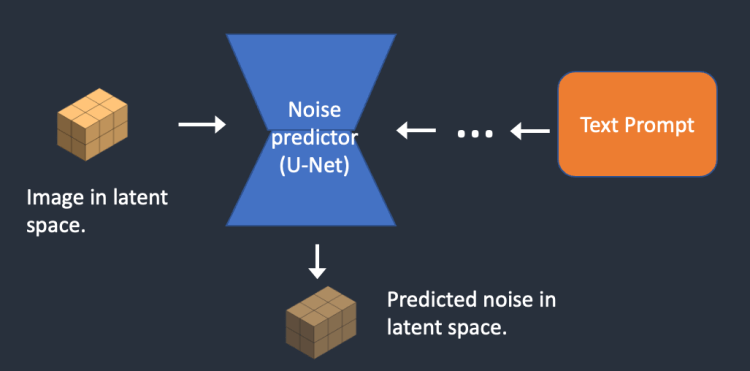
- 사용자가 원하는 정보(condition:조건)를 잠재공간(Latent space)에 추가하여 맞춤형 이미지를 만들어낼 수 있도록 모델이 발견했다
1. 텍스트를 이용한 이미지 생성 프로세스
2. 이미지를 활용한 이미지 생성
stable Diffusion 기초 실습
# 관련 라이브러리 설치
!pip install transformers scipy ftfy accelerate diffusers
import torch
from diffusers import StableDiffusionPipeline # 텍스트를 이용해서 이미지를 만들어내는 파이프라인# 파이프라인 객체생성
TxtToImage_pipe = StableDiffusionPipeline.from_pretrained(
'CompVis/stable-diffusion-v1-4', # 활용한 사전학습 모델 저장소 이름
torch_dtype=torch.float16 # 16비트 float타입으로 설정하여 메모리를 절약
)# 파이프라인이 GPU를 사용하도록 설정
TxtToImage_pipe = TxtToImage_pipe.to('cuda')
- 프롬프트 참고 사이트
https://civitai.com/
# 이미지 생성에 활용한 프롬포트
prompt = "A super cute kitten. Its a wide angle shot, the subject full body is viewable, The view is from behind and you can see mountains and valleys in the distance lit by golden hour sunlight. In the sky you see the words 'The Search for Buzz' on the next line 'Never Ends'"

create_image = TxtToImage_pipe(prompt) # 파이프라인을 활용해 이미지 생성

create_image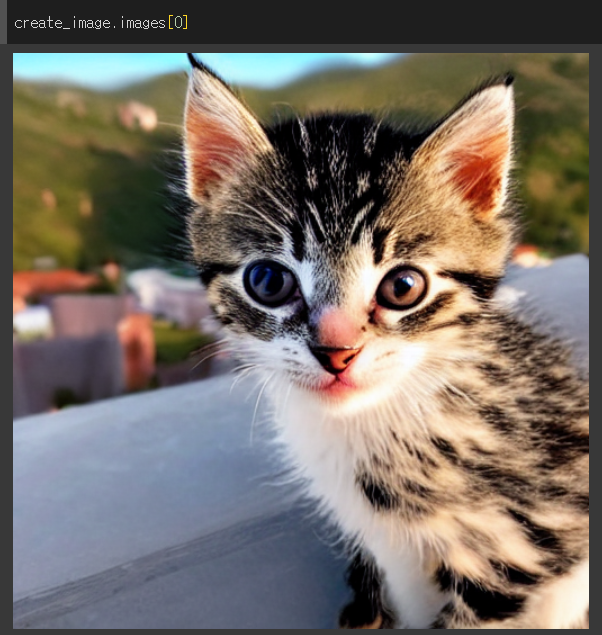
난수시드 고정하기 & 이미지 생성시 반복 횟수 조절하기
prompt = "Cats and dogs laughing and playing in a wide, green field, high quality, photograph, colorful"
generator = torch.Generator('cuda').manual_seed(816)
# 파이프라인을 활용해 이미지 생성
create_image = TxtToImage_pipe(prompt,
                               generator = generator,
num_inference_steps = 80) # 이미지 생성시 파이프라인 반복 횟수 제어 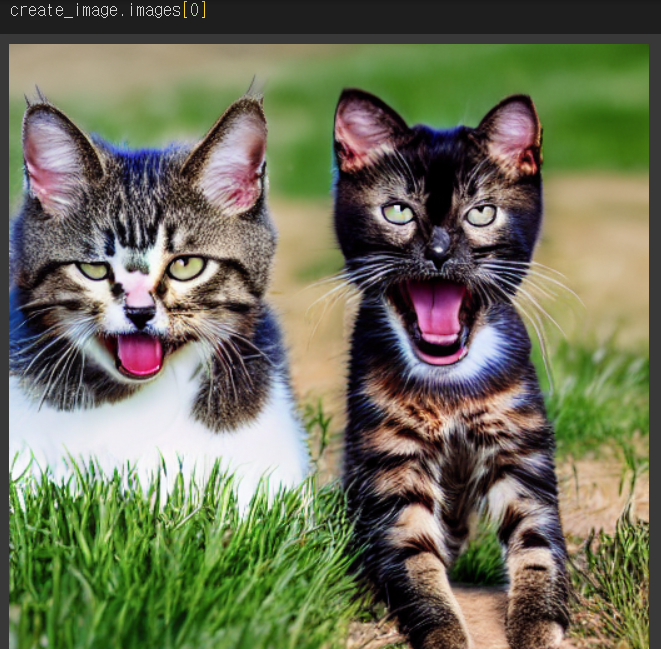
이미지 인페인팅
- 이미지의 특정부분을 채워넣는 생성방법
!pip install peft opencv-python mediapipe
!pip install -U controlnet-aux
from diffusers.utils import load_image, make_image_grid # 이미지를 로딩하고 grid 형태로 시각화하는 함수
# 추가 조건을 넣을 수 있는 ControlNet 모델과 파이프라인 관련 클래스
from diffusers import StableDiffusionControlNetPipeline, ControlNetModel, UniPCMultistepScheduler
from diffusers import StableDiffusionControlNetInpaintPipeline
# Openpose를 활용하여 사람의 관절 정보를 추출하는 도구
from controlnet_aux import OpenposeDetector
from PIL import Image # 파이썬 이미지처리 라이브러리
import cv2 # OpenCV 라이브러리
import numpy as np활용할 이미지 로드
# 원본 이미지, 마스크 이미지
init_image = Image.open('./data/cyh1_origin.jpg')
mask_image = Image.open('./data/cyh1_mask.jpg')

# 이미지 리사이징
# default 512*512
init_image = init_image.resize((512,512))
mask_image = mask_image.resize((512,512))

# 원본, 마스크 이미지 시각화
make_image_grid([init_image, mask_image], rows=1, cols=2)
- 마스크 이미지로 눈부분 가져옴
컨디션 이미지 생성
# 인페인팅을 위한 컨디션 이미지를 생성하는 함수 정의
def make_inpaint_condition(image, image_mask): # 원본 이미지를 RGB 모드로 변환하고 numpy 배열로 변경한 후, float32 타입으로 변환하고 0~1 사이로 정규화
    # 마스크 이미지를 그레이스케일(L 모드)로 변환하고 numpy 배열로 변경한 후, float32 타입으로 변환하고 0~1 사이로 정규화
    image = np.array(image.convert("RGB")).astype(np.float32) / 255.0
    image_mask = np.array(image_mask.convert("L")).astype(np.float32) / 255.0

    assert image.shape[0:1] == image_mask.shape[0:1] # 원본 이미지와 마스크 이미지의 높이와 너비가 동일한지 확인

    # 마스크 이미지에서 값이 0.5보다 큰 위치(마스크된 영역)에 해당하는 원본 이미지의 픽셀 값을 -1.0으로 설정
    image[image_mask > 0.5] = -1.0  # 마스크된 픽셀로 설정
    image = np.expand_dims(image, 0).transpose(0, 3, 1, 2) # 이미지 배열에 배치 차원을 추가하고, 차원 순서를 (배치, 채널, 높이, 너비)로 변경
    image = torch.from_numpy(image) # numpy 배열을 PyTorch 텐서로 변환
    return image # 변환된 이미지를 반환
# 초기 이미지와 마스크 이미지를 이용해 컨디션 이미지 생성
condition_image = make_inpaint_condition(init_image, mask_image)관련 모델 및 파이프라인 생성
# controlnet 모델 로딩
controlnet = ControlNetModel.from_pretrained(
    "lllyasviel/control_v11p_sd15_inpaint", # 인페인팅용으로 학습된 사전학습 모델 주소
    torch_dtype = torch.float16, # 모델의 데이터 타입을 float16으로 줄여서 메모리 사용량을 적게 만듬
    use_safetensors=True # 텐서연산을 안정화 시켜주는 역할
)
# pipeline 구축
pipeline = StableDiffusionControlNetInpaintPipeline.from_pretrained(
"sd-legacy/stable-diffusion-v1-5", # 사용할 stable diffusion 모델
controlnet = controlnet, # 파이프라인과 결합할 사전학습된 controlnet 연결
torch_dtype = torch.float16, # 모델의 데이터 타입을 float16으로 줄여서 메모리 사용량을 적게 만듦
use_safetensors=True # 텐서연산을 안정화 시켜주는 역할
)# 스케줄러를 UniPCMultistepScheduler로 변경
# 기존 파이프라인의 스케줄러 설정을 가져와서 새로운 스케줄러를 생성함
pipeline.scheduler = UniPCMultistepScheduler.from_config(pipeline.scheduler.config)
# 모델 CPU 오프로드를 활성화함
# - 이 기능을 사용하면 GPU 메모리가 부족할 때 CPU로 모델의 일부를 이동시켜 메모리 효율을 높일 수 있음
pipeline.enable_model_cpu_offload()프롬프트와 마스크된 이미지를 이용한 인페인팅 실시
prompt = "big eyes, eyebrow, scared, best quality, extremely detailed"

# 생성 시 제외할 요소를 지정하는 네거티브 프롬프트를 설정
# 원하지 않는 이미지의 특징을 나열
negative_prompt = "monochrome, lowres, bad anatomy, worst quality, low quality, full body shot"
# 흑백, 저해상도, 나쁜 해부학, 최악의 화질, 저화질, 전신 샷

# 재현성을 위해 시드를 고정함
generator = torch.Generator("cuda").manual_seed(2024)

# 파이프라인을 실행하여 이미지를 생성
output = pipeline(
    prompt,  # 텍스트 프롬프트
    num_inference_steps=80,  # 디노이징 스텝 수 (클수록 품질 향상)
    # eta=1.0,  # 다양성 조절 파라미터 (DDIM 스케줄러에서 사용)
    image=init_image,  # 초기 이미지 (인페인팅 전 원본 이미지)
    mask_image=mask_image,  # 마스크 이미지 (수정할 영역을 지정)
    control_image=condition_image,  # 컨디션 이미지 (모델에 추가 정보를 제공)
    generator=generator,  # 랜덤 시드 설정을 위한 생성기
    negative_prompt=negative_prompt  # 네거티브 프롬프트 (생성에서 제외할 요소)
).images[0]

# 초기 이미지, 마스크 이미지, 생성된 이미지를 한 행에 나란히 표시함
make_image_grid([init_image, mask_image, output], rows=1, cols=3)output.save("output.jpg")
Hello, World!