🪴 공식 문서
- MongoDB: [TTL을 설정하여 컬렉션에서 데이터 만료하기] , [TTL 인덱스]
- InfluxDB: [Data retention in InfluxDB]
🪴 MongoDB vs InfluxDB
MongoDB와 InfluxDB는 둘 다 NoSQL 데이터베이스 시스템 이지만
각 사용 용도가 명확하다.
특징
| 특징\DB | MongoDB | InfluxDB |
|---|---|---|
| 데이터베이스 유형 | Document Store (NoSQL) | Time Series Database (TSDB) |
| 데이터 구조 | BSON (Binary JSON) | 시계열 데이터 (Time Series) |
| 사용 사례 | 비교적 복잡한 데이터 구조 및 검색 쿼리 | 모니터링, IoT 데이터 ... |
+ BSON
JSON의 이진 표현, MongoDB에서 효율적인 저장 및 데이터 탐색을 위해 내부적으로 사용
MongoDB 내부에서 어떤 동작을 하는 지, 공식 문서에서 가져왔다.

사내 웹서비스를 기획할 때 MongoDB와 InfluxDB를 둘 다 사용했던 적이 있는데, 다음과 같이 사용했다.
- MongoDB: 사용자 계정 목록, IoT센서 목록 기록
- InfluxDB: IoT 센서 측정값 누적 기록
용어
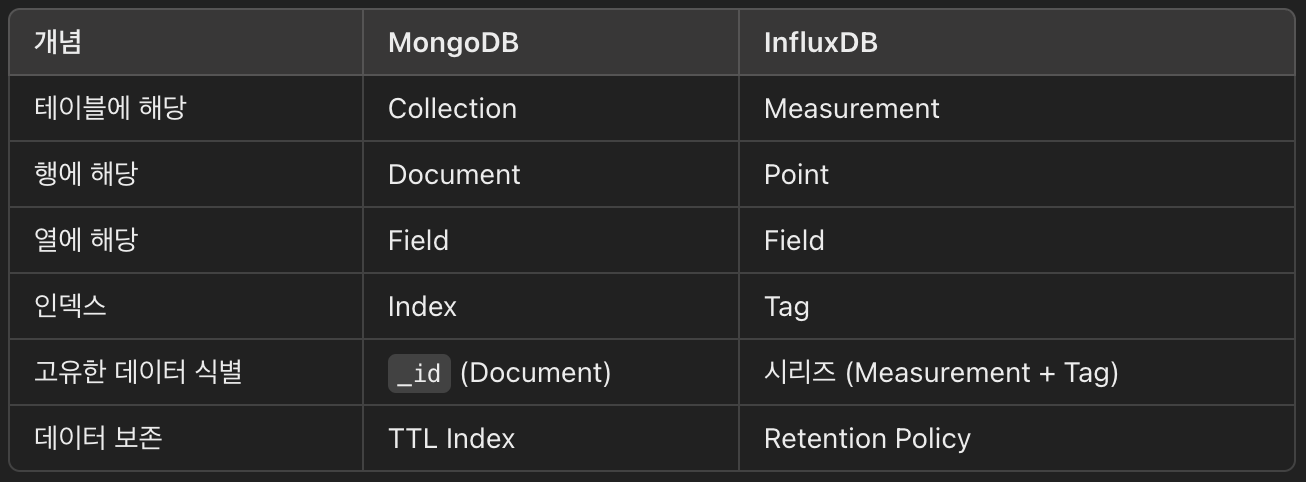
아래에 용어별 자세한 설명을 적어두었다.
🪴 MongoDB
용어
Database (데이터베이스)
- 데이터를 저장하는 최상위 컨테이너
- 하나의 MongoDB 서버에는 여러 개의 데이터베이스를 가질 수 있음.
Collection (컬렉션)
- MongoDB의 테이블에 해당
- 문서(Document)들의 그룹으로 구성
- 스키마가 고정되어 있지 않아서, 같은 컬렉션 내의 문서들이 서로 다른 구조를 가질 수 있음
Document (문서)
- 데이터를 저장하는 기본 단위
- BSON(Binary JSON) 형식으로 저장
- 각 문서는 고유한
_id필드를 포함하며, MongoDB에서 자동으로 생성해줌
Field (필드)
- 문서내의 데이터 항목
- 키-값 쌍으로 구성
Index (인덱스)
- 데이터 검색 속도를 높이기 위해 특정 필드에 생성하는 색인 구조
- 단일 필드, 복합 필드, 텍스트 인덱스 등 다양한 인덱스를 지원
클라이언트 예시 - FastAPI(python)
- python 비동기 MongoDB 드라이버 motor 라이브러리 사용
- 추가:
insert_one,insert_many - 조회:
find_one,find - 업데이트:
update_one
- 추가:
from fastapi import HTTPException
import motor.motor_asyncio

# MongoDB 클라이언트를 생성
client = motor.motor_asyncio.AsyncIOMotorClient('mongodb://id:pw@localhost:27017')
# DATABASE라는 이름의 데이터베이스에 접근
db = client.DATABASE
# 'users'라는 컬렉션에 접근 (접근시에 해당 컬렉션이 없으면 생성됨)
collection_users = db.users


# 사용자 정보 추가
async def add_user(user_entered):
    # 인자로 받은 이메일과 일치하는 사용자가 이미 존재하는지 확인
    user_info = await collection_users.find_one({"email":user_entered["email"]})
    if not user_info:
        await collection_users.insert_one(user_entered)
        return user_info

    # 이미 사용자가 존재하면 409 Conflict 에러 처리
    raise HTTPException(status_code=409, detail="ACCOUNT_ALREADY_EXISTS")


# 사용자 정보 조회
async def get_user(email: str):
    # 'users' 컬렉션에서 인자로 받은 email과 email 필드가 일치하는 문서를 하나 조회
    user_info = await collection_users.find_one({"email":email})
    if user_info:
        return user_info

    # 해당 email과 일치하는 필드가 없을 시에 404 에러 처리
    raise HTTPException(status_code=404, detail="USER_NOT_FOUND")


# 사용자 목록 조회
async def get_user_list():
    # 'users' 컬렉션에서 role 필드가 'user'인 모든 문서를 조회
    if (user_info := collection_users.find({"role": "user"})) is not None:
        # Cursor 객체를 Python 리스트로 변환 (to_list 비동기 메서드)
        user_list = await user_info.to_list(length=100)
        return user_list


# 사용자 정보 업데이트
async def update_user(user_entered):
    # 인자로 받은 이메일과 일치하는 사용자가 존재하는지 확인
    user_info = await get_user(user_entered["email"])
    if user_info:
        # "$set" 연산자를 사용하여 기존 정보에 새 데이터를 덮어씀
        await collection_users.update_one({"email": user_entered["email"]}, {"$set": user_info})
        return user_info

    # 사용자가 없으면 404 Not Found 에러 처리
    raise HTTPException(status_code=404, detail="USER_NOT_FOUND")
TTL 예시 - FastAPI(python)
- TTL은 time to live 의 약자
- 기간이 만료된 문서(Document)를 자동 제거 하는 기능
- 컬렉션마다 TTL 인덱스를 생성 할 수도 안 할 수도 있음
- 컬렉션에 TTL 인덱스를 생성했다면, 해당 컬렉션의 문서들은 TTL 인덱스 필드를 가짐.
- TTL 인덱스는 날짜 유형의 값을 가짐
- 컬렉션에 TTL 인덱스를 생성하고, 문서를 insert 할 때, 문서의 TTL 인덱스에 날짜 값을 할당하면 설정 완료
- mongod의 백그라운드 스레드가 TTL 인덱스 값을 읽고 컬렉션에서 만료된 문서를 제거함.
- 삭제 백그라운드 스레드는 60초마다 한 번 실행됨.
import motor.motor_asyncio

client = motor.motor_asyncio.AsyncIOMotorClient('mongodb://id:pw@localhost:27017')
db = client.DATABASE
collection_logs = db.logs

# logs 컬렉션에 "created_at"이라는 TTL 인덱스를 설정하여, 1년이 경과된 문서를 자동 삭제 되도록 함.
collection_logs.create_index([("created_at", 1)], expireAfterSeconds=365*86400)

...
async def add_log():
	log = {
    	"content": "1년 뒤에 사라질 문서(Document)",
        "created_at": datetime.utcnow()  # TTL 인덱스 필드에 UTC 현재 시간을 할당
    }
    await collection_logs.insert_one(log)
    return True
🪴 InfluxDB
용어
[InfluxDB 1.x] Database (데이터베이스)
- 데이터를 저장하는 최상위 컨테이너
- 여러 데이터베이스를 생성할 수 있음
[InfluxDB 2.x] Organization(Org) (조직)
- 데이터를 관리하는 최상위 단위
- 데이터를 논리적으로 조직화하고 분리하기 위해 추가
- 여러 Bucket의 집합
[InfluxDB 2.x] Bucket (버킷)
- InfluxDB 1.x의 Database+Retention Policy를 결합한 개념
- 여러 Measurement들의 집합
- 보존 기간(Retention Policy) 을 설정할 수 있음
Measurement (메저먼트)
- InfluxDB의 테이블에 해당
- Point(포인트) 들의 집합
- 동일한 유형의 시계열 데이터를 그룹화하는데에 사용
- ex) temperature, cpu_usage
Point (포인트)
- 단일 데이터 레코드
- Timestamp(시간), Measurement(메저먼트), Tags(태그), Fields(필드)로 구성
Field (필드)
- 포인트 내의 데이터 필드
Tag (태그)
- 포인트 내의 인덱싱 가능한 메타데이터 필드
- 데이터 검색 속도를 높이기 위함
- 문자열로만 구성
- 태그는 인덱싱되기 때문에 너무 많은 고유값이 있으면 오히려 성능에 영향을 미침
Timestamp (타임스탬프)
- Point가 기록된 시간 정보
- 각 Point들은 Timestamp 기준으로 기록
- InfluxDB는 특정 시간 범위로 쿼리하므로 필수 요소이며, 명시하지 않으면 자동으로 할당됨
클라이언트 예시 - FastAPI(python)
- python의 InfluxDB v2 클라이언트 라이브러인 influxdb-client 사용
- 추가: write_api
- 조회: query_api
- 업데이트: delete_api
- InfluxDB는 시계열 데이터베이스로, 기본적으로 데이터의 불변성을 가정하기 때문에, 업데이트가 불가능하고, 기존 데이터를 삭제하고 해당 Timestamp로 다시 기록하는 방식으로 해결
from influxdb_client import InfluxDBClient, Point, WritePrecision
from influxdb_client.client.write_api import SYNCHRONOUS

token = "token"      # 인증 토큰
org   = "my_org"     # 조직 (Org) 이름
bucket= "my_bucket"  # 버킷 (Bucket) 이름

# InfluxDB 클라이언트 생성
client = InfluxDBClient(url="http://localhost:8086", token=token, org=org)
# 데이터 쓰기 및 조회 API 설정
write_api = client.write_api(write_options=SYNCHRONOUS)
query_api = client.query_api()


# IoT 측정값 기록
async def add_datain(device, timestamp):
    # 동기식 쓰기 API 생성
    write_api = client.write_api(write_options=SYNCHRONOUS)
    # InfluxDB에 저장할 Point 객체 생성
    point = Point("mem") \
        .tag("data_type", "datain") \  # 태그 추가
        .tag("mac", device["mac"]) \  # 태그 추가
        .field("ip", device["ip"]) \  # 필드 추가
        .field("offset", device["offset"] \   # 필드 추가
        .time(datetime.fromtimestamp(timestamp), WritePrecision.NS)  # 타임스탬프 할당
    # 데이터 쓰기 (InfluxDB에 저장)
    write_api.write(bucket, org, point)
    return data


# IoT 측정값 조회
async def get_datain(query_info, device_list):
    try:
        res = []
        for device_info in device_list:
            res_per_device = {"mac": device_info['mac'], "offset_list": []}
            # Flux 쿼리 작성 (InfluxDB 2.x)
            query = f'''
                from(bucket: "{bucket}")
                |> range(start: {query_info["date_range"][0]}, stop: {query_info["date_range"][1]})
                |> filter(fn: (r) => r._measurement == "mem")
                |> filter(fn: (r) => r.data_type == "datain")
                |> filter(fn: (r) => r.mac == "{device_info['mac']}")
                |> filter(fn: (r) => r["_field"] == "offset")
            '''

            # 쿼리 실행 및 결과 조회
            tables = query_api.query(query)
            # 결과가 있는 경우, 각 테이블의 레코드를 순회
            if len(tables) > 0:
                for table in tables:
                    for row in table.records:
                        # JSON 형식으로 데이터 변환
                        device = jsonable_encoder(row.values)

                        if device["_value"] is not None:
                            # UTC to KST
                            time_str = row.values["_time"].strftime("%Y-%m-%d %H:%M:%S.%f")
                            time = datetime.strptime(time_str, "%Y-%m-%d %H:%M:%S.%f")
                            time += timedelta(hours=9)

                            res_per_device["offset_list"].append({
                                "time": time.strftime("%Y-%m-%d %H:%M:%S.%f"),
                                "offset": device["_value"]
                            })

            res.append(res_per_device)

        return res

    except Exception as e:
        print("e", e)
        return []
Retention Policy 예시 - FastAPI(python)
- Retention Policy: 보존 정책
- Bucket에 정의된 보존 기간을 초과한 Timestamp가 있는 Point를 자동 제거 하는 정책
- Bucket마다 보존 정책을 정의할 수 있음. (1hour ~ infinite)
- Bucket에 보존 정책을 설정하고, Point를 write할 때, Point의 Timestamp에 날짜 값을 할당하면 적용 완료
- 보존 강제 서비스는 30분마다 한 번 실행됨. (storage-retention-check-interval 구성 옵션으로 간격 구성 가능)
async def add_datain(device, timestamp):
    write_api = client.write_api(write_options=SYNCHRONOUS)
    point = Point("mem") \
        .tag("mac", device["mac"]) \
        .field("offset", device["offset"] \
        .time(int(time.time()), WritePrecision.NS)  # 타임스탬프 할당 (UNIX timestamp)

    write_api.write(bucket, org, point)
    return data