요약 : Tibero 설치 이후 설정에 대한 설명
1. 환경변수 설정
-
TB_HOME : <경로>\tibero6
-
TB_SID : tibero
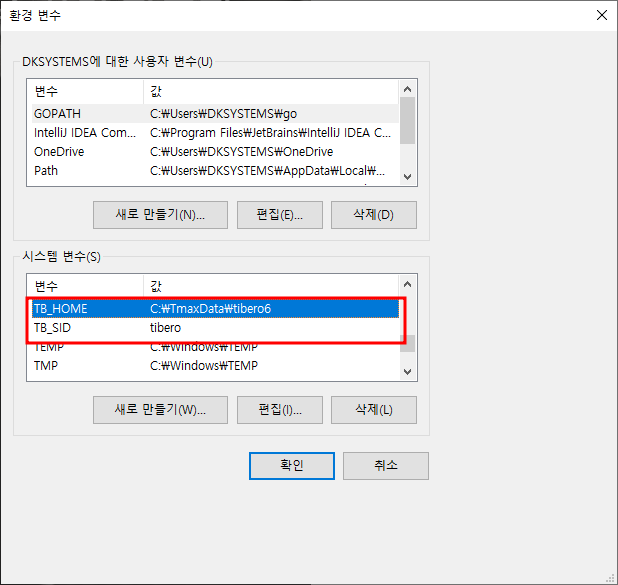
-
Path : <경로>\tibero6\bin; <경로>\tibero6\client\bin

2. Tibero Service 등록
- cmd 창을 관리자 권한으로 실행
tbinstall %TB_HOME% %TB_SID%3. Tibero 파라미터 설정파일 생성
cd %TB_HOME%/config
gen_tip.bat
4. Tibero 시작
tbboot nomount5. 데이터베이스 만들기
- %TB_HOME% 위치에 db_c.sql 파일 생성
- db_c.sql 파일에 다음 스크립트 작성 후 저장
create database
user sys identified by tibero
character set UTF8
national character set UTF16
logfile group 0 ('redolog001.log') size 50M,
        group 1 ('redolog002.log') size 50M,
        group 2 ('redolog003.log') size 50M
maxdatafiles 1024
maxlogfiles 100
maxlogmembers 8
noarchivelog
  datafile 'system001.dtf' size 1G autoextend on next 16M maxsize 2G
default tablespace USR
  datafile 'usr001.dtf' size 100M autoextend on next 16M maxsize 3G
default temporary tablespace TEMP
  tempfile 'temp001.dtf' size 1G autoextend on next 100M maxsize 3G
  extent management local AUTOALLOCATE
undo tablespace UNDO
  datafile 'undo001.dtf' size 1G autoextend on next 100M maxsize 3G
  extent management local AUTOALLOCATE
-- extent management local UNIFORM SIZE 1M
6. DB 접속
디렉토리를 %TB_HOME% 으로 변경 후 다음 명령어를 통해 DB에 접속한다.
tbsql sys/tibero초기 id/pwd 는 sys/tibero 이고 접속하게 되면 다음과 같이 변함
SQL>7. 터미널에서 sql 파일 실행
SQL> @db_c.sqlSQL> q이후 tibero 접속 종료
SQL> tbdown재시작
tbboot8. 에러 발생시 등 알림 발생시 커멘드 창에 표시되도록 설정
- 기본 스크립트 호스트를 CScript.exe 로 변경 -> 이 과정이 없으면 alert 창으로 떠서 매우 불편
cscript //H:SCript- 스크립트 실행 ( DB를 만드는 과정이라서 DB가 boot 된 상태여야 함 )
cd %TB_HOME%\scripts
system.vbs -p1 tibero -p2 syscat -a1 y -a2 y -a3 y -a4 y
%TB_HOME%\instance\tibero\log\system_init.log 참조
=========================================================
cmd 분석
C:\Users\DKSYSTEMS>cd %TB_HOME%/config		// config 디렉토리로 이동

C:\TmaxData\tibero6\config>gen_tip.bat		// tibero 에서 제공해주는 레지스트리 실행

C:\TmaxData\tibero6\config>tbboot nomount	// Tibero 서버를 노마운트 모드로 가동

C:\TmaxData\tibero6\config>cd %TB_HOME%		// 홈 폴더로 다시 이동

C:\TmaxData\tibero6>tbsql sys/tibero		// tbsql 유틸을 이용하여 DB에 접속

SQL> @db_c.sql								// 위에서 저장해놓은 파일 실행

SQL> q  /  SQL> exit						// 반영을 위해 닫고

C:\TmaxData\tibero6>tbdown					// 서버 다운 시키고
C:\TmaxData\tibero6>tbboot // 서버 재실행
--------------------------
Tibero 6
TmaxData Corporation Copyright (c) 2008-. All rights reserved.
Tibero instance started up (NORMAL mode).
C:\TmaxData\tibero6>dir
C 드라이브의 볼륨에는 이름이 없습니다.
볼륨 일련 번호: 481E-E73C
C:\TmaxData\tibero6 디렉터리
2022-09-14 오후 02:00 <DIR> .
2022-09-14 오후 02:00 <DIR> ..
2022-09-14 오전 11:25 <DIR> .installation
2022-09-14 오전 11:25 <DIR> bin
2022-09-14 오전 11:25 <DIR> client
2022-09-14 오전 11:29 <DIR> config
2022-09-14 오전 11:29 <DIR> database
2022-09-14 오후 01:59 782 db_c.sql
2022-09-14 오전 11:29 <DIR> instance
2022-09-14 오전 11:25 <DIR> jre
2022-09-14 오전 11:25 <DIR> lib
2022-09-14 오전 11:25 <DIR> license
2022-09-14 오전 11:30 <DIR> scripts
2022-09-14 오전 11:31 2,472 tibero.conf
2개 파일 3,254 바이트
12개 디렉터리 32,239,984,640 바이트 남음C:\TmaxData\tibero6>cd scripts // scripts 디렉토리로 이동
------------------------------
C:\TmaxData\tibero6\scripts>dir // 불필요
C 드라이브의 볼륨에는 이름이 없습니다.
볼륨 일련 번호: 481E-E73C
C:\TmaxData\tibero6\scripts 디렉터리
2022-09-14 오전 11:30 <DIR> .
2022-09-14 오전 11:30 <DIR> ..
2022-09-14 오전 11:25 464,170 catalogview.sql
2018-07-27 오전 11:21 432,628 catalogview_sod.sql
2018-07-27 오전 10:31 174 ckpt_on_create.sql
2018-07-27 오전 10:31 484 client_policy.sql
2018-07-27 오전 10:31 377 cm_boot_cmd.sh
2018-07-27 오전 10:31 2,554 cm_boot_cmd.vbs
2018-07-27 오전 10:31 919 cm_boot_cmd_repl.sh
2018-07-27 오전 10:31 2,680 cm_boot_cmd_repl.vbs
2018-07-27 오전 10:31 274 cm_down_cmd.sh
2018-07-27 오전 10:31 2,185 cm_down_cmd.vbs
2018-07-27 오전 10:31 732 cm_hacmp_check_cmd_aix.sh
2018-07-27 오전 10:31 429 cm_if_check_cmd_aix.sh
2018-07-27 오전 10:31 1,065 cm_import_res_from_file.sh
..
..
97개 파일 2,380,306 바이트
3개 디렉터리 32,239,980,544 바이트 남음C:\TmaxData\tibero6\scripts>cscript //H:CScript
-----------------------------------------------
Microsoft (R) Windows Script Host 버전 5.812
Copyright (C) Microsoft Corporation. All rights reserved.
기본 스크립트 호스트가 이제 "cscript.exe"로 설정되었습니다.18 . %TB_HOME%\scripts 폴더에서
system.vbs 명령어를 입력하면 현재 디렉터리에 있는 SQL 문이 저장된 파일(*.sql, 이하 SQL 파일)이 수행된다.
C:\TmaxData\tibero6\scripts>system.vbs -p1 tibero -p2 syscat -a1 y -a2 y -a3 y -a4 y
------------------------------------------------------------------------------------
Microsoft (R) Windows Script Host 버전 5.812
Copyright (C) Microsoft Corporation. All rights reserved.

Creating text packages table ...
       Running C:\TmaxData\tibero6\scripts\pkg\create_pkg_text_tbl.sql...
Creating the role DBA...
       Running C:\TmaxData\tibero6\scripts\create_dba_gen.sql...
Creating system users & roles...
       Running C:\TmaxData\tibero6\scripts\system_users.sql...
Creating example users...
       Running C:\TmaxData\tibero6\scripts\example_users.sql...
Dropping agent table...
       Running C:\TmaxData\tibero6\scripts\systbl_drop_agent.sql...
Creating virtual tables(1)...
       Running C:\TmaxData\tibero6\scripts\vt_drop_gen.sql...
Creating virtual tables(2)...
       Running C:\TmaxData\tibero6\scripts\vt_create_gen.sql...
Granting public access to _VT_DUAL...
       Running C:\TmaxData\tibero6\scripts\vt_dual.sql...
Creating the system generated sequences...
       Running C:\TmaxData\tibero6\scripts\create_seq.sql...

       ...
       ...
       ...
       Done.
For details, check C:\TmaxData\tibero6\instance\tibero\log\system_init.log.
C:\TmaxData\tibero6\scripts>tbsql sys/tibero
SQL> select * from v$database;
------------------------------
      DBID NAME
---------- ----------------------------------------
CREATE_DATE                      CURRENT_TSN OPEN_MODE  RESETLOG_TSN
-------------------------------- ----------- ---------- ------------
RESETLOG_DATE                    PREV_RESETLOG_TSN
-------------------------------- -----------------
PREV_RESETLOG_DATE               LOG_MODE       CKPT_TSN
-------------------------------- ------------ ----------
CKPT_DATE                        CPU_NAME
-------------------------------- --------------------------------
PLATFORM_NAME
--------------------------------
CPU_MODEL
--------------------------------------------------------------------------------
OS_UPTIME
--------------------------------------------------------------------------------
1715142876 tibero
2022/09/14                             36065 READ WRITE            0
                                                 0
                                 NOARCHIVELOG      35943
2022/09/14                       X86
WINDOWS_64
UNSUPPORTED
UNSUPPORTED


1 row selected.
SQL> exit
Disconnected.참고사항
- tibero6 > config 폴더에서 tibero.tip 파일을 열어보면
#--------------------------------------------------
# Tibero Initialization Parameters
#--------------------------------------------------
#Wed Sep 14 11:28:33 KST 2022
CONTROL_FILES="C\:\\TmaxData\\tibero6\\database\\tibero\\c1.ctl"
DB_NAME=tibero
LISTENER_PORT=8629				-- 리스너 사용 포트
MEMORY_TARGET=2G				-- 사용 가능 메모리
MAX_SESSION_COUNT=100			-- 사용 가능한 세션 수
TOTAL_SHM_SIZE=1G				-- ?
세션 수가 20으로 되어있었는데 Intelli J 에서 사용할 때 20개로는 부족해서 100개로 늘려줌!

개발하는헬창