import os
import json
import ssl

ssl._create_default_https_context = ssl._create_unverified_context

# annotation.json 생성

def generate_annotation_json(data_dir, output_path):
    """
    annotation.json 생성
    """
    annotation_list = []

    for label_name in os.listdir(data_dir):
        label_path = os.path.join(data_dir, label_name)
        if not os.path.isdir(label_path):
            continue

        for img_file in os.listdir(label_path):
            if img_file.lower().endswith((".jpg")):
                image_path = os.path.join(label_path, img_file)
                annotation_list.append({
                    "image_path": image_path,
                    "labels": [label_name]
                })

    with open(output_path, 'w') as f:
        json.dump(annotation_list, f, indent=4)

    print(f"Annotation file saved to {output_path}")
'''
Annotation file saved to train_annotations.json
Annotation file saved to test_annotations.json
'''

# Set paths
train_dir = 'C:/Users/hi/PycharmProjects/DeepVision_part/day2/quiz_part/seg_train/seg_train'
test_dir = 'C:/Users/hi/PycharmProjects/DeepVision_part/day2/quiz_part/seg_test/seg_test'

generate_annotation_json(train_dir, "train_annotations.json")
generate_annotation_json(test_dir, "test_annotations.json")

data_root = 'quiz_part'
annotation_filename_train = 'train_annotations.json'
annotation_filename_test =  'test_annotations.json'

# json 으로 데이터 불러오기
with open(annotation_filename_train, 'r')as json_f:
    annotations_train = json.load(json_f)

with open(annotation_filename_test, 'r')as json_f:
    annotations_test = json.load(json_f)

#데이터 샘플 출력
print(annotations_train[:3])
print(annotations_test[:3])

from collections import defaultdict

'''
    데이터의 기본 속성을 파악한다. (데이터 개수, 클래스 개수, 클래스 개수 분포 등)
'''

# 클래스맵을 생성하는 함수
def get_class_map(annotations):
    cls_map = defaultdict(int)  # 기본 값을 int(0)으로 지정하는 딕셔너리 생성
    for annot in annotations:  # 어노테이션 루프
        for cls in annot['labels']: # 라벨마다 카운트 추가
            cls_map[cls] += 1

    return cls_map

cls_map = get_class_map(annotations_train)
print(cls_map)
'''
defaultdict(<class 'int'>, {'buildings': 2191, 'forest': 2271, 'glacier': 2404, 'mountain': 2512, 'sea': 2274, 'street': 2382})
'''
print(f'데이터 개수 : {len(annotations_train)}')
'''
데이터 개수 : 14034
'''
print(f'클래스 개수 : {len(list(cls_map.keys()))}')
'''
클래스 개수 : 6
'''

from PIL import Image
import numpy as np
import random

'''
    데이터를 랜덤하게 셔플하고 시각화를 수행한다.
'''

random.shuffle(annotations_train)
sample_images = [] # 이미지 샘플 저장
sample_classes = [] # 이미지 클래스 저장
sample_cnt = 0 # 시작 count
max_cnt = 8 # 종류 count

for annot in annotations_train:
    sample_classes.append(annot['labels'])
    image_path = annot['image_path']
    image = Image.open(image_path).convert('RGB')
    sample_images.append(np.array(image))
    sample_cnt += 1
    if sample_cnt == max_cnt:
        break

import matplotlib.pyplot as plt

def draw_images(images, classes):
    '''
        :param images: cv2(ndarray) 이미지 리스트
        :param classes: 라벨 리스트
        :return: None
    '''
    # 4x2의 그리드 생성 (바둑판 이미지 틀 생성)
    fig, axs = plt.subplots(2, 4)


    # 각 하위 그래프에 이미지 출력
    for i, ax in enumerate(axs.flat):
        ax.imshow(images[i])  # 이미지를 바둑판에 출력
        ax.set_title(classes[i])  # 라벨 이름으로 이미지 제목 생성
        ax.axis('off') # 축 숨기기 (이미지 크기 출력 해제)

    plt.tight_layout()
    plt.show()

draw_images(sample_images, sample_classes)

import torch
import torch.nn.functional as F
from torch.utils.data import Dataset


#JsonDataset 생성
class JsonDataset(Dataset):
    def __init__(self,data_root,annotations,transform=None):
        self.data_root = data_root
        self.annotations = annotations_train
        self.transform = transform
        self.class_list = self._get_classes()
        self.num_classes = len(self.class_list)

    def __len__(self):
        return len(self.annotations)  # 데이터 개수

    def __getitem__(self, idx):
        annot = self.annotations[idx]
        image_path = annot['image_path']
        image = Image.open(image_path).convert('RGB')
        classes = annot['labels']

        target = []
        for cls in classes:
            target.append(self.class_list.index(cls))
        target = F.one_hot(torch.tensor(target), self.num_classes).sum(dim=0).to(torch.float)

        if self.transform:
            image = self.transform(image)

        return image, target

    def _get_classes(self):
        class_set = set()
        for annot in self.annotations:
            for cls in annot['labels']:
                class_set.add(cls)
        class_list = list(class_set)
        class_list.sort()
        return class_list

dataset = JsonDataset(data_root=data_root, annotations=annotations_train)
data = dataset[0]
print(data[1])
'''
tensor([1., 0., 0., 0., 0., 0.])
'''
print(data[0])
'''
<PIL.Image.Image image mode=RGB size=150x150 at 0x2626B85D2B0>
'''

random.shuffle(annotations_train)
len_annot = len(annotations_train)
train_annot = annotations_train[ : int(len_annot * 0.9)]
val_annot = annotations_train[int(len_annot * 0.9) :]

print(f'학습 데이터 개수 : {len(train_annot)}')
'''
학습 데이터 개수 : 12630
'''
print(f'검증 데이터 개수 : {len(val_annot)}')
'''
검증 데이터 개수 : 1404
'''
from torch.utils.data import DataLoader
from torchvision import transforms

hyper_params = {
    'num_epochs': 5,
    'lr': 0.0001,
    'score_threshold': 0.5, # 모델의 출력값에 대한 임계값
    'image_size': 224,
    'train_batch_size': 8,
    'val_batch_size': 4,
    'test_batch_size': 4,
    'print_preq': 0.1 # 학습 중 로그 출력 빈도
}

transform = transforms.Compose([
    transforms.Resize((hyper_params['image_size'], hyper_params['image_size'])),
    transforms.RandomHorizontalFlip(p=0.5),
    transforms.RandomRotation(degrees=15),
    transforms.ToTensor(),
])

# 학습, 검증, 테스트 데이터세트 설정
train_dataset = JsonDataset(data_root, train_annot, transform=transform)
val_dataset   = JsonDataset(data_root, val_annot, transform=transform)
test_dataset  = JsonDataset(data_root, annotations_test, transform=transform)

# 학습, 검증, 테스트 데이터로드 설정
train_loader = DataLoader(train_dataset, batch_size=hyper_params['train_batch_size'], shuffle=True)
val_loader   = DataLoader(val_dataset, batch_size=hyper_params['val_batch_size'], shuffle=False)
test_loader  = DataLoader(test_dataset, batch_size=hyper_params['test_batch_size'], shuffle=False)

import torch.nn as nn
from torchvision import models
import torch.optim as optim

'''
    1. VGG16 모델을 불러온다.
    2. 클래스 개수에 맞게 출력 레이어를 변경한다.
'''

# 장치 설정

device = torch.device('cuda' if torch.cuda.is_available() else 'cpu')
model = models.vgg16(pretrained=True)
model.classifier[-1] = nn.Linear(4096, train_dataset.num_classes, bias=True)
print(model)
model = model.to(device)

# loss 함수와 옵티마이저 설정

criterion = nn.BCEWithLogitsLoss()
optimizer = optim.Adam(model.parameters(), lr=hyper_params['lr'])
num_epochs = hyper_params['num_epochs']

# 학습 루프
def calculate_accuracy(preds, targets):
    preds = (torch.sigmoid(preds) > 0.5).int()
    targets = targets.int()
    correct = (preds == targets).sum().item()
    total = targets.numel()
    return correct / total


train_loss_Adam =[]
train_acc_Adam = []
val_loss_Adam = []
val_acc_Adam = []
test_loss_Adam =[]
test_acc_Adam =[]

for epoch in range(num_epochs):
    model.train()
    running_loss = 0.0
    train_acc = 0.0

    for i, (images, labels) in enumerate(train_loader):
        images, labels = images.to(device), labels.to(device)

        optimizer.zero_grad()
        outputs = model(images)
        loss = criterion(outputs, labels)
        loss.backward()
        optimizer.step()

        running_loss += loss.item()
        train_acc += calculate_accuracy(outputs, labels)

    avg_train_loss = running_loss / len(train_loader)
    avg_train_acc = train_acc / len(train_loader)

    model.eval()
    val_loss = 0.0
    val_acc = 0.0
    test_loss = 0.0
    test_acc = 0.0

    with torch.no_grad():
        for i,(images, labels) in enumerate(val_loader):

            images, labels = images.to(device), labels.to(device)
            outputs = model(images)
            loss = criterion(outputs, labels)

            val_loss += loss.item()
            val_acc += calculate_accuracy(outputs, labels)

        for i,(images, labels) in enumerate(test_loader):


            images, labels = images.to(device), labels.to(device)
            outputs = model(images)
            loss = criterion(outputs, labels)

            test_loss += loss.item()
            test_acc += calculate_accuracy(outputs, labels)

    avg_val_loss = val_loss / len(val_loader)
    avg_val_acc = val_acc / len(val_loader)

    avg_test_loss = test_loss / len(test_loader)
    avg_test_acc = test_acc / len(test_loader)

    train_loss_Adam.append(avg_train_loss)
    train_acc_Adam.append(avg_train_acc)
    val_loss_Adam.append(avg_val_loss)
    val_acc_Adam.append(avg_val_acc)
    test_loss_Adam.append(avg_test_loss)
    test_acc_Adam.append(avg_test_acc)

    print(f"Epoch [{epoch + 1}/{num_epochs}] "
          f"Train Loss: {avg_train_loss:.4f}, Train Acc: {avg_train_acc:.4f} | "
          f"Val Loss: {avg_val_loss:.4f}, Val Acc: {avg_val_acc:.4f} | "
          f"Test Loss: {avg_test_loss:.4f}, Test Acc: {avg_test_acc:.4f}")


# 모델 저장
model_save_dir = 'quiz_results'
os.makedirs(model_save_dir, exist_ok=True)
model_save_path = os.path.join(model_save_dir, 'model.pth')
torch.save(model.state_dict(), model_save_path)
param_save_path = os.path.join(model_save_dir, 'hyper_params.json')
with open(param_save_path, 'w')as json_f:
    json.dump(hyper_params, json_f, indent='\t', ensure_ascii=False)

# 모델 불러오기
model = models.vgg16(pretrained=True)
model.classifier[-1] = nn.Linear(4096,train_dataset.num_classes, bias=True)
model_save_dir = 'quiz_results'
model_save_path = os.path.join(model_save_dir, 'model.pth')
model.load_state_dict(torch.load(model_save_path, map_location='cpu'))
model.to(device)


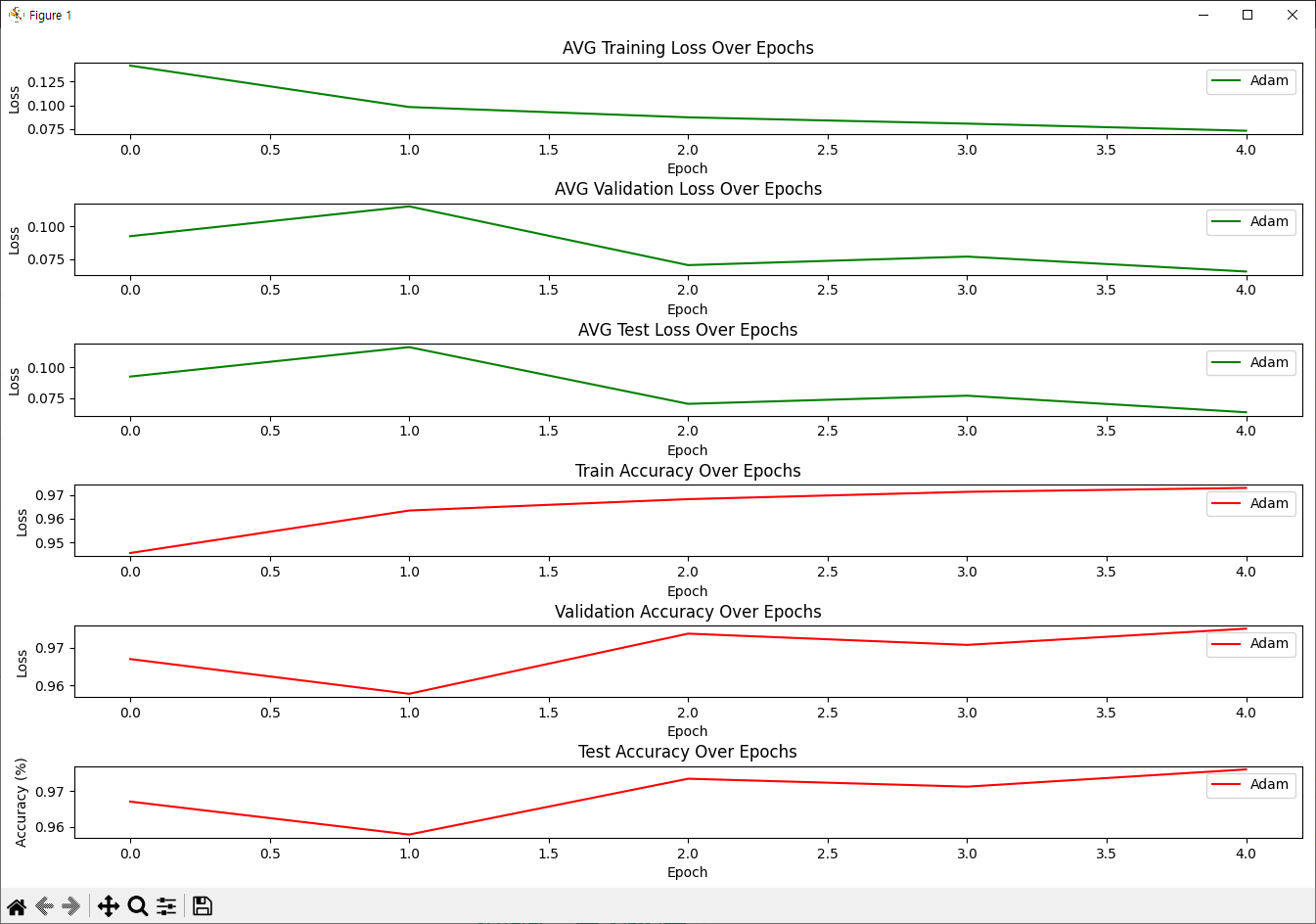
#  학습 손실과 검증 정확도 그래프 그리기
plt.figure(figsize=(15,10))

# 학습 손실 그래프
plt.subplot(6,1,1)
plt.plot(train_loss_Adam, label='Adam',color='green')
plt.xlabel('Epoch')
plt.ylabel('Loss')
plt.title('AVG Training Loss Over Epochs')
plt.legend()


# 검증 손실 그래프
plt.subplot(6,1,2)
plt.plot(val_loss_Adam, label='Adam', color='green')
plt.xlabel('Epoch')
plt.ylabel('Loss')
plt.title('AVG Validation Loss Over Epochs')
plt.legend()


# 테스트 손실 그래프
plt.subplot(6,1,3)
plt.plot(test_loss_Adam, label='Adam', color='green')
plt.xlabel('Epoch')
plt.ylabel('Loss')
plt.title('AVG Test Loss Over Epochs')
plt.legend()


# 학습 정확도 그래프
plt.subplot(6,1,4)
plt.plot(train_acc_Adam, label='Adam', color='red')
plt.xlabel('Epoch')
plt.ylabel('Accuracy (%)')
plt.title('Train Accuracy Over Epochs')
plt.legend()


# 검증 정확도 그래프
plt.subplot(6,1,5)
plt.plot(val_acc_Adam, label='Adam', color='red')
plt.xlabel('Epoch')
plt.ylabel('Accuracy (%)')
plt.title('Validation Accuracy Over Epochs')
plt.legend()


# 테스트 정확도 그래프
plt.subplot(6,1,6)
plt.plot(test_acc_Adam, label='Adam', color='red')
plt.xlabel('Epoch')
plt.ylabel('Accuracy (%)')
plt.title('Test Accuracy Over Epochs')
plt.legend()


plt.tight_layout()
plt.show()
C:\Users\hi\Desktop\PS\python_lib\Scripts\python.exe C:\Users\hi\PycharmProjects\DeepVision_part\day2\quiz_part\quiz.py
Annotation file saved to train_annotations.json
Annotation file saved to test_annotations.json
[{'image_path': 'C:/Users/hi/PycharmProjects/DeepVision_part/day2/quiz_part/seg_train/seg_train\\buildings\\0.jpg', 'labels': ['buildings']}, {'image_path': 'C:/Users/hi/PycharmProjects/DeepVision_part/day2/quiz_part/seg_train/seg_train\\buildings\\10006.jpg', 'labels': ['buildings']}, {'image_path': 'C:/Users/hi/PycharmProjects/DeepVision_part/day2/quiz_part/seg_train/seg_train\\buildings\\1001.jpg', 'labels': ['buildings']}]
[{'image_path': 'C:/Users/hi/PycharmProjects/DeepVision_part/day2/quiz_part/seg_test/seg_test\\buildings\\20057.jpg', 'labels': ['buildings']}, {'image_path': 'C:/Users/hi/PycharmProjects/DeepVision_part/day2/quiz_part/seg_test/seg_test\\buildings\\20060.jpg', 'labels': ['buildings']}, {'image_path': 'C:/Users/hi/PycharmProjects/DeepVision_part/day2/quiz_part/seg_test/seg_test\\buildings\\20061.jpg', 'labels': ['buildings']}]
defaultdict(<class 'int'>, {'buildings': 2191, 'forest': 2271, 'glacier': 2404, 'mountain': 2512, 'sea': 2274, 'street': 2382})
데이터 개수 : 14034
클래스 개수 : 6
tensor([0., 0., 0., 0., 1., 0.])
<PIL.Image.Image image mode=RGB size=150x150 at 0x1B9F28CE310>
학습 데이터 개수 : 12630
검증 데이터 개수 : 1404
C:\Users\hi\Desktop\PS\python_lib\lib\site-packages\torchvision\models\_utils.py:208: UserWarning: The parameter 'pretrained' is deprecated since 0.13 and may be removed in the future, please use 'weights' instead.
warnings.warn(
C:\Users\hi\Desktop\PS\python_lib\lib\site-packages\torchvision\models\_utils.py:223: UserWarning: Arguments other than a weight enum or `None` for 'weights' are deprecated since 0.13 and may be removed in the future. The current behavior is equivalent to passing `weights=VGG16_Weights.IMAGENET1K_V1`. You can also use `weights=VGG16_Weights.DEFAULT` to get the most up-to-date weights.
warnings.warn(msg)
VGG(
(features): Sequential(
(0): Conv2d(3, 64, kernel_size=(3, 3), stride=(1, 1), padding=(1, 1))
(1): ReLU(inplace=True)
(2): Conv2d(64, 64, kernel_size=(3, 3), stride=(1, 1), padding=(1, 1))
(3): ReLU(inplace=True)
(4): MaxPool2d(kernel_size=2, stride=2, padding=0, dilation=1, ceil_mode=False)
(5): Conv2d(64, 128, kernel_size=(3, 3), stride=(1, 1), padding=(1, 1))
(6): ReLU(inplace=True)
(7): Conv2d(128, 128, kernel_size=(3, 3), stride=(1, 1), padding=(1, 1))
(8): ReLU(inplace=True)
(9): MaxPool2d(kernel_size=2, stride=2, padding=0, dilation=1, ceil_mode=False)
(10): Conv2d(128, 256, kernel_size=(3, 3), stride=(1, 1), padding=(1, 1))
(11): ReLU(inplace=True)
(12): Conv2d(256, 256, kernel_size=(3, 3), stride=(1, 1), padding=(1, 1))
(13): ReLU(inplace=True)
(14): Conv2d(256, 256, kernel_size=(3, 3), stride=(1, 1), padding=(1, 1))
(15): ReLU(inplace=True)
(16): MaxPool2d(kernel_size=2, stride=2, padding=0, dilation=1, ceil_mode=False)
(17): Conv2d(256, 512, kernel_size=(3, 3), stride=(1, 1), padding=(1, 1))
(18): ReLU(inplace=True)
(19): Conv2d(512, 512, kernel_size=(3, 3), stride=(1, 1), padding=(1, 1))
(20): ReLU(inplace=True)
(21): Conv2d(512, 512, kernel_size=(3, 3), stride=(1, 1), padding=(1, 1))
(22): ReLU(inplace=True)
(23): MaxPool2d(kernel_size=2, stride=2, padding=0, dilation=1, ceil_mode=False)
(24): Conv2d(512, 512, kernel_size=(3, 3), stride=(1, 1), padding=(1, 1))
(25): ReLU(inplace=True)
(26): Conv2d(512, 512, kernel_size=(3, 3), stride=(1, 1), padding=(1, 1))
(27): ReLU(inplace=True)
(28): Conv2d(512, 512, kernel_size=(3, 3), stride=(1, 1), padding=(1, 1))
(29): ReLU(inplace=True)
(30): MaxPool2d(kernel_size=2, stride=2, padding=0, dilation=1, ceil_mode=False)
)
(avgpool): AdaptiveAvgPool2d(output_size=(7, 7))
(classifier): Sequential(
(0): Linear(in_features=25088, out_features=4096, bias=True)
(1): ReLU(inplace=True)
(2): Dropout(p=0.5, inplace=False)
(3): Linear(in_features=4096, out_features=4096, bias=True)
(4): ReLU(inplace=True)
(5): Dropout(p=0.5, inplace=False)
(6): Linear(in_features=4096, out_features=6, bias=True)
)
)
Epoch [1/5] Train Loss: 0.1419, Train Acc: 0.9455 | Val Loss: 0.0925, Val Acc: 0.9670 | Test Loss: 0.0926, Test Acc: 0.9670
Epoch [2/5] Train Loss: 0.0982, Train Acc: 0.9634 | Val Loss: 0.1153, Val Acc: 0.9578 | Test Loss: 0.1164, Test Acc: 0.9578
Epoch [3/5] Train Loss: 0.0872, Train Acc: 0.9682 | Val Loss: 0.0704, Val Acc: 0.9738 | Test Loss: 0.0705, Test Acc: 0.9734
Epoch [4/5] Train Loss: 0.0806, Train Acc: 0.9712 | Val Loss: 0.0769, Val Acc: 0.9708 | Test Loss: 0.0771, Test Acc: 0.9712
Epoch [5/5] Train Loss: 0.0730, Train Acc: 0.9729 | Val Loss: 0.0655, Val Acc: 0.9751 | Test Loss: 0.0636, Test Acc: 0.9760
C:\Users\hi\PycharmProjects\DeepVision_part\day2\quiz_part\quiz.py:349: FutureWarning: You are using `torch.load` with `weights_only=False` (the current default value), which uses the default pickle module implicitly. It is possible to construct malicious pickle data which will execute arbitrary code during unpickling (See https://github.com/pytorch/pytorch/blob/main/SECURITY.md#untrusted-models for more details). In a future release, the default value for `weights_only` will be flipped to `True`. This limits the functions that could be executed during unpickling. Arbitrary objects will no longer be allowed to be loaded via this mode unless they are explicitly allowlisted by the user via `torch.serialization.add_safe_globals`. We recommend you start setting `weights_only=True` for any use case where you don't have full control of the loaded file. Please open an issue on GitHub for any issues related to this experimental feature.
model.load_state_dict(torch.load(model_save_path, map_location='cpu'))

+AI to AI+