음성파일 정규화 + STT
0. Summary

음성 데이터 STT 검수 자동화 요약
- 입력 설정: 구글 시트 URL 및 작업 대상 열(ID/URL) 지정
- 필터링: 결과값이 없는 행만 추출하여
work_queue 생성
- 정규화: Drive API로 다운로드 후, FFmpeg로 16k/Mono 규격 변환
- STT 실행: Whisper AI를 통해 음성을 텍스트로 추출
- 결과 기록: 변환된 텍스트를 시트에 자동 업데이트 및 로컬 파일 삭제
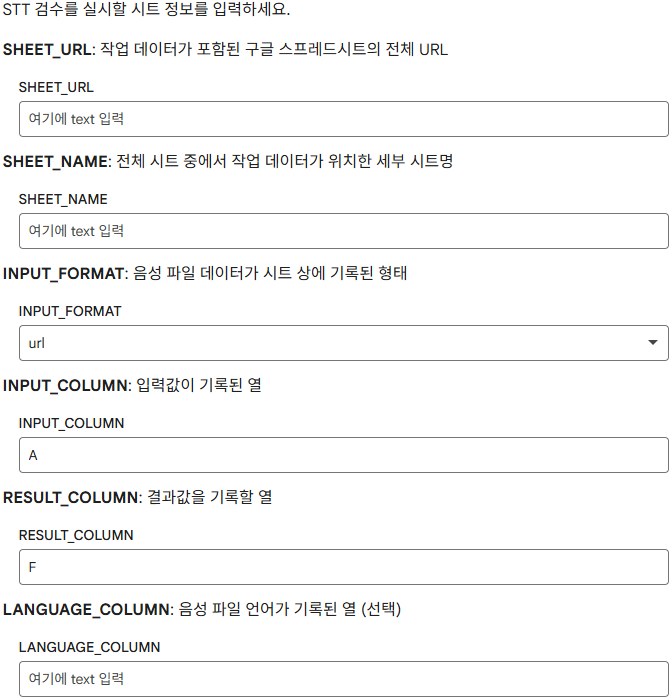
입력값
SHEET_URL
- 검수할 음성 파일
url 또는 드라이브 파일 id가 포함된 Google Sheet url
SHEET_NAME
- 전체 시트에서 작업 데이터가 위치한 세부 시트명
- 여러 시트를 포함하고 있는 경우 특정 시트를 찾아 검수 대상으로 선정
- 음성 파일
url 또는 드라이브 파일 id가 기록된 열 이름
RESULT_COLUMN
(선택) LANGUAGE_COLUMN
- STT시 모델이 언어를 자동 감지하도록 하려면 미입력
- STT시 해당 음성에 대한 언어가 미리 정해져 있어, 이를 입력값에 포함하려면 열 이름 입력
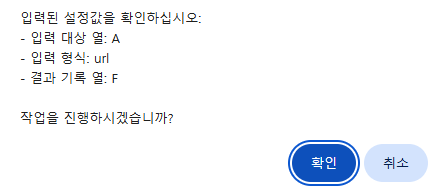
확인 메시지 창
예시 이미지
실행 코드
from google.colab import output
import sys
# @title ⚠️ 설정값 최종 확인
confirm_msg = f"""
입력된 설정값을 확인하십시오:
- 입력 대상 열: {INPUT_COLUMN}
- 입력 형식: {INPUT_FORMAT}
- 결과 기록 열: {RESULT_COLUMN}
작업을 진행하시겠습니까?
"""
# 자바스크립트 confirm 창 호출
js_msg = confirm_msg.strip().replace('\n', '\\n').replace('"', '\\"')
# 자바스크립트 confirm 창 호출
res = output.eval_js(f'confirm("{js_msg}")')
if not res:
    print("🚫 사용자에 의해 작업이 중단되었습니다.")
    # 이후 셀들이 실행되지 않도록 에러를 발생시키거나 흐름 제어
    raise SystemExit("작업 중단")
else:
    print("✅ 확인 완료. 작업을 시작합니다.")
- 실행 전 입력된 설정값을 확인창으로 전시해, 사전에 입력값을 한번 더 확인하도록 함
helper 함수 세팅
column_to_index(col_str)
# 열 문자(A, B, C...)를 인덱스 숫자(0, 1, 2...)로 변환하는 유틸리티
def column_to_index(col_str):
    if(col_str == ""): return -1

    col_str = col_str.upper()
    index = 0
    for char in col_str:
        index = index * 26 + (ord(char) - ord('A') + 1)
    return index - 1
INPUT_COLUMN과 RESULT_COLUMN 등을 열 문자로 입력하므로, 이를 숫자로 변환하는 함수A,B,C~X,Y,Z까지만 대응 (AA, AB, AC~ 등 이후 열 문자에는 대응하지 못함)
get_sheet_data(url, sheet_name)
def get_sheet_data(url, sheet_name):
    """지정한 URL과 시트명으로 데이터를 로드합니다."""
    sh = gc.open_by_url(url)
    worksheet = sh.worksheet(sheet_name)
    # 셀의 수식(Formula)까지 가져와서 RichText 링크를 추출할 수 있게 함
    data = worksheet.get_all_values(value_render_option='FORMULA')
    return worksheet, data
- 입력한
SHEET_URL과 SHEET_NAME을 통해 데이터 로드
RichText를 추출해 내부에 포함된 링크까지 추출할 수 있게 함
get_file_id(url), get_url(rich_text)
def get_file_id(url):
    """URL에서 구글 드라이브 파일 ID 추출"""
    match = re.search(r'[-\w]{25,}', str(url))
    return match.group(0) if match else None

def get_url(rich_text):
    """Rich Text에서 구글 파일 공유 url 추출"""
    match = re.search(r'HYPERLINK\("(.*?)",', str(rich_text))
    return match
get_file_id(url) : 파일 id만 있으면 드라이브 상의 파일에 접근할 수 있으므로, url에서 파일 id를 추출하는 함수 get_url(rich_text) : Rich Text에서 파일 url 추출
def extract_clean_id(cell_content):
    """
    URL, ID, Formula(RichText) 등 다양한 형태에서 순수 파일 ID만 추출합니다.
    INPUT_FORMAT의 값이 ID, URL, Rich_Text 인지에 따라 구분
    """
    if not cell_content:
        return None

    #1. 입력 형식에 따라 cell_content 처리 분기
    file_id = ""

    if(INPUT_FORMAT == "id"):
      file_id = cell_content
    elif(INPUT_FORMAT == "url"):
      file_id = get_file_id(cell_content)
    elif(INPUT_FORMAT == "rich_text"):
      file_id = get_file_id(get_url(cell_content))
    return file_id
INPUT_FORMAT 값에 따라 셀 값에서 순수 파일 id를 추출
2. Load Sheet & Filtering
작업 대상 불러오기
#@title 📊 Google Sheet 연결 및 ID 추출 로직
from google.colab import auth
import gspread
from google.auth import compute_engine
from google.colab import drive
import unicodedata
import re

# 구글 계정 인증 (시트 및 드라이브 접근 권한)
auth.authenticate_user()
from google.auth import default
creds, _ = default()
gc = gspread.authorize(creds)

# 시트 로드 실행
try:
    ws, all_rows = get_sheet_data(SHEET_URL, SHEET_NAME)
    print(f"✅ 시트 로드 완료: {len(all_rows)}개의 행을 발견했습니다.")
except Exception as e:
    print(f"❌ 시트 로드 실패: {e}")
- 시트 불러오기 및 작업물 개수(행 개수) 확인
작업 대상 필터링
#@title 📥 작업 대상 필터링
# 1. 설정된 열 문자를 인덱스로 변환
input_idx = column_to_index(INPUT_COLUMN)
result_idx = column_to_index(RESULT_COLUMN)
lang_idx = column_to_index(LANGUAGE_COLUMN)

# 작업을 수행할 데이터 객체들을 담을 리스트
work_queue = []

print(f"🔍 '{INPUT_COLUMN}'열에서 ID 추출 및 '{RESULT_COLUMN}'열 결과 확인 중...")

# all_rows 순회(헤더 건너뛰기 설정)
for i, row in enumerate(all_rows[1:]):
    try:
        # 1. 기존 결과값이 있는지 확인 (중복 작업 방지)
        # 행의 길이가 결과 열 인덱스보다 짧거나, 해당 셀이 비어있어야만 작업 대상으로 분류
        has_result = len(row) > result_idx and str(row[result_idx]).strip() != ""

        if has_result:
            # 이미 결과가 있는 행은 건너뜁니다.
            continue

        # 2. 입력 열에서 ID 추출
        if len(row) > input_idx:
            cell_val = row[input_idx]
            clean_id = extract_clean_id(cell_val)

            if clean_id:
              # 해당 행의 언어 설정 값 확인
              spec_lang = None

              if(lang_idx < 0): spec_lang = None
              elif (len(row) > lang_idx):
                val = str(row[lang_idx]).strip().lower()
                # 값이 비어있지 않다면 해당 값을 사용 (예: "ko", "en", "ja")
                spec_lang = val if val else None

        print(spec_lang)

        work_queue.append({
            "row_index": i + 2,
            "file_id": clean_id,
            "local_path": "",
            "stt_result": "",
            "language": spec_lang  # 언어 설정값 저장 (없으면 None)
            })

    except Exception as e:
        print(f"⚠️ {i+1}행 데이터 확인 중 오류 발생: {e}")

print(f"✅ 필터링 완료: 총 {len(work_queue)}개의 새로운 작업이 예약되었습니다.")
작업물 객체 구조
{
"row_index": i + 2,
"file_id": clean_id,
"local_path": "",
"stt_result": "",
"language": spec_lang  # 언어 설정값 저장 (없으면 None)
}
row_index : 작업물이 위치한 행 번호, 향후 결과물 기록시 동일한 행에 기록file_id : Rich Text, url 등에서 추출된 파일 idlocal_path : 음성 파일 다운로드 후 저장한 로컬 파일 경로stt_result : Whisper AI를 통해 STT한 결과language : 음성 파일 언어 입력값 (없을 경우 None)
작업대상 필터링
        # 1. 기존 결과값이 있는지 확인 (중복 작업 방지)
        # 행의 길이가 결과 열 인덱스보다 짧거나, 해당 셀이 비어있어야만 작업 대상으로 분류
        has_result = len(row) > result_idx and str(row[result_idx]).strip() != ""

        if has_result:
            # 이미 결과가 있는 행은 건너뜁니다.
            continue
RESULT_COLUMN에 값이 없는 경우에만 작업 대상으로 선정해, 처리해야할 음성 파일 개수를 줄임- 작업 대상으로 선정된 행에서 필요한 값을 추출해
work_queue에 추가
3. Download & Normalize
음성파일 다운로드
Google 드라이브 세팅
#@title 📁 작업용 드라이브 환경 세팅
#@markdown 작업용 임시 디렉토리 및 드라이브 api 서비스 빌드
import os
import subprocess
from googleapiclient.discovery import build
from googleapiclient.http import MediaIoBaseDownload
import io

# 1. 작업용 임시 디렉토리 생성
TEMP_DIR = "stt_workspace"
os.makedirs(TEMP_DIR, exist_ok=True)

# Drive API 서비스 빌드 (이미 인증된 서비스 객체가 있다고 가정)
drive_service = build('drive', 'v3', credentials=creds)
- 작업용 임시 디렉토리를 생성해 작업 대상인 음성 파일을 다운로드 및 저장할 공간으로 사용
다운로드 및 변환
# @title 🎙️음성 파일 다운로드 및 변환

print(f"🚀 총 {len(work_queue)}개의 작업에 대한 파일 처리를 시작합니다.")

for task in work_queue:
    file_id = task['file_id']
    row_num = task['row_index']

    # 임시 파일 경로 설정
    download_path = os.path.join(TEMP_DIR, f"temp_{file_id}")
    output_path = os.path.join(TEMP_DIR, f"audio_{row_num}.wav")

    try:
        # A. 구글 드라이브에서 파일 다운로드
        request = drive_service.files().get_media(fileId=file_id)
        fh = io.FileIO(download_path, 'wb')
        downloader = MediaIoBaseDownload(fh, request)

        done = False
        while done is False:
            status, done = downloader.next_chunk()

        # B. FFmpeg를 이용한 포맷 변환 (Whisper 권장 사양: 16k, mono)
        # -y: 기존 파일 덮어쓰기, -ar: 샘플링 레이트, -ac: 채널 수
        command = [
            'ffmpeg', '-y', '-i', download_path,
            '-ar', '16000', '-ac', '1',
            output_path
        ]

        # subprocess를 사용하여 ffmpeg 실행
        result = subprocess.run(command, capture_output=True, text=True)

        if result.returncode == 0:
            # 성공 시 객체 업데이트
            task['local_path'] = output_path
            print(f"✅ [행 {row_num}] 변환 완료: {output_path}")
        else:
            print(f"❌ [행 {row_num}] FFmpeg 오류: {result.stderr}")

        # 다운로드한 원본 임시 파일 삭제 (용량 관리)
        if os.path.exists(download_path):
            os.remove(download_path)

    except Exception as e:
        print(f"❌ [행 {row_num}] 처리 중 예외 발생: {e}")

print("\n📦 모든 파일 다운로드 및 변환 공정 완료.")
work_queue를 순회하며 작업 대상을 다운로드 및 변환하고, 객체에 값을 설정
다운로드
for task in work_queue:
    file_id = task['file_id']
    row_num = task['row_index']

    # 임시 파일 경로 설정
    download_path = os.path.join(TEMP_DIR, f"temp_{file_id}")
    output_path = os.path.join(TEMP_DIR, f"audio_{row_num}.wav")

    try:
        # A. 구글 드라이브에서 파일 다운로드
        request = drive_service.files().get_media(fileId=file_id)
        fh = io.FileIO(download_path, 'wb')
        downloader = MediaIoBaseDownload(fh, request)

        done = False
        while done is False:
            status, done = downloader.next_chunk()

        ...
파일 id를 통해 드라이브 상에 업로드되어 있는 음성 파일에 접근하고, 이를 다운로드 한 뒤, 행 번호를 통해 파일을 네이밍
형식 변환
		...

        # B. FFmpeg를 이용한 포맷 변환 (Whisper 권장 사양: 16k, mono)
        # -y: 기존 파일 덮어쓰기, -ar: 샘플링 레이트, -ac: 채널 수
        command = [
            'ffmpeg', '-y', '-i', download_path,
            '-ar', '16000', '-ac', '1',
            output_path
        ]

        # subprocess를 사용하여 ffmpeg 실행
        result = subprocess.run(command, capture_output=True, text=True)

        if result.returncode == 0:
            # 성공 시 객체 업데이트
            task['local_path'] = output_path
            print(f"✅ [행 {row_num}] 변환 완료: {output_path}")
        else:
            print(f"❌ [행 {row_num}] FFmpeg 오류: {result.stderr}")

        # 다운로드한 원본 임시 파일 삭제 (용량 관리)
        if os.path.exists(download_path):
            os.remove(download_path)
ffmpeg를 사용해 16k, mono, PCM 사양에 맞춰 음성 파일을 변환해, 이전에 발생했던 입력 형식 오류를 방지output_path를 객체에 저장하고, 기존 원본 음성파일을 삭제
4. STT
STT 실행
#@title 🎧 Whisper 사용 STT 실행

import whisper
import torch

# 모델 로드 (다중 언어 대응을 위해 turbo 또는 large-v3 권장)
model = whisper.load_model("turbo")

print(f"🎙️ 총 {len(work_queue)}개 작업에 대해 STT를 시작합니다.")

for task in work_queue:
    audio_path = task.get('local_path')
    target_lang = task.get('language') # 시트에서 가져온 언어 값 (None일 수 있음)

    if audio_path and os.path.exists(audio_path):
        try:


            # 로그 출력: 언어 설정 여부에 따른 메시지 차별화
            has_language = target_lang is not None

            if(has_language):
              log_msg = f"🌐 언어 지정({target_lang})"
              result = model.transcribe(
                audio_path,
                language=target_lang,
                task="transcribe",
                beam_size=5,
                fp16=True if torch.cuda.is_available() else False)
            else:
              log_msg = "🔍 언어 자동 감지"
              result = model.transcribe(
                audio_path,
                task="transcribe",
                beam_size=5,
                fp16=True if torch.cuda.is_available() else False)

            print(f"📝 [행 {task['row_index']}] {log_msg} 처리 중...")

            task['stt_result'] = result['text'].strip()

            # 파일 관리: 변환 완료 후 로컬 파일 삭제
            os.remove(audio_path)

        except Exception as e:
            print(f"❌ [행 {task['row_index']}] STT 오류: {e}")
            task['stt_result'] = f"ERROR: {str(e)}"
work_queue에 저장된 작업 대상의 STT 실행language값이 있는지, 없는지를 구분하여 실행- STT 결과물 출력 후 로컬의 음성파일 삭제
결과물 기록
#@title 📝 Google Sheet에 기록

# RESULT_COLUMN을 인덱스로 변환 (예: "F" -> 6)
result_col_idx = column_to_index(RESULT_COLUMN) + 1

print(f"📊 '{RESULT_COLUMN}'열에 결과를 기록합니다...")

# gspread의 update_cell은 호출이 많으면 느려지므로,
# 작업량이 많다면 범위를 지정해 한 번에 업데이트하는 것이 좋으나
# 여기서는 직관적인 row_index 기반 업데이트를 사용합니다.
success_count = 0

for task in work_queue:
    if task['stt_result']:
        try:
            # ws는 이전 단계에서 정의된 gspread 워크시트 객체
            ws.update_cell(task['row_index'], result_col_idx, task['stt_result'])
            success_count += 1
        except Exception as e:
            print(f"❌ [행 {task['row_index']}] 시트 기록 실패: {e}")

print(f"\n✅ 최종 완료: {success_count}개의 결과가 시트에 반영되었습니다.")
work_queue에 종합되어 있는 정보를 통해 시트에 최종 결과물을 기록RESULT_COLUMN에 STT 결과를 기록
