음성파일 스크립트 일치도 검사
0. Summary
음성 데이터 일치도 검사 요약
- 설정: STT 결과, 정답 스크립트, 점수 기록 열 지정 및 시트 연결
- 필터링: 점수가 없고 비교 데이터(STT/스크립트)가 모두 있는 행만 추출
- 전처리: 정규표현식을 활용해 특수문자와 공백을 제거하여 데이터 정제
- 채점: Levenshtein Distance 기반 편집 거리 계산 및 100점 환산
- 기록: 계산된 일치도 점수를 구글 시트에 자동 업데이트하여 완료
1. 입력값 설정
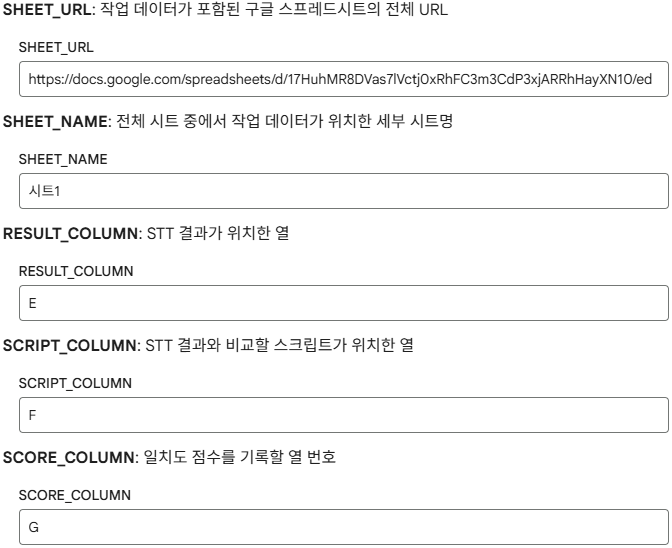
입력값
SHEET_URL
- 검수할 음성 파일
url 또는 드라이브 파일 id가 포함된 Google Sheet url
SHEET_NAME
- 전체 시트에서 작업 데이터가 위치한 세부 시트명
- 여러 시트를 포함하고 있는 경우 특정 시트를 찾아 검수 대상으로 선정
RESULT_COLUMN
SCRIPT_COLUMN
- STT 결과물과 비교할 정답 스크립트가 위치한 열 문자
SCORE_COLUMN
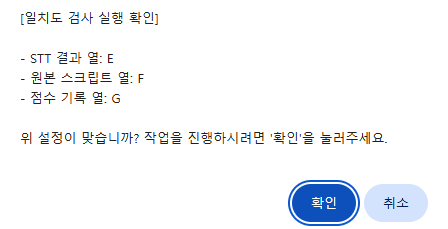
확인 메시지 창
예시 이미지
실행 코드
from google.colab import output
import sys

# @title ⚠️ 설정값 최종 확인
confirm_msg = f"""[일치도 검사 실행 확인]

- STT 결과 열: {RESULT_COLUMN}
- 원본 스크립트 열: {SCRIPT_COLUMN}
- 점수 기록 열: {SCORE_COLUMN}

위 설정이 맞습니까? 작업을 진행하시려면 '확인'을 눌러주세요."""

# 파이썬의 줄바꿈(\n)을 자바스크립트 문자열 내 줄바꿈(\\n)으로 변환
# 또한 따옴표 충돌을 방지하기 위해 replace 처리
js_msg = confirm_msg.strip().replace('\n', '\\n').replace('"', '\\"')

# 자바스크립트 confirm 창 호출
res = output.eval_js(f'confirm("{js_msg}")')

if not res:
    print("🚫 사용자에 의해 작업이 중단되었습니다.")
    # 이후 셀들이 실행되지 않도록 에러를 발생시키거나 흐름 제어
    raise SystemExit("작업 중단")
else:
    print("✅ 확인 완료. 작업을 시작합니다.")
2. 작업 시트 불러오기
Google Sheet 연결
#@title 📊 Google Sheet 연결
from google.colab import auth
import gspread
from google.auth import compute_engine
from google.colab import drive
import unicodedata
import re

# 구글 계정 인증 (시트 및 드라이브 접근 권한)
auth.authenticate_user()
from google.auth import default
creds, _ = default()
gc = gspread.authorize(creds)

# 시트 로드 실행
try:
    ws, all_rows = get_sheet_data(SHEET_URL, SHEET_NAME)
    print(f"✅ 시트 로드 완료: {len(all_rows)}개의 행을 발견했습니다.")
except Exception as e:
    print(f"❌ 시트 로드 실패: {e}")
3. 일치도 검사
대상 필터링
#title 📥 작업 대상 필터링
# @title 📥 일치도 검사 대상 필터링
# 1. 설정된 열 문자를 인덱스로 변환
result_idx = column_to_index(RESULT_COLUMN)   # STT 결과 열
script_idx = column_to_index(SCRIPT_COLUMN)   # 원본 스크립트 열
score_idx = column_to_index(SCORE_COLUMN)     # 일치도 점수 기록 열

# 일치도 검사를 수행할 데이터 객체들을 담을 리스트
comparison_queue = []

print(f"🔍 '{SCORE_COLUMN}'열을 확인하여 미작업 대상을 필터링합니다...")

# all_rows 순회 (헤더 제외: [1:])
for i, row in enumerate(all_rows[1:]):
    try:
        # 1. 기존 점수가 있는지 확인 (중복 작업 방지)
        # 행의 길이가 점수 열 인덱스보다 짧거나, 해당 셀이 비어있어야만 작업 대상으로 분류
        has_score = len(row) > score_idx and str(row[score_idx]).strip() != ""

        if has_score:
            # 이미 점수가 기록된 행은 건너뜁니다.
            continue

        # 2. 비교에 필요한 데이터(STT 결과, 원본 스크립트)가 모두 존재하는지 확인
        if len(row) > max(result_idx, script_idx):
            stt_text = str(row[result_idx]).strip()
            script_text = str(row[script_idx]).strip()

            # 두 데이터 중 하나라도 비어있으면 비교가 불가능하므로 제외
            if stt_text and script_text:
                comparison_queue.append({
                    "row_index": i + 2,     # 시트의 실제 행 번호 (1-based + header)
                    "stt_text": stt_text,
                    "script_text": script_text
                })

    except Exception as e:
        print(f"⚠️ {i+2}행 데이터 확인 중 오류 발생: {e}")

print(f"✅ 필터링 완료: 총 {len(comparison_queue)}개의 일치도 검사 작업이 예약되었습니다.")
Score 열 확인
has_score = len(row) > score_idx and str(row[score_idx]).strip() != ""
- 점수 열에 이미 값이 있는 경우 작업이 이미 이루어진 것으로 보고 작업 대상에서 제외
필요 데이터 존재 여부 확인
# 두 데이터 중 하나라도 비어있으면 비교가 불가능하므로 제외
if stt_text and script_text:
	comparison_queue.append({
	"row_index": i + 2,     # 시트의 실제 행 번호 (1-based + header)
	"stt_text": stt_text,
	"script_text": script_text
})
- STT 결과와 정답 스크립트 둘 다 있어야 비교 가능하므로, 둘 중 하나라도 누락된 경우 작업 대상에서 제외
스크립트 일치도 측정
#@title 💯 스크립트 일치도 측정
import re

def python_levenshtein(s1, s2):
    """자바스크립트 levenshtein 함수를 파이썬으로 변환"""
    if len(s1) < len(s2):
        return python_levenshtein(s2, s1)

    if len(s2) == 0:
        return len(s1)

    previous_row = range(len(s2) + 1)
    for i, c1 in enumerate(s1):
        current_row = [i + 1]
        for j, c2 in enumerate(s2):
            insertions = previous_row[j + 1] + 1
            deletions = current_row[j] + 1
            substitutions = previous_row[j] + (c1 != c2)
            current_row.append(min(insertions, deletions, substitutions))
        previous_row = current_row

    return previous_row[-1]

def calculate_score(stt_text, script_text):
    """텍스트 전처리 후 일치도 점수(0~100) 계산"""
    # 1. 전처리: 공백 제거 및 소문자화 (정확한 비교를 위해 필요 시 선택)
    s1 = re.sub(r'[^가-힣a-zA-Z0-9]', '', stt_text)
    s2 = re.sub(r'[^가-힣a-zA-Z0-9]', '', script_text)

    if not s1 and not s2: return 100.0

    # 2. 편집 거리 계산
    distance = python_levenshtein(s1, s2)

    # 3. 점수 변환 (최대 길이 대비 일치율)
    max_len = max(len(s1), len(s2))
    score = (1 - distance / max_len) * 100
    return round(score, 2)

# --- 실제 작업 진행 ---
print(f"🚀 총 {len(comparison_queue)}건의 점수 채점을 시작합니다.")

for task in comparison_queue:
    try:
        # 점수 계산
        score = calculate_score(task['stt_text'], task['script_text'])

        # 구글 시트에 업데이트 (row_index는 1-based)
        # SCORE_COLUMN 문자를 인덱스로 변환하여 업데이트
        ws.update_cell(task['row_index'], column_to_index(SCORE_COLUMN) + 1, score)

        print(f"✅ {task['row_index']}행 채점 완료: {score}점")

    except Exception as e:
        print(f"❌ {task['row_index']}행 처리 중 오류 발생: {e}")

print("✨ 모든 작업이 완료되었습니다.")
levenshtein 함수
def python_levenshtein(s1, s2):
    """자바스크립트 levenshtein 함수를 파이썬으로 변환"""
    if len(s1) < len(s2):
        return python_levenshtein(s2, s1)

    if len(s2) == 0:
        return len(s1)

    previous_row = range(len(s2) + 1)
    for i, c1 in enumerate(s1):
        current_row = [i + 1]
        for j, c2 in enumerate(s2):
            insertions = previous_row[j + 1] + 1
            deletions = current_row[j] + 1
            substitutions = previous_row[j] + (c1 != c2)
            current_row.append(min(insertions, deletions, substitutions))
        previous_row = current_row

    return previous_row[-1]
- 기존 GAS 환경에서 사용하던 편집 거리 기반 일치도 측정 함수를 파이썬으로 변환
점수 계산
def calculate_score(stt_text, script_text):
    """텍스트 전처리 후 일치도 점수(0~100) 계산"""
    # 1. 전처리: 공백 제거 및 소문자화 (정확한 비교를 위해 필요 시 선택)
    s1 = re.sub(r'[^가-힣a-zA-Z0-9]', '', stt_text)
    s2 = re.sub(r'[^가-힣a-zA-Z0-9]', '', script_text)

    if not s1 and not s2: return 100.0

    # 2. 편집 거리 계산
    distance = python_levenshtein(s1, s2)

    # 3. 점수 변환 (최대 길이 대비 일치율)
    max_len = max(len(s1), len(s2))
    score = (1 - distance / max_len) * 100
    return round(score, 2)
- 텍스트 전처리 후 스크립트와 STT 결과를 비교해 일치도를 점수로 표현
결과 기록
for task in comparison_queue:
    try:
        # 점수 계산
        score = calculate_score(task['stt_text'], task['script_text'])

        # 구글 시트에 업데이트 (row_index는 1-based)
        # SCORE_COLUMN 문자를 인덱스로 변환하여 업데이트
        ws.update_cell(task['row_index'], column_to_index(SCORE_COLUMN) + 1, score)

        print(f"✅ {task['row_index']}행 채점 완료: {score}점")

    except Exception as e:
        print(f"❌ {task['row_index']}행 처리 중 오류 발생: {e}")

print("✨ 모든 작업이 완료되었습니다.")
comparison_queue 내에 있는 스크립트와 STT 결과물을 채점 후 시트에 기록
