
Platform을 움직이기 위한 발판(충돌 트리거)을 만들고 이벤트 등록해보기
- Trigger를 밟는다면? (OnComponentBeginOverlap)
- Platform의 ActiveTriggers 수를 증가시킴- Tirgger에서 나온다면? (OnComponentEndOverlap)
- Platform의 ActiveTriggers 수를 감소시킴- 즉, ActiveTriggers의 수가 1 이상인 경우에만 발판이 움직이도록 구현
충돌 트리거 생성
-
Actor를 상속받은 PlatformTrigger 클래스를 생성하고 BoxComponent를 추가
// header
private:
    UPROPERTY(VisibleAnywhere, Category = "Collision", meta = (AllowPrivateAccess = "true"))
    class UBoxComponent* BoxComponent;

// cpp
#include "PlatformTrigger.h"
#include "Components/BoxComponent.h"

APlatformTrigger::APlatformTrigger()
{
    PrimaryActorTick.bCanEverTick = true;

    BoxComponent = CreateDefaultSubobject<UBoxComponent>(TEXT("BoxComponent"));
    if (!BoxComponent) return;

    RootComponent = BoxComponent;
}
- 생성한 클래스를 바탕으로 블루프린트 클래스를 생성하고 발판처럼 꾸미기
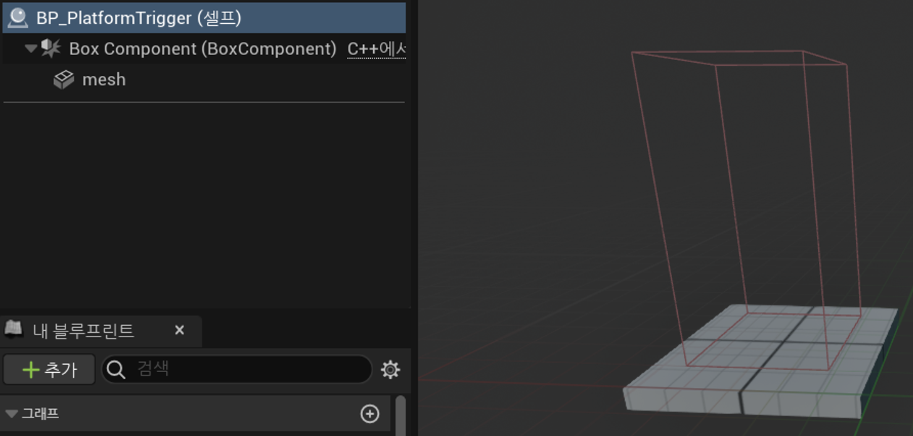
- 이벤트 등록하기 (콜백 함수)
콜백 함수란?
- 콜백 함수는 다른 함수의 인자로 전달되거나 어떤 이벤트가 발생할 때 호출되는 함수를 의미합니다.
- 언리얼에서 매핑할 함수는 항상 UFUNCTION() 매크로를 사용해야 합니다. (동적 이벤트)
	// header

	// 충돌 시작 이벤트 & 종료 이벤트
	private:
		UFUNCTION()
		void OnOverlapBegin(class UPrimitiveComponent* OverlappedComp, class AActor* OtherActor, class UPrimitiveComponent* OtherComp, int32 OtherBodyIndex, bool bFromSweep, const FHitResult& SweepResult);

		UFUNCTION()
		void OnOverlapEnd(class UPrimitiveComponent* OverlappedComp, class AActor* OtherActor, class UPrimitiveComponent* OtherComp, int32 OtherBodyIndex);

	// cpp
	#include "PlatformTrigger.h"
	#include "Components/BoxComponent.h"

	APlatformTrigger::APlatformTrigger()
	{
	 	PrimaryActorTick.bCanEverTick = true;

		BoxComponent = CreateDefaultSubobject<UBoxComponent>(TEXT("BoxComponent"));
		if (!BoxComponent) return;

		RootComponent = BoxComponent;

		// 이벤트 설정
		// * 충돌 시작 / 종료 이벤트 등록
		BoxComponent->OnComponentBeginOverlap.AddDynamic(this, &APlatformTrigger::OnOverlapBegin);
		BoxComponent->OnComponentEndOverlap.AddDynamic(this, &APlatformTrigger::OnOverlapEnd);
	}

	void APlatformTrigger::OnOverlapBegin(UPrimitiveComponent* OverlappedComp, AActor* OtherActor, UPrimitiveComponent* OtherComp, int32 OtherBodyIndex, bool bFromSweep, const FHitResult& SweepResult)
	{
		UE_LOG(LogTemp, Warning, TEXT("Activate"));
	}

	void APlatformTrigger::OnOverlapEnd(UPrimitiveComponent* OverlappedComp, AActor* OtherActor, UPrimitiveComponent* OtherComp, int32 OtherBodyIndex)
	{
		UE_LOG(LogTemp, Warning, TEXT("UnActivate"));
	}
- 충돌 이벤트가 정상적으로 호출되는 것을 확인 가능합니다.
충돌 트리거를 에디터 상에서 Platform과 연결해주기
에디터 상에서 설정 가능하도록 구조 변경하기
-
움직이는 발판에 활성/비활성화 변수를 선언하고 설정 함수를 만들어줍니다.
// header public: void AddActiveTrigger(); void RemoveActiveTrigger(); private: // 현재 활성화 된 트리거의 수 UPROPERTY(EditAnywhere, Category = "Trigger", meta = (AllowPrivateAccess = "true")) int32 ActiveTriggers = 1; -
위에서 생성한 충돌 트리거에 반응하는 발판들을 저장하기 위한 배열을 선언합니다.
// header private: // 트리거에 영향을 받을 플랫폼들 목록 UPROPERTY(EditAnywhere, Category = "Trigger", meta = (AllowPrivateAccess = "true")) TArray<class AMovingPlatforms> PlatformsToTrigger; -
충돌 트리거의 충돌 시작/종료 부분에 저장된 플랫폼들을 위한 로직을 추가합니다.
//cpp void APlatformTrigger::OnOverlapBegin(UPrimitiveComponent* OverlappedComp, AActor* OtherActor, UPrimitiveComponent* OtherComp, int32 OtherBodyIndex, bool bFromSweep, const FHitResult& SweepResult) { // 영향을 받을 플랫폼들을 순회합니다. for (AMovingPlatforms* Platform : PlatformsToTrigger) { // 활성화된 트리거의 수를 증가시켜줍니다. Platform->AddActiveTrigger(); } } void APlatformTrigger::OnOverlapEnd(UPrimitiveComponent* OverlappedComp, AActor* OtherActor, UPrimitiveComponent* OtherComp, int32 OtherBodyIndex) { for (AMovingPlatforms* Platform : PlatformsToTrigger) { // 활성화된 트리거의 수를 감소시켜줍니다. Platform->RemoveActiveTrigger(); } } -
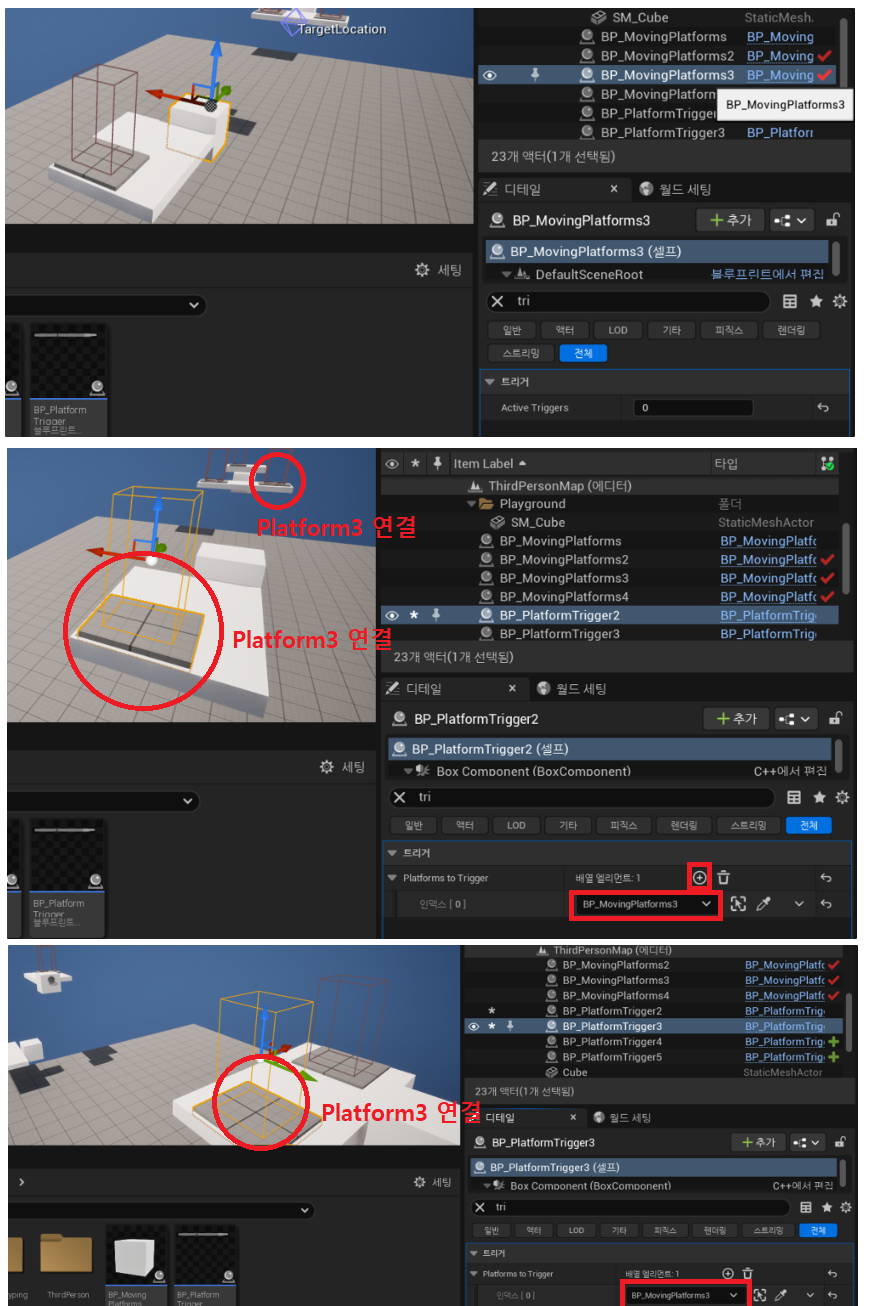
실제 에디터의 디테일 패널에서 Trigger에 Platform을 연결해줍니다.
실행 테스트
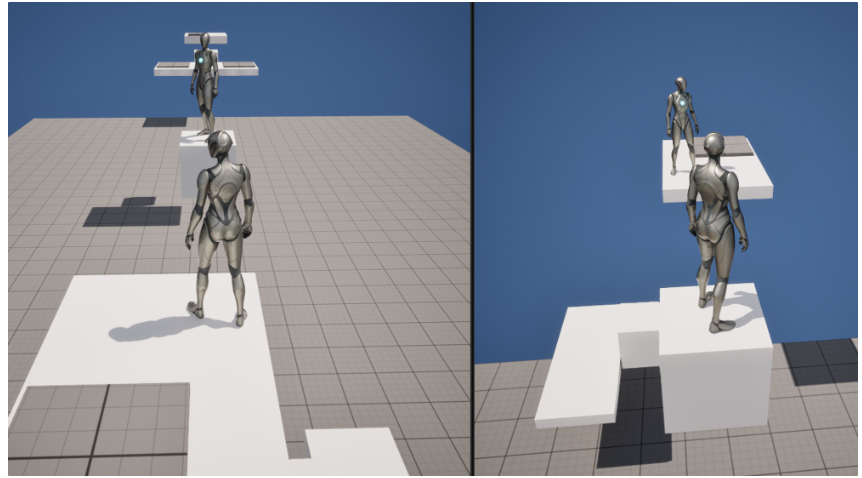
- 양측의 Trigger를 밟으면 사이 Platform이 움직이는 것을 확인할 수 있습니다.
- 위 로직을 사용해 간단한 멀티 플레이어 퍼즐 게임을 테스트 해봤습니다.
참고 강의

클라이언트 프로그래머 지망생