Sentiment Classification
Task
- IMDB 영화사이트에서 50000개의 영화평을 가지고 positive/negative인지 구분해보자.
- 데이터 불러오기를 제외한 딥러닝 트레이닝 과정을 직접 구현해보는 것이 목표 입니다.
Dataset
- IMDB datasets
Base code
- Dataset: train, val, test로 split
- Input data shape: (batch_size, max_sequence_length)
- Output data shape: (batch_size, 1)
- Architecture:
- RNN을 이용한 간단한 classification 모델 가이드
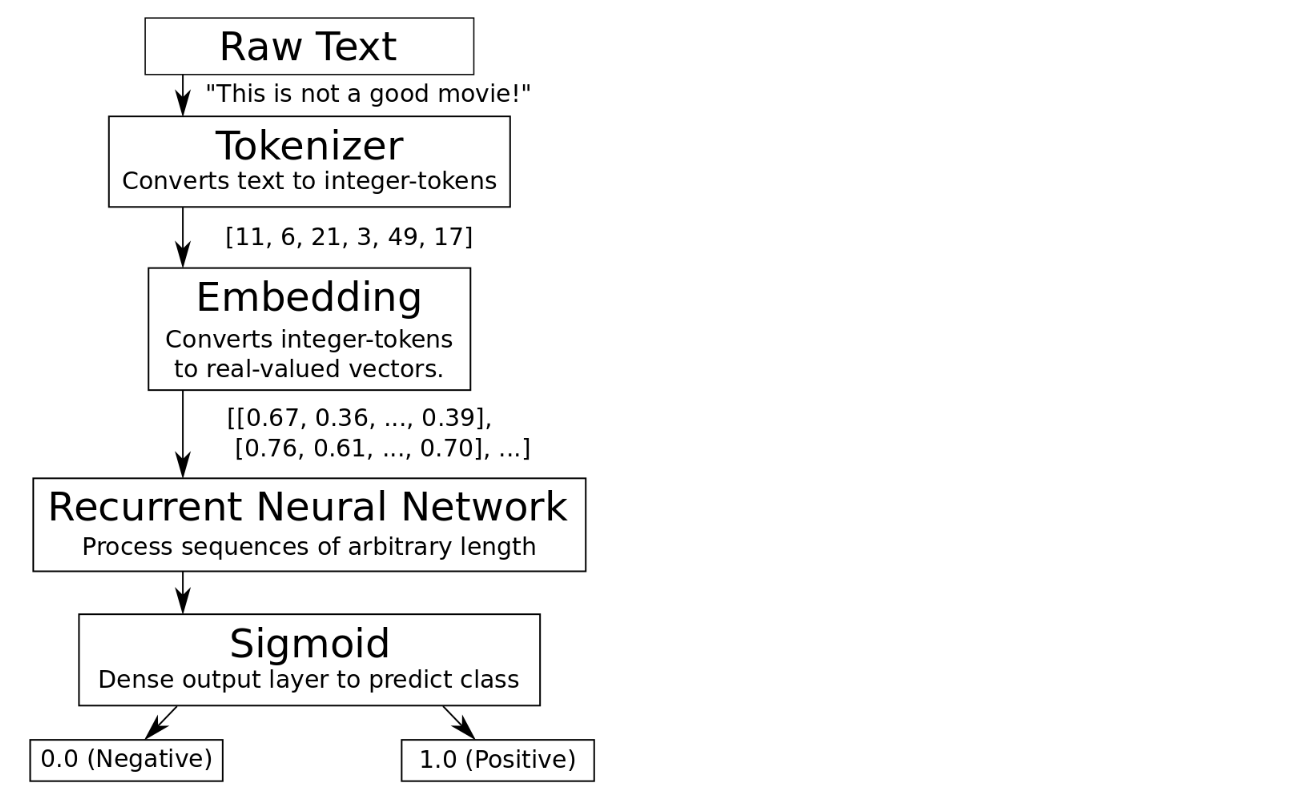
- Embedding - SimpleRNN - Dense (with Sigmoid)
- tf.keras.layers 사용
- Training
- model.fit 사용
- Evaluation
- model.evaluate 사용 for test dataset
Try some techniques
- Training-epochs 조절
- Change model architectures (Custom model)
- Use another cells (LSTM, GRU, etc.)
- Use dropout layers
- Embedding size 조절
- 또는 one-hot vector로 학습
- Number of words in the vocabulary 변화
- pad 옵션 변화
- Data augmentation (if possible)
자연어처리에 관한 work flow
The flowchart of the algorithm is roughly:
Import modules
use_colab = True
assert use_colab in [True, False]
from google.colab import drive
drive.mount('/content/drive')#Mounted at /content/drivefrom __future__ import absolute_import
from __future__ import division
from __future__ import print_function
from __future__ import unicode_literals
import os
import time
import shutil
import tarfile
import numpy as np
import matplotlib.pyplot as plt
%matplotlib inline
from IPython.display import clear_output
import tensorflow as tf
from tensorflow.keras import layers
os.environ["CUDA_VISIBLE_DEVICES"]="0"Load Data
- IMDB에서 다운받은 총 50000개의 영화평을 사용한다.
tf.keras.datasets에 이미 잘 가공된 데이터 셋이 있으므로 쉽게 다운받아 사용할 수 있다.- 원래는 text 데이터이지만
tf.keras.datasets.imdb는 이미 Tokenizing이 되어있다.
# Load training and eval data from tf.keras
imdb = tf.keras.datasets.imdb

(train_data, train_labels), (test_data, test_labels) = imdb.load_data(num_words=10000)
train_labels = train_labels.astype(np.float64)
test_labels = test_labels.astype(np.float64)
Downloading data from https://storage.googleapis.com/tensorflow/tf-keras-datasets/imdb.npz
17464789/17464789 [==============================] - 0s 0us/stepprint("Train-set size: ", len(train_data))
print("Test-set size: ", len(test_data))#Train-set size: 25000
#Test-set size: 25000Data 출력
- 데이터셋을 바로 불러왔을때 출력되는 데이터를 확인해보자
print(train_data[1])[1, 194, 1153, 194, 8255, 78, 228, 5, 6, 1463, 4369, 5012, 134, 26, 4, 715, 8, 118, 1634, 14, 394, 20, 13, 119, 954, 189, 102, 5, 207, 110, 3103, 21, 14, 69, 188, 8, 30, 23, 7, 4, 249, 126, 93, 4, 114, 9, 2300, 1523, 5, 647, 4, 116, 9, 35, 8163, 4, 229, 9, 340, 1322, 4, 118, 9, 4, 130, 4901, 19, 4, 1002, 5, 89, 29, 952, 46, 37, 4, 455, 9, 45, 43, 38, 1543, 1905, 398, 4, 1649, 26, 6853, 5, 163, 11, 3215, 2, 4, 1153, 9, 194, 775, 7, 8255, 2, 349, 2637, 148, 605, 2, 8003, 15, 123, 125, 68, 2, 6853, 15, 349, 165, 4362, 98, 5, 4, 228, 9, 43, 2, 1157, 15, 299, 120, 5, 120, 174, 11, 220, 175, 136, 50, 9, 4373, 228, 8255, 5, 2, 656, 245, 2350, 5, 4, 9837, 131, 152, 491, 18, 2, 32, 7464, 1212, 14, 9, 6, 371, 78, 22, 625, 64, 1382, 9, 8, 168, 145, 23, 4, 1690, 15, 16, 4, 1355, 5, 28, 6, 52, 154, 462, 33, 89, 78, 285, 16, 145, 95]print("sequence length: {}".format(len(train_data[1])))sequence length: 189- Label정보
- 0.0 for a negative sentiment
- 1.0 for a positive sentiment
# negative sample
index = 1
print("text: {}\n".format(train_data[index]))
print("label: {}".format(train_labels[index]))text: [1, 194, 1153, 194, 8255, 78, 228, 5, 6, 1463, 4369, 5012, 134, 26, 4, 715, 8, 118, 1634, 14, 394, 20, 13, 119, 954, 189, 102, 5, 207, 110, 3103, 21, 14, 69, 188, 8, 30, 23, 7, 4, 249, 126, 93, 4, 114, 9, 2300, 1523, 5, 647, 4, 116, 9, 35, 8163, 4, 229, 9, 340, 1322, 4, 118, 9, 4, 130, 4901, 19, 4, 1002, 5, 89, 29, 952, 46, 37, 4, 455, 9, 45, 43, 38, 1543, 1905, 398, 4, 1649, 26, 6853, 5, 163, 11, 3215, 2, 4, 1153, 9, 194, 775, 7, 8255, 2, 349, 2637, 148, 605, 2, 8003, 15, 123, 125, 68, 2, 6853, 15, 349, 165, 4362, 98, 5, 4, 228, 9, 43, 2, 1157, 15, 299, 120, 5, 120, 174, 11, 220, 175, 136, 50, 9, 4373, 228, 8255, 5, 2, 656, 245, 2350, 5, 4, 9837, 131, 152, 491, 18, 2, 32, 7464, 1212, 14, 9, 6, 371, 78, 22, 625, 64, 1382, 9, 8, 168, 145, 23, 4, 1690, 15, 16, 4, 1355, 5, 28, 6, 52, 154, 462, 33, 89, 78, 285, 16, 145, 95]
label: 0.0# positive sample
index = 200
print("text: {}\n".format(train_data[index]))
print("label: {}".format(train_labels[index]))text: [1, 14, 9, 6, 227, 196, 241, 634, 891, 234, 21, 12, 69, 6, 6, 176, 7, 4, 804, 4658, 2999, 667, 11, 12, 11, 85, 715, 6, 176, 7, 1565, 8, 1108, 10, 10, 12, 16, 1844, 2, 33, 211, 21, 69, 49, 2009, 905, 388, 99, 2, 125, 34, 6, 2, 1274, 33, 4, 130, 7, 4, 22, 15, 16, 6424, 8, 650, 1069, 14, 22, 9, 44, 4609, 153, 154, 4, 318, 302, 1051, 23, 14, 22, 122, 6, 2093, 292, 10, 10, 723, 8721, 5, 2, 9728, 71, 1344, 1576, 156, 11, 68, 251, 5, 36, 92, 4363, 133, 199, 743, 976, 354, 4, 64, 439, 9, 3059, 17, 32, 4, 2, 26, 256, 34, 2, 5, 49, 7, 98, 40, 2345, 9844, 43, 92, 168, 147, 474, 40, 8, 67, 6, 796, 97, 7, 14, 20, 19, 32, 2188, 156, 24, 18, 6090, 1007, 21, 8, 331, 97, 4, 65, 168, 5, 481, 53, 3084]
label: 1.0Prepare dataset
Convert the integers back to words
- 실제 우리가 다루고 있는 데이터가 진짜 리뷰데이터인지 확인해보자
# A dictionary mapping words to an integer index
word_index = imdb.get_word_index()

# The first indices are reserved
word_index = {k:(v+3) for k,v in word_index.items()}
word_index["<PAD>"] = 0
word_index["<START>"] = 1
word_index["<UNK>"] = 2  # unknown
word_index["<UNUSED>"] = 3

reverse_word_index = dict([(value, key) for (key, value) in word_index.items()])

def decode_review(text):
  return ' '.join([reverse_word_index.get(i, '?') for i in text])
Downloading data from https://storage.googleapis.com/tensorflow/tf-keras-datasets/imdb_word_index.json
1641221/1641221 [==============================] - 0s 0us/steplen(word_index)# 88588Text data 출력
print(train_data[5])#[1, 778, 128, 74, 12, 630, 163, 15, 4, 1766, 7982, 1051, 2, 32, 85, 156, 45, 40, 148, 139, 121, 664, 665, 10, 10, 1361, 173, 4, 749, 2, 16, 3804, 8, 4, 226, 65, 12, 43, 127, 24, 2, 10, 10]decode_review(train_data[5])<START> begins better than it ends funny that the russian submarine crew <UNK> all other actors it's like those scenes where documentary shots br br spoiler part the message <UNK> was contrary to the whole story it just does not <UNK> br brprint(train_labels[5])0.0Padding and truncating data using pad sequences
- 전부 길이가 다른 리뷰들의 길이를 통일해주자
from tensorflow.keras.preprocessing.sequence import pad_sequencesnum_seq_length = np.array([len(tokens) for tokens in list(train_data) + list(test_data)])
train_seq_length = np.array([len(tokens) for tokens in train_data], dtype=np.int32)
test_seq_length = np.array([len(tokens) for tokens in test_data], dtype=np.int32)max_seq_length = 256- Max length보다 작은 리뷰의 퍼센트
print(np.sum(num_seq_length < max_seq_length) / len(num_seq_length))# 0.70518max_seq_length을 256으로 설정하면 전체 데이터 셋의 70%를 커버할 수 있다.- 30% 정도의 데이터가 256 단어가 넘는 문장으로 이루어져 있다.
- 보통 미리 정한 max_seq_length를 넘어가는 문장의 데이터는 truncate 한다.
# padding 옵션은 두 가지가 있다.
pad = 'pre'
# pad = 'post'
train_data_pad = pad_sequences(train_data,
maxlen=max_seq_length,
padding=pad,
value=word_index["<PAD>"])
test_data_pad = pad_sequences(test_data,
maxlen=max_seq_length,
padding=pad,
value=word_index["<PAD>"])print(train_data_pad.shape)
print(test_data_pad.shape)Padding data 출력
index = 0
print("text: {}\n".format(decode_review(train_data[index])))
print("token: {}\n".format(train_data[index]))
print("pad: {}".format(train_data_pad[index]))
Create a validation set
num_val_data = #TODO
val_data_pad = train_data_pad[:num_val_data]
train_data_pad_partial = train_data_pad[num_val_data:]

val_labels = train_labels[:num_val_data]
train_labels_partial = train_labels[num_val_data:]
Dataset 구성
batch_size = #TODO

# for train
train_dataset = tf.data.Dataset.from_tensor_slices((#TODO, #TODO))
train_dataset = train_dataset.shuffle(10000).repeat().batch(batch_size=batch_size)
print(train_dataset)

# for test
test_dataset = tf.data.Dataset.from_tensor_slices((#TODO, #TODO))
test_dataset = test_dataset.batch(batch_size=batch_size)
print(test_dataset)

# for valid
valid_dataset = tf.data.Dataset.from_tensor_slices((#TODO, #TODO))
valid_dataset = valid_dataset.batch(batch_size=batch_size)
print(valid_dataset)
Setup hyper-parameters
# Set the hyperparameter set
max_epochs = #TODO
embedding_size = #TODO
vocab_size = #TODO

# the save point
if use_colab:
    checkpoint_dir ='./drive/My Drive/train_ckpt/sentimental/exp1'
    if not os.path.isdir(checkpoint_dir):
        os.makedirs(checkpoint_dir)
else:
    checkpoint_dir = 'sentimental/exp1'
Build the model
Embedding layer
- embedding-layer는 전체 vocabulary의 갯수(num_words)로 이루어진 index가 embedding_size의 dense vector 로 변환되는 과정이다.
# TODO
model = tf.keras.Sequential()
model.add(layers.Embedding(#TODO, #TODO, mask_zero=True,)) # 10000, 256

# model.add 를 통해 자유롭게 모델을 만들어보세요.
# TODO
model.add(layers.GRU(#TODO)) # LSTM,bidirectional

# TODO
model.add(layers.Dense(#TODO)) # 이진 분류! 0 or 1model.summary()Compile the model
optimizer = tf.keras.optimizers.Adam(#TODO)
model.compile(optimizer=optimizer,
              loss=#TODO,
              metrics=['accuracy'])
Train the model
cp_callback = tf.keras.callbacks.ModelCheckpoint(checkpoint_dir,
                                                 save_weights_only=True,
                                                 monitor='val_loss',
                                                 mode='auto',
                                                 save_best_only=True,
                                                 verbose=1)
history = model.fit(#,
epochs=#,
validation_data=#,
steps_per_epoch=#,
validation_steps=#,
callbacks=[#,#]
)모델 테스트
- 테스트 데이터셋을 이용해 모델을 테스트해봅시다.
model.load_weights(checkpoint_dir)results = model.evaluate(test_dataset)
# loss
print("loss value: {:.3f}".format(results[0]))
# accuracy
print("accuracy value: {:.3f}".format(results[1]))
AI, Information and Communication, Electronics, Computer Science, Bio, Algorithms