TreeMap이란?
자바 컬렉션(Collection) 중 하나로, 이진 탐색 트리의 구조와 특징을 가지고 있다.
이진 탐색 트리(Binary Search Tree)는 하나의 부모 노드가 최대 두 개의 자식 노드를 가질 수 있는 트리이다. 왼쪽 자식 노드에는 부모 노드보다 작은 값만 들어가며, 오른쪽 자식 노드에는 부모 노드보다 큰 값만 들어가는 구조로 설계되어 있어 정렬과 검색에 특화된 자료 구조이다.
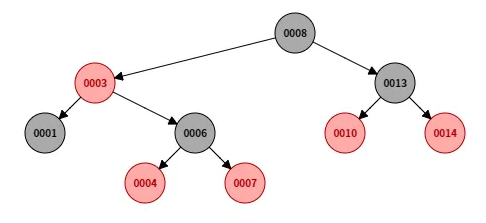
삽입, 삭제, 검색 모두 의 시간복잡도를 가지며 TreeMap은 항상 정렬된 상태를 유지하기 때문에 데이터를 N번 삽입하는 것과 같아 정렬은 의 시간복잡도를 가진다.
Map 특성을 가지고 있기 때문에 데이터를 Key와 Value로 이루어진 Entry 객체 형태로 저장한다.
항상 Key를 기준으로 정렬되어 있기 때문에, 삽입,삭제,검색 모두 Key를 기준으로 하게된다. 중요한 점은 중복되는 Key를 가질 수 없다는 점이다.(중복 시 기존 값을 덮어쓴다)
TreeSet은 TreeMap과 같은 구조를 가지고 있지만 Value는 없고 Key만 가지고 있다.
메소드 사용법이랑 시간복잡도는 같기 때문에 사용하는 경우는 비슷하지만 Value값을 저장할 필요가 없을 때 사용한다.
탐색 속도가 HashMap보다는 느리지만 순서가 유지된다는 장점이 있다.
- 정렬 되어있다.
- 이분 탐색이 가능하다.
TreeMap은 Value보다는 Key가 핵심인 자료구조다. 아래 시간복잡도에서도 알 수 있지만 특정 Value를 찾는 데에는 한계가 있는 자료구조다. 즉, Key의 정렬이 중요하거나 Key를 활용하는 경우가 많은 문제에 사용해야 하는 자료구조다.
⏱️ 트리맵 연산의 시간복잡도
- 출력 = O(logN)
get()- 삽입 및 삭제 = O(logN)
put()remove()- 최댓값/최솟값 확인 = O(1)
- TreeMap은 처음과 끝 노드의 참조를 직접 유지하고 있어 상수 시간에 접근할 수 있다.
firstEntry(),lastEntry()- 특정 Key를 탐색할 때 = O(logN)
- 전체 정렬 상태이기 때문에 O(logN)
containsKey(Object key)- 특정 Value를 탐색할 때 혹은 N번 째로 큰 수 등 몇 번째 숫자를 얻어오고 싶을 때= O(N)
- 처음부터 순회를 돌아야 하므로 O(N)
- 이런 경우가 TreeMap의 한계라고 볼 수 있다.
- 그래서 보통 다른 자료구조와 같이 사용해서 최적화 하거나 이분탐색을 잘 사용하거나 해야 한다.
containsValue(Object value)
TreeMap은 보통 다음과 같은 경우에 사용한다.
- 삽입, 삭제, 검색 연산이 다양하게 많이 쓰여 모두 의 시간복잡도가 필요한 경우.
- 자동으로 정렬된 순서로 요소를 유지해야 하는 경우.
- 범위 기반 작업이 필요하거나 특정 범위 내의 요소를 효율적으로 찾아야 하는 경우.(이분 탐색)
- 중복 요소가 허용되지 않고 고유성이 필수적인 경우.
💡 Key와 Value에는 기본 타입들(Integer, String 등등)뿐만 아니라 객체(Class)도 들어갈 수 있다. 다만, Key에 객체를 넣을 경우 Comparable이나 Comparator 인터페이스를 구현해야 한다.
1. List를 Value로 사용하는 경우:
TreeMap<String, List<String>> fruitMap = new TreeMap<>();

List<String> appleTypes = new ArrayList<>();
appleTypes.add("후지");
appleTypes.add("홍옥");
appleTypes.add("그래니 스미스");

fruitMap.put("사과", appleTypes);

List<String> grapeTypes = new ArrayList<>();
grapeTypes.add("거봉");
grapeTypes.add("캠벨");

fruitMap.put("포도", grapeTypes);

System.out.println(fruitMap.get("사과")); // [후지, 홍옥, 그래니 스미스] 출력
2. 새로운 객체를 Value로 사용하는 경우:
class Fruit {
    String name;
    String color;

    public Fruit(String name, String color) {
        this.name = name;
        this.color = color;
    }

    @Override
    public String toString() {
        return name + " (" + color + ")";
    }
}

TreeMap<Integer, Fruit> fruitInventory = new TreeMap<>();

fruitInventory.put(1, new Fruit("사과", "빨강"));
fruitInventory.put(2, new Fruit("바나나", "노랑"));
fruitInventory.put(3, new Fruit("포도", "보라"));

System.out.println(fruitInventory.get(2)); // 바나나 (노랑) 출력
3. 새로운 객체를 Key로 사용하는 경우:
class Person implements Comparable<Person> {
    String name;
    int age;

    public Person(String name, int age) {
        this.name = name;
        this.age = age;
    }

    @Override
    public int compareTo(Person other) {
        return this.age - other.age;
    }

    @Override
    public String toString() {
        return name + " (" + age + ")";
    }
}

TreeMap<Person, String> personMap = new TreeMap<>();
personMap.put(new Person("Alice", 30), "엔지니어");
personMap.put(new Person("Bob", 25), "디자이너");
personMap.put(new Person("Charlie", 35), "매니저");

for (Map.Entry<Person, String> entry : personMap.entrySet()) {
    System.out.println(entry.getKey() + ": " + entry.getValue());
}
// 결과
Bob (25): 디자이너
Alice (30): 엔지니어
Charlie (35): 매니저
※ HashMap/Set
- TreeMap과 같이 Key-Value 쌍으로 데이터를 가지고 있는 자료구조로 내부적으로 해시 테이블을 사용하여 Key와 Value를 1대1로 매칭한다.(해시 충돌이 안 났을 경우)
- 순서를 보장하지 않기 때문에 정렬은 할 수 없다.
- 보통 Key의 존재여부만을 알고 싶을 때 HashSet/Map을 사용한다. N이 매우 커서 배열을 사용할 수 없고 Key의 존재여부를 알아야 할 때 사용한다. TreeSet/Map과 같이 Key에 객체를 넣을 수도 있지만, HashCode를 직접 짜줘야 하기 때문에 비추천한다.
- 일반적인 경우 삽입, 삭제, 검색의 시간복잡도가 모두 O(1)으로 매우 빠르다.
다만, N이 매우 커져서 해시 충돌이 발생할 경우 O(logN/M)까지 늘어나지만, 보통 상수 시간안에 가능하기 때문에 O(1)로 알고 있어도 크게 문제 없다. (N = Key의 개수, M = 해시 테이블의 수)
해시 충돌에 대한 자세한 내용은 Reference에 블로그 링크를 달아놓았다. (여유가 된다면 실제로 테스트 해보는 김에 한 번 정리 할지도…?)
TreeMap 주요 메소드
메소드명에 Entry라는 단어가 많이 들어가는데 Entry = {key,Value}쌍 이라고 보면 된다.
TreeMap 생성
TreeMap<String, String> map1 = new TreeMap<>(); // TreeMap 객체 생성
TreeMap<String, String> map2 = new TreeMap<>(otherCollection); // 다른 컬렉션으로부터 생성

// 기존의 HashMap 생성
HashMap<String, String> existingMap = new HashMap<>();
existingMap.put("banana", "노란색");
existingMap.put("apple", "빨간색");
existingMap.put("grape", "보라색");

// existingMap을 사용하여 새로운 TreeMap 생성
TreeMap<String, String> sortedMap = new TreeMap<>(existingMap);

// sortedMap의 내용 출력
for (Map.Entry<String, String> entry : sortedMap.entrySet()) {
    System.out.println(entry.getKey() + ": " + entry.getValue());
}
// 결과
// TreeMap으로 만들었으므로 key 순으로 정렬된 모습
apple: 빨간색
banana: 노란색
grape: 보라색
V put(K key, V value) : Entry 삽입 (덮어쓰기)
- 값을 새로 추가한 경우는 Null 리턴
- 기존 값이 있는 경우는 덮어쓰고 이전 값 리턴
map.put("Key1", "Value1"); // 새로운 값 추가 Null 리턴
map.put("Key2", "Value2"); // 새로운 값 추가 Null 리턴
map.put("Key1", "Value3"); // 기존 값이 덮어쓰여짐 이전 값(Value1) 리턴
V putIfAbsent(K key, V value) : Entry 삽입 (새로운 값만 추가)
- 기존 값이 없는 경우에만 삽입한다.
- 값을 새로 추가한 경우는 Null 리턴
- 기존 값이 있는 경우는 삽입을 하지 않고 기존 값 리턴
map.putIfAbsent("Key1", "Value1"); // 새로운 값 추가 Null 리턴
map.putIfAbsent("Key2", "Value2"); // 새로운 값 추가 Null 리턴
map.putIfAbsent("Key1", "Value3"); // 기존 값이 있으므로 삽입X 기존 값(Value1) 리턴
void putAll(Map m) : 기존 Map에 새로운 Map 추가
- 주어진 Map의 모든 요소를 현재 TreeMap에 추가한다.
- 이미 존재하는 키의 경우, 새로운 값으로 덮어쓴다.
- TreeMap에 HashMap 요소를 추가할 수도 있다. 키-값 쌍을 가지고 있는 Map 인터페이스를 구현한 객체라면 다 받을 수 있다.
TreeMap<Integer, String> map1 = new TreeMap<>();
map1.put(1, "Apple");
map1.put(3, "Banana");

Map<Integer, String> map2 = new HashMap<>();
map2.put(2, "Cherry");
map2.put(4, "Date");

map1.putAll(map2);
// 결과: map1은 {1=Apple, 2=Cherry, 3=Banana, 4=Date} 상태가 됩니다.
V remove(Object Key), void clear() : Entry 삭제
map.remove("Key1"); // 키에 해당하는 엔트리 삭제, 삭제한 value 리턴
map.clear(); // 전부 삭제
V get(Object Key) : 값 출력
map.get("Key"); // "Key"에 해당하는 Value 리턴
// 값이 없다면 Null 리턴

map.firstEntry(); // 저장된 엔트리 중 가장 키 값이 작은 엔트리 리턴
map.firstKey();  // 저장된 엔트리 중 가장 작은 키 리턴
map.lastEntry(); // 저장된 엔트리 중 키 값이 가장 큰 엔트리 리턴
map.lastKey(); // 저장된 엔트리 중 가장 큰 키 리턴
V getOrDefault(Object key, V defaultValue) : 값 출력(값이 없다면 디폴트 값 반환)
- 키가 존재하면 해당 키에 매핑된 값을 반환한다.
- 키가 없으면 지정된 기본값(defaultValue)을 반환한다.
- 따로 Null 처리를 안해줘도 된다.
Map<String, Integer> map = new TreeMap<>();
map.put("A", 123);
System.out.println(map.getOrDefault("A", 0)); // 출력: 123
System.out.println(map.getOrDefault("B", 0)); // 출력: 0
boolean containsKey(Object key) : Key 탐색
if(map.**containsKey("Key"))** // map에 Key가 있는지 확인. 있다면 true, 없다면 false 리턴
// O(logN)
boolean containsValue(Object value) : Entry 탐색
if(map.**containsValue("Value"))** // map에 Value가 있는지 확인. 있다면 true, 없다면 false 리턴
// O(N)
순회
// Entry Set으로 순회
for (Entry<String, String> entry : map.entrySet()) {
    System.out.println(entry.getValue());
}

// Key Set으로 순회
for (String k : map.keySet()) {
    String value = map.get(k);
    System.out.println(value);
}

// Entry Iterator로 순회
Iterator<Entry<String, String>> entries = map.entrySet().iterator();
while(entries.hasNext()){
    Map.Entry<String, String> entry = entries.next();
    System.out.println(entry.getValue));
}

// Key Iterator로 순회
Iterator<String> keys = map.keySet().iterator();
while(keys.hasNext()){
    String key = keys.next();
    String value = map.get(key);
    System.out.println(value);
}
LowerBound/UpperBound (이분 탐색)
[ ceilingEntry() / ceilingKey() / floorEntry() / floorKey() ]
- ceilingEntry() : 제공된 키 값보다 크거나 같은 값 중 가장 작은 키의 Entry를 반환
- ceilingKey() : 제공된 키 값보다 크거나 같은 값 중 가장 작은 키의 키값을 반환
- floorEntry() : 제공된 키 값보다 같거나 작은 값 중 가장 큰 키의 Entry를 반환
- floorKey() : 제공된 키 값보다 같거나 작은 값 중 가장 큰 키의 키값을 반환
- Entry란 키와 값을 저장하고 있는 Map의 내부 클래스 (C언어 구조체의 역할과 유사함)
[ higherEntry() / higherKey() / lowerEntry() / lowerKey() ]
- 위의 메소드와 비슷하지만, "같거나"가 빠짐
- 더 큰 값 중에서 가장 작은 값, 더 작은 값 중에서 가장 큰 값을 Entry 또는 key 타입으로 반환함
		TreeMap<String, String> list = new TreeMap<String, String>();

		String[] key = { "a", "b", "c", "d", "e" };
		String[] value = { "apple", "banana", "candy", "dog", "enum" };

		// 데이터 삽입
		for (int i = 0; i < key.length; i++)
			list.put(key[i], value[i]);

		System.out.println(list.ceilingEntry("A")); // "a=apple"
		System.out.println(list.ceilingKey("A"));   // "a"

		System.out.println(list.floorEntry("z"));   // "e=enum"
		System.out.println(list.floorKey("z"));     // "e"

		/////////////////////////////////////////////////////////

		System.out.println(list.higherEntry("a"));  // "b=banana"
		System.out.println(list.higherKey("a"));    // "b"

		System.out.println(list.lowerEntry("e"));   // "d=dog"
		System.out.println(list.lowerKey("e"));     // "d"
[ entrySet() / keySet() ]
- 맵의 Entry / Key 정보를 담은 Set 생성
- Key값 기준으로 오름차순 정렬
[ firstEntry() / firstKey() / lastEntry() / lastKey() ]
- 현재 맵에서 가장 큰 작은 키 값(first) / 큰 키 값(last)에 대한 정보를 반환함
[ pollFirstEntry() / pollLastEntry() ]
- 현재 맵에서 가장 큰 작은 키 값(first) / 큰 키 값(last)의 Entry를 반환 후 삭제
[ headMap() ]
- 제공된 키보다 작은 키 값의 Entry를 SortedMap에 담아 반환
- 2번 째 인자로 true를 줄 경우 지정된 키도 포함
[ tailMap() ]
- 제공된 키보다 크거나 같은 값의 Entry를 SortedMap에 담아 반환
- 2번 째 인자로 flase를 줄 경우 지정된 키를 포함하지 않음
TreeMap은 어떻게 정렬된 상태를 유지할 수 있을까?
결론부터 말하자면 TreeMap의 내부 구조가 레드-블랙 트리(Red-Black Tree)로 구현되어 있기 때문이다.
그렇기 때문에 TreeMap이 항상 정렬된 상태를 유지할 수 있으며 모든 연산이 의 시간복잡도를 가질 수 있는 것이다.
위에서 말했듯이 TreeMap의 모든 연산의 시간복잡도는 이다. 근데 항상 이 시간복잡도를 유지하기 위해선 트리의 높이를 logN으로 유지해야 한다. 그러기 위해서는 트리가 한 쪽으로 쏠린 상태가 아닌 균형이 잡힌 모양을 유지해야 한다.
레드-블랙 트리가 뭔지, 균형 문제를 어떻게 해결하였는지는, 내용이 너무 길어지기 때문에 다음편에 알아보도록 하자.
Reference
💡
-
해시 충돌에 대한 자세한 설명이 담긴 블로그들
https://systemdata.tistory.com/16
https://dkswnkk.tistory.com/679
https://modimodi.tistory.com/41 -
TreeMap 메소드 참고
https://codevang.tistory.com/134
https://hbase.tistory.com/135