✅ What I did today
- Udemy Course : Unity Shader
- Project BCA
📝 Things I Learned
🏷️ Unity :: Cinemachine Basic Multichannel Perlin
Pivot Offset : 카메라가 회전하거나 흔들릴 때 중심이 되는 기준점
Noise Profile Presets
6D Shake
- 전방위(6축)의 강한 랜덤 흔들림.
- 폭발이나 격렬한 충돌에 적합.
- 트랜스폼의 Position과 Rotation이 모두 빠르게 흔들림.
6D Wobble
- Shake보다 부드러운 랜덤 움직임.
- 흔들림보다는 '출렁이는' 느낌.
- 드라마틱한 순간이나 긴장감을 줄 때 사용.
Handheld_normal_extreme
- 매우 거칠고 불안정한 핸드헬드 느낌.
- 액션 장면이나 뛰는 장면 등 격한 움직임에 적합.
Handheld_normal_mild
- 일반적인 핸드헬드 느낌, 부드러움.
- 다큐멘터리 스타일이나 일상적인 장면에 사용.
Handheld_normal_strong
- normal_mild보다 강한 흔들림.
- 주의를 끌고 싶은 드라마틱한 컷에 적합.
Handheld_tele_mild
- Telephoto(망원) 렌즈에서의 핸드헬드 느낌.
- 망원은 작은 흔들림도 크게 보여지므로, 약하지만 불안정한 느낌.
Handheld_tele_strong
- 망원렌즈 특유의 흔들림 강조.
- 멀리 있는 대상을 따라가는 강한 흔들림.
Handheld_wideangle_mild
- 광각렌즈 핸드헬드. 넓은 화각의 안정적인 느낌.
- 흔들림이 자연스럽고 넓게 표현됨.
Handheld_wideangle_strong
- 광각렌즈 + 강조된 핸드헬드.
- 자유로운 다큐멘터리나 액션 느낌의 장면에 적합.
🏷️ Unity :: Cinemachine Impulse Source : Parameters
Impulse Channel
- 임펄스를 보낼 때 사용할 "채널".
Impulse Listener도 같은 채널을 수신하고 있어야 진동이 전달됩니다.- 보통은
0: default로 충분하지만, 여러 종류의 진동을 분리하고 싶을 때 유용해요.
Dissipation Distance
- 진동이 사라지기까지 영향을 미치는 최대 거리 (단위: 월드 유닛).
- 여기선
100으로 설정되어 있어서,- Impulse가 생성된 지점에서 100 유닛까지는 영향을 주고, 그 이후부턴 무시됩니다.
- 카메라가 멀리 있으면 충격이 약하거나 아예 안 느껴질 수 있어요.
Dissipation Rate
- 충격이 얼마나 빠르게 약해지는가를 결정.
0.0에 가까울수록 천천히 사라짐 (멀리서도 강함),1.0에 가까울수록 빠르게 감쇠 (가까이 있어야 강하게 느껴짐).
Impulse Shape
- 충격의 모양(패턴). 흔들림이 어떻게 시작하고 끝나는지를 정해줍니다.
- 흔들림의 곡선을 정의하는 Signal Curve를 설정해주는 부분.
Default Invocation - Default Velocity
GenerateImpulse()호출 시 기본으로 사용되는 진동의 방향과 세기.- 여기선
X: 0, Y: 0, Z: 0→ 방향 정보 없음 = Signal에서 정의된 대로 작동. - 여기에 값을 넣으면 특정 방향(예: 위로 튀는 느낌)으로 충격을 보낼 수 있어요.
🏷️ Unity :: Cinemachine Impulse Source : Impulse Type
Uniform (균일)
- 임펄스가 모든 방향으로 동시에 동일하게 퍼짐.
- 거리나 방향에 관계없이 항상 같은 힘으로 도달.
- 실제 현실적이진 않지만, 간단한 테스트나 전방위 진동에 유용.
🟢 사용 예시: 폭발이 캐릭터 중심에서 동시에 발생하고, 거리 무시하고 동일하게 흔들리고 싶을 때.
Dissipating (감쇠)
- 기본 설정.
- 방출 즉시 모든 방향으로 퍼지지만, 거리에 따라 점점 약해짐.
- 현실적이며 거리가 멀수록 카메라에 덜 영향을 줌.
🟢 사용 예시: 발걸음, 총알 발사, 작은 폭발 등 — 가까울수록 더 세게 느껴지게 하고 싶을 때.
Propagating (파동 전파형)
- 충격이 파동처럼 일정 속도로 외곽으로 퍼짐.
- 중심에선 바로 안 느껴지고, 충격이 전파되어 오며 타이밍 차가 있음.
- 사운드 웨이브처럼 느리게 움직이는 느낌을 만들 수 있음.
🟢 사용 예시: 지진, 우주선 충격파, 초음파나 마법 효과처럼 "멀리서 오는 충격"을 표현할 때.
Legacy
- 구 버전 호환을 위한 옵션.
- 이전 Cinemachine Impulse 시스템 방식 그대로 적용.
- 특별한 이유가 없으면 사용하지 않는 걸 권장.
🎞️ Udemy Course : Unity Shader
- Cull Off를 넣으면 뒷면도 렌더링해준다
Decal
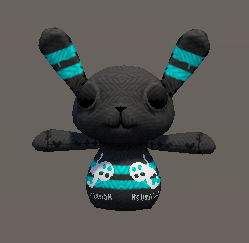
    Properties {
        _MainTex ("MainTex", 2D) = "white" {}
        _DecalTex ("Decal", 2D) = "white" {}
        [Toggle] _ShowDecal("Show Decal?", Float) = 0
    }
    (생략)
    void surf(Input IN, inout SurfaceOutput o) {
        fixed4 a = tex2D(_MainTex, IN.uv_MainTex);
        fixed4 b = tex2D(_DecalTex, IN.uv_MainTex) * _ShowDecal;
        o.Albedo = b.r > 0.9 ? b.rgb : a.rgb;
}- Properties에는 bool 못 쓴다 (대신 [Toggle] 붙이고 float 0,1로 관리)
    void Start()
    {
        mat = this.GetComponent<Renderer>().sharedMaterial;
    }

    public void OnMouseDown()
    {
        showDecal = !showDecal;
        if (showDecal)
            mat.SetFloat("_ShowDecal", 1);
        else
            mat.SetFloat("_ShowDecal", 0);
    }
c# 코드로 decal 표시 제어하는 연습
(OnMouseDown()은 deprecated됐길래 Player Input으로 받음)
Stencil hole
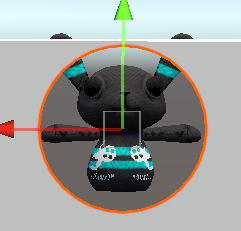
        Tags {"Queue" = "Geometry-1"}

        ColorMask 0
        ZWrite Off
        Stencil
        {
            Ref 1 // 기준값
            Comp always // 스텐실 테스트 (렌더링 할지말지)
            Pass replace // 테스트 통과하면 뭐 할건지
        }
Hole.shader
        Tags { "Queue" = "Geometry" }

        Stencil
        {
            Ref 1
            Comp notequal // 스텐실이 1이랑 다르면 그린다
            Pass keep // Comp 통과하면 스텐실 값 그대로 둔다
        }
Wall.shader
Stencil magic window
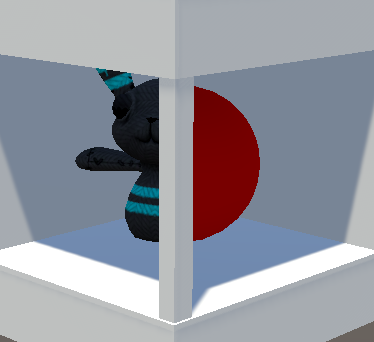
Shader "Holistic/StencilWindow"
{
    Properties
    {
        _SRef("Stencil Ref", Float) = 1
        [Enum(UnityEngine.Rendering.CompareFunction)] _SComp("Stencil Comp", Float) = 8
        [Enum(UnityEngine.Rendering.StencilOp)] _SOp("Stencil Op", Float) = 2
    }

    SubShader
    {
        Tags{ "Queue" = "Geometry-1" }

        ZWrite Off
        ColorMask 0

        Stencil
        {
            Ref[_SRef]
            Comp[_SComp]
            Pass[_SOp]
        }

        CGPROGRAM
        (생략)
        ENDCG
    }
}
StencilWindow.shader
- stencil만 쓰더라도 더미용 CGPROGRAM 코드는 작성해주어야 한다
[Enum(...)]을 붙이면 머테리얼 인스펙터에서 드롭다운으로 노출된다
    Properties {
        _SRef("Stencil Ref", Float) = 1
        [Enum(UnityEngine.Rendering.CompareFunction)]  _SComp("Stencil Comp", Float)   = 8
        [Enum(UnityEngine.Rendering.StencilOp)]        _SOp("Stencil Op", Float)      = 2
    }
    SubShader {

      Stencil
        {
            Ref[_SRef]
            Comp[_SComp]
            Pass[_SOp]
        }
StencilObject.shader
- 각 스텐실 값에 해당하는 영역만 그리도록 Stencil Ref를 설정
- 어색함을 줄이려면 Renderer에서 Receive Shadows 끄기
Exception for CGPROGRAM
SubShader {
    Tags {"Queue" = "Transparent"}
    Pass {
        Blend DstColor Zero
        SetTexture [_MainTex] { combine texture }
    }
}
이건 Pass만 적어도 되는 이유?
- OpenGL 1.x / DirectX 8 시절에 쓰이던, 프로그래머가 셰이더 코드를 직접 안 짜도 되는 방식의 셰이더.
Unity는 이 형식도 여전히 지원하고 있고, 아주 기본적인 작업 (텍스처 입히기, 블렌딩 등)엔 이 구조만으로도 충분함. - surface shader나 URP/HDRP에서는 무조건 CGPROGRAM ~ ENDCG 사이에 HLSL 코드 써야 함
🎮 Project BCA
- Area light 대신 Point Light로 변경하여 더 현실적으로 라이팅 (기존에는 상단에 강한 Area Light가 있어 Reflection Probe의 반사도 잘 보이지 않음)
- 하려고 했는데 Reflection Probe가 잘 보이게 되고 나니 문이 움직였을 때 위화감 엄청남.
- 동적 Reflection Probe를 적용하는 건 Custom으로 필요할 때만 update하더라도 6장이나 찍으니 너무 낭비가 심함.
- Planar Reflection을 이용해야 할 것 같은데, 방안이 2가지 있긴 함.
- URP에서 스크립트로 구현 : https://www.youtube.com/watch?v=wAC77JcJEnM
- HDRP로 migration
- 지금이라도 언리얼 배우기
- 하지만 분명 체스 게임인데 이렇게까지 인트로 디테일을 만지작거리고 있는게 맞는지 의문.
- 게슈탈트 붕괴까지 와서 이제 슬슬 어떻게 해야 더 좋은 그래픽이 될지도 모르겠음.
- 일단 본게임과 엔딩까지 다 만들고 와서 폴리싱을 해보는게 맞는 순서.
- 3주 가까이 씬 다듬는 데에 시간을 쏟았는데, 굉장히 좋지 않다.
- 일단 완성을 하고 폴리싱을 생각했어야 함. 완성하지 않고 폴리싱만 하면서 릴리즈를 차일피일 미루면 게임은 영원히 만들어지지 않는다.
- 제발 쓸데없는 디테일에 목매느라 시간 날려먹지 말기
- 메인 메뉴 대충 만들고 엔딩 만들려고 했는데 진행을 하려고 해보니까 내가 원하는 씬을 구현하는게 내 능력으로는 불가능하다는 걸 깨달음
- 사실 기존 게임 구조가 불만족스럽기도 했어서, 게임의 방향성을 약간 수정해야할 것 같음
- 문 텍스쳐 변경 : https://ambientcg.com/view?id=Concrete008 극히 일부 사용
- 엔딩용 애셋 구매 및 trim : https://assetstore.unity.com/packages/3d/environments/japanese-neet-s-apartment-267657
Natural handheld camera movement
Impulse Source를 player에, Cinemachine Impulse Receiver를 Cinameachine camera에,
Cinemachine Basic Multichannel Perlin은 Cinemachine camera에.
        if (direction != Vector3.zero) noise.NoiseProfile = walk_noise;
        else noise.NoiseProfile = idle_noise;
noiseSetting(perline noise의 preset)을 불연속적으로 변화시켰더니 부자연스러운 전환 발생.
using UnityEngine;
using Unity.Cinemachine;
using System.Collections;

public class PlayerMove : MonoBehaviour
{
    [SerializeField] CinemachineCamera player_vcam;
    [SerializeField] float walk_gap = 0.5f;
    [SerializeField] float amplitudeGain_walk = 2f;
    [SerializeField] float frequencyGain_walk = 1.5f;
    [SerializeField] AudioClip[] footstepSounds;
    AudioSource footstep;
    public float moveSpeed = 5f;
    private CharacterController characterController;
    private CinemachineImpulseSource impulse;
    private CinemachineBasicMultiChannelPerlin noise;
    private bool wait_nextFootstep = false;
    private float targetAmplitudeGain;
    private float targetFrequencyGain;

    void Start()
    {
        characterController = GetComponent<CharacterController>();
        impulse = GetComponent<CinemachineImpulseSource>();
        noise = player_vcam.GetComponent<CinemachineBasicMultiChannelPerlin>();
        footstep = gameObject.AddComponent<AudioSource>();
        Cursor.lockState = CursorLockMode.Locked; // 마우스를 화면 중앙에 고정
        Cursor.visible = false; // 마우스 커서 숨김
    }

    void Update()
    {
        Vector3 direction = Vector3.zero;

        if (Input.GetKey(KeyCode.W)) direction += player_vcam.transform.forward;
        if (Input.GetKey(KeyCode.S)) direction += -player_vcam.transform.forward;
        if (Input.GetKey(KeyCode.A)) direction += -player_vcam.transform.right;
        if (Input.GetKey(KeyCode.D)) direction += player_vcam.transform.right;

        direction.y = 0f; // 점프를 구현하지 않는 이상 y 축 이동 방지 (중력 유지)
        direction.Normalize();

        if (direction != Vector3.zero)
        {
            targetAmplitudeGain = amplitudeGain_walk;
            targetFrequencyGain = frequencyGain_walk;
            if (!wait_nextFootstep)
            {
                wait_nextFootstep = true;
                StartCoroutine(GenerateImpulseWithDelay());
            }
        }
        else
        {
            targetAmplitudeGain = 0.7f;
            targetFrequencyGain = 0.7f;
        }

        noise.AmplitudeGain = Mathf.Lerp(noise.AmplitudeGain, targetAmplitudeGain, Time.deltaTime * 5f);
        noise.FrequencyGain = Mathf.Lerp(noise.FrequencyGain, targetFrequencyGain, Time.deltaTime * 5f);

        characterController.Move(direction * moveSpeed * Time.deltaTime);
    }

    private IEnumerator GenerateImpulseWithDelay()
    {
        impulse.GenerateImpulse();
        PlayFootstepSound();
        yield return new WaitForSeconds(walk_gap);
        wait_nextFootstep = false;
    }

    private void PlayFootstepSound()
    {
        if (footstepSounds.Length > 0)
        {
            int randomIndex = Random.Range(0, footstepSounds.Length);
            footstep.clip = footstepSounds[randomIndex];
            footstep.Play();
        }
    }

}
목표값을 향해 lerp로 변경
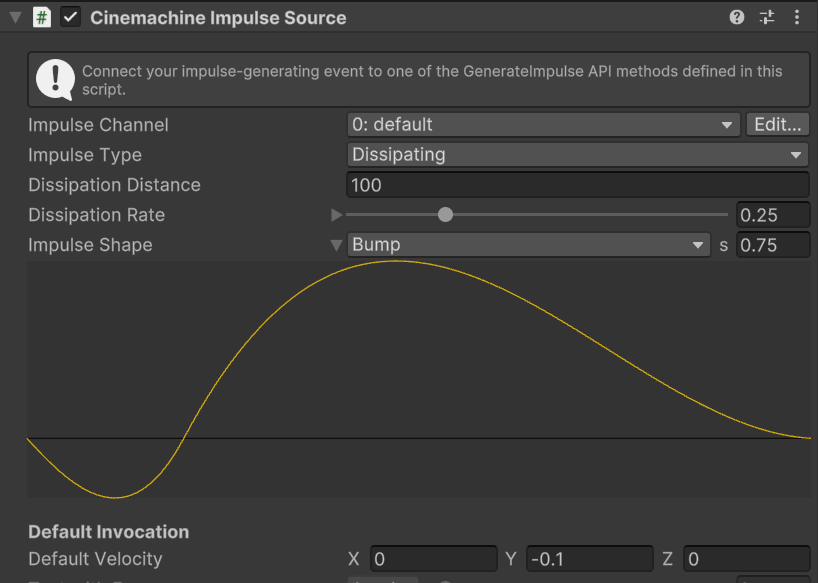
perlin preset은 handheld_normal_mild
Main menu
- 버튼이 아니라 text에 버튼 컴포넌트 붙임
- content size fitter로 사이즈 조절
About Light Probe
문이 하나밖에 없는데 APV 적용시키기 애매해서
Light Probe를 뒀다가 문이 열리고 나면 꺼봤는데 효과 안 사라짐
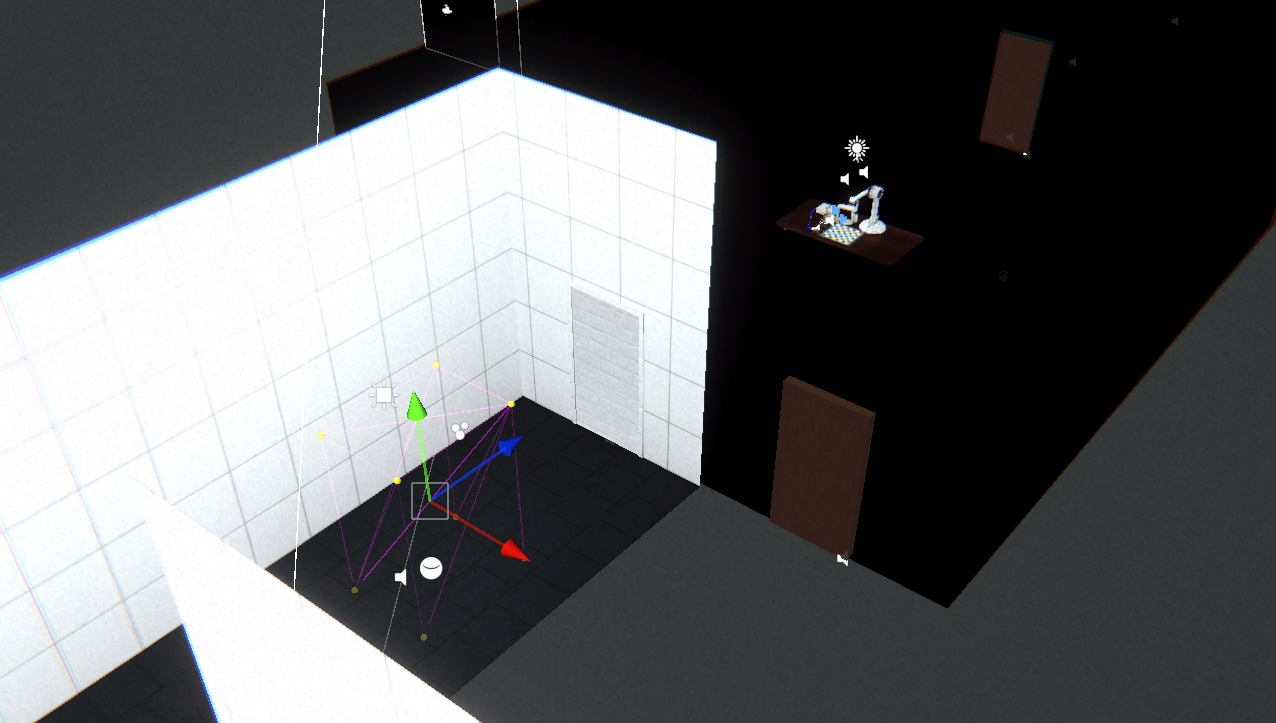
Light Probe는 해당 점 안에 있는 오브젝트들 뿐만 아니라
모든 동적 오브젝트들에도 밝기를 적용시킨다
