서버 웹소켓
서버에 등록/배포하여 동시접속 시연해보기

웹소켓 사진전송
WebSocketController
@Controller
public class WebSocketController {
    @GetMapping("/chat")
    public String showview(){
        return "chat";
    }
    @GetMapping("/chat2")
    public String showView2() {
        System.out.println("컨트롤러");
        return "chatt2";
    }
}
MyBinaryHandler
@Component
public class MyBinaryHandler extends TextWebSocketHandler{
	HashMap<String, WebSocketSession> sessionMap = new HashMap<>(); //웹소켓 세션을 담아둘 맵
	private static final String FILE_UPLOAD_PATH = "C:\\chat";
	static int fileUploadIdx = 0;
	static String fileUploadSession = "";

	//소켓연결
	@Override
	public void afterConnectionEstablished(WebSocketSession session) throws Exception {
		// TODO Auto-generated method stub
		super.afterConnectionEstablished(session);
		System.out.println("연결");
		sessionMap.put(session.getId(), session);
	}
	//메시지전송
	@Override
	protected void handleTextMessage(WebSocketSession session, TextMessage message) throws JsonMappingException, JsonProcessingException{
		try {
			String msg = message.getPayload();
			//fileUploadSession = msg;
			ObjectMapper objectMapper = new ObjectMapper();
			//ChattDTO dto =  objectMapper.readValue(msg, new TypeReference<Map<String, Object>>(){});
			Map<String, Object> chatMap =  objectMapper.readValue(msg, new TypeReference<Map<String, Object>>(){});
			String type=(String)chatMap.get("type");
			System.out.println("type:"+type);
			if(!type.equals("fileUpload")) {
				for(String key : sessionMap.keySet()) {
					WebSocketSession wss = sessionMap.get(key);
					System.out.println(msg);

					wss.sendMessage(new TextMessage(msg));

				}
			}else {
				fileUploadSession = msg;
				System.out.println("파일업로드가 발생됨"+fileUploadSession);
//				for(String key : sessionMap.keySet()) {
//					WebSocketSession wss = sessionMap.get(key);
//					System.out.println(msg);
//
//					wss.sendMessage(new TextMessage(msg));
//
//				}
			}
		}catch(Exception e) {
			e.printStackTrace();
		}
	}

	@Override
	protected void handleBinaryMessage(WebSocketSession session, BinaryMessage message) {
		// TODO Auto-generated method stub
		//super.handleBinaryMessage(session, message);
		System.out.println("바이너리데이터 전송됨");
		System.out.println(message);

		ByteBuffer byteBuffer = message.getPayload();
		String fileName = "temp.jpg";
		File dir = new File(FILE_UPLOAD_PATH);
		if(!dir.exists()) {
			dir.mkdirs();
		}

		File file = new File(FILE_UPLOAD_PATH, fileName);
		FileOutputStream out = null;
		FileChannel outChannel = null;
		try {
			byteBuffer.flip(); //byteBuffer를 읽기 위해 세팅
			out = new FileOutputStream(file, true); //생성을 위해 OutputStream을 연다.
			outChannel = out.getChannel(); //채널을 열고
			byteBuffer.compact(); //파일을 복사한다.
			outChannel.write(byteBuffer); //파일을 쓴다.
		}catch(Exception e) {
			e.printStackTrace();
		}finally {
			try {
				if(out != null) {
					out.close();
				}
				if(outChannel != null) {
					outChannel.close();
				}
			}catch (IOException e) {
				e.printStackTrace();
			}
		}
		byteBuffer.position(0); //파일을 저장하면서 position값이 변경되었으므로 0으로 초기화한다.
		//파일쓰기가 끝나면 이미지를 발송한다.
		//HashMap<String, Object> temp = sessionMap.get(fileUploadIdx);
		for(String k : sessionMap.keySet()) {
//
//			WebSocketSession wss = (WebSocketSession) temp.get(k);
			try {
				WebSocketSession wss = sessionMap.get(k);
				//System.out.println(msg);
				System.out.println(fileUploadSession+"_______");
				wss.sendMessage(new TextMessage(fileUploadSession));

				wss.sendMessage(new BinaryMessage(byteBuffer)); //초기화된 버퍼를 발송한다.
			} catch (IOException e) {
				e.printStackTrace();
			}
		}
	}
	//소켓종료
	@Override
	public void afterConnectionClosed(WebSocketSession session, CloseStatus status) throws Exception {
		// TODO Auto-generated method stub
		System.out.println("종료");
		sessionMap.remove(session.getId());
		super.afterConnectionClosed(session, status);
	}

}
WebSocketConfigVer2
@Configuration
@EnableWebSocket
public class WebSocketConfigVer2 implements WebSocketConfigurer{

	//웹소켓 핸들러 객체에 매핑하기
	// /mywebsocket으로 요청하면 웹소켓핸들러가 동작할 수 있도록 등록하기
	@Override
	public void registerWebSocketHandlers(WebSocketHandlerRegistry registry) {
		registry.addHandler(myHendler(),"/chatting");
		//.setAllowedOrigins("*");
		System.out.println("등록완료");
	}
	//핸들러 객체 리턴하기
	@Bean
	public WebSocketHandler myHendler() {
		return new MyBinaryHandler();
	}

    @Bean
    public ServletServerContainerFactoryBean createWebSocketContainer() {
        ServletServerContainerFactoryBean container = new ServletServerContainerFactoryBean();
        container.setMaxTextMessageBufferSize(8192);
        container.setMaxBinaryMessageBufferSize(50000000);
        return container;
    }

}
chatt2.html
<!DOCTYPE html>
<html xmlns:th="http://www.thymeleaf.org">
<head>
<meta charset="UTF-8">
<title>Insert title here</title>
<script
	src="https://ajax.googleapis.com/ajax/libs/jquery/1.12.0/jquery.min.js"></script>
	<style type="text/css">
		#talklist{
			border:1px solid;
			width: 600px;
			height: 400px;
			overflow: auto;
		}
		#msg{
			border:1px solid;
			width: 550px;
			margin-top: 10px
		}
		#sendbtn{
			height: 40px;
			margin-top: 10px;
		}
		#id{
			width: 350px;
			margin-bottom: 10px
		}
		.me{
			background: #F5F0C5;
			width: 70%;
			float: right;
			margin: 1px;
		}
		.other{
			background: #dcdcdc;
			width: 70%;
			float: left;
			margin: 1px
		}
	</style>

</head>
<body>
	<div id='chatt'>
		<h1>웹 소켓 채팅~~</h1>
		<input type='text' id='id' >
		<input type='button' value='채팅참여' id='joinbtn' >
		<input type='button' value='채팅종료' id='btnclose' >
		<br/>
		<div id='talklist'></div>
		<div id='sendZone'>
			<textarea id='msg' ></textarea>
			<input type="file" id="myimg">
			<input type='button' value='전송' id='sendbtn'>
			<input type='button' value='파일올리기' id='filesend' onclick="fileSend()">
		</div>
	</div>
	<script type="text/javascript">

		let mydata = {};//전송 데이터(JSON)
		$(document).ready(function(){
			$("#joinbtn").on("click", function(){
			//	ws = new WebSocket("ws://10.10.0.17/chatting");
			ws = new WebSocket("ws://" + location.host + "/chatting");
				//웹 소켓에서 메시지가 날라왔을 때 호출되는 이벤트
				let resid="";
				ws.onmessage = function(msg){
					var data = msg.data;

					if(data != null && data.type != ''){
						let resMsg = JSON.parse(data);
						console.log("&&&&&&&&&&&"+resMsg)
						resid = resMsg.id
						let msgcss = "";
						console.log("$$$$$$$$$$"+resid)
						if(resMsg.id == $("#id").val()){
							msgcss = 'class=me';
						}else{
							msgcss = 'class=other';
						}
						//alert(msg.data)
						let item = "<div "+msgcss+"><span><b>"+resMsg.id+"</b></span> [ "+resMsg.date+" ]<br/>"+
									"<span>"+resMsg.msg+"</span></div>";
						$("#talklist").append(item)

						console.log("====="+resid);
					}else{
						console.log("--------"+resid);
						if(resid == $("#id").val()){
							msgcss = 'class=me';
						}else{
							msgcss = 'class=other';
						}
						var url = URL.createObjectURL(new Blob([data]));
						console.log("++++++++"+msgcss)
						let item = "<div "+msgcss+"><span><img class='msgImg' src="+url+" width='100' height='100'></span></div>";
						$("#talklist").append(item);
					}
					//alert($("#talklist").scrollHeight)
				//	console.log($("#talklist").height())
					//console.log($("#talklist").s)
					//$("#talklist").scrollTop(300)
					$("#talklist").scrollIntoView(false)
				}
				 //웹 소켓이 연결되었을 때 호출되는 이벤트
		        ws.onopen = function(message){
		        	$("#talklist").append("server start...");
		        };
		        //웹 소켓이 닫혔을 때 호출되는 이벤트
		        ws.onclose = function(message){
		        	$("#talklist").append("Server Disconnect...\n");
		        };
		        //웹 소켓이 에러가 났을 때 호출되는 이벤트
		        ws.onerror = function(message){

		        	$("#talklist").append(message+"error...\n");
		        };

			})
			$("#msg").on("keyup",function(ev){
				if(ev.keyCode == 13){
					sendMessage();
				}

			})
			$("#sendbtn").on("click",function(){
				sendMessage();
			})
			$("#btnclose").on("click",function(){
				ws.close();
			})

		})
		//Send 버튼을 누르면 실행되는 함수
        function sendMessage(){
			mydata.type= "message";
			let message = $("#msg").val();
			//서버로 보낼 데이터 만들기
			mydata.id = $("#id").val();
			mydata.msg = message;
			mydata.date = new Date().toLocaleString();
			let sendmsg = JSON.stringify(mydata);
			//웹소켓으로 textMessage객체의 값을 보낸다.
			ws.send(sendmsg);
			$("#msg").val("");
        }
		function fileSend(){
			var file = document.querySelector("#myimg").files[0];
			var fileReader = new FileReader();
			fileReader.onload = function() {
				mydata.type= "fileUpload",
				mydata.file= file;
				mydata.id = $("#id").val();
				mydata.msg = "";
				mydata.date = new Date().toLocaleString();
				let sendmsg = JSON.stringify(mydata);

				ws.send(sendmsg); //파일 보내기전 메시지를 보내서 파일을 보냄을 명시한다.

			    arrayBuffer = this.result;
				console.log(arrayBuffer);
				ws.send(arrayBuffer); //파일 소켓 전송
			};
			fileReader.readAsArrayBuffer(file);
		}
	</script>
</body>
</html>
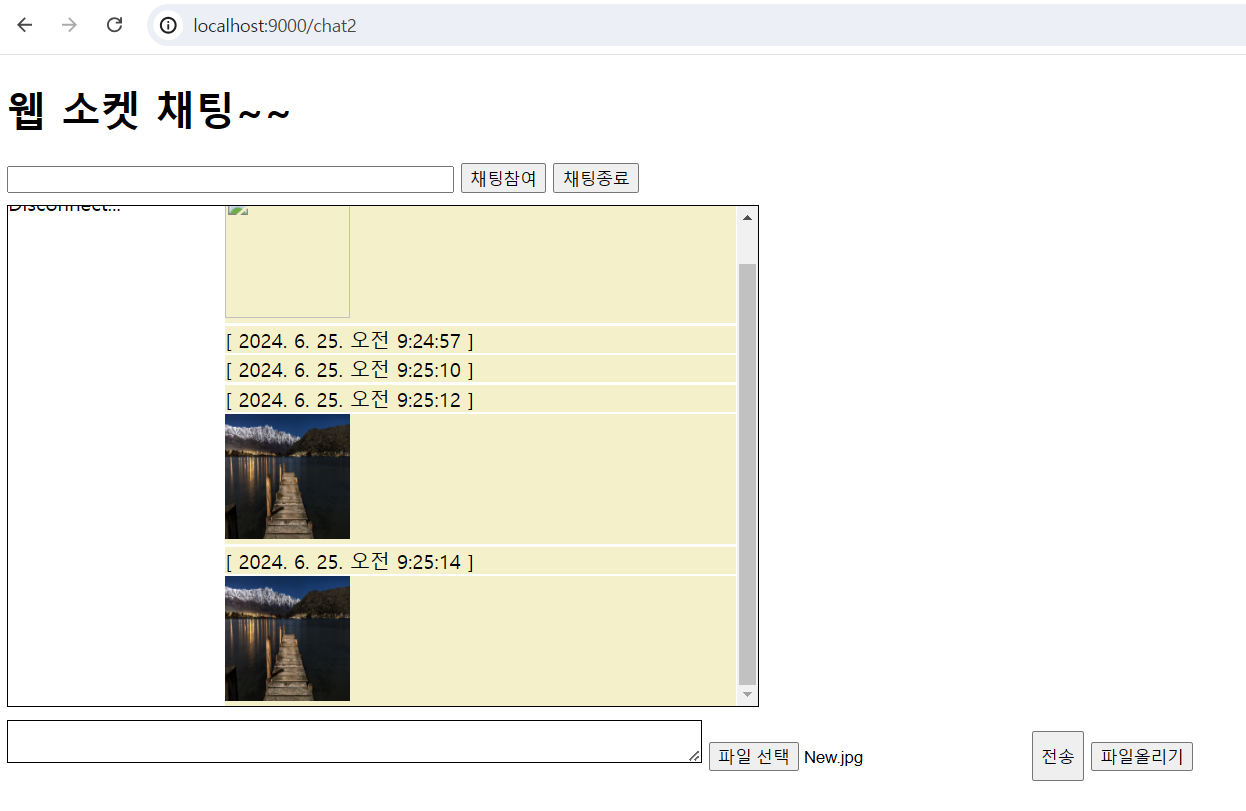
사진전송 결과보기
본 포스팅은 멀티캠퍼스의 멀티잇 백엔드 개발(Java)의 교육을 수강하고 작성되었습니다.