웹소켓통신
- HTML5표준기술
- HTTP환경에서 TCP를 통해서 접속해서 통신
- TCP통신을 통해 접속하므로 최초접속시에 3way handshake발생
- 연결유지
- 이벤트발생되고 이 이벤트에 대해서 처리하는 코드를 적용(SSE도 동일)
- 양방향통신(클라이언트에서 요청을 보내지 않아도 서버에서 메시지를 보낼 수 있다)
- 클라이언트는 자바스크립트 코드를 이용해서 작업
- 웹소켓은 Socket Connection을 유지한 상태로 양방향통신을 하면서 실시간 데이터 전
=> 텍스트전송, 바이너리전송 모두 가능 - stateful(연결이 유지)
- 클라이언트와 서버가 한 번 연결되면 같은 연결을 통해서 통신하므로 TCP커넥션 비용 절약
[이전방식]
- 폴링 : 일정주기를 가지고 서버의 API를 호출(2초마다 한번씩 호출하기)
- 롱폴링 : 폴링과 비슷, 요청이 서버로 간 후 대기했다가 요청한 데이터가 업데이트되면 서버에서 응답을 보낸다.
==> 리소스도 낭비, 실시간데이터를 주고받는것도 힘들다(채팅,주식,게임,...)
[최근방식]
- 웹소켓
- SSE - 서버에서 웹브라우저로 메시지를 보내는 방법
[웹소켓]
1. 설정
- 웹소켓 통신을 할 수 있도록 객체를 빈으로 만들어서 등록
- ServerEndpointExporter등록
(웹소켓을 사용하기 위해서 필요한 객체)
2. 핸들러작성
- 컨트롤러처럼 웹소켓통신을 할 수 있도록 제공되는 객체
- 클라이언트가 접속하면 클라이언트와 연결, 통신할 수 있도록 제공되는 클래스
클라이언트와 서버가 연결해서 하고싶은 작업은 여기에 정의 - 웹소켓 서버의 역할을 하는 객체(웹소켓 통신할때 요청을 받는 역할)
- endpoint(path)를 등록해야
어떻게 요청하면 서버와 요청할 수 있는지 path를 등록
클라이언트의 요청을 핸들러에서 받아야하는데 클라이언트에서 어떻게 요청하면 핸들러가 동작할지 path를 등록 - 이벤트 드리븐 방식
접속, 메시지전송, 오류, 접속종료 등 이벤트가 발생하면 반응하는 방식 - 웹소켓 내부에서도 세션을 관리할 수 있다.
HttpSession과 다른 세션
웹소켓 통신 내부에서 관리하는 세션
웹소켓 통신을 하는 클라이언트를 구분하기 위한 세션
3. 자바스크립트로 클라이언트에서 통신할 코드를 작성
실습
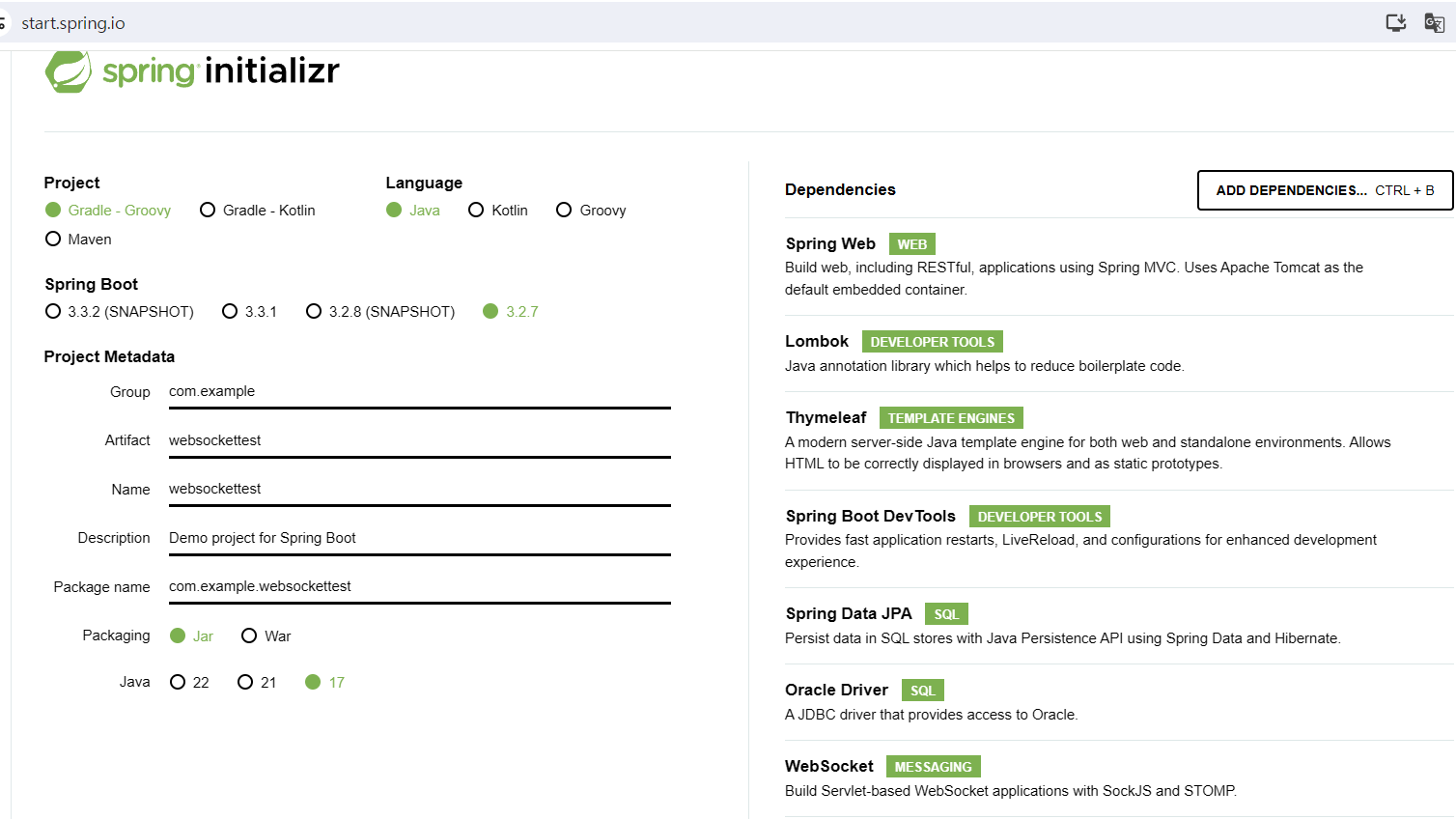
spring initializr
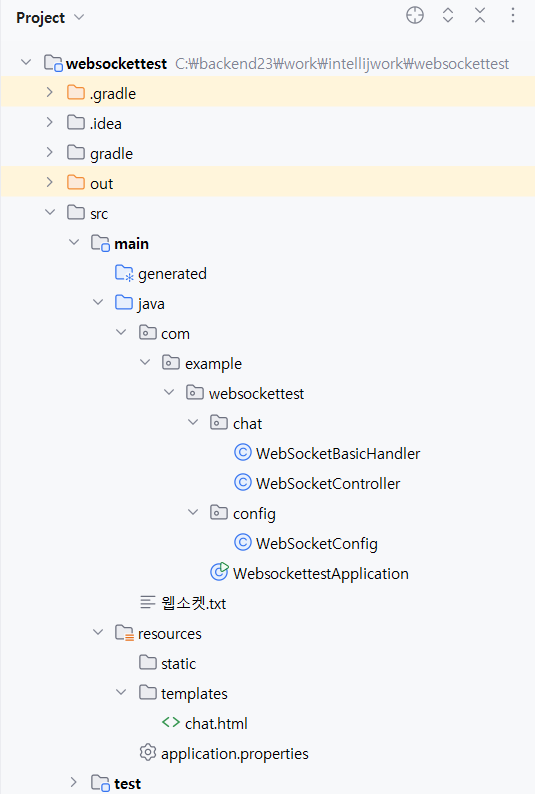
디렉토리 구성
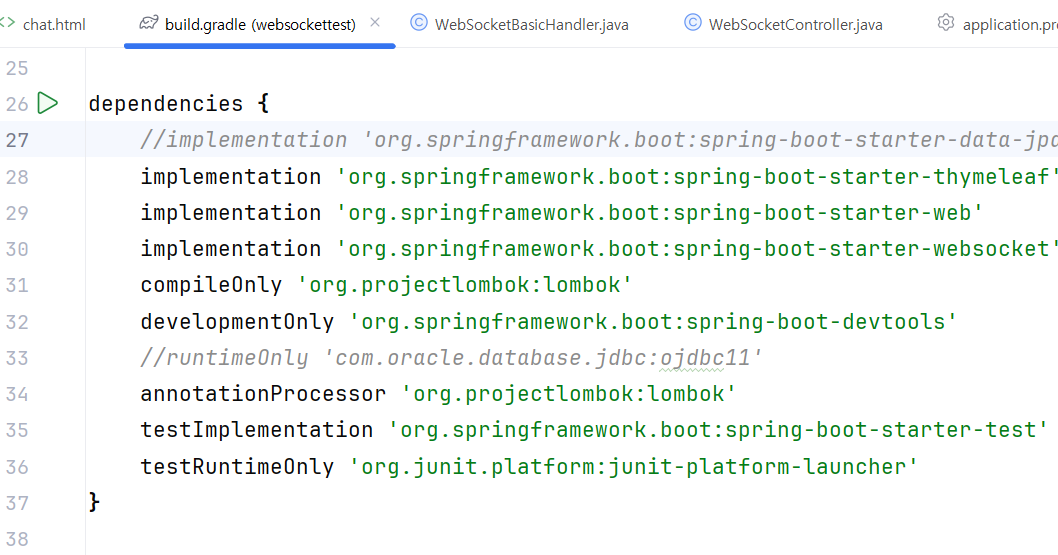
build gradle
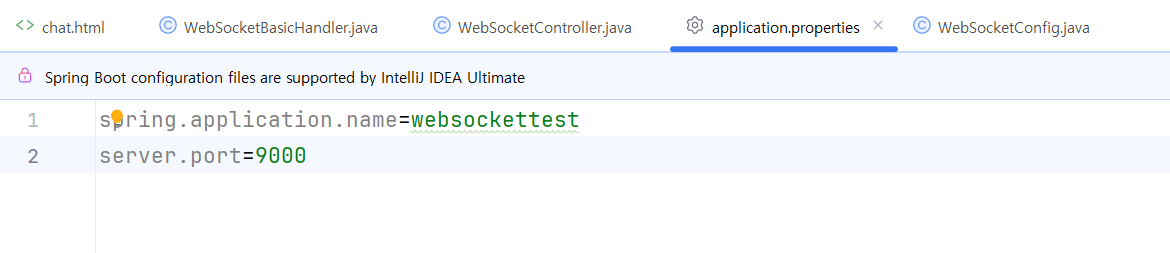
application.properties
WebSocketConfig
웹소켓컨테이너를 활성화시키는 작업 - 웹소켓을 사용하겠다고 정의
@Configuration
@EnableWebSocket
public class WebSocketConfig {
    @Bean
    public ServerEndpointExporter serverEndpointExporter(){
        return new ServerEndpointExporter();
    }
}
WebSocketController
@Controller
public class WebSocketController {
    @GetMapping("/chat")
    public String showview(){
        return "chat";
    }
}
WebSocketBasicHandler
웹소켓통신을 하면서 서버역할을 하는 프로그램
@Component
@ServerEndpoint(value = "/chat")
public class WebSocketBasicHandler {
    //세션을 저장하기 위해서 컬렉션을 추가
    //동기화된 컬렉션 - 멀티스레드환경에서 안전하게 작업할 수 있도록 제공되는 set
    private static Set<Session> clientlist = Collections.synchronizedSet(new HashSet<>());

    //클라이언트가 접속을하면 실행되는 메소드
    @OnOpen
    public void open(Session client){
        System.out.println("클라이언트가 접속했다");
        System.out.println(client);
        if (!clientlist.contains(client)){
            clientlist.add(client);
        }
    }
    //클라이언트에게 메시지를 받으면 호출되는 메소드
    //통신할때 메시지를 받으면 호출되는 메소드로 모든 접속자들한테 메시지를 전송할 수 있어야 한다.
    //메시지를 받을때마다 호출되는 메소드
    //텍스트메시지통신(웹소켓에 접속한 모든 클라이언트에게 메시지를 전송)
    @OnMessage
    public void onMessage(String msg,Session sender) throws IOException {
       //웹소켓에 접속한 모든 클라이언트에게 메시지전송
        System.out.println("수신된 메시지:"+msg);
        System.out.println("클라이언트:"+sender);
        for(Session client:clientlist){
            client.getBasicRemote().sendText(msg);
        }
    }
    @OnClose
    //접속종료 - 소켓연결이 끊어지면 호출되는 메소드
    public void onClose(Session client){
        System.out.println("접속종료");
        clientlist.remove(client);
    }
}
chat.html
<!DOCTYPE html>
<html xmlns:th="http://www.thymeleaf.org">
<head>
<meta charset="UTF-8">
<title>Insert title here</title>
  <script src="https://ajax.googleapis.com/ajax/libs/jquery/3.3.1/jquery.min.js"></script>
	<style type="text/css">
		#talklist{
			border:1px solid;
			width: 600px;
			height: 400px
		}
		#msg{
			border:1px solid;
			width: 550px;
			margin-top: 10px
		}
		#sendbtn{
			height: 40px;
			margin-top: 10px;
		}
		#id{
			width: 350px;
			margin-bottom: 10px
		}
		.me{
			background-color: #FAECC5;
			width: 70%;
			float: right;
			margin: 1px
		}
		.other{
			background-color: #EAEAEA;
			width: 70%;
			float: left;
			margin: 1px
		}
	</style>

</head>
<body>
	<div id='chatt'>
		<h1>웹 소켓 채팅</h1>
		<input type='text' id='id' >
		<input type='button' value='채팅참여' id='joinbtn' >
		<input type='button' value='채팅종료' id='btnclose' >
		<br/>
		<div id='talklist'></div>
		<div id='sendZone'>
				<textarea id='msg' ></textarea>
			<input type='button' value='전송' id='sendbtn'>
		</div>
	</div>
	<script type="text/javascript">
		//전송할 데이터가 여러개이므로 json으로 전송
		let mydata = {};

		$(document).ready(function(){
			$("#joinbtn").on("click",function(){
				//alert(location.host);
				//1. 웹소켓객체를 생성 - 서버에 연결하는 작업
				ws = new WebSocket("ws://"+location.host+"/chat");
				//연결이 되면 이벤트에 반응할 수 있도록 콜백등록

				//웹소켓에서 클라이언트로 전송하는 메시지를 받을 수 있도록 처리
				//웹소켓에 연결된 후에 실행
				ws.onopen = function(msg){
					console.log(msg);
					$("#talklist").append("<div>접속완료....</div>");
				}
				//웹소켓 연결 후에 서버가 메시지를 보내면 받을 수 있도록 콜백등록
				ws.onmessage = function(msg){
					//실제 데이터가 json으로 전송
					console.log(msg.data);
					//받은 메시지를 출력 - 내가 보낸건지 받은 메시지인지 확인하기 위해서 id하고 비교
					//전송되는 메시지에서 데이터만 추출
					//json데이터에 저장된 값을 엑세스하려면 JSON문자열을 parsing해야한다.
					let resMsg = JSON.parse(msg.data);
					console.log(resMsg);
					let msgcss = "";
					if(resMsg.id==$("#id").val()){//내가 작성한 메시지인지 확인
						msgcss = "class = me";
					}else{
						msgcss = "class = other";
					}
					//talklist에 출력할 div생성
					let item = "<div "+ msgcss+ " ><span><b>"+ resMsg.id+ "</b></span>"
					           + "<b>["+ resMsg.date+ "]</b><br/>"
					           + "<span>"+ resMsg.msg +"</span>"
					           +"</div>"
					$("#talklist").append(item);
				}
				//웹소켓이 종료된 후에 발생하는 이벤트에 대해서 처리할 수 있도록 콜백등록
				ws.onclose = function(msg){
					//실제 데이터가 json으로 전송
					console.log(msg);
					$("#talklist").append("<div>접속종료....</div>");
				}
				ws.onerror = function(msg){
					//실제 데이터가 json으로 전송
					console.log(msg);
					$("#talklist").append("<div>에러발생....</div>");
				}
			});
			$("#sendbtn").on("click",function(){
				sendMessage();
			})
			$("#msg").on("click",function(event){
				//엔터키가 눌려지면
				if(event.keyCode==13){
					sendMessage();
				}
			})
			$("#btnclose").on("click",function(){
				//웹소켓연결종료
				ws.close();
			})
		})
		function sendMessage(){
			//메시지전송함수
			//서버로 보낼 메시지를 만들어서 전송
			//지금은 id를 <input>에서 꺼내지만 나중에는 웹의 세션에 저장된 dto에서 꺼내기
			mydata.id = $("#id").val();
			mydata.msg = $("#msg").val();
			mydata.date = new Date().toLocaleDateString();//오늘날짜
			mydata.type = "textmsg";//메시지유형(텍스트와 바이너리를 구분하기 위한 값)

			//자바스크립트 객체로 정의된 데이터를 json문자열로 변환
			let sendMsg = JSON.stringify(mydata);
			ws.send(sendMsg);//웹소켓서버로 메시지를 전송
			$("#msg").val("");//메시지전송이 완료되면 텍스트창을 지우기
		}
	</script>
</body>
</html>
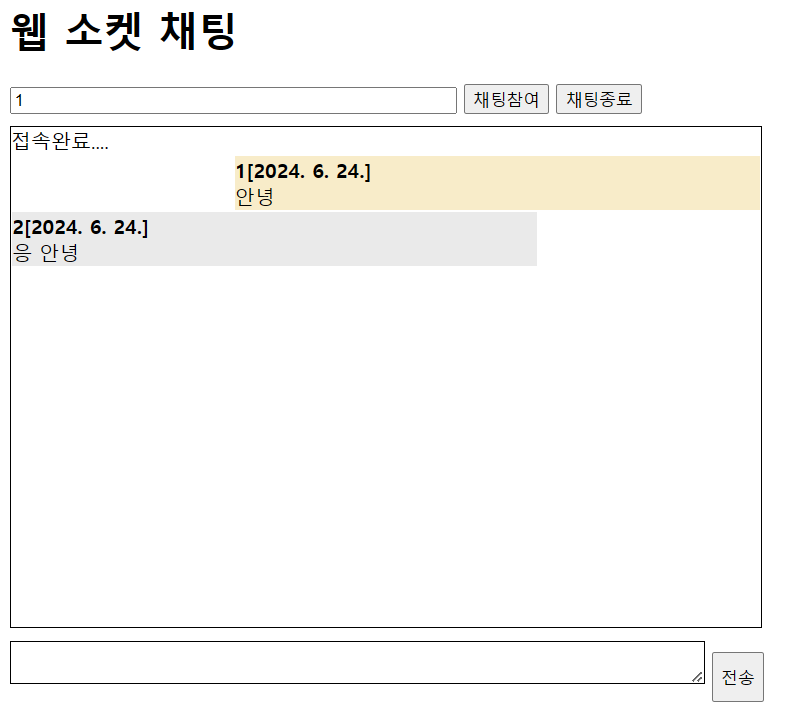
결과
본 포스팅은 멀티캠퍼스의 멀티잇 백엔드 개발(Java)의 교육을 수강하고 작성되었습니다.