
1. 학습 주제
데이터 계산 및 가공, 조건문
- sum, avg, count, min, max, replace, substring, concat, if, case when
2. 핵심 개념 정리
숫자 연산
+, -, *, /
ex)
select food_preparation_time,
       delivery_time,
       food_preparation_time + delivery_time as total_time
from food_orders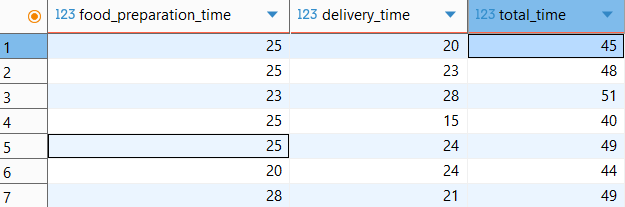
함수 종류
- 합계 : SUM(컬럼)
- 평균 : AVG(컬럼)
- 데이터 갯수 : COUNT(컬럼) * 컬럼명 대신 1 혹은 * 사용 가능
- 최솟값 : MIN(컬럼)
- 최댓값 : MAX(컬럼)
정렬(order by)
- 오름차순: order by sum(price)
- 내림차순: order by sum(price) desc

ex)
select cuisine_type,
       sum(price) sum_of_price
from food_orders
group by cuisine_type
order by sum(price), cuisine_type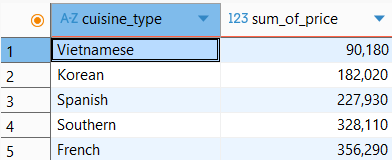
특정 문자 바꾸기: replace **
replace(바꿀 컬럼, 현재 값, 바꿀 값)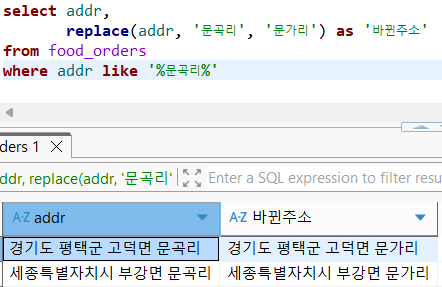
특정 문자만 골라서 조회: substring(substr) **
- substring or substr
substr(조회 할 컬럼, 시작 위치, 글자 수)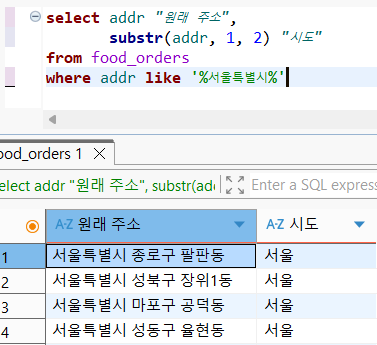
여러 컬럼의 문자 합치기: concat **
concat(붙이고 싶은 값1, 붙이고 싶은 값2, 붙이고 싶은 값3, .....)- 붙일 수 있는 문자의 종류
- 컬럼
- 한글
- 영어
- 숫자
- 기타 특수문자
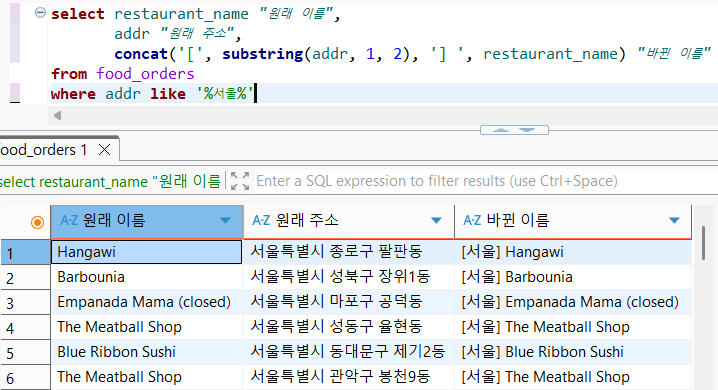
실습
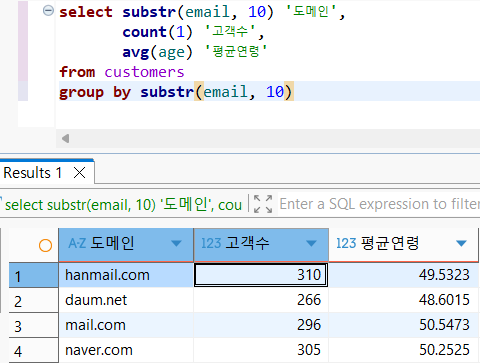
[실습] 이메일 도메인별 고객 수와 평균 연령 구하기
- substr(email, 10): 10번째부터 끝까지
- 참고: substring_index(email, '@', '-1')로도 가능
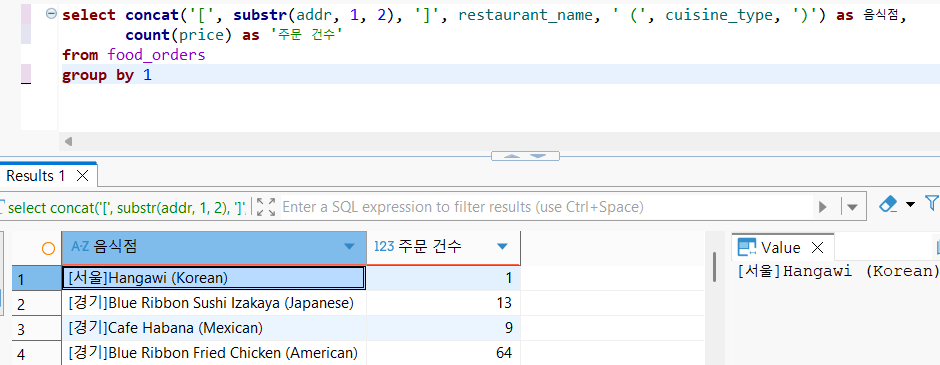
[실습] ‘[지역(시도)] 음식점이름 (음식종류)’ 컬럼을 만들고, 총 주문건수 구하기
if **
- 조건을 충족할 때와 아닐때의 두 케이스로 나눠 값을 적용할 때 사용됨.
if(조건, 조건을 충족할 때, 조건을 충족하지 못할 때)ex)
select addr "원래 주소",
if(addr like '%평택군%', replace(addr, '문곡리', '문가리'), addr) "바뀐 주소"
from food_orders
where addr like '%문곡리%'
ex) 기존에 gmail 앞에 @가 없었던 상태였음.

select substring(if(email like '%gmail%', replace(email, 'gmail', '@gmail'), email), 10) "이메일 도메인",
       count(customer_id) "고객 수",
       avg(age) "평균 연령"
from customers
group by 1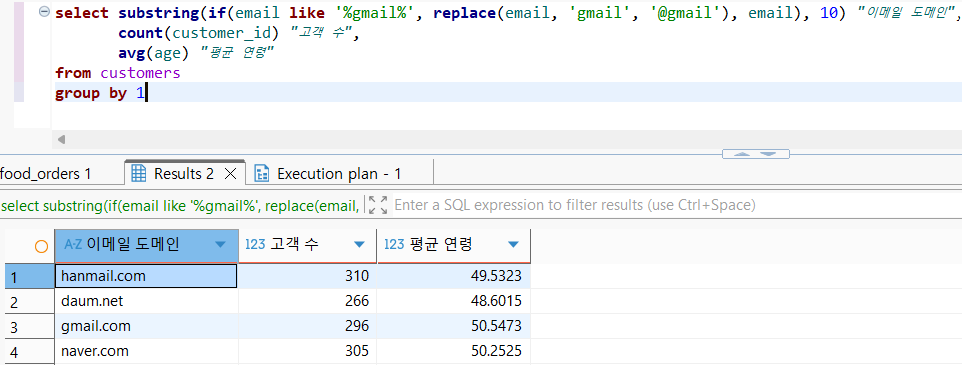
Case When **
- 여러 조건을 지정하고 싶을 때 사용함.
case when 조건1 then 값(수식)1
     when 조건2 then 값(수식)2
     else 값(수식)3
end
조건에 부합하지 않는 케이스가 없는 경우에는 else를 안써도 됨.
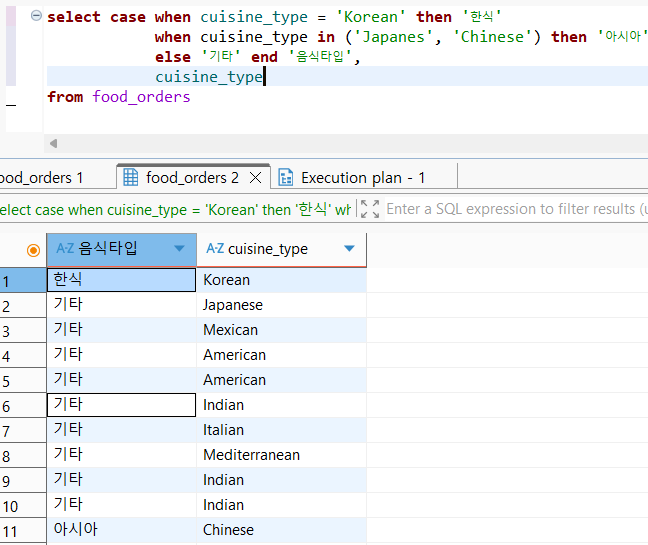
조건문을 사용하는 케이스
- 새롭게 '분류'하는 경우
- 서로 다른 계산 방식 적용(결제 방식에 따른 수수료 계산)
- 다른 문법 안에 적용
ex) concat 문으로 여러 컬럼을 합칠 때, rating 이 있을 때는 rating 을 넣어주고 없을 때는 아무것도 넣지 않도록
숫자, 문자 오류시 값 변경: cast
에러 메시지: data type
--숫자로 변경
cast(if(rating='Not given', '1', rating) as decimal)

--문자로 변경
concat(restaurant_name, '-', cast(order_id as char))
3. 배운점 & 생각
- python으로 전처리를 많이 하다보니 SQL을 통해 substring과 concat을 자주 사용하지 않았어서 잊고 있었지만 이번 학습을 통해 한 번 더 익힐 수 있었다.
- case when과 if를 종종 헷갈려했는데 여러 조건과 단일 조건에서의 사용 차이를 명확히 할 수 있었다.