
1. 학습 주제
subquery, join, coalesce, pivot table
2. 학습 내용
subquery
: 쿼리 안에 select~from 으로 구성된 또다른 쿼리를 사용하는 것.
서브쿼리가 필요한 경우
- 여러번의 연산을 수행해야 할 때
- 조건문에 연산 결과를 사용해야 할 때
- 조건에 Query 결과를 사용하고 싶을 때
→ 별도의 계산된 컬럼을 추가하고 싶을 때 주로 사용함.
ex)
select restaurant_name,
       sido,
       case when avg_time<=20 then '<=20'
            when avg_time>20 and avg_time <=30 then '20<x<=30'
            when avg_time>30 then '>30' end time_segment
from
(
select restaurant_name,
       substring(addr, 1, 2) sido,
       avg(delivery_time) avg_time
from food_orders
group by 1, 2
) a
join
여러 테이블에서 데이터를 불러와 결합할 때 사용함.
-- LEFT JOIN
select 조회 할 컬럼
from 테이블1 a left join 테이블2 b on a.공통컬럼명=b.공통컬럼명

-- INNER JOIN
select 조회 할 컬럼
from 테이블1 a inner join 테이블2 b on a.공통컬럼명=b.공통컬럼명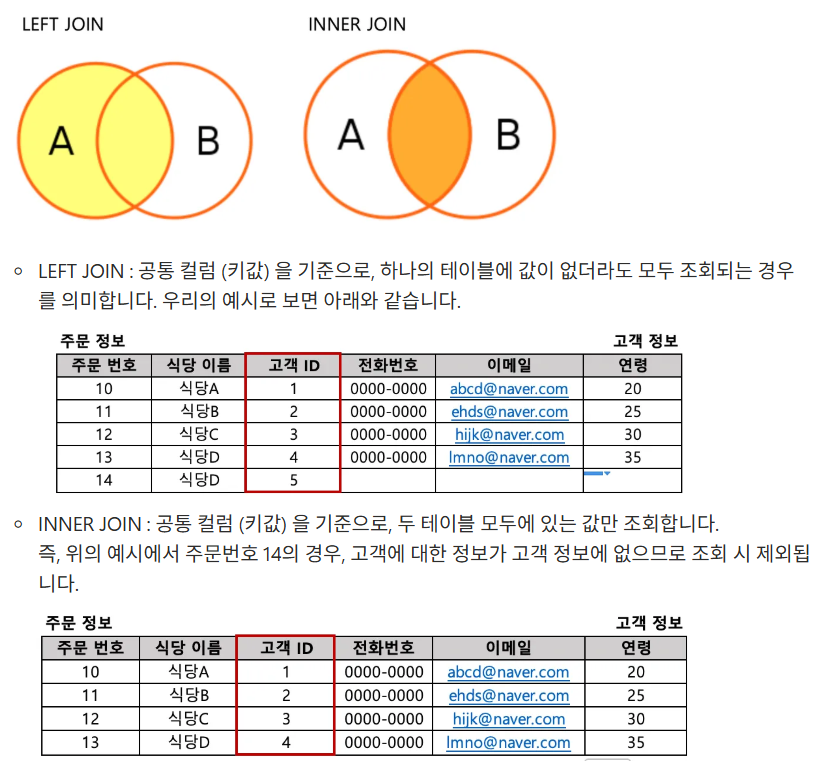
ex) 실습
select distinct c.name,
       c.age,
       c.gender,
       f.restaurant_name
from food_orders f left join customers c on f.customer_id=c.customer_id
where c.name is not null -- null 값 제거
order by c.name
cf) distinct는 행을 기준으로 중복값을 제거함으로 맨 앞에 넣어줘야 오류가 안생긴다.
조회한 데이터에 아무 값이 없는 경우
1. 없는 값을 제외하기
Mysql 에서는 사용할 수 없는 값이 있을 경우 해당 값을 연산에서 제외함. → 0으로 간주
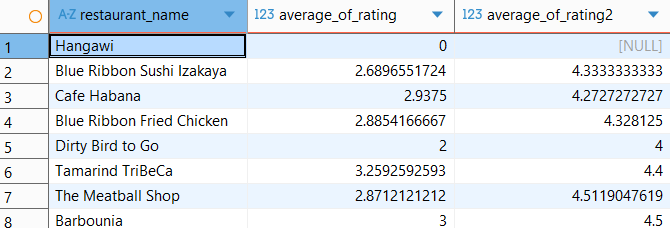
select restaurant_name,
       avg(rating) average_of_rating,
       avg(if(rating<>'Not given', rating, null)) average_of_rating2
from food_orders
group by 1
- 처음 평균 값은 'Not given'이라는 문자를 평균에 사용할 수 없기에 Mysql이 0으로 처리해서 계산한 결과
- 두번째 평균 값은 문자를 null로 바꿨기에 null 값은 제외하고 평균 구함.
null을 제외하고 평균을 구하고 싶다면 where 절에is not null
을 사용해서 null이 아닌 값을 제외한 후 계산을 하면 된다.
2. 다른 값을 대신 사용하기
- 다른 값이 있을 때 조건문 이용하기 : if(rating>=1, rating, 대체값)
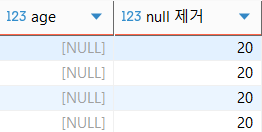
- null 값일 때 : coalesce(age, 대체값)
ex) coalesce 사용
select a.order_id,
       a.customer_id,
       a.restaurant_name,
       a.price,
       b.name,
       b.age,
       coalesce(b.age, 20) "null 제거",
       b.gender
from food_orders a left join customers b on a.customer_id=b.customer_id
where b.age is null
SQL로 pivot table 만들기
Pivot table 이란?
2개 이상의 기준으로 데이터를 집계할 때, 보기 쉽게 배열하여 보여주는 것을 의미함.
집계 기준: 일자, 시간
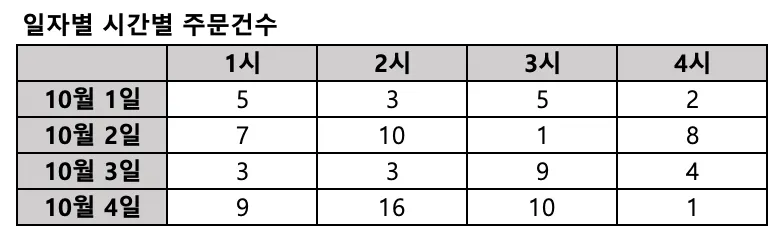
베이스가 되는 테이블을 서브쿼리로 먼저 만든 뒤 max, if를 활용해서 컬럼을 생성함.
max를 사용하는 이유
: if 문에서 조건에 해당하지 않는 경우에는 0 값으로 변환하기 때문에 최종적으로 group by로 묶어주는 경우 0값이 대표값으로 나올 수 있음. 따라서 조건에 해당하는 값을 나타내기 위해 max를 사용함.select age, max(if(gender='male', order_count, 0)) male, max(if(gender='female', order_count, 0)) female from ( select b.gender, case when age between 10 and 19 then 10 when age between 20 and 29 then 20 when age between 30 and 39 then 30 when age between 40 and 49 then 40 when age between 50 and 59 then 50 end age, count(1) order_count from food_orders a inner join customers b on a.customer_id=b.customer_id where b.age between 10 and 59 group by 1, 2 ) t group by 1 order by 1 desc
pivot table에 너무 매몰되기 보다는 내가 원하는 조건의 결과를 어떻게 컬럼으로 나타내고 보여줄 것인지에 대해서 생각하면서 작성.
3. 배운점 및 생각
- distinct는 행 기준으로 하기 때문에 컬럼 데이터 자체를 distinct 하려면 중간에 해서는 안된다는 것을 알게됐다.
- avg 계산
- 문자가 포함된 경우: 0으로 여기고 해당 행도 포함해서 계산함.
- null이 있는 경우: null을 제외한 행들의 평균 - coalesce 함수는 한번도 사용해본적이 없는 함수였는데 null값인 경우 원하는 값으로 모두 치환시킬때 사용하는 함수로 기억하고 있어야겠다.
- SQL을 활용해 pivot table을 구현하면서 생각한 것은 pivot table 용어에 매몰되지 말고 내가 원하는 조건의 결과 값을 어떻게 나타내게 할 건지에 대해 집중하면 조금 더 수월할 것 같다.