[사전캠프 TIL]#4 SQL Window Function (RANK, SUM), 날짜 포맷(date, date_format), python 기초#1
데이터분석 내일배움캠프 TIL
목록 보기
4/46

1. 학습 주제
Window Function (RANK, SUM), 날짜 포맷(date, date_format), python 기초
2. 학습 내용
Window Function 의 기본 구조
window_function(argument) over (partition by 그룹 기준 컬럼 order by 정렬 기준)- argument : 함수에 따라 작성하거나 생략
RANK
특정 기준으로 순위를 매기는 함수
select cuisine_type,
       restaurant_name,
       rank() over (partition by cuisine_type order by order_count desc) rn,
       order_count
from
(
select cuisine_type, restaurant_name, count(1) order_count
from food_orders
group by 1, 2
) a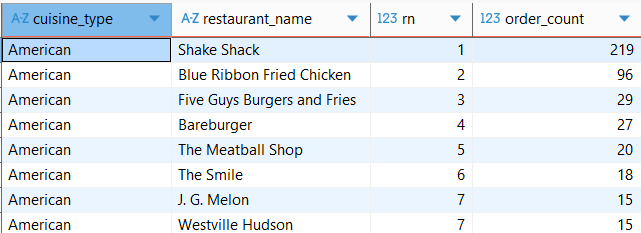
SUM
누적합을 구할때 주로 사용함.
select cuisine_type,
       restaurant_name,
       cnt_order,
       sum(cnt_order) over (partition by cuisine_type) sum_cuisine,
       sum(cnt_order) over (partition by cuisine_type order by cnt_order) cum_cuisine
from
(
select cuisine_type,
	restaurant_name,
	count(1) cnt_order
from food_orders
group by 1, 2
) a
order by cuisine_type , cnt_order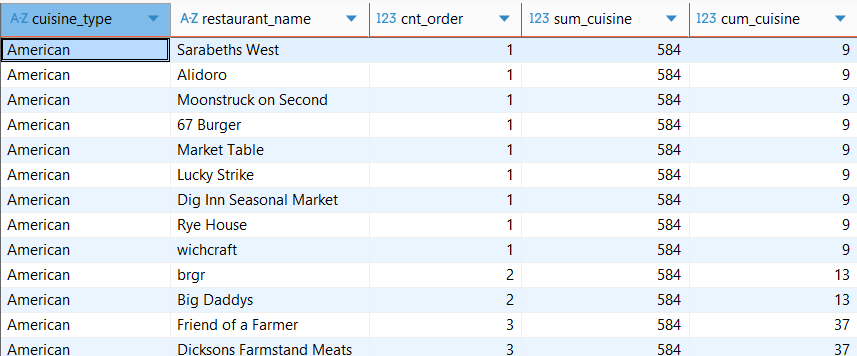
date
yyyy-mm-dd 형식의 컬럼을 date type 으로 변경
select date(date) date_type,
       date
from payments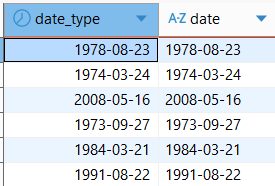
date_format
- 년 : Y (4자리), y(2자리)
- 월 : M, m
- 일 : d, e
- 요일 : w (일요일=0, 월요일=1, ...)
select date(date) date_type,
       date_format(date(date), '%Y') "년",
       date_format(date(date), '%m') "월",
       date_format(date(date), '%d') "일",
       date_format(date(date), '%w') "요일"
from payments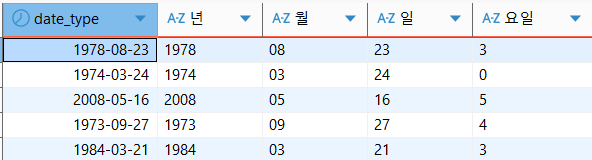
python 기초
자료형 다루기
종종 생각 안나는 계산 방법
a//b  # 3 (몫)
a%b   # 1 (나머지)
a**b  # 49 (거듭제곱)
Bool 자료형
x = True   # 참
y = False  # 거짓
#
# 소문자로 쓰면 자료형으로 인식하지 않고 변수명이라 생각해 에러가 남.
z = true   # name 'true' is not defined
#
True = 1   # True/False는 변수명으로 쓸 수 없음!
a = 4 > 2  # True 출력
not a      # False 출력 -> NOT 연산자로 참을 거짓으로, 거짓을 참으로 바꿔준다.

a and b    # False    AND 연산자로 모두 참이어야 참을 반환한다.
a or b     # True     OR 연산자로 둘 중 하나만 참이면 참이다.
문자형 다루기: .split()
phone = "02-123-1234"
print(phone.split("-")[0])
결과: 02
리스트, 딕셔너리
- 리스트: 순서가 있는 다른 자료형들의 모임
- 딕셔너리: 키(key)와 밸류(value)의 쌍으로 이루어진 자료의 모임
퀴즈
smith의 science 점수를 출력people = [ {'name': 'bob', 'age': 20, 'score':{'math':90,'science':70}}, {'name': 'carry', 'age': 38, 'score':{'math':40,'science':72}}, {'name': 'smith', 'age': 28, 'score':{'math':80,'science':90}}, {'name': 'john', 'age': 34, 'score':{'math':75,'science':100}} ]print(people[2]['score']['science'])
조건문, 반복문 예시
- 조건문: if, elif, else
- 반복문:
- for
- enumerate: 인덱스를 같이 출력,
- break: for문 탈출
for i, fruit in enumerate(fruits):
    print(i, fruit)
    if i == 4:
        break
함수
기본 구조: def로 함수명 선언, return으로 결과 반환
def bus_fee(age):
		if age > 65:
		    return 0
		elif age > 20:
		    return 1200
		else:
		    return 0


money = bus_fee(28)
print(money)
3. 배운점 및 생각
- 윈도우 함수를 잘 사용하지 않았었는데 특히 sum을 통한 누적합을 구하는 것은 유용하게 사용될 것 같다.
- python 기초는 이전에 공부를 했기에 간단히 다시 리마인드하는 생각으로 살펴봄.
- 나는 뭔가 bool 사용하는게 손이 잘 안가고 익숙하지가 않다.
- 함수 사용시 주로 return을 맨 마지막에 한번 사용하는데 중간 조건마다 사용하는 방식도 상황에 따라 사용할 수 있음.