Google Developer Program (GDP): What Is the “Google Developer Program” Button in Chrome DevTools?
Computer Science
https://developers.google.com/program?utm_source=devtools&utm_campaign=stable&hl=ko
What Is the Google Developer Program?
The Google Developer Program (GDP) is a unified platform created by Google to support developers who use Google technologies. It brings together tools, documentation, educational resources, community features, and developer profiles into one place. The goal is to help developers learn faster, build better, and stay connected to Google’s latest technologies.
Purpose of the Program
Google created the Developer Program to simplify the developer experience. Instead of having scattered resources across multiple websites and tools, GDP provides a centralized environment where developers can:
-
Access Google APIs, SDKs, and development tools
-
Learn through official courses, tutorials, and structured training
-
Explore community resources and connect with other developers
-
Track their learning progress through a unified developer profile
-
Receive updates and previews of new Google technologies
The program is designed for developers of all skill levels, from beginners to professionals.
Membership Types
Google Developer Program offers three membership levels: Standard, Premium, and Enterprise.
Standard (Free)
-
Free to join
-
Access to basic development tools, documentation, and learning materials
-
Ability to create a Google Developer Profile and earn achievement badges
-
Suitable for hobby projects, learning, and early-stage development
Premium (Paid)
-
Monthly subscription
-
Provides advanced tools and expanded resources
-
May include AI-assisted coding tools, increased cloud credits, premium learning modules, and early access to new features
-
Intended for developers who want enhanced productivity or are building larger projects
Enterprise (For Organizations)
-
Designed for teams or companies using Google Cloud and other Google technologies
-
Offers team-level cloud credits, advanced tooling, collaboration features, and subscription management
-
Supports professional software development environments
Key Features
Centralized Resources
All core Google developer tools and documentation are available in one place, making it easier to find and use what you need.
Developer Profile
A public or private profile where developers can track learning progress, collect badges, and showcase skills.
Learning and Training
Includes access to tutorials, courses, code labs, and Google Cloud Skills Boost learning paths.
Community and Networking
Opportunities to connect with other developers through discussion spaces, events, and community programs.
Early Access and Previews
Premium and enterprise members may receive access to pre-release tools and technologies so they can experiment before public launch.
Why Google Introduced This Program
The Google Developer Program is a relatively new initiative introduced to streamline the developer experience. Google’s growing ecosystem—AI, cloud services, mobile tools, and web technologies—made it necessary to unify resources and provide developers with a clearer path for learning and building.
Google has also expanded the program with new AI-powered tools and better workflows, aiming to support developers as technology evolves.
Who Should Consider Joining
The program is valuable for:
-
Developers learning Google technologies such as Android, Firebase, Google Cloud, and web APIs
-
Students who want structured learning paths
-
Professional developers who want enhanced tools or early access to features
-
Teams building production-level applications with Google Cloud
Whether you are a beginner or an experienced developer, the program provides a structured ecosystem to support your growth.
What the “Google Developer Program” Button in Chrome DevTools Really Is
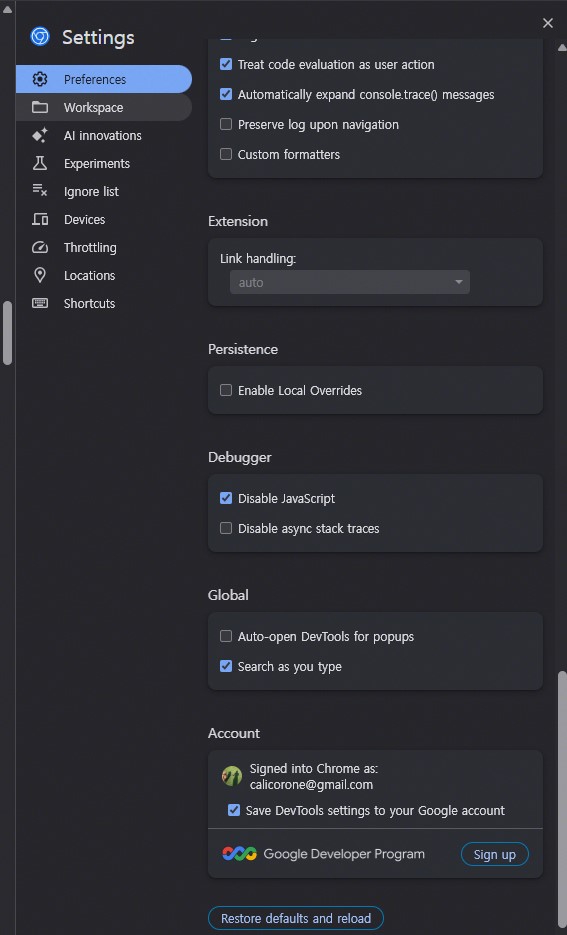
What Is the “Google Developer Program” Button in Chrome DevTools?
At the bottom of Chrome DevTools settings, Google includes a link to the Google Developer Program. This is not a DevTools feature, but an optional subscription program offering educational resources, developer profiles, and tools for people working with Google technologies. Clicking the button simply takes you to the program’s website, and signing up does not change how Chrome DevTools operates.
The button you see at the bottom of Chrome DevTools is not a debugging feature.
It is simply a promotional link added by Google to suggest that developers sign up for the Google-wide Developer Program.
In other words:
Chrome DevTools works the same whether you join the program or not. The button is optional and has no effect on debugging or browser features.
Why This Button Appears in DevTools
Google wants to provide developers with:
-
learning resources
-
documentation
-
Google Cloud credits (for some tiers)
-
developer profile and achievements
-
access to tutorials and code labs
Because many developers use DevTools, Google included a shortcut there to encourage sign-ups.
This is why the button appears under Account in DevTools settings.
Here is a clear explanation of exactly what that “Google Developer Program” button in Chrome DevTools means, based on the screenshot you provided.
Why This Button Appears in DevTools
Google wants to provide developers with:
-
learning resources
-
documentation
-
Google Cloud credits (for some tiers)
-
developer profile and achievements
-
access to tutorials and code labs
Because many developers use DevTools, Google included a shortcut there to encourage sign-ups.
This is why the button appears under Account in DevTools settings.