해당 내용은 Udemy 강의 'Pandas 및 Python을 이용한 데이터 분석:마스터 클래스'를 수강 후 정리한 내용입니다.
Section1
LOAD TEXT DATA AND PERFORM BASIC DATA EXPLORATION
# Dataset consists of 3000 Amazon customer reviews, star ratings, date of review, variant and feedback of various amazon Alexa products like Alexa Echo, Echo dots.
# The objective is to discover insights into consumer reviews.MINI CHALLENGE #1:
- What is the average rating?
- How many unique classes do we have in the variation column?
- What is memory usage of this dataframe in memory?
# What is the average rating?

# alexa_df['rating'].mean()
alexa_df.describe()
# How many unique classes do we have in the variation column?
alexa_df['variation'].nunique()# What is memory usage of this dataframe in memory?
alexa_df.info()Section2
UPPER AND LOWER
# You can convert all words in a given column into upper case by applying str.lower()

alexa_df['verified_reviews'].str.lower()
# You can convert all words in a given column into lower case by applying str.upper()
alexa_df['verified_reviews'].str.upper()# You can also convert the headernames into upper case
alexa_df.columns = alexa_df.columns.str.upper()
alexa_df# Let's convert them back to lowercase!
alexa_df.columns = alexa_df.columns.str.lower()
alexa_dfMINI CHALLENGE #2:
- Apply a method to return strings where the first character in every word is upper case (external research is required)
alexa_df['verified_reviews'].str.title()Section3
PANDAS OPERATIONS PART #1
# obtain the length of a given string (how many characters per string)

alexa_df['reviews_length'] = alexa_df['verified_reviews'].str.len()

alexa_df
# Let's obtain the shortest review
min_char = alexa_df['reviews_length'].min()
min_char# Let's obtain the longest review
max_char = alexa_df['reviews_length'].max()
max_char# Let's filter out the shortest reviews
alexa_df[alexa_df['reviews_length'] == min_char]MINI CHALLENGE #3:
- Locate the verified review that has the maximum number of characters
alexa_df[alexa_df['reviews_length'] == max_char]# 전체 리뷰 내용 확인하기
alexa_df[alexa_df['reviews_length'] == max_char]['verified_reviews'].iloc[0]Section4
PANDAS OPERATIONS PART #2
# You can replace elements in a dataframe as follows:

alexa_df['variation'] = alexa_df['variation'].str.replace('Walnut Finish', 'Walnut Finish (Best Seller)')
# Filter the DataFrame by selecting rows that only ends with the word "love"
# Note that we had to convert all words into lower case first
mask = alexa_df['verified_reviews'].fillna('').str.lower().str.endswith('love')
alexa_df[mask]💡 체크 사항
-
NaN 값 여부
verified_reviews컬럼에 결측값이 존재한다면.str메서드 사용시 오류 발생 가능 -
불리언 마스크 적용 방식
mask는 불리언 시리즈이므로 인덱싱은 작동해야 함. 1번 문제가 있다면 오류 발생
-
str속성 사용 가능 여부verified_reviews컬럼이 문자열 데이터로만 이루어져 있지 않으면 (int,float같은 값 포함).str을 사용할 수 없음.
💡 해결 방법
-
fillna('')사용 (추천)NaN 값을 빈 문자열(
'')로 대체한 후 실행하면 문제없이 작동 -
dropna()사용NaN 값을 아예 제거한 상태에서 실행하는 방법 존재
-
astype(str)사용NaN이
'nan'문자열로 바뀌어버리므로 의도한 결과와 다를 수 있음.
# Filter the DataFrame by selecting rows that only starts with the word "love"
# Note that we had to convert all words into lower case first

mask = alexa_df['verified_reviews'].fillna('').str.lower().str.startswith('love')
alexa_df[mask]
# you can split the string into a list
alexa_df['verified_reviews'].str.split()# you can also select the index within the extracted list as follows
# Note that index 0 indicates the first element in a given list
alexa_df['verified_reviews'].str.split(' ').str.get(0)MINI CHALLENGE #4:
- Filter the DataFrame by selecting rows that contains the word "love" in any location
mask = alexa_df['verified_reviews'].fillna('').str.lower().str.contains('love')

alexa_df[mask]
Section5
PERFORM TEXT DATA CLEANING BY REMOVE PUNCTUATIONS
# String module is super useful when dealing with text data
# String contains constants and classes for working with text

import string
string.punctuation
Test = '$I love Pandas &Data Analytics!!'
Test_punc_removed = [char for char in Test if char not in string.punctuation]
Test_punc_removedTest_punc_removed_join = ''.join(Test_punc_removed)
Test_punc_removed_join# Let's define a function to remove punctuations
def remove_punc(message):
Test_punc_removed = [char for char in message if char not in string.punctuation]
Test_punc_removed_join = ''.join(Test_punc_removed)
return Test_punc_removed_join# Let's remove punctuations from our dataset
# alexa_df['verified_reviews_nopunc'] = alexa_df['verified_reviews'].apply(remove_punc)
alexa_df['verified_reviews_nopunc'] = alexa_df['verified_reviews'].fillna('').apply(remove_punc)MINI CHALLENGE #5:
- Explore at least 3 rows from the DataFrame and check if the function worked as expected
강의에서는 인덱싱을 통해 개별 컬럼을 출력한 후 눈으로 비교하는 방법을 제시했지만, 이는 수동으로 각 행을 살펴봐야 하는 번거로움이 있다.
이를 보완하기 위해 문장 부호가 제거되었는지 여부를 나타내는 새로운 컬럼을 추가하여 한눈에 확인할 수 있도록 개선했다.
데이터의 변환 여부를 직관적으로 확인할 수 있어 편의성이 높아지고, 대량의 데이터를 다룰 때도 효율적인 검토가 가능하다.
alexa_df['verified_reviews_nopunc'].head(5).apply(lambda x: any(char in string.punctuation for char in x))import random
# 랜덤시드 고정
random.seed(42)
alexa_df_subset = alexa_df[['verified_reviews', 'verified_reviews_nopunc']].sample(5, random_state=42).copy()
alexa_df_subset['has_punctuation'] = alexa_df_subset['verified_reviews_nopunc'].apply(
lambda x: 'Yes' if any(char in string.punctuation for char in x) else 'No'
)
alexa_df_subsetSection6
PERFORM TEXT DATA CLEANING BY REMOVING STOPWORDS
import nltk
from nltk.corpus import stopwords
import gensim
from gensim.utils import simple_preprocess

# import re
# from nltk.stem import PorterStemmer, WordNetLemmatizer
# from nltk.tokenize import word_tokenize, sent_tokenize
# from gensim.parsing.preprocessing import STOPWORDS
# download stopwords
nltk.download('stopwords')
stopwords.words('english')# Add more stopwords by using extend
stop_words = stopwords.words('english')
stop_words.extend(['amazon', 'Amazon', 'alexa', 'Alexa', 'echo', 'Dot', 'dot'])# **Simple_preprocess converts a string into a series of lowered case tokens**
# Let's try it on a sample dataset
gensim.utils.simple_preprocess(alexa_df['verified_reviews'][0])두개의 열을 groupby도 가능
# Remove stopwords and remove short words (less than 2 characters)

def preprocess(text):
    result = []
    for token in gensim.utils.simple_preprocess(text):
        if token not in stop_words and len(token) >=1: # 너무 짧은 단어를 제하기 위함
            result.append(token)

    return result
# apply pre-processing to the text column
alexa_df['verified_reviews_nopunc_nostopwords'] = alexa_df['verified_reviews_nopunc'].apply(preprocess)# 두 컬럼 비교
alexa_df[['verified_reviews', 'verified_reviews_nopunc_nostopwords']].loc[38]# join the words into a string
alexa_df['verified_reviews_nopunc_nostopwords_joined'] = alexa_df['verified_reviews_nopunc_nostopwords'].apply(lambda x: " ".join(x))MINI CHALLENGE #6:
- Modify the code in order keep words that are longer than or equal 3 characters
- Add the word 'really' to the list of stopwords and rerun the code
# Add the word 'really' to the list of stopwords and rerun the code

stop_words = stopwords.words('english')
stop_words.extend(['amazon', 'Amazon', 'alexa', 'Alexa', 'echo', 'Dot', 'dot', 'really'])
# Modify the code in order keep words that are longer than or equal 3 characters
def preprocess(text):
result = []
for token in gensim.utils.simple_preprocess(text):
if token not in stop_words and len(token) >=3: # 너무 짧은 단어를 제하기 위함
result.append(token)
return result# apply pre-processing to the text column
alexa_df['verified_reviews_nopunc_nostopwords'] = alexa_df['verified_reviews_nopunc'].apply(preprocess)Section7
TOKENIZATION AND PADDING
from sklearn.feature_extraction.text import CountVectorizer

vectorizer = CountVectorizer()
alexa_countvectorizer = vectorizer.fit_transform(alexa_df['verified_reviews_nopunc_nostopwords_joined'])alexa_countvectorizer.shape# 4163개의 의미
print(vectorizer.get_feature_names_out())# 작동여부 체크 방법
word_count_array = alexa_countvectorizer.toarray()word_count_array[0, :]index = 438
plt.plot(word_count_array[index, :])alexa_df['verified_reviews_nopunc_nostopwords_joined'][index]MINI CHALLENGE #7:
- Explore the data with index 13 and confirm that the tokenization works
index = 13

plt.plot(word_count_array[index, :])alexa_df['verified_reviews_nopunc_nostopwords_joined'][index]Section8
TEXT DATA VISUALIZATION
# Let's obtain the number of words in every row in the DataFrame

alexa_df['length'] = alexa_df['verified_reviews_nopunc_nostopwords'].apply(len)
alexa_df
# Let's plot the histogram of the length column
alexa_df['length'].hist(bins=100, figsize=(20, 10))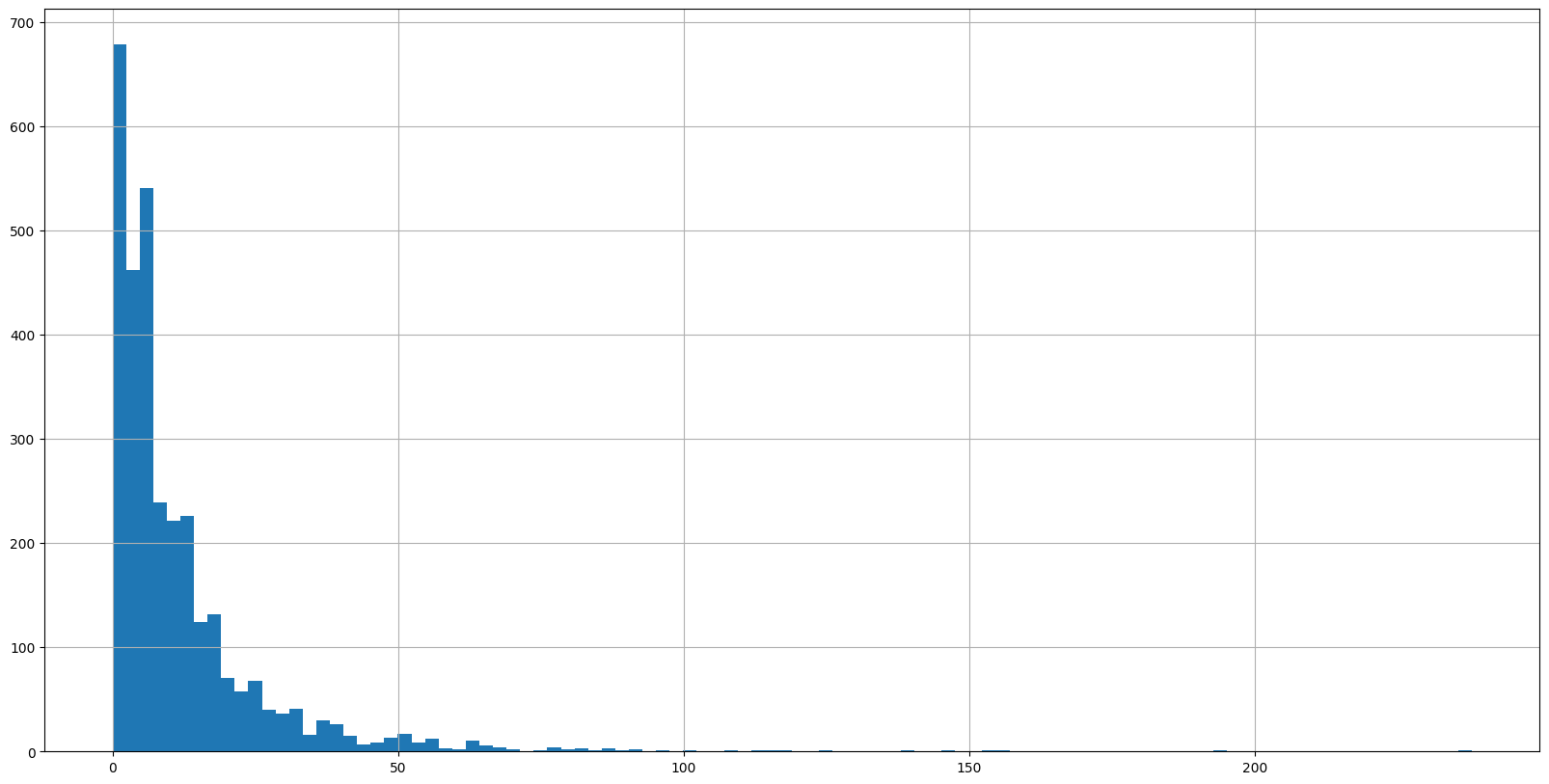
# Use count plot to show how many samples have positive/negative feedback

sns.countplot(x='feedback', data=alexa_df, palette='Set1')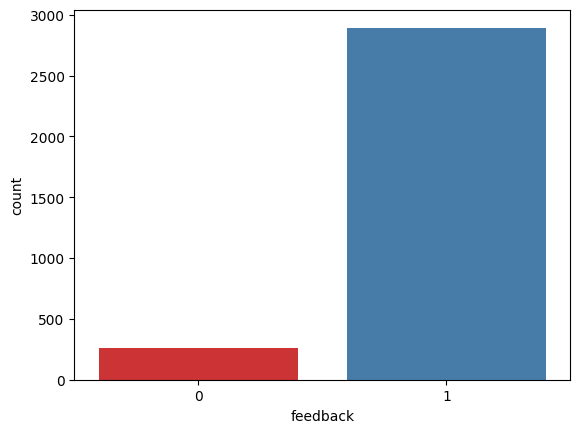
# Use Seaborn barplot to show variations/ratings

plt.figure(figsize=(25, 10))
sns.barplot(x='variation', y='rating', data=alexa_df, palette='deep')

# x축 글씨 각도 변경
plt.xticks(rotation=45)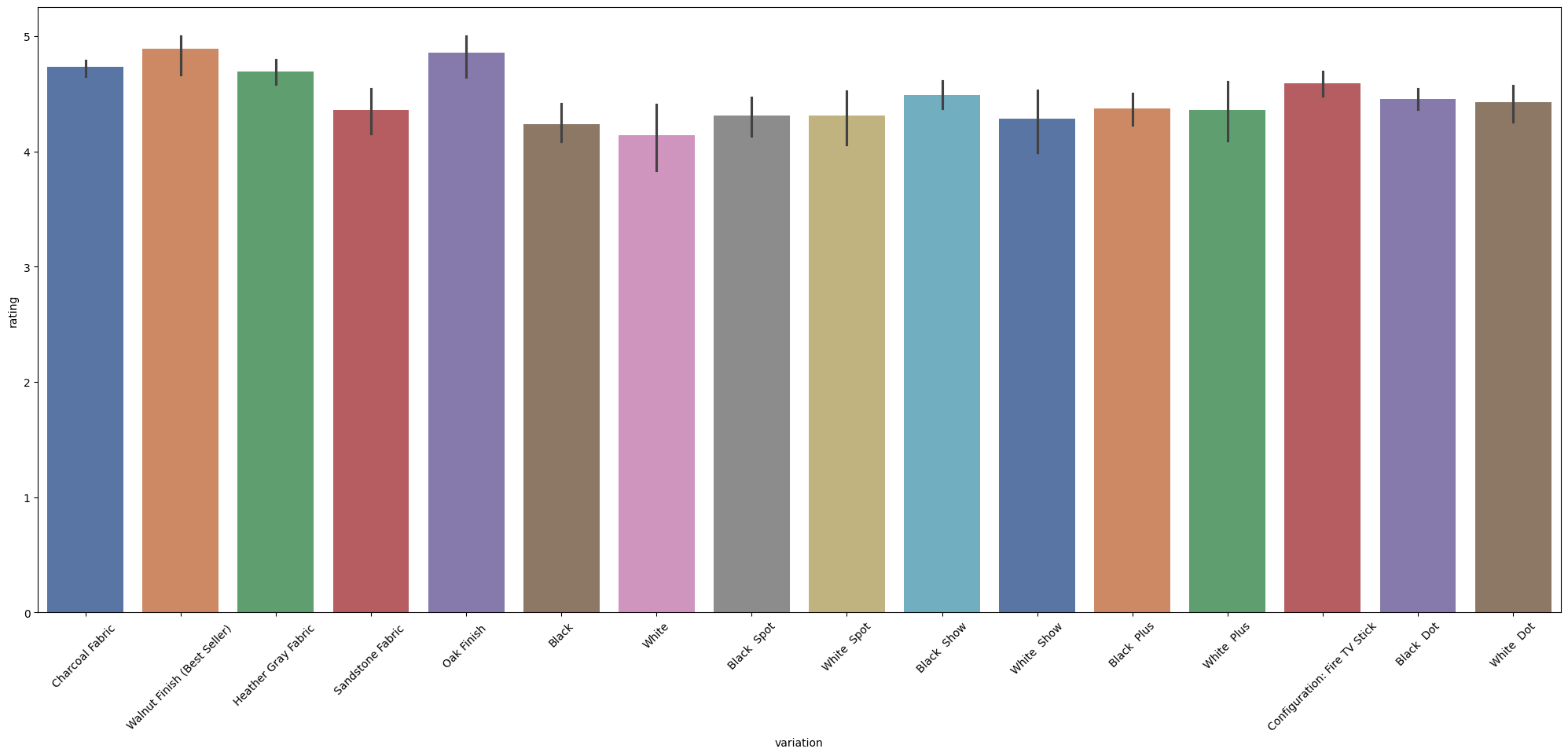
MINI CHALLENGE #8:
- Plot the count plot for the ratings column
sns.countplot(x='rating', data=alexa_df, palette='deep')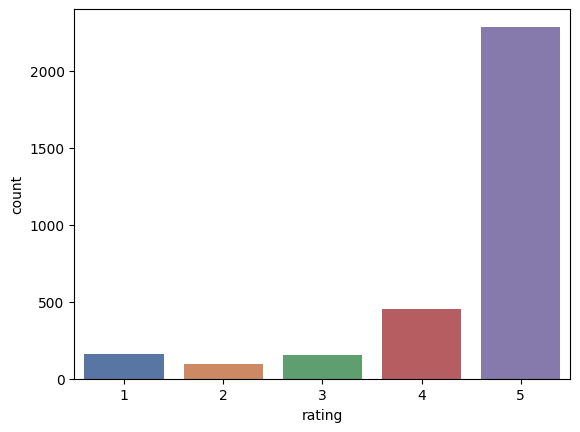
Section9
WORD CLOUD
# Take a dataframe column and convert it into a list

sentences = alexa_df['verified_reviews_nopunc_nostopwords_joined'].tolist()
sentences
# Take a dataframe column and convert it into a list
sentences = alexa_df['verified_reviews_nopunc_nostopwords_joined'].tolist()
sentences# Join all elements in the list into one massive string!
word_as_one_string = " ".join(sentences)# 더 높은 해상도의 WordCloud 생성
wordcloud = WordCloud(
width=800, # 이미지 가로 크기 (픽셀)
height=800, # 이미지 세로 크기 (픽셀)
max_font_size=150, # 최대 글자 크기
background_color='white', # 배경 색상 (선택 사항)
colormap='viridis' # 색상 맵 (선택 사항)
).generate(word_as_one_string)
# 화질 좋은 WordCloud 출력
plt.figure(figsize=(10, 10)) # 출력 크기
plt.imshow(wordcloud, interpolation='bilinear') # 화질 개선
plt.axis('off') # 축 없애기
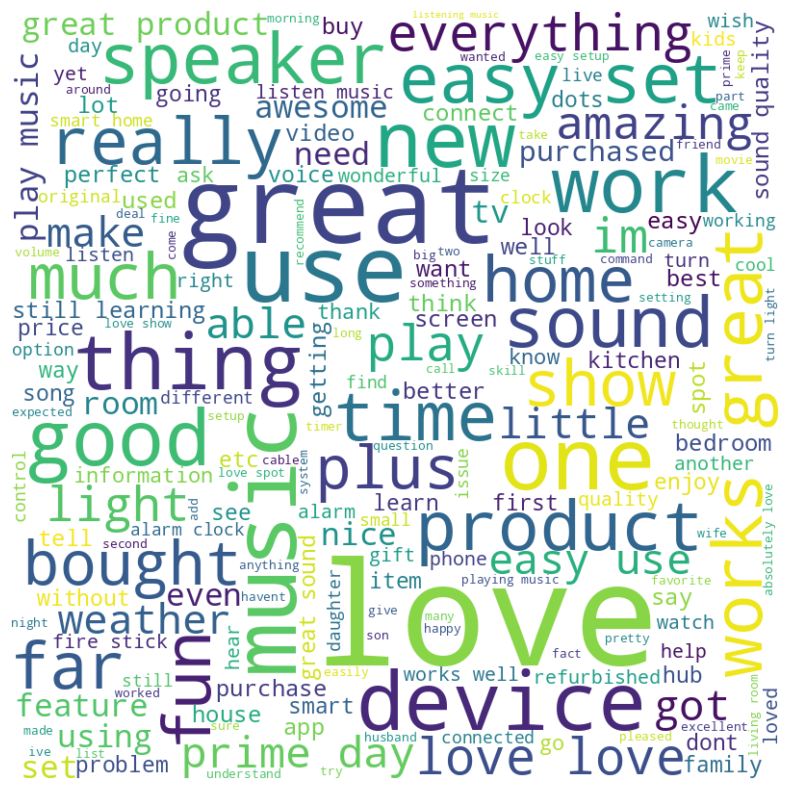
plt.show()positive_df = alexa_df[alexa_df['rating']==5]
positive_dfsentences = positive_df['verified_reviews_nopunc_nostopwords_joined'].tolist()
word_as_one_string = " ".join(sentences)
wordcloud = WordCloud(
width=800,
height=800,
max_font_size=150,
background_color='white',
colormap='viridis'
).generate(word_as_one_string)
plt.figure(figsize=(10, 10))
plt.imshow(wordcloud, interpolation='bilinear')
plt.axis('off')
plt.show()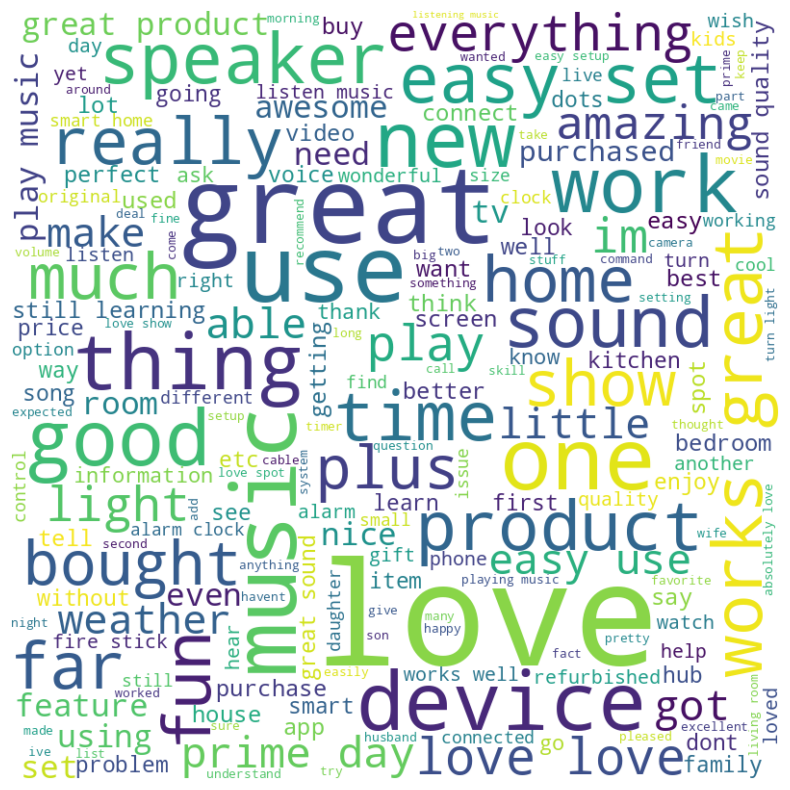
MINI CHALLENGE #9:
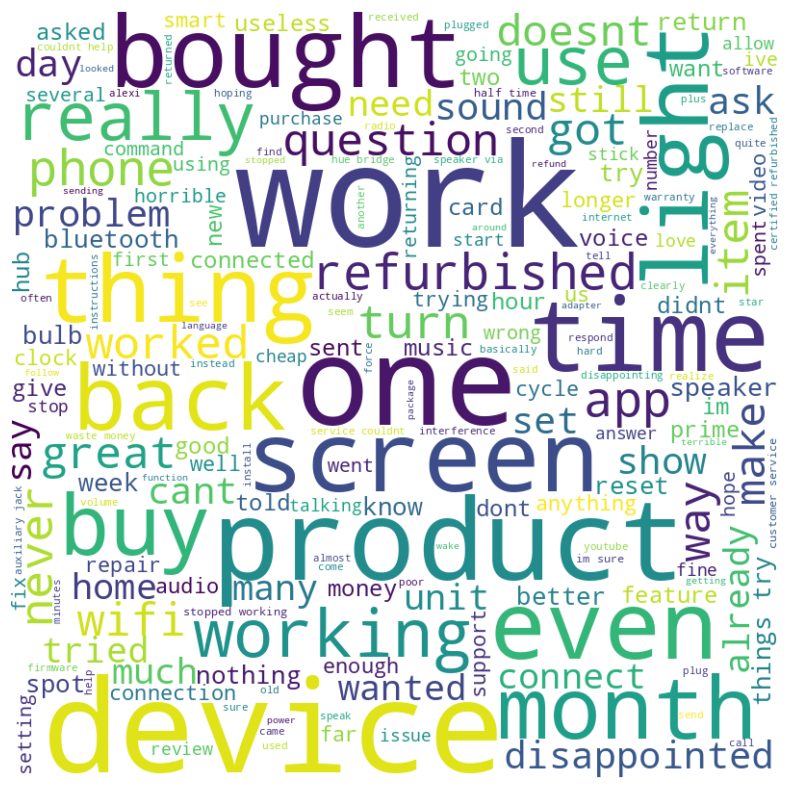
- Plot the wordcloud for the negative ratings
negative_df = alexa_df[alexa_df['rating']==1]
negative_df
sentences = negative_df['verified_reviews_nopunc_nostopwords_joined'].tolist()
word_as_one_string = " ".join(sentences)
wordcloud = WordCloud(
width=800,
height=800,
max_font_size=150,
background_color='white',
colormap='viridis'
).generate(word_as_one_string)
plt.figure(figsize=(10, 10))
plt.imshow(wordcloud, interpolation='bilinear')
plt.axis('off')
plt.show()