오늘 학습한거 복기하는 형태로 적어본 TIL
FineiteStateMaching = FSM(유한 상태 기계)
어떤사람이 가만히 있으면, 나를 따라오는 상태가 되었다가, 다시 가만히 있는 상태(조건의 따라 상태가 변경됨)
interface 역할, c# 인터페이서 왜 다중상속 금지냐?
-> 어떠한 함수들이 존재하기로 약속 하는 것
enum
- Enemy의 애니메이션을 컨트롤 하기 위해 enum State추가
using UnityEngine;
using UnityEngine.AI;
using UnityEngine.UI;
using UnityEngine.UIElements;

// Health.IHealthListener 인터페이스 구현,
// c#은 다중 상속이 금지되어 있기에, 인터페이스로 구현
// 이미 스크립트에 MonoBehaviour 클래스 상속받았기에 인터페이스로 구현
public class EnemyController : MonoBehaviour, Health.IHealthListener
{
    enum State
    {
        Idle,
        Follow,
        Attack,
    }

    GameObject player;
    NavMeshAgent agent;
    Animator animator;
    public float walkSpeed = 3;

    State state;    // 적의 현재 상태
    float currentStateTime; // 현재 상태 시간
    public float timeForNextState = 2; //2초간 같은 상태에 머문다

    // Start is called once before the first execution of Update after the MonoBehaviour is created
    void Start()
    {
        animator = GetComponent<Animator>();
        player = GameObject.FindWithTag("Player");
        agent = GetComponent<NavMeshAgent>();

        // 적의 기본 이동 속도를 설정
        agent.speed = walkSpeed;

        agent.destination = player.transform.position;

        state = State.Idle;
        currentStateTime = timeForNextState = 2;
    }

    // Update is called once per frame
    void Update()
    {
        switch(state)
        {
            case State.Idle:
                currentStateTime -= Time.deltaTime;
                if(currentStateTime <0)
                {
                    float distance = (player.transform.position - transform.position).magnitude;
                    if(distance<1.5f)
                    {
                        StartAttack();
                    }
                    else
                    {
                        StartFollow();
                    }
                }
                break;

            case State.Follow:
                //남은 거리가 1m 미만이면 또는,Agent가 갈 수 있는 경로를 가지고 있는지 확인
                if (agent.remainingDistance < 1.5f || !agent.hasPath)
                {
                    StartIdle();
                }
                break;

            case State.Attack:
                currentStateTime -= timeForNextState;
                if(currentStateTime<0)
                {
                    StartIdle();
                }

                break;
        }
    }
    void StartIdle()
    {
        state = State.Idle;
        currentStateTime = timeForNextState;
        agent.isStopped = true;
        animator.SetTrigger("Idle");
    }

    void StartFollow()
    {
        state = State.Follow;
        agent.destination = player.transform.position;
        agent.isStopped = false;
        animator.SetTrigger("Run");
    }
    void StartAttack()
    {
        state = State.Attack;
        agent.isStopped = true;
        currentStateTime = timeForNextState;
        animator.SetTrigger("Attack");

    }

    // Health.IHealthListener의 OnDie()함수 필수
    public void OnDie()
    {
        //throw new System.NotImplementedException();
        Debug.Log("Real Die");
        agent.isStopped = true;
        animator.SetTrigger("Die");
        Invoke("OnDestroy", 2);
    }

    void OnDestroy()
    {
        GameManager.Instance.EnemyDie();
        Destroy(gameObject);
    }

    private void OnTriggerEnter(Collider other)
    {
        if(other.tag == "Player")
        {
            other.GetComponent<Health>().Damage(10);
        }
    }
}
Attack Animation, 콜라이더 설정
공격할때 콜라이더를 껏다 켰다 해야 적이 공격하지 않을때 데미지 안입음
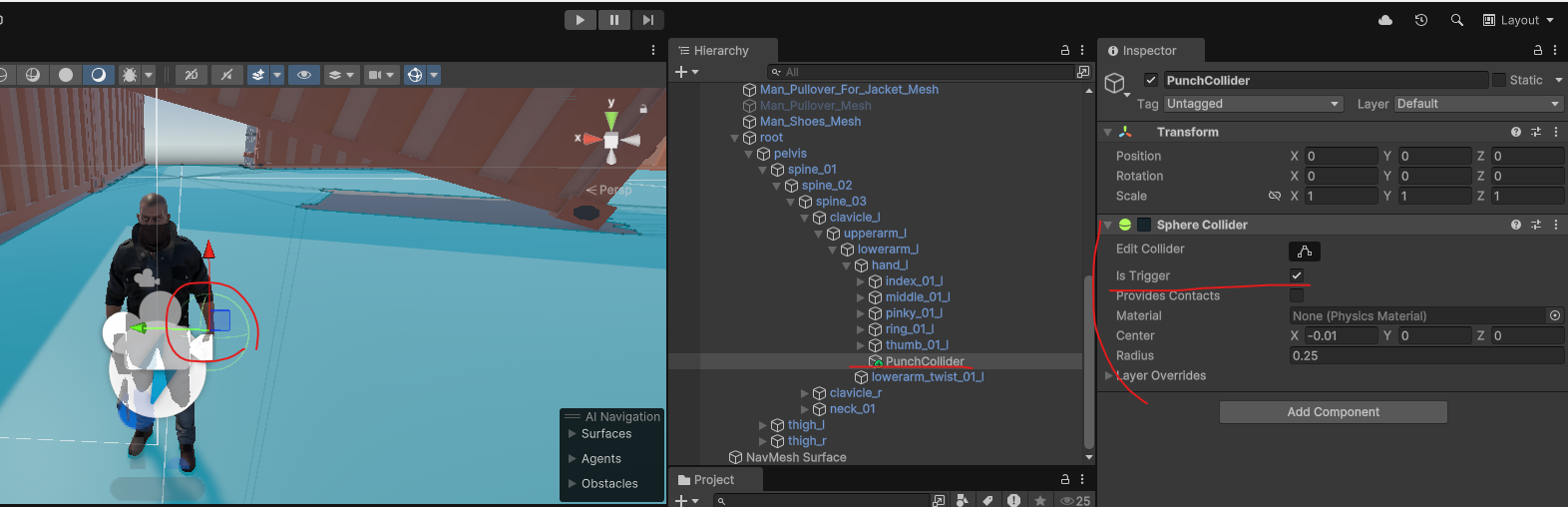
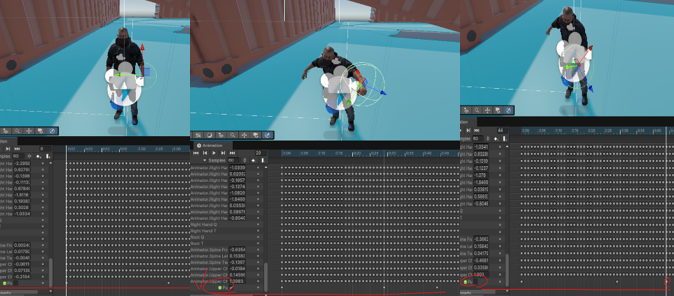
Health.cs / EnemyController.cs 를 사용
주먹에 콜라이더를 추가하고, 공격 공격 모션이 되면 주먹에서 콜라이더가 작동이 되도록 애니메이션 및 스크립트 수정
public class EnemyController : MonoBehaviour, Health.IHealthListener
{
    ...

    private void OnTriggerEnter(Collider other)
    {
        if (other.tag == "Player") // 콜라이더의 태그가 플레이어라면
        {
            other.GetComponent<Health>().Damage(1); // 플레이어의 Health 컴포넌트에서 Damage(1)을 호출
        }
    }
}

> 플레이어가 공격시 데미지 넣을 수 있도록

using UnityEngine;
using UnityEngine.UI;

public class Health : MonoBehaviour
{
    public float hp = 10;
    public float maxHp = 10;
    public float invincibleTime;    //무적시간

    public Image hpGauge;

    IHealthListener healthListener;
    float lastDamageTime;

    // Start is called once before the first execution of Update after the MonoBehaviour is created
    void Start()
    {
        healthListener = GetComponent<IHealthListener>();
    }

    public void Damage(float damage)
    {
        if (hp > 0 && lastDamageTime+invincibleTime < Time.time)    // 현재 시간이 마지막으로 맞은 시간 + 무적 시간 이후라면

        {
            hp -= damage;

            if(hpGauge != null)
            {
                hpGauge.fillAmount = hp / maxHp;
            }

            lastDamageTime =Time.time;	// 맞은 시간 저장

            if (hp <= 0)
            {
                if(healthListener != null)	// listner가 있다면
                {
                    healthListener.OnDie();
                }
            }
            else
            {
                Debug.Log("다침");
            }
        }
    }

    // 클래스 선언과 비슷하지만 이 함수들이 존재하기로 약속한다.
    // 언제 쓰는것인가? 어떻게 쓰는것인가? 에 대한 사례
    public interface IHealthListener
    {
        void OnDie();
    }

}
HPGauage
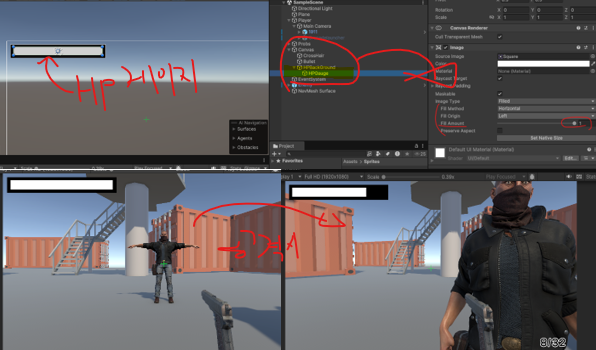
적이 캐릭터를 공격하면 HP게이지가 깎이도록 설정
Health.cs 를 작성해서 구현
using UnityEngine;
using UnityEngine.UI;

public class Health : MonoBehaviour
{
    public float hp = 10;
    public float maxHp = 10;
    public float invincibleTime;    //무적시간

    public Image hpGauge;

    IHealthListener healthListener;
    float lastDamageTime;

    // Start is called once before the first execution of Update after the MonoBehaviour is created
    void Start()
    {
        healthListener = GetComponent<IHealthListener>();
    }

    public void Damage(float damage)
    {
        if (hp > 0 && lastDamageTime+invincibleTime < Time.time)    // 무적 시간이면 안맞음
        {
            hp -= damage;

            if(hpGauge != null)
            {
                hpGauge.fillAmount = hp / maxHp;
            }

            lastDamageTime =Time.time;

            if (hp <= 0)
            {
                if(healthListener != null)
                {
                    healthListener.OnDie();
                }
            }
            else
            {
                Debug.Log("다침");
            }
        }
    }

    // 클래스 선언과 비슷하지만 이 함수들이 존재하기로 약속한다.
    // 언제 쓰는것인가? 어떻게 쓰는것인가? 에 대한 사례
    public interface IHealthListener
    {
        void OnDie();
    }

}Weapon.cs
using System.Collections;
using TMPro;
using UnityEngine;
public class Weapon : MonoBehaviour
{
```
void RayCastFire()
{
```
if(hit.collider.tag == "Enemy") // hit collider가 부딫힌 태그가 Enemy라면, Health컴포턴트를 받아와 Damage를 준다
{
hit.collider.GetComponent<Health>().Damage(damage);
}
}
```
}
Weapon 스크립트의
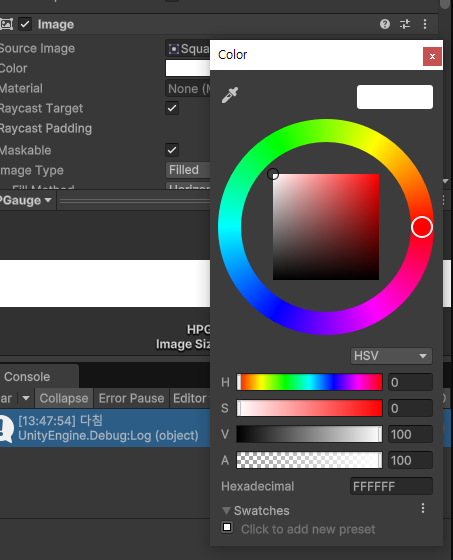
HSVToRGB
using UnityEngine;
using UnityEngine.UI;

public class GaugeColor : MonoBehaviour
{

    // Update is called once per frame
    void Update()
    {
        Image image = GetComponent<Image>();

        // fillamount값에 따라서 색이 바뀌게 됨
        image.color = Color.HSVToRGB(image.fillAmount/3 ,1.0f, 1.0f);
    }
}

Hue (색상), Saturation(채도), Value(명도),Transparent(투명도)
Canvas Render Mode
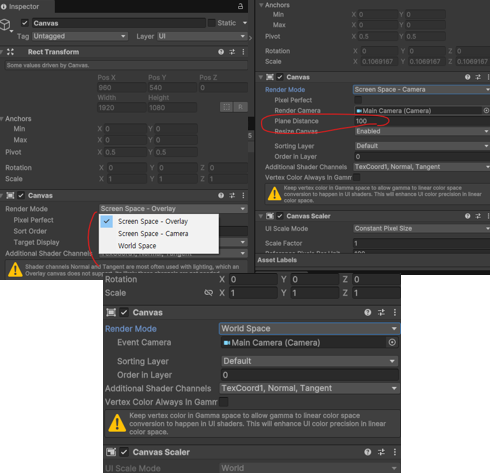
- Screen Space - Overlay
- 이 모드는 UI 카메라에 주로 사용
- 다른 카메라의 영향 없이 화면 위에 UI가 그려지고, 게임 월드의 오브젝트들보다 항상 화면 최상단에 표시 - Screen Space - Camera
- 이 모드는 UI가 특정 카메라에 종속되어 그려지는 방식
- UI가 카메라의 위치와 방향에 맞춰 3D 공간에서 렌더링되지만, 여전히 화면 공간에 나타남
- 카메라의 이동이나 회전에 따라 UI의 위치에 따라 변함 - World Space
- 이 모드는 UI 요소들이 3D 공간 안에 실제 오브젝트처럼 배치
- 카메라에 종속되지 않고, 다른 3D 오브젝트처럼 공간 안에서 위치
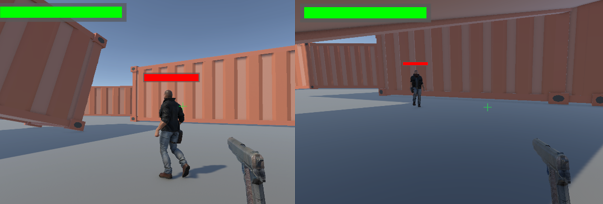
그래서 우리는 Enemy의 체력바를 나타내기 위해서 World Space를 사용해서 어디서 보더라도 체력바가 정면에서 보이도록 스크립트를 사용해 출력했다.
using UnityEngine;

public class LookCamera : MonoBehaviour
{
    // Update is called once per frame
    void Update()
    {
        transform.LookAt(transform.position + Camera.main.transform.forward);
    }
}
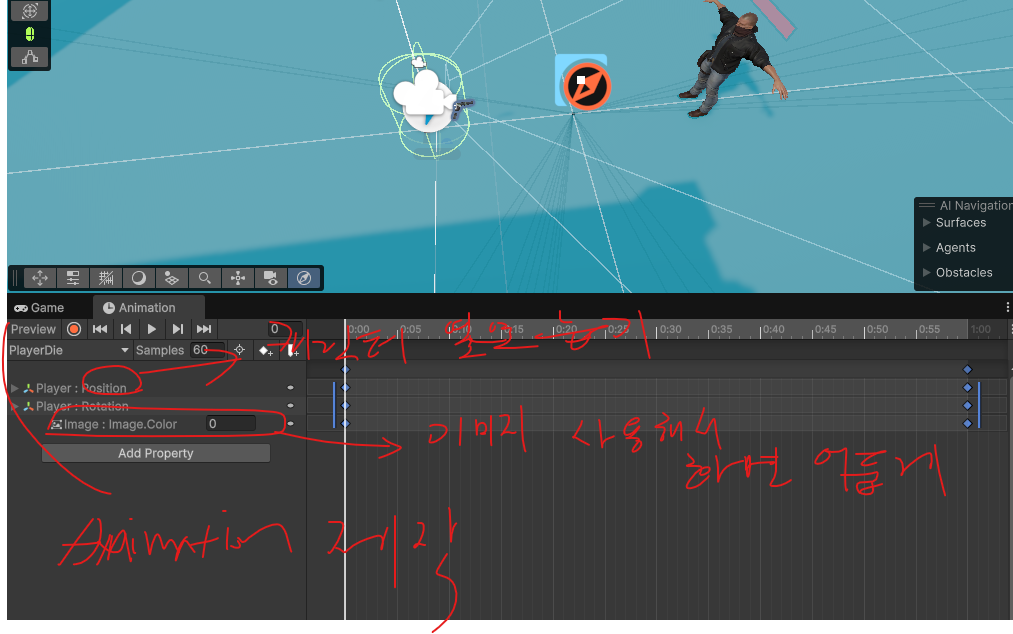
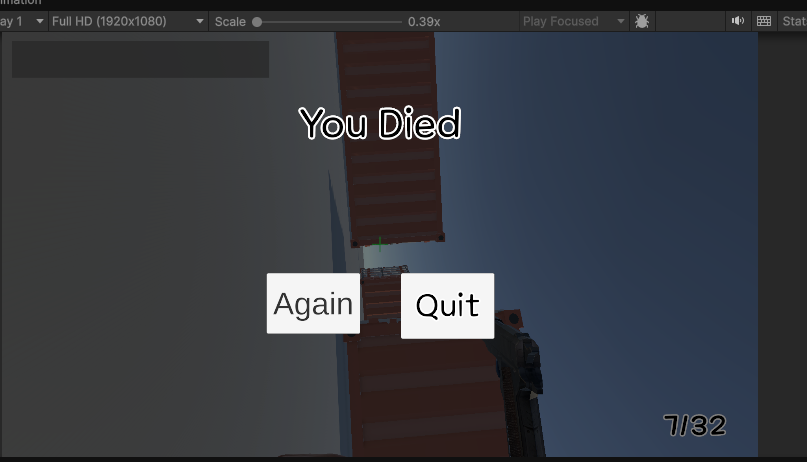
Player Die
public class GameManager : MonoBehaviour
{
    static private GameManager instance = null;
    static public GameManager Instance
    {
        get { return instance; }
    }

    private void Awake()
    {
        instance = this;
    }

    public int EnemyNumber;
    public bool IsPlaying;
    public GameObject GameOverCanvas;
    public TMP_Text title;

    // Start is called once before the first execution of Update after the MonoBehaviour is created
    void Start()
    {
        IsPlaying = true;
    }

    public void PlayerDie()
    {
        title.text = "You Died";
        GameEnd();
    }

    public void GameEnd()
    {
        IsPlaying = false;
        Cursor.visible = true;
        Cursor.lockState = CursorLockMode.None;
        GameOverCanvas.SetActive(true);
    }

    public void EnemyDie()
    {
        EnemyNumber--;

        if (EnemyNumber <= 0)
        {
            title.text = "You Win";
            GameEnd();
        }
    }

    public void AgainPressed()
    {
        SceneManager.LoadScene("GameScene");
    }

    public void QuitPressed()
    {
        Application.Quit();
    }
}
public class EnemyController : MonoBehaviour, Health.IHealthListener
{
    ...
    void DestroyThis()
    {
        GameManager.Instance.EnemyDie();
        Destroy(gameObject); // 오브젝트 파괴
    }
    ...
}
플레이어가 죽었을 때 나타나는 캔버스를 관리하는 GameManger.cs와, Enemy가 죽었을때 오브젝트가 파괴되는 EnemyController.cs

코딩테스트는 진짜 못하겠어요 ㅠㅠ