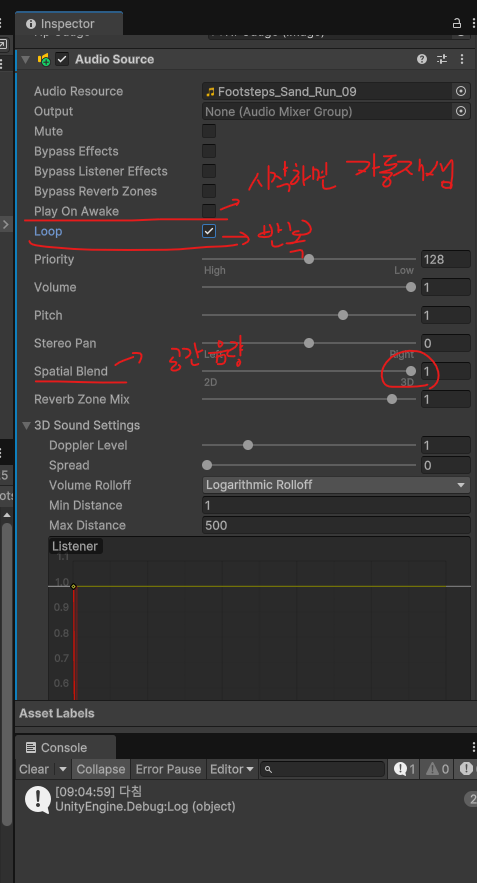
오늘 추가한 내용
- 플레이 사운드
- 발소리
확장자
- 음악은 보통 .mp3, 효과음은 .wav
Audio Source
FootSound(발소리)
- 적이 걸어올때, 발소리가 나도록 Audio Source컴포넌트, Script를 활용해서 구현
- 발소리를 여러개 섞어서 사용하려면, List로 사용하면된다.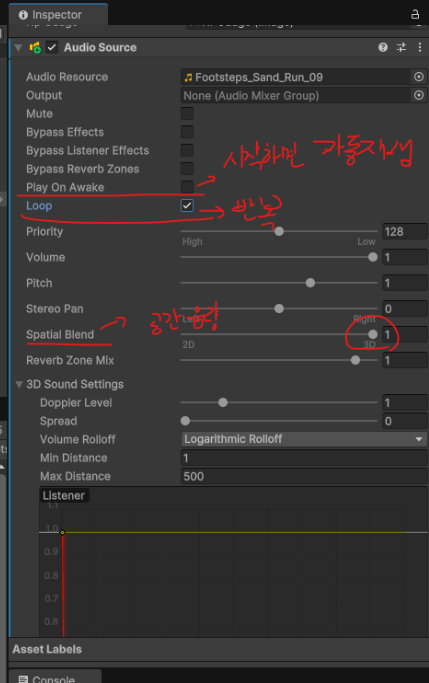
- Doppler Level
- 도플러 효과, 소리를 내는 사람이 나에게 다가오면 소리의 파장이 짧아져서 소리가 커진다. - Min Distance
- 최대 소리가 나는 거리, 1m 내부에 들어와도 소리가 더 커지지 않는다. - Max Distance
-이 거리를 넘어가면 소리가 안 들린다.
public class EnemyController : MonoBehaviour, Health.IHealthListener
{
    ```
    new AudioSource audio;
	```
	void Start()
	{
		```
    	audio = GetComponent<AudioSource>();
    	```
	}
	void StartIdle()
	{
    	audio.Stop();
    	state = State.Idle;
    	currentStateTime = timeForNextState;
    	agent.isStopped = true;
    	animator.SetTrigger("Idle");
	}

	void StartFollow()
	{
    	audio.Play();
    	state = State.Follow;
    	agent.destination = player.transform.position;
    	agent.isStopped = false;
    	animator.SetTrigger("Run");
	}
}
Shot Sound
- 무기에서 소리가 나기때문에 무기 오브젝트에 Audio Source 오브젝트를 배치
- 단순히 총 소리가 들린다면, 플레이어에 배치 하겠지만, 총을 쏠때 소리가 나기 때문에 무기에 배치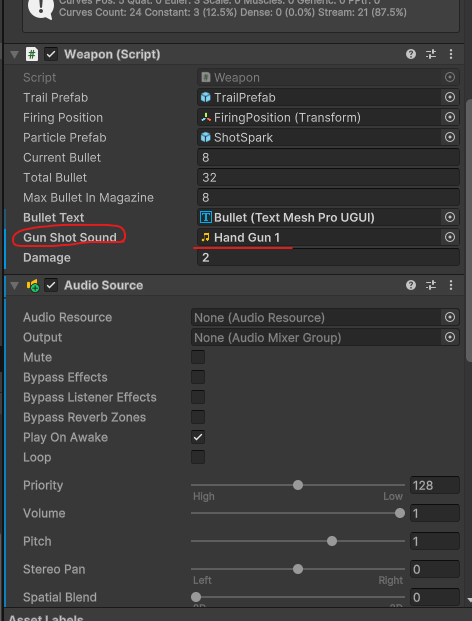
public class Weapon : MonoBehaviour
{
	```
    public AudioClip gunShotSound;
	```
 	void RayCastFire()
 	{
     	GetComponent<AudioSource>().PlayOneShot(gunShotSound);
     ```
 	}
}
Bomb Sound
- 수류탄이 터질 때 사운드가 나도록 설정
- Bomb.cs의 수류탄이 터지는 애니메이션끝에 Audio가 실행되도록 설정 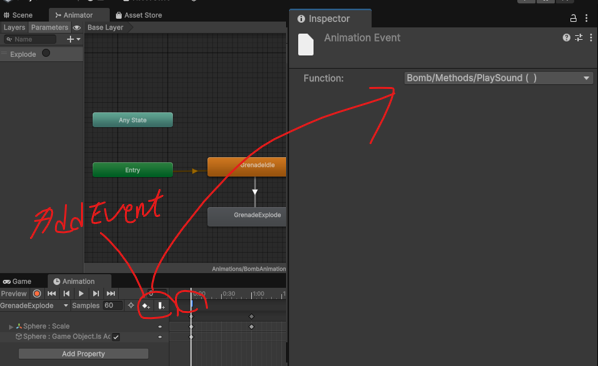
public class Bomb : MonoBehaviour
{
    public float time;
    public float damage;
    public AudioClip explodeSound;

    private void Update()
    {
        time -= Time.deltaTime;
        if (time < 0)
        {
            GetComponent<Animator>().SetTrigger("Explode");
            // 애니메이션 길이가 2초면 2초뒤 폭발, 1초면 1초뒤 폭발
            Destroy(gameObject, 2);

        }
    }
    // 수류탄 폭발 사운드
    public void PlaySound()
    {
        GetComponent<AudioSource>().PlayOneShot(explodeSound);
    }
Die, Hurt sound
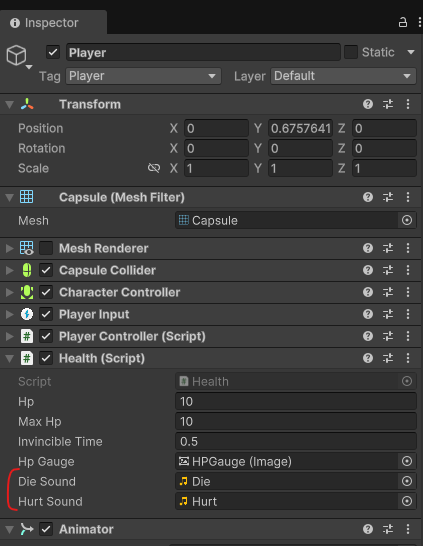
public class Health : MonoBehaviour
{
    ```
    public AudioClip dieSound;
    public AudioClip hurtSound;
	```
    public void Damage(float damage)
    {
        ```
            if (hp <= 0)
            {
                if(dieSound!=null)
                {
                    GetComponent<AudioSource>().PlayOneShot(dieSound);
                }

                if (healthListener != null)
                {
                    healthListener.OnDie();
                }
            }
            else
            {
                if (hurtSound != null)
                {
                    GetComponent<AudioSource>().PlayOneShot(hurtSound);
                }
                Debug.Log("다침");

            }
        }
    }
TextMeshPro 한글 사용
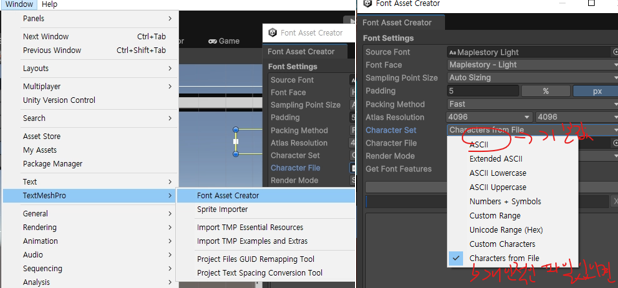
- TextMeshPro를 사용하면 폰트에 따라서 한글이 안나오는 경우가 대부분이다. 이때, window->TextMeshPro->FontAssetCreator를 들어가면, 우측 사진과 같이 창이 뜨는데,
이때, ASCII(표준)와 Characters from File이 있다.
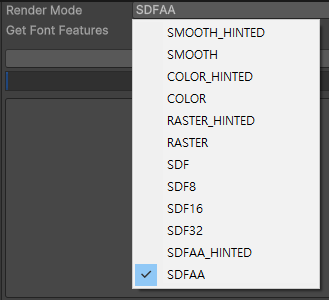
- RenderMode는 텍스트 품질과 성능에 영향을 미친다.
여러 품질을 중 RASTER(제일 가벼운 작업), SDFAA(고품질)을 선호해서 사용 중이다.
뉴튼 json
com.unity.nuget.newtonsoft-json
C# script에 new를 쓰면?
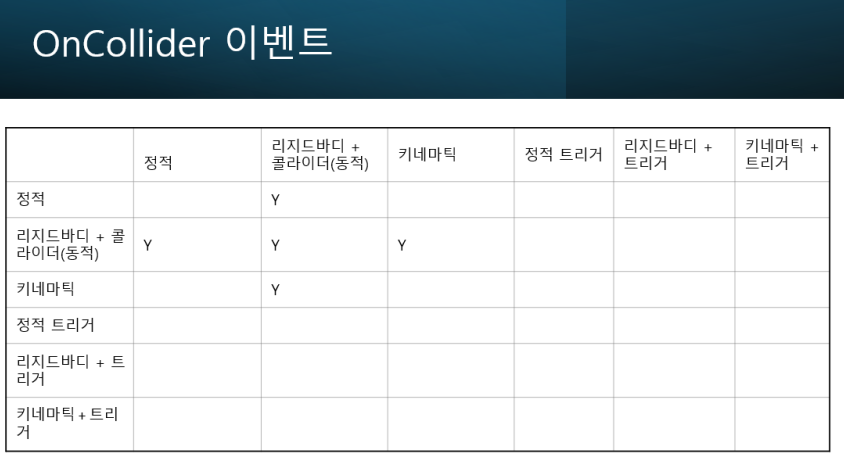
Collision action matrix(충돌 액션 매트릭스)
OnCollider이벤트
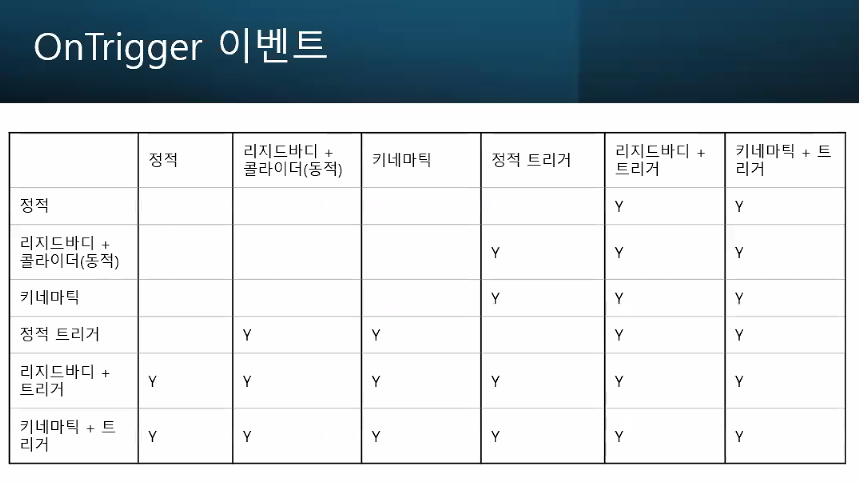
OnTrigger이벤트

코딩테스트는 진짜 못하겠어요 ㅠㅠ