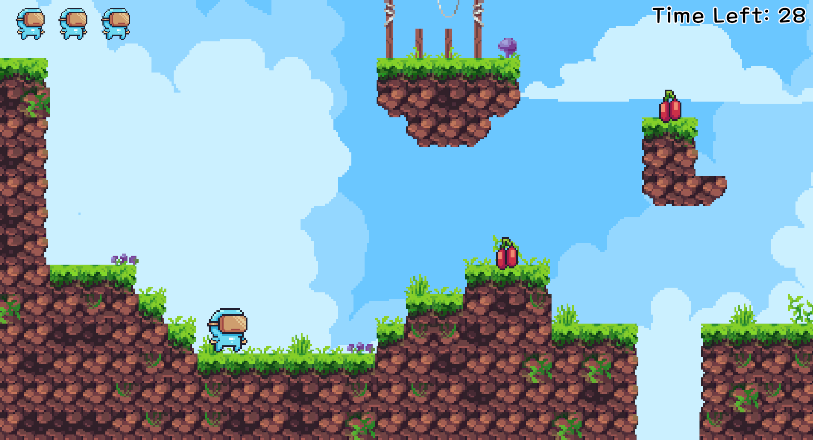
오늘은 내용이 너무 복잡해서 정리가 쉽지가 않네...
추가한 부분 / 새로운 부분
팝업
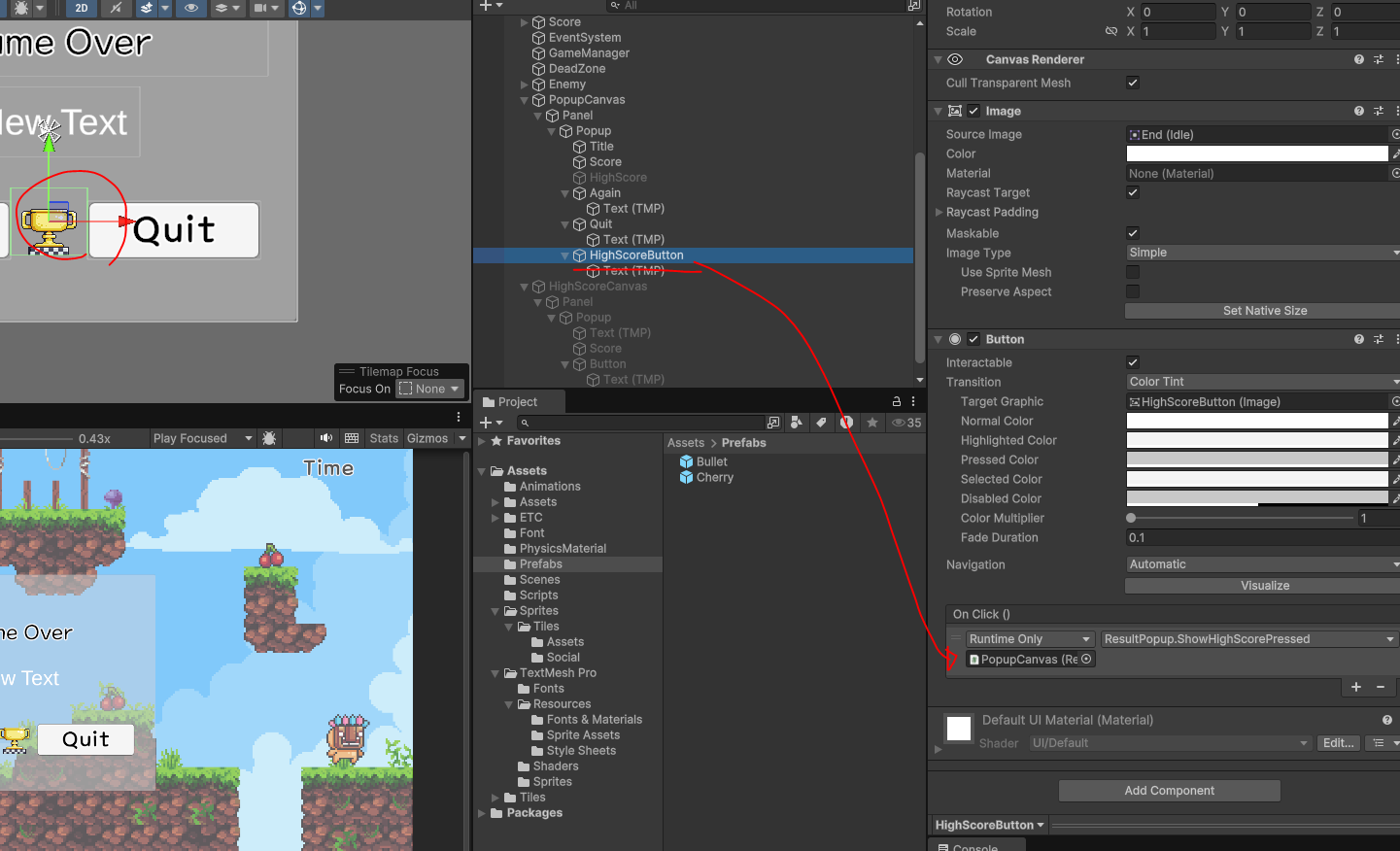
- 게임 오버시 점수 기록, 팝업에서 버튼 누르면 점수 랭킹 확인
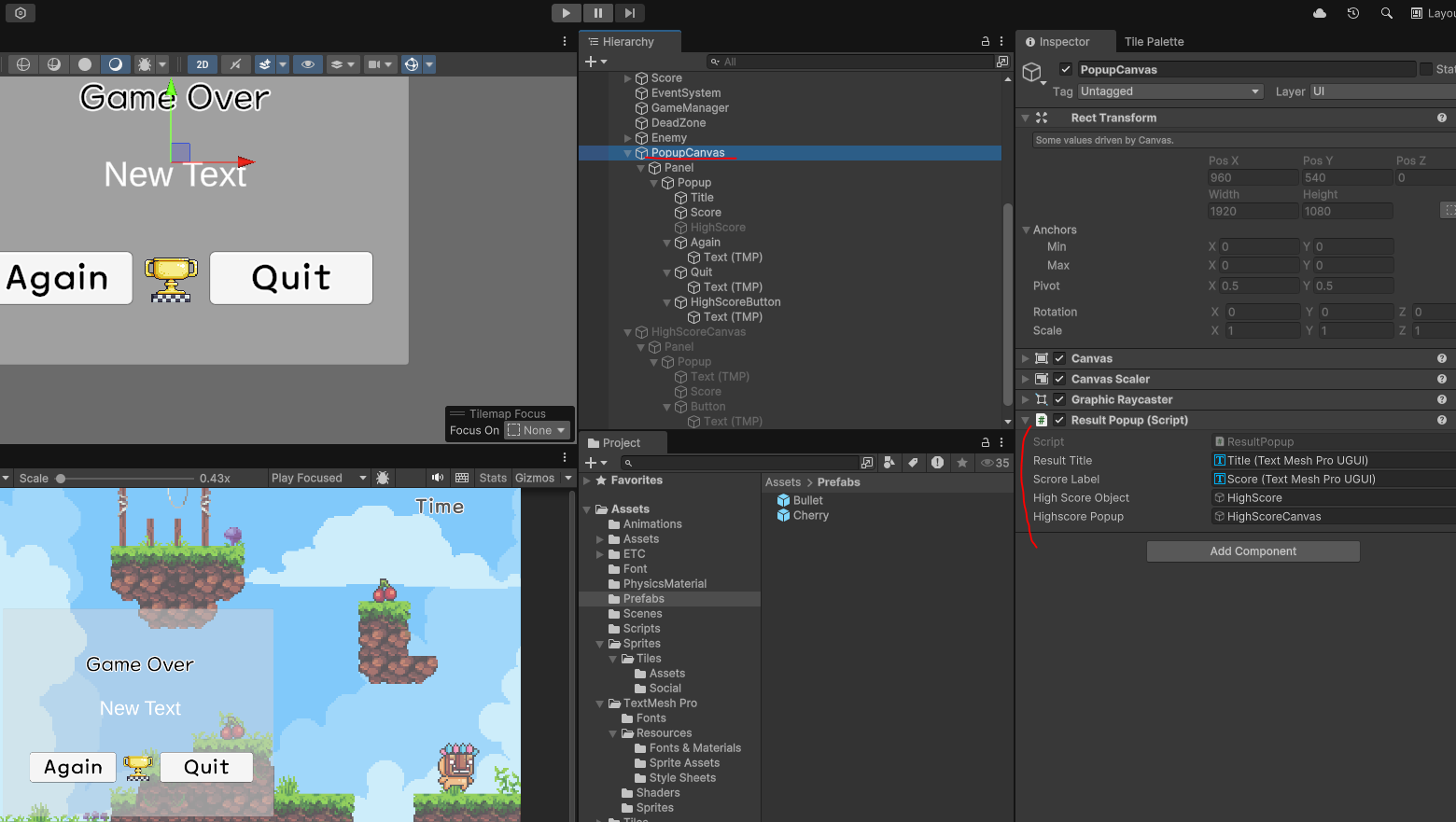
using NUnit.Framework;
using System.Collections.Generic;
using TMPro;
using UnityEngine;
using UnityEngine.SceneManagement;

public class ResultPopup : MonoBehaviour
{
    [SerializeField]
    private TMP_Text resultTitle;
    [SerializeField]
    private TMP_Text scroreLabel;
    [SerializeField]
    GameObject highScoreObject;
    [SerializeField]
    GameObject highscorePopup;


    private void OnEnable()
    {
        Time.timeScale = 0;

        if(GameMangerController.Instance.IsCleared)
        {
            resultTitle.text = "Cleard";
            scroreLabel.text = GameMangerController.Instance.TimeLimit.ToString("#.##");
            SaveHighScore();
        }
        else
        {
            resultTitle.text = "GameOver";
            scroreLabel.text = "";
            highScoreObject.SetActive(false);
        }

    }

    private void OnDisable()
    {

    }

    void SaveHighScore()
    {
        float score = GameMangerController.Instance.TimeLimit;

        float highscore = PlayerPrefs.GetFloat("highscore", 0);

        if(score>highscore)
        {
            highScoreObject.SetActive(true);
            PlayerPrefs.SetFloat("highscore", GameMangerController.Instance.TimeLimit);
            PlayerPrefs.Save();
        }
        else
        {
            highScoreObject.SetActive(false);
        }

        string currentScoreString = score.ToString("#.###");
        string savedScoreString = PlayerPrefs.GetString("HighScores", ""); // 빈 String을 받음


        if(savedScoreString=="")
        {
            PlayerPrefs.SetString("HighScores",currentScoreString);

        }
        else
        {
            string[] scoreArray = savedScoreString.Split(',');  // 저장된 점수를 배열로 분리
            List<string> scoreList = new List<string>(scoreArray);

            for(int i=0; i<scoreList.Count; i++)                // 적당한 위치에 새 점수 넣기
            {
                float savedScore = float.Parse(scoreList[i]);
                if(savedScore < score)                          // 저장된 점수가 더 낮으면
                {
                    scoreList.Insert(i, currentScoreString);    // 낮은 점수는 뒤로 배치
                    break;
                }
            }

            if(scoreArray.Length == scoreList.Count) // 위치를 찾지 못하면 마지막으로 저장
            {
                scoreList.Add(currentScoreString);
            }

            if(scoreList.Count>10)  // 기록이 10개 이상이면 마지막 기록 삭제
            {
                scoreList.RemoveAt(10);
            }

            string result = string.Join(",", scoreList); // 리시트를 한 개의 스트링으로 합치기
            Debug.Log(result);
            PlayerPrefs.SetString("HighScores", result);
        }

        PlayerPrefs.Save();

    }
    public void TryAgainPressed()
    {
        Time.timeScale = 1;
        SceneManager.LoadScene("GameScene");
    }

    public void QuitPressed()
    {
        Time.timeScale = 1;
        Application.Quit();
        // PlayerPrefs에 저장된 스코어들을 Quit버튼 누르면 삭제
        PlayerPrefs.DeleteAll();
    }

    public void ShowHighScorePressed()
    {
        highscorePopup.SetActive(true);
    }
}- 최고 점수 달성시 팝업 이펙트
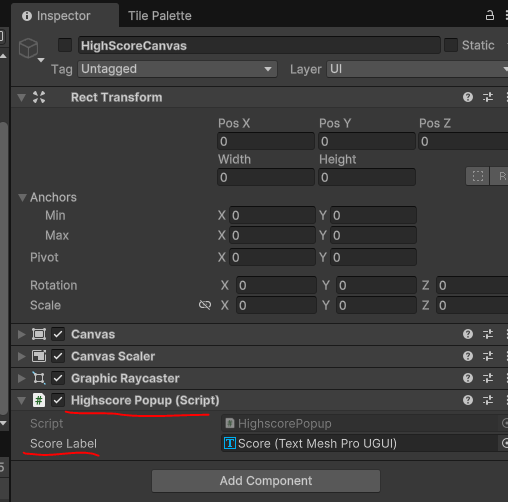
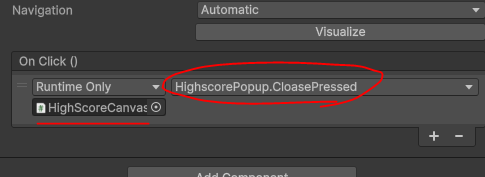
using TMPro;
using UnityEngine;

public class HighscorePopup : MonoBehaviour
{
    public TMP_Text ScoreLabel;

    private void OnEnable()
    {
        string[] scores = PlayerPrefs.GetString("HighScores", "").Split(",");
        string result = "";

        for(int i=0; i<scores.Length; i++)
        {
            result += (i+1)+". " + scores[i]+ "\n";
        }
        ScoreLabel.text = result;
    }

    public void CloasePressed()
    {
        gameObject.SetActive(false);
    }
}- Quit버튼 누르면 PlayerPers기록된 점수 삭제
PlayerPref.DeleteAll();
public void QuitPressed()
{
    Time.timeScale = 1;
    Application.Quit();
    // PlayerPrefs에 저장된 스코어들을 Quit버튼 누르면 삭제
    PlayerPrefs.DeleteAll();
}
Player
- Object Pooling 을 사용한 Bullet 공격
- Bullet프리팹 설정
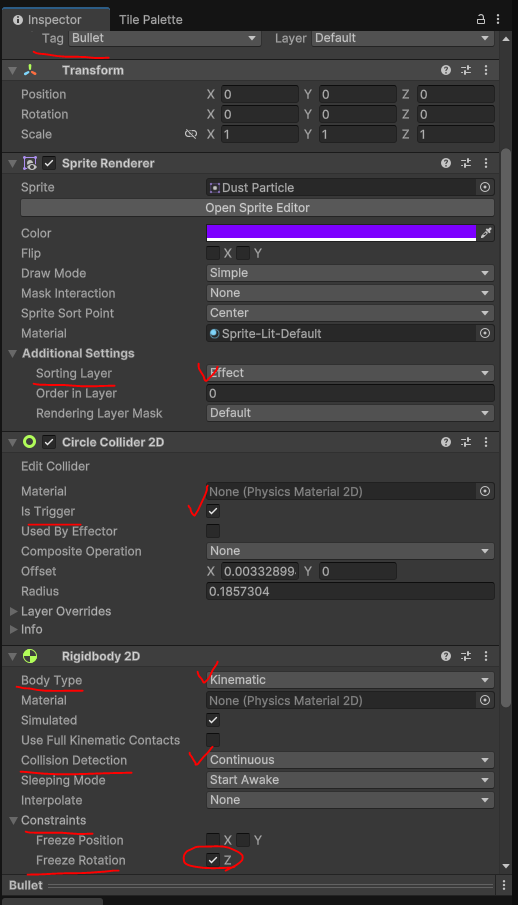
public GameObject BulletPrefab;

 if (Input.GetButtonDown("Fire1"))
{
    // 총알 방향
    Vector2 bulletV = new Vector2(10, 0);

    // 방향 변경
    if (GetComponent<SpriteRenderer>().flipX)
    {
        bulletV.x = -bulletV.x;
    }

    GameObject bullet = GameMangerController.Instance.BulletPool.GetObject();
    bullet.transform.position = transform.position;
    bullet.GetComponent<Bullet>().Velocity = bulletV;
}- 터레인에 걸려서 Fall모션 고정 되는 오류 수정
- 새로운 스크립트 작성
PlayerController.cs

// 땅에 닿아있는지 체크
grounded = BottomCollider.IsTouching(TerrainCollider);

//------캐릭터 왼쪽,오른쪽 벽 확인------
onWall = LeftWallCollider.IsTouching(TerrainCollider) || RightWallCollider.IsTouching(TerrainCollider);

if (onWall && !grounded && vx != 0)
{
    // 벽에 붙어 있을 때 중력 효과 약화 (미끄러짐)
    vy = Mathf.Max(vy, -WallSlideSpeed);

    if (Input.GetButtonDown("Jump"))
    {
        wallJumping = true;     // 벽 점프 중
        vy = JumpSpeed;         // 점프 시 세로 속도 설정

        // 벽에서 반대 방향으로 점프
        if (LeftWallCollider.IsTouching(TerrainCollider))
        {
            vx = WallJumpSpeed; // 오른쪽으로 점프
        }
        else if (RightWallCollider.IsTouching(TerrainCollider))
        {
            vx = -WallJumpSpeed; // 왼쪽으로 점프
        }

        Invoke("StopWallJump", 0.3f); // 일정 시간 후 벽 점프 종료
    }
}
//-------윗부분 벽타기 추가

if (vx < 0)
{
    GetComponent<SpriteRenderer>().flipX = true;
}

if (vx > 0)
{
    GetComponent<SpriteRenderer>().flipX = false;
}


// 애니메이션 처리
if (grounded)  // 땅에 닿아있을 때
{
    if (!wallJumping)
    {
        GetComponent<Animator>().ResetTrigger("Fall");
        GetComponent<Animator>().ResetTrigger("Jump");

        if (vx == 0)
        {
            GetComponent<Animator>().SetTrigger("Idle");
        }
        else
        {
            GetComponent<Animator>().SetTrigger("Run");
        }
    }
}
else  // 공중에 있을 때
{
    if (vy > 0)  // 위로 올라가는 중이면 Jump 애니메이션
    {
        GetComponent<Animator>().SetTrigger("Jump");
        GetComponent<Animator>().ResetTrigger("Fall");
    }
    else if (vy < 0)  // 아래로 내려가는 중이면 Fall 애니메이션
    {
        GetComponent<Animator>().SetTrigger("Fall");
        GetComponent<Animator>().ResetTrigger("Jump");
    }
}

// 윗 키 누르면 점프 속도 업
if (Input.GetButtonDown("Jump") && grounded)
{
    vy = JumpSpeed;
    if (Input.GetKey(KeyCode.UpArrow))
    {
        vy = BoostedJumpSpeed;
    }
}

GetComponent<Rigidbody2D>().linearVelocity = new Vector2(vx, vy);
기타
- 시간 오류 수정
- 30초가 지났어도 시간초가 - 시간으로 내려가는 오류 수정
void Update()
{
    TimeLimit -= Time.deltaTime;
    TimeLimitLabel.text = "Time Left: " + ((int)TimeLimit);

    // 시간이 다 되면 게임 오버
    // +(추가해볼것) 목숨이 하나 깎이고, 시간이 다시 30초 늘어난다.
    if (TimeLimit <= 0)
    {
        GameOver();
    }
}-
OnEnable() / OnDisable() 메소드 차이
OnEnable() : 활성화 될 때마다 호출되는 함수(Awake/Start와 다르게 활성화 될 때마다)
OnDisable() : 비활성화 될 때마다 호출되는 함수(스크립트,오브젝트 전부 다) -
ToString("#.###")
ToString("#.###") 이렇게 작성시 설정한 소수점 자릿수까지 표시 가능
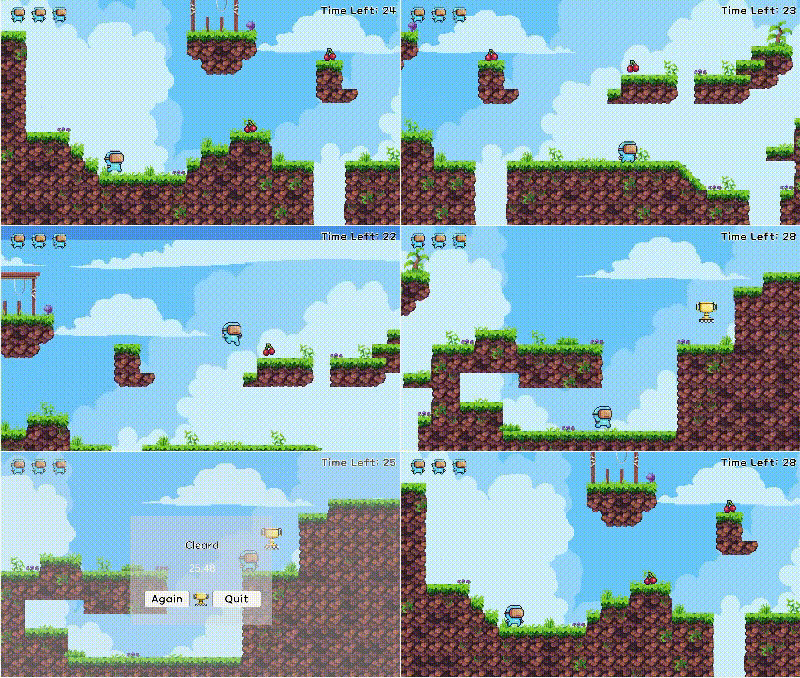
기능사진
코딩테스트는 진짜 못하겠어요 ㅠㅠ