☁️ Bumpy surface
🔎 High-resolution polygon mesh
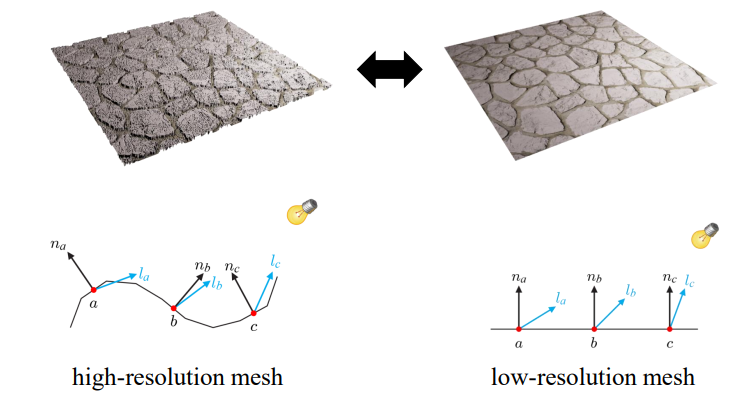
- 고해상도 mesh에서 bumpy suface의 경우, vertex가 늘어난다.
- 오돌토돌한 표면을 표현하기 위해서는 vertex가 많아진다.
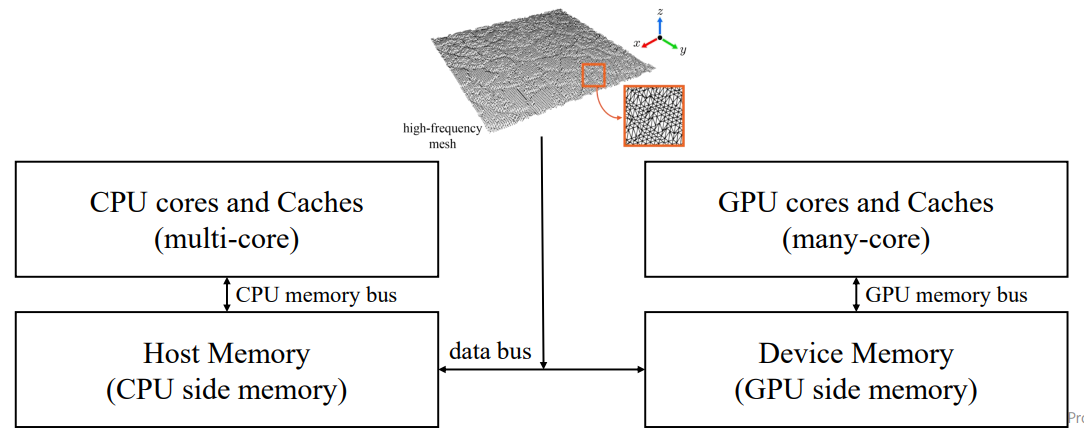
- CPU에서 GPU로 넘어갈 때 vertex가 늘어나면 처리양이 많아진다.
- 배경으로는 고해상도 대신 눈속임을 사용한다.
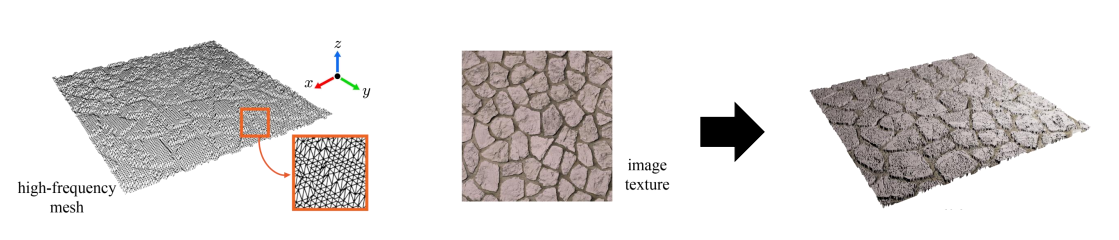
- 고해상도 mesh는 rendering하기 비싸다.
🔎 Low-resolution polygon mesh
- 저해상도 mesh는 render 하기 싸지지만, quality가 많이 떨어진다.
- 그림을 잘 그리더라도 빛을 처리할 때 한계가 있다.
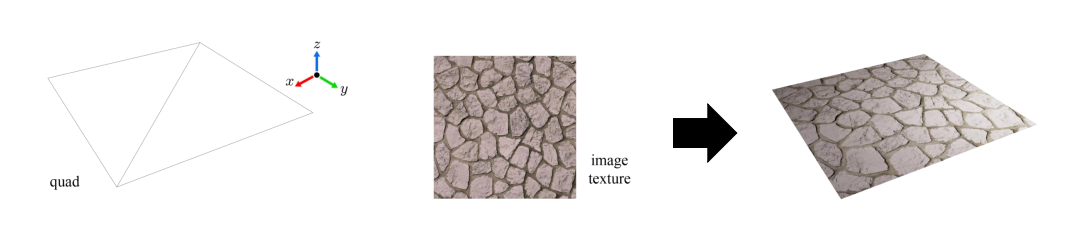
🔎 High-resolution mesh vs. Low-resolution mesh
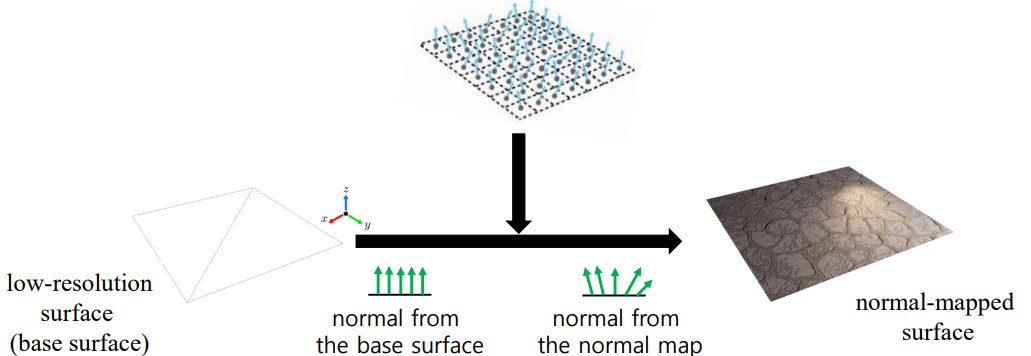
- normal에 차이가 있다.
- low-resolution의 경우 normal이 모두 위로 향한다.
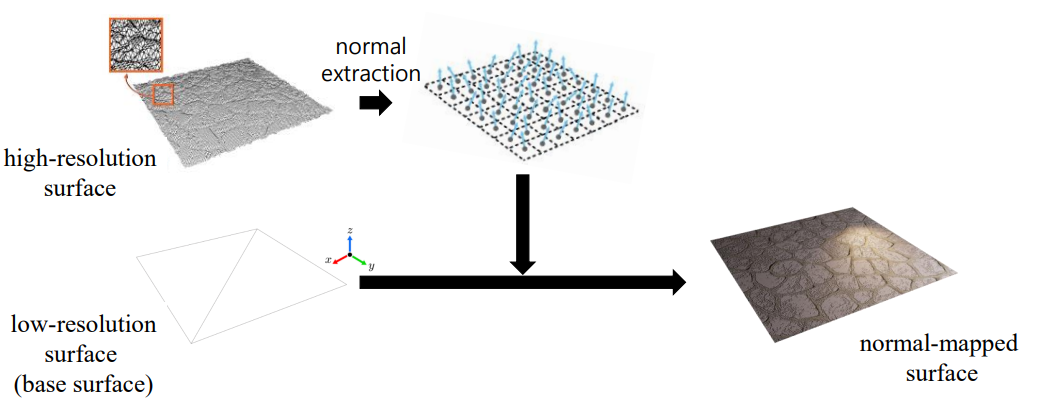
☁️ Normal Mapping
🔎 Pre-computed normal
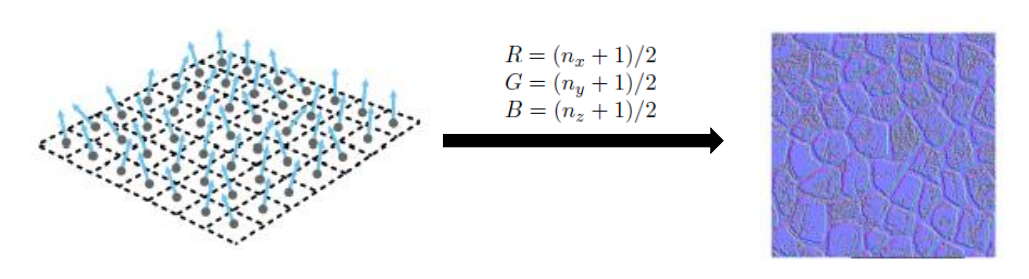
normal map = 고해상도의 normal을 texture로 저장한 것. (x,y,z)의 형태
- 원래는 rasterizer에서 vertex의 normal 정보로 pixel들의 normal을 interpolation 해줬다.
- normal map이 있으면 여기서 normal 정보를 가져온다.
☁️ Normal Mapping Generation
🔎 Image to height map
= 높낮이 정보 = elevation data = height data
- often visualized in gray scale
- integer range [ 0 , 255 ]
- lowest height 0 / highest 255
🔎 Height map to normal map
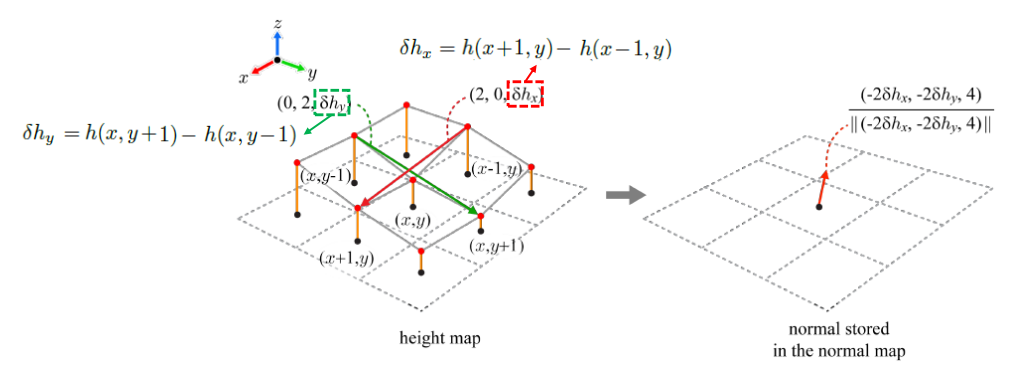
- height map으로 normal map을 만들 수 있다.
- 주변 점들의 normal을 참조하여 의 normal을 구한다.
🔎 Normal map visualization
- DX의 기본 texture setting : int
- normal : floating-point in range of [-1,1]
- normal map에는 음수가 존재하기 때문에 시각화를 위해서는 ( 0 , 1 ) 의 범위로 바꿔야한다. 음수를 표현할 수 없기 때문이다.
🔎 How to use normal map
- texture coordinates ( s , t ) 는 normal map에 access할 때 사용된다.
- diffuse reflection term
- VSINPUT.normal을 버리고 normal map의 normal을 가져온다.
- 는 = image texture에서 가져온 diffuse reflectance
☁️ Tangent-space Normal Mapping
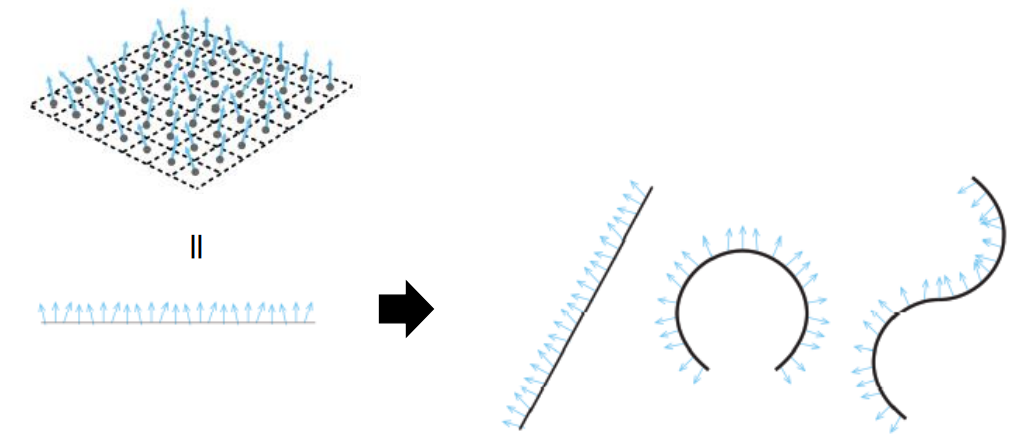
🔎 Normal mapping = texturing
- 평면에서는 문제가 없지만 뭉치는 현상이 발생하면 처리가 필요하다.
🔎 Shaders for tangent-space normal mapping
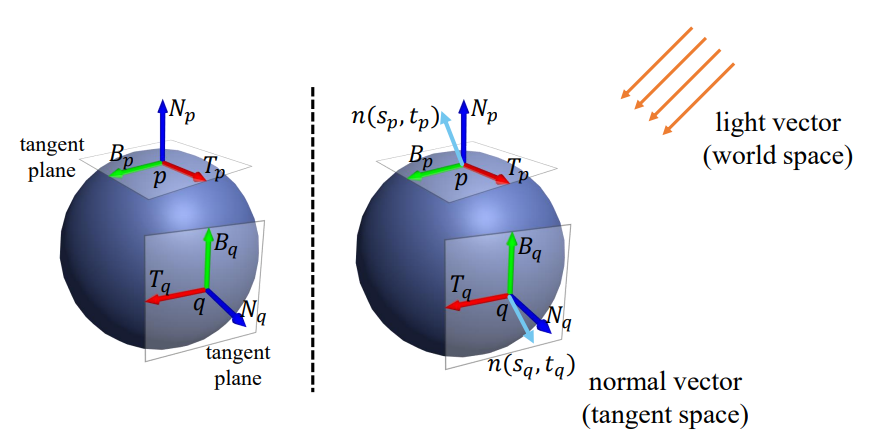
- normal mapping을 위해 을 사용해야 한다.
- normal : tangent-space vector
- light : world-space vector
- 는 모두 tangent space에서 (0,0,1)이다.
텍스트
☁️ Tangent space
= defined by three orthonormal vectors
- T (for tangent)
- B (for bitangent)
- N (for normal)
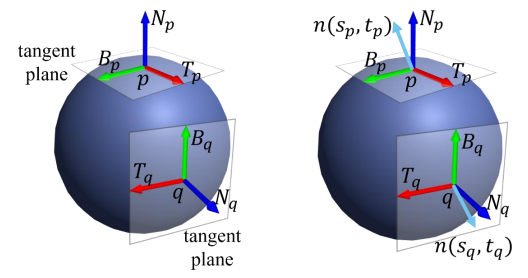
- normal map의 normal 은 q의 texture coordinates 를 이용한다.
- 는 q의 tangent space로 옮겨주고 에 넣어준다.
- normal : tangent-space vector
- light : world-space vector
따라서 normal을 world space로 바꿔주거나 light를 tangent space로 바꿔주어야 한다.
🔎 The basis of tangent space {T, B, N}
- Vertex normal N – 모델링 단계에서 vertex마다 할당되어 있음 -> 알고있는 정보
- Tangent T
- Bitangent B
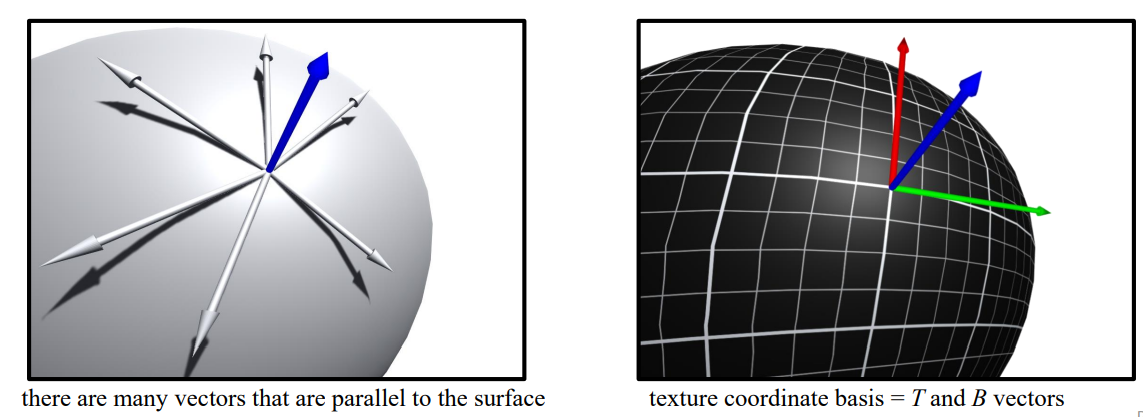
- Tangent T : surface와 평행한(parallel) vector
- 수많은 벡터 중 texture coordinate basis에 맞게 T와 B를 선택한다.
<T,B 구하기>
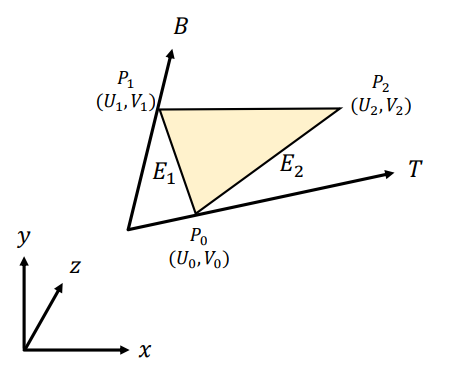
- Edges 는 T와 B로 나타낼 수 있다

- Matrix로 만들면
- 위의 식에서 U와V matrix를 넘겨주면 T,B를 구할 수 있다
U,V는 이미 알고있는 값이고, E는 직접구해줄 수 있다.



🔎 Consider the diffuse term of the Phong lighting model

- : light source in world space
- : in tangent space
- 을 tangent space로 바꿔준다.
- vertex마다 TBN-basis는 미리 계산되어야 한다. vertex array에 담겨서 VS에 전달된다.
- VS가 TBN을 world space로 transform 해주고 matrix를 만들어준다.
- 그럼 world space light vector를 per-vertex tangent space로 회전시킨다.
☁️ Normal Mapping Discussion
🔎 tangent normal map
Advantages
- object independent normal map
- 따라서 객체의 방향이나 위치에 의존하지 않기 때문에 서로 다른 mesh에 reusable.
- asset library를 만드는 데 유리하다.
- 캐릭터의 피부와 같은 deforming surface(변형되는 표면)에 잘 작동한다.
- nomal이 object 자체의 표면과 관련하여 계산되기 때문에 world 관련이 없기 때문.
Disadvantages
- need to calculate and maintain a consistent tangent space
- UV coordinate 경계면에서 특수한 처리가 필요하다.
☁️ Hardware Tessellation
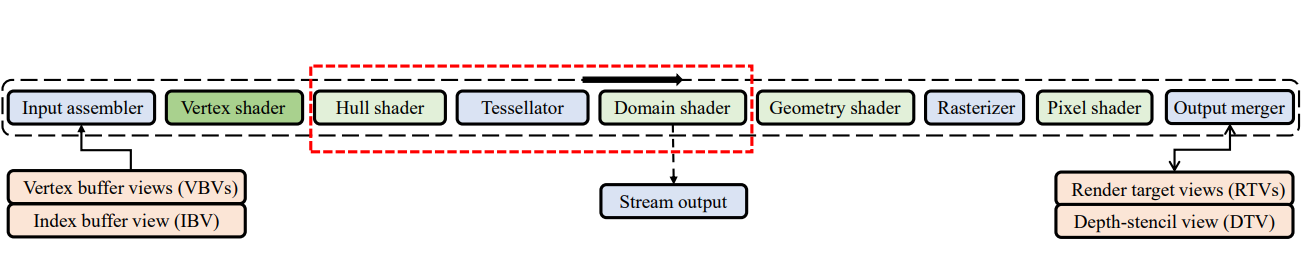
- Tessellator : hardware-wired
코딩할 수 없고, 내부에서 정해진 일들만 하여 매우 빠르다. - Hull Shader, Domain Shader : programmable
Tessellator가 결과를 낼 수 있도록 돕고, 후처리도 해준다.
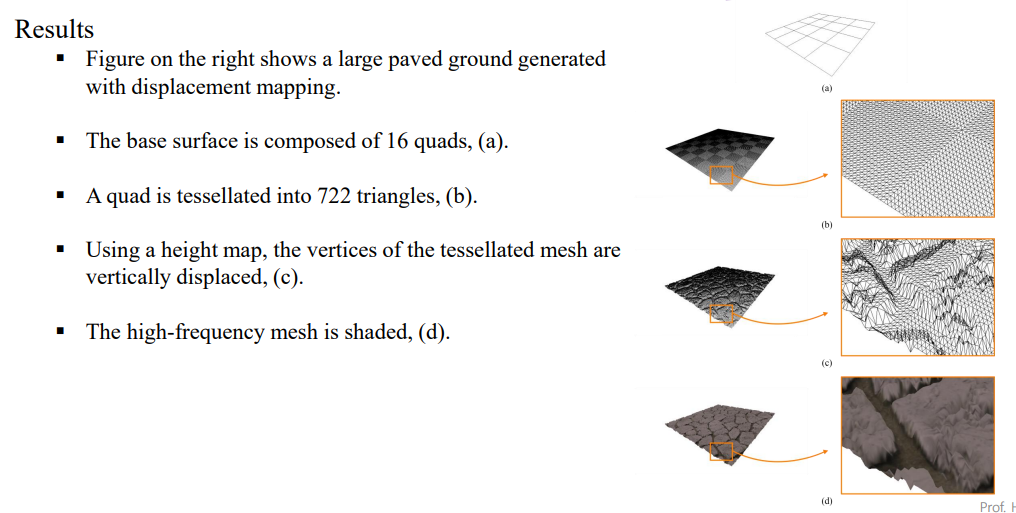
☁️ Displacement Mapping
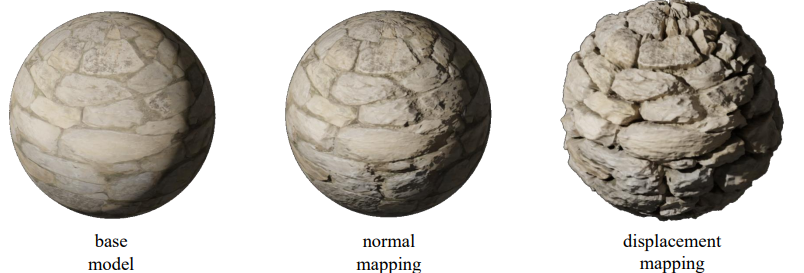
= base surface를 잘게 쪼개서 정점을 직접 이동시킨다.
= 실제로 윤곽선이 바뀐다.
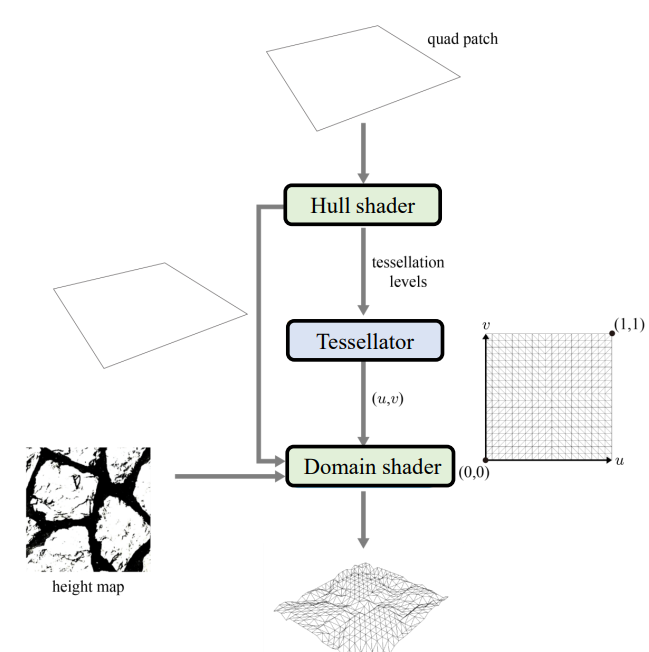
- input : patch, base surface
ex) triangle, quad - Hull shader
Tessellator를 control 한다.
Tessellation level을 결정한다. - Tessellator : 쪼개기 & 정점 생성
- Domain shader : UV coordinate를 이용해서 위치 결정
☁️ Vertex Shader and Hull Shader
- Hull Shader가 있는 경우 Vertex Shader가 space change를 하지 않는다.
- 그 경우 Domain Shader가 clip space vertex position을 계산한다.
- Hull Shader는 Tessellator에게 어떤식으로 쪼갤지 알려준다.
☁️ Tessellator
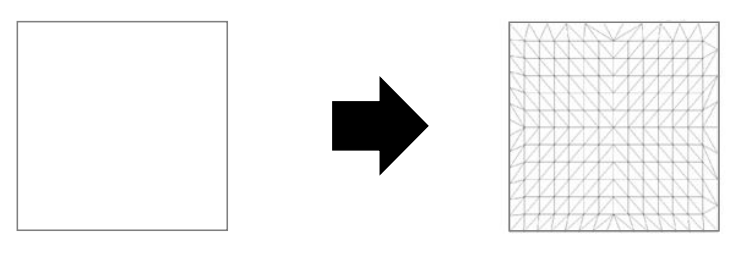
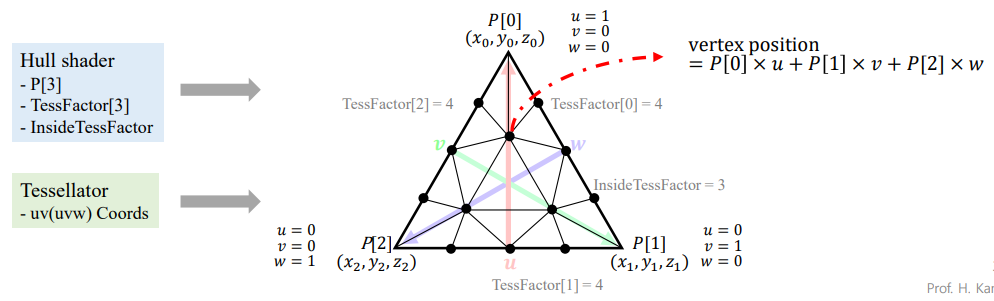
- patch를 잘게 쪼개고, 무게중심 좌표로 표현된 작은 generics들을 생성한다.
- single input, single output인 점에서 VS와 유사하다.
- 호출당 하나의 정점만 생성할 수 있고, 정점을 삭제할 수도 없습니다.
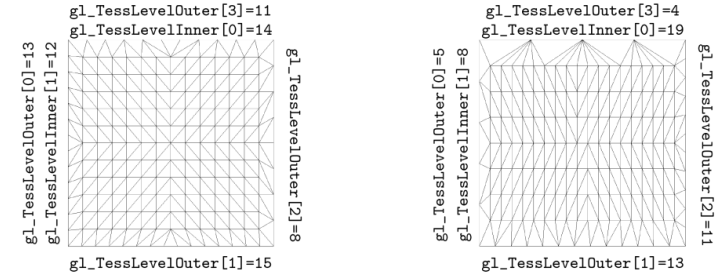
- inner and outer tessellation level을 이용해서 특수한 패턴을 만든다.
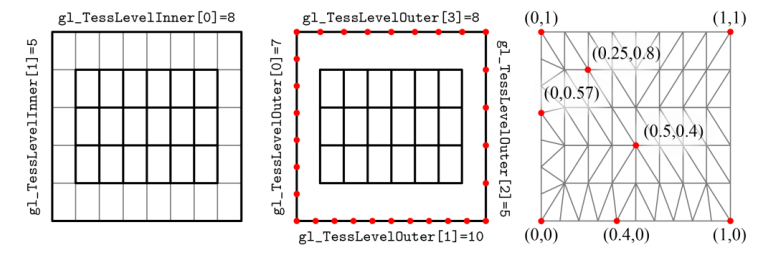
- 오른쪽 예시 처럼 삼각형이 길쭉한 경우도 요즘에는 문제가 되지 않는다.
☁️ Domain Shader
- Hull shader에서 나온 vertex position을 받아서 bilinear patch의 control point로 사용한다.
- control point들은 bilinear patch의 형태를 결정하는 데 사용된다.
- control point들을 이용하여 패치 내부의 정점들을 생성하고 배치하는 작업을 수행
- Using 를 이용해서 vertex position의 최종 위치를 구해준다.
☁️ Displacement Mapping