일시중지
일시중지하는 간단한 방법들을 알아보자.
Time.timeScale
Time.timeScale을 이용한 스크립트를 작성해보자.
using System.Collections;
using System.Collections.Generic;
using UnityEngine;

public class PauseController : MonoBehaviour
{
    private bool isPaused;

    private void Update()
    {
        if(Input.GetKeyDown(KeyCode.Escape))
        {
            isPaused = !isPaused;

            if(isPaused)
            {
                Time.timeScale = 0;
            }
            else
            {
                Time.timeScale = 1;
            }
        }
    }
}Time.timeScale을 이용한 일시중지는 간단하지만
timeScale이 0이 되더라도 스크립트 실행에서Update()메서드는 중지되지 않는다는 문제가 있다.
- 예를 들어 입력은 계속 처리될 것이다.
스크립트 비활성화
유니티 이벤트를 사용하여 스크립트 활성/비활성화를 통해 위 문제를 해결해보자.
using System.Collections;
using System.Collections.Generic;
using UnityEngine;
using UnityEngine.Events;

public class PauseController : MonoBehaviour
{
    public UnityEvent GamePaused;
    public UnityEvent GameResumed;

    private bool isPaused;

    private void Update()
    {
        if(Input.GetKeyDown(KeyCode.Escape))
        {
            isPaused = !isPaused;

            if(isPaused)
            {
                Time.timeScale = 0;
                GamePaused.Invoke();
            }
            else
            {
                Time.timeScale = 1;
                GameResumed.Invoke();
            }
        }
    }
}
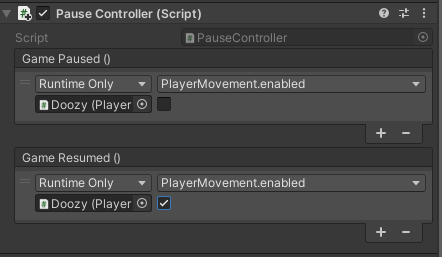
유니티 이벤트를 추가하고 활성/비활성화할 스크립트를 연결한다.
timeScale이 0으로 설정된 경우
FixedUpdate()메서드는 절대로 호출되지 않는다.