점프 애니메이션
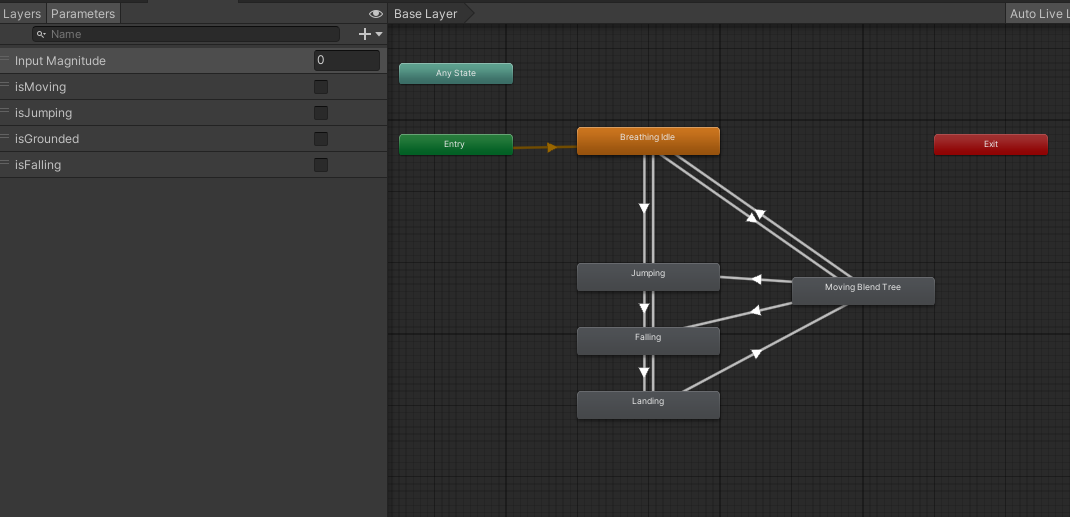
애니메이터 구성
점프 애니메이션에는 점프할 때, 점프 중, 착지할 때 3가지 애니메이션을 구성
스크립트
전체 코드를 보자.
using System.Collections;
using System.Collections.Generic;
using UnityEngine;

public class PlayerMovement : MonoBehaviour
{
    public float rotationSpeed = 720;
    public float jumpSpeed = 5;

    public float jumpButtonGracePeriod = 0.2f;

    public Transform cameraTransform;

    private CharacterController characterController;
    private Animator animator;

    private float ySpeed;
    private float originalStepOffset;

    private float? lastGroundedTime;
    private float? jumpButtonPressedTime;

    private bool isJumping;
    private bool isGrounded;

    private void Start()
    {
        characterController = GetComponent<CharacterController>();
        animator = GetComponent<Animator>();
        originalStepOffset = characterController.stepOffset;
    }

    void Update()
    {
        float horizontalInput = Input.GetAxis("Horizontal");
        float verticalInput = Input.GetAxis("Vertical");

        Vector3 movementDirection = new Vector3(horizontalInput, 0, verticalInput);

        float inputMagnitude = Mathf.Clamp01(movementDirection.magnitude);

        if (Input.GetKey(KeyCode.LeftShift) || Input.GetKey(KeyCode.RightShift))
        {
            inputMagnitude *= 0.5f;
        }

        animator.SetFloat("Input Magnitude", inputMagnitude, 0.05f, Time.deltaTime);

        movementDirection = Quaternion.AngleAxis(cameraTransform.rotation.eulerAngles.y, Vector3.up) * movementDirection;
        movementDirection.Normalize();

        ySpeed += Physics.gravity.y * Time.deltaTime;

        if(characterController.isGrounded)
        {
            lastGroundedTime = Time.time;
        }
        if(Input.GetButtonDown("Jump"))
        {
            jumpButtonPressedTime = Time.time;
        }

        if (Time.time - lastGroundedTime <= jumpButtonGracePeriod)
        {
            characterController.stepOffset = originalStepOffset;
            ySpeed = -0.8f;

            animator.SetBool("isGrounded", true);
            isGrounded = true;
            animator.SetBool("isJumping", false);
            isJumping = false;
            animator.SetBool("isFalling", false);

            if (Time.time - jumpButtonPressedTime <= jumpButtonGracePeriod)
            {
                ySpeed = jumpSpeed;

                animator.SetBool("isJumping", true);
                isJumping = true;

                lastGroundedTime = null;
                jumpButtonPressedTime = null;
            }
        }
        else
        {
            characterController.stepOffset = 0;

            animator.SetBool("isGrounded", false);
            isGrounded = false;

            /* 낙하 애니메이션 전환 처리 */
            if ((isJumping && ySpeed < 0) || (ySpeed < -2))
            {
                animator.SetBool("isFalling", true);
            }
        }

        if (movementDirection != Vector3.zero)
        {
            animator.SetBool("isMoving", true);
            Quaternion toRotation = Quaternion.LookRotation(movementDirection, Vector3.up);
            transform.rotation = Quaternion.RotateTowards(transform.rotation, toRotation, rotationSpeed * Time.deltaTime);
        }
        else
        {
            animator.SetBool("isMoving", false);
        }
    }

    private void OnAnimatorMove()
    {
        Vector3 velocity = animator.deltaPosition;
        velocity.y = ySpeed * Time.deltaTime;

        characterController.Move(velocity);
    }

    private void OnApplicationFocus(bool focus)
    {
        if (focus)
        {
            Cursor.lockState = CursorLockMode.Locked;
        }
        else
        {
            Cursor.lockState = CursorLockMode.None;
        }
    }
}
낙하 중 처리
if ((isJumping && ySpeed < 0) || (ySpeed < -2))
{
    animator.SetBool("isFalling", true);
}
(isJumping && ySpeed < 0)처리의 의미는 점프의 최고 높이에 도달했을 때 낙하 애니메이션을 처리하기 위함.(ySpeed < -2)처리의 의미는 계단을 내려올 때나 경사를 내려올때도 낙하 애니메이션 처리가 되지 않도록 하기위한 체크
문제 상황
#1 연속된 점프
연속으로 점프를 누를 경우 착지 애니메이션 재생되면서 곧바로 점프 시작 애니메이션으로 바뀌지 않아 어색한 애니메이션이 연결된다.
이유는
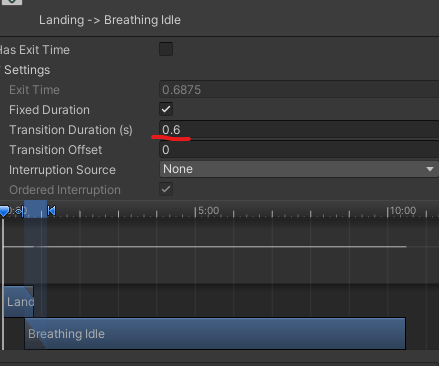
착지 후 Idle 모션으로 돌아갈 때 트랜지션 시간이 0.6로 설정되어 있기 때문이다.
이를 해결하기 위해서는 Interruption Source를 Next State로 설정하여 다음 상태의 전환이 현재 상태를 중단 시키도록 할 수 있다.
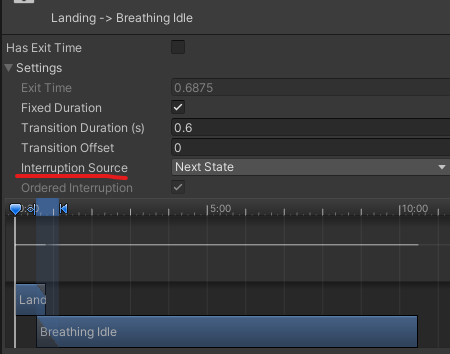
전환 흐름
1. 착지 -> Idle 전환 중
2. 점프 버튼이 눌린다면
3. 착지 -> Idle 전환 중단
4. Idle -> 점프 전환 시작
다음 상태인 Idle의 상태 전환이 우선권을 가짐
#2 점프 중 이동
현재 코드로는 점프 중 이동을 할 수 있다. 이를 해결해보자.
점프 중 이동이 되지 않는 이유는 루트 모션에서 움직임을 제어하기 때문이므로 지상에 있을 때는 루트 모션이 제어하도록하고, 점프 중에는 새로운 이동 제어를 추가해준다.
private void OnAnimatorMove()
{
    if (isGrounded)
    {
        Vector3 velocity = animator.deltaPosition;
        velocity.y = ySpeed * Time.deltaTime;

        characterController.Move(velocity);
    }
}
지상에서만 제어하도록 수정
public float jumpHorizontalSpeed = 3;

void Update()
{
	// ...생략

    if (isGrounded == false)
    {
        Vector3 velocity = movementDirection * inputMagnitude * jumpHorizontalSpeed;
        velocity.y = ySpeed;

        characterController.Move(velocity * Time.deltaTime);
    }
}
Update() 메서드 하단에 점프 중 이동 추가