Abstract
PaddleX 를 사용했었지만 https://github.com/PaddlePaddle/PaddleX
- PaddleX 는 PaddlePaddle framework 을 사용
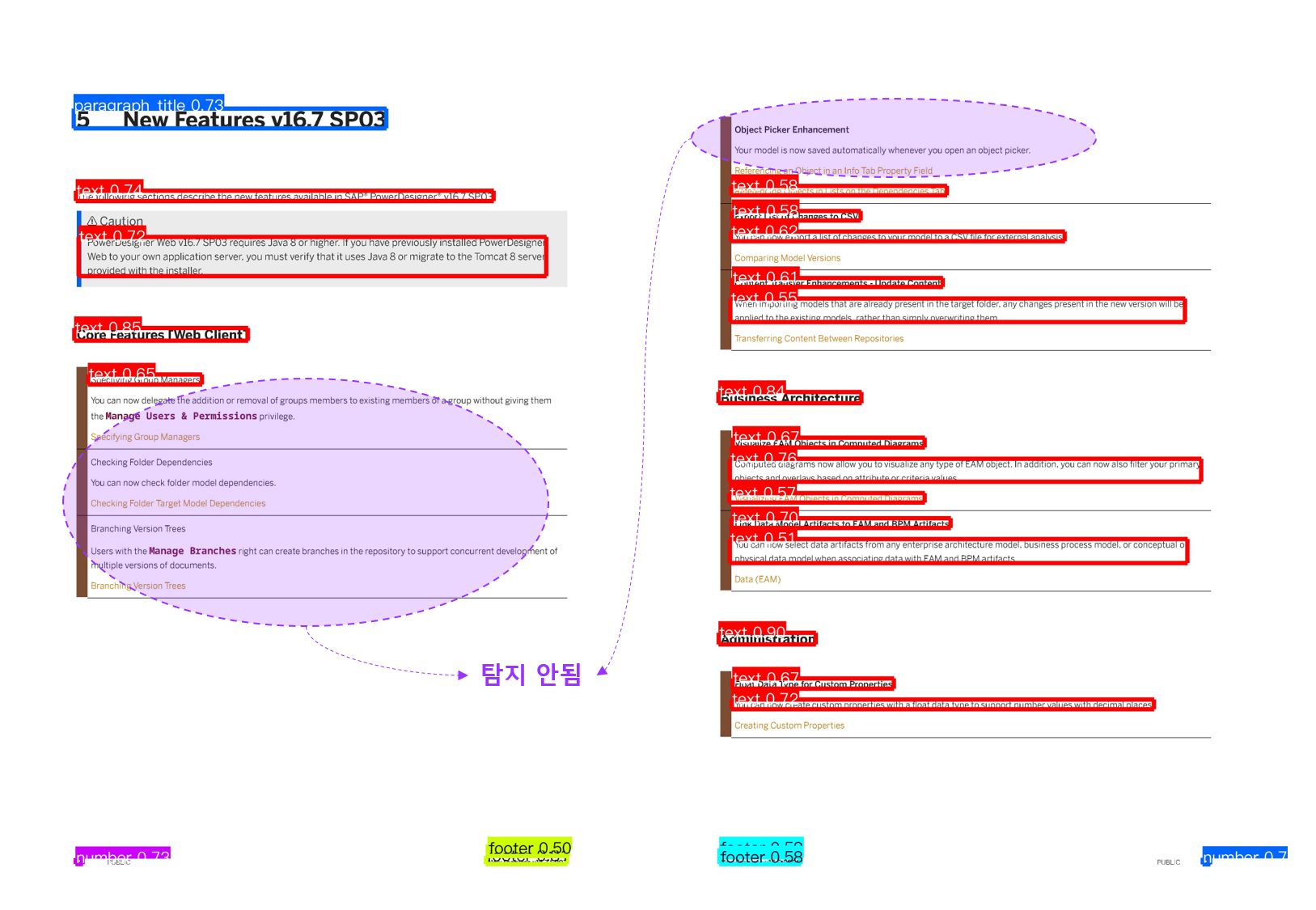
- Vision 의 다양한 영역을 커버할 수 는 있으나, 너무 무겁다.
- 생각보다 detection 이 잘 안되는 경향이 많다.
따라서 YOLO v11 에 직접 DocLayNet data 를 학습해보기로 한다.
- YOLO v11 : https://docs.ultralytics.com/ko/models/yolo11/#performance-metrics
- DocLayNet : https://github.com/DS4SD/DocLayNet
Future Work
- YOLO’s hyperparameter tuning
- How to train custom data s.t. Korean
Prepare dataset
Create dataset.yaml ( YOLO-Style )
YOLO 가 알아 먹을 수 있게 data 와의 mapping 할 navigator 가 필요하다.
DATASET_FOLDER = Path("./Trainer/datasets")
DATASET_YAML = "dataset.yaml"

def create_data_yaml():

    dataset_dict = {
        "path": "./",
        "train": "images/train",
        "val": "images/val",
        "test": "images/test",
        "names": {
            "0": "Caption",
            "1": "Footnote",
            "2": "Formula",
            "3": "List-item",
            "4": "Page-footer",
            "5": "Page-header",
            "6": "Picture",
            "7": "Section-header",
            "8": "Table",
            "9": "Text",
            "10": "Title",
        },
    }

    with open(DATASET_FOLDER / DATASET_YAML, "w") as f:
        yaml.dump(dataset_dict, f)
Analyse DocLayNet data
Example train data
COCO type
categories
"categories": [
    {"supercategory": "Caption", "id": 1, "name": "Caption"},
    {"supercategory": "Footnote", "id": 2, "name": "Footnote"},
    {"supercategory": "Formula", "id": 3, "name": "Formula"},
    {"supercategory": "List-item", "id": 4, "name": "List-item"},
    {"supercategory": "Page-footer", "id": 5, "name": "Page-footer"},
    {"supercategory": "Page-header", "id": 6, "name": "Page-header"},
    {"supercategory": "Picture", "id": 7, "name": "Picture"},
    {"supercategory": "Section-header", "id": 8, "name": "Section-header"},
    {"supercategory": "Table", "id": 9, "name": "Table"},
    {"supercategory": "Text", "id": 10, "name": "Text"},
    {"supercategory": "Title", "id": 11, "name": "Title"}
],
COCO-Style JSON format.
"images": [
    {
      "id": 0,
      "width": 1025,
      "height": 1025,
      "file_name": "c6effb847ae7e4a80431696984fa90c98bb08c266481b9a03842422459c43bdd.png",
      "collection": "ann_reports_00_04_fancy",
      "doc_name": "NYSE_F_2004.pdf",
      "page_no": 72,
      "precedence": 0,
      "doc_category": "financial_reports"
    },
    {
      "id": 1,
      "width": 1025,
      "height": 1025,
      "file_name": "f446422ed85e300319d3aff929762b8527cbc9ec26f55703b36df3e7447cc2d5.png",
      "collection": "ann_reports_00_04_fancy",
      "doc_name": "NASDAQ_TTWO_2003.pdf",
      "page_no": 5,
      "precedence": 0,
      "doc_category": "financial_reports"
    },
    {
      "id": 2,
      "width": 1025,
      "height": 1025,
      "file_name": "ab93496c47e2acdc5c715cb61b876f16b8a332d3b797dd3b88fd3fa8bd089a51.png",
      "collection": "ann_reports_00_04_fancy",
      "doc_name": "NYSE_IP_2004.pdf",
      "page_no": 78,
      "precedence": 0,
      "doc_category": "financial_reports"
    },
    {
      "id": 3,
      "width": 1025,
      "height": 1025,
      "file_name": "f77ae4702c4b8635b13ce0eed4f0f69ef91b28af4172c361b66772f67111b40a.png",
      "collection": "ann_reports_00_04_fancy",
      "doc_name": "NYSE_ED_2003.pdf",
      "page_no": 16,
      "precedence": 0,
      "doc_category": "financial_reports"
    },

# ...
Document image
"id": 3, "page_no" : 16,
"file_name": "f77ae4702c4b8635b13ce0eed4f0f69ef91b28af4172c361b66772f67111b40a.png"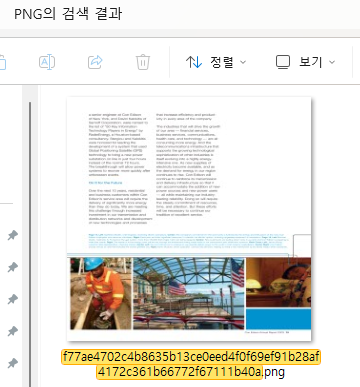
Lable
COCO-style 에서
- [’image’] 의
id
{
  "id": 3,
  "width": 1025,
  "height": 1025,
  "file_name": "f77ae4702c4b8635b13ce0eed4f0f69ef91b28af4172c361b66772f67111b40a.png",
  "collection": "ann_reports_00_04_fancy",
  "doc_name": "NYSE_ED_2003.pdf",
  "page_no": 16,
  "precedence": 0,
  "doc_category": "financial_reports"
},- [’annotations’] 의
image_id
{
  "id": 41,
  "image_id": 3,
  "category_id": 10,
  "bbox": [
    91.78941993464052,
    70.86601515151528,
    248.09619199346406,
    213.017868371212
  ],
  "segmentation": [
    [
      91.78941993464052,
      70.86601515151528,
      91.78941993464052,
      283.8838835227273,
      339.8856119281046,
      283.8838835227273,
      339.8856119281046,
      70.86601515151528
    ]
  ],
  "area": 52848.921969462666,
  "iscrowd": 0,
  "precedence": 0
},
{
"id": 43,
"image_id": 3,
"category_id": 10,
"bbox": [
377.0695134803922,
70.85874179292944,
250.48759068627453,
27.95111584595952
],
"segmentation": [
[
377.0695134803922,
70.85874179292944,
377.0695134803922,
98.80985763888896,
627.5571041666667,
98.80985763888896,
627.5571041666667,
70.85874179292944
]
],
"area": 7001.40766524735,
"iscrowd": 0,
"precedence": 0
},- mapping.
for image in tqdm.tqdm(data["images"]):
    image_id = image["id"]
    image_name = image["file_name"]
    shutil.copy2(
        DATASET_FOLDER / "PNG" / image_name,
        DATASET_FOLDER / "images" / folder / f"{image_id}.png",
    )
Convert YOLO
for annotation in tqdm.tqdm(data["annotations"]):
    image_id = annotation["image_id"]
    label_name = f"{image_id}.txt"
    left, top, width, height = annotation["bbox"]

    left /= 1025
    top /= 1025
    width /= 1025
    height /= 1025

    center_x = left + width / 2
    center_y = top + height / 2
    category_id = annotation["category_id"] - 1
    with open(DATASET_FOLDER / "labels" / folder / label_name, "a") as f:
        f.write(
            f"{category_id} {center_x} {center_y} {width} {height}\n"
)- COCO-style 의 좌표계를 YOLO 형태로 변경
YOLO format
class_id, x_centre, y_centre, width, height-
로 나누는 이유는, 원본 데이터가 이미지 이기 때문.
-
bbox 의 Center 좌표 를 구한다.
9 0.2105731862745098 0.17304873106060614 0.24204506535947712 0.2078223106060605
9 0.21518660130718953 0.3043599747474748 0.2512718954248366 0.04368328282828293
9 0.49006176470588236 0.08276517045454557 0.24437813725490198 0.02726938131313124
9 0.4989424264705882 0.3043472790404041 0.26213946078431366 0.3719502904040404
9 0.21982174019607842 0.4520825631313132 0.26054217320261436 0.14216401515151514
9 0.4991455367647059 0.5915289015151515 0.8197824885620916 0.05735828282828279
4 0.8196766421568629 0.9670082064393939 0.1802912254901962 0.00799873863636364
7 0.1582572385620915 0.35360047348484847 0.13741316993464053 0.010855467171717264
6 0.5052291380937425 0.8058407584279632 0.988031335408971 0.30038508557888244
-
Train YOLO model
hyperparameter
base_model: str = "yolo11m.pt",
datasets: str = ROOT_PATH / DATASET_YAML,
epochs: int = 40,
images: int = 1024,
batch: int = 8,
dropout: float = 0.0,
seed: int = 3355,
resume: bool = False,
dfl: bool = False,
Train YOLO
from ultralytics import YOLO
from pathlib import Path

model = YOLO(base_model)
results = model.train(
    data=datasets,
    epochs=epochs,
    imgsz=images,
    batch=batch,
    dropout=dropout,
    seed=seed,
    resume=resume,
    dfl=dfl,
    device='cuda'
)
사용 모델 : yolo11m
YOLO11m summary: 409 layers, 20,061,489 parameters, 20,061,473 gradients, 68.2 GFLOPs비교 모델 : yolo11l
YOLO11l summary: 631 layers, 25,318,961 parameters, 25,318,945 gradients, 87.3 GFLOPsEpochs : 40
      Epoch    GPU_mem   box_loss   cls_loss   dfl_loss  Instances       Size
      40/40      11.3G     0.3785     0.3081          0         97       1024: 100%|██████████| 8646/8646 [33:01<00:00,  4.36it/s]
                 Class     Images  Instances      Box(P          R      mAP50  mAP50-95): 100%|██████████| 405/405 [01:15<00:00,  5.37it/s]
                   all       6475      99760      0.898      0.865      0.931      0.757

40 epochs completed in 22.611 hours.
Optimizer stripped from D:\AI_Proj\AI_Parser\runs\detect\train23\weights\last.pt, 40.6MB
Optimizer stripped from D:\AI_Proj\AI_Parser\runs\detect\train23\weights\best.pt, 40.6MB
Class : 11
YOLO11m summary (fused): 303 layers, 20,038,513 parameters, 0 gradients, 67.7 GFLOPs
                 Class     Images  Instances      Box(P          R      mAP50  mAP50-95): 100%|██████████| 405/405 [01:18<00:00,  5.14it/s]
                   all       6475      99760      0.898      0.865      0.931      0.757
               Caption       1065       1757      0.916      0.873      0.949      0.858
              Footnote        179        312       0.81      0.744      0.832      0.634
               Formula        548       1894      0.905      0.843      0.911       0.72
             List-item       1687      13320      0.914       0.91      0.944      0.812
           Page-footer       5132       5569      0.917       0.94      0.973      0.636
           Page-header       3611       6682      0.952      0.829      0.958      0.673
               Picture       1465       2753      0.886      0.878       0.94       0.86
        Section-header       4505      15743       0.91      0.888      0.954      0.639
                 Table       1477       2268       0.85      0.869      0.923      0.865
                  Text       5756      49167      0.929      0.925      0.968      0.836
                 Title        151        295      0.891      0.817      0.896      0.791
Speed: 0.2ms preprocess, 7.5ms inference, 0.0ms loss, 0.7ms postprocess per image
Results saved to D:\AI_Proj\AI_Parser\runs\detect\train23
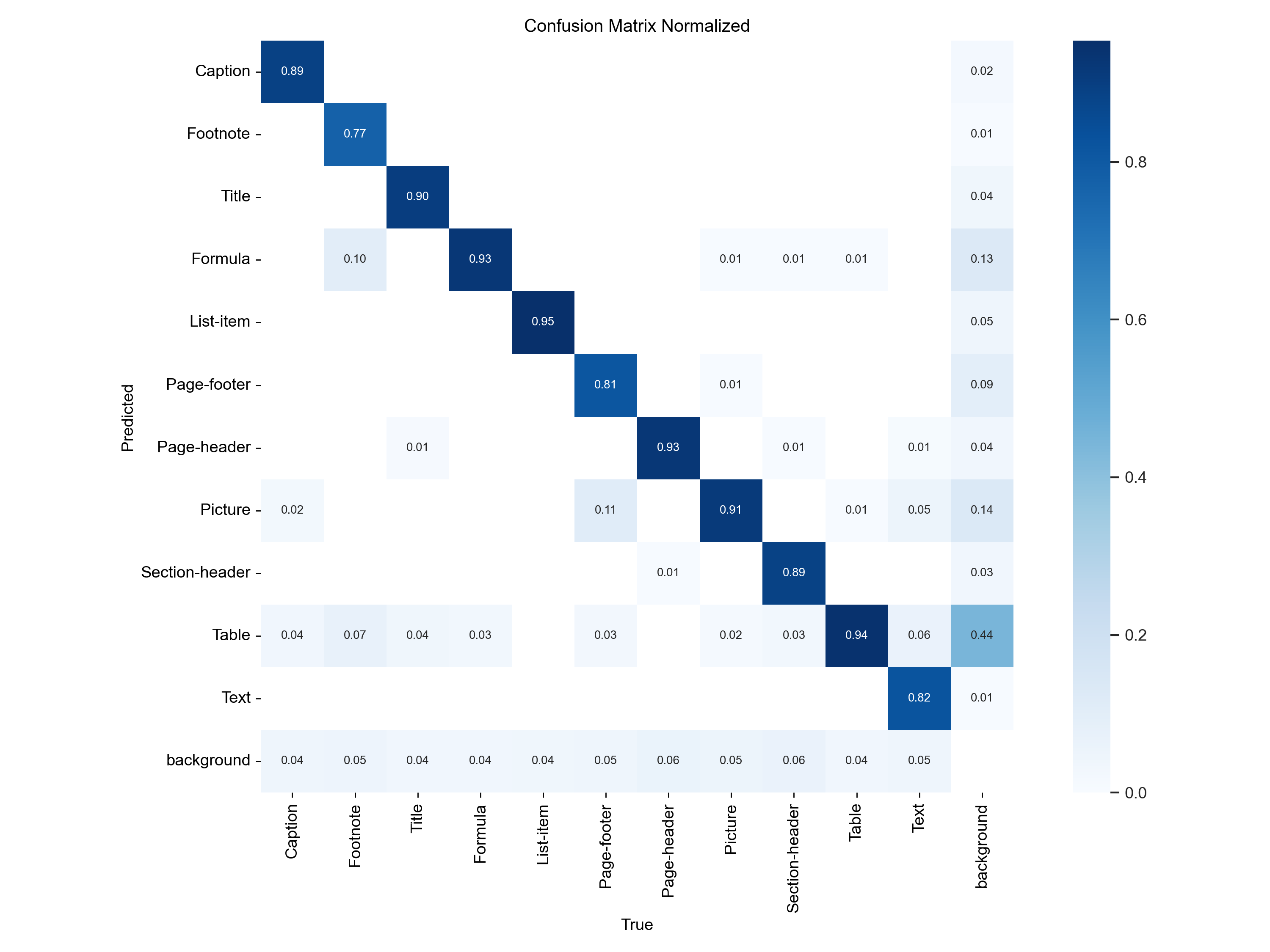
Class 별 굉장히 잘 맞추는 지표가 나오고 있다.
전체적인 loss.
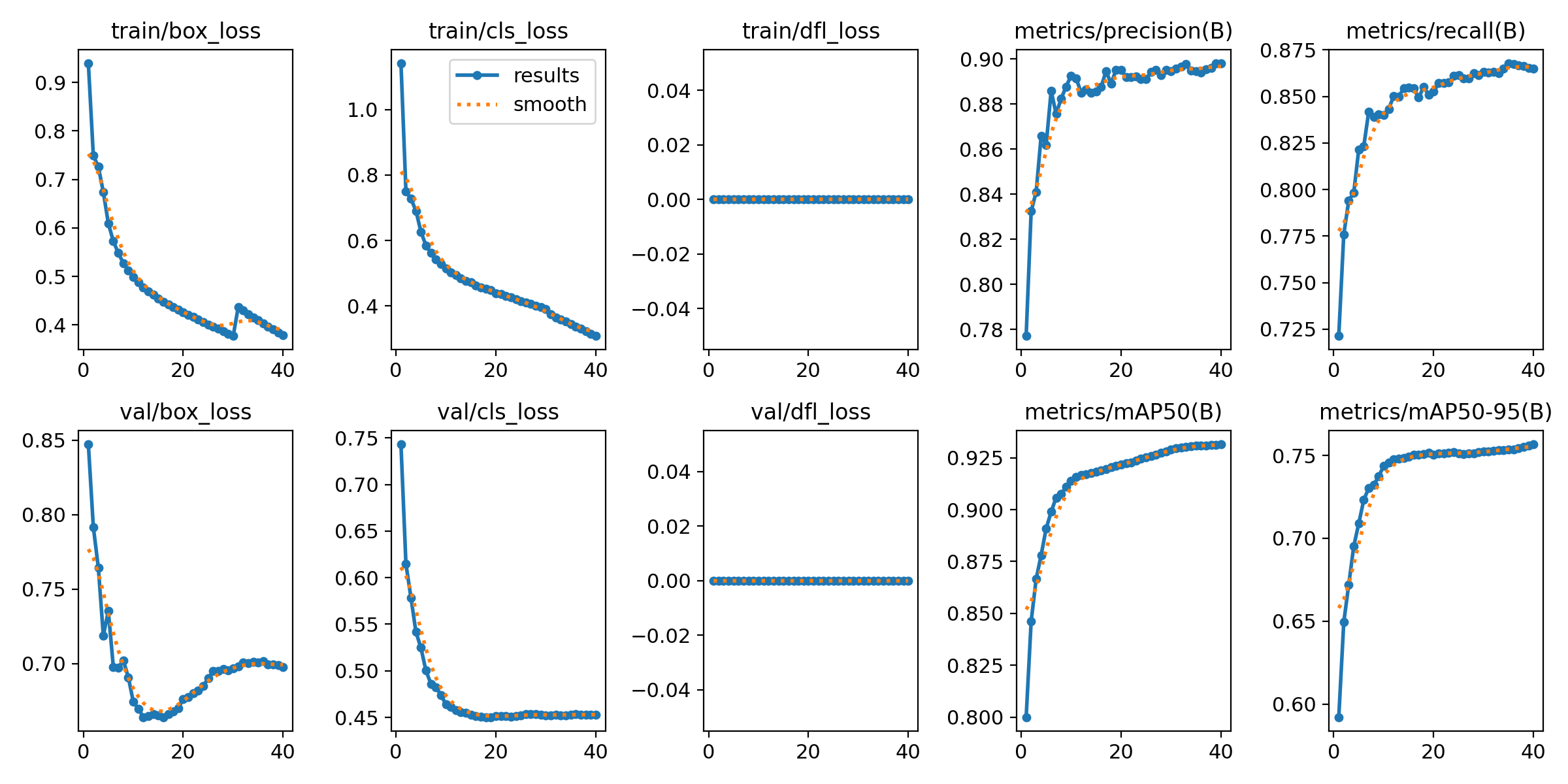
- train, valid 모두 box_loss 가 떨어지다가 위로 튀는 모습이 보인다.
-
dfl_loss 반영
-
Optimizer 를 SGD 에서 AdamW 로 변경.
-
미세하지만 이미지 사이즈를 1024 오타를 1025 수정
- WARNING ⚠️ imgsz=[1025] must be multiple of max stride 32, updating to
[1056] - 다시 1024 로 변경.
- WARNING ⚠️ imgsz=[1025] must be multiple of max stride 32, updating to
-
m모델에서l모델로 업그레이드 예정.진행 예정.
-
- 현 그래픽카드 성능으로 batch size 를 더 올리는건 불가능.
Inference YOLO + DocLayNet
from ultralytics import YOLO
from ultralytics.utils.plotting import Annotator, Colors

model = YOLO(MODEL)

img = cv2.imread(IMG_PATH, cv2.IMREAD_COLOR)
result = model.predict(img)[0]
height = result.orig_shape[0]
width = result.orig_shape[1]

colors = Colors()
annotator = Annotator(img, line_width=4, font_size=20)
for label, box in zip(result.boxes.cls.tolist(), result.boxes.xyxyn.tolist()):
    label = int(label)
    annotator.box_label(
        [box[0] * width, box[1] * height, box[2] * width, box[3] * height],
        result.names[label],
        color=colors(label, bgr=True),
    )
annotator.save(os.path.join(SAVE_PATH, os.path.basename(IMG_PATH)))
Result
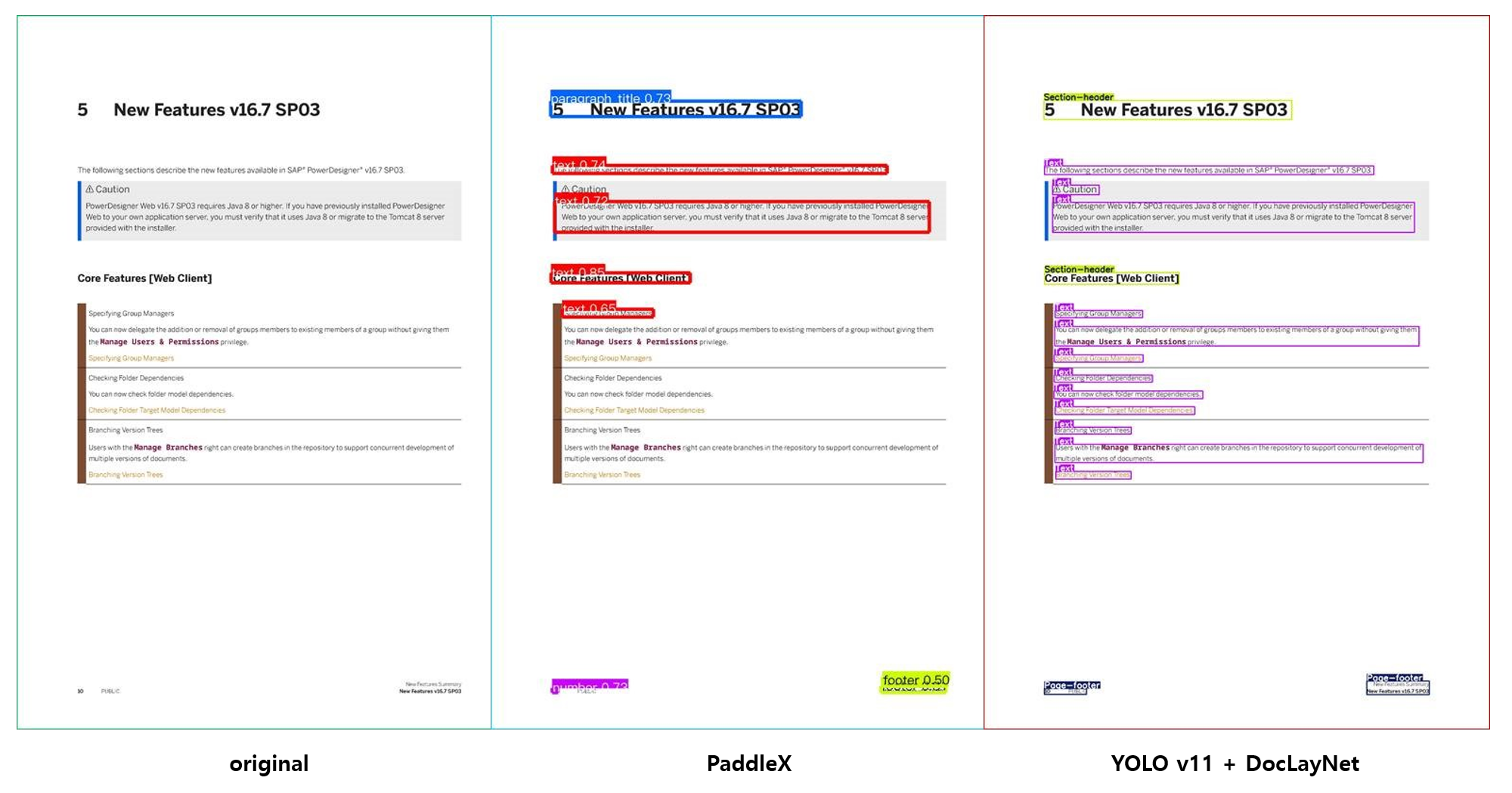
YOLOv11 + DocLayNet 이 훨씬 잘 탐지하는것을 볼 수가 있다.