
Issue
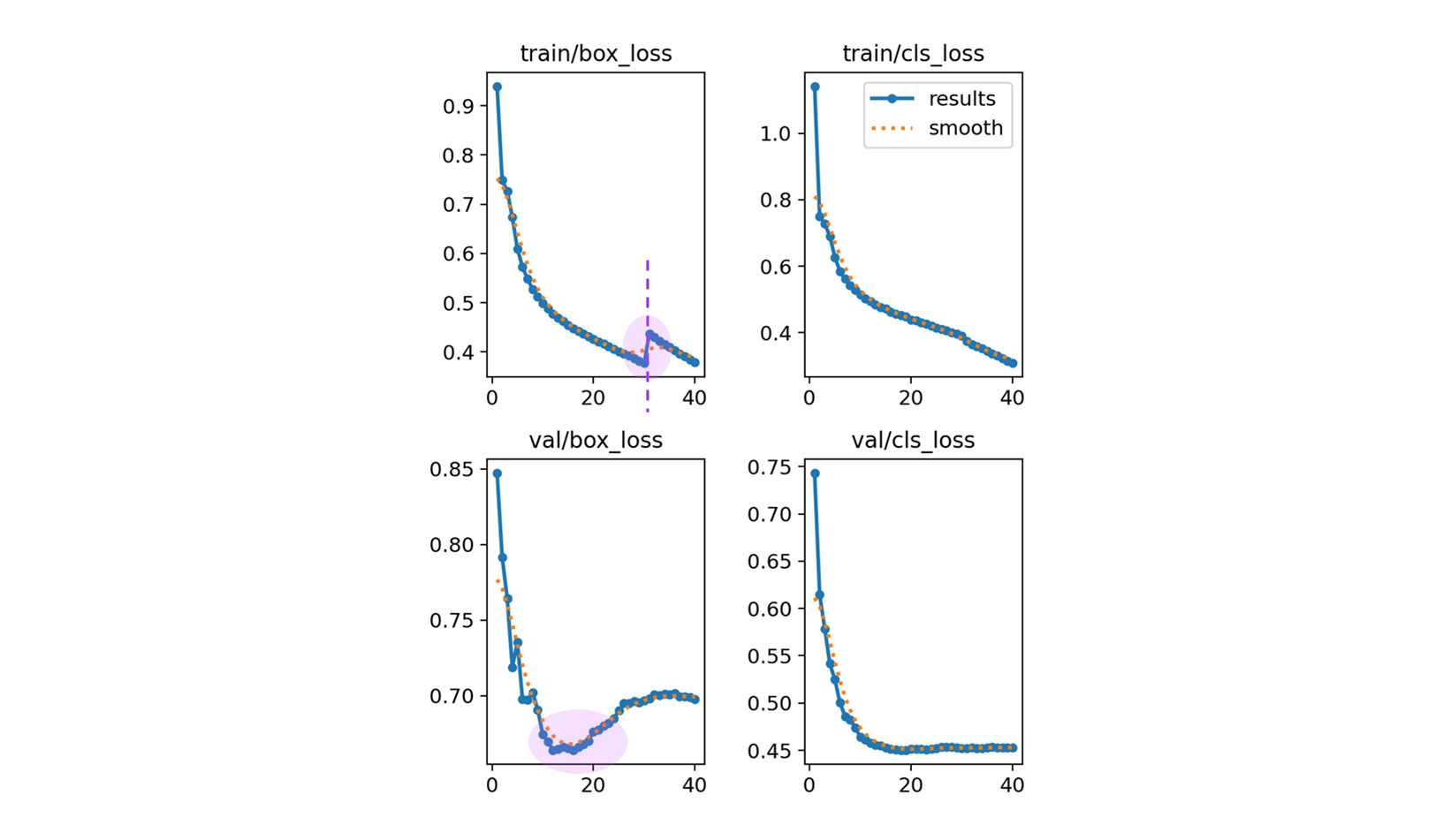
box_loss 의 train, valid 의 위로 튀어오르는 부분을 최대한 잡아 보도록 한다.
closing dataloader mosaic
- 실제, train 의 box_loss 의 log 를 보면
Epoch    GPU_mem   box_loss   cls_loss   dfl_loss  Instances       Size
30/40      11.4G        0.4     0.4158          0        128       1024: 100%|██████████| 8646/8646 [32:36<00:00,  4.42it/s]
           Class     Images  Instances      Box(P          R      mAP50  mAP50-95): 100%|██████████| 405/405 [03:59<00:00,  1.69it/s]
             all       6475      99760   5.81e-07    6.8e-05   2.91e-07   1.34e-07
Closing dataloader mosaic

Epoch    GPU_mem   box_loss   cls_loss   dfl_loss  Instances       Size
31/40      11.4G     0.4555     0.3954          0         58       1024: 100%|██████████| 8646/8646 [32:22<00:00,  4.45it/s]
           Class     Images  Instances      Box(P          R      mAP50  mAP50-95): 100%|██████████| 405/405 [03:59<00:00,  1.69it/s]
             all       6475      99760   5.81e-07    6.8e-05   2.91e-07   1.34e-07
Closing dataloader mosaic이후 box_loss 가 0.4 에서 0.4555 로 올라가는 것을 볼 수 있다.
default.yaml
close_mosaic: 10 # (int) disable mosaic augmentation for final epochs (0 to disable)if epoch == (self.epochs - self.args.close_mosaic):
self._close_dataloader_mosaic()
self.train_loader.reset()즉, 총 40 에서 30 부터는 dataloader_mosaic 과 train_loader 를 reset 한다는 이야기 인데
self.train_loader.dataset.close_mosaic(hyp=copy(self.args))Ultralytics 의 Train Setting 의 내용을 참고하면,
완료하기 전에 훈련을 안정화하기 위해 지난 N개의 epochs 에서 mosaic 데이터 증강을 비활성화합니다. 0으로 설정하면 이 기능이 비활성화됩니다.- Mosaic class 참고.
# ultralytics/data/augment.py

class Mosaic(BaseMixTransform):
    """
    Mosaic augmentation for image datasets.

    This class performs mosaic augmentation by combining multiple (4 or 9) images into a single mosaic image.
    The augmentation is applied to a dataset with a given probability.

- 모자이크 방식. 여러 방법을 섞기도 한다.
_mix_transform: Applies mixup transformation to the input image and labels. _mosaic3: Creates a 1x3 image mosaic. _mosaic4: Creates a 2x2 image mosaic. _mosaic9: Creates a 3x3 image mosaic. - 그러면 train bbox 의 30 에서 살짝 튀는 것은 reasonable 하다고 볼 수 있다.
- 여러 장을 섞어 쓰다가, 한장 만 쓰는 걸 마지막 epoch 10 으로 두는 것은 맞는 방법이라 생각한다.
validation 일 때의 loss 안정성을 위해
- Optimizer : SGD → AdamW 으로 변경.
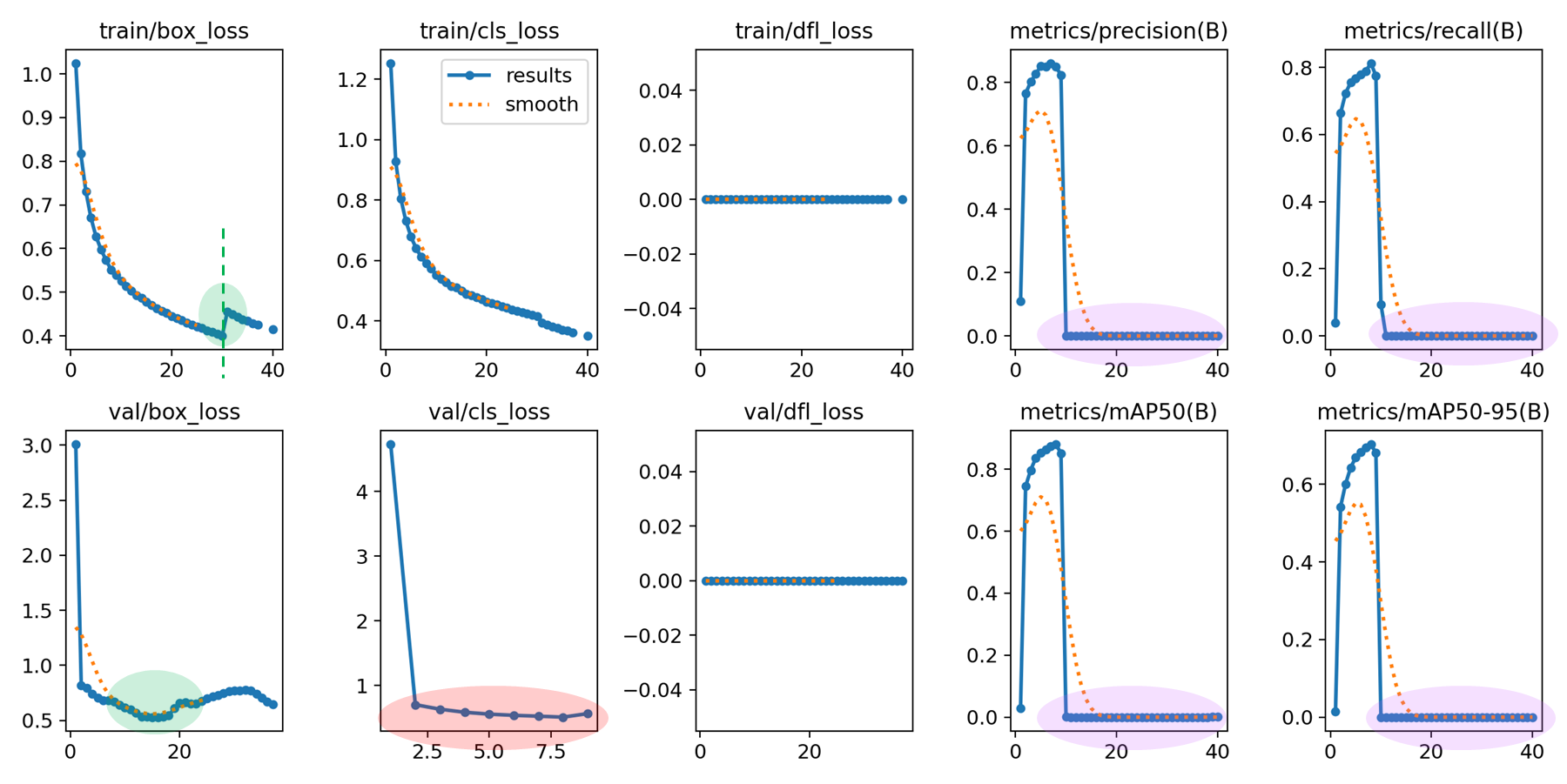
box_loss 는 아름다워졌는데, metric 이 밑으로 깔렷다. 아무래도 cls_loss 가 발산한 듯. 즉, 40 번 돌았어야 하는데, cls_loss 가 AdamW 로 했을 때, loss 가 미끄러짐.. (inf)
그러고 보면 결과 비교시
| 1st training | 3rd training | ||
|---|---|---|---|
| optimizer | “auto” (SGD) | optimizer | “AdamW” |
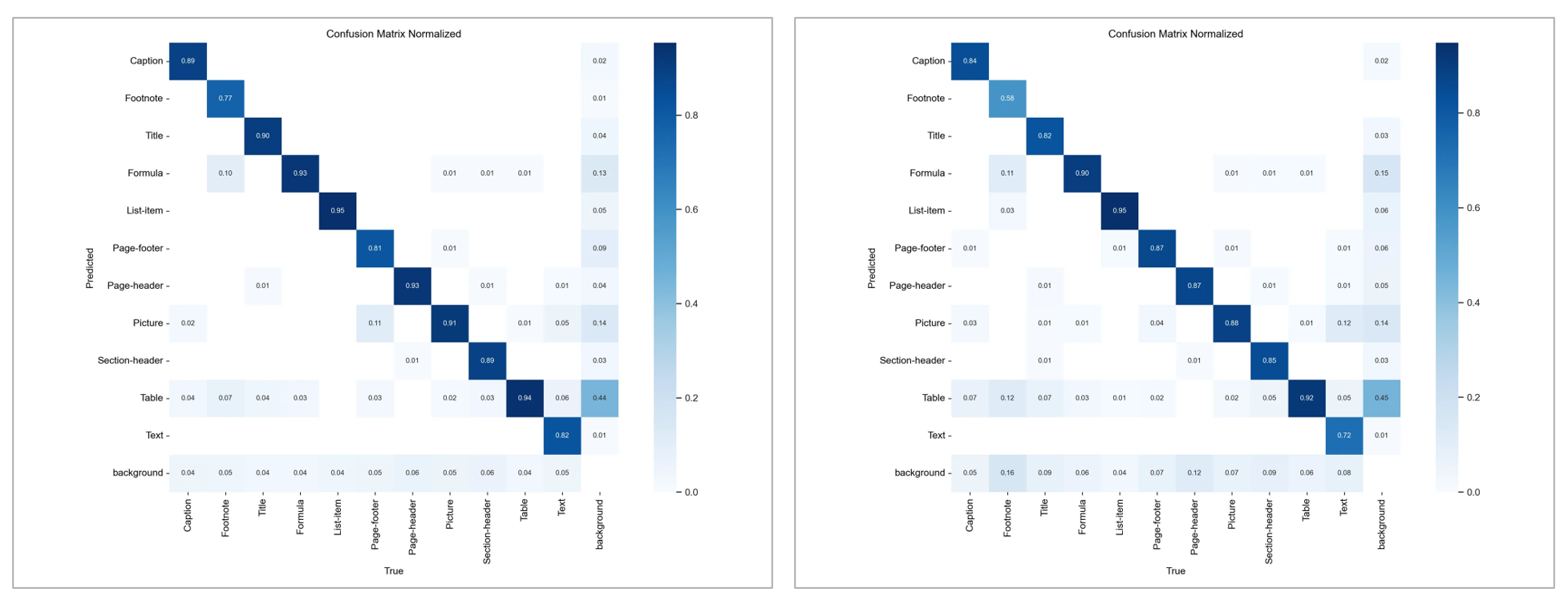
다른 점이 optimizer 말고 없다. SGD 수치가 조금 더 낫다고 볼 수 있다.
- gradient accumulate 적용.
nbs ( Nominal batch size for normalization of loss. )
따라서 64/8 = 8 로 1 batch 전체 파일 8 개를 전부 accumulate 하게 된다.self.accumulate = max(round(self.args.nbs / self.batch_size), 1) # accumulate loss before optimizing # default nbs : 64. # batch_size : 8.
nbs를 줄여서 중간에 gradient 를 Nomalization 할 수 있게 변경. https://github.com/opendatalab/DocLayout-YOLO/blob/main/train.py- DocLayOut-YOLO 에서 batch size default 가 16 이므로, 1/4 를 gradient accumulate 했다.
- 일단 위와 같이 4로 맞춰보고 metric 이 괜찮은지 확인. ( nbs 32 )
- 여기서도 문제 생기면 auto 로 다시 바꾼다.
따라서 optimizer 는 그대로 두고, 모델 크기를 늘려서 훈련 시켜서 valid box_loss 를 잡아보자.
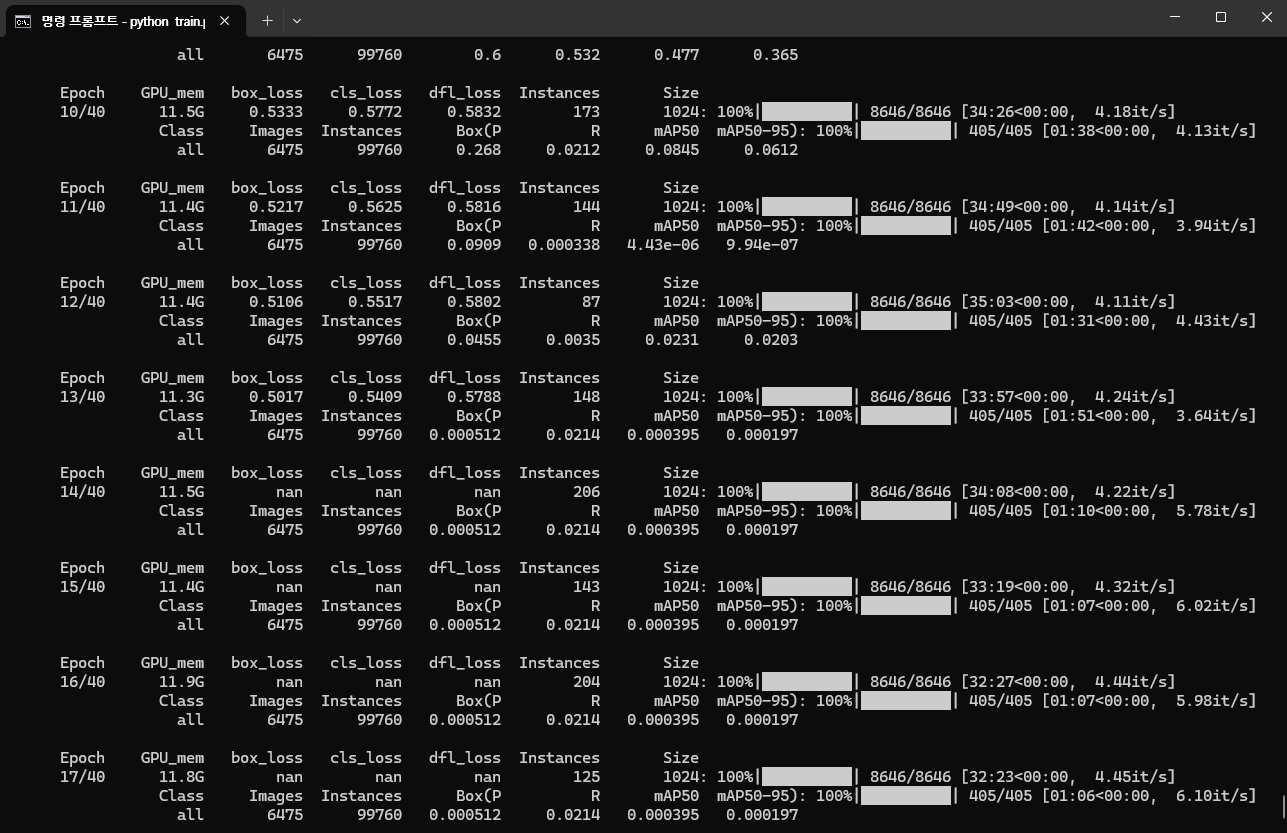
- 14 Epoch 이후 Non 으로 수치가 divergence 한 것으로 보여서, 훈련을 중단.
- 다시 원복 후에,
AdamW으로는 계속 모델이 터져서, 기존SGD에서DFL loss를 추가하여 진행.
[ 1 ] Only SGD, Non DFL loss.
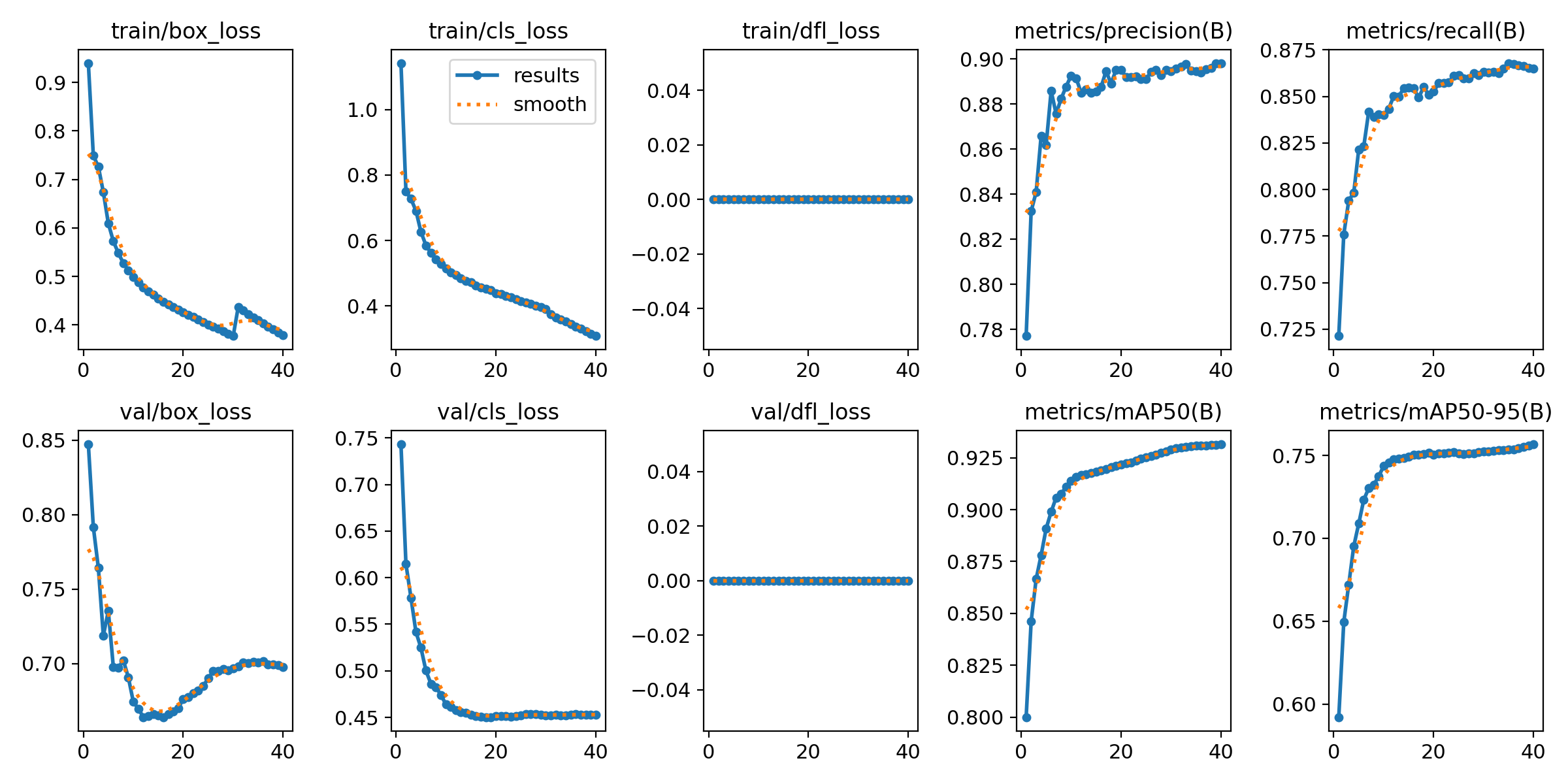
[ 2 ] Include DFL Loss
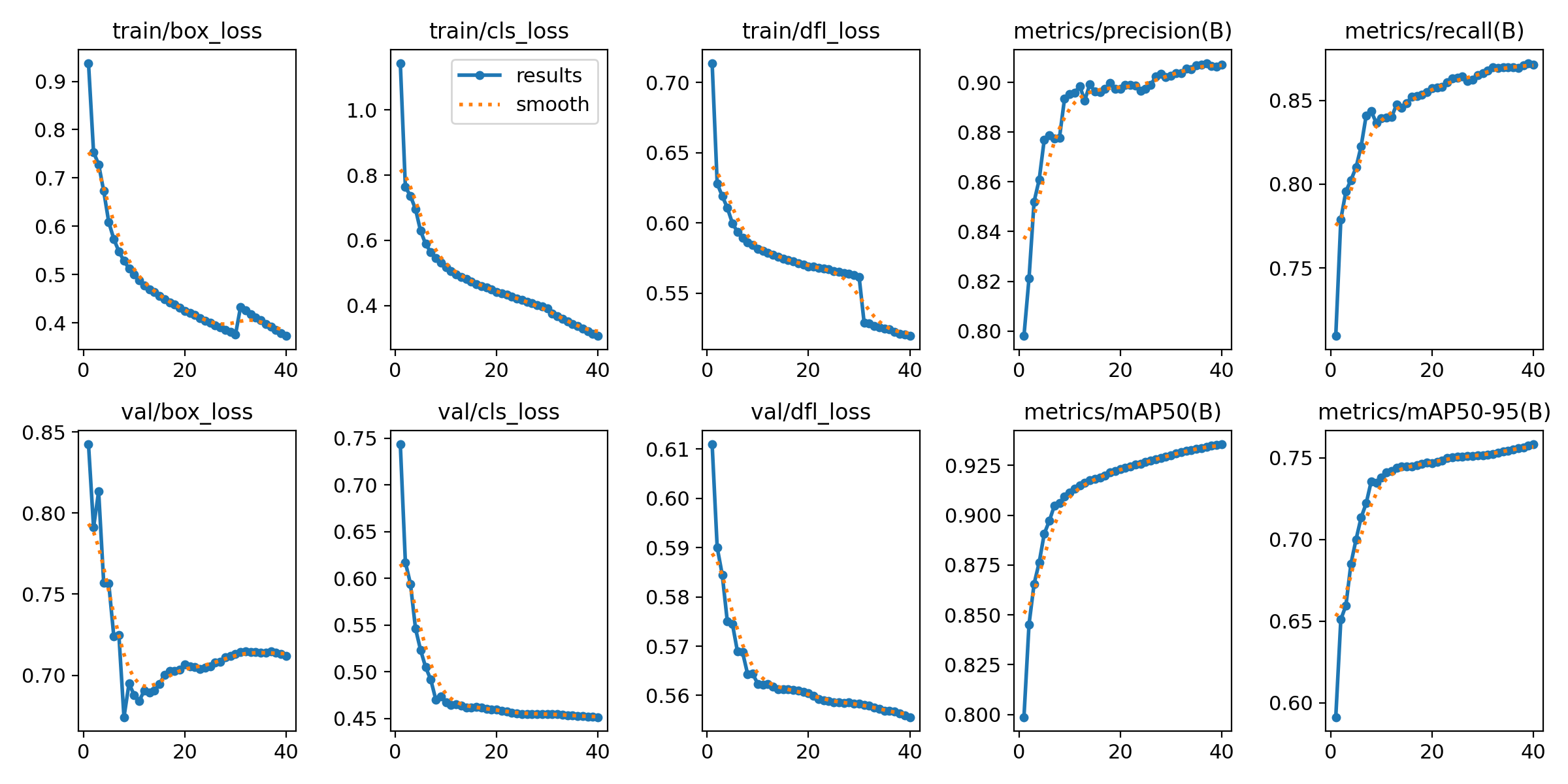
마지막 수치 비교.

마지막 수치를 보는 것은 큰 의미 부여는 없지만,
- 두 학습의 추세가 너무 비슷하다.
box_loss에서 [ 1 ] Non DFL loss 보다 [ 2 ] DFL loss 가 더 완만한 그래프를 갖는다.mAP그래프를 보면 [ 1 ] 은 wiggly 하지만, [ 2 ] 가 좀 더 smooth 하다.
confusion matrix
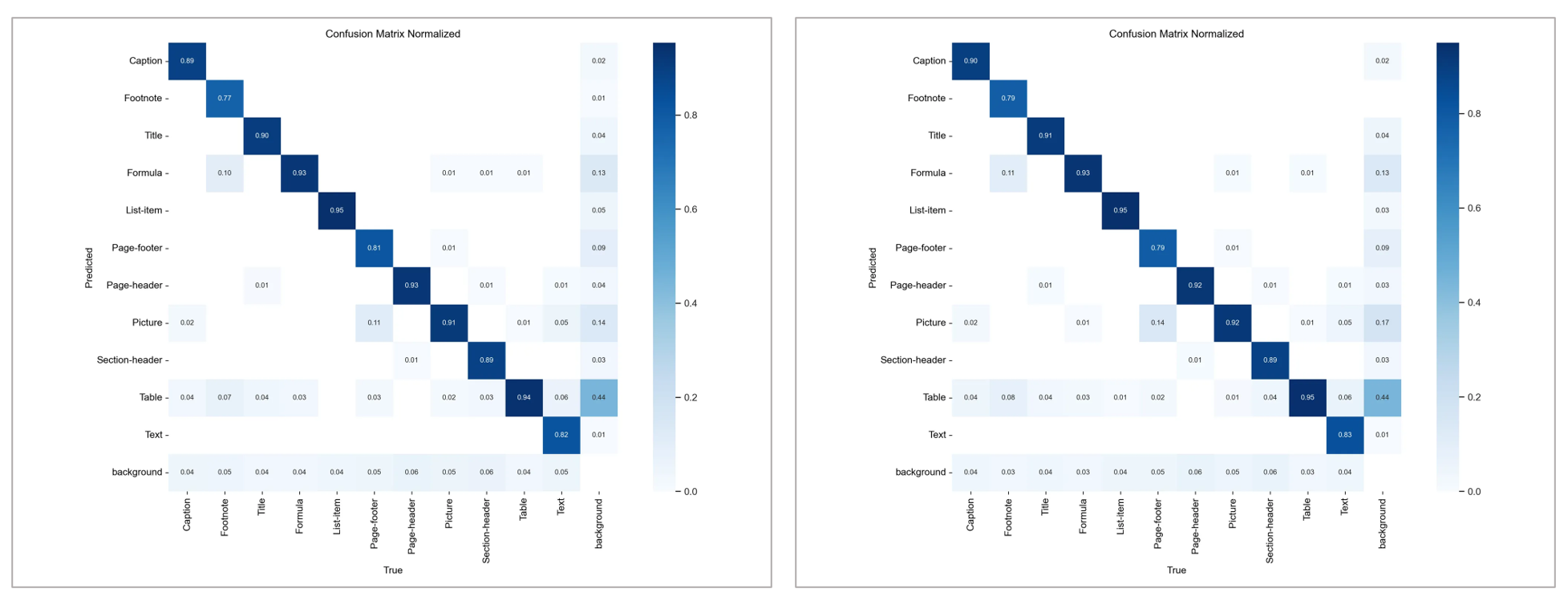
DFL loss 를 추가하여 결과를 내니 조금 더 좋은 결과가 나왔다.

미세하게 DFL_loss 넣은 모델이 좋았다.