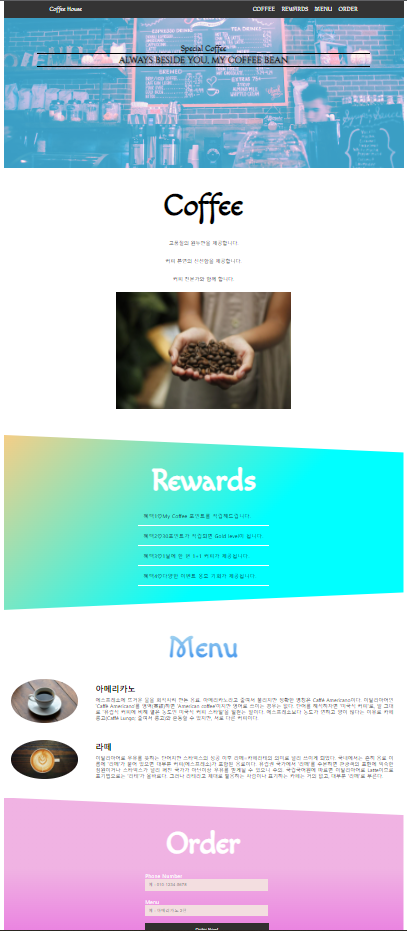
1. 학습한 내용
[카페 메인페이지 실습]
[HTML]
<!DOCTYPE html>
<html lang="en">
<head>
    <meta charset="UTF-8">
    <meta http-equiv="X-UA-Compatible" content="IE=edge">
    <meta name="viewport" content="width=device-width, initial-scale=1.0">
    <title>My Cafe</title>
    <link rel="stylesheet" href="./CSS/style.css">
    <link rel="shortcut icon" href="./images/favicon.ico">
</head>
<body>

    <header id="header">
        <div class="header-top">
            <nav>
                <ul id="header-nav">
                    <li><a href="index.html" class="header-left">Coffee House</a></li>
                    <li><a href="#coffee">COFFEE</a></li>
                    <li><a href="#rewards">REWARDS</a></li>
                    <li><a href="#menu">MENU</a></li>
                    <li><a href="#order">ORDER</a></li>
                </ul>
            </nav>
        </div>
    </header>

    <section id="main">
        <div class="main-image">
            <div class="main-title">
                <h1>Special Coffee</h1>
            </div>
            <div class="main-text">
                <h3>ALWAYS BESIDE YOU, MY COFFEE BEAN</h3>
            </div>
        </div>
    </section>

    <section id="coffee">
        <div class="coffee-title">
            <h1>Coffee</h1>
        </div>
        <div class="coffee-contant">
            <div class="coffee-text">
                <p>고품질의 원두만을 제공합니다.</p><br><br>
                <p>커피 본연의 신선함을 제공합니다.</p><br><br>
                <p>커피 전문가와 함께 합니다.</p>
            </div>
            <div class="coffee-image">
                <img src="./images/bean.jpg" class="image">
            </div>
        </div>
    </section>

    <section id="rewards">
        <div class="rewards-title">
            <h1>Rewards</h1>
        </div>
        <div class="rewards-table">
            <table>
                <tr>
                    <td>혜택1♡My Coffee 포인트를 적립해드립니다.</td>
                </tr>
                <tr>
                    <td>혜택2♡30포인트가 적립되면 Gold level이 됩니다.</td>
                </tr>
                <tr>
                    <td>혜택3♡1달에 한 번 1+1 커피가 제공됩니다.</td>
                </tr>
                <tr>
                    <td>혜택4♡다양한 이벤트 응모 기회가 제공됩니다.</td>
                </tr>
            </table>
        </div>
    </section>
    <section id="menu">
        <div class="menu-title">
            <h1>Menu</h1>
        </div>
        <div class="menu-content">
            <div class="menu-image">
                <img src="./images/ame.jpg" class="image">
            </div>
            <div class="menu-text">
                <h3>아메리카노</h3>
                <p>에스프레소에 뜨거운 물을 희석시켜 만든 음료. 아메리카노라고 줄여서 불리지만 정확한 명칭은 Caffé Americano이다. 이탈리아어인 'Caffè Americano'를 영역(英譯)하면 'American coffee'이지만 영어로 쓰이는 경우는 없다. 단어를 해석하자면 '미국식 커피'로, 말 그대로 '유럽식 커피에 비해 옅은 농도인 미국식 커피 스타일'을 일컫는 말이다. 에스프레소보다 농도가 연하고 양이 많다는 이유로 카페 룽고(Caffé Lungo; 줄여서 룽고)와 혼동할 수 있지만, 서로 다른 커피이다.</p>
            </div>
        </div>
        <div class="menu-content">
            <div class="menu-image">
                <img src="./images/latte.jpg" class="image">
            </div>
            <div class="menu-text">
                <h3>라떼</h3>
                <p>이탈리아어로 우유를 뜻하는 단어지만 스타벅스의 성공 이후 라떼=카페라테의 의미로 널리 쓰이게 되었다. 국내에서는 흔히 음료 이름에 '라떼'가 붙어 있으면 대부분 커피(에스프레소)가 포함된 음료이다. 유럽권 국가에서 '라떼'를 주문하면 관광객의 표현에 익숙한 점원이거나 스타벅스가 널리 퍼진 국가가 아닌이상 우유를 받게될 수 있으니 주의. 국립국어원에 따르면 이탈리아어로 Latte이므로 표기법으로는 '라테'가 올바르다. 그러나 라테라고 제대로 발음하는 사람이나 표기하는 카페는 거의 없고, 대부분 '라떼'로 부른다.</p>
            </div>
        </div>
    </section>
    <section id="order">
        <div class="order-title">
            <h1>Order</h1>
        </div>
        <form>
            <label>
                <span class="order-span">Phone Number</span><br>
                <input type="tel" class="order-label" placeholder="예 : 010-1234-5678"><br>
            </label>
            <br>
            <label>
                <span class="order-span">Menu</span><br>
                <input type="text" class="order-label" value="" placeholder="예 : 아메리카노 2잔"><br>
            </label>
            <br>
            <label>
                <input type="submit" class="order-submit" value="Order Now!">
            </label>
        </form>
    <footer>
        <div class="footer">
            <span class="footer-text">문의사항</span>
            <span>© 2022 My Coffee House</span>
        </div>
    </footer>
    </section>
</body>
</html>
[CSS]
기본 구성
@charset "utf-8";
@import url('https://fonts.googleapis.com/css2?family=Macondo&display=swap');
@import url('https://fonts.googleapis.com/css2?family=Cinzel&family=Nanum+Myeongjo&display=swap');
*{
    max-width:1200px;
    margin:0 auto;
    padding:0 auto;
    text-decoration: none;
    list-style: none;
}
a,h1{
    font-family: 'Macondo', cursive;
}
header 부분
- inline-block으로 메뉴 가로로 만들고 z-index로 가장 앞부분에 위치하게 만들고 header부분 fixed해서 스크롤을 내려도 보이도록 설정
- a태그에 속성 지정해서 마우스를 올려놨을 때, 클릭했을 때 등 변화에 색상 변화 추가
/************************************ header *****************************************/
header{
    width: 100%;
    position: fixed;
    top: 0;
    z-index: 1000;
}
nav{
    height: 50px;
    background-color: rgb(52,52,52);
}
#header-nav {
    text-align: center;
    padding: 5px;
}
#header-nav li{
    display: inline-block;
    color: #fff;
    font-size: 18px;
    margin: 5px 7px;
}
#header-nav li:first-child{
    margin-right: 500px;
}
/* a태그 속성: link(방문전) visited(방문후) hover(마우스오버) active(클릭중)*/
nav a:link {
    color: white;
}
nav a:visited {
    color: white;
}
nav a:hover {
    color: rgb(9, 89, 209);
}
nav a:active {
    color: white;
}
section-image 부분
/**************************** section-image ******************************************/
section{
    position: relative;
    width: 100%;
    text-align: center;
}
#main {
    position: relative;
    display: flex;
    align-items: center;
    text-transform: capitalize;
}
#main .main-image{
    width: 100%;
    height: 500px;
    background: url(../images/main.jpg) center no-repeat;
    background-size: cover;
    background-blend-mode: lighten;
    background-color:rgba(72, 194, 243, 0.808);
}
#main .main-title{
    margin-top: 130px;
}
#main .main-text{
    width: 1000px;
    text-shadow: 5px 3px 3px gray;
    font-size: 23px;
    border-top:2px solid black;
    border-bottom:2px solid black;
    font-family: 'Cinzel', serif;
}
section-coffee 부분
/**************************** section-coffee ***************************************/
#coffee .coffee-title,
#rewards .rewards-title,
#menu .menu-title,
#order .order-title{
    font-size:60px;
    margin:50px;
    padding: 10px;
    margin-bottom: 10px;
}
#coffee .coffee-text,
#rewards .rewards-text,
#menu .menu-text,
#order .order-text{
    font-size: 15px;
    padding: 30px;
}
#coffee .coffee-image .image{
    box-sizing: border-box;
    height: 400px;
    padding-bottom: 50px;
}
section-rewards 부분
- linear-gradient를 사용해서 백그라운드 색상 설정
- clip-path: polygon으로 section-rewards 부분 모양 설정
- table 사용으로 전체적인 틀을 잡고 그 안에 텍스트 작성
/**************************** section-rewards ***************************************/
#rewards{
    width:100%;
    height:500px;
    background: linear-gradient(135deg, rgb(245, 206, 135), cyan 60%);
    margin-top:25px;
    padding-top:25px;
    margin-bottom: 50px;
    clip-path: polygon(0 0%, 100% 10%, 100% 90%, 0% 100%);
}
#rewards .rewards-title{
    color: #fff;
}
.table, tr, td{
    border-bottom: solid 1px #fff;
    border-collapse: collapse;
    padding: 18px;
    text-align: justify;
}
section-menu 부분
- linear-gradient를 사용해서 백그라운드 색상 설정
background-clip: text
-webkit-background-clip: text
-webkit-text-fill-color: transparent
=> 백그라운드 속성을 텍스트로 적용하고 설정한 백그라운드 색상을 텍스트에 적용 - flex => 하나의 차원만을 다루는 특성을 지녔다 (1차원 레이아웃 모델)
- flex-direction 속성 => row(기본값, 행축, 콘텐츠 방향→)
row-reverse(행축, 콘텐츠 반대방향←)
column(열축, 콘텐츠 방향↓)
column-reverse(열축, 콘텐츠 반대방향↑)
- flex 속성
- justify-content 주축 배치 방법
=> justify-content: start, center, flex-end, space-around, space-between - align-items 교차축 배치 방법
=> align-items: flex-start, center, flex-end - alimg-self 교차축 개별요소 배치 방법
=> alimg-self: align-start, center, align-end (모두 개별요소 적용) - flex-wrap 줄 바꿈 여부
=> flex-wrap: nowrap(기본상태)
wrap(주축으로 진행되면 하위요소들의 도합 크기가 부모요소 축 길이보다 커졌을 때, 두행 이상으로 처리할 수 있도록 하겠다
wrap-reverse(wrap의 decalcomanie와 같은 모양이 된다)
/**************************** section-menu ***************************************/
#menu h1{
    background: linear-gradient(to top,rgb(44, 134, 236),rgb(181, 224, 241));
    background-clip: text;
    -webkit-background-clip: text;
    -webkit-text-fill-color: transparent;
}
#menu h3{
    font-size: 24px;
    text-align: left;
    margin-bottom: 10px;
}
#menu .menu-image img{
    flex-direction: row;
    max-width: 200px;
    height: auto;
    border: 1px solid #fff;
    border-radius: 50%;
    margin-left: 20px;
    margin-right: 20px;
}
#menu .menu-content{
    display: flex;
    flex-wrap: nowrap;
    justify-content: space-evenly;
    align-items: center;
    flex-direction: row;
}
#menu .menu-text p{
    text-align: justify;
}
section-order 부분
/**************************** section-order ***************************************/
#order{
    width:100%;
    height:500px;
    margin-top:25px;
    padding-top:25px;
    clip-path: polygon(0 0%, 100% 10%, 100% 100%, 0% 100%);
    background: linear-gradient(to top, rgb(230, 100, 223), rgb(240, 179, 227) 60%);
}
#order h1{
    color: #fff;
}
#order form{
    text-align: left;
    margin-top: 20px;
}
#order label{
    width: 350px;
    display: block;
}
#order span{
    color: #fff;
}
#order .order-label{
    width: 350px;
    color: black;
    background-color: rgb(243, 222, 224);
    padding: 10px;
    border: #fff;
}
#order .order-submit{
    width: 370px;
    color: #fff;
    padding: 10px;
    background-color: rgb(49, 47, 47);
    border: #fff;
    cursor: pointer;
}
footer 부분
/**************************** footer ***************************************/
footer{
    margin-top: 60px;
    padding: 25px;
    width: 1000px;
    border-top: 1px solid rgb(212, 209, 206);
    margin-bottom: 0;
}
footer .footer{
    text-align: center;
    color: #000;
    font-size: 8px;
}
footer .footer-text{
    text-decoration: underline;
}
코딩공부중