1. 학습한 내용
1.media-query
background-attachment: fixed => 그림 고정
background-position: x, y => 가로 중앙, 세로 중앙
left | center | right :: top | center | bottom
html{
    background: url(../images/img5.jpg) no-repeat center center fixed;
    background-size: cover;
    font-family: "Open Sans", sans-serif;
}
[text-transform]
none 기본값
capitalize 각 단어의 첫 번째 문자를 대문자로 변환합니다.
uppercase 모든 문자를 대문자로 변환합니다.
lowercase 모든 문자를 소문자로 변환합니다.
#content{
    position: absolute;
    top: 50%;
    left: 50%;
    transform: translate(-50%, -50%);
}
h1{
    color: #fff;
    font-size: 8em; /* 16 x 8 */
    font-style: italic;
    text-shadow: 2px 2px 3px #222, 2px 2px 3px #000;
    text-transform: uppercase;
}
미디어쿼리 변환
@media (max-width:700px){
    html{
        background: url(../images/img4.jpg) no-repeat center center fixed;
        background-size: cover;
    }
    h1{
        font-size: 4em;
    }
}
2. 반려묘 blog
<!DOCTYPE html>
<html lang="en">
<head>
    <meta charset="UTF-8">
    <meta http-equiv="X-UA-Compatible" content="IE=edge">
    <meta name="viewport" content="width=device-width, initial-scale=1.0">
    <title>내 고양이 이름은 키!</title>
    <link href="https://fonts.googleapis.com/css?family=Amatic+SC|M+PLUS+Rounded+1c:400,500&display=swap" rel="stylesheet">
    <link rel="stylesheet" href="./CSS/style.css">
    <link rel="shortcut icon" href=".images/favicon.png">
    <!-- Font Awesome -->
    <!-- <script src="https://kit.fontawesome.com/b8a7fea4d4.js"></script> -->
</head>
<body>
    <header>
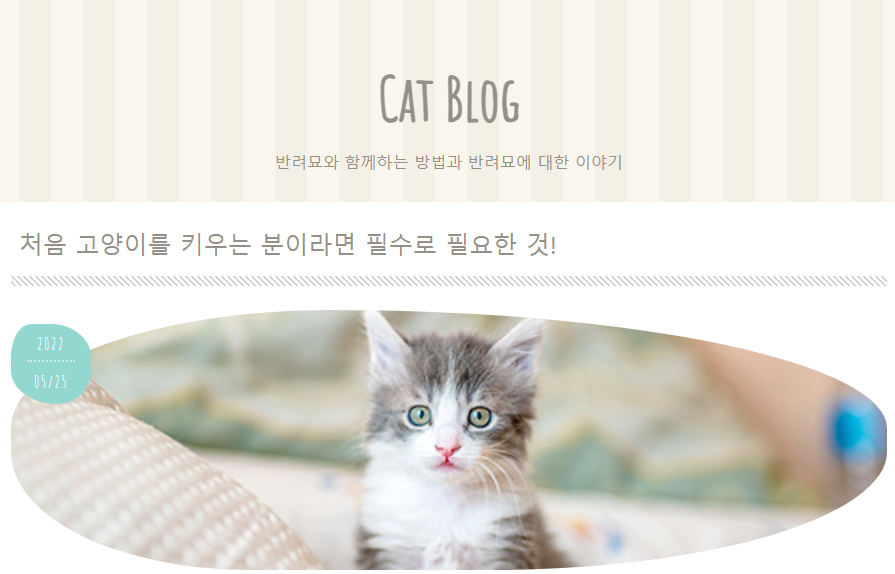
        <h1 class="page-title">Cat Blog</h1>
        <p class="page-desc">반려묘와 함께하는 방법과 반려묘에 대한 이야기</p>
    </header>
    <div class="container">
        <section>
            <article>
                <div class="post-title">
                    <h2><a href="#">처음 고양이를 키우는 분이라면 필수로 필요한 것!</a></h2>
                </div>
                <div class="post-thumb">
                    <p class="post-date"><span>2022</span><span>05/25</span></p>
                    <img class="post-img" src=".//images/cat1.jpg" alt="">
                </div>
                <p>
                    처음 고양이를 키운다면 우선 무엇이 필요할까요? 꼭 필요한 물품과 사두면 편리한 물품에 대해 소개합니다. 고양이는 앞으로 약 10년간 함께 살아가는 가족입니다. 함께하는 생활을 기분좋게 시작하기 위해서 미리 제대로 준비해둡시다! 추천하는 고양이 사료 랭킹도 정리해보았습니다!
                </p>
                <h3>반려묘와 처음 함께할 때 필수 아이템</h3>
                <ul>
                    <li>간식</li>
                    <li>화장실, 화장실 모래</li>
                    <li>식품</li>
                </ul>
                <img src="./images/cat5.jpg" alt="">
                <h4>추천하는 고양이 사료</h4>
                <ol>
                    <li>건식 사료A</li>
                    <li>습식 사료B(C배합)</li>
                    <li>건식 사료D 닭고기 맛</li>
                </ol>
                <h5>고양이 사료를 고르는 포인트</h5>
                <p>사람이 먹는 음식이 아닌 꼭 고양이용 건식, 습식 사료를 준비해야 합니다.
                    <strong>종합영양식</strong>이라고 쓰여있는 것으로 준비해주세요.
                    <a href="#">건식 사료와 습식 사료는 함께 급여</a>해도 됩니다.</p>
                <h6>고양이의 귀여운 재롱</h6>
                <blockquote>
                    <p>쉬고 있는 고양이의 눈은 아주 부드럽습니다. 적대적이지 않고 상대방에게 호의가 있을 때에는 눈을 가늘게 뜨거나 깜빡거립니다. 가끔 윙크를 할 때도 있습니다.</p>
                </blockquote>
            </article>
        </section>
        <aside>
            <div class="side-box">
                <h3>Category</h3>
                <ul>
                    <li><a href="#">고양이 종류</a></li>
                    <li><a href="#">식사・사료</a></li>
                    <li><a href="#">건강・질병</a></li>
                    <li><a href="#">고양이 생태</a></li>
                    <li><a href="#">고양이와 함께 사는 법</a></li>
                </ul>
            </div>
            <div class="side-box">
                <h3>Newsletter</h3>
                <p>고양이와 애완동물에 관한 최신 정보와 공지사항 전달! 부담없이 등록하세요!</p>
                <form class="newsletter-form">
                    <input type="email" placeholder="hello@example.com">
                    <input type="submit" value="등록">
                </form>
            </div>
            <div class="side-box">
                <h3>Popular Posts</h3>
                <ul>
                    <li><a href="#">처음 고양이를 병원에 데려갈 때의 마음가짐</a></li>
                    <li><a href="#">고양이 발바닥 젤리로 알아보는 반려묘 성격?</a></li>
                    <li><a href="#">움직이는 고양이 사진 찍는 팁</a></li>
                    <li><a href="#">추천하는 고양이 사료는?</a></li>
                    <li><a href="#">고양이에게 목걸이를 채워도 괜찮을까? 조심해야 할 5가지</a></li>
                </ul>
            </div>
        </aside>
    </div>
    <footer>
        <ul class="footer-nav">
            <li><a href="#">Twitter</a></li>
            <li><a href="#">Facebook</a></li>
            <li><a href="#">YouTube</a></li>
            <li><a href="#">Instagram</a></li>
        </ul>
        <p><small>©️ 2022 Cat Blog</small></p>
    </footer>
</body>
</html>
css(기본)
@charset "utf-8";

*{
    box-sizing: border-box;
}

html{
    font-size: 100%; /* 16px */
    line-height: 1.15; /* 배수, %,px 가능 */
}
body{
    color: #949087;
    font-family: sans-serif;
    background: #faf6ed url(../images/bg.png);
    margin: 0;
}
ul, ol{
    margin: 0;
    padding: 0;
    list-style: none;
}
a{
    background-color: transparent;
    text-decoration: none;
}
button, input{
    border: 0;
    outline: 0;
}
p{
    line-height: 1.6;
}
.container{
    max-width: 1000px;
    margin: 0 auto;
    padding: 1.5rem; /* 16px x 1.5 */
    background: #fff;
    border-radius: 10px 10px 10px 10px;
}

img{border-style: none; vertical-align: bottom;}

h1, h2, h3, h4, h5, h6{margin: 0;}
css(header)
/************** header ****************/
header{
    max-width: 1000px;
    margin: 2.5rem auto 0;
    height: 170px; /* header와 section 간격 */
}
.page-title{
    font-size: 3.75rem;
    font-family: 'Amatic SC', cursive;
    margin: 1rem; /* tag와 tag사이 공간 */
    padding-top: 2rem;
}
.page-desc{
    font-size: 1rem;
    margin-bottom: 0;
}
.page-title, .page-desc{
    text-align: center;
}
css(section)
sans-serif = 서체의 획 끝에 삐침이 없는 서체
cursive = 손글씨, 필기체
/************** section ****************/
section{
    margin-bottom: 3rem;
    display: block;
}
.post-title{
    padding-bottom: 10px;
    background-image:linear-gradient(45deg, #fff 30%, #ccc 30%, #ccc 50%, #fff 50%, #fff 80%, #ccc 80%, #ccc 100%);
    background-size: 6px 6px;
    margin-bottom: 1.5rem;
}
.post-title h2{
    background-color: #fff;
    padding: 0 0.5rem 0.875rem;
    font-family: 'Noto Sans KR', sans-serif;
    font-weight: 500;
    line-height: 1.5;
}
.post-title a{
    color: #949087;
}
.post-title a:hover{
    color: #605c55;
}
.post-thumb{
    margin: 0 0 1rem 0;
    position: relative; /* 날짜의 좌표를 고정시켜주기 위해 부모코드 */
}
.post-date{
    position: absolute;
    left: 0;
    top: -10px;
    font-size: 1.5rem;
    letter-spacing: 0.1rem;
    font-family: 'Amatic SC', sans-serif;
    background: #93d8d0;
    width: 80px;
    height: 80px;
    text-align: center;
    color: #fff;
    border-radius: 30% 60% 50% 70% / 50%;
}
.post-date span{
    font-size: 1rem;
    border-bottom: 2px rgba(255, 255, 255, .5) dotted;
    display: block;
    margin: 8px auto 0;
    padding-bottom: 2px;
    width: 60%; /* 100%로 설정할 경우 중간 선이 전체적으로 표시 된다 */
}
.post-date span:last-child{
    border-bottom: none;
}
.post-img{
    width: 100%;
    height: 260px;
    object-fit: cover; /* 이미지를 원하는 비율에 맞게 최대한 가져오는 방법 */
    border-radius: 40% 70% 50% 30% / 50%;
}
article h3, article h4, article h5, article h6{
    font-family: 'Noto Sans KR',sans-serif;
    font-weight: 500;
    margin: 3rem 0 1rem;
}
article h3{
    font-size: 1.5rem;
    border-top: #ccc dotted 2px;
    padding: .7rem;
    line-height: 1.4;
}
article img{
    max-width: 100%;
    border-radius: 50px;
}
css(article)
/******** 목록 *************/
article li{
    margin: .5rem;
}
article ul li::before{
    content:'';
    width: 8px;
    height: 8px;
    background: #93d8d0;
    display: inline-block;
    margin: 0 8px 2px 0;
    border-radius: 50%;
}
article h4{
    font-size: 1.5rem;
}
article ol li{
    counter-increment: list;
}
article ol li::before{
    content: counter(list);
    color: #93d8d0;
    display: inline-block;
    margin-right: 8px;
}
article h5{
    font-size: 1.375rem;
}
article a{
    color: #93d8d0;
}
article a:hover{
    color: #7ac69f;
    text-decoration: underline;
}
article h6{
    font-size: 1.25rem;
}
css(article blockquote)
content: '\201C';
content: '\201D';
=> 큰따옴표 나타내기
/***************** 인용문 *************************/
article blockquote{
    position: relative;
    padding: 1rem 3rem;
    margin-bottom: 1rem;
}
article blockquote::before,
article blockquote::after{
    font-size: 6rem;
    font-family: 'Noto Sans KR', sans-serif;
    color: #ccc;
    position: absolute;
    line-height: 0;
}
article blockquote::before{
    content: '\201C';
    top: 2.5rem;
    left: 0;
}
article blockquote::after{
    content: '\201D';
    bottom: .5rem;
    right: 0;
}
2. 학습한 내용 중 어려웠던 점
구성을 잡고 이미지나 텍스트를 입력하는데까지는 큰 어려움없이 가능한 것 같으나 이후 포지션잡는게 아직도 잘 안된다. 혼자 메뉴부분을 카테고리화해서 잡아보려했는데 위치가 잡히지를 않는다.
3.해결방법
미디어쿼리부분도 아직 줄였을 때 어떻게 적용해야 하는지 감이 잘 잡히지 않는다. 막연히 줄이는 것 까지는 할 수 있지만 줄였을 때 어떻게 보여져야 하는가에 대한 감이 부족한 것 같다.
포지션과 쿼리 부분 둘 다 좀 더 학습이 필요하다.
4.학습소감
세부적인 요소들을 하나씩 하나씩 더 알아가고 배워가고 있다. 네이버블로그를 보고 기초적인 모습을 구상하고 감을 잡는데 도움을 받을 수 있을 것 같다. 코딩은 혼자 처음부터하면 아직 쉽지 않지만 적어도 조금은 아는 부분이 있다는 점에서 좋게 생각할 수 있을 것 같다.