1. 금일 학습 내용
- 팀프로젝트 수행
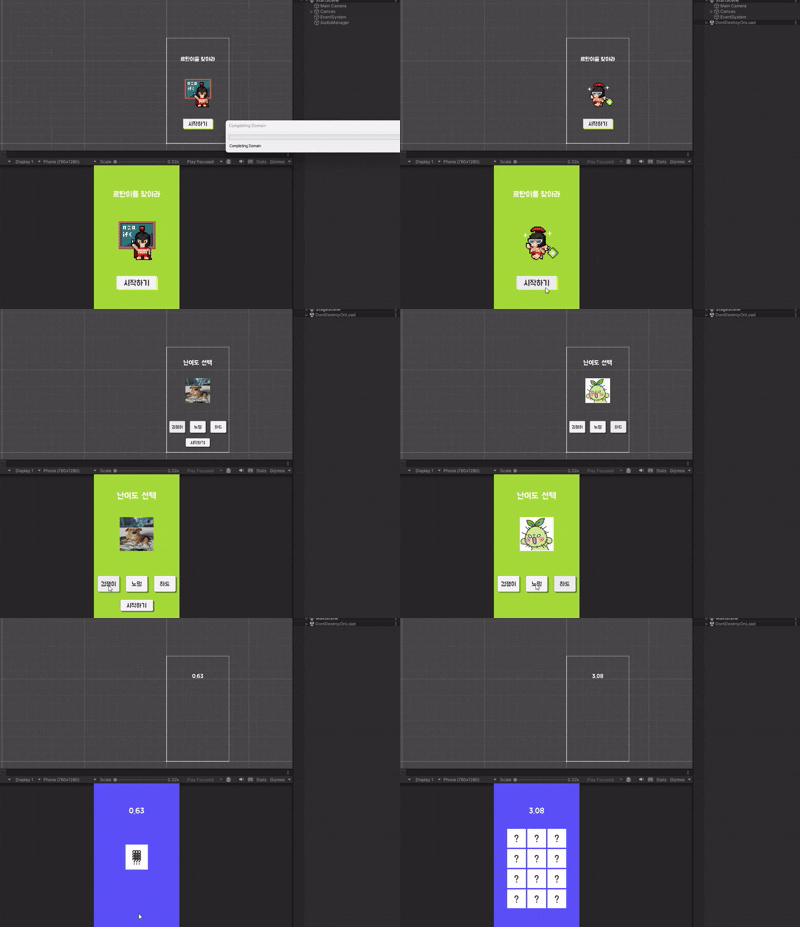
- 스테이지 선택 Scene구현
- 난이도에 따른 카드의 갯수, 크기 조절
- 난이도 Unlock기능 추가
using System.Collections;
using System.Collections.Generic;
using UnityEngine;
using UnityEngine.UI;
public class ChooseStage : MonoBehaviour
{
    public static ChooseStage Instance; //ChooseStage를 싱글톤을 만들기 위한 변수

  public Image CenterImage;

   public GameObject ChickenBtn;

    public GameObject LockNormalBtan;
    public GameObject NormalBtn;
    public GameObject LockHardBtan;
    public GameObject HardBtn;

    public GameObject StartBtn;

    public int StageUnlocked = 0;

    public int Stage = 1;

    private void Awake()
    {
        Instance = this;
    }

    void Start()
    {
        StageUnlocked = PlayerPrefs.GetInt("StageUnlocked", 1);
    }

    public void Choose(GameObject clickButton)
    {
        switch (clickButton.name)
        {
            case "EasyBtn":
                CenterImage.sprite = Resources.Load<Sprite>("membercard2");
                Stage = 1;
                if (!StartBtn.activeSelf) //만약 시작하기 버튼이 활성화가 안 되어있으면 활성화 시켜줌
                {
                    StartBtn.SetActive(true);
                }
                break;

            case "NormalBtn":
                CenterImage.sprite = Resources.Load<Sprite>("membercard8");

                if (StageUnlocked >= 2)
                {
                    Stage = 2;

                    if (!StartBtn.activeSelf) //만약 시작하기 버튼이 활성화가 안 되어있으면 활성화 시켜줌
                    {
                        StartBtn.SetActive(true);
                    }
                }
                else
                {
                    if (StartBtn.activeSelf)//만약 활성화가 되어 있으면 비활성화 시켜 시작을 막음
                    {
                        StartBtn.SetActive(false);
                    }
                    Debug.Log(StageUnlocked);
                }
                break;

            case "HardBtn":
                CenterImage.sprite = Resources.Load<Sprite>("membercard10");

                if (StageUnlocked >= 3)
                {
                    Stage = 3;
                    if (!StartBtn.activeSelf) //만약 시작하기 버튼이 활성화가 안 되어있으면 활성화 시켜줌
                    {
                        StartBtn.SetActive(true);
                    }
                }
                else
                {
                    if (StartBtn.activeSelf)//만약 활성화가 되어 있으면 비활성화 시켜 시작을 막음
                    {
                        StartBtn.SetActive(false);
                    }
                }
                break;
        }
    }
}
(스테이지 선택 Scene 구성 코드)
2. 문제점 및 해결방법
- 난이도에 따라 프리팹의 크기를 조정해야 하는데, 애니메이터와 어떠한 충돌이 있는지(다 옮게 하였음) 크기 조절이 진행이 안 됨
-애니메이션 클립을 다시 만들어서 해결
3. 다음 학습 내용
- C#실습
- 팀프로젝트 히든스테이지 구성
4. 느낀 점
사전캠프 때 쓸 거 같다고 하였던 PlayerPrefs. 을 바로 사용하게 될 줄은 몰랐음. 추가로 제대로 작성 및 틀린 것 없이 오류가 발생했을 때 다른 방법을 찾는 것이 좋지만 그 원인 자체를 다시 만드는 거와 같은 방법을 쓰는 것도 방법이라는 것을 배웠음.

@