본 게시물은 CloudNet@팀 Gasida(서종호) 님이 진행하시는
AWS EKS Workshop Study 내용을 기반으로 작성되었습니다.
1. 노드 간 파드 통신
AWS VPC CNI는 pod의 IP 네트워크 대역과 node의 IP 대역이 동일하여, 별도의 오버레이(Overay) 통신 기술 없이, VPC Native하게 파드 간 직접 통신이 가능하다.
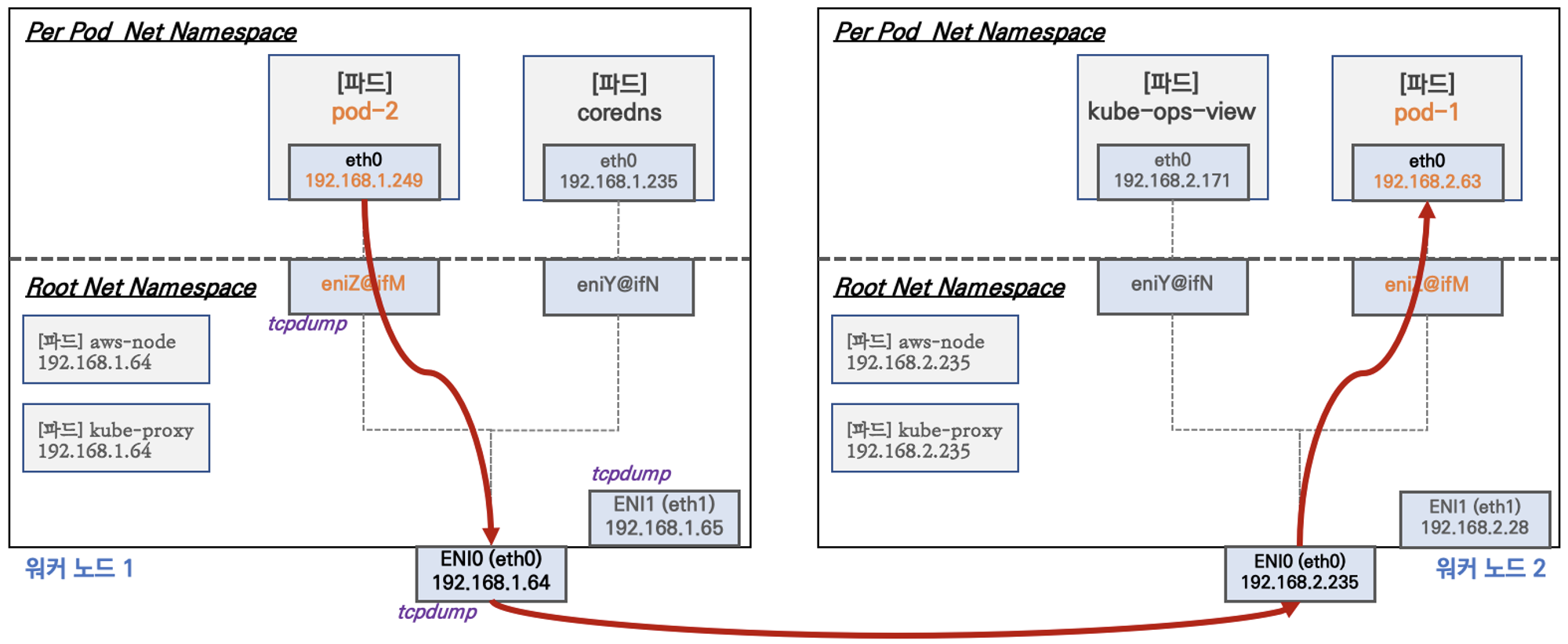
파드 간 통신 확인
# 테스트용 파드 netshoot-pod 생성
cat <<EOF | kubectl create -f -
apiVersion: apps/v1
kind: Deployment
metadata:
  name: netshoot-pod
spec:
  replicas: 3
  selector:
    matchLabels:
      app: netshoot-pod
  template:
    metadata:
      labels:
        app: netshoot-pod
    spec:
      containers:
      - name: netshoot-pod
        image: nicolaka/netshoot
        command: ["tail"]
        args: ["-f", "/dev/null"]
      terminationGracePeriodSeconds: 0
EOF

# 파드 IP 변수 지정
PODIP1=$(kubectl get pod -l app=netshoot-pod -o jsonpath={.items[0].status.podIP})
PODIP2=$(kubectl get pod -l app=netshoot-pod -o jsonpath={.items[1].status.podIP})
PODIP3=$(kubectl get pod -l app=netshoot-pod -o jsonpath={.items[2].status.podIP})

# 파드1 Shell 에서 파드2로 ping 테스트
kubectl exec -it $PODNAME1 -- ping -c 2 $PODIP2

PING 192.168.3.164 (192.168.3.164) 56(84) bytes of data.
64 bytes from 192.168.3.164: icmp_seq=1 ttl=125 time=1.86 ms
64 bytes from 192.168.3.164: icmp_seq=2 ttl=125 time=1.36 ms

--- 192.168.3.164 ping statistics ---
2 packets transmitted, 2 received, 0% packet loss, time 1002ms
rtt min/avg/max/mdev = 1.364/1.613/1.862/0.249 ms

# 파드2 Shell 에서 파드3로 ping 테스트
kubectl exec -it $PODNAME2 -- ping -c 2 $PODIP3

PING 192.168.1.103 (192.168.1.103) 56(84) bytes of data.
64 bytes from 192.168.1.103: icmp_seq=1 ttl=125 time=1.70 ms
64 bytes from 192.168.1.103: icmp_seq=2 ttl=125 time=1.07 ms

--- 192.168.1.103 ping statistics ---
2 packets transmitted, 2 received, 0% packet loss, time 1002ms
rtt min/avg/max/mdev = 1.072/1.383/1.695/0.311 ms


# 파드3 Shell 에서 파드1로 ping 테스트
kubectl exec -it $PODNAME3 -- ping -c 2 $PODIP1

PING 192.168.2.141 (192.168.2.141) 56(84) bytes of data.
64 bytes from 192.168.2.141: icmp_seq=1 ttl=125 time=1.47 ms

64 bytes from 192.168.2.141: icmp_seq=2 ttl=125 time=0.778 ms

--- 192.168.2.141 ping statistics ---
2 packets transmitted, 2 received, 0% packet loss, time 1002ms
rtt min/avg/max/mdev = 0.778/1.122/1.466/0.344 ms
2. 파드에서 외부 통신
파드에서 외부와 통신할 때는 iptable의 SNAT(External source network address translation)을 통해, 노드의 eth0 IP 변경되어 통신한다.
(VPC CNI의 SNAT 설정에 따라 외부 통신 시 SNAT 없이 통신도 가능하다.)
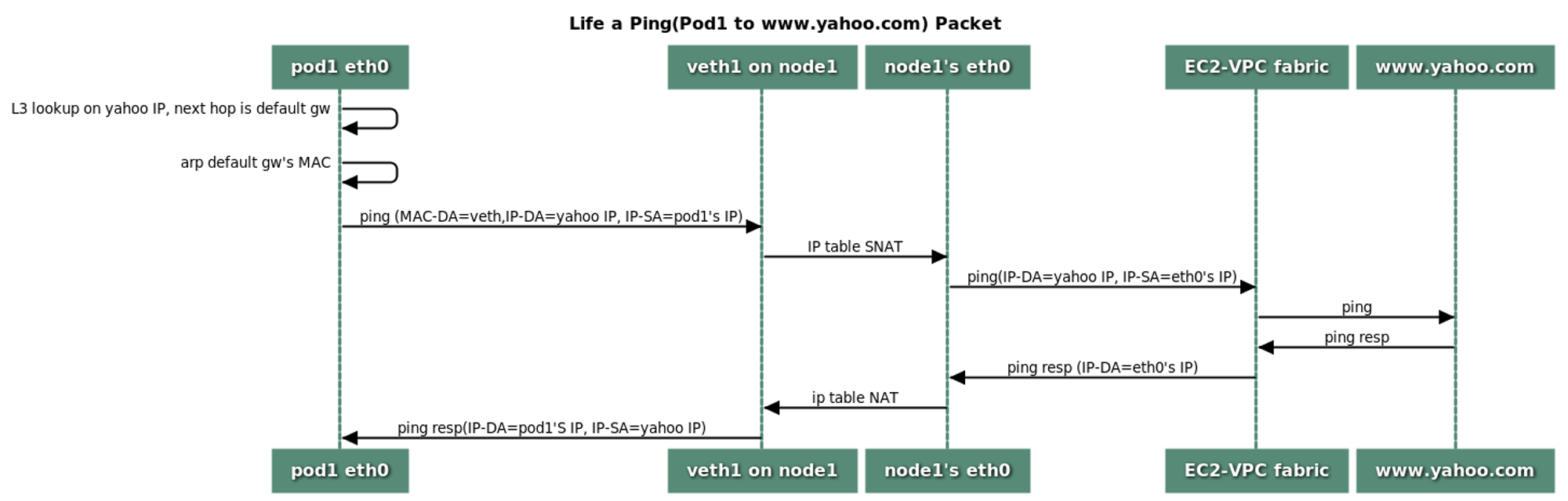
파드에서 외부 통신 확인
# 작업용 EC2 : pod-1 Shell 에서 외부로 ping
kubectl exec -it $PODNAME1 -- ping -c 1 www.google.com

www.google.comPING www.google.com (172.217.25.164) 56(84) bytes of data.
64 bytes from sin01s16-in-f4.1e100.net (172.217.25.164): icmp_seq=1 ttl=104 time=17.5 ms

--- www.google.com ping statistics ---
1 packets transmitted, 1 received, 0% packet loss, time 0ms
rtt min/avg/max/mdev = 17.475/17.475/17.475/0.000 ms

# 워커 노드 EC2 : TCPDUMP 확인
sudo tcpdump -i any -nn icmp -v

tcpdump: listening on any, link-type LINUX_SLL (Linux cooked), capture size 262144 bytes
11:28:19.088196 IP (tos 0x0, ttl 127, id 33262, offset 0, flags [DF], proto ICMP (1), length 84)
    192.168.2.141 > 172.217.25.164: ICMP echo request, id 62, seq 1, length 64
11:28:19.088217 IP (tos 0x0, ttl 126, id 33262, offset 0, flags [DF], proto ICMP (1), length 84)
    192.168.2.139 > 172.217.25.164: ICMP echo request, id 34765, seq 1, length 64
11:28:19.105670 IP (tos 0x0, ttl 105, id 0, offset 0, flags [none], proto ICMP (1), length 84)
    172.217.25.164 > 192.168.2.139: ICMP echo reply, id 34765, seq 1, length 64
11:28:19.105704 IP (tos 0x0, ttl 104, id 0, offset 0, flags [none], proto ICMP (1), length 84)
    172.217.25.164 > 192.168.2.141: ICMP echo reply, id 62, seq 1, length 64

sudo tcpdump -i eth0 -nn icmp -v

listening on eth0, link-type EN10MB (Ethernet), capture size 262144 bytes
11:29:03.725519 IP 192.168.2.139 > 172.217.25.164: ICMP echo request, id 49787, seq 1, length 64
11:29:03.742927 IP 172.217.25.164 > 192.168.2.139: ICMP echo reply, id 49787, seq 1, length 64


# 워커 노드 EC2 : 퍼블릭IP 확인
for i in $N1 $N2 $N3; do echo ">> node $i <<"; ssh ec2-user@$i curl -s ipinfo.io/ip; echo; echo; done

# 작업용 EC2 : pod-1 Shell 에서 외부 접속 확인
# 공인IP는 어떤 주소인가? --> 워커 노드 ENI의 Public IP
## The right way to check the weather - 링크
for i in $PODNAME1 $PODNAME2 $PODNAME3; do echo ">> Pod : $i <<"; kubectl exec -it $i -- curl -s ipinfo.io/ip; echo; echo; done
kubectl exec -it $PODNAME1 -- curl -s wttr.in/seoul
kubectl exec -it $PODNAME1 -- curl -s wttr.in/seoul?format=3
kubectl exec -it $PODNAME1 -- curl -s wttr.in/Moon
kubectl exec -it $PODNAME1 -- curl -s wttr.in/:help

# 워커 노드 EC2
## 출력된 결과를 보고 어떻게 빠져나가는지 고민해보자!
ip rule

0:	from all lookup local
512:	from all to 192.168.2.88 lookup main
512:	from all to 192.168.2.141 lookup main
1024:	from all fwmark 0x80/0x80 lookup main
32766:	from all lookup main
32767:	from all lookup default

ip route show table main

default via 192.168.2.1 dev eth0
169.254.169.254 dev eth0
192.168.2.0/24 dev eth0 proto kernel scope link src 192.168.2.139
192.168.2.88 dev eni6098bb25eb2 scope link
192.168.2.141 dev enifebf88f7ecb scope link


sudo iptables -L -n -v -t nat

Chain PREROUTING (policy ACCEPT 53 packets, 3958 bytes)
 pkts bytes target     prot opt in     out     source               destination
  107  8416 KUBE-SERVICES  all  --  *      *       0.0.0.0/0            0.0.0.0/0            /* kubernetes service portals */
   31  2447 AWS-CONNMARK-CHAIN-0  all  --  eni+   *       0.0.0.0/0            0.0.0.0/0            /* AWS, outbound connections */
   58  4568 CONNMARK   all  --  *      *       0.0.0.0/0            0.0.0.0/0            /* AWS, CONNMARK */ CONNMARK restore mask 0x80

Chain INPUT (policy ACCEPT 15 packets, 900 bytes)
 pkts bytes target     prot opt in     out     source               destination

Chain OUTPUT (policy ACCEPT 1627 packets, 108K bytes)
 pkts bytes target     prot opt in     out     source               destination
 1856  125K KUBE-SERVICES  all  --  *      *       0.0.0.0/0            0.0.0.0/0            /* kubernetes service portals */

Chain POSTROUTING (policy ACCEPT 933 packets, 64952 bytes)
 pkts bytes target     prot opt in     out     source               destination
 1943  131K KUBE-POSTROUTING  all  --  *      *       0.0.0.0/0            0.0.0.0/0            /* kubernetes postrouting rules */
 1910  129K AWS-SNAT-CHAIN-0  all  --  *      *       0.0.0.0/0            0.0.0.0/0            /* AWS SNAT CHAIN */

Chain AWS-CONNMARK-CHAIN-0 (1 references)
 pkts bytes target     prot opt in     out     source               destination
   18  1499 RETURN     all  --  *      *       0.0.0.0/0            192.168.0.0/16       /* AWS CONNMARK CHAIN, VPC CIDR */
   13   948 CONNMARK   all  --  *      *       0.0.0.0/0            0.0.0.0/0            /* AWS, CONNMARK */ CONNMARK or 0x80

Chain AWS-SNAT-CHAIN-0 (1 references)
 pkts bytes target     prot opt in     out     source               destination
  651 50305 RETURN     all  --  *      *       0.0.0.0/0            192.168.0.0/16       /* AWS SNAT CHAIN */
  900 57216 SNAT       all  --  *      !vlan+  0.0.0.0/0            0.0.0.0/0            /* AWS, SNAT */ ADDRTYPE match dst-type !LOCAL to:192.168.2.139 random-fully

Chain KUBE-KUBELET-CANARY (0 references)
 pkts bytes target     prot opt in     out     source               destination

Chain KUBE-MARK-MASQ (8 references)
 pkts bytes target     prot opt in     out     source               destination
    0     0 MARK       all  --  *      *       0.0.0.0/0            0.0.0.0/0            MARK or 0x4000

Chain KUBE-NODEPORTS (1 references)
 pkts bytes target     prot opt in     out     source               destination

Chain KUBE-POSTROUTING (1 references)
 pkts bytes target     prot opt in     out     source               destination
 1713  115K RETURN     all  --  *      *       0.0.0.0/0            0.0.0.0/0            mark match ! 0x4000/0x4000
    0     0 MARK       all  --  *      *       0.0.0.0/0            0.0.0.0/0            MARK xor 0x4000
    0     0 MASQUERADE  all  --  *      *       0.0.0.0/0            0.0.0.0/0            /* kubernetes service traffic requiring SNAT */ random-fully

Chain KUBE-PROXY-CANARY (0 references)
 pkts bytes target     prot opt in     out     source               destination

Chain KUBE-SEP-37S63LQHMBB2WM2G (1 references)
 pkts bytes target     prot opt in     out     source               destination
    0     0 KUBE-MARK-MASQ  all  --  *      *       192.168.1.143        0.0.0.0/0            /* default/kubernetes:https */
    1    60 DNAT       tcp  --  *      *       0.0.0.0/0            0.0.0.0/0            /* default/kubernetes:https */ tcp to:192.168.1.143:443

Chain KUBE-SEP-DRO3PWWN4CNK7UZL (1 references)
 pkts bytes target     prot opt in     out     source               destination
    0     0 KUBE-MARK-MASQ  all  --  *      *       192.168.3.127        0.0.0.0/0            /* kube-system/kube-dns:dns-tcp */
    0     0 DNAT       tcp  --  *      *       0.0.0.0/0            0.0.0.0/0            /* kube-system/kube-dns:dns-tcp */ tcp to:192.168.3.127:53

Chain KUBE-SEP-UNP57TGZXCY4XOTU (1 references)
 pkts bytes target     prot opt in     out     source               destination
    0     0 KUBE-MARK-MASQ  all  --  *      *       192.168.3.127        0.0.0.0/0            /* kube-system/kube-dns:metrics */
    0     0 DNAT       tcp  --  *      *       0.0.0.0/0            0.0.0.0/0            /* kube-system/kube-dns:metrics */ tcp to:192.168.3.127:9153

Chain KUBE-SEP-UUPNHWJMCSQAV2IT (1 references)
 pkts bytes target     prot opt in     out     source               destination
    0     0 KUBE-MARK-MASQ  all  --  *      *       192.168.2.88         0.0.0.0/0            /* kube-system/kube-dns:metrics */
    0     0 DNAT       tcp  --  *      *       0.0.0.0/0            0.0.0.0/0            /* kube-system/kube-dns:metrics */ tcp to:192.168.2.88:9153

Chain KUBE-SEP-X3GHW5KT2T3XPT4P (1 references)
 pkts bytes target     prot opt in     out     source               destination
    0     0 KUBE-MARK-MASQ  all  --  *      *       192.168.2.88         0.0.0.0/0            /* kube-system/kube-dns:dns-tcp */
    0     0 DNAT       tcp  --  *      *       0.0.0.0/0            0.0.0.0/0            /* kube-system/kube-dns:dns-tcp */ tcp to:192.168.2.88:53

Chain KUBE-SEP-Y5P6QEQKG5AB6VCO (1 references)
 pkts bytes target     prot opt in     out     source               destination
    0     0 KUBE-MARK-MASQ  all  --  *      *       192.168.3.127        0.0.0.0/0            /* kube-system/kube-dns:dns */
   26  2014 DNAT       udp  --  *      *       0.0.0.0/0            0.0.0.0/0            /* kube-system/kube-dns:dns */ udp to:192.168.3.127:53

Chain KUBE-SEP-YAYJ3GSVQAXZT23W (1 references)
 pkts bytes target     prot opt in     out     source               destination
    0     0 KUBE-MARK-MASQ  all  --  *      *       192.168.2.205        0.0.0.0/0            /* default/kubernetes:https */
    0     0 DNAT       tcp  --  *      *       0.0.0.0/0            0.0.0.0/0            /* default/kubernetes:https */ tcp to:192.168.2.205:443

Chain KUBE-SEP-YD4GWOZP6T6SSLW4 (1 references)
 pkts bytes target     prot opt in     out     source               destination
    0     0 KUBE-MARK-MASQ  all  --  *      *       192.168.2.88         0.0.0.0/0            /* kube-system/kube-dns:dns */
   22  1774 DNAT       udp  --  *      *       0.0.0.0/0            0.0.0.0/0            /* kube-system/kube-dns:dns */ udp to:192.168.2.88:53

Chain KUBE-SERVICES (2 references)
 pkts bytes target     prot opt in     out     source               destination
   48  3788 KUBE-SVC-TCOU7JCQXEZGVUNU  udp  --  *      *       0.0.0.0/0            10.100.0.10          /* kube-system/kube-dns:dns cluster IP */ udp dpt:53
    0     0 KUBE-SVC-ERIFXISQEP7F7OF4  tcp  --  *      *       0.0.0.0/0            10.100.0.10          /* kube-system/kube-dns:dns-tcp cluster IP */ tcp dpt:53
    0     0 KUBE-SVC-JD5MR3NA4I4DYORP  tcp  --  *      *       0.0.0.0/0            10.100.0.10          /* kube-system/kube-dns:metrics cluster IP */ tcp dpt:9153
    0     0 KUBE-SVC-NPX46M4PTMTKRN6Y  tcp  --  *      *       0.0.0.0/0            10.100.0.1           /* default/kubernetes:https cluster IP */ tcp dpt:443
  350 21000 KUBE-NODEPORTS  all  --  *      *       0.0.0.0/0            0.0.0.0/0            /* kubernetes service nodeports; NOTE: this must be the last rule in this chain */ ADDRTYPE match dst-type LOCAL

Chain KUBE-SVC-ERIFXISQEP7F7OF4 (1 references)
 pkts bytes target     prot opt in     out     source               destination
    0     0 KUBE-SEP-X3GHW5KT2T3XPT4P  all  --  *      *       0.0.0.0/0            0.0.0.0/0            /* kube-system/kube-dns:dns-tcp -> 192.168.2.88:53 */ statistic mode random probability 0.50000000000
    0     0 KUBE-SEP-DRO3PWWN4CNK7UZL  all  --  *      *       0.0.0.0/0            0.0.0.0/0            /* kube-system/kube-dns:dns-tcp -> 192.168.3.127:53 */

Chain KUBE-SVC-JD5MR3NA4I4DYORP (1 references)
 pkts bytes target     prot opt in     out     source               destination
    0     0 KUBE-SEP-UUPNHWJMCSQAV2IT  all  --  *      *       0.0.0.0/0            0.0.0.0/0            /* kube-system/kube-dns:metrics -> 192.168.2.88:9153 */ statistic mode random probability 0.50000000000
    0     0 KUBE-SEP-UNP57TGZXCY4XOTU  all  --  *      *       0.0.0.0/0            0.0.0.0/0            /* kube-system/kube-dns:metrics -> 192.168.3.127:9153 */

Chain KUBE-SVC-NPX46M4PTMTKRN6Y (1 references)
 pkts bytes target     prot opt in     out     source               destination
    1    60 KUBE-SEP-37S63LQHMBB2WM2G  all  --  *      *       0.0.0.0/0            0.0.0.0/0            /* default/kubernetes:https -> 192.168.1.143:443 */ statistic mode random probability 0.50000000000
    0     0 KUBE-SEP-YAYJ3GSVQAXZT23W  all  --  *      *       0.0.0.0/0            0.0.0.0/0            /* default/kubernetes:https -> 192.168.2.205:443 */

Chain KUBE-SVC-TCOU7JCQXEZGVUNU (1 references)
 pkts bytes target     prot opt in     out     source               destination
   22  1774 KUBE-SEP-YD4GWOZP6T6SSLW4  all  --  *      *       0.0.0.0/0            0.0.0.0/0            /* kube-system/kube-dns:dns -> 192.168.2.88:53 */ statistic mode random probability 0.50000000000
   26  2014 KUBE-SEP-Y5P6QEQKG5AB6VCO  all  --  *      *       0.0.0.0/0            0.0.0.0/0            /* kube-system/kube-dns:dns -> 192.168.3.127:53 */
[ec2-user@ip-192-168-2-139 ~]$


sudo iptables -t nat -S

-P PREROUTING ACCEPT
-P INPUT ACCEPT
-P OUTPUT ACCEPT
-P POSTROUTING ACCEPT
-N AWS-CONNMARK-CHAIN-0
-N AWS-SNAT-CHAIN-0
-N KUBE-KUBELET-CANARY
-N KUBE-MARK-MASQ
-N KUBE-NODEPORTS
-N KUBE-POSTROUTING
-N KUBE-PROXY-CANARY
-N KUBE-SEP-37S63LQHMBB2WM2G
-N KUBE-SEP-DRO3PWWN4CNK7UZL
-N KUBE-SEP-UNP57TGZXCY4XOTU
-N KUBE-SEP-UUPNHWJMCSQAV2IT
-N KUBE-SEP-X3GHW5KT2T3XPT4P
-N KUBE-SEP-Y5P6QEQKG5AB6VCO
-N KUBE-SEP-YAYJ3GSVQAXZT23W
-N KUBE-SEP-YD4GWOZP6T6SSLW4
-N KUBE-SERVICES
-N KUBE-SVC-ERIFXISQEP7F7OF4
-N KUBE-SVC-JD5MR3NA4I4DYORP
-N KUBE-SVC-NPX46M4PTMTKRN6Y
-N KUBE-SVC-TCOU7JCQXEZGVUNU
-A PREROUTING -m comment --comment "kubernetes service portals" -j KUBE-SERVICES
-A PREROUTING -i eni+ -m comment --comment "AWS, outbound connections" -j AWS-CONNMARK-CHAIN-0
-A PREROUTING -m comment --comment "AWS, CONNMARK" -j CONNMARK --restore-mark --nfmask 0x80 --ctmask 0x80
-A OUTPUT -m comment --comment "kubernetes service portals" -j KUBE-SERVICES
-A POSTROUTING -m comment --comment "kubernetes postrouting rules" -j KUBE-POSTROUTING
-A POSTROUTING -m comment --comment "AWS SNAT CHAIN" -j AWS-SNAT-CHAIN-0
-A AWS-CONNMARK-CHAIN-0 -d 192.168.0.0/16 -m comment --comment "AWS CONNMARK CHAIN, VPC CIDR" -j RETURN
-A AWS-CONNMARK-CHAIN-0 -m comment --comment "AWS, CONNMARK" -j CONNMARK --set-xmark 0x80/0x80
-A AWS-SNAT-CHAIN-0 -d 192.168.0.0/16 -m comment --comment "AWS SNAT CHAIN" -j RETURN
-A AWS-SNAT-CHAIN-0 ! -o vlan+ -m comment --comment "AWS, SNAT" -m addrtype ! --dst-type LOCAL -j SNAT --to-source 192.168.2.139 --random-fully
-A KUBE-MARK-MASQ -j MARK --set-xmark 0x4000/0x4000
-A KUBE-POSTROUTING -m mark ! --mark 0x4000/0x4000 -j RETURN
-A KUBE-POSTROUTING -j MARK --set-xmark 0x4000/0x0
-A KUBE-POSTROUTING -m comment --comment "kubernetes service traffic requiring SNAT" -j MASQUERADE --random-fully
-A KUBE-SEP-37S63LQHMBB2WM2G -s 192.168.1.143/32 -m comment --comment "default/kubernetes:https" -j KUBE-MARK-MASQ
-A KUBE-SEP-37S63LQHMBB2WM2G -p tcp -m comment --comment "default/kubernetes:https" -m tcp -j DNAT --to-destination 192.168.1.143:443
-A KUBE-SEP-DRO3PWWN4CNK7UZL -s 192.168.3.127/32 -m comment --comment "kube-system/kube-dns:dns-tcp" -j KUBE-MARK-MASQ
-A KUBE-SEP-DRO3PWWN4CNK7UZL -p tcp -m comment --comment "kube-system/kube-dns:dns-tcp" -m tcp -j DNAT --to-destination 192.168.3.127:53
-A KUBE-SEP-UNP57TGZXCY4XOTU -s 192.168.3.127/32 -m comment --comment "kube-system/kube-dns:metrics" -j KUBE-MARK-MASQ
-A KUBE-SEP-UNP57TGZXCY4XOTU -p tcp -m comment --comment "kube-system/kube-dns:metrics" -m tcp -j DNAT --to-destination 192.168.3.127:9153
-A KUBE-SEP-UUPNHWJMCSQAV2IT -s 192.168.2.88/32 -m comment --comment "kube-system/kube-dns:metrics" -j KUBE-MARK-MASQ
-A KUBE-SEP-UUPNHWJMCSQAV2IT -p tcp -m comment --comment "kube-system/kube-dns:metrics" -m tcp -j DNAT --to-destination 192.168.2.88:9153
-A KUBE-SEP-X3GHW5KT2T3XPT4P -s 192.168.2.88/32 -m comment --comment "kube-system/kube-dns:dns-tcp" -j KUBE-MARK-MASQ
-A KUBE-SEP-X3GHW5KT2T3XPT4P -p tcp -m comment --comment "kube-system/kube-dns:dns-tcp" -m tcp -j DNAT --to-destination 192.168.2.88:53
-A KUBE-SEP-Y5P6QEQKG5AB6VCO -s 192.168.3.127/32 -m comment --comment "kube-system/kube-dns:dns" -j KUBE-MARK-MASQ
-A KUBE-SEP-Y5P6QEQKG5AB6VCO -p udp -m comment --comment "kube-system/kube-dns:dns" -m udp -j DNAT --to-destination 192.168.3.127:53
-A KUBE-SEP-YAYJ3GSVQAXZT23W -s 192.168.2.205/32 -m comment --comment "default/kubernetes:https" -j KUBE-MARK-MASQ
-A KUBE-SEP-YAYJ3GSVQAXZT23W -p tcp -m comment --comment "default/kubernetes:https" -m tcp -j DNAT --to-destination 192.168.2.205:443
-A KUBE-SEP-YD4GWOZP6T6SSLW4 -s 192.168.2.88/32 -m comment --comment "kube-system/kube-dns:dns" -j KUBE-MARK-MASQ
-A KUBE-SEP-YD4GWOZP6T6SSLW4 -p udp -m comment --comment "kube-system/kube-dns:dns" -m udp -j DNAT --to-destination 192.168.2.88:53
-A KUBE-SERVICES -d 10.100.0.10/32 -p udp -m comment --comment "kube-system/kube-dns:dns cluster IP" -m udp --dport 53 -j KUBE-SVC-TCOU7JCQXEZGVUNU
-A KUBE-SERVICES -d 10.100.0.10/32 -p tcp -m comment --comment "kube-system/kube-dns:dns-tcp cluster IP" -m tcp --dport 53 -j KUBE-SVC-ERIFXISQEP7F7OF4
-A KUBE-SERVICES -d 10.100.0.10/32 -p tcp -m comment --comment "kube-system/kube-dns:metrics cluster IP" -m tcp --dport 9153 -j KUBE-SVC-JD5MR3NA4I4DYORP
-A KUBE-SERVICES -d 10.100.0.1/32 -p tcp -m comment --comment "default/kubernetes:https cluster IP" -m tcp --dport 443 -j KUBE-SVC-NPX46M4PTMTKRN6Y
-A KUBE-SERVICES -m comment --comment "kubernetes service nodeports; NOTE: this must be the last rule in this chain" -m addrtype --dst-type LOCAL -j KUBE-NODEPORTS
-A KUBE-SVC-ERIFXISQEP7F7OF4 -m comment --comment "kube-system/kube-dns:dns-tcp -> 192.168.2.88:53" -m statistic --mode random --probability 0.50000000000 -j KUBE-SEP-X3GHW5KT2T3XPT4P
-A KUBE-SVC-ERIFXISQEP7F7OF4 -m comment --comment "kube-system/kube-dns:dns-tcp -> 192.168.3.127:53" -j KUBE-SEP-DRO3PWWN4CNK7UZL
-A KUBE-SVC-JD5MR3NA4I4DYORP -m comment --comment "kube-system/kube-dns:metrics -> 192.168.2.88:9153" -m statistic --mode random --probability 0.50000000000 -j KUBE-SEP-UUPNHWJMCSQAV2IT
-A KUBE-SVC-JD5MR3NA4I4DYORP -m comment --comment "kube-system/kube-dns:metrics -> 192.168.3.127:9153" -j KUBE-SEP-UNP57TGZXCY4XOTU
-A KUBE-SVC-NPX46M4PTMTKRN6Y -m comment --comment "default/kubernetes:https -> 192.168.1.143:443" -m statistic --mode random --probability 0.50000000000 -j KUBE-SEP-37S63LQHMBB2WM2G
-A KUBE-SVC-NPX46M4PTMTKRN6Y -m comment --comment "default/kubernetes:https -> 192.168.2.205:443" -j KUBE-SEP-YAYJ3GSVQAXZT23W
-A KUBE-SVC-TCOU7JCQXEZGVUNU -m comment --comment "kube-system/kube-dns:dns -> 192.168.2.88:53" -m statistic --mode random --probability 0.50000000000 -j KUBE-SEP-YD4GWOZP6T6SSLW4
-A KUBE-SVC-TCOU7JCQXEZGVUNU -m comment --comment "kube-system/kube-dns:dns -> 192.168.3.127:53" -j KUBE-SEP-Y5P6QEQKG5AB6VCO

# 파드가 외부와 통신시에는 아래 처럼 'AWS-SNAT-CHAIN-0' 룰(rule)에 의해서 SNAT 되어서 외부와 통신!
# 참고로 뒤 IP는 eth0(ENI 첫번째)의 IP 주소이다
# --random-fully 동작 - 링크1  링크2
sudo iptables -t nat -S | grep 'A AWS-SNAT-CHAIN'

-A AWS-SNAT-CHAIN-0 -d 192.168.0.0/16 -m comment --comment "AWS SNAT CHAIN" -j RETURN
-A AWS-SNAT-CHAIN-0 ! -o vlan+ -m comment --comment "AWS, SNAT" -m addrtype ! --dst-type LOCAL -j SNAT --to-source 192.168.2.139 --random-fully

## 아래 'mark 0x4000/0x4000' 매칭되지 않아서 RETURN 됨!
-A KUBE-POSTROUTING -m mark ! --mark 0x4000/0x4000 -j RETURN
-A KUBE-POSTROUTING -j MARK --set-xmark 0x4000/0x0
-A KUBE-POSTROUTING -m comment --comment "kubernetes service traffic requiring SNAT" -j MASQUERADE --random-fully
...

# 카운트 확인 시 AWS-SNAT-CHAIN-0에 매칭되어, 목적지가 192.168.0.0/16 아니고 외부 빠져나갈때 SNAT 192.168.2.139(EC2 노드1 IP) 변경되어 나간다!
sudo iptables -t filter --zero; sudo iptables -t nat --zero; sudo iptables -t mangle --zero; sudo iptables -t raw --zero
watch -d 'sudo iptables -v --numeric --table nat --list AWS-SNAT-CHAIN-0; echo ; sudo iptables -v --numeric --table nat --list KUBE-POSTROUTING; echo ; sudo iptables -v --numeric --table nat --list POSTROUTING'

Chain AWS-SNAT-CHAIN-0 (1 references)
 pkts bytes target     prot opt in     out     source               destination
   39  3015 RETURN     all  --  *      *       0.0.0.0/0            192.168.0.0/16	 /* AWS SNAT CHAIN */
   55  3444 SNAT       all  --  *      !vlan+  0.0.0.0/0            0.0.0.0/0            /* AWS, SNAT */ ADDRTYPE match dst-type !LOCAL to:192.168.2.139 random-fully

Chain KUBE-POSTROUTING (1 references)
 pkts bytes target     prot opt in     out     source               destination
  116  7779 RETURN     all  --  *      *       0.0.0.0/0            0.0.0.0/0            mark match ! 0x4000/0x4000
    0     0 MARK       all  --  *      *       0.0.0.0/0            0.0.0.0/0            MARK xor 0x4000
    0     0 MASQUERADE  all  --  *	*	0.0.0.0/0            0.0.0.0/0            /* kubernetes service traffic requiring SNAT */ random-fully

Chain POSTROUTING (policy ACCEPT 61 packets, 4335 bytes)
 pkts bytes target     prot opt in     out     source               destination
  116  7779 KUBE-POSTROUTING  all  --  *      *       0.0.0.0/0            0.0.0.0/0            /* kubernetes postrouting rules */
  116  7779 AWS-SNAT-CHAIN-0  all  --  *      *       0.0.0.0/0            0.0.0.0/0            /* AWS SNAT CHAIN */

# conntrack 확인
for i in $N1 $N2 $N3; do echo ">> node $i <<"; ssh ec2-user@$i sudo conntrack -L -n |grep -v '169.254.169'; echo; done

>> node 192.168.1.158 <<
conntrack v1.4.4 (conntrack-tools): 52 flow entries have been shown.
tcp      6 2 CLOSE src=192.168.1.158 dst=52.95.194.65 sport=43910 dport=443 src=52.95.194.65 dst=192.168.1.158 sport=443 dport=54972 [ASSURED] mark=128 use=1
tcp      6 431987 ESTABLISHED src=192.168.1.158 dst=15.165.135.7 sport=48264 dport=443 src=15.165.135.7 dst=192.168.1.158 sport=443 dport=43632 [ASSURED] mark=128 use=1
tcp      6 431992 ESTABLISHED src=192.168.1.158 dst=52.95.195.121 sport=39410 dport=443 src=52.95.195.121 dst=192.168.1.158 sport=443 dport=8358 [ASSURED] mark=128 use=1
tcp      6 106 TIME_WAIT src=192.168.1.158 dst=34.117.186.192 sport=42856 dport=80 src=34.117.186.192 dst=192.168.1.158 sport=80 dport=29650 [ASSURED] mark=128 use=1
tcp      6 431992 ESTABLISHED src=192.168.1.158 dst=52.95.194.65 sport=42876 dport=443 src=52.95.194.65 dst=192.168.1.158 sport=443 dport=26615 [ASSURED] mark=128 use=1

>> node 192.168.2.139 <<
conntrack v1.4.4 (conntrack-tools): 52 flow entries have been shown.
tcp      6 106 TIME_WAIT src=192.168.2.139 dst=34.117.186.192 sport=44530 dport=80 src=34.117.186.192 dst=192.168.2.139 sport=80 dport=64626 [ASSURED] mark=128 use=1
tcp      6 431996 ESTABLISHED src=192.168.2.139 dst=52.95.194.61 sport=47376 dport=443 src=52.95.194.61 dst=192.168.2.139 sport=443 dport=60311 [ASSURED] mark=128 use=1
tcp      6 6 CLOSE src=192.168.2.139 dst=52.95.194.61 sport=48460 dport=443 src=52.95.194.61 dst=192.168.2.139 sport=443 dport=17572 [ASSURED] mark=128 use=1
tcp      6 431992 ESTABLISHED src=192.168.2.139 dst=15.165.135.7 sport=59760 dport=443 src=15.165.135.7 dst=192.168.2.139 sport=443 dport=42823 [ASSURED] mark=128 use=1

>> node 192.168.3.215 <<

tcp      6 431995 ESTABLISHED src=192.168.3.215 dst=52.95.194.65 sport=46422 dport=443 src=52.95.194.65 dst=192.168.3.215 sport=443 dport=42266 [ASSURED] mark=128 use=1
conntrack v1.4.4 (conntrack-tools): 59 flow entries have been shown.
tcp      6 431996 ESTABLISHED src=192.168.3.215 dst=52.95.195.109 sport=44274 dport=443 src=52.95.195.109 dst=192.168.3.215 sport=443 dport=49640 [ASSURED] mark=128 use=1
tcp      6 431996 ESTABLISHED src=192.168.3.215 dst=13.125.144.229 sport=43990 dport=443 src=13.125.144.229 dst=192.168.3.215 sport=443 dport=49364 [ASSURED] mark=128 use=1
tcp      6 117 TIME_WAIT src=192.168.3.215 dst=34.117.186.192 sport=48408 dport=80 src=34.117.186.192 dst=192.168.3.215 sport=80 dport=13688 [ASSURED] mark=128 use=1
tcp      6 5 CLOSE src=192.168.3.215 dst=52.95.194.65 sport=51574 dport=443 src=52.95.194.65 dst=192.168.3.215 sport=443 dport=46096 [ASSURED] mark=128 use=1