Booting
Booting Process - Classical way
Bootstrapping
- CPU needs a first instruction
- Memory needs initial code/data
- I/O needs to know how to communicate
Firmware: Power on sequence
Firmware는 hw와 sw의 중간
- Installed with a computer in non volatile location (ROM)
- Initialize low level hardware
- Hands off control to operating system loader
After power-on
Three-steps
- Firmware → Bootloader → OS kernel
- xv6: BIOS → bootblock → kernel
- Linux: BIOS/UEFI → GRUB → vmlinuz
BIOS
Real mode environment
- 16-bit real-mode interface → address space is 64KB
x86
- real mode
- backward compatibility
- 16 bit 주소가 너무 짧아 20 bit 주소 공간 제공
- 최대 1MB의 메모리에 접근 가능
- multi-processing 불가
- 보호 기능 x - 모든 주소 공간에 직접 접근 가능
- protectd mode
- booting 후 os가 동작하면 protectd로 변경
- 32bit 주소 공간을 제공하여 훨씬 더 큰 메모리에 접근
- 가상 메모리 가능
- 보호 기능 o - 안정적
x86 Registers (32bit)
General purpose register
- CPU executes operation through registers
- EAX, EBX, ECX, EDX
Stack registers
- ESP: Points to the top of the stack
- Stack grows down, so ESP is the lowest address
- EBP: Points to the bottom of the current stack frame
Other register
- EIP: Points to the currently executing instruction
- EFLAGS: Bit vector of flags (e.g. carry(after addition), equals zero(after comparison)
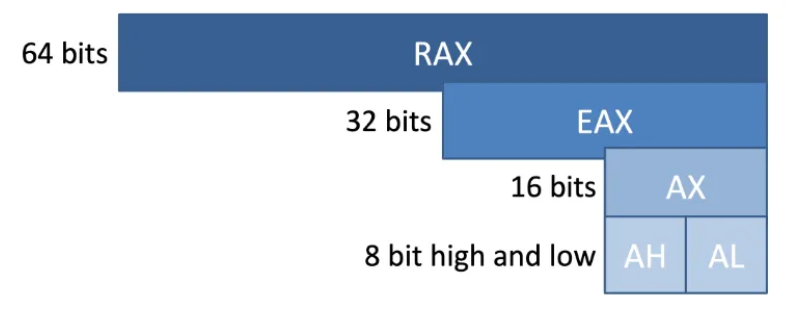
반 잘라서 쓸 수 있음 → backward compatibility
Assembly Examples
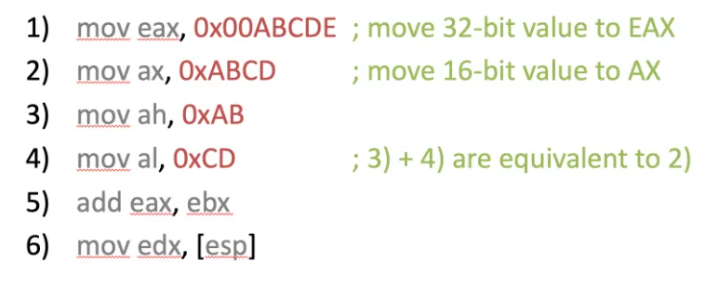
- eax ← eax + ebx
- edx ← ESP
- [esp] : measn deference, pointer
- 현재 stack 합의 값을 읽어서 edx에 놓아라
Memory Addressing
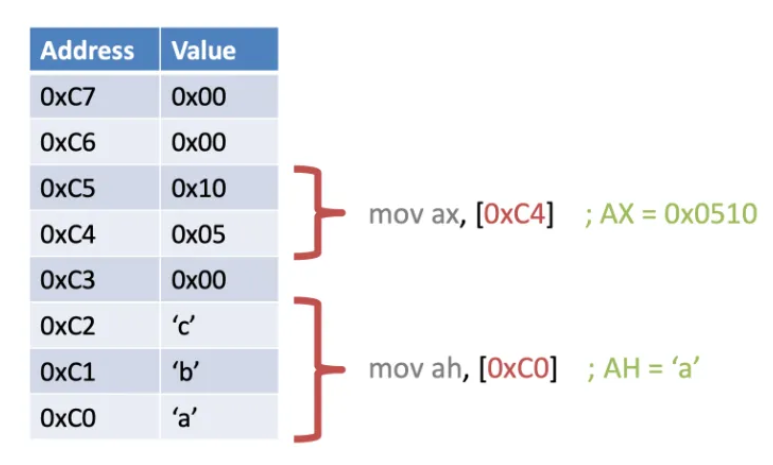
Memory can be addressed as
- Individual bytes - 가장 작은 주소 지정 단위 8bits, 1 byte
- Multi-byte words, double words, quad words, etc.
Byte ordering
- How to order bytes in memory
- Variable x has 4-byte 0x01234567
- 0x는 16진수 표기법, 각 숫자와 문자는 4bit를 나타내므로, 32비트로 해석됨
- Address &x is 0x100
Big Endian
- Least significant byte has highest address (comes last)
Little Endian
- Least significant byte has lowest address (comes first)
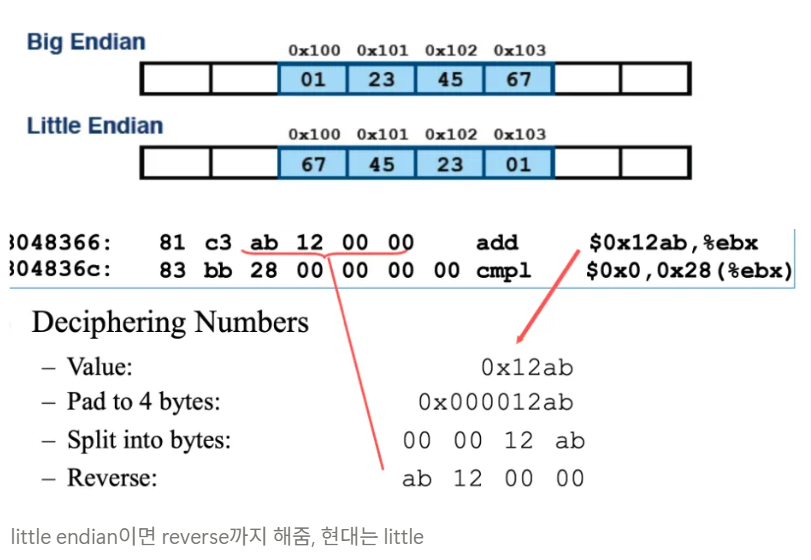
little endian이면 reverse까지 해줌, 현대는 little
Segmentation
16bit를 확장시키는 방법
- To represent more than 16-bit address, use segment
- If segment is 4-bit, then X address can be accessed
- e.g.) 0xfffffff0 = 0xffff0000 (base=segment) + 0x000fff0 (EIP)
- 최종 주소 = 기본 주소 + 오프셋
Segmentation in x86
- 16-bit micro-processor
- Has 20-bit physical addr
- Use extra 4 bits from a 16-bit segment register
- Address translation: PA = VA + seg×16
Using BIOS
BIOS ends by loading a boot loader
Default way is to load the first sector(512 bytes)
- From disk into the memory location at 0x7c00
BIOS then starts executing instructions at the address 0x7c00
- xv6에서는 7c00에서 시작하도록 set
Booting Sequence
- System startup
- Power-On Self Test(POST)
- Handover to bootloader
- Search bootable devices (0x55, 0xAA = magic number)
- Load the first sector (MBR, 512B) into 0x0000:0x7c00
- 0000 is segment and 7c00 is offset
- segment: 메모리의 특정 세그먼트의 시작 주소
- offset: 해당 세그먼트 내에서의 특정 위치
Booting Process - UEFI
EFI: Extensible Firmware Interface
Can be programmed in C/C++
UEFI: Unified EFI
Runtime calls must run in same mode as operating system
- A 64-bit OS requires 64-bit UEFI firmware
- A 32-bit OS requires 32-bit UEFI firmware
- 32-bit UEFI cannot run 64-bit OS
| UEFI | BIOS | |
|---|---|---|
| Drive size | 9 zettabytes | 2.2terabytes |
| Secure Boot | O | X |
| Running Mode | 32, 64 bit | 16 bit |

갓생호소인