- Hard dirives are relatively fast, persistent storage
Shortcomings
- How to cope with disk failure?
- Mechanical parts break over time
- Sector may become silently corrupted
- Capacity is limited
- Managing files across multiple physical devices is cumbersome
-> parallel
- Managing files across multiple physical devices is cumbersome
RAID
Redundant Array of Inexpensive(=Independent) Disks
- Use multiple disks to create the illusion of a large, faster, more reliable disk
- RAID looks like a single disk
- Internally, RAID is a complex computer system
- Disks managed by a dedicated CPU + software
- RAM and non-volatile memory
- Many different RAID levels
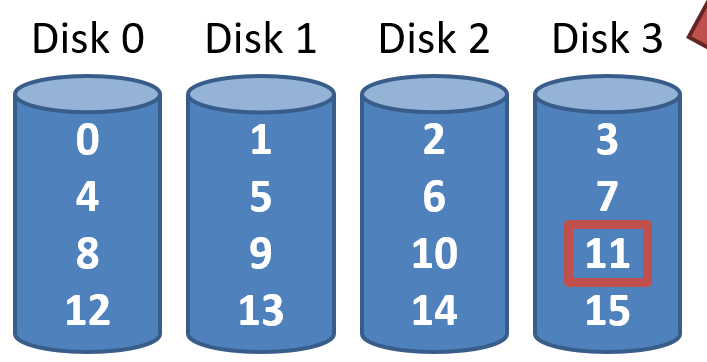
RAID 0: Stripping
present an array of disks as a single large disk
여러 드라이브로 분산되지만, 사용자는 마치 하나의 큰 디스크를 사용하는 것처럼 느낌
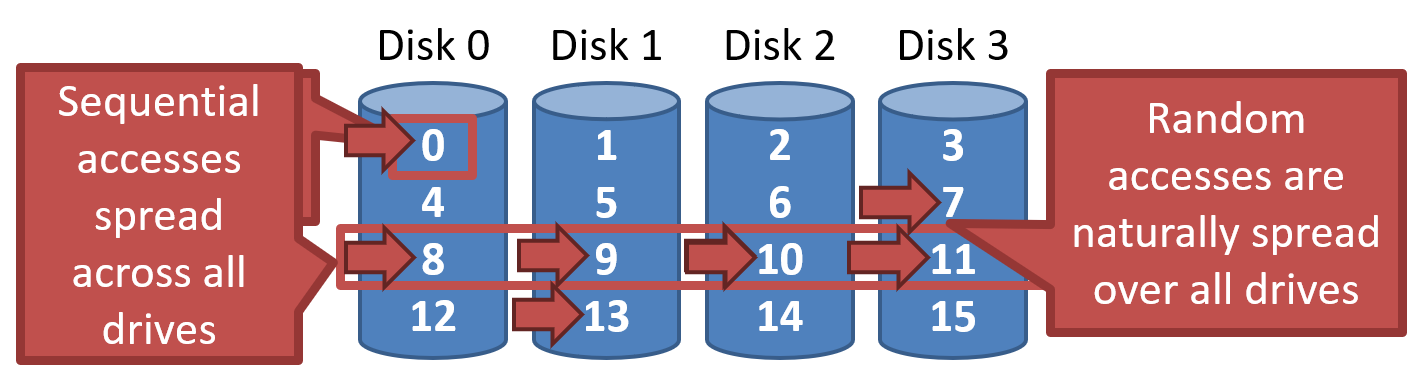
datablock -> 512 byte(sector)
- Sequential accesses spread accros all drives
- Random accesses are naturally spread over all drives
Addressing Blocks
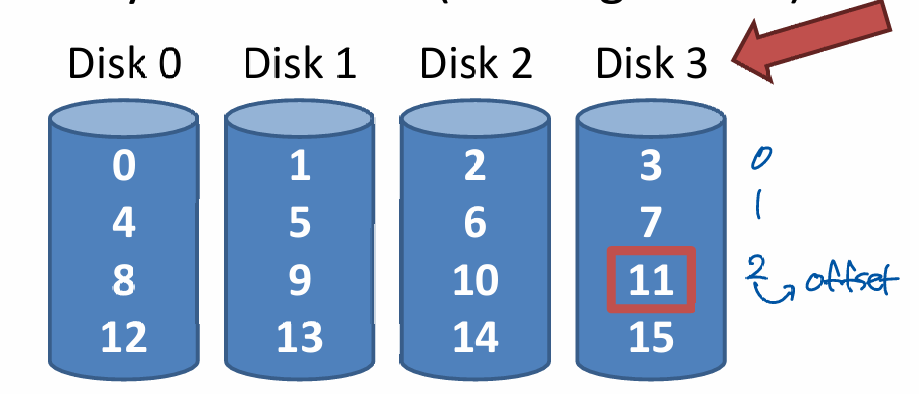
- Disk = logical block number % number of disks
- Offset = logical block number / number of disks
- E.g. read block 11
- 11 % 4 = Disk 3
- 11 / 4 = Physical Block 2(starting from 0)
Chuck sizing
- Chuck size impacts array performance
- Smaller chucks -> greater parallelism
- Big chunks -> reduced seek times
- Typical array use 64KB chucks
seektime 때문에 chuck size가 클 때가 병렬성이 감소하더라도 더 빠를 수 있음
Measuring RAID Performance
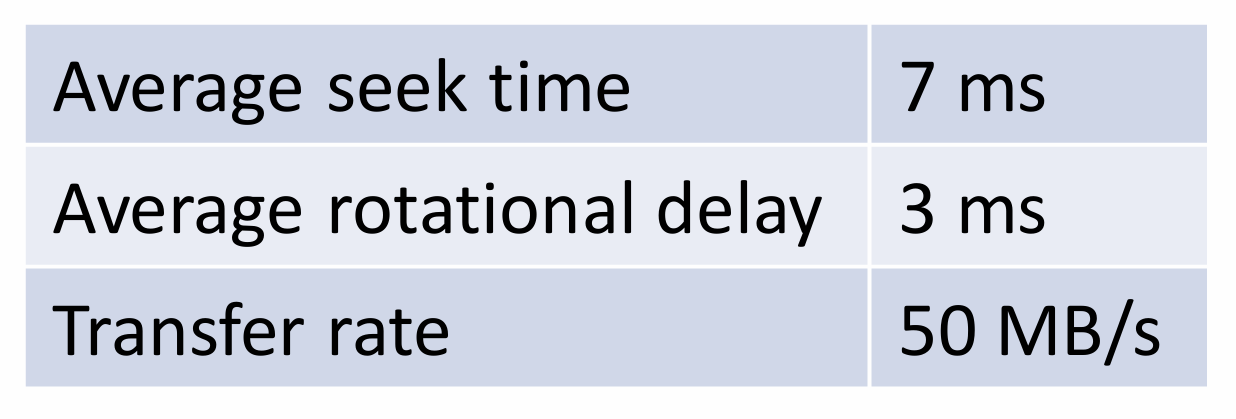
1. Sequential access time S
- 10MB transfer
- = transfer size / time to access

sequential은 처음에만 seektime 존재
2. Random access time R
- 10KB transfer
- = transfer size / time to access

- On each access, need seek time and rotational delay
Analsys of RAID 0
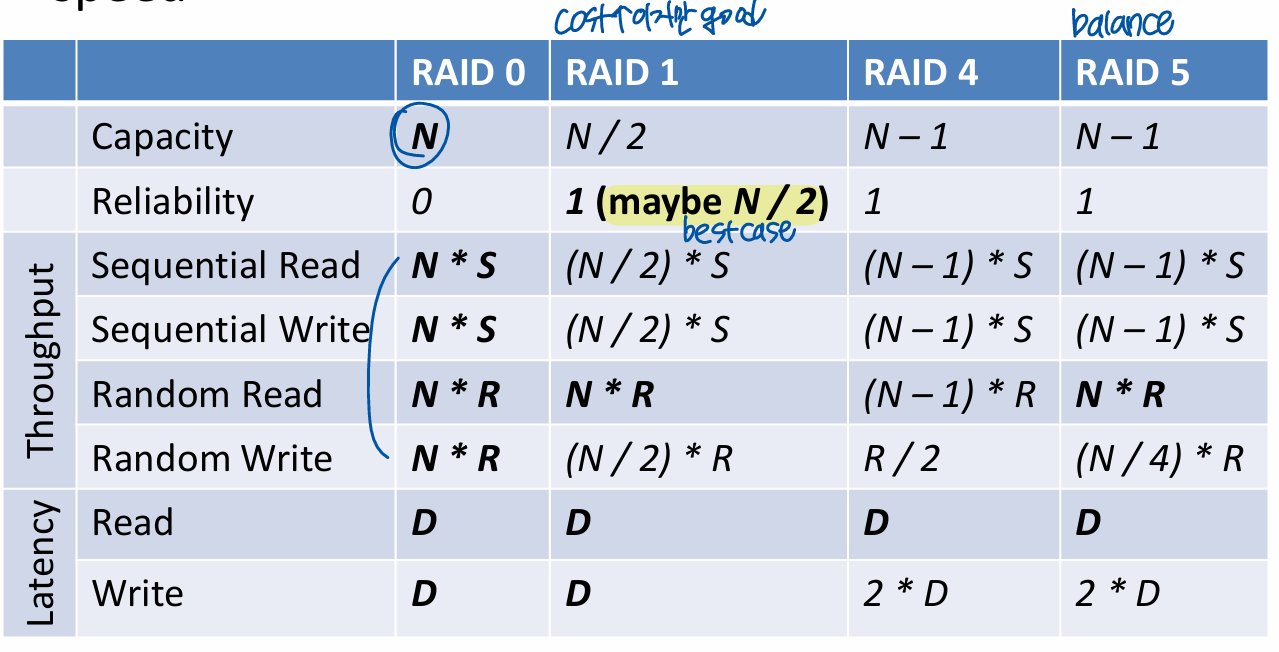
- Capacity : (Number of Disks)
- Reliability : 0
- Sequential read and write :
- Random read and write :
RAID 1: Mirroring
RAID 0 offers high performance, but zero error recovery
-> Make two copies of all data
RAID 0+1 and 1+0
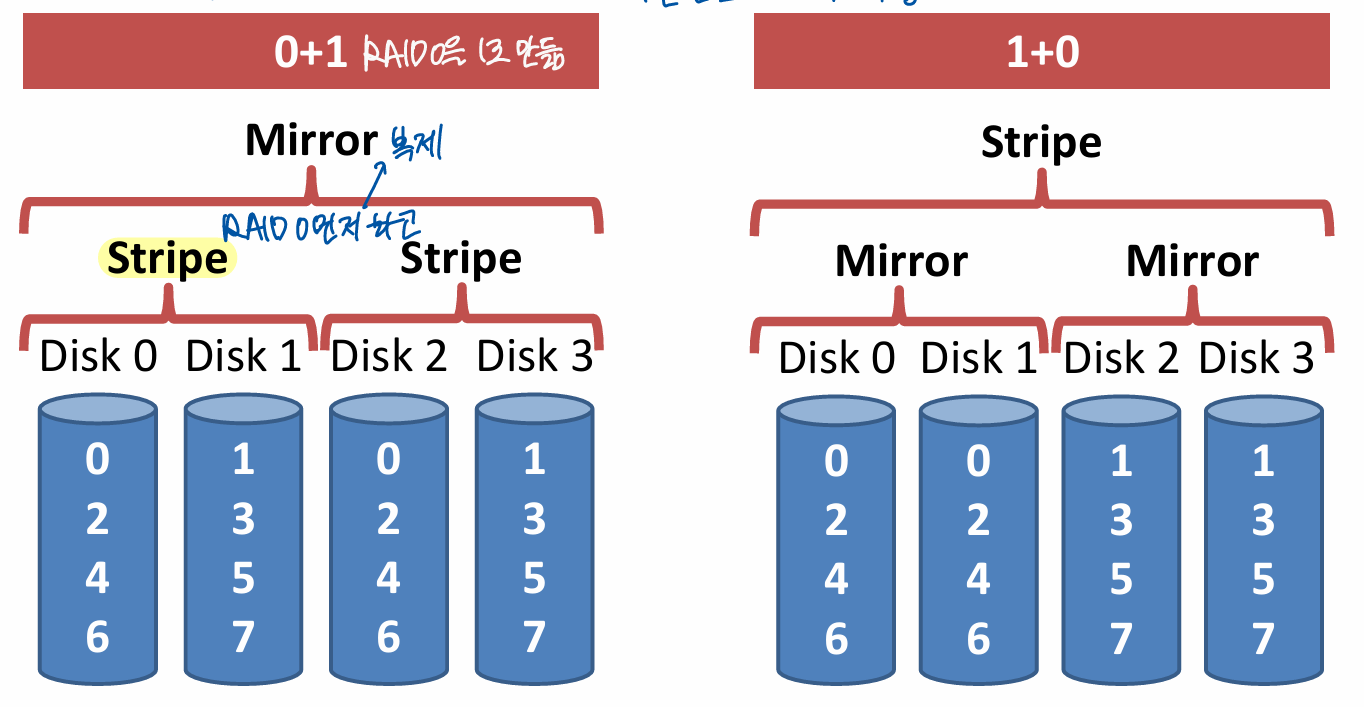
Analysis of RAID 1
- Capacity : - mirroring으로 half
- Reliability : 1 drive can fail
- Lucky -> drives can fail without data loss
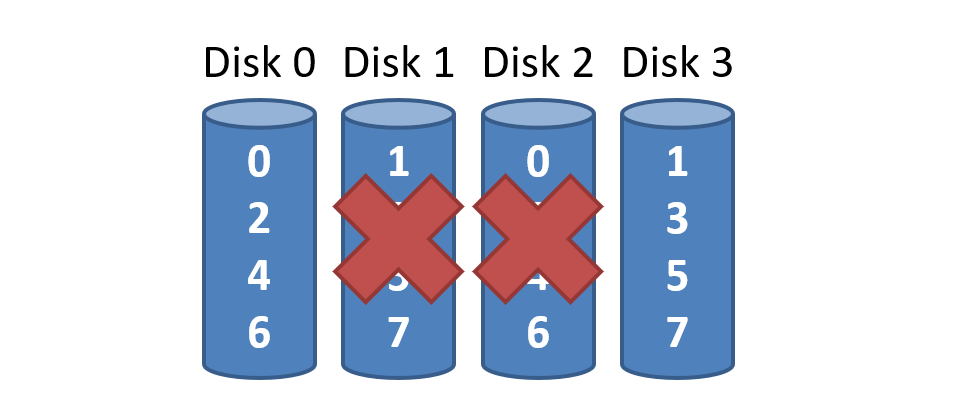
거의 RAID 0 성능의 절반이지만, Reliability good but expensive
- Sequential write :
- Two copies of all data, thus half throughput
- Sequential read :
- Random write :
- Two copies of all data, thus half throughput
-> 둘 다 써줘야 하니까 /2
- Two copies of all data, thus half throughput
- Random read:
- Best scenario for RAID 1
- Reads can parallelize across all disks
Consistent update problem
- Mirrored writes should be atomic
- All copies are written or none are written
- Difficult to guarantee (e.g. power failure)
- Many RAID controllers include a write-ahead log
- Battery backed, non-volatile storage
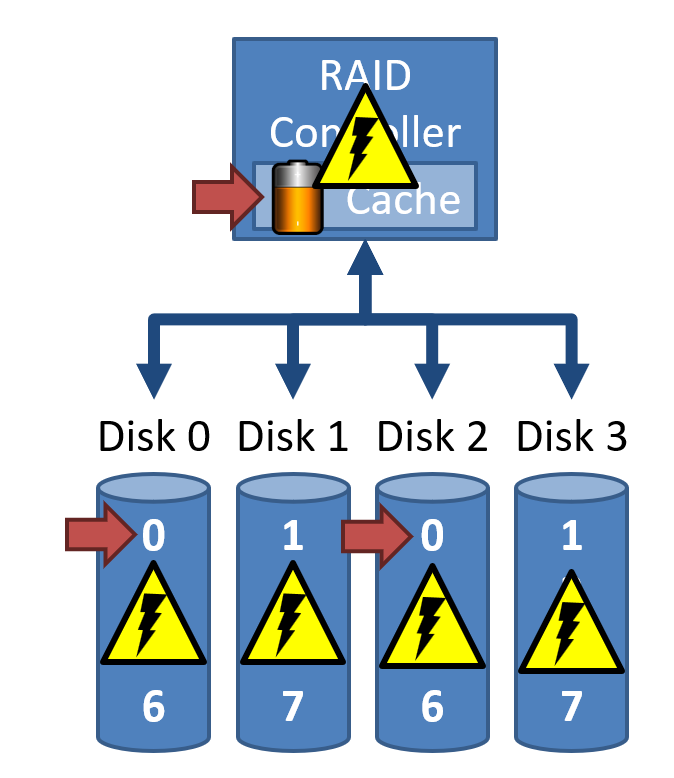
- Battery backed, non-volatile storage
disk0에 쓰다가 power 나가면 disk2와 다른 데이터가 됨 -> cache
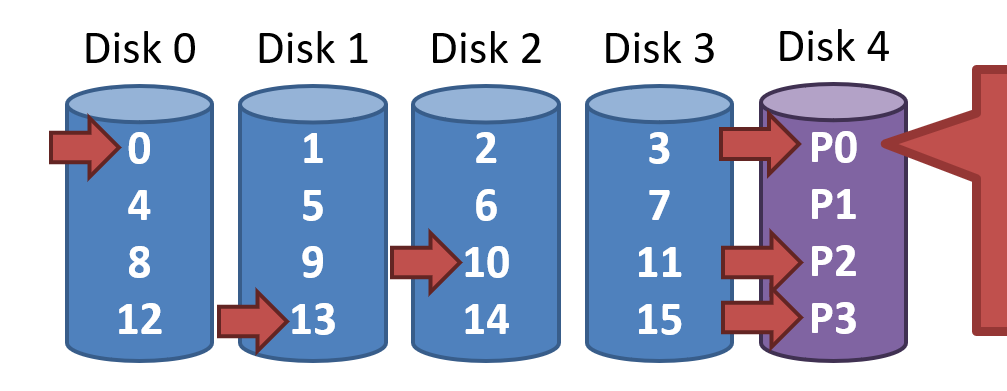
RAID 4: Parity Drive
Disk N only stores parity information for the other N-1 disks
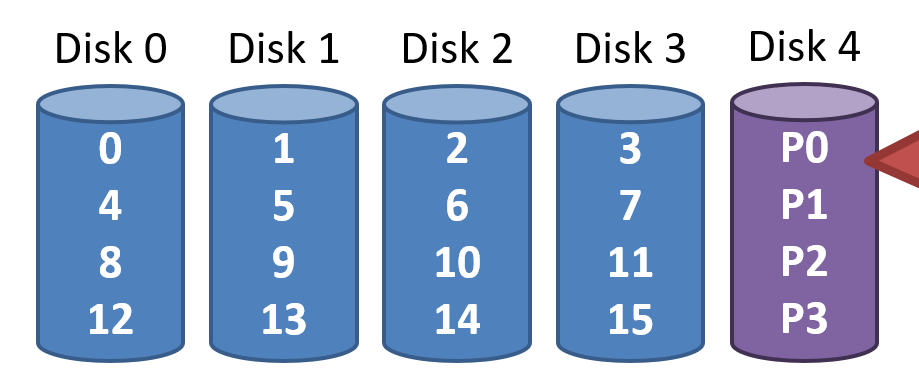
Updating Parity on Write
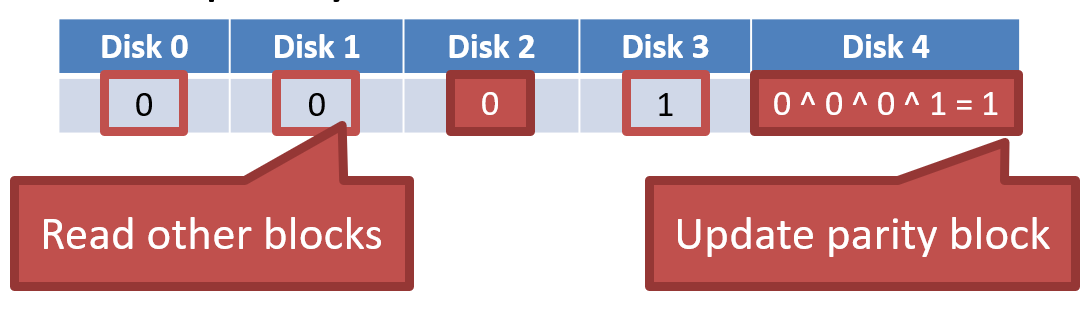
1. Additive parity
- Big overhead
- Write Disk 4를 원했으나, Read 3번(0, 1, 3), Write 2번(2,4)
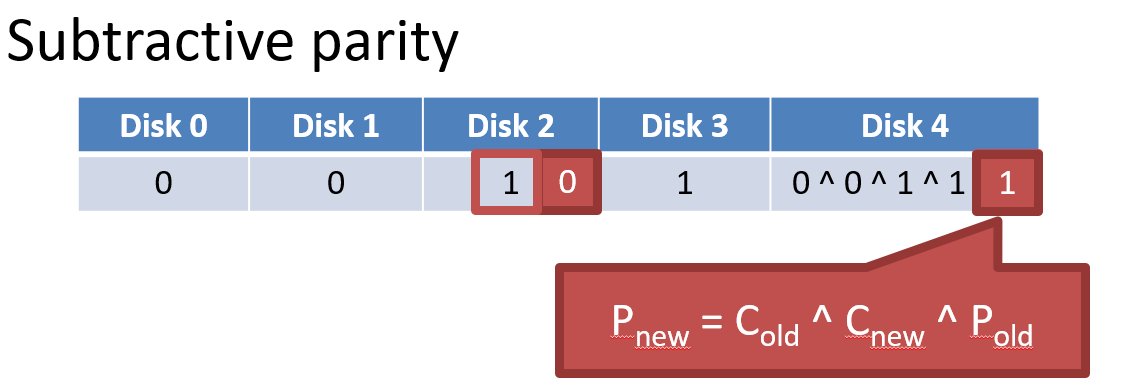
2. Subtract parity
- Write 2, 4
- Disk 2 : 1 -> 0
Analysis of RAID 4
- Capacity :
- Space on the parity drive is lost
- Reliability : 1 drive can fail
- Sequential Read and Write :
- Parallelization across all non-parity blocks
- stripe 단위이므로 한 parity bit만 update
- Random Read :
- Reads parallelize over all but the parity drive
- Random Write :
- Writes serialize due to the parity drive
- Each write requires 1 read and 1 write of the parity drive
- All writes must update the parity drive, causing serialization
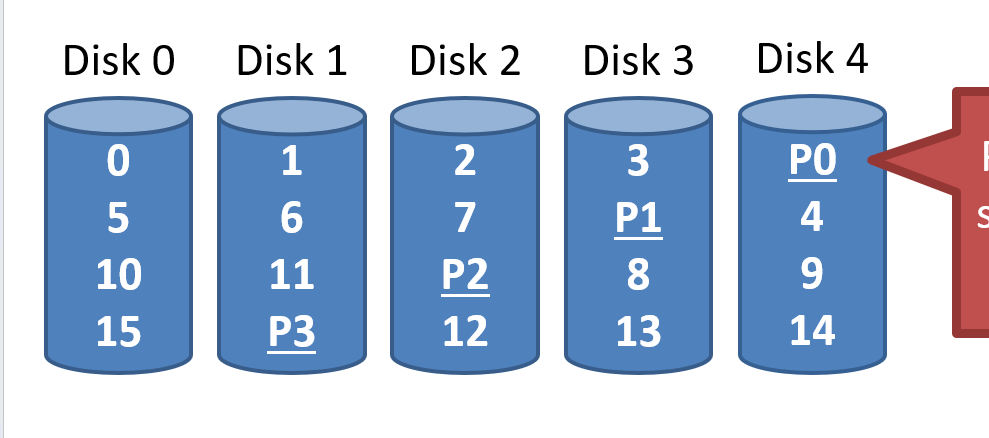
RAID 5: Rotating Parity
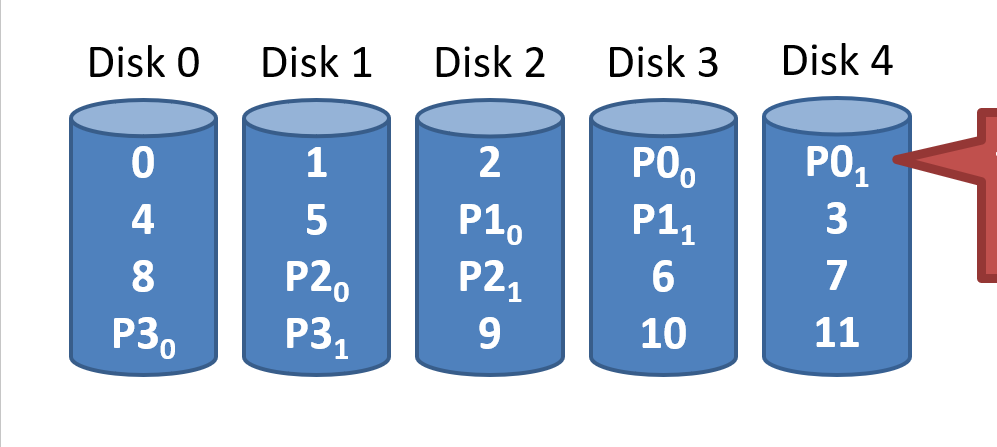
Parity blocks are spread over all N disks
Analysis of RAID 5
분산되어 있지만 한 군데로 모으면 same as RAID 4
- Capacity :
- Space on the parity drive is lost
- Reliability : 1 drive can fail
- Sequential Read and Write :
- Parallelization across all non-parity blocks
- Random Read :
- Reads parallelize over all drives
- Random Write :
- Unlike RAID 4, writes parallelize over all drives
- Each write requires 2 reads and 2 write, hence N / 4
RAID 6
Two parity blocks per stripe
- Any two drives can fail
- Capacity :
- No overhead on read, significant overhead on write
- Implemented using Reed-Solomon codes
Choosing a RAID Level
- Best performance
- RAID 0
- Greatest error recovery
- RAID 1 or RAID 6
- Balance
- RAID 5
Other Considerations
Many RAID systems include a hot spare
- Unused disk installed in the system -> 여분의 disk, 무중단 system
- If a drive fails, the array is immediately rebuilt using the hot spare
RAID can be implemented in HW or SW
- Hardware
- Faster and more reliable
- Migrating to a different hardware controller almost never works
- Software
- Simpler to migrate and cheaper
- Worse performance and weaker reliability
- Due to the consisten update problem -> 비휘발성 메모리를 쓰지 못해서

갓생호소인