OpenGL Mathematics (GLM)
기하학 관점에서 벡터와 행렬 계산을 주로 지원
GLSL 표준명세를 따라 C++ 템플릿으로 작성한 것이 GLM
- GLM 오픈소스
https://www.opengl.org/sdk/libs/GLM/ - GLM 문서
https://github.com/g-truc/glm
GLM 설치
https://github.com/g-truc/glm/releases
Hello GLM
- 기본 세팅
// C++ 컴파일러인지 확인
#ifndef __cplusplus
#error This file works only with C++
#endif

#include <iostream>
using namespace std;

// 현재의 표준 C++ 컴파일러 warning 메시지 무시
#pragma warning(disable: 4711 4710 4100 4514 4626 4774 4365 4625 4464 4571 4201 5026 5027 5039)

#define GLM_FORCE_SWIZZLE // Swizzling 계산 가능
#include <glm/glm.hpp>
#include <glm/gtx/string_cast.hpp> // for glm::to_string(), GLM의 자료형을 문자열로 바꿔 출력 가능
#include <glm/gtc/type_ptr.hpp> // for glm::make_mat4(), 자료형을 만들때 추가 함수 사용 가능- main 함수
벡터 테스트
int main(void) {
	// using namespace glm; 으로 "glm::" 생략 가능
	glm::vec4 a(1.0f, 2.0f, 3.0f, 1.0f);
	glm::vec4 b = glm::vec4(2.0f, 3.0f, 1.0f, 1.0f);
	glm::vec4 c = a + b;
	float d = glm::dot(a, b); // 벡터끼리 내적
	std::cout << glm::to_string(a) << " + " << std::endl; // to_string()으로 문자열 변환
	std::cout << glm::to_string(b) << " --> " << std::endl;
	std::cout << glm::to_string(c) << std::endl;
	std::cout << "a . b = " << d << std::endl;
}- 결과 출력
vec4(1.000000, 2.000000, 3.000000, 1.000000) +
vec4(2.000000, 3.000000, 1.000000, 1.000000) -->
vec4(3.000000, 5.000000, 4.000000, 2.000000)
a . b = 12
GLM 1.0.1 버전으로 설치하였는데 그대로 컴파일하면 아래와 같은 에러가 발생함
#error 지시문: "GLM: GLM_GTX_dual_quaternion is an experimental extension and may change in the future. Use #define GLM_ENABLE_EXPERIMENTAL before including it, if you really want to use it."
#error 지시문: "GLM: GLM_GTX_string_cast is an experimental extension and may change in the future. Use #define GLM_ENABLE_EXPERIMENTAL before including it, if you really want to use it."
#define GLM_ENABLE_EXPERIMENTAL
include 전처리 전에 위 줄을 추가해주면 해결
- main 함수 2
행렬 테스트
glm::vec4 pos = glm::vec4(1.0f, 2.0f, 3.0f, 1.0f);
std::cout << "pos = " << glm::to_string(pos) << std::endl;
const float mat_val[] = { // CAUTION: column major
	2.0f, 0.0f, 0.0f, 1.0f,
	0.0f, 3.0f, 0.0f, 2.0f,
	0.0f, 0.0f, 1.0f, 3.0f,
	0.0f, 0.0f, 0.0f, 1.0f,
};
glm::mat4 mat = glm::make_mat4(mat_val); // 4x4 행렬 생성
std::cout << "mat = " << glm::to_string(mat) << std::endl;
// 행렬과 벡터의 곱연산
std::cout << "mat * pos = " << glm::to_string(mat * pos) << std::endl;
std::cout << "pos * mat = " << glm::to_string(pos * mat) << std::endl;- 결과 출력
행렬은 실제로는 열 우선방식으로 저장되는 것에 주의
pos = vec4(1.000000, 2.000000, 3.000000, 1.000000)
mat = mat4x4(
	(2.000000, 0.000000, 0.000000, 1.000000),
	(0.000000, 3.000000, 0.000000, 2.000000),
	(0.000000, 0.000000, 1.000000, 3.000000),
	(0.000000, 0.000000, 0.000000, 1.000000)
)
mat * pos = vec4(2.000000, 6.000000, 3.000000, 15.000000)
pos * mat = vec4(3.000000, 8.000000, 6.000000, 1.000000)
GLM을 이용한 애니메이션
- 벡터 정의
// GLfloat 타입 대신 glm::vec4 타입 사용하여 원소를 4개씩 묶음
glm::vec4 vertPos[] = { // big-size triangle
	{ -0.5F, -0.5F, 0.0F, 1.0F, },
	{ +0.5F, -0.5F, 0.0F, 1.0F, },
	{ -0.5F, +0.5F, 0.0F, 1.0F, },
};

glm::vec4 vertColor[] = {
	{ 1.0F, 0.0F, 0.0F, 1.0F, }, // red
	{ 0.0F, 1.0F, 0.0F, 1.0F, }, // green
	{ 0.0F, 0.0F, 1.0F, 1.0F, }, // blue
};

const float step = 0.005F; // WARNING: arrange the value for your own system !

glm::vec4 moveOrg = glm::vec4( 0.0F, 0.0F, 0.0F, 0.0F ); // movement vector, original position
glm::vec4 moveCur = moveOrg; // movement vector, current time

void updateFunc(void) { // triangle moves from left to right
	// 배열이었던 moveCur[0] 대신 moveCur.x로 표현
	moveCur.x += step; // uMove.x is increased
	if (moveCur.x > 1.8F) { // out of screen: -0.5 + 1.8 = 1.3
		moveCur = moveOrg; // memcpy() 대신 직접 대입
	}
}- drawFunc()
glm::value_ptr()을 사용하여 넘겨줄 vec4의 주소를 넘겨줌
void drawFunc(void) {
	...
	glVertexAttribPointer(locPos, 4, GL_FLOAT, GL_FALSE, 0, glm::value_ptr(vertPos[0]));
    ...
	glVertexAttribPointer(locColor, 4, GL_FLOAT, GL_FALSE, 0, glm::value_ptr(vertColor[0]));
    ...
	glUniform4fv(locMove, 1, glm::value_ptr(moveCur));
    ...
}
삼각형 돌리기
원점을 기준으로 회전
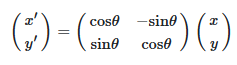
2차원 좌표 기준으로 원점을 기준으로 각도를 θ회전
반지름은 r
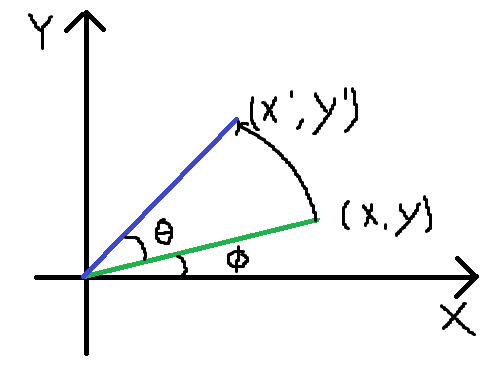
x = r cosΦ
y = r sinΦ
x' = r cos(Φ+θ) = (r cosΦ) cosθ - (r sinΦ) sinθ = x cosθ - y sinθ
y' = r sin(Φ+θ) = (r sinΦ) cosθ + (r cosΦ) sinθ = x sinθ - y cosθ
- 2차원 회전 행렬식
- Affine Transformation의 특징
2차원 회전은 어파인 변환에 속함- Line Preserving Property
변환 전에 선분이었던 건 변환 후에도 선분임을 보장
선분의 꼭짓점만 변환하여 꼭짓점을 다시 연결하면 선분 전체가 변환된 것과 동일한 효과
- Line Preserving Property
삼각형의 회전
2차원 회전은 어파인 변환이므로 모든 선분을 회전하지 않아도 됨
꼭짓점 3개만 회전하여 꼭짓점을 다시 연결하여 삼각형을 그림
glm::vec4 vertOrg[3] = { // triangle: original position
	{ -0.5F, -0.5F, 0.0F, 1.0F, },
	{ +0.5F, -0.5F, 0.0F, 1.0F, },
	{ -0.5F, +0.5F, 0.0F, 1.0F, },
};

glm::vec4 vertPos[3] = { // triangle: current position
	// will be calculated !
};

float theta = 0.0F;
const float theta_step = 0.01F; // radians. must be tuned for your system

// 매 프레임 삼각형을 조금씩 회전
void updateFunc(void) {
	theta += theta_step; // radian
	// 삼각형의 각 꼭짓점을 회전
	for (int i = 0; i < 3; i++) { // for each vertex,
		vertPos[i].x = vertOrg[i].x * cosf(theta) - vertOrg[i].y * sinf(theta);
		vertPos[i].y = vertOrg[i].x * sinf(theta) + vertOrg[i].y * cosf(theta);
		vertPos[i].z = vertOrg[i].z; // 2차원이므로 z, w 좌표는 유지
		vertPos[i].w = vertOrg[i].w;
	}
}
삼각형이 반시계 방향으로 회전
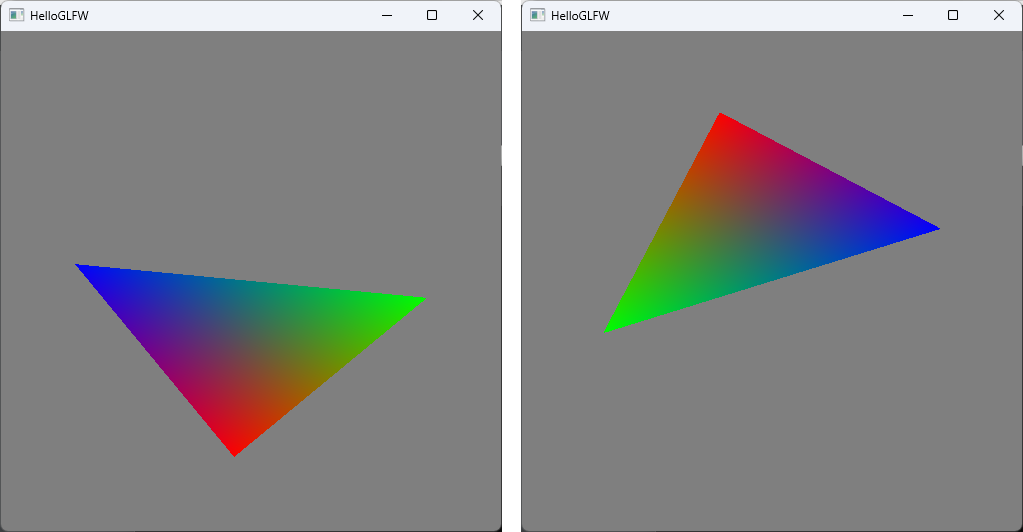
삼각형 돌리기 예제
입력으로 들어온 vertex 위치를 새로운 vertex 위치로 변환하는 건 vertex shader에서 해야할 작업
- vertex shader 프로그램 코드
#version 330 core

in vec4 aPos;
in vec4 aColor;
out vec4 vColor;
uniform float uTheta; // rotation angle: uniform

void main(void) {
	// vertex를 uTheta만큼 회전
	gl_Position.x = aPos.x * cos(uTheta) - aPos.y * sin(uTheta);
	gl_Position.y = aPos.x * sin(uTheta) + aPos.y * cos(uTheta);
	gl_Position.zw = aPos.zw;
	vColor = aColor;
}- main 코드
glm::vec4 vertPos[3] = { // triangle
	{ -0.5F, -0.5F, 0.0F, 1.0F, },
	{ +0.5F, -0.5F, 0.0F, 1.0F, },
	{ -0.5F, +0.5F, 0.0F, 1.0F, },
};

glm::vec4 vertColor[] = {
	{ 1.0F, 0.0F, 0.0F, 1.0F, }, // red
	{ 0.0F, 1.0F, 0.0F, 1.0F, }, // green
	{ 0.0F, 0.0F, 1.0F, 1.0F, }, // blue
};

const float theta_step = 0.01F; // radians. must be tuned for your system
float theta = 0.0F;

// vertex 위치는 vertex shader에서 계산
void updateFunc(void) {
	theta += theta_step; // radian
}

// 변경된 theat를 받을 수 있도록 세팅
void drawFunc(void) {
	...
	GLuint locTheta = glGetUniformLocation(prog, "uTheta");
	glUniform1f(locTheta, theta);
	glDrawArrays(GL_TRIANGLES, 0, 3);
	...
}
언리얼 프로그래머