컴퓨터 애니메이션의 개념
- 애니메이션 루프
- Input: 유저의 마우스 및 키보드 콜백
- Update: 물리 시뮬레이션으로 위치 갱신
- Draw: 장면 출력
GLFW의 애니메이션 루프
while(!glfwWindowShouldClose(win)) {
	updateFunc();	// 2. Update
    drawFunc();		// 3. Draw
    // end of loop
    glfwSwapBuffers(win);
glfwPollEvents(); // 1. Input Processing-
Refresh Callback
window open/resized/exposed -
main 함수에서 callback 등록
glfwSetWindowRefreshCallback();
Refresh Callback 발생 시 화면을 그려야 함
애니메이션 프로그램
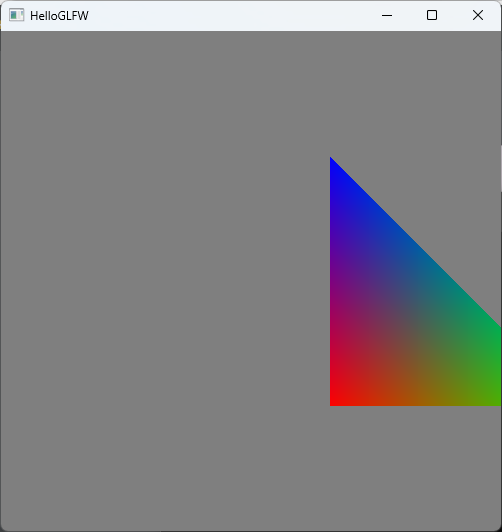
매 프레임 우측으로 조금씩 움직이는 삼각형을 그리는 프로그램
const float step = 0.005F;

GLfloat moveCur[] = { // movement vector, current time
	0.0F, 0.0F, 0.0F, 0.0F
};

void updateFunc(void) { // triangle moves from left to right
	moveCur[0] += step; // uMove.x is increased
}

void drawFunc(void) {
	...
	// draw the triangle
	GLuint locMove = glGetUniformLocation(prog, "uMove");
	glUniform4f(locMove, moveCur[0], moveCur[1], moveCur[2], moveCur[3]);
	glDrawArrays(GL_TRIANGLES, 0, 3);
    ...
}

int main(int argc, char* argv[]) {
	...
	// main loop
	initFunc();
	while (!glfwWindowShouldClose(window)) {
		// animation loop
		updateFunc(); // 삼각형 위치 갱신
		drawFunc();
		// GLFW actions
		glfwSwapBuffers(window);
		glfwPollEvents();
	}
    ...
}
시간이 지나며 삼각형이 이동한 모습
삼각형 위치 재설정
R키 입력 시 위치 초기화
const float step = 0.005F;

GLfloat moveOrg[] = { // movement vector, original position
	0.0F, 0.0F, 0.0F, 0.0F
};

GLfloat moveCur[] = { // movement vector, current time
	0.0F, 0.0F, 0.0F, 0.0F
};

// 화면을 벗어나면 원래 위치로 초기화
void updateFunc(void) { // triangle moves from left to right
	moveCur[0] += step; // uMove.x is increased
	if (moveCur[0] > 1.6F) { // out of screen case
		memcpy(moveCur, moveOrg, sizeof(moveOrg));
	}
}

// R키 입력 시 위치 초기화
void keyFunc(GLFWwindow* window, int key, int scancode, int action, int mods) {
	switch (key) {
	case GLFW_KEY_ESCAPE:
		if (action == GLFW_PRESS) {
			glfwSetWindowShouldClose(window, GL_TRUE);
		}
		break;
	case GLFW_KEY_R:
		if (action == GLFW_PRESS) {
			memcpy(moveCur, moveOrg, sizeof(moveOrg));
		}
		break;
	}
}

// Refresh Callback, Key Callback 함수 등록
int main(int argc, char* argv[]) {
	...
	// prepare
	glfwSetWindowRefreshCallback(window, refreshFunc);
	glfwSetKeyCallback(window, keyFunc);
    ...
}
더블 버퍼링
프레임버퍼의 기능
프레임버퍼는 2D 배열
디스플레이 프로세서에 의해 프레임버퍼를 모니터 픽셀로 표현
Partial Update Problem
프레임버퍼의 일부만 업데이트된 상태에서 디스플레이 프로세서에서 출력 시 문제 발생
일부는 새로운 장면, 일부는 이전 장면 출력
Double Buffering 하드웨어 구현
하드웨어로 구현하여 빠르게 처리
ping-pong buffering: 두 버퍼를 번갈아서 출력
디스플레이는 buffer0을 출력하고 OpenGL 프로그램에선 buffer1에 Draw
다음 프레임에서 디스플레이는 buffer1을 출력하고 OpenGL 프로그램에선 buffer0에 Draw
이 과정을 반복
끊임없는 애니메이션을 보여주는 장점
프레임버퍼 두 개가 필요하여 메모리가 두 배 증가하는 비용 문제
-
Triple Buffering
하나의 프론트버퍼, 두 개의 백버퍼 사용
하나의 버퍼는 화면을 지우는데에 사용
화면이 커지며 화면 전체를 배경색으로 지우는데 시간이 걸리게 됨 -
Quad Buffering
Stereoscopic
VR과 같이 양쪽 눈에 다른 영상을 보여줄 때 사용
각 눈에 프론트/백버퍼 사용
GLFW의 Double Buffering
GLFW는 더블버퍼링을 디폴트로 사용
- glfwSwapBuffers()
프론트버퍼와 백버퍼를 교체 - glfwWindowHint(GLFW_DOUBLEBUFFER, GLFW_FALSE)
더블버퍼를 꺼 싱글버퍼만 사용
(Window를 생성하기 전 설정해야함)
언리얼 프로그래머