소개
2025년 11월, Google DeepMind는 이미지 생성 기술의 새로운 지평을 여는 Nano Banana Pro(Gemini 3 Pro Image)를 공개했습니다. 불과 몇 달 전 출시된 Nano Banana(Gemini 2.5 Flash Image)의 뒤를 이어, 이번 모델은 Gemini 3 Pro의 강력한 추론 능력과 실세계 지식을 기반으로 구축되었습니다.
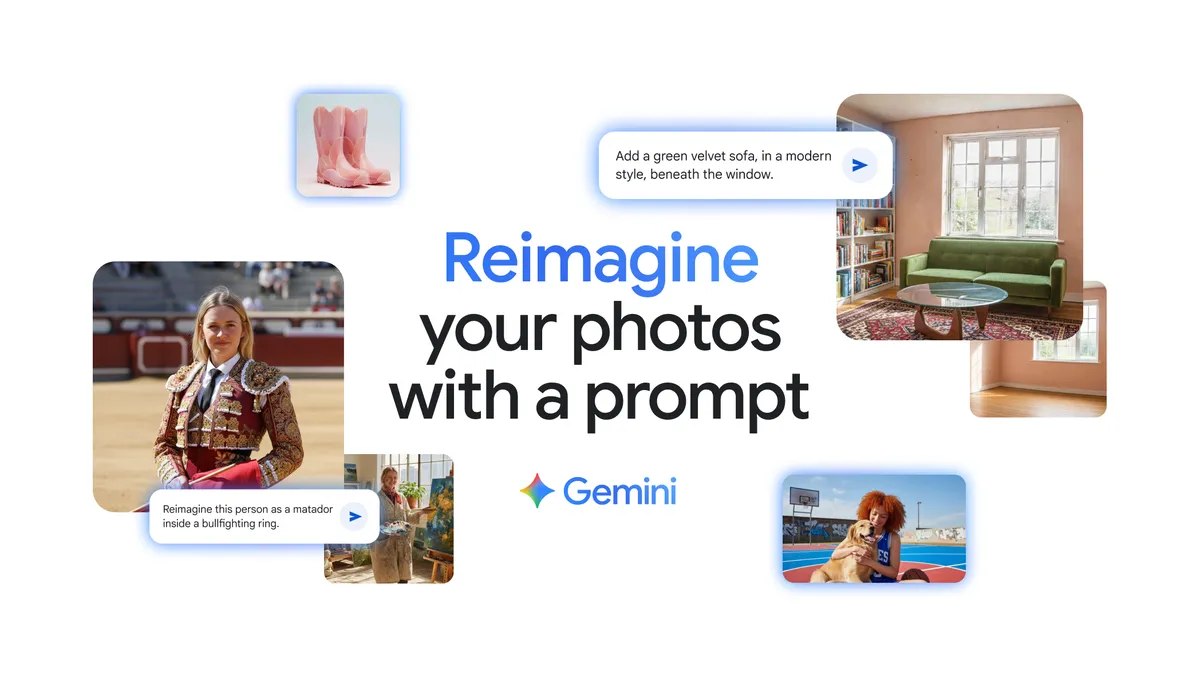

이미지 생성 AI는 이제 단순히 "예쁜 그림"을 만드는 수준을 넘어, 복잡한 개념을 시각화하고, 정확한 텍스트를 렌더링하며, 실시간 정보를 반영하는 실용적인 도구로 진화하고 있습니다. Nano Banana Pro는 이러한 진화의 최전선에 서 있으며, 전문가급 크리에이티브 제어 기능과 스튜디오 품질의 결과물을 제공합니다.
이 포스팅에서는 Nano Banana Pro의 핵심 기술적 특징, 실제 활용 사례, 그리고 개발자들이 이 모델을 어떻게 활용할 수 있는지 상세히 살펴보겠습니다.
배경: 이미지 생성 AI의 진화
1세대에서 3세대까지
이미지 생성 AI는 GAN(Generative Adversarial Networks)에서 시작해 Diffusion Models로, 그리고 이제는 대규모 언어 모델의 추론 능력을 통합한 multimodal 시스템으로 발전해왔습니다.
Nano Banana Pro는 이러한 발전의 정점에 있으며, 다음과 같은 세대별 특징을 보여줍니다:
- 1세대 (GAN 기반): 이미지 품질은 우수했으나 텍스트 렌더링과 복잡한 개념 이해에 한계
- 2세대 (Diffusion Models): Stable Diffusion, DALL-E 등 프롬프트 기반 생성의 대중화
- 3세대 (LLM-integrated): Gemini 3 Pro의 추론 능력을 활용한 맥락 이해와 정확한 텍스트 생성
📓 (참고) 핵심 용어 정의
- Text-to-Image Generation: 텍스트 프롬프트를 입력받아 이미지를 생성하는 기술
- Image-to-Image Editing: 기존 이미지를 입력으로 받아 수정하거나 변형하는 기술
- Grounding with Google Search: 실시간 웹 검색 결과를 활용해 최신 정보를 이미지에 반영하는 기능
- SynthID: Google이 개발한 AI 생성 이미지 식별용 디지털 워터마크 기술
- Multimodal Reasoning: 텍스트, 이미지 등 여러 형태의 입력을 통합적으로 이해하고 처리하는 능력
Nano Banana Pro의 핵심 기능
1. 향상된 추론과 실세계 지식 활용
고급 추론 능력
Nano Banana Pro의 가장 큰 차별점은 Gemini 3 Pro의 고급 추론 능력입니다. 이는 단순히 "아름다운" 이미지를 생성하는 것을 넘어, 맥락적으로 정확하고 정보가 풍부한 시각 자료를 만들어냅니다.
실시간 정보 통합
Google Search와의 grounding 기능을 통해 모델은 실시간 데이터에 접근할 수 있습니다. 예를 들어:
- 특정 날짜의 날씨 정보를 반영한 인포그래픽 생성
- 최신 스포츠 경기 결과를 시각화
- 실제 레시피를 단계별로 보여주는 다이어그램 제작
이러한 기능은 기존 이미지 생성 모델이 학습 데이터에만 의존했던 것과 달리, 현재 시점의 정확한 정보를 반영할 수 있게 합니다.
향상된 추론 능력과 세상에 대한 지식(world knowledge), 실시간 정보를 더해 더욱 정확하고 맥락 있는 시각 자료를 생성하세요. - 구글 코리아 블로그
교육용 콘텐츠 생성
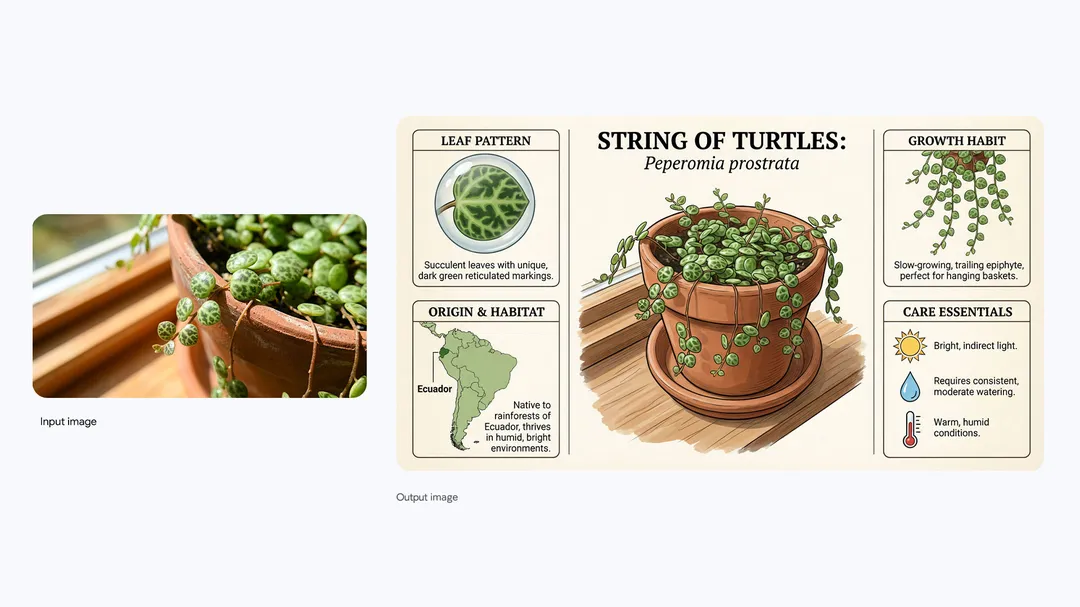
문서나 텍스트를 입력하면, 해당 내용을 정확하게 이해하고 시각화합니다:
- 식물의 원산지, 관리 요령, 성장 패턴을 담은 인포그래픽
- 과학 실험 과정을 단계별로 보여주는 다이어그램
- 역사적 사건을 시간순으로 정리한 타임라인
https://blog.google/intl/ko-kr/company-news/technology/nano-banana-pro/
2. 최고 수준의 텍스트 렌더링
Text-to-Image 모델의 고질적인 문제 중 하나는 이미지 내 텍스트를 정확하게 렌더링하는 것이었습니다. Nano Banana Pro는 이 문제를 획기적으로 개선했습니다.
다양한 텍스트 스타일 지원
- 짧은 태그라인부터 긴 문단까지 정확하게 렌더링
- 다양한 폰트, 텍스처, 캘리그래피 스타일 구현
- 3D 효과, 그림자, 레이어링 등 복잡한 타이포그래피
예시 프롬프트와 결과:
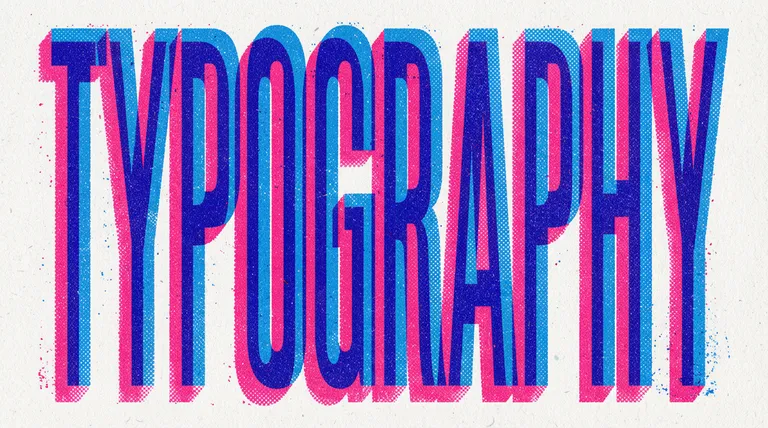
- "TYPOGRAPHY"라는 단어를 retro print aesthetic으로 표현 → 질감이 있는 오프화이트 배경에 굵고 블록 형태의 초압축 글자로 표현되며, 밝은 블루와 핫핑크의 겹쳐진 레이어가 하프톤 도트 패턴과 함께 3D 효과를 만들어 1960-70년대 레트로 인쇄 미학을 구현
https://blog.google/intl/ko-kr/company-news/technology/nano-banana-pro/
Prompt:
A vibrant, eye-catching "TYPOGRAPHY" design on a textured
off-white background. The letters are bold, blocky, extra condensed
and create a 3D effect with overlapping layers of bright blue and
hot pink, each with a halftone dot pattern, evoking a retro print
aesthetic. (16:9 aspect ratio)
프롬프트:
질감이 있는 오프화이트 배경에 생생하고 눈길을 끄는 "TYPOGRAPHY" 디자인을 생성합니다. 글자는 굵고 블록 형태의 초압축 스타일이며, 밝은 블루와 핫핑크의 겹쳐진 레이어가 각각 하프톤 도트 패턴을 가지고 있어 3D 효과를 만들어냅니다. 레트로 인쇄 미학을 구현하며, 16:9 종횡비로 제작합니다- "How much wood would a woodchuck chuck..." 문구를 나무로 만든 느낌으로 표현 → 텍스트가 나무 재질로 렌더링
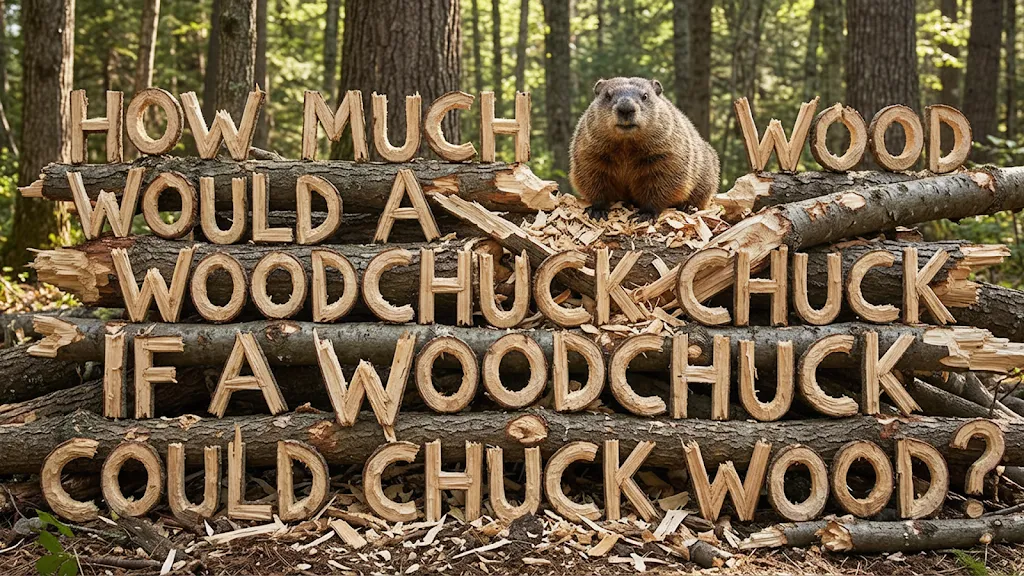
https://blog.google/intl/ko-kr/company-news/technology/nano-banana-pro/
Prompt:
Create an image showing the phrase "How much wood would a woodchuck chuck if a woodchuck could chuck wood" made out of wood chucked by a woodchuck
프롬프트:
우드척이 나무를 깎아서 만든 "How much wood would a woodchuck chuck if a woodchuck could chuck wood"라는 문구를 보여주는 이미지를 만듭니다다국어 지원과 현지화
Gemini 3의 multilingual reasoning 능력을 활용하여:
- 영어에서 한국어, 프랑스어, 독일어 등으로 이미지 내 텍스트 번역
- 원본 디자인의 예술적 스타일과 레이아웃 유지
- 국제 시장 진출을 위한 현지화된 마케팅 자료 생성
이는 이미지 생성과 현지화 로직 사이의 장벽을 제거한 것으로, 기존에는 Photoshop 등의 도구로 수동 작업이 필요했던 과정을 자동화합니다.
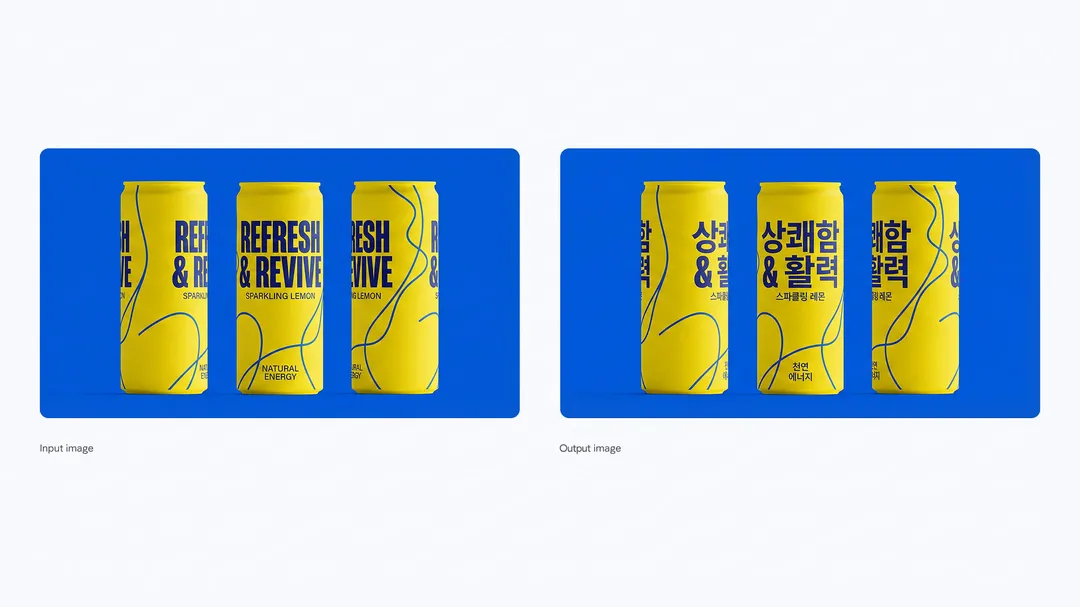
https://blog.google/intl/ko-kr/company-news/technology/nano-banana-pro/
Prompt:
Translate all the English text on the three yellow and blue cans into Korean, while keeping everything else the same
프롬프트:
노란색과 파란색 캔 세 개에 있는 모든 영어 텍스트를 한국어로 번역하면서 다른 모든 내용은 그대로 유지하세요3. 스튜디오급 크리에이티브 제어
전문 포토그래퍼와 디자이너가 사용하는 수준의 제어 기능을 제공합니다.
물리적 요소 제어
조명(Lighting):
- 주간에서 야간으로 변환
- Chiaroscuro 효과(강한 명암 대비) 적용
- Volumetric lighting을 bokeh 효과로 전환
- 특정 부분만 조명하는 dramatic lighting
카메라 설정(Camera Controls):
- Wide angle, panoramic, close-up 등 다양한 앵글
- 피사계 심도(Depth of Field) 조정
- 특정 피사체에 초점을 맞추고 배경 흐리기
색상 그레이딩(Color Grading):
- 전문적인 색 보정 적용
- 특정 색조나 분위기 연출

https://blog.google/intl/ko-kr/company-news/technology/nano-banana-pro/
Prompt:
Focus on the faces of the crowd and make woman blurry
프롬프트:
군중의 얼굴에 집중하고, 여성을 흐릿하게 만들어주세요.해상도와 종횡비
- 해상도: 1K, 2K, 4K까지 지원하여 인쇄물이나 대형 디스플레이에 적합한 고품질 출력
- 종횡비: 1:1, 16:9, 9:16, 4:3, 2.39:1 등 다양한 플랫폼에 맞는 비율 지원
- 종횡비 변경 시 피사체 위치 고정 옵션으로 자연스러운 크롭

https://blog.google/intl/ko-kr/company-news/technology/nano-banana-pro/
Prompt:
Zoom in on this image, maintaining a 16:9 aspect ratio.
프롬프트:
16:9 화면 비율을 유지하며, 이 이미지를 확대해주세요.4. 일관성 유지 기능
복잡한 구성에서도 일관성을 유지하는 것은 이미지 생성 AI의 중요한 과제입니다.
다중 입력 처리
- 최대 14개의 이미지 통합 가능
- 최대 5명의 인물 얼굴 일관성 유지
- 스케치를 제품으로, 청사진을 사실적인 3D 구조물로 변환
실제 사용 사례
- 제품 이미지, 로고, 참조 이미지를 결합한 일관된 광고 제작
- 여러 캐릭터가 등장하는 스토리보드 생성
- 브랜드 아이덴티티를 유지하면서 다양한 목업 제작

https://blog.google/intl/ko-kr/company-news/technology/nano-banana-pro/
Prompt:
Combine these images into one appropriately arranged cinematic image in 16:9 format
프롬프트:
이 이미지들을 적절히 배열된 하나의 영화 이미지로 16:9 형식으로 결합합니다기술적 우수성: 벤치마크 성과
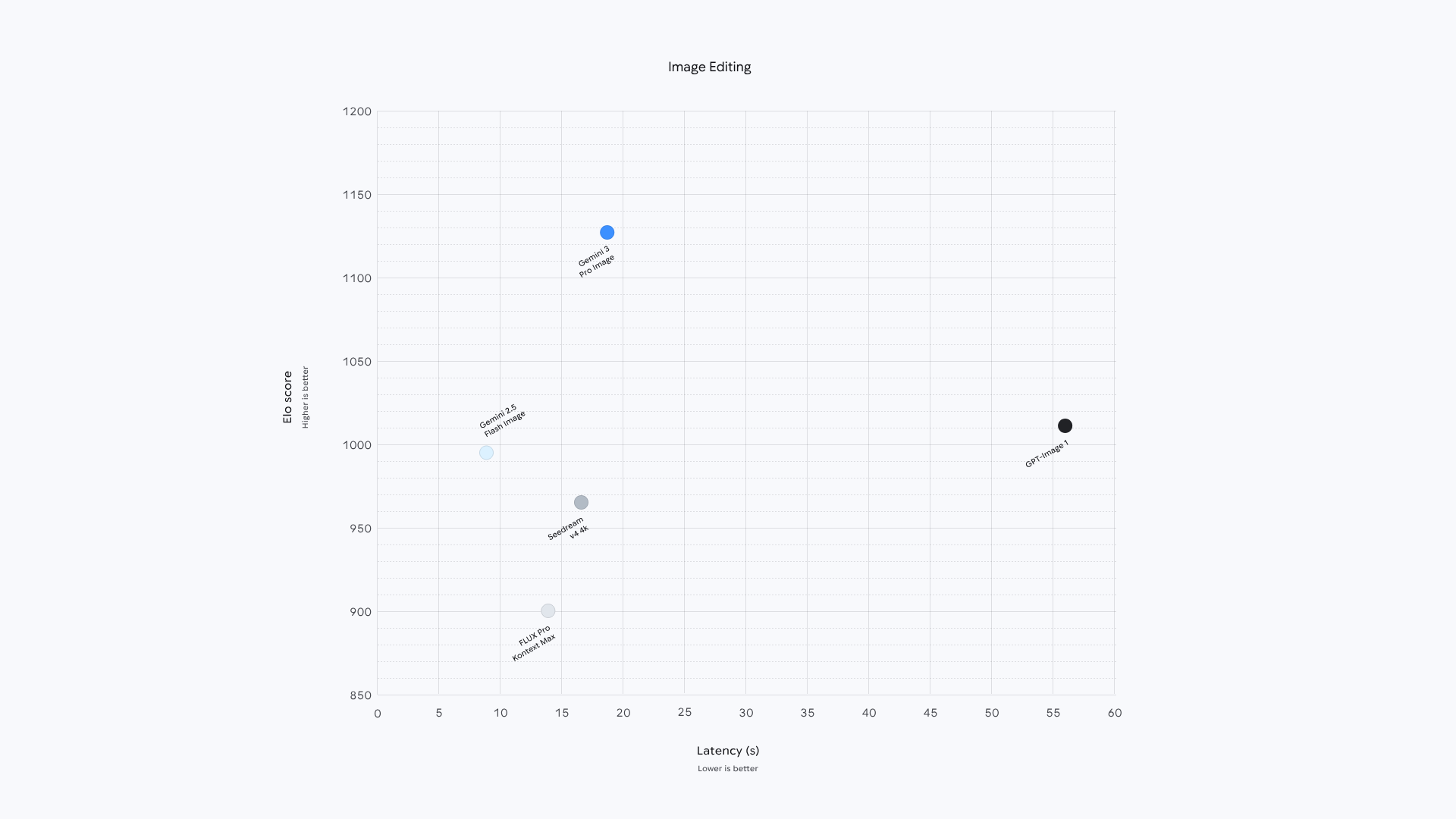
Nano Banana Pro는 Text-to-Image AI 벤치마크에서 최고 수준의 성능을 보여줍니다. 주요 경쟁 모델들과 비교했을 때:
- 텍스트 정확도: 이미지 내 텍스트 렌더링에서 가장 높은 정확도
- 프롬프트 충실도: 사용자의 지시사항을 가장 정확하게 반영
- 시각적 품질: 사실성과 예술적 완성도에서 우수한 평가
이러한 성과는 Gemini 3 Pro의 강력한 언어 이해 능력과 multimodal reasoning이 결합된 결과입니다.
실전 활용: Nano Banana Pro 최대한 활용하기
Nano Banana Pro의 강력한 기능을 제대로 활용하려면 효과적인 프롬프팅 전략이 필요합니다. (그냥도 좋긴한데, 더 잘하기 위해)
https://blog.google/products/gemini/prompting-tips-nano-banana-pro/
여기서는 전문가급 결과물을 얻기 위한 실전 팁과 구체적인 예시를 분야별로 소개합니다.
기본 원칙: 효과적인 프롬프트 구조
최고의 결과를 얻고 섬세한 크리에이티브 제어를 하려면 프롬프트에 다음 요소들을 포함해야 합니다:
1. Subject (피사체):
이미지에 무엇이 있는가? 구체적으로 명시하세요.
- 예: "glowing blue optics를 가진 stoic한 로봇 바리스타"
- 예: "작은 마법사 모자를 쓴 fluffy calico 고양이"
2. Composition (구도):
샷이 어떻게 프레이밍되는가?
- 예: extreme close-up, wide shot, low angle shot, portrait
3. Action (동작):
무슨 일이 일어나고 있는가?
- 예: brewing a cup of coffee, casting a magical spell, mid-stride running through a field
4. Location (장소):
장면이 어디서 일어나는가?
- 예: 화성의 미래형 카페, 어수선한 연금술사의 도서관, golden hour의 햇살 가득한 초원
5. Style (스타일):
전체적인 미학은?
- 예: 3D animation, film noir, watercolor painting, photorealistic, 1990s product photography
6. Editing Instructions (편집 지시사항):
기존 이미지를 수정할 때는 직접적이고 구체적으로 편집을 요청하였는가?
- 예: change the man's tie to green, remove the car in the background
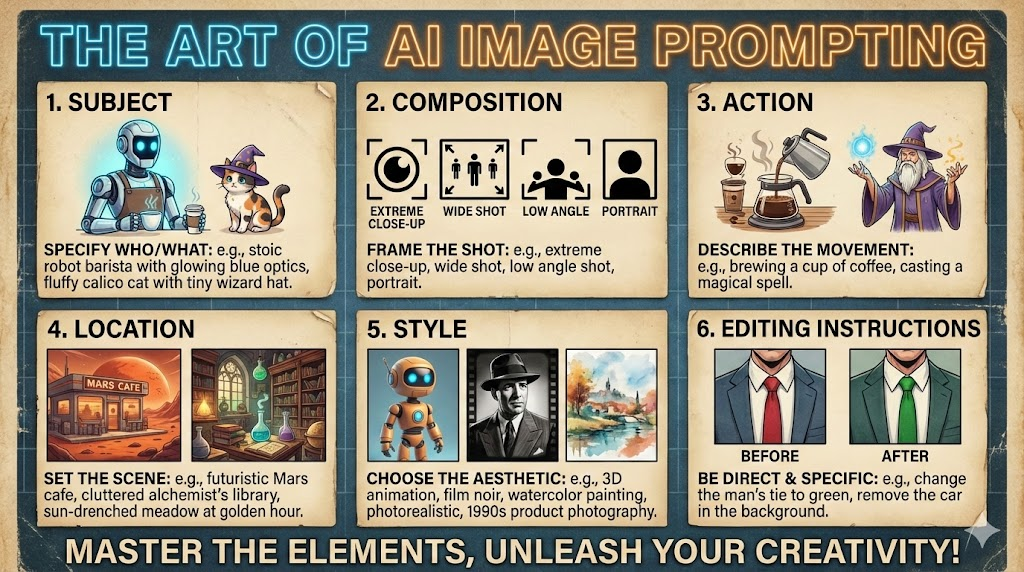
Made with Nano-banana Pro (헉..잘한다.. 🤤)
세부 조정: 카메라, 조명, 포맷
간단한 프롬프트도 작동하지만, 전문가급 결과를 위해서는 더 구체적인 지시가 필요합니다:
Composition과 Aspect Ratio (구도와 종횡비):
- 예: "A 9:16 vertical poster", "A cinematic 21:9 wide shot"
Camera와 Lighting Details (카메라와 조명 세부사항):
- 예: "A low-angle shot with a shallow depth of field (f/1.8)"
- 예: "Golden hour backlighting creating long shadows"
- 예: "Cinematic color grading with muted teal tones"
Specific Text Integration (구체적인 텍스트 통합):
- 예: "The headline 'URBAN EXPLORER' rendered in bold, white, sans-serif font at the top"
Factual Constraints (다이어그램의 사실적 제약):
- 예: "A scientifically accurate cross-section diagram"
- 예: "Ensure historical accuracy for the Victorian era"
Reference Inputs (참조 입력):
- 예: "Use Image A for the character's pose, Image B for the art style, and Image C for the background environment"
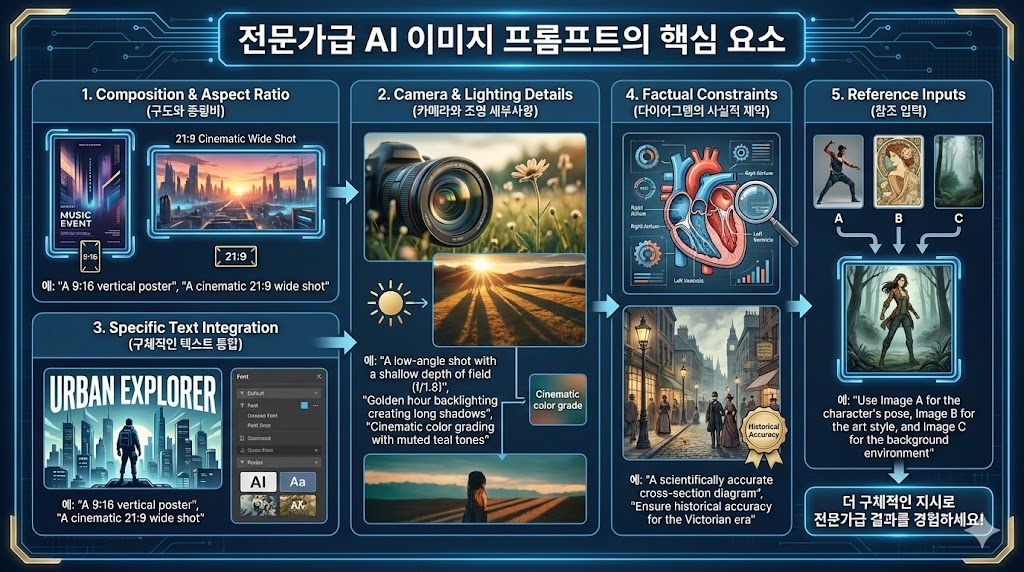
Made with Nano-banana Pro (헉..잘한다.. 🤤)
카테고리별 실전 프롬프트 예시
1. 실세계 지식 활용 (Real-world Knowledge)
Gemini 3 Pro의 실세계 지식과 깊은 추론 능력을 활용하여 정확하고 상세하며 풍부한 이미지를 생성합니다. 사진에 주석을 달거나, 데이터를 인포그래픽으로 표현하거나, 손으로 쓴 노트를 다이어그램으로 변환할 수 있습니다.
예시 1: 태양 에너지 DIY 인포그래픽
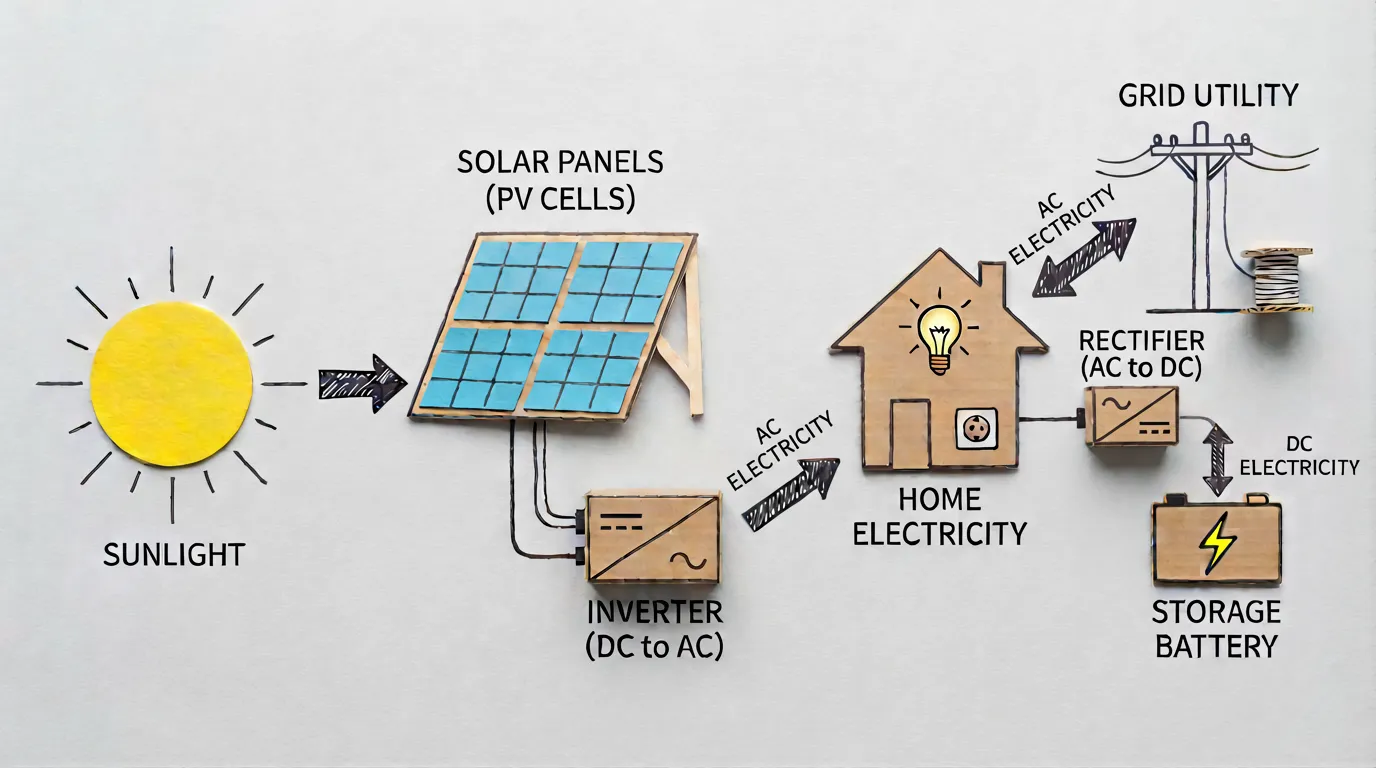
프롬프트:
High-quality flat lay photography creating a DIY infographic that simply explains how solar energy works, arranged on a clean, light gray textured background.

* The visual story flows from left to right in  clear steps: Content is based on this: https://en.wikipedia.org/wiki/Solar_power.

* Simple, clean black arrows are hand-drawn onto the background to guide the viewer's eye from the sun to the house, clearly marking the flow of energy.

* The overall mood is educational, modern, and easy to understand.

* The image is shot from a top-down, bird's-eye view with soft, even lighting that minimizes shadows and keeps the focus on the process. (Format 16:9)
프롬프트 해설:
-
Wikipedia의 태양광 발전 원리를 기반으로, 태양 → 패널 → 인버터 → 가정으로의 에너지 흐름을 평면 배치(flat lay) 스타일로 시각화합니다.
-
손으로 그린 듯한 화살표가 에너지 흐름을 명확하게 표시하며, 교육적이면서도 현대적인 미니멀 디자인으로 표현됩니다.
예시 2: 식물 정보 인포그래픽
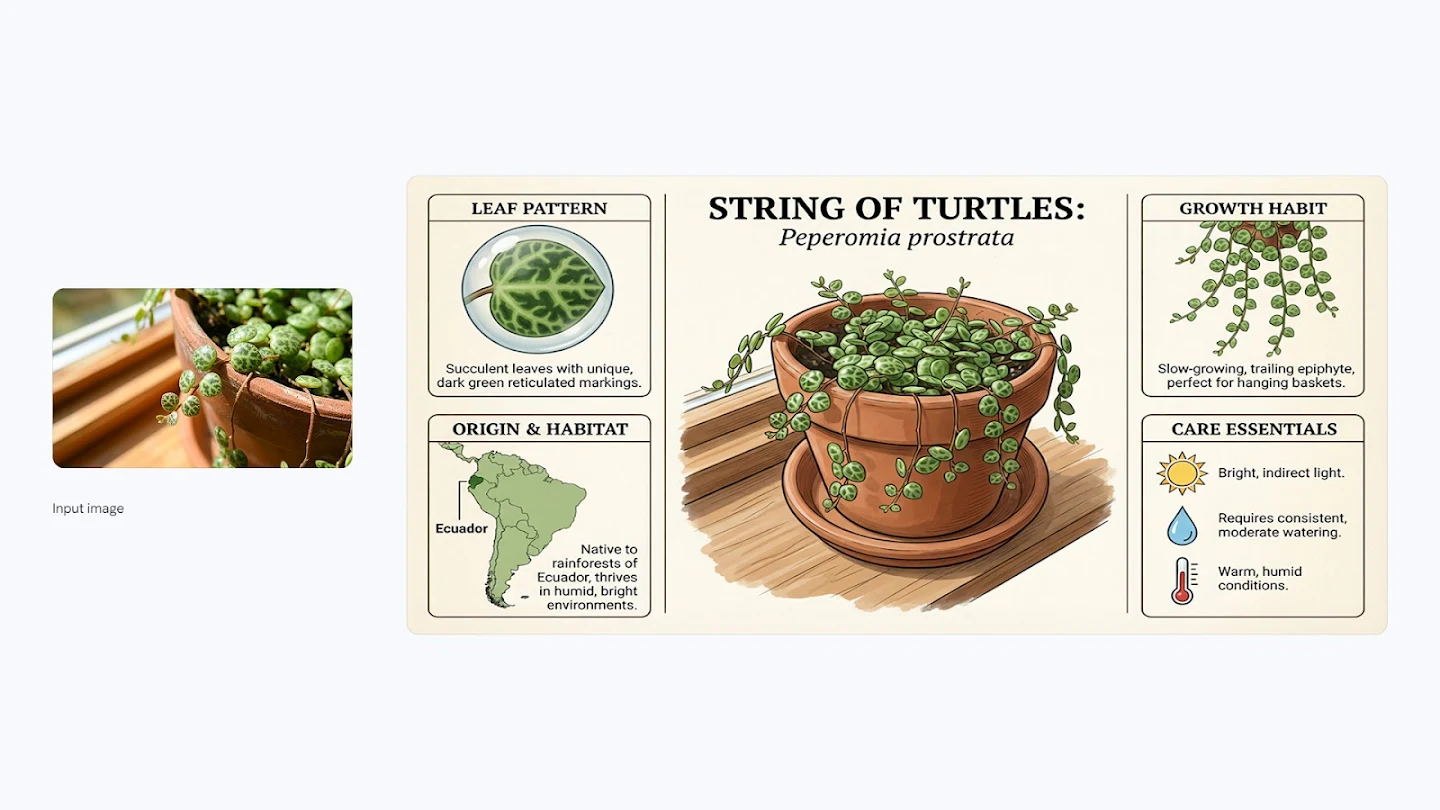
프롬프트:
Create an infographic about this plant focusing on interesting information
활용 방법:
- 식물 사진을 업로드하면, Gemini 3 Pro의 실세계 지식을 활용하여 해당 식물의 원산지, 관리 방법, 특징, 성장 패턴 등을 담은 인포그래픽을 자동으로 생성합니다.
이건 못 참지!! ㅋㅎㅎㅎ 바로 해보기!
- 파리지옥 사진 투척
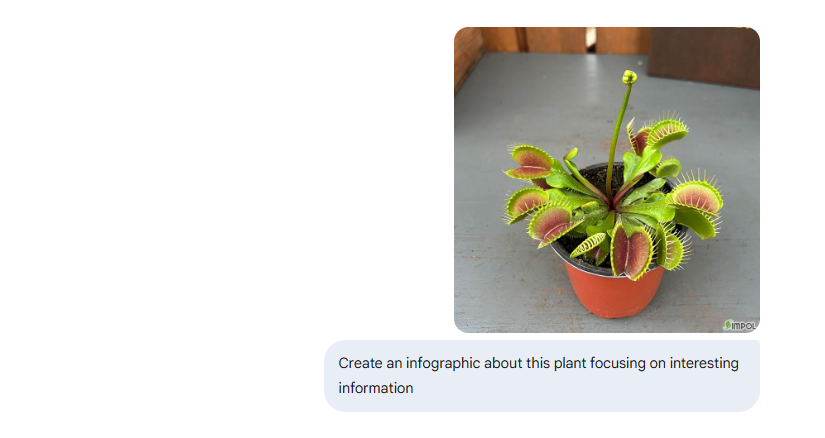
- 파리지옥 인포그래픽 생성
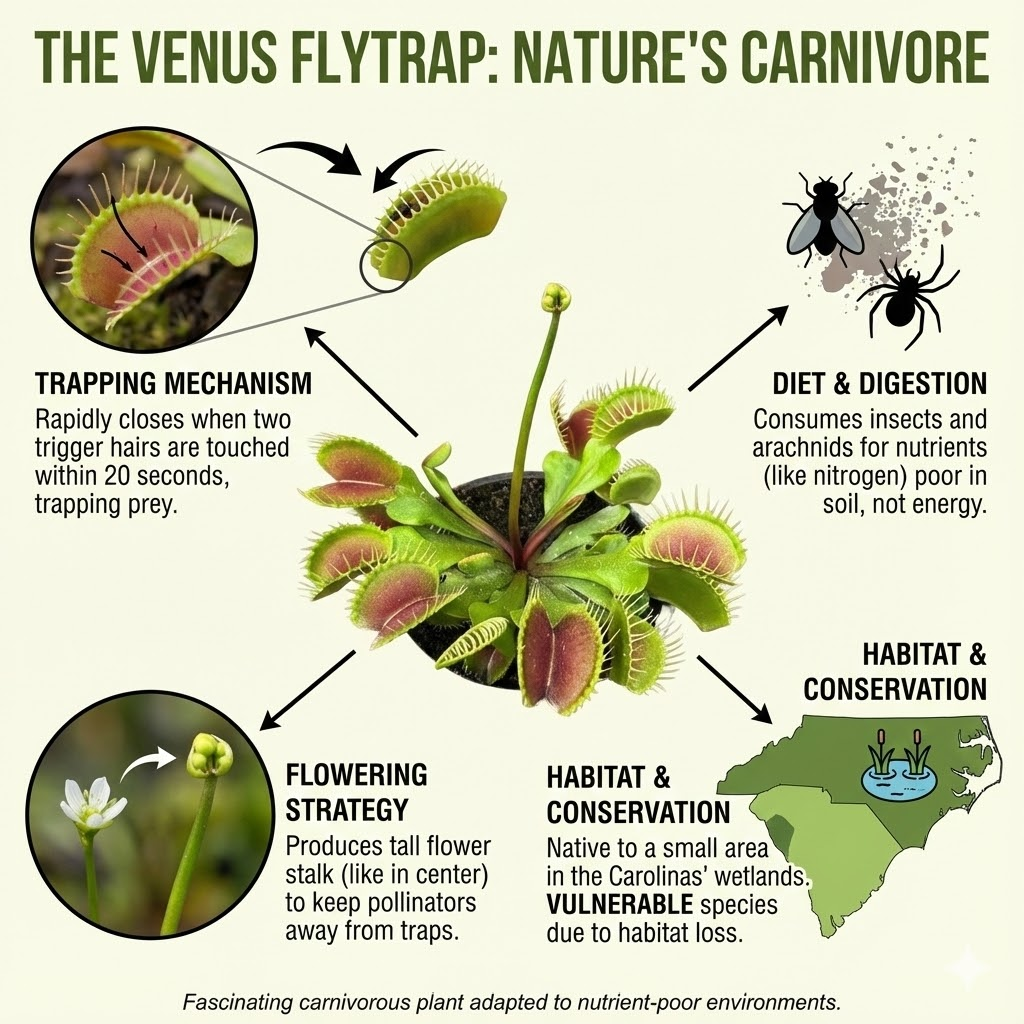
오... 관련 지식이 확실하게 있다..!
예시 3: 엘라이치 차이 레시피
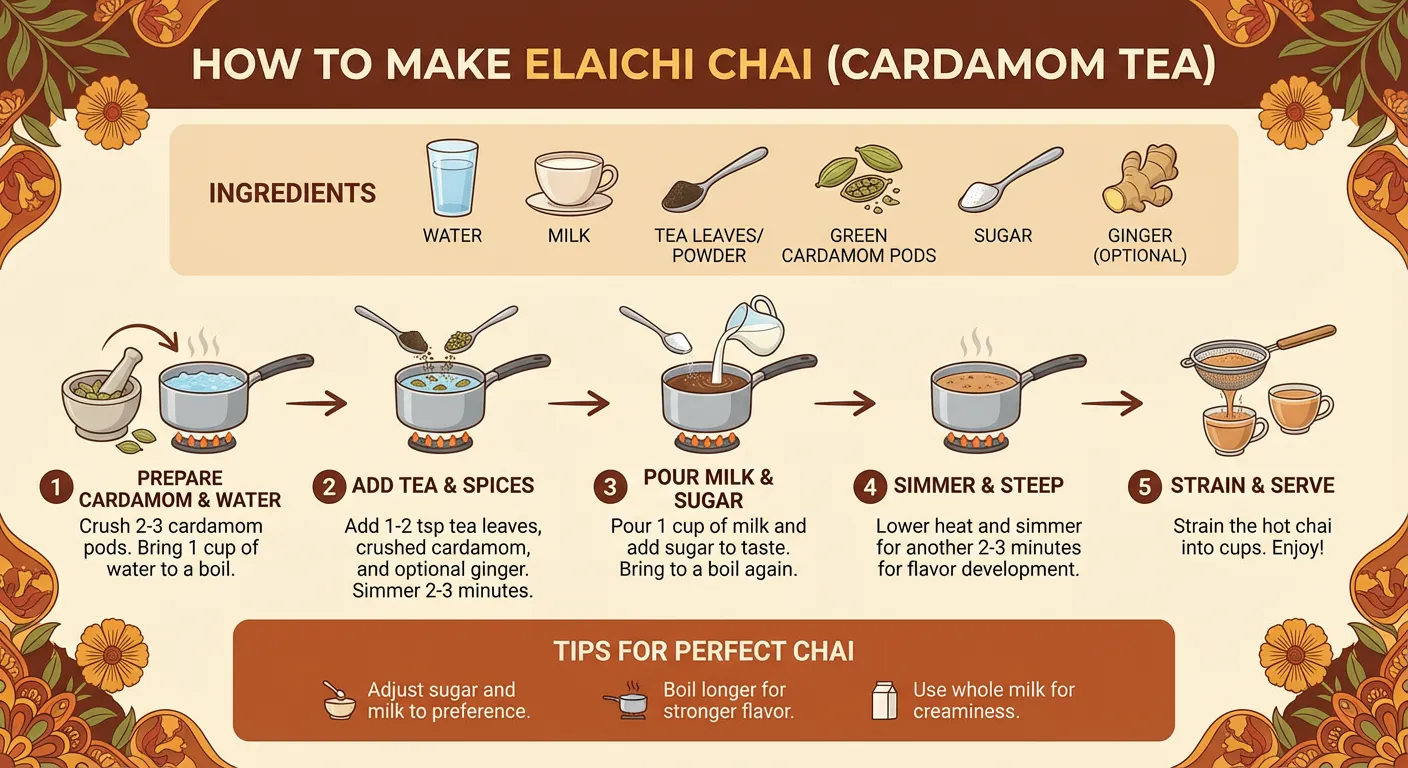
프롬프트:
Create an infographic that shows how to make elaichi chai
프롬프트 해설:
- 엘라이치 차이(카다멈 차)의 재료, 준비 과정, 끓이는 방법을 단계별로 보여주는 시각적 레시피 가이드가 생성됩니다.
(참고) Elaichi chai (엘라이치 차)는 인도의 전통적인 음료인 짜이(Chai, 향신료 밀크티)의 한 종류로, 카다멈(Cardamom) 향이 특징인 차입니다.
예시 4: 뉴턴의 빛과 색 이론 시각화

프롬프트:
Modern, clean, and minimalist flat lay photography illustrating Sir Isaac Newton's theory of light and color, presented on a seamless, matte light gray background. The composition follows a precise, geometric flow from left to right.

* All annotations are rendered in an ultra-clean, minimalist sans-serif font.
* Simple, numbered labels—"01", "02", "03", "04" - mark each stage of the process.
* The concept is a modern visualization of the experiment from Newton's 1671 letter, the content of which can be referenced here: https://hti.osu.edu/sites/hti.osu.edu/files/Sir-Isaac-Newton_Letter-Theory-Light-Colors.pdf
* The overall mood is scientific, precise, and elegant. The image is shot from a top-down bird's-eye view with bright, perfectly even, shadowless studio lighting to create a clean, high-tech aesthetic. (Format 16:9)
프롬프트 해설:
- 뉴턴의 1671년 편지에 기록된 프리즘 실험을 현대적이고 미니멀한 스타일로 재해석합니다.
- 빛이 프리즘을 통과하며 분해되는 과정을 "01", "02", "03", "04"로 번호가 매겨진 단계로 명확하게 표현하며, 과학적이면서도 우아한 디자인을 구현합니다.
- 정보는 https://hti.osu.edu/sites/hti.osu.edu/files/Sir-Isaac-Newton_Letter-Theory-Light-Colors.pdf 에서 참고하라고 가이드를 제공했습니다.
확실히 이렇게 소스와 함께 주면, Hallucination이 대폭 줄고, 내가 원하는 내용에 포커스해줘서 만들 수 있겠군 (╭ರ_•́)
2. 번역 및 현지화 (Translation & Localization)
현지화된 텍스트를 생성하거나 이미지 내부의 텍스트를 번역할 수 있습니다. 제품이 다양한 지역에서 어떻게 보일지 확인하고, 국제 시장을 위한 포스터와 인포그래픽을 제작하세요.
예시 1: 제품 패키지 한국어 번역

프롬프트:
Translate all the English text on the Coca Cola Can into Korean, while keeping everything else the same
프롬프트 해설:
- 코카콜라 캔의 모든 영어 텍스트가 한국어로 번역되며, 디자인 레이아웃, 색상, 로고 배치 등은 완벽하게 유지됩니다.
돌릴 때마다 살짝씩 결과가 다르긴 한데, 로고는 바꿀때도 있고, 안 바꿀때도 있음. 로고까지 바꾸고 싶으면 프롬프트로 명시해줘야할 것 같음.
예시 2: 런던 거리 광고 포스터
Prompt 1:
Create a poster ad for a sparkling water called 'Aura Fizz'. The setting is a London street at dusk with neon lights. The tagline should be "Taste the Aura". The can design should be minimalist. Make the aspect ratio 16:9.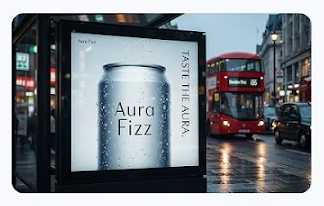
Prompt 1 해설:
'Aura Fizz'라는 탄산수 광고 포스터를 생성합니다. 네온 불빛이 있는 황혼녘 런던 거리를 배경으로, "Taste the Aura"라는 태그라인과 미니멀한 캔 디자인을 16:9 비율로 구현합니다.
Prompt 2:
Localize this concept to a Japan setting, keep the can exactly the same, making sure to translate the words "Taste the Aura" accurately and authentically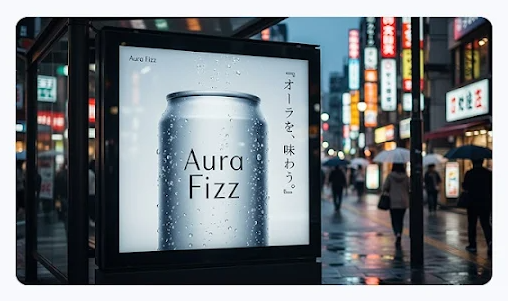
Prompt 2 해설:
동일한 컨셉을 일본 배경으로 현지화합니다. 캔 디자인은 그대로 유지하면서 "Taste the Aura" 문구를 일본어로 정확하고 자연스럽게 번역합니다.
Prompt 3:
Localize this concept to a Mexico setting, keep the can exactly the same, making sure to include translation.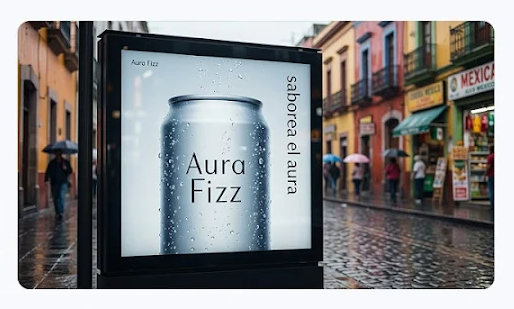
Prompt 3 해설:
동일한 컨셉을 멕시코 배경으로 현지화합니다. 캔 디자인은 그대로 유지하면서 텍스트를 스페인어로 번역합니다.
활용 시나리오:
- 이처럼 하나의 원본 컨셉을 생성한 후, 후속 프롬프트를 통해 각 지역의 문화적 배경과 언어에 맞게 현지화된 버전을 즉시 제작할 수 있습니다.
- 브랜드 아이덴티티(캔 디자인)는 일관되게 유지하면서 글로벌 마케팅 캠페인을 효율적으로 진행할 수 있습니다.
예시 3: 커피 체인 디지털 스크린 광고
프롬프트 1 :
Design a poster for Zestful's new "Sunrise Defence" smoothie.

* The style should be playful, quirky, and hand-drawn, featuring the tagline "A little bottle of sunshine."
* The 16:9 poster is displayed on a digital screen inside a popular coffee chain in London during the morning commute.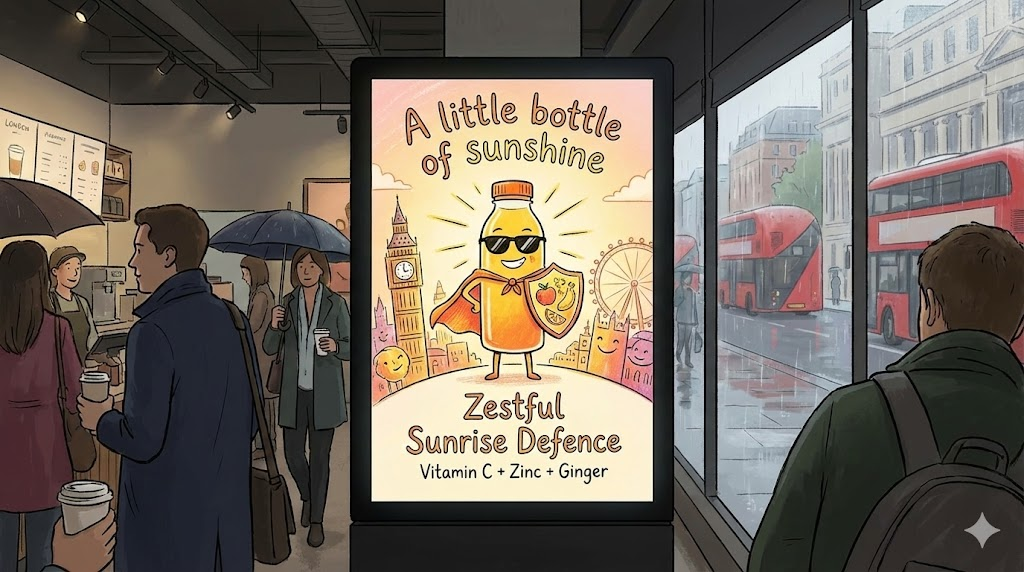
프롬프트 2 :
Take this concept and localize it to a setting in South Korea, including translation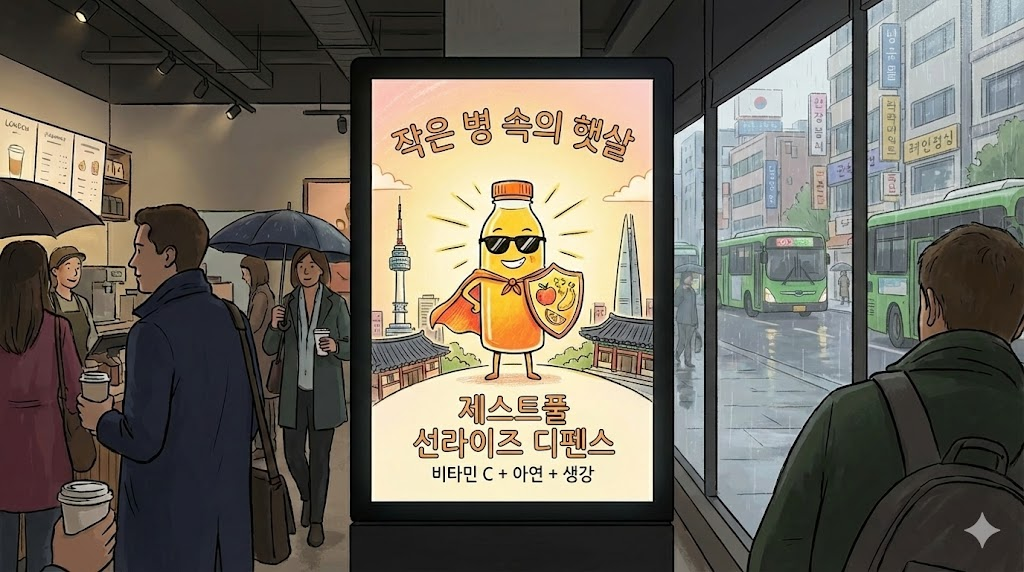
다국어 확장
- 먼저, 마음에 드는 포스터를 생성한 후, 동일한 디자인을 유지하면서 한국, 일본, 프랑스 등 각 시장에 맞는 언어로 현지화할 수 있습니다.
- 보이시나요 ㄷㄷ 버스 디테일까지 영국 버스 ➜ 한국 녹색 버스로 바뀐 것이?!
3. 디자인, 스타일, 표준화 (Design, Style, Standardize)
낙서를 제품으로 전환하고, 스케치를 실물로, 아이디어를 3D 렌더링된 건물로 변환합니다.
예시 1: 레트로 로고 생성
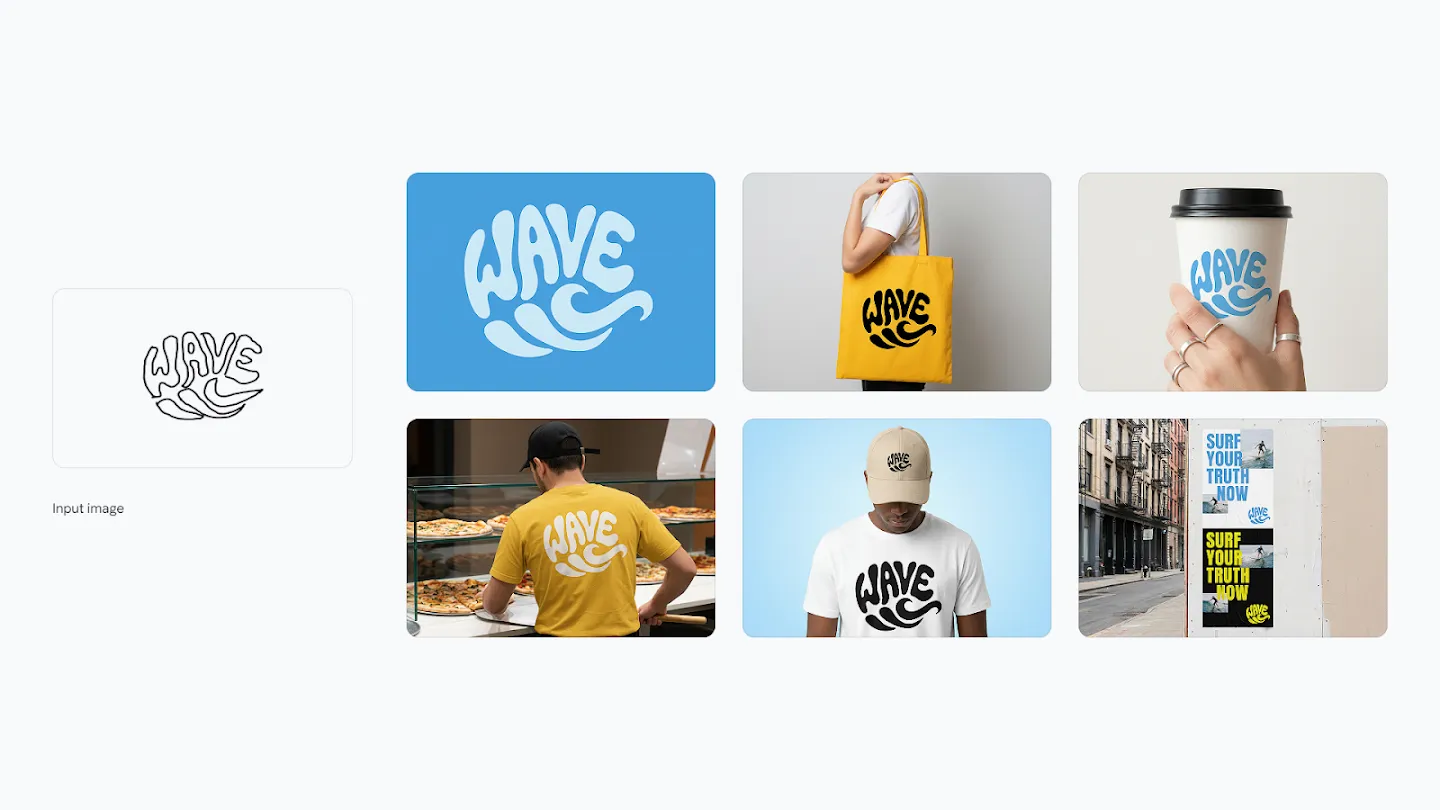
Prompt 1:
Create a smooth logo in a graphic style is a vibrant and playful form of typographic illustration, deeply rooted in the retro aesthetics of the 1960s and 1970s loosely based on the sketch Its defining feature is a groovy, psychedelic-inspired typeface characterized by soft, rounded, and fluid letterforms. Don't exactly follow the sketch, get inspired from it. The letters are skillfully distorted, stretched, and compressed, abandoning rigid structure to flow together and form a cohesive, recognizable shape.
* This technique, known as a calligram, masterfully merges text and image, where the word's form visually embodies its meaning. The word "WAVE" is artfully arranged into the fluid silhouette of a wave.
* The design is a clever visual pun, making the message instantly accessible and memorable.
* The color palette reinforces the vintage feel, employing a simple two-toned scheme with warm, often muted or earthy colors light blue background and deep blue logo. This choice enhances the nostalgic charm of the artwork.
* The overall effect is one of whimsical nostalgia and clever graphic design. It’s a bold yet approachable style that communicates a simple, positive message through the seamless integration of shape and word, creating an immediate and delightful visual impact.
Prompt 2:
Now create identity system one by one, use 10 high quality mockups with variety of relevant products, ads, billboards, bus stop, etc. generate one at a time, 16:9 each기대 효과:
-
Prompt 1 (로고 생성):
- 1960-70년대 레트로 미학에 뿌리를 둔 사이키델릭 스타일의 로고를 생성합니다.
- 부드럽고 둥글며 유동적인 글자 형태가 특징이며, "WAVE"라는 단어가 파도의 실루엣 형태로 배열되는 칼리그램 기법을 사용합니다.
- 연한 블루 배경에 딥 블루 로고의 2톤 배색으로 빈티지한 느낌을 강화합니다.
-
Prompt 2 (브랜드 아이덴티티 시스템):
- 생성된 로고를 활용하여 제품, 광고, 빌보드, 버스 정류장 등 다양한 목업에 적용한 10개의 고품질 이미지를 16:9 비율로 하나씩 순차적으로 생성합니다.
예시 2: 스케치를 실제 자동차로
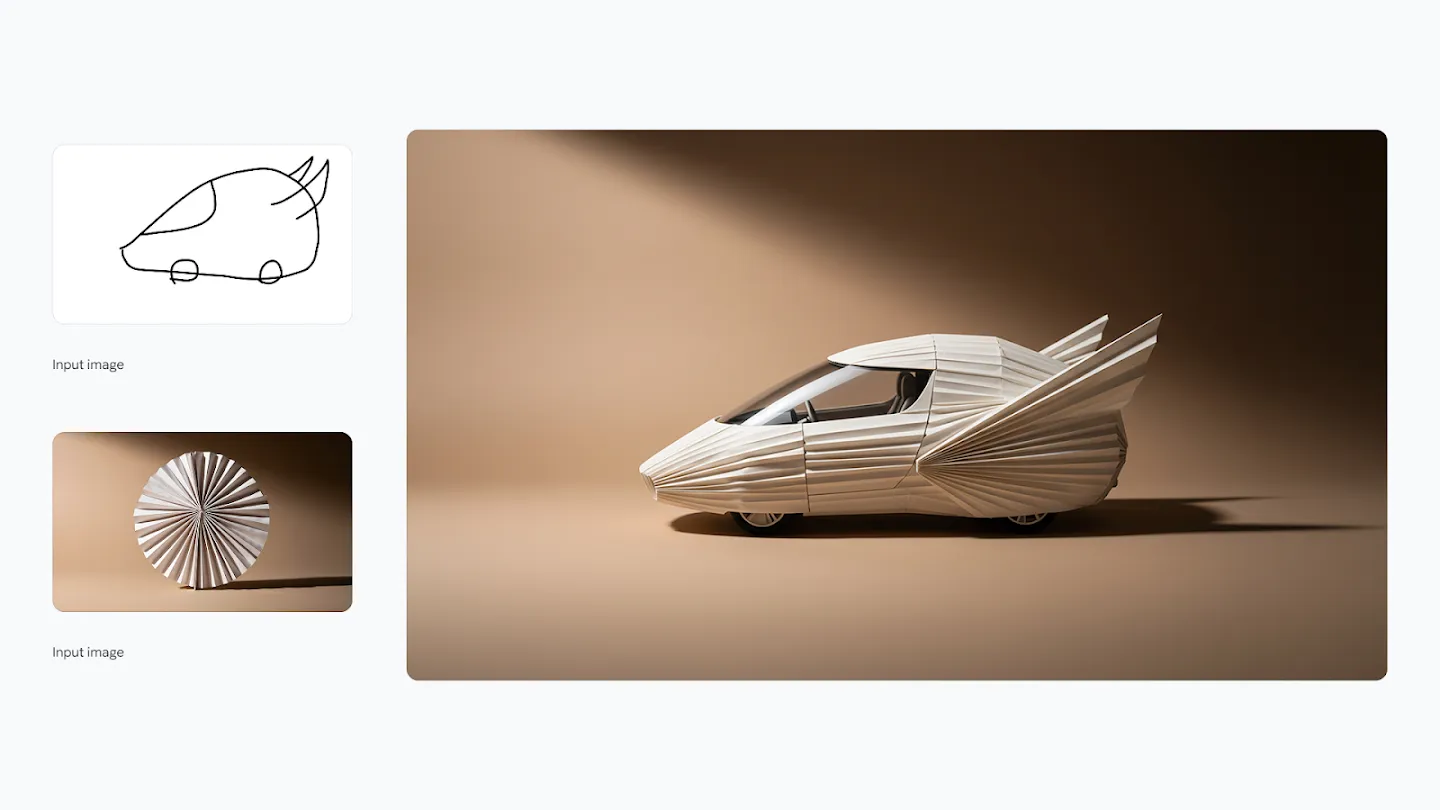
프롬프트:
Transform the simple sketch into a realistic car, follow creative
direction of the sketch and use the colors and texture from the uploaded image
활용 방법:
- 간단한 자동차 스케치와 참조 이미지(색상 및 텍스처용)를 업로드하면, 스케치의 디자인 방향을 따르면서도 사실적인 자동차 렌더링을 생성합니다.
예시 3: 스케치를 실제 의자로

프롬프트:
Transform the simple sketch into a realistic chair, follow creative
direction of the sketch and use the colors and texture from the car image
기대 효과:
- 의자 스케치를 자동차 이미지의 고급스러운 재질과 색상을 적용하여 사실적인 가구 제품 이미지로 변환합니다.
예시 4: 건축 디자인 프로세스 시각화
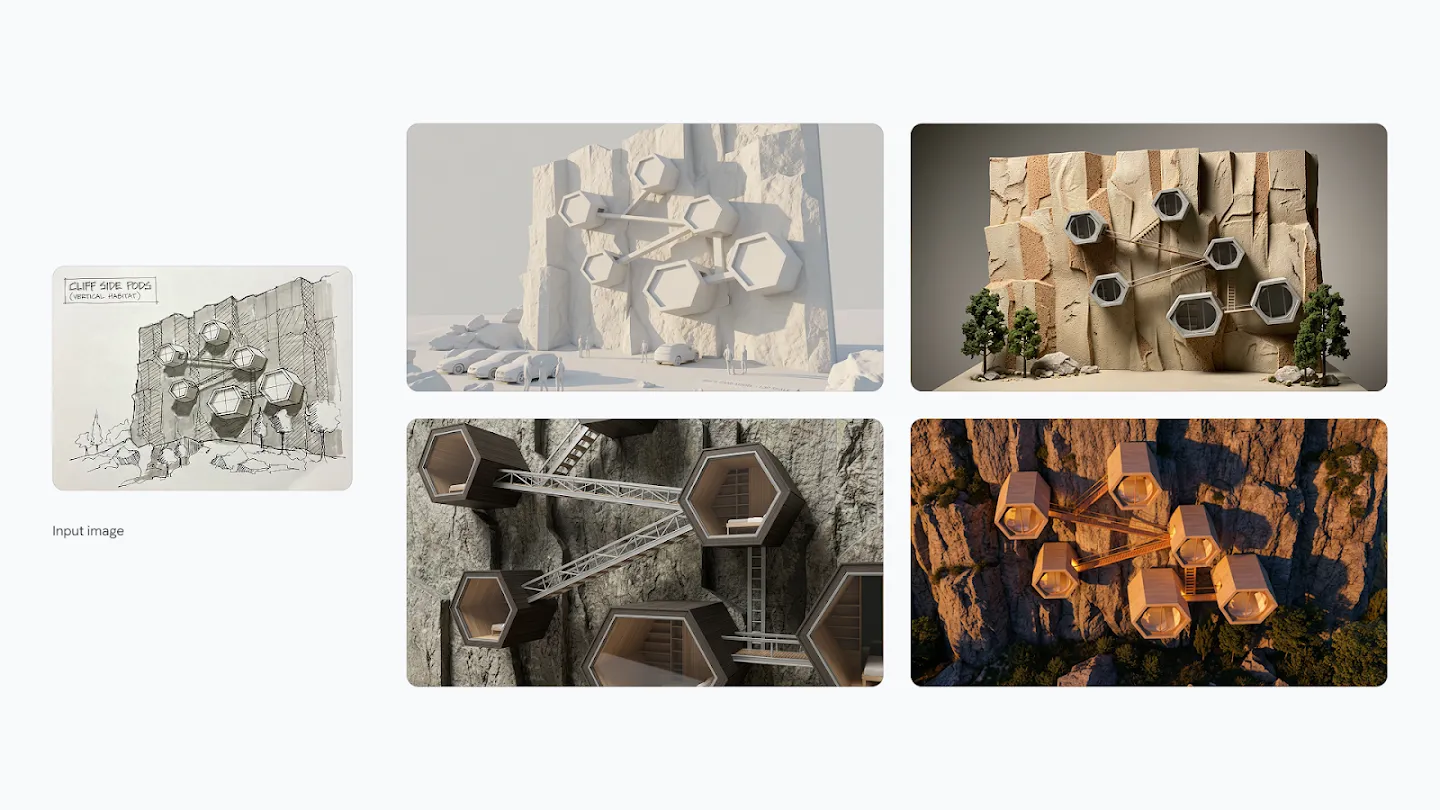
프롬프트:
Create four images of different architectural design processes based
on this image, these need to be consistent with the input sketch.

* Ensure all text is legible and correctly spelt.
* Do not show any UI from design software.
* Generate 4 frames, one by one.
* You must create 4 separate images and not a single composite image.
기대 효과:
건축 스케치를 기반으로 다음 단계들을 순차적으로 시각화합니다:
- 초기 컨셉 스케치
- 상세 설계도
- 3D 모델링
- 최종 렌더링
각 프레임이 일관성을 유지하면서도 디자인 진행 과정을 명확하게 보여줍니다.
4. 스튜디오 품질 제어 (Studio-Quality Control)
이미지의 모든 측면을 세밀하게 제어하여 고화질 결과물을 얻을 수 있습니다.
4-1. 다양한 앵글과 샷 타입 탐색
와이드 앵글, 파노라마, 클로즈업 등 앵글과 샷 타입을 선택하거나, 피사계 심도를 조정하여 이미지의 다른 피사체에 초점을 맞출 수 있습니다.
예시 1: 군중의 얼굴에 초점
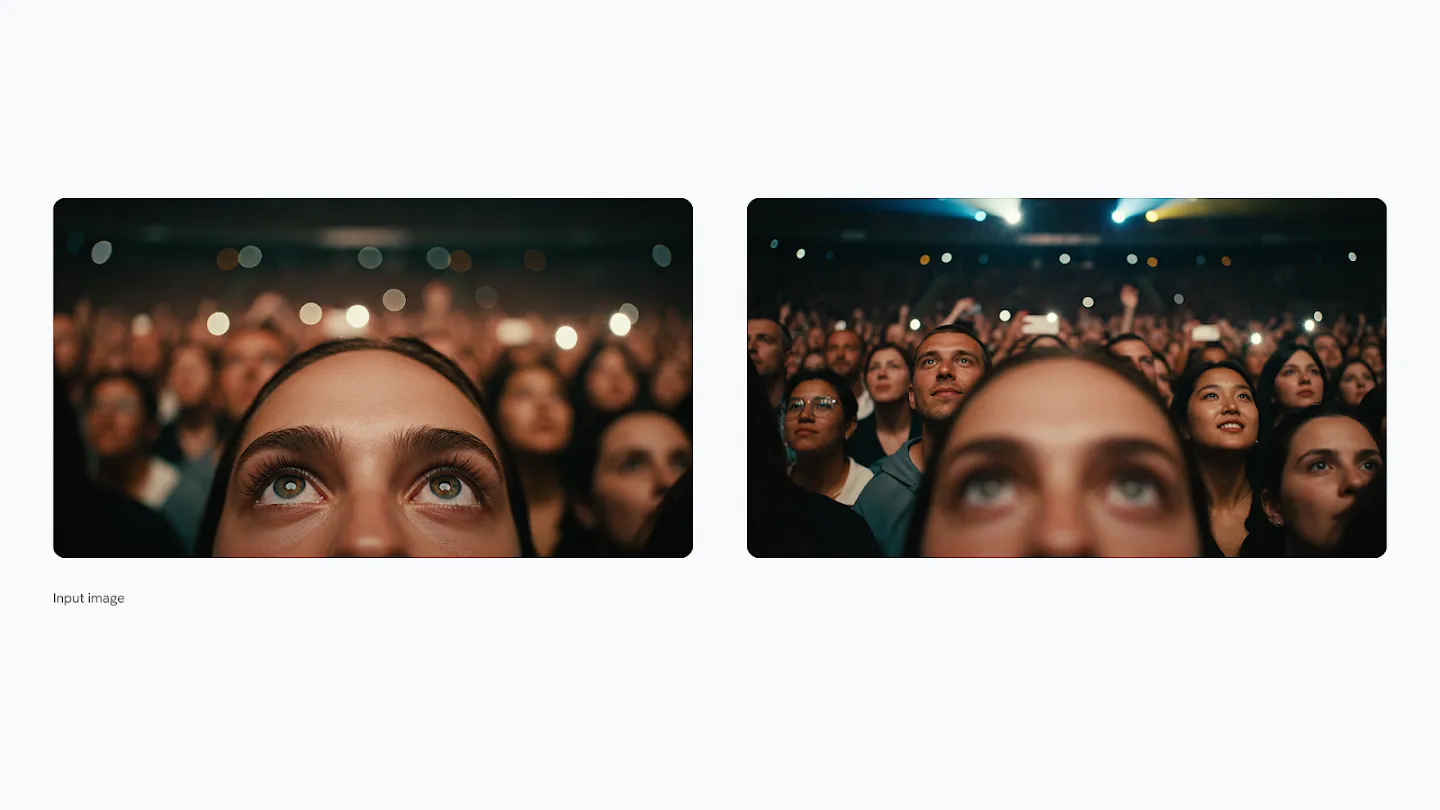
프롬프트:
Focus on the faces of the crowd and make woman blurry
기대 효과:
- 원래 여성에게 초점이 맞춰져 있던 이미지에서 군중의 얼굴로 초점이 이동하며, 여성은 bokeh 효과로 흐려집니다.
예시 2: 손에 초점, 얼굴 흐림

프롬프트:
Focus on man's hand, blur his face
활용 시나리오:
- 제품을 들고 있는 사람의 손에 초점을 맞추고 싶을 때, 얼굴을 흐려 프라이버시를 보호하면서도 제품을 강조할 수 있습니다.
예시 3: 숲 속 와이드 샷
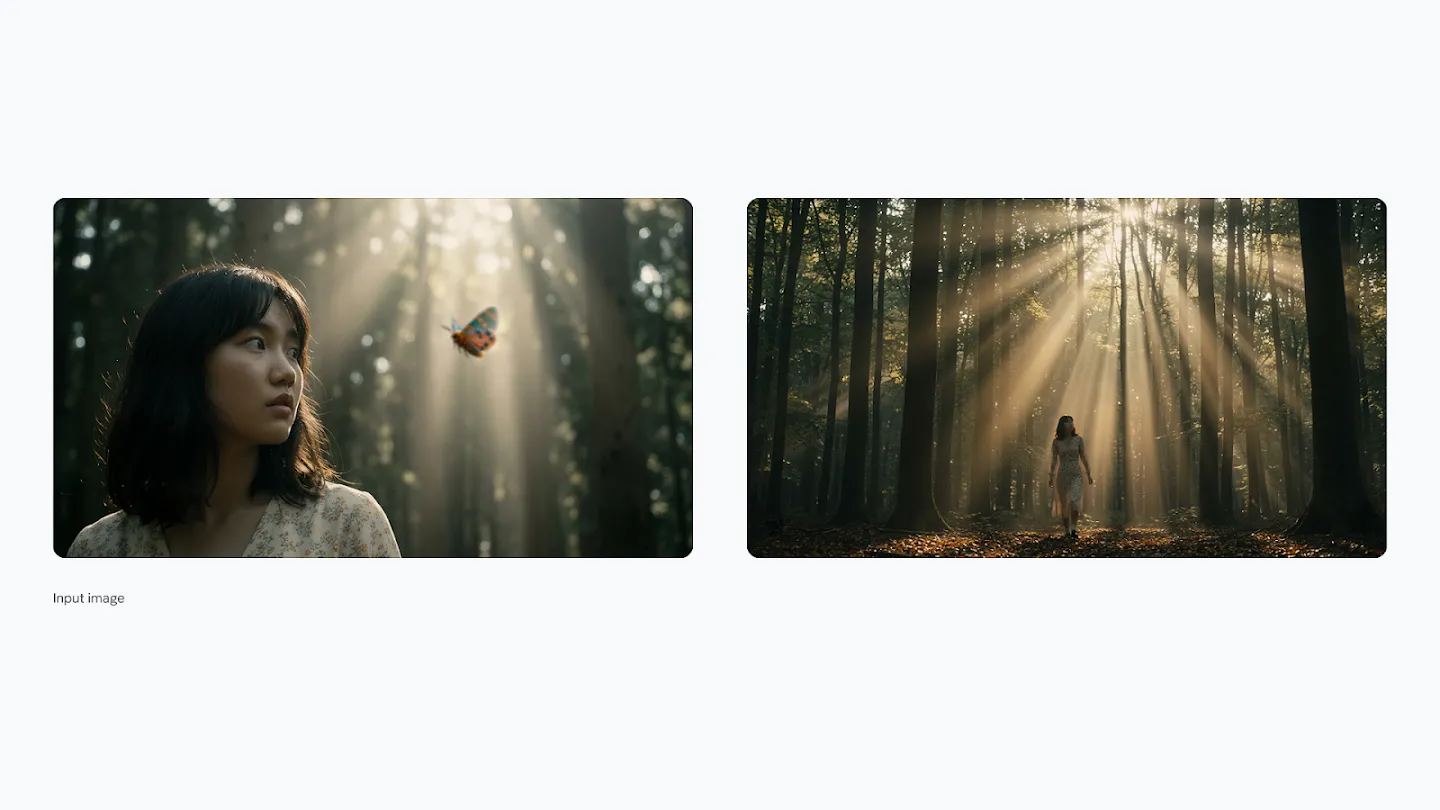
프롬프트:
A wide shot of a woman walking in the forest, with sunbeams and volumetric lighting. 16:9 aspect ratio
기대 효과:
- 광활한 숲을 배경으로 걷는 여성의 모습을 포착하며, 나뭇가지 사이로 들어오는 햇살과 volumetric lighting이 몽환적인 분위기를 연출합니다.
4-2. 색상과 조명 조작
색상 그레이딩과 조명 방향을 조정하거나, 주간 샷을 야간으로 변경하는 등 극적인 변화를 줄 수 있습니다.
예시 1: 야간에서 주간으로
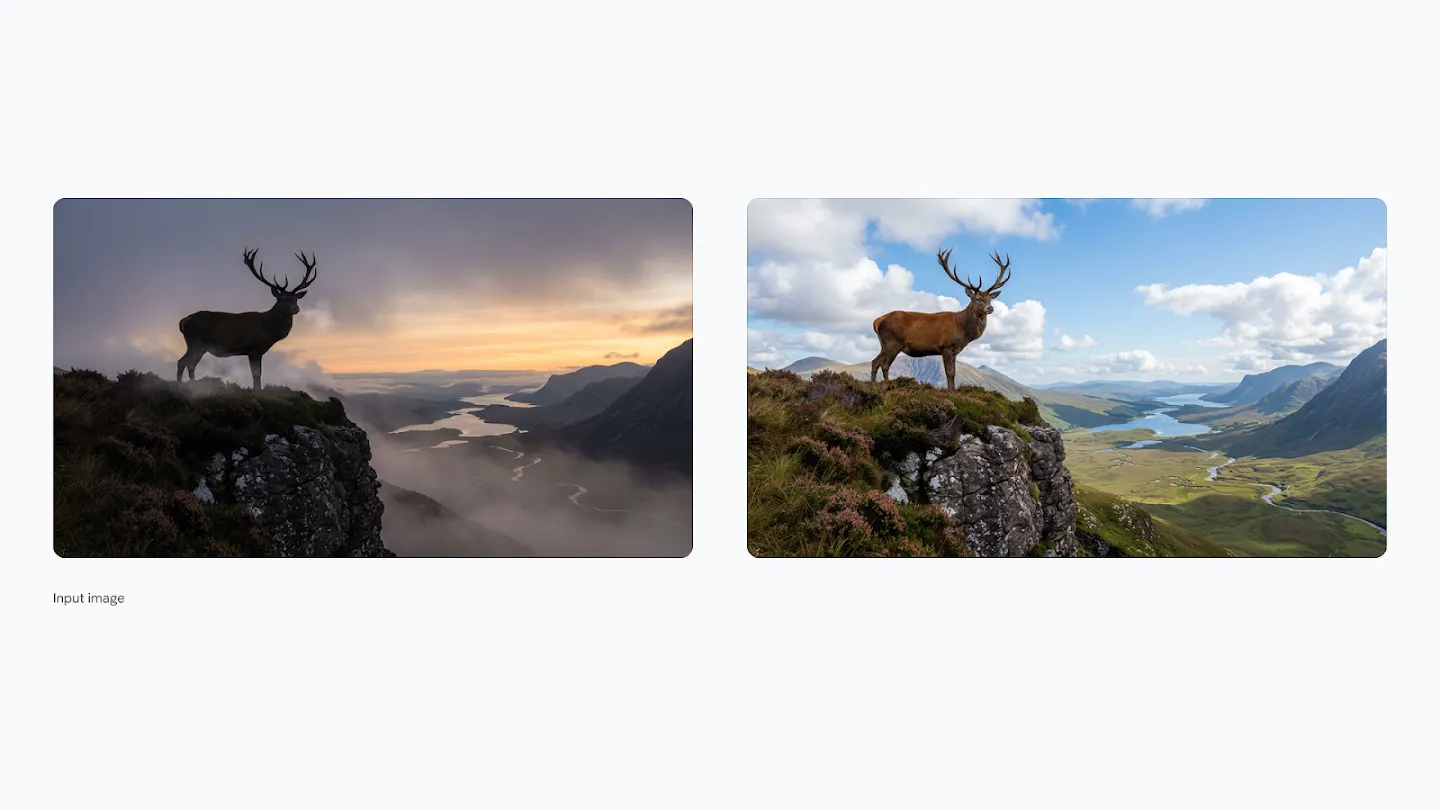
프롬프트:
Change to daytime
예시 2: 주간에서 야간으로
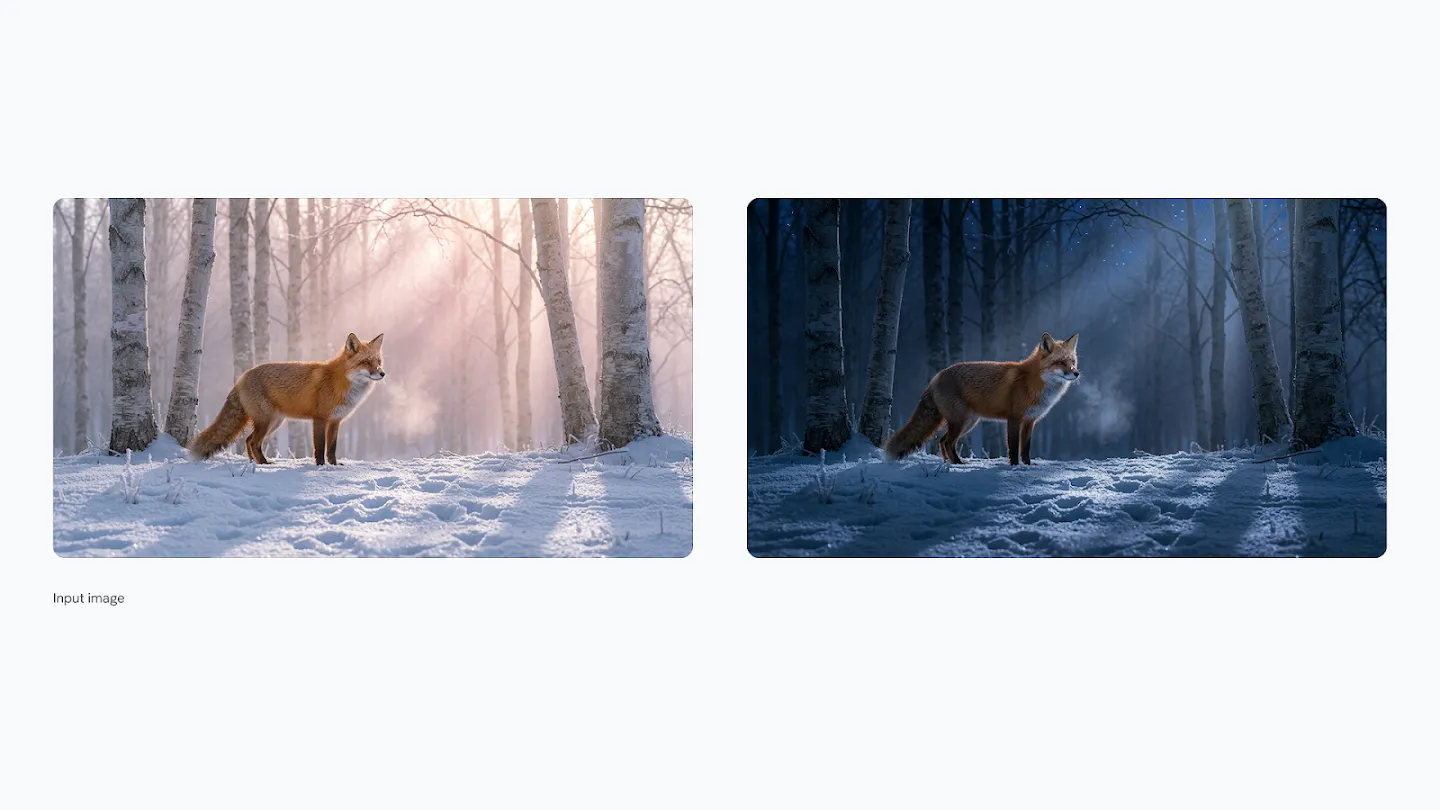
프롬프트:
Turn this scene into nighttime
기대 효과:
- 하늘의 색상, 조명 방향, 그림자 길이, 전반적인 색 온도가 자연스럽게 조정되어 시간대가 완전히 바뀝니다.
예시 3: 조명 스타일 변경
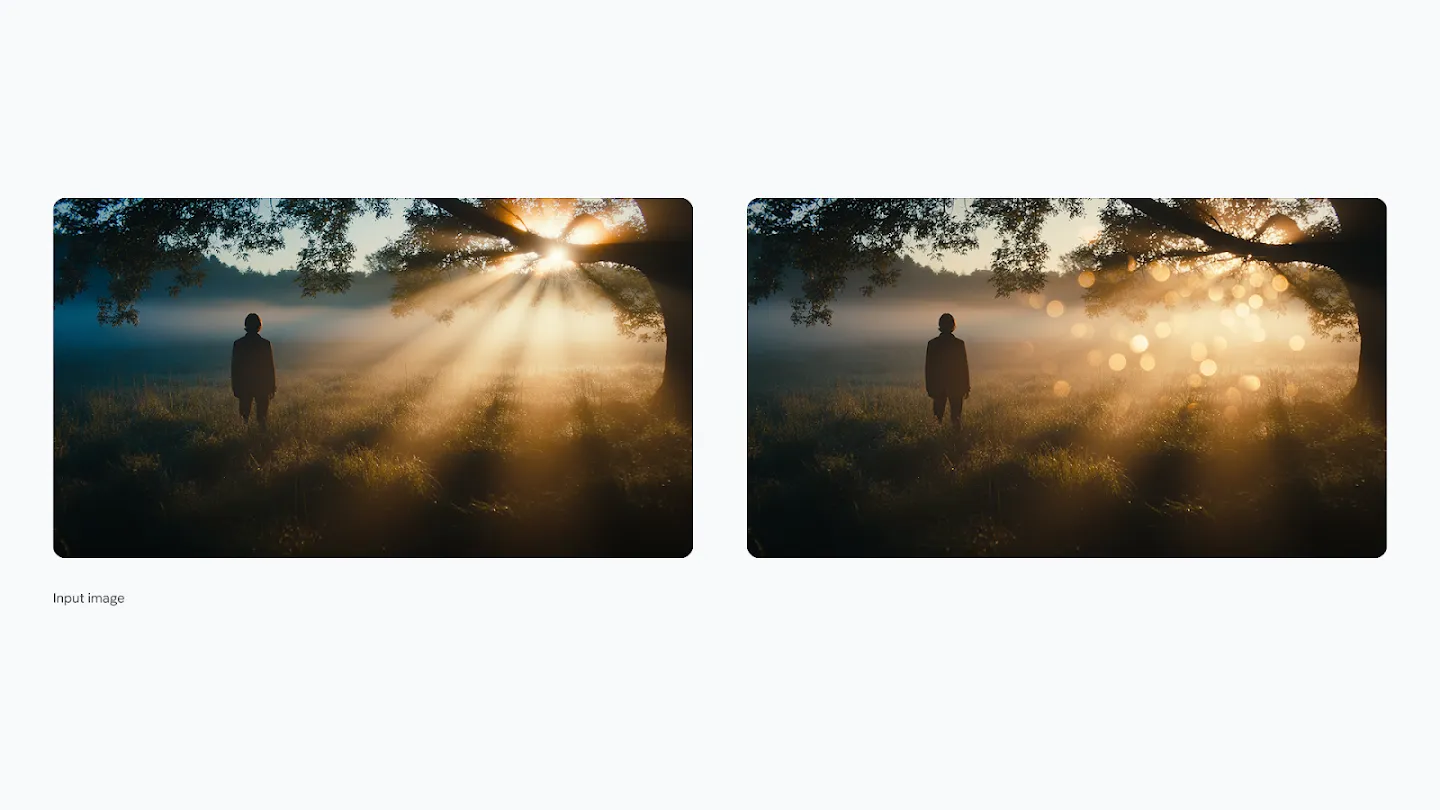
프롬프트:
Replace volumetric lighting with bokeh
활용 시나리오:
- 숲 속 장면에서 volumetric lighting(공기 중 빛의 산란)을 bokeh 효과(아웃포커스 영역의 부드러운 빛망울)로 전환하여 분위기를 변경합니다.
예시 4: Chiaroscuro 효과 적용
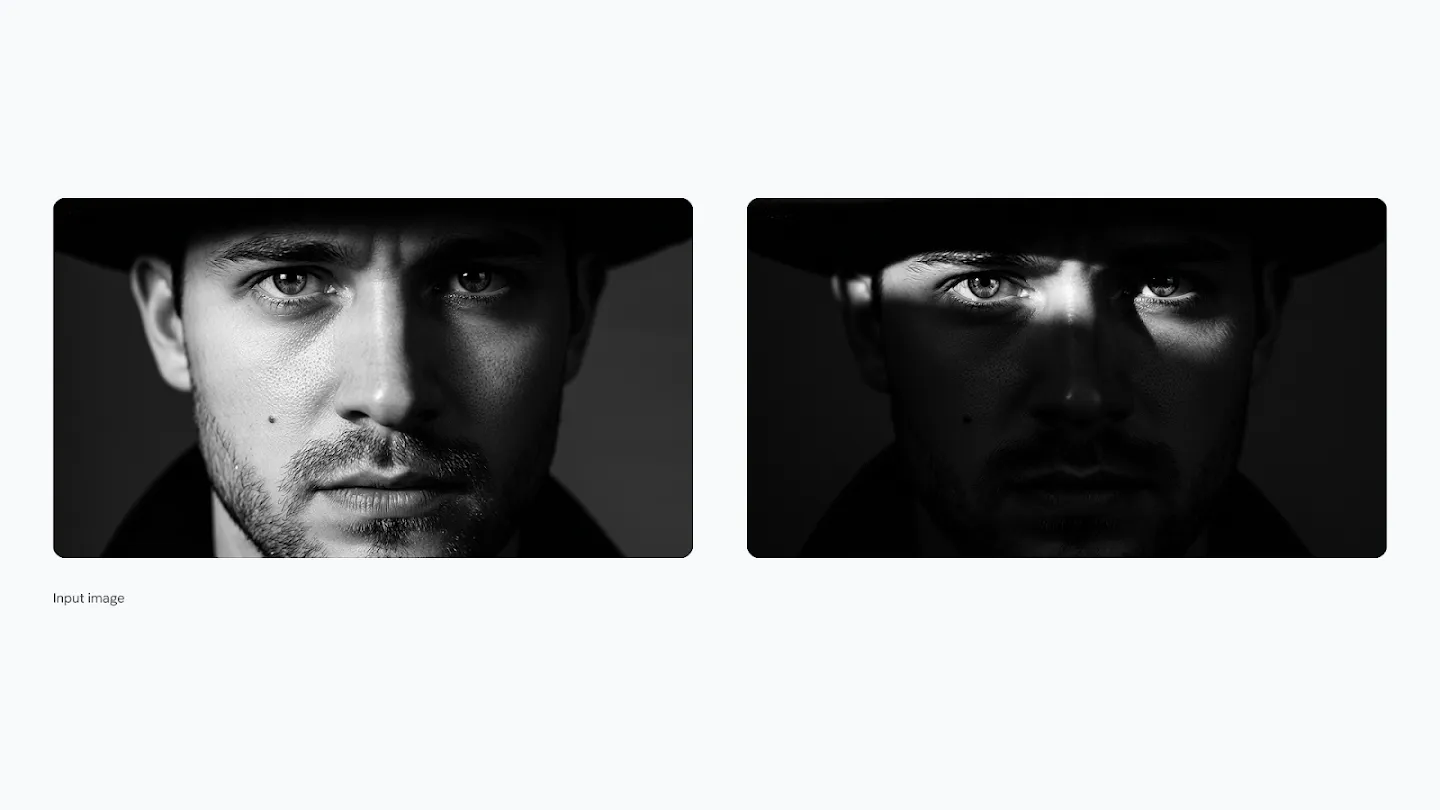
프롬프트:
Generate an image with an intense chiaroscuro effect:
* The man should retain his original features and expression.
* Introduce harsh, directional light, appearing to come from above and slightly to the left, casting deep, defined shadows across the face.
* Only slivers of light illuminating his eyes and cheekbones, the rest of the face is in deep shadow
기대 효과:
- 카라바조 스타일의 강렬한 명암 대비(Chiaroscuro)를 적용합니다.
- 위쪽과 약간 왼쪽에서 비추는 강한 방향성 조명이 얼굴에 깊은 그림자를 드리우며, 눈과 광대뼈에만 빛이 닿아 극적인 분위기를 연출합니다.
4-3. 정밀한 업스케일링
1K, 2K, 4K 해상도로 선명한 비주얼을 생성할 수 있습니다.
예시: 줌인 (16:9 유지)
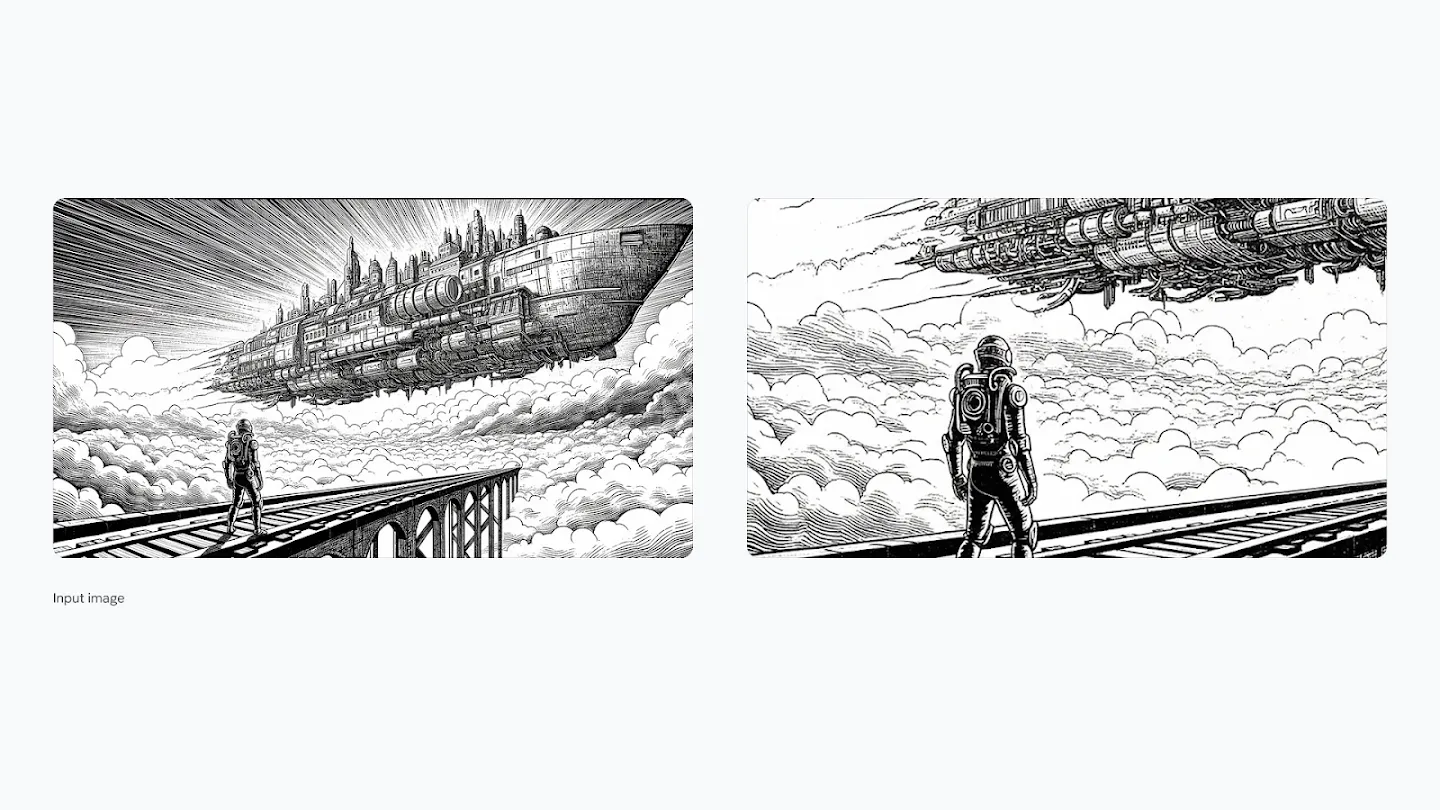
프롬프트 1: Zoom in on this image, maintaining a 16:9 aspect ratio
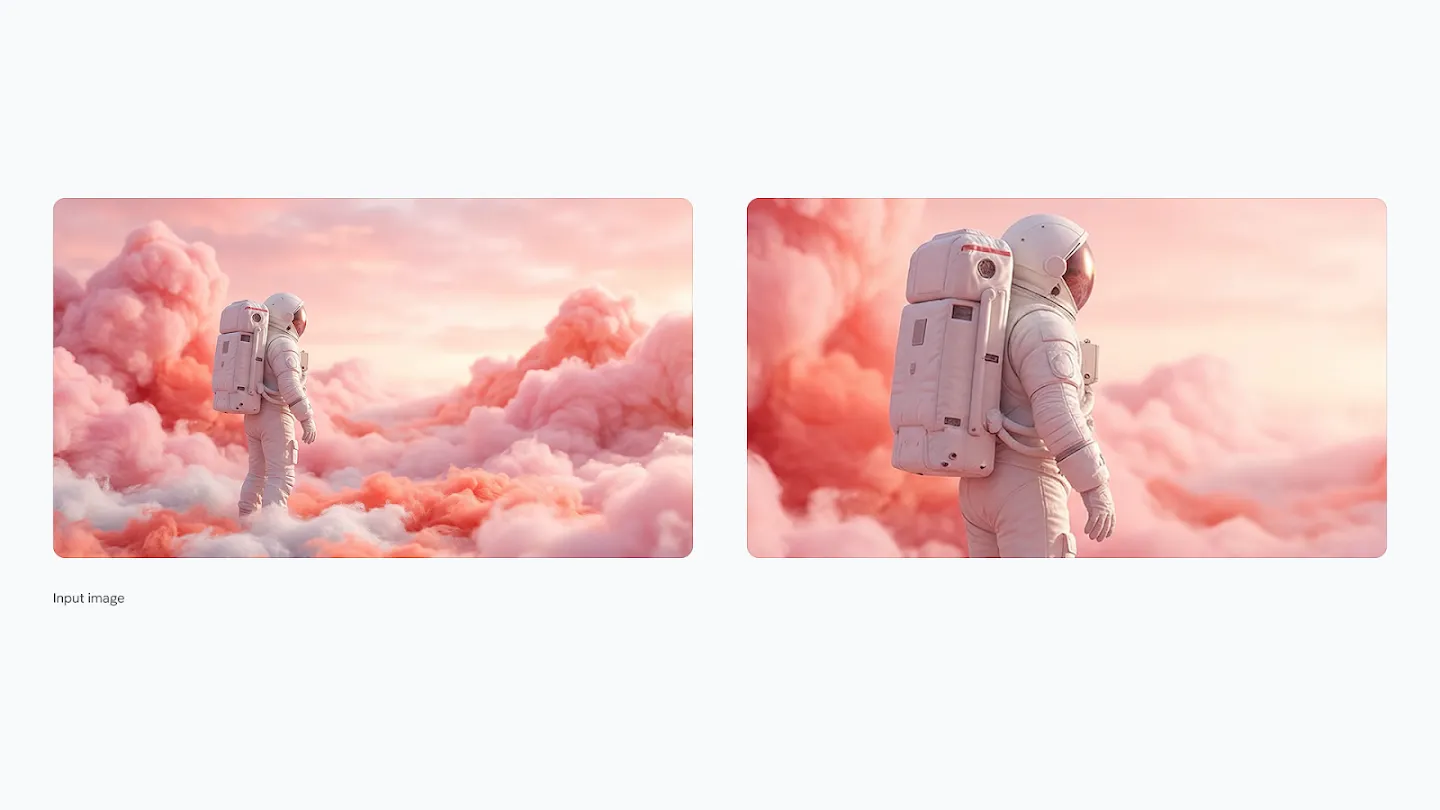
프롬프트 2: Zoom in on this image, maintaining a 16:9 aspect ratio
프롬프트 3: Zoom in on this image, maintaining a 16:9 aspect ratio활용 방법:
- 동일한 프롬프트를 반복하여 점진적으로 줌인하면서도 16:9 종횡비를 유지합니다.
- 각 단계에서 디테일이 선명하게 유지되며, 인쇄물이나 대형 디스플레이에 적합한 고해상도 이미지를 생성할 수 있습니다.
4-4. 종횡비 조정
플랫폼이나 용도에 맞게 종횡비를 자유롭게 전환하여 비주얼을 적응시킬 수 있습니다.
예시 1: 1:1 비율로 변경 (Instagram 포스트)
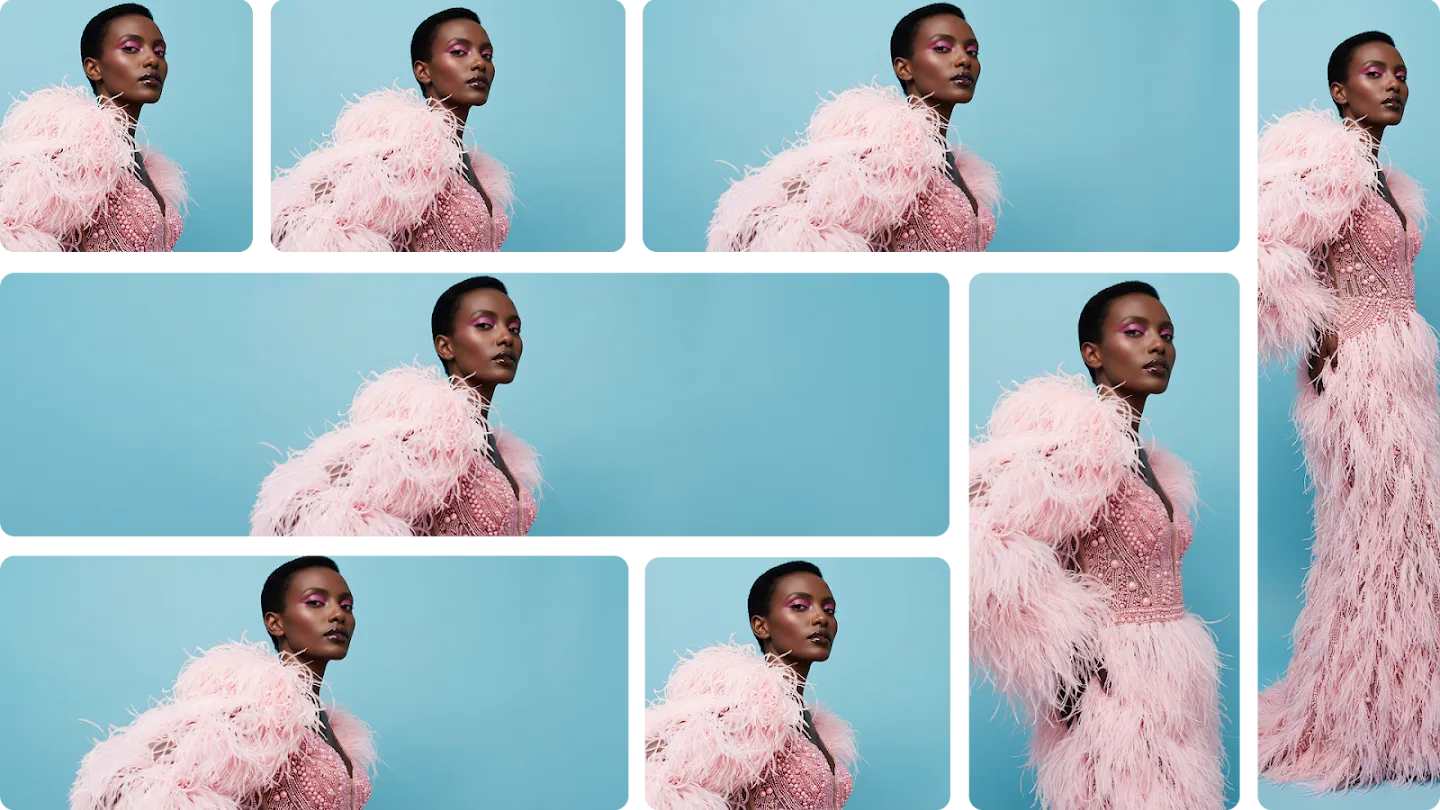
프롬프트:
change aspect ratio to 1:1 by reducing background.
* The character, remains **exactly locked in its current position**
예시 2: 4:3 비율로 변경 (프레젠테이션)
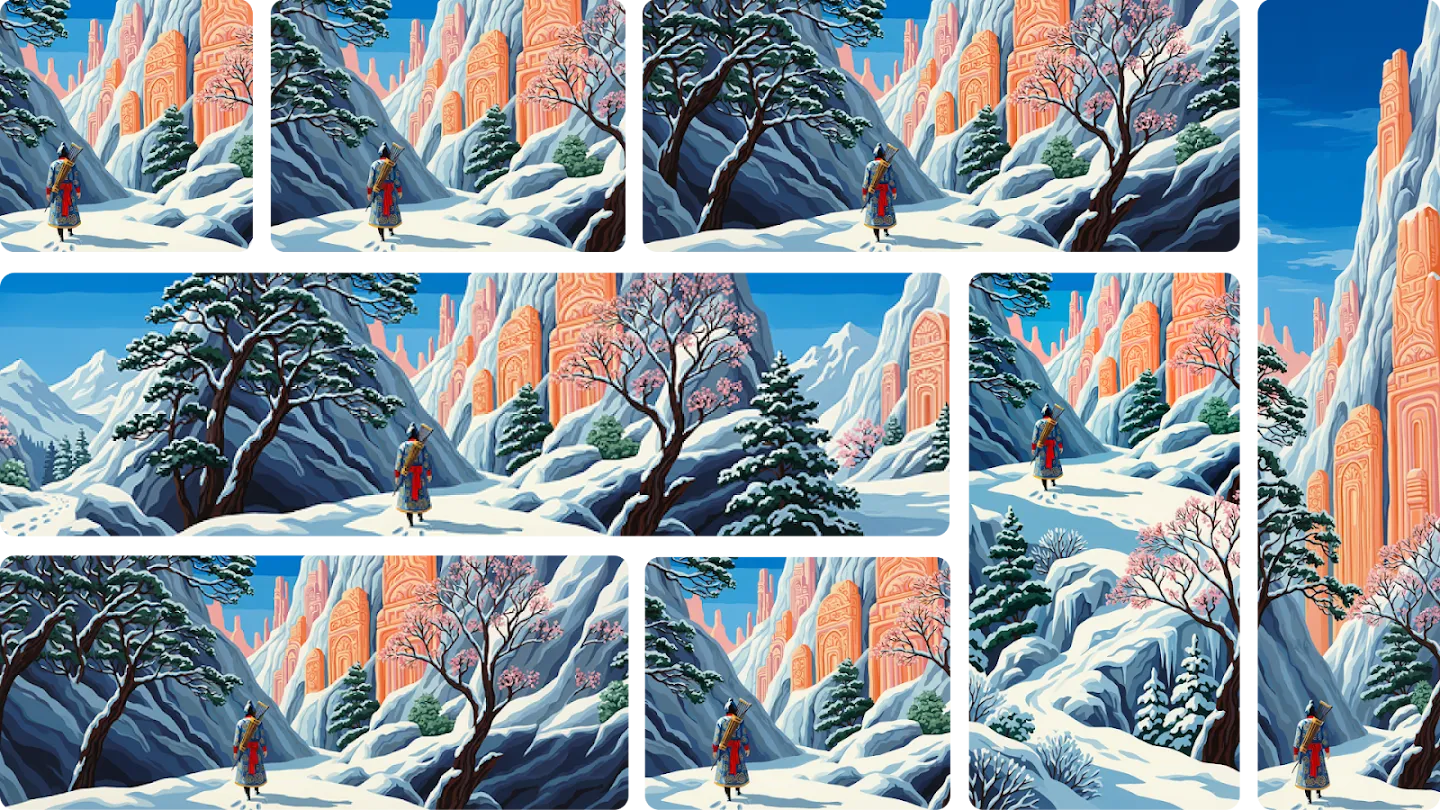
프롬프트:
change aspect ratio to 4:3 by reducing background.
* The character, remains **exactly locked in its current position**
핵심 포인트:
- "The character, remains exactly locked in its current position"이라는 지시사항 덕분에 캐릭터의 위치와 크기가 고정되고, 배경만 자연스럽게 조정됩니다.
- 이는 여러 플랫폼에 맞는 버전을 제작할 때 일관성을 유지하는 핵심 기법입니다.
5. 피사체 일관성 (Subject Consistency)
최대 5명의 캐릭터와 최대 14개의 객체의 일관성과 유사성을 단일 워크플로우에서 유지할 수 있습니다.
예시 1: 14개 캐릭터가 TV 시청

프롬프트:
A medium shot of the 14 fluffy characters sitting squeezed together side-by-side on a worn beige fabric sofa and on the floor.

* They are all facing forwards, watching a vintage, wooden-boxed television set placed on a low wooden table in front of the sofa.
* The room is dimly lit, with warm light from a window on the left and the glow from the TV illuminating the creatures' faces and fluffy textures.
* The background is a cozy, slightly cluttered living room with a braided rug, a bookshelf with old books, and rustic kitchen elements in the background.
* The overall atmosphere is warm, cozy, and amused
기대 효과:
- 14개의 서로 다른 푹신한 캐릭터들이 소파와 바닥에 다닥다닥 붙어 앉아 빈티지 TV를 시청하는 장면입니다.
- 각 캐릭터의 고유한 특징이 유지되면서도, 통일된 조명(창문의 따뜻한 빛과 TV 화면의 빛)과 분위기 속에서 자연스럽게 어우러집니다.
예시 2: 패션 컴포지트 이미지
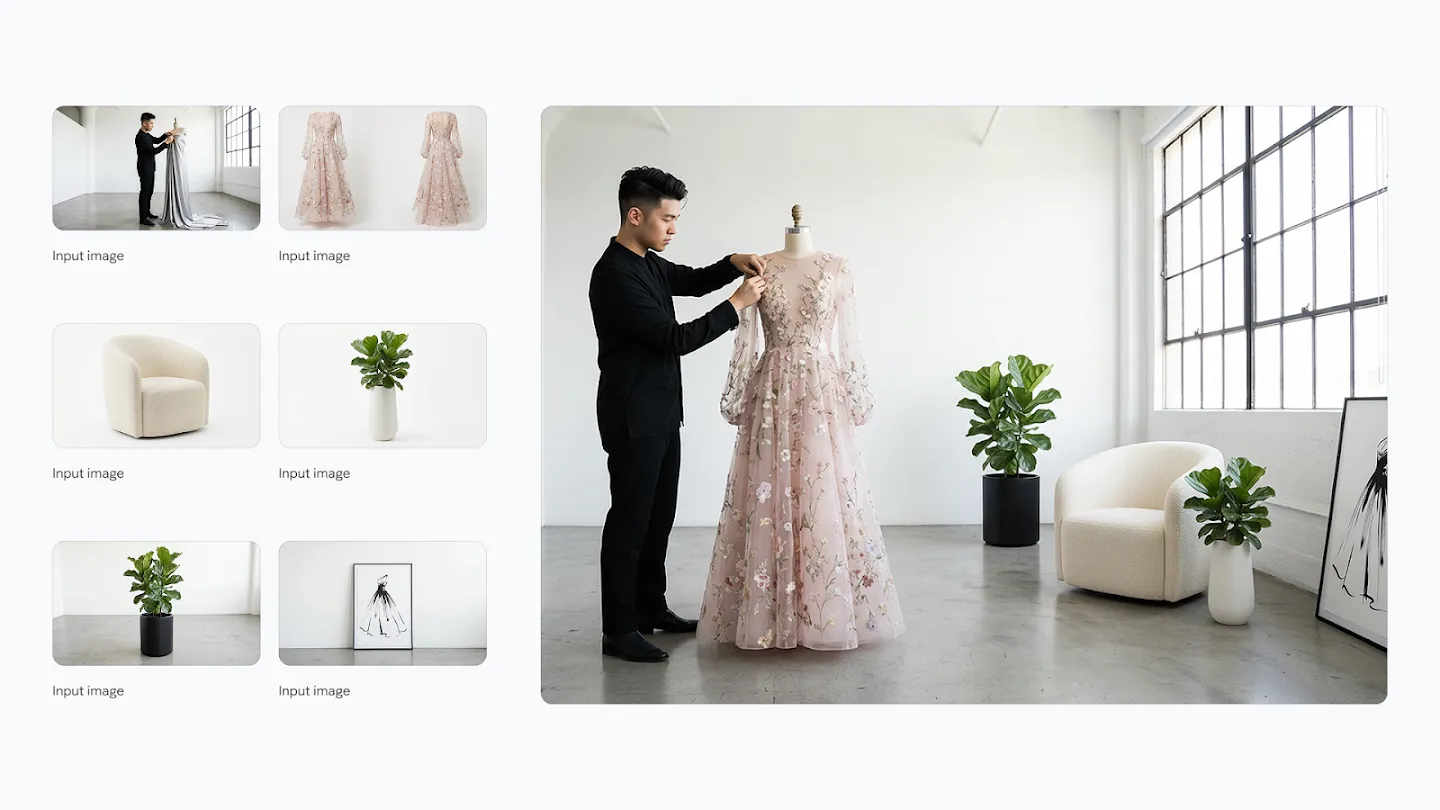
프롬프트:
Combine these images into one appropriately arranged cinematic image in 16:9 format and change the dress on the mannequin to the dress in the image
활용 방법:
- 여러 소스 이미지(마네킹, 드레스, 배경, 액세서리)를 업로드하면, 이들을 하나의 일관된 패션 사진으로 합성합니다.
- 마네킹의 드레스가 참조 이미지의 드레스로 교체되며, 조명과 색상 톤이 자연스럽게 조화를 이룹니다.
예시 3: 6명의 패션 에디토리얼 샷

프롬프트:
Put these six people into a single image, they should fit into a stunning award-winning shot in the style of a fashion editorial.

* The identity of all six people and their attire must stay consistent throughout but they can and should be seen from different angles and distances in as is most natural and suitable to the scene
기대 효과:
- 6명의 사람들을 각각 다른 각도와 거리에서 촬영한 것처럼 배치하면서도, 각 인물의 정체성과 의상을 완벽하게 유지합니다.
- 패션 에디토리얼 스타일의 수상작 같은 구도로 자연스럽게 배치됩니다.
예시 4: 여러 이미지를 하나의 시네마틱 이미지로

프롬프트:
Combine these images into one appropriately arranged cinematic image in 16:9 format
활용 시나리오:
- 제품 촬영, 인물, 배경 등 여러 요소를 촬영한 후, 이들을 하나의 영화 같은 장면으로 합성하여 광고나 프로모션 자료로 활용할 수 있습니다.
6. 하나의 프롬프트로 여러 가능성 탐색
여러 이미지를 한 번에 생성하여 크리에이티브 옵션을 빠르고 효율적으로 탐색하고 검토할 수 있습니다.
예시: 공개 도메인 아동 영화 스타일 프레임

프롬프트:
Famous childrens film in public domain in provided style and same color scheme.

* 10 frames one by one. no text. not a single comic strip,  instead generate 10 frame one after the other, each it's own prompt and server call. Each landscape 16:9
기대 효과:
- 공개 도메인의 유명 아동 영화를 제공된 스타일과 색상 배치로 재해석한 10개의 프레임을 순차적으로 생성합니다.
- 각 프레임이 독립적으로 생성되지만 일관된 스타일과 색상을 유지하여, 스토리보드나 비주얼 개발에 활용할 수 있습니다.
핵심 포인트:
- "generate 10 frame one after the other, each it's own prompt and server call"이라는 지시사항으로 10개의 개별 이미지가 생성되며, 각각이 독립적인 크리에이티브 옵션으로 제공됩니다.
"generate 10 frame one after the other, each it's own prompt and server call"
이게 된다고? 😐 흐으음.. 사실이라면 아주 놀랍군!! 비유적 표현이겠죠?
7. 차세대 생성 능력 (Next-Level Generation)
사실적인 디테일을 가진 풍경, 식물, 사람, 동물의 이미지를 생성합니다.
예시 1: 빨간 눈 개구리 클로즈업
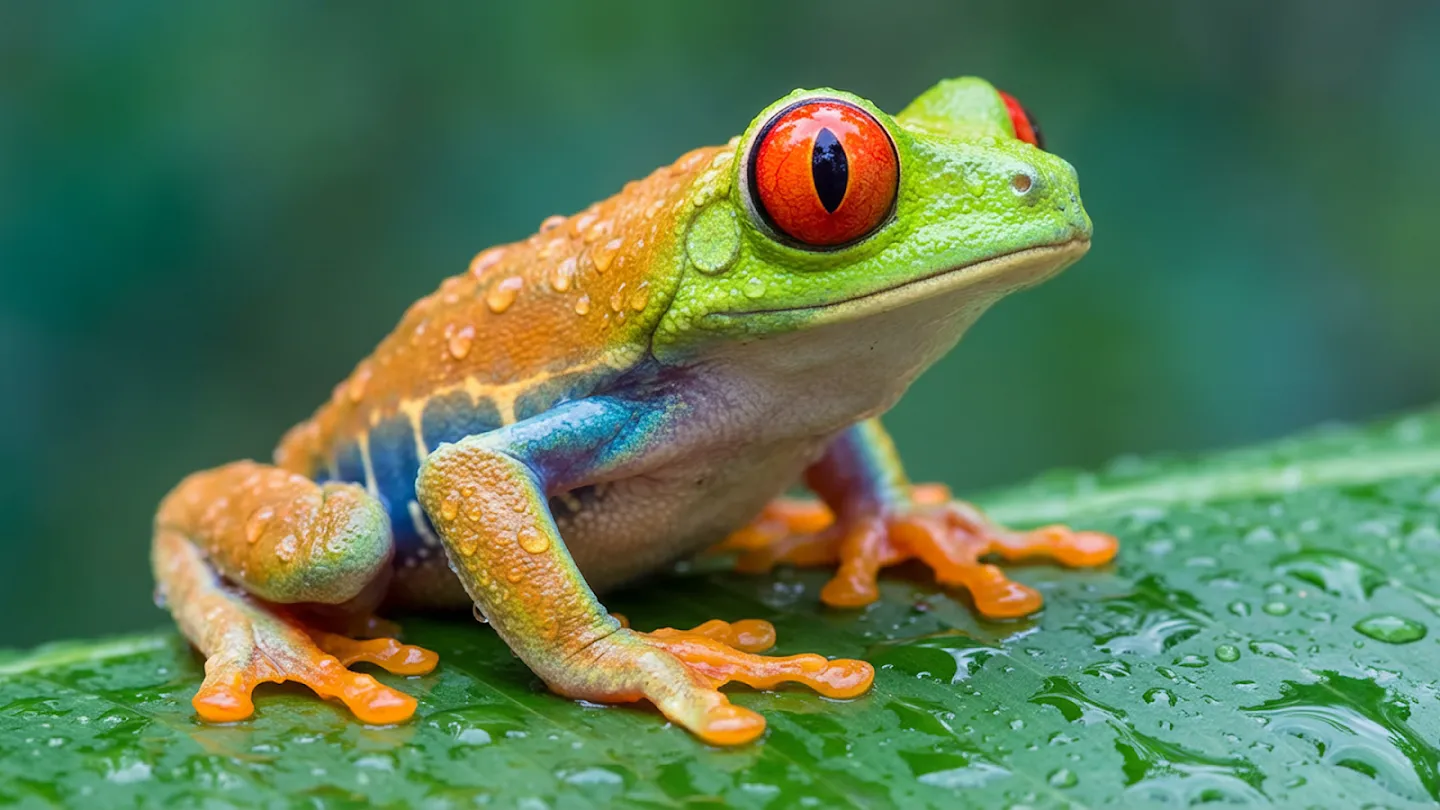
프롬프트:
This is a stunning close-up photograph of a red-eyed tree frog, capturing its vibrant colors and intricate details with remarkable clarity.
* The frog is positioned on a large, dewy green leaf, its body angled slightly away from the viewer but its head turned to face us.
* Its most striking feature is its large, bulging red eye with a vertical black pupil, which seems to gaze intently.

The frog's skin is a beautiful tapestry of colors:
* its head and the upper part of its back are a bright, almost lime green, transitioning into a striking orange on its lower back and legs.
* A band of iridescent blue runs along its side, separating the green from its pale, almost translucent underbelly.
* The entire surface of the frog and the leaf it rests on are covered in glistening water droplets, which catch the light and add a sense of freshness and life to the scene.

The background is a soft, out-of-focus blend of green and teal, which makes the brightly colored frog stand out even more. The photograph is so detailed that you can see the
texture of the frog's skin and the tiny suction pads on its orange feet.

The overall effect is one of vibrant life and natural beauty, captured in a moment of quiet stillness.
기대 효과:
- 매크로 렌즈로 촬영한 듯한 초정밀 개구리 사진이 생성됩니다.
- 붉은 눈, 라임 그린에서 오렌지로 전환되는 피부 색상, 청록색 줄무늬, 물방울이 맺힌 질감까지 사실적으로 표현됩니다.
예시 2: 역동적인 인물 샷 (안개와 조명 속에서 회전)
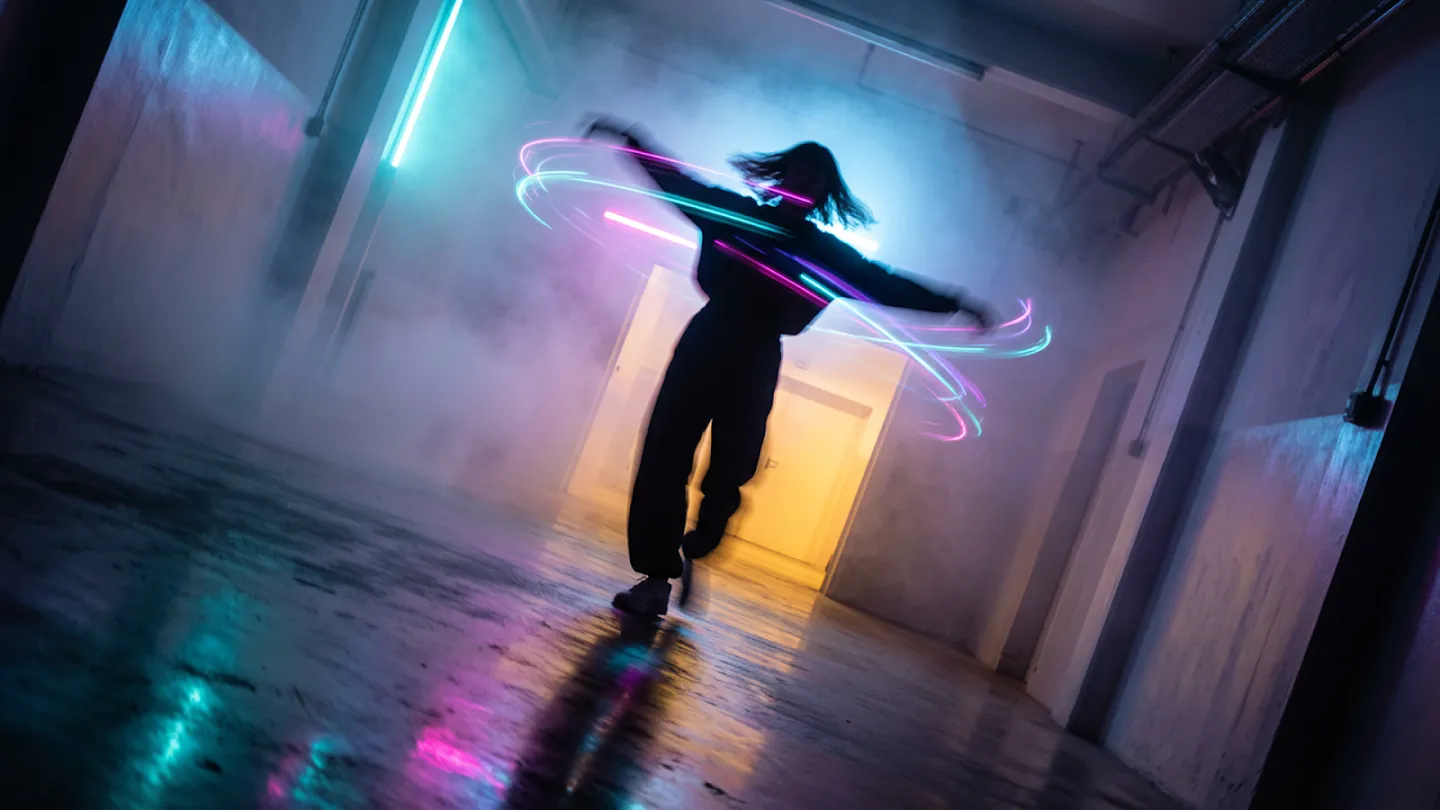
프롬프트:
In a burst of uninhibited movement, a figure is captured mid-spin in a corridor of light and mist. The photography freezes the action at its peak, the person's arms flung wide, their head tilted back in a moment of pure, kinetic release. This rapid twirl has visibly disturbed the dense,
colored fog, creating eddies and vortices of cyan, magenta, and violet light around their silhouetted form.

The composition is vibrant and chaotic, a stark contrast to a static scene. Light from a warm, yellow-orange portal
ahead illuminates the swirling mist from one direction, while a cool blue glow from behind adds depth and complexity to the color palette.

The floor, a dark mirror, reflects a blurred, chaotic version of the scene—a painterly smear of motion and color. The camera angle is slightly tilted, a Dutch angle that enhances the feeling of disequilibrium and exhilaration, capturing a fleeting, joyful rebellion against the quiet, contemplative nature of the space
기대 효과:
- 빛과 안개로 가득한 복도에서 회전하는 인물의 순간을 포착합니다.
- 시안, 마젠타, 바이올렛 색상의 안개가 소용돌이치며, 앞쪽의 따뜻한 노란-오렌지 빛과 뒤쪽의 차갑고 푸른 빛이 깊이와 복잡성을 더합니다.
- 약간 기울어진 더치 앵글이 불균형감과 황홀감을 강화합니다.
예시 3: 극적인 여성 초상화 (터널 배경)
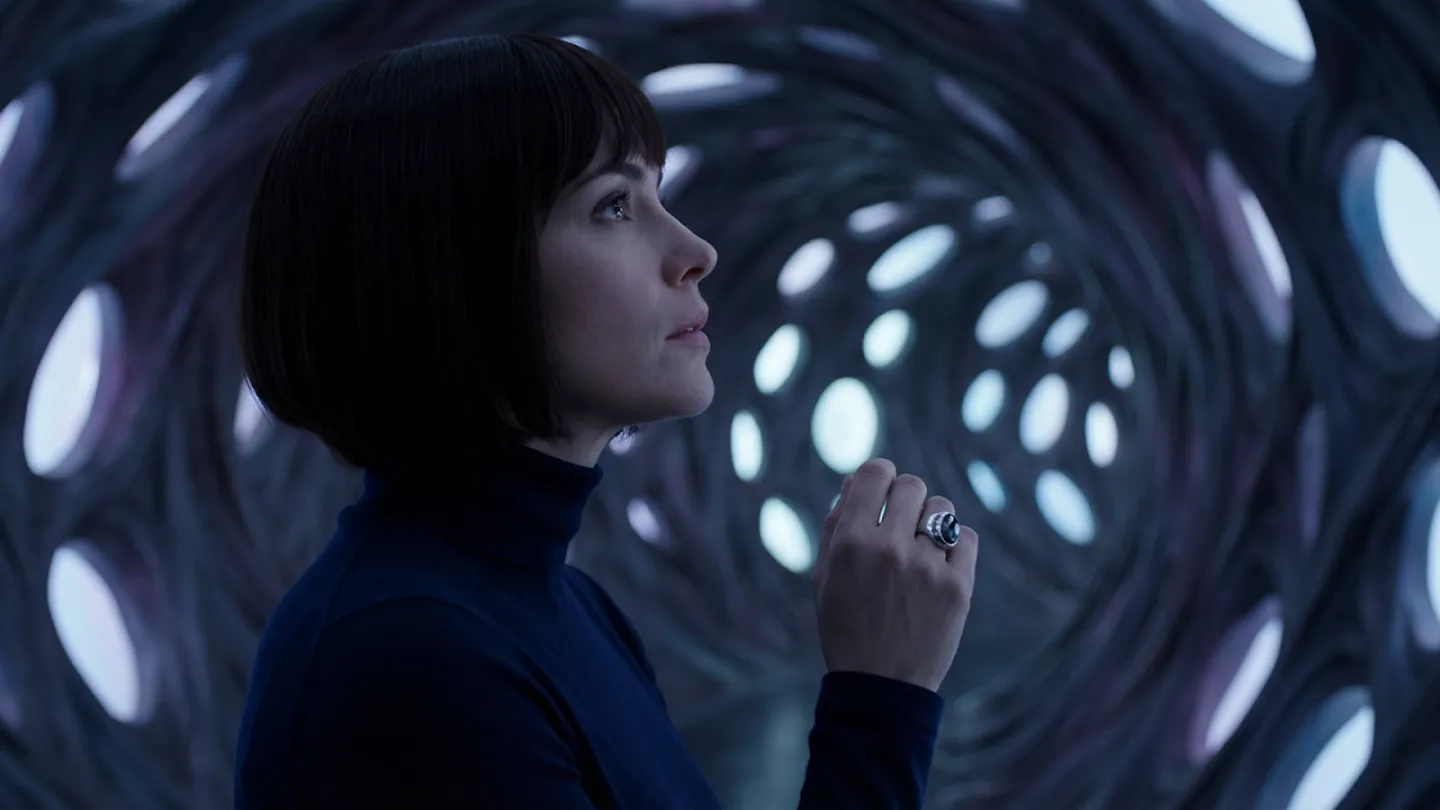
프롬프트:
This cinematic still captures a striking portrait of a woman, rendered with a dramatic, almost theatrical flair.

The camera angle is a medium shot, framing her from the waist up, with her profile turned slightly upwards and to the right, as if in contemplation or awe. Her dark, sleek bob haircut frames a delicate face with a prominent nose and full lips, her gaze directed towards an unseen wonder above and beyond the frame.

She wears a simple, dark turtleneck, which allows her face and the intricate background to take center stage. Her right hand is raised, fingers slightly splayed, adorned with a single, ornate ring on her ring finger, adding a touch of
subtle elegance. The color palette is predominantly cool, dominated by deep blues and grays, with subtle hints of white and silver in the background, creating a mood that is both mysterious and serene. The lighting is low-key,
with soft, diffused light illuminating her face and the background, creating a sense of depth and dimension. The ambiance is one of quiet wonder and discovery, inviting the viewer to share in her experience.

The background is a swirling, organic tunnel-like structure, reminiscent of a fantastical cave or an alien landscape. It's composed of numerous circular and oval openings
of varying sizes, through which a brighter, textured light source is visible, suggesting an otherworldly environment. The texture of the tunnel appears intricate and woven, like a complex web or a futuristic architectural marvel.

This composition, with its strong leading lines and central subject, is reminiscent of a meticulously composed shot by a master of visual storytelling, evoking a sense of expansive scale and profound intrigue, often found in a grand science fiction or fantasy epic
기대 효과:
- SF나 판타지 영화의 한 장면 같은 극적인 여성 초상화가 생성됩니다.
- 차가운 블루-그레이 톤의 색상, 로우키 조명, 소용돌이치는 터널 같은 배경이 신비롭고 고요한 분위기를 연출합니다.
예시 4: 나선형 계단 건축 공간
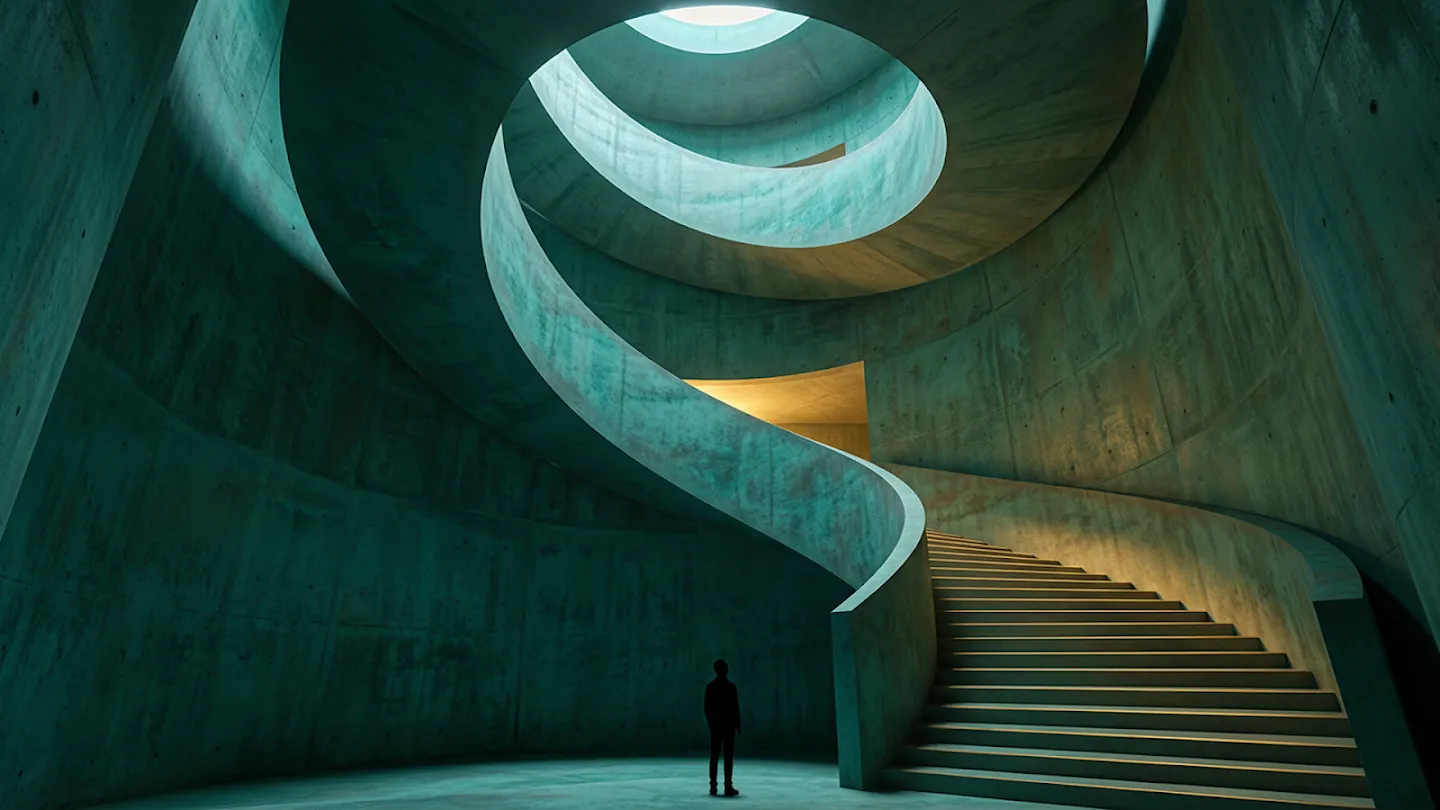
프롬프트:
This image captures a dramatic, spiraling interior space, viewed from a perspective near the base of a majestic, curving staircase.

The composition is dynamic and asymmetrical, with the smooth, sweeping form of the staircase guiding the eye upward in a graceful, continuous curve. The walls, floor, and ceiling are all rendered in a single, continuous material that appears to be a mottled, patinated teal or verdigris-covered concrete, giving the space a monolithic, cavernous feel.

The art style is one of minimalist, sculptural architecture, where form and light are the primary subjects. At the bottom of the frame, a lone, dark, slender figure stands in silhouette, providing a stark sense of scale and adding a solitary, contemplative mood.

Light enters the scene dramatically from two sources: a
warm, inviting glow illuminates the steps from an unseen point further up the spiral, while a cool, circular skylight high above casts a soft, ethereal light onto the upper wall. The cinematic effect is one of quiet grandeur and mystery, a journey through a space that feels both ancient and
futuristic, carved from a single, seamless piece of material
기대 효과:
- 미니멀리스트 조각적 건축 스타일의 나선형 계단 공간이 생성됩니다.
- 청록색 또는 녹청색 콘크리트로 보이는 단일 재질이 벽, 바닥, 천장을 덮고 있으며, 따뜻한 빛이 계단을 비추고 위의 원형 천창에서 부드러운 빛이 내려와 고요한 웅장함과 신비로움을 연출합니다.
개발자를 위한 실용 가이드
API 접근
Nano Banana Pro는 다음 플랫폼을 통해 접근할 수 있습니다:
- Google AI Studio: 프로토타이핑과 실험에 적합
- Vertex AI: 엔터프라이즈 규모의 배포를 위한 플랫폼
- Gemini API: 직접 통합을 원하는 개발자용
가격 및 성능 비교
| 모델 | 속도 | 품질 | 비용 | 적합한 사용 사례 |
|---|---|---|---|---|
| Gemini 2.5 Flash Image | 빠름 | 중간 | 낮음 | 빠른 프로토타이핑, 대량 생성 |
| Gemini 3 Pro Image | 느림 | 최고 | 높음 | 전문가급 결과물, 마케팅 자료 |
주요 매개변수
해상도 설정:
# 2K 해상도 (2048 픽셀)
resolution = "2k"

# 4K 해상도 (4096 픽셀)
resolution = "4k"
종횡비 조정:
# 프롬프트에 직접 포함
prompt = "
change aspect ratio to 16:9 by expanding background.
The character remains exactly locked in its current position
"
다중 이미지 입력:
- 최대 14개의 표준 입력 이미지
- 최대 6개의 고해상도 샷
- 최대 5명의 인물 일관성 유지
프롬프트 작성 베스트 프랙티스
효과적인 프롬프트 구조:
- 주제 명시: "A professional photograph of..."
- 스타일 지정: "in the style of minimalist design"
- 기술적 세부사항: "with soft lighting, shallow depth of field"
- 텍스트 내용: "featuring the text 'INNOVATION' in bold sans-serif"
- 종횡비: "16:9 aspect ratio"
예시:
Create a modern infographic about renewable energy.
Use a flat design style with a color palette of blue,
green, and white. Include clear labels for solar, wind,
and hydro power. Layout should flow from left to right.
16:9 aspect ratio.
통합 예제 시나리오
Google Antigravity에서 코딩 에이전트가 Nano Banana Pro를 활용하는 방법:
- UI 목업 생성: 사용자 검토를 위한 상세한 인터페이스 디자인
- 비주얼 에셋 생성: 코드 구현 전 필요한 이미지 자동 생성
- 반복적 개선: 피드백을 받아 실시간으로 디자인 수정
Adobe와 Figma 같은 크리에이티브 플랫폼에서도 통합이 진행 중이며, 디자이너들은 워크플로우 내에서 직접 Nano Banana Pro를 활용할 수 있게 됩니다.
제한사항과 주의사항
모든 기술이 그렇듯, Nano Banana Pro도 완벽하지는 않습니다. 사용 시 다음 사항들을 고려해야 합니다:
1. 시각적 정확성
- 작은 얼굴: 군중 장면이나 멀리 있는 인물의 얼굴 세부사항이 부정확할 수 있음
- 철자 정확도: 대부분 정확하지만, 복잡한 텍스트나 특수 용어에서 오류 발생 가능
- 미세한 디테일: 손가락, 복잡한 패턴 등에서 부자연스러움
2. 데이터 정확성
실세계 지식이 방대하지만 완벽하지 않습니다:
- 인포그래픽 생성 시 사실 확인 필수
- 복잡한 데이터 표현에서 오해석 가능성
- 최신 정보라도 검증 권장
3. 번역 및 현지화
다국어 지원이 강력하지만:
- 문법이나 철자 오류 가능
- 문화적 뉘앙스나 관용구 처리에 한계
- 언어별 타이포그래피 규칙이 완벽하지 않을 수 있음
4. 복잡한 편집
- 마스크 편집: 특정 영역만 수정할 때 경계가 부자연스러울 수 있음
- 조명 변경: 주간→야간 같은 극적인 변화에서 시각적 아티팩트 발생 가능
- 다중 이미지 합성: 서로 다른 조명 조건의 이미지를 합칠 때 이질감
5. 캐릭터 일관성
대부분 우수하지만:
- 각도나 조명이 크게 다른 경우 일관성 유지 어려움
- 액세서리나 의상 디테일이 변할 수 있음
- 계속해서 개선 중인 영역
안전성과 윤리적 고려사항
SynthID 워터마크
Google은 AI 생성 이미지의 출처를 명확히 하기 위해 SynthID 기술을 모든 Nano Banana Pro 생성 이미지에 적용합니다:
- 비가시적 워터마크: 이미지 품질에 영향 없이 내장
- 검증 가능: Gemini 앱에 이미지를 업로드하면 Google AI가 생성했는지 확인 가능
- 내구성: 크롭, 리사이즈, 압축 후에도 유지
가시적 워터마크 정책
- 무료/Pro tier 사용자: Gemini 스파클 마크가 이미지에 표시
- Ultra 구독자: 전문 작업을 위해 가시적 워터마크 제거
콘텐츠 안전
- 데이터 필터링: 유해 콘텐츠를 최소화하기 위한 광범위한 레이블링
- Red Teaming: 아동 안전, 편향성 등에 대한 지속적인 평가
- 표현성 검토: 다양한 인구 집단의 공정한 표현 보장
결론
Nano Banana Pro는 이미지 생성 AI의 새로운 기준을 제시합니다. Gemini 3 Pro의 고급 추론 능력, 정확한 텍스트 렌더링, 실세계 지식 통합, 그리고 스튜디오급 제어 기능이 결합되어, 단순한 "이미지 생성기"를 넘어 진정한 크리에이티브 파트너로 자리매김합니다.
핵심 요점
- 정확성: Text-to-Image 벤치마크에서 최고 수준의 성능
- 다재다능함: 마케팅부터 교육, 프로토타이핑, 사실적 이미지 생성까지 광범위한 활용
- 접근성: 소비자용 앱부터 엔터프라이즈 API까지 다양한 접근 방식
- 책임감: SynthID를 통한 투명한 AI 생성 콘텐츠 표시
앞으로의 발전 방향
Google은 사용자 피드백을 바탕으로 다음 영역을 개선할 계획입니다:
- 캐릭터 일관성의 더욱 정확한 유지
- 복잡한 편집 시나리오에서의 자연스러움 향상
- 더 많은 언어와 문화적 맥락 지원
- 비디오와 오디오로의 SynthID 확장
시작하기
- 소비자: Gemini 앱에서 'Create images' 선택 후 'Thinking' 모델 사용
- 개발자: Google AI Studio나 Vertex AI에서 시작
- 크리에이터: Flow(AI 영화 제작 도구)에서 Google AI Ultra 구독으로 사용
Nano Banana Pro는 우리의 상상을 현실로 만드는 강력한 도구입니다. 정확성과 창의성, 실용성과 예술성의 균형을 이루며, 이미지 생성 AI의 미래를 보여줍니다.
읽어주셔서 감사합니다 🍌