
Retro Unity 서적을 공부하고 정리한 내용입니다.
바닥(Level) 회전
public class Rotator : MonoBehaviour
{
    public float rotationSpeed = 60f;
    // Start is called before the first frame update
    void Start()
    {

    }

    // Update is called once per frame
    void Update()
    {
        // transform.Rotate(0f, rotationSpeed, 0f);
        transform.Rotate(0f, rotationSpeed * Time.deltaTime, 0f);
    }
}
Rotate(x,y,z)
입력값으로 x,y,z 축에 대한 회전값을 받고, 현재 회전상태에서 입력된 값만큼 상대적으로 더 회전
transform.Rotate(0f, rotationSpeed, 0f);의 경우, Y축 기준으로 60도 만큼 더 회전,
다만, 위 코드 같은 경우 Update() 메서드가 실행될때마다 실행되기때문에,
매 프레임마다 60도 회전.
결국 1초에 60도 회전이 아니기에, 60프레임이 평균인 컴퓨터에선 1초에 3600도 이상 회전하는 코드가 되어버림.
해결책
프레임을 기준으로 잡는 것이 아닌, 시간 간격을 기준으로 잡기.
즉, 초당 프레임의 역수를 회전값에 곱해야 함.
ex. 60도 회전 1/60 60(프레임) => 60도
exii. 60도 회전 1/120 120(프레임) => 60도
Time.deltaTime이 update() 와 update() 사이 시간 간격을 제공.
따라서 이 Time.deltaTime 값은 프레임의 주기이자 초당 프레임에 역수를 취한 값임을 알 수가 있음.
transform.Rotate(0f, rotationSpeed * Time.deltaTime, 0f);으로 수정 하면 1초에 60도 회전함.
UI
UI 씬도 하나의 게임월드 속 하나의 오브젝트로 취급.
캔버스와 이벤트 시스템
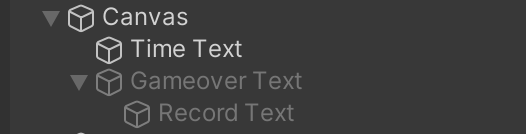
Text 게임 오브젝트는 Canvas 오브젝트의 자식 오브젝트로 설정,
UI는 캔버스의 2차원 평면에 배치되기 때문
즉, 모든 UI 게임 옵젝은 Canvas의 자식이 되어야 함.
Anchor Presets(앵커 프리셋)
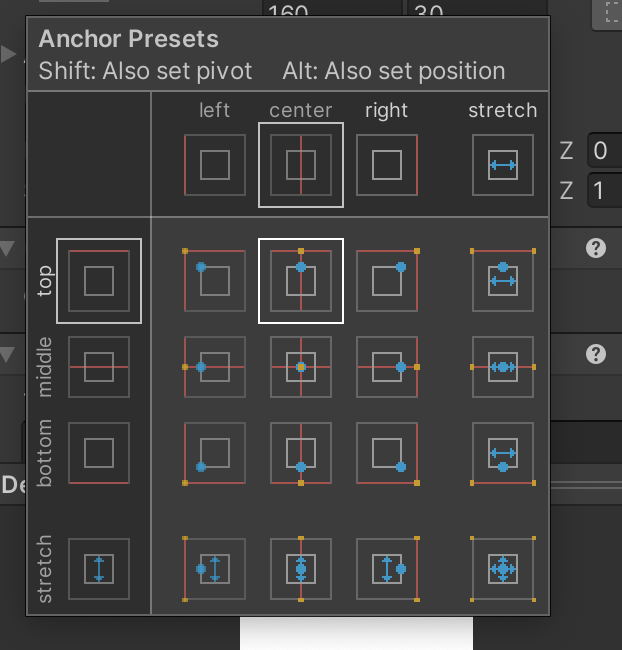
UI 배치의 3요소는
1. 앵커
2. 피벗
3. 포지션
이 앵커 프리셋을 통해 세가지 값을 편하게 조정 가능함.
alt / option 키를 누르면 Snapping 활성화 가능
이 스내핑을 활성화 하면 UI 오브젝트가 해당 방향에 모서리에 붙게 됨.
게임매니저
using System.Collections;
using System.Collections.Generic;
using UnityEngine;
using UnityEngine.UI;
using UnityEngine.SceneManagement;
public class GameManager : MonoBehaviour
{
    public GameObject gameoverText;
    public Text timeText;
    public Text recordText;

    private float surviveTime;
    private bool isGameOver;
    // Start is called before the first frame update
    void Start()
    {
        surviveTime = 0;
        isGameOver = false;
    }

    // Update is called once per frame
    void Update()
    {
        if (!isGameOver) {
            surviveTime += Time.deltaTime;
            timeText.text = "Time : " + (int) surviveTime;
        }
        else {
            if(Input.GetKeyDown(KeyCode.R)){
                SceneManager.LoadScene("SampleScene");
            }
        }
    }

    public void EndGame(){
        isGameOver = true;
        gameoverText.SetActive(true);

        float bestTime = PlayerPrefs.GetFloat("BestTime");
        if(surviveTime > bestTime)
        {
            bestTime = surviveTime;
            PlayerPrefs.SetFloat("BestTime", bestTime);
        }
        recordText.text = "Best Time" + (int)bestTime;
    }
}-
using UnityEngine.UI;
UI 시스템 관련 코드를 가져옴.
이 선언을 반드시 추가해야 UI 관련 컴포넌트를 변수로 선언하고 사용 가능 -
using UnityEngine.SceneManagement;
씬 관리자 등이 포함된 씬 관리 코드를 가져옴
이 선언을 통해 씬 재시작 기능 작성 가능
재시작 기능
 else {
            if(Input.GetKeyDown(KeyCode.R)){
                SceneManager.LoadScene("SampleScene");
            }
}SceneManager.LoadScene("SampleScene");을 실행하여, 직전까지의 SampleScene 을 파괴하고 다시 SampleScene 을 다시 로드
PlayerPrefs
PlayerPreference (플레이어 설정)는 간단히 특정 수치를 로컬에 저장하고 이를 불러오는 역할을 하는 유니티 내장 클래스.
float bestTime = PlayerPrefs.GetFloat("BestTime");
        if(surviveTime > bestTime)
        {
            bestTime = surviveTime;
            PlayerPrefs.SetFloat("BestTime", bestTime);
        }
        recordText.text = "Best Time" + (int)bestTime;
    }
Key : Value 형태로 저장하며, BestTime(key) : bestTime(value) 형태로 저장.